
Vue语法
1.我们使用v-bind来绑定元素特性
用v-bind绑定message的内容
<span v-bind:title="message">
 鼠标悬停就可以看到绑定的提示信息
</span>
语法:
v- 开头的叫指令,表示Vue提供的特性。他们会渲染DOM上应用特殊的响应式行为。
v-bind
条件判断
v-if
v-else
v-else-if
<!DOCTYPE html>
<html lang="en" xmlns:v-bind="http://www.w3.org/1999/xhtml">
<head>
    <meta charset="UTF-8">
    <title>Title</title>
</head>
<body>
    <!--    view层-->
    <div id="app">
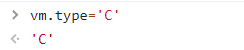
        <h1 v-if="type=='A'">成绩是A</h1>
        <h1 v-else-if="type=='B'">成绩是B</h1>
        <h1 v-else-if="type=='C'">成绩是C</h1>
        <h1 v-else>D</h1>
    </div>
    <!--    引入vue-->
    <script src="https://cdn.jsdelivr.net/npm/vue@2.5.16/dist/vue.js"></script>

    <script>
        var vm=new Vue({
            el:"#app",
            data:{
                type: 'A'
            }
        });

    </script>
</body>
</html>
循环
v-for :操作数组 script中{}存对象[]存数组 v-for="xxx in 数组名"
<!DOCTYPE html>
<html lang="en" xmlns:v-bind="http://www.w3.org/1999/xhtml">
<head>
    <meta charset="UTF-8">
    <title>Title</title>
</head>
<body>

<div id="app">
    <!-- xxx in  数组名-->
    <li v-for="xxx in items">
        {{xxx.message}}
    </li>
</div>

<script src="https://cdn.jsdelivr.net/npm/vue@2.5.16/dist/vue.js"></script>

<script>
    var vm=new Vue({
        el:"#app",
        data: {
            // script中{}存对象[]存数组
            items: [
                {message:"第一项"},
                {message:"第二项"},
                {message:"第三项"}
            ]
        }
    });

</script>
</body>
</html>
效果: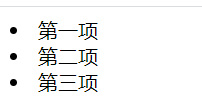
v-for自带index属性
  <!--v-for= "xxx in  数组名" 自带index属性-->
    <li v-for="xxx,index in items">
        {{xxx.message}}---{{index}}
    </li>

 浙公网安备 33010602011771号