
全栈测试开发系列----WebDriver API及对象识别技术(二)---selenium三种等待方式
前言:
前面学习了WebDriver中的鼠标键盘、iframe、下拉列表框等相关API接口的操作,下面更进一步学习,元素等待、文件上传和下载、验证码的操作。
目录:
一、selenium三种元素等待方式
1.强制等待
2.隐式等待
3.显示等待
二、selenium文件上传和下载
三、selenium验证码处理的多种实现方式
正文:
一、三种元素的等待方式
在整个UI自动化脚本运行过程中,肯定会遇到环境不稳定、网络慢等情况,如果此时不在脚本中处理,则代码会因为无法找到元素而报错,并结束运行。此时就需要控制执行脚本的速度,可以使用wait语句设置脚本的等待操作。在selenium中,设置等待操作有三种方式,每种都有相应的优缺点,需要根据项目的实际情况来选择使用。
1.1、强制等待
语法:time.sleep(x),表示等待x秒后,进行下一步操作。直接使用Python的内置time模块,调用sleep方法即可。
强制等待又称强制休眠,该方法只能作用于当前行的脚本。如果存在多行,则需要在每行都设置休眠操作,此种方式容易造成大量的重复代码,并且使代码的走读性降低。
缺点:影响代码的执行速度(不能精确设定代码的休眠时间,时间过长则一定要等到所设置的时间之后才能继续执行代码,如果元素在设定的时间前就加载完成,则会浪费时间)
优点:使用简单,可以再调试时使用
1.2、隐式等待
语法:driver.implicitly_wait(x),在x时间内,页面加载完成,进行下一步操作。implicitly_wait(x)方法直接通过使用浏览器驱动器对象进行调用
隐式等待又称只能等待,也称全局等待。表示当整个页面的所有元素加载完成才会执行,会根据其内部所设定的频率不断的刷新页面继续加载并检测当前所执行的元素是否加载完成;如果在设定的时间之前加载完成,则不会继续等待,直接执行下一步。一般的脚本实际设置该部分的时间范围是5~30秒,直接通过驱动器对象调用,即driver.implicitly_wait(20),作用于整个脚本生命周期。
缺点:使用隐式等待,程序会一直等待整个页面加载完成,才会执行下一步操作。但有时候页面想要的元素已经加载完成了,却因为网页上个别元素还没有加载完成,仍要等到页面全部加载才能执行下一步,使用也不是很灵活。
优点:隐式等待对整个脚本的生命周期都起作用,所以只需要设置一次即可。
1.3、显示等待
WebDriverWait 表示显示等待,主要是对单个元素设定一定的频率,使其按频率刷新当前页面并检测是否存在该元素,该模块可以从ui包中导入,也可以从wait包中导入。
from selenium.webdriver.support.ui import WebDriverWait

# 或者
from selenium.webdriver.support.wait import WebDriverWait
WebDriverWait的参数如下;
driver:传入当前驱动器对象,
timeout:设定刷新页面的超时时间,即等待的最长时间
poll_frequency:传入页面刷新频率,默认是0.5s
ignored_exceptions:表示忽略异常。如果没有定位为默认值,若页面无法找到元素的异常类型对象,则抛出NoSuchElementException异常
这个模块中共有两种方法:until与until_not
method:传入的对象只能是两种,一种是匿名函数,另外一种是预置条件对象expected_conditions
message:当执行until或者until_not方法出现超时时会抛出TimeoutException异常,并将message信息传入异常。until表示直接指定某元素出现或者某些条件成立才继续执行,until_not则表示直到某元素消失或者指定的某些条件不成立才继续执行。
可以引用Selenium提供的模块expected_conditions,以百度为例
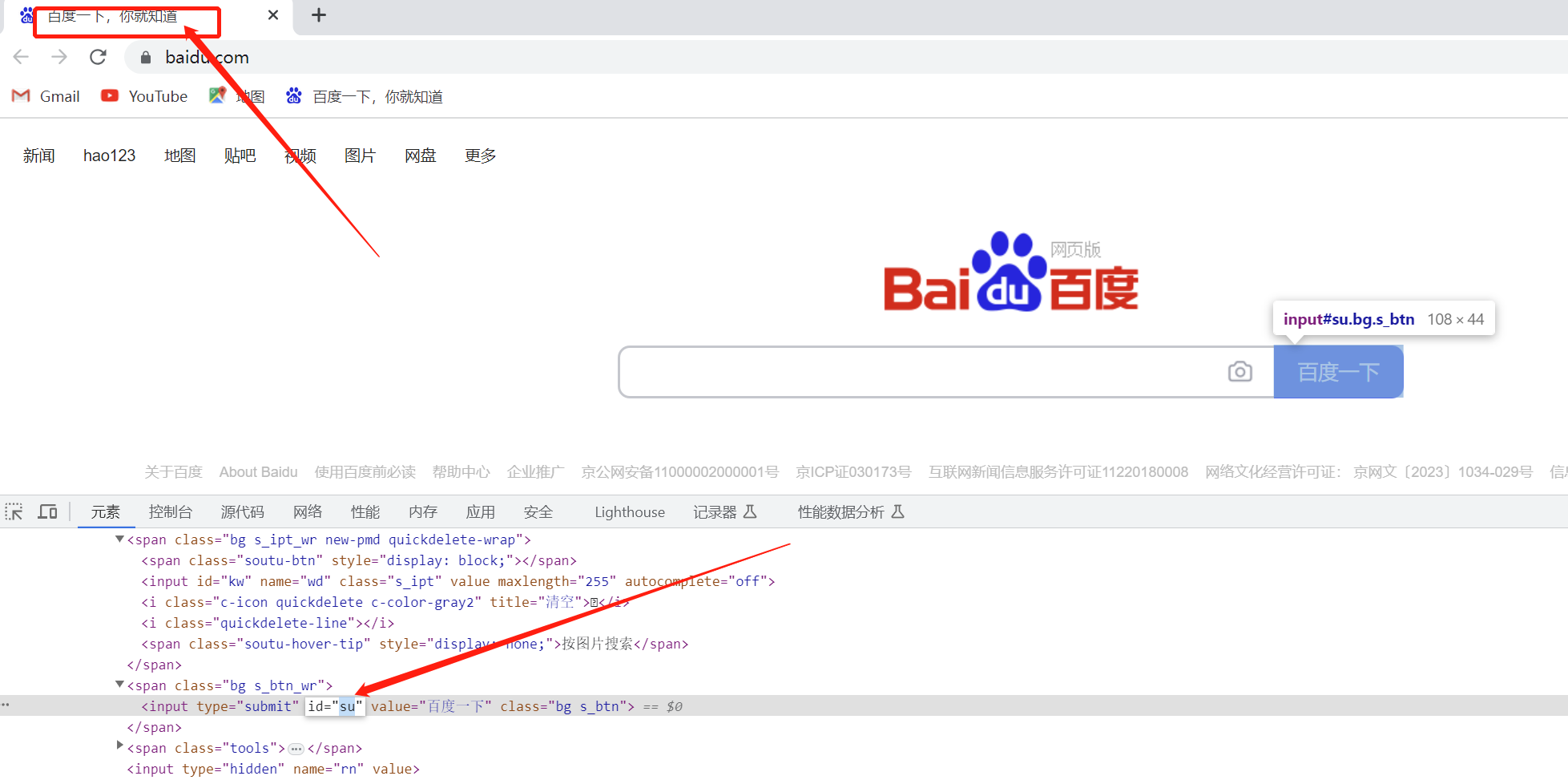
# -----------------------------------
'''
@Author:C_N_Candy
@Date  :2023/6/27 20:23
@File  :Test_EC.py
@Desc  :
'''
# ------------------------------------
import time
from selenium import webdriver
from selenium.webdriver.support.wait import WebDriverWait
from selenium.webdriver.support import expected_conditions as EC
from selenium.webdriver.common.by import By

driver = webdriver.Chrome()
driver.get("http://www.baidu.com/")
driver.maximize_window()

if '百度一下' in driver.title:
    print(True)
else:
    print(False)

try:
    """
    print(WebDriverWait(driver,5,1).until(lambda dir: dir.find_element(By.ID,"ghhu")))
    expected_conditions:预期条件,可以实现当前元素的相关信息判定:判定当前元素是否存在,当前元素是否可见,当前页面的标题、当前页面的alert框是否存在,iframe是否存在等一系列方法
    """
    # 判断页面的标题是否为“百度一下”
    print(EC.title_is("百度一下")(driver))
    # False,页面的标题是否为“百度一下,你就知道”

    # 判断标题是否包含“百度一下”
    print(EC.title_contains("百度一下")(driver))
    # True

    driver.execute_script("javascript:alert('hello');")
    time.sleep(5)
    # alert弹窗操作————accept()确定,dismiss()取消
    (EC.alert_is_present()(driver)).accept()


    """
    传入的locator(定位器)参数必须是一个元祖类型,其内部封装就是封装驱动器对象并调用find_element方法进行元素定位
    """

    """
    def presence_of_element_located(locator):
        "An expectation for checking that an element is present on the DOM of a
        page. This does not necessarily mean that the element is visible.

        locator - used to find the element
        returns the WebElement once it is located
        元素的DOM上是否存在一个元素的期望页面。这并不一定意味着元素是可见的。

        定位器-用于查找元素
        一旦定位,返回WebElement
        "

        def _predicate(driver):
            return driver.find_element(*locator)

        return _predicate
    """

    print(EC.presence_of_element_located((By.ID,"kw"))(driver))


    """
    def element_to_be_clickable(mark):
    "An Expectation for checking an element is visible and enabled such that
    you can click it.

    element is either a locator (text) or an WebElement
    "

    # renamed argument to 'mark', to indicate that both locator
    # and WebElement args are valid
    def _predicate(driver):
        target = mark
        if not isinstance(target, WebElement):  # if given locator instead of WebElement
            target = driver.find_element(*target)  # grab element at locator
        target = visibility_of(target)(driver)
        if target and target.is_enabled():
            return target
        return False

    return _predicate
    """
    # 传入驱动器对象,设置页面超时时间5s,刷新频率1s一次,直到ID为su的页面元素加载完成
    get_element = WebDriverWait(driver,5,1).until(EC.element_to_be_clickable((By.ID,"su")))

    """
    def visibility_of_element_located(locator):
    "An expectation for checking that an element is present on the DOM of a
    page and visible. Visibility means that the element is not only displayed
    but also has a height and width that is greater than 0.

    locator - used to find the element
    returns the WebElement once it is located and visible
    "

    def _predicate(driver):
        try:
            return _element_if_visible(driver.find_element(*locator))
        except StaleElementReferenceException:
            return False

    return _predicate
    """

    print("该对象是否可见?",EC.visibility_of_element_located((By.ID,"kw"))(driver))

except:
    print("该元素在页面上无法定位")

driver.quit()
了解了,以上的基础语法操作之后,可以进一步利用显示等待完成一系列的需求操作
1.3.1、判断某个元素是否被加入DOM树中,并不代表该元素一定可见,如果定位到就返回WebElement。
wait_demo_1 = WebDriverWait(driver,10).until(EC.presence_of_element_located((By.ID,"kw")))
1.3.2、判断某个元素是否被添加到了DOM树中国并且可见,可见代表元素可显示,且宽和高都大于0
wait_demo_2 = WebDriverWait(driver,10).until(EC.visibility_of_element_located((By.ID,"su")))
1.3.3、判断元素是否可见,如果可见就返回这个元素
wait_demo_3 = WebDriverWait(driver,10).until(EC.visibility_of(driver.find_element(by=By.ID,value="kw")))
1.3.4、判断是否至少有1个元素存在DOM树中,如果定位到就返回列表
wait_demo_4 = WebDriverWait(driver,10).until(EC.presence_of_all_elements_located((By.CSS_SELECTOR,".mnav")))
1.3.5、判断指定元素的属性值中是否包含了预期的字符串,返回布尔值
wait_demo_5 = WebDriverWait(driver,10).until(EC.text_to_be_present_in_element_value((By.CSS_SELECTOR,"#su"),u'百度一下'))
1.3.6、判断指定的元素中是否包含了预期的字符串,返回布尔值
wait_demo_6 = WebDriverWait(driver,10).until(EC.text_to_be_present_in_element((By.XPATH,"//*[@id='u1']/a[8]"),u'设置'))
1.3.7、判断某个元素是否存在于DOM树中或不可见,如果可见,则返回False,否则返回这个元素
wait_demo_7 = WebDriverWait(driver,10).until(EC.invisibility_of_element_located((By.CSS_SELECTOR,"#swfEveryCookieWrap")))
#swfEveryCookieWrap在这个页面中是一个隐藏元素
1.3.8、判断某个元素是否可见并且状态是enable(这代表可以单击)
wait_demo_8 = WebDriverWait(driver,10).until(EC.element_to_be_clickable((By.XPATH,"//*[@id='u1']/a[8]"))).click()

 浙公网安备 33010602011771号