

Spring Boot第一个Demo
环境准备:
工具:安装了STS插件的eclipse。
1、创建一个Maven项目。
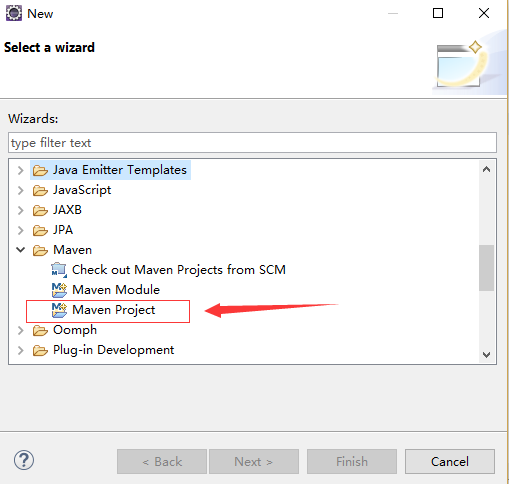
红框处要打勾。
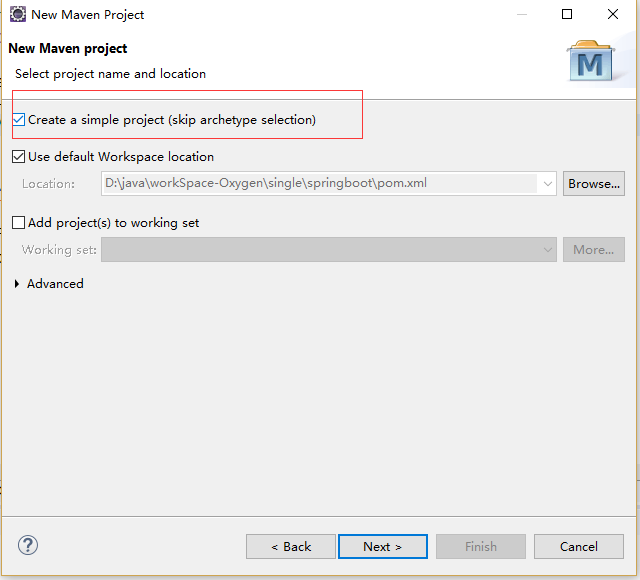
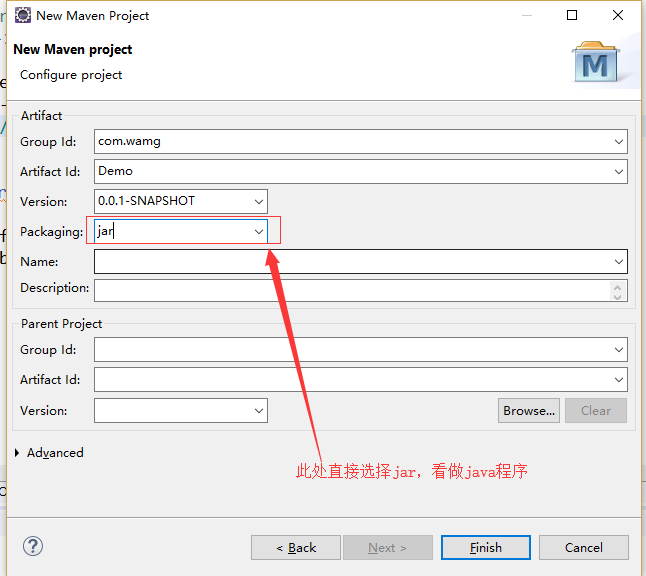
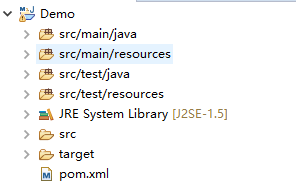
项目结构如下图所示:
添加SpringBoot依赖:
在pom.xml中添加:
<parent>
        <groupId>org.springframework.boot</groupId>
        <artifactId>spring-boot-starter-parent</artifactId>
        <version>1.5.2.RELEASE</version>
</parent>
实例:完整pom.xml:
<project xmlns="http://maven.apache.org/POM/4.0.0"
xmlns:xsi="http://www.w3.org/2001/XMLSchema-instance"
xsi:schemaLocation="http://maven.apache.org/POM/4.0.0 http://maven.apache.org/xsd/maven-4.0.0.xsd">
<modelVersion>4.0.0</modelVersion>
<groupId>com.jiahou</groupId>
<artifactId>springboot</artifactId>
<version>0.0.1-SNAPSHOT</version>
<!-- 引入springboot 父类依赖 -->
<parent>
<groupId>org.springframework.boot</groupId>
<artifactId>spring-boot-starter-parent</artifactId>
<version>1.5.2.RELEASE</version>
</parent>
<dependencies>
<!-- 用于web开发的话 导入 springboot -web组件 -->
<dependency>
<groupId>org.springframework.boot</groupId>
<artifactId>spring-boot-starter-web</artifactId>
</dependency>
</dependencies>
</project>
依赖添加成功标志,项目上带有boot标识:

项目测试:
创建Demo:
package com.springboot.hello;
import java.util.HashMap;
import java.util.Map;
import org.springframework.boot.SpringApplication;
import org.springframework.boot.autoconfigure.EnableAutoConfiguration;
import org.springframework.web.bind.annotation.RequestMapping;
import org.springframework.web.bind.annotation.RestController;
@EnableAutoConfiguration
// 该注解的作用 是表示 在HelloSpringboot类的所有方法 返回的都是json格式
@RestController
public class HelloSpringboot {
@RequestMapping(value = "/index")
public String reqIndex() {
System.out.println("接受请求index");
return "success";
}
@RequestMapping(value = "/getMap")
public Map<String, String> getMap() {
Map<String, String> map = new HashMap<String, String>();
map.put("获取map数据", "成功");
System.out.println("接受请求getMap");
return map;
}
public static void main(String[] args) {
SpringApplication.run(HelloSpringboot.class, args);
}
}
执行main方法。浏览器查看

即为启动成功。
注解说明:
@EnableAutoConfiguration:启用spring 的上下文配置 创建需要生成的bean以及自动装载 tomcat 如果没有这个注解 就无法启动成功。
@SuppressWarnings("deprecation")
@Target(ElementType.TYPE)
@Retention(RetentionPolicy.RUNTIME)
@Documented
@Inherited
@AutoConfigurationPackage
@Import(EnableAutoConfigurationImportSelector.class)
public @interface EnableAutoConfiguration {
@RestController:即@Controller+@ResponseBody 的组合,用在 类上面 表示 该类所有方法 都返回json格式,也可以分开写:
@Target(ElementType.TYPE)
@Retention(RetentionPolicy.RUNTIME)
@Documented
@Controller
@ResponseBody
public @interface RestController {
另:springboot 内置tomact 可以直接启动主函数的方式 来直接运行springboot 项目

 浙公网安备 33010602011771号