
尚庭公寓学习笔记
1. 项目概述
1.1 项目业务概述
尚庭公寓是一个公寓租赁平台项目,包含移动端和后台管理系统,其中移动端面向广大用户,提供找房、看房预约、租约管理等功能,后台管理系统面向管理员,提供公寓(房源)管理、租赁管理、用户管理等功能。下面分别介绍两端的具体业务功能。

1.1.1 移动端
移动端的线上体验地址为: http://139.198.127.41:8002 ,其主要业务功能如下图所示

各功能模块具体内容如下
-
房源检索
用户可以使用这个功能来搜索和检索符合其需求的房源。他们可以根据不同的条件,如地理位置、租金范围、支付方式等,快速找到适合的房源。
-
看房预约管理
用户可以通过这个功能预约看房。他们可以选择合适的时间,预约在特定的公寓进行实地看房,以便更好地了解房源的情况和环境。
-
租约管理
这个功能允许用户查看和管理他们的租约信息。他们可以在移动端查看租约合同,以及提交租约终止或延长的请求。
-
房源浏览历史
用户可以在这里查看他们曾经浏览过的房源历史记录。这个功能可以帮助用户追踪之前感兴趣的房源,方便他们重新查看或做出决策。
1.1.2 后台管理系统
后台管理系统的线上体验地址为: http://139.198.127.41:8001 ,主要业务功能如下图所示

各功能模块具体内容如下
-
公寓信息管理
这个模块负责管理所有公寓的基本信息,包括公寓名称、地址、联系方式等。管理员可以在这里添加、编辑、删除公寓信息。
-
房间信息管理
该模块负责管理每个公寓内各个房间的详细信息,包括房间号、户型、面积、租金等。管理员可以在这里进行房间信息的添加、编辑和删除。
-
公寓/房间属性管理
这个模块允许管理员定义公寓和房间的各种属性,比如公寓和房间的配套设施,方便管理员在维护公寓信息和房间信息时进行选择。
-
看房预约管理
该模块用于管理用户的看房预约请求。用户可以在移动端提交看房预约,管理员可以在后台管理系统中查看和处理这些请求,以方便安排人员接待用户。
-
租约管理
这个模块用于管理租约的创建、修改和终止。管理员可以在这里生成租约合同,并发送给用户签约。
-
后台系统用户管理
该模块用于管理后台系统的用户账户信息,管理员可以创建、编辑、删除、禁用账户信息。
-
移动端用户管理
这个模块负责管理移动端用户的信息。管理员可以查看用户信息,处理账户相关问题。
1.1.3 核心业务流程
本项目的核心业务流程为签约、续约、退租,具体流程如下图所示

在上述的业务流程中,会涉及到租约状态的多次变化,下面详细介绍一下租约状态。租约共有7个状态,分别是签约待确认、已签约、已取消、已到期、退租待确认、已退租、续约待确认,以下是这些状态的变化流程。

1.2 项目技术概述
本项目的技术架构如下图所示。

项目采用前后端分离的模式,下面介绍各模块用到的技术。
-
前端
- 框架:VUE3
-
后端
-
框架:Spring Boot
-
数据库访问:MyBatis、MyBatis Plus
MyBatis-Plus(简称 MP)是一个MyBatis的增强工具,在 MyBatis 的基础上只做增强不做改变,为简化开发、提高效率而生。
-
Web:Spring MVC
-
-
数据存储
-
关系型数据库:MySQL
-
缓存:Redis
-
对象存储:MinIO
对象存储是用于存储非结构化数据的数据存储架构,它将一个数据单元称为一个对象,每个对象都包含数据本身、元数据(描述数据的信息)和一个唯一标识符(通常是一个URL地址)。
在2001年,亚马逊推出了Simple Storage Service(简称S3),这是第一个商业化的、面向互联网的对象存储服务。随后国内众多云服务厂商也都推出了自己的对象存储服务,例如阿里云的OSS,华为云的OBS,百度云的BOS等等。
MinIO是一个开源的对象存储方案,兼容亚马逊S3协议。
对于对象存储,我们可以选择直接购买各大云厂商提供的服务,也可以选择使用开源的服务,自行安装和维护。本项目采用开源的对象存储Minio来存储图片信息。
-
-
部署
- 前端服务器:Nginx
2. 项目开发流程
前后端分离项目的完整开发流程如下
第一步
由产品经理负责分析市场、用户需求,并将其转化为详细的产品需求。然后创建初步的产品原型,以便更好地理解和传达产品的设计和功能。
原型通常指的是产品、系统或概念的初步版本或样品,旨在展示设计概念、功能、外观或其他关键特征。
第二步
由UI设计师基于产品需求和初步原型,设计用户界面的外观和交互,得到高保真的原型。高保真原型可能包含更具体的设计元素,如颜色、字体、布局等。
第三步
由架构师根据高保真原型,规划软件系统的整体结构和组件。他们会设计数据库架构和定义接口,输出API文档,以便开发团队进行后续工作。
API文档是关于接口的详细说明文档,其会包含接口所提供的功能,所需参数、返回值、错误处理等细节。接口文档的目的是为开发人员、集成人员以及其他利益相关者提供清晰的指导,以便他们能够正确地使用和集成接口。
第四步
前后端开发工程师根据API文档,分别开发前端和后端的业务逻辑和功能。前端工程师负责构建用户交互界面,而后端工程师负责数据处理逻辑和数据存储。
第五步
测试工程师进行各种测试,以确保软件的质量和稳定性。
第六步
运维工程师负责配置、部署和维护应用程序的生产环境,确保应用程序能够正常运行并具备良好的性能和可用性。
3. 项目原型
目前市面上有很多功能强大的原型设计工具,常用的有墨刀,Figma等,这些工具设计出的原型美观且具备交互逻辑。以下是本项目的原型(当做原型看吧^_^)。
移动端地址:[点击访问](https://modao.cc/proto/yaPxwdkwrvtlaepAbqZzO/sharing?view_mode=device&screen=rbpTgNkz0plpyCNJi&canvasId=rcTgNntk14ENgkLr #租赁平台APP-分享)
后台管理系统地址:[点击访问](https://modao.cc/proto/jyri5tlrvvh6dn3SWyLBQ/sharing?view_mode=device&screen=rbpTgTi9axnREyQVW&canvasId=rcTgTi9ay8uTGyt0 #租赁平台后台管理-分享)
4. 数据库设计
4.1 数据库设计理论
4.1.1 数据库模型
数据库设计中最常采用的模型为实体(Entity)关系(Relationship)模型,简称ER模型。其核心思想是将现实世界中的复杂数据表示为一组实体,并描述这些实体之间的关系。
-
实体通常对应现实世界中的一个对象,例如:学生、班级、教师、课程。
-
每个实体都包含一组属性,这些属性用于描述实体,例如学生实体包含姓名、年龄、性别等属性。
-
关系用于描述各实体之间的联系,例如学生和班级之间存在从属关系。
其中关系可分为一对一、一对多、多对多三种,例如学生和班级之间的关系为一对多、学生和课程之间的关系为多对多。
实体关系模型通常使用实体关系图(ER diagram)进行表示。下图是一个简易的选课系统的实体关系图,其中方框代表实体,方框之间的连线则代表实体间的关系,连线两端的不同符号用于表示一对一、一对多、多对多的关系。

符号说明如下:
| 符号 | 说明 |
|---|---|
 |
表示0个 |
 |
表示1个 |
 |
表示多个 |
上述符号通常是两个成对使用,其分别表示最小值和最大值。例如上述ER图中的班级和学生之间的连线,班级一侧的符号表示一(最小值和最大值都是一),学生一侧的符号表示多(最小值是一,最大值是多),其表达的含义就是班级和学生之间的关系为一对多,一个学生只对应一个班级,而一个班级会对应多个学生(且至少对应一个学生)。
4.1.2 数据库设计流程
传统的数据库设计流程分为三个阶段,分别是概念模型设计阶段、逻辑模型设计阶段和物理模型设计阶段。三个阶段由粗略到详细,由抽象到具体。
4.1.2.1 概念模型设计
概念模型是一个粗略的初步设计,其只关注实体和关系,不体现最终建表所需的各种细节信息(例如实体的属性)。下图便是一个典型的简易选课系统数据库的概念模型。
4.1.2.2 逻辑模型设计
相较于概念模型,逻辑模型会包含更多的细节信息,例如实体的属性、用于关联两个实体的字段等等。需要注意的是,逻辑模型并不关注具体的数据库实现(例如MySQL或者Oracle)。下图是上述选课系统数据库的逻辑模型。

4.1.2.3 物理模型设计
相较于逻辑模型,物理模型会包含更多的与所选数据库相关的具体信息,例如存储引擎、字段类型、索引等信息。一般而言,物理模型会包含最终建表所需的所有信息,下图是上述选课系统数据库的物理模型。

4.2 数据库设计实操
4.2.1 概念模型设计
根据原型可得,本项目包含的实体有公寓、房间、用户(租客)、租约(合同)、看房预约、浏览历史和后台管理系统用户,各实体间的关系如下

4.2.2 逻辑模型设计
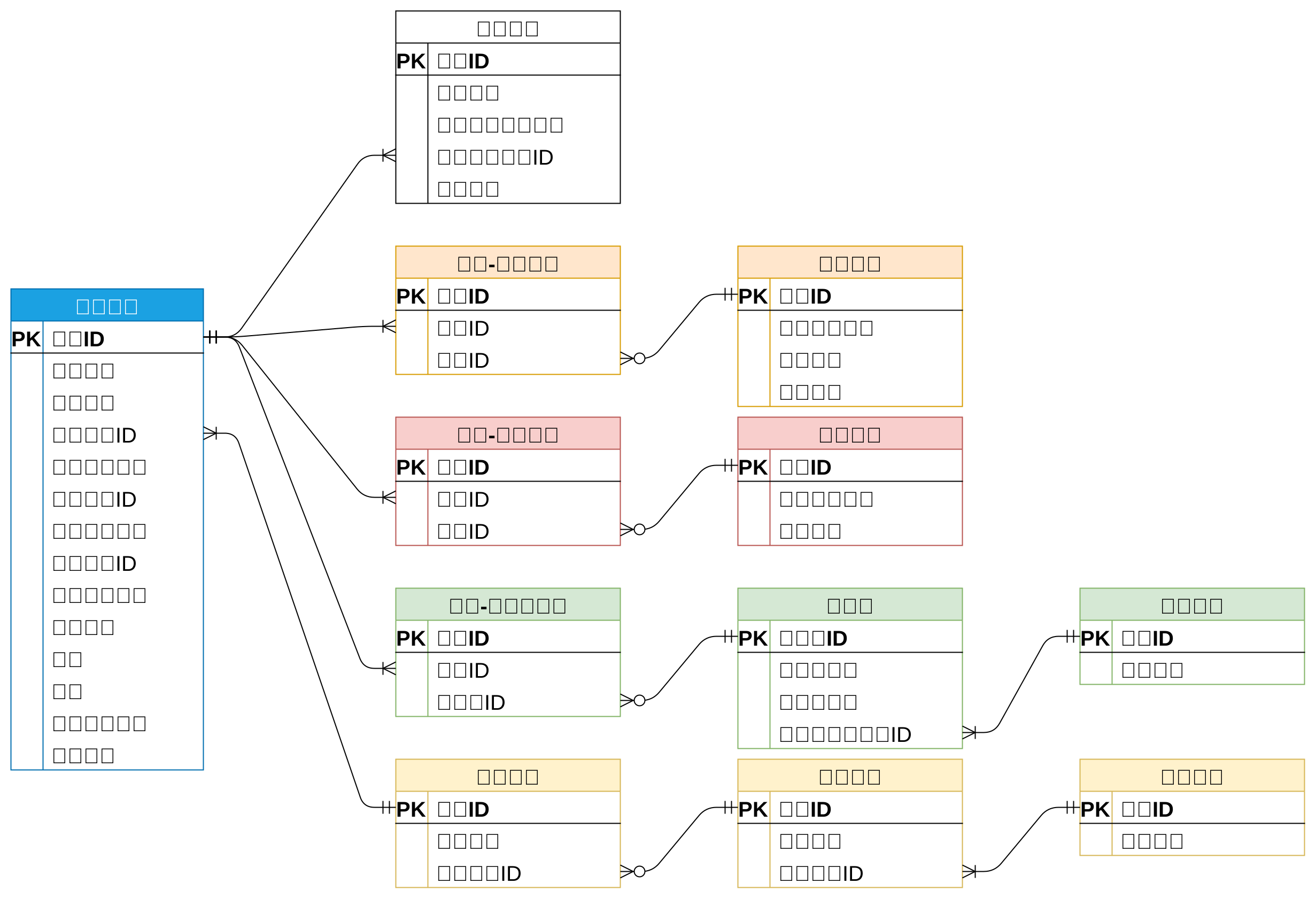
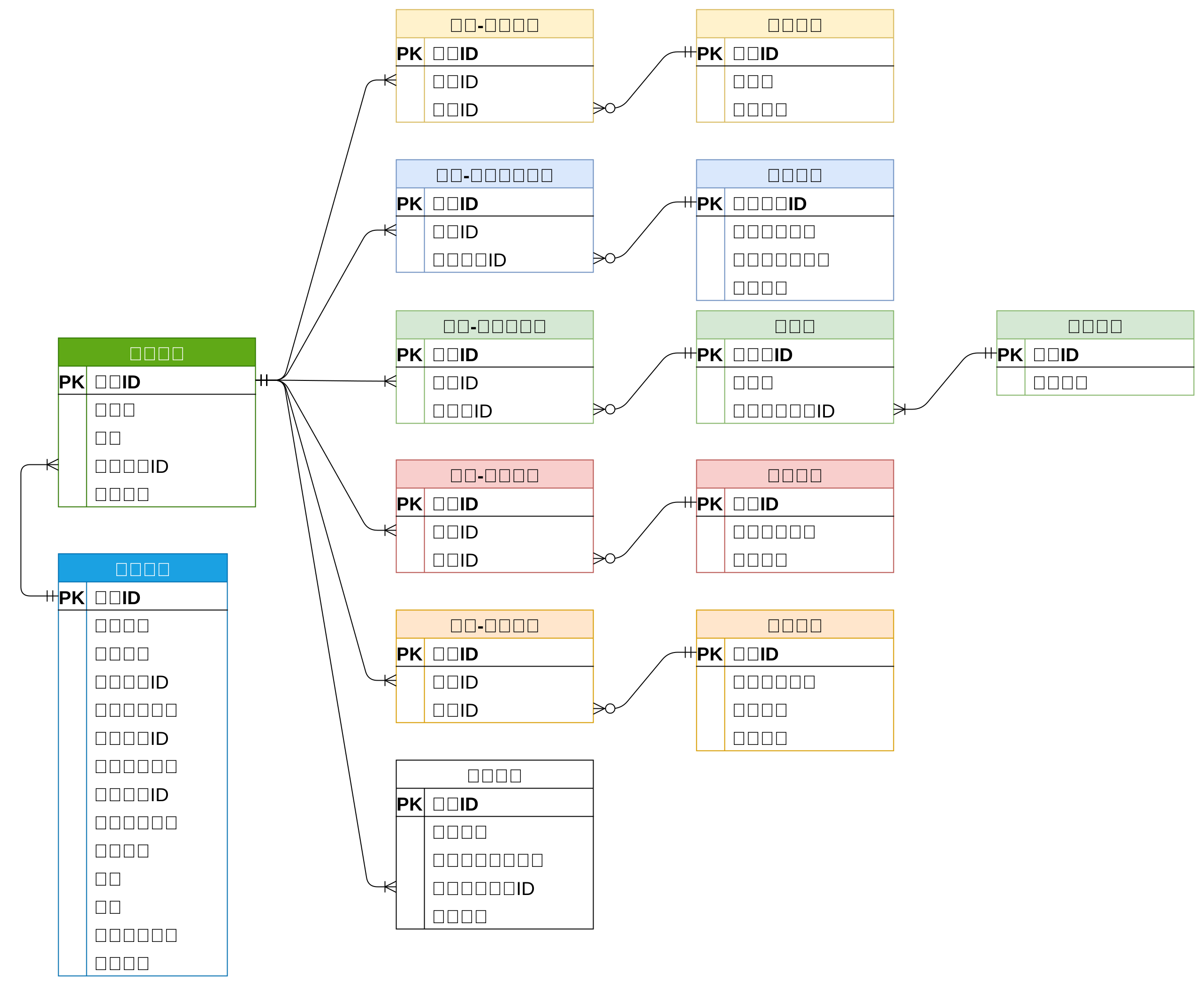
根据原型明确各实体所需属性并明确各表关联字段,得到的完整的逻辑模型如下图所示。下面逐一分析。

4.2.2.1 公寓信息
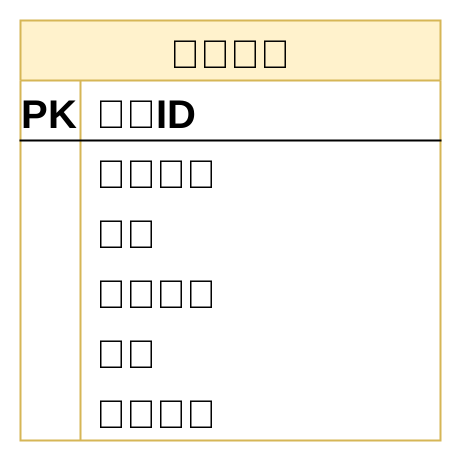
公寓信息包含的属性有公寓名称、公寓简介、公寓地址、公寓联系方式、公寓图片、公寓标签、公寓杂费、公寓发布状态,这部分的逻辑模型如下图所示
4.2.2.2 房间信息
房间信息包含的属性有房间号、房间租金、房间所属公寓、房间可选租期、房间可选支付方式、房间属性、房间标签、房间配套、房间图片、房间发布状态,这部分的逻辑模型如下图所示
4.2.2.3 用户信息
用户信息包含的属性有手机号码、密码、头像、昵称、账号状态,这部分的逻辑模型如下
4.2.2.4 看房预约信息
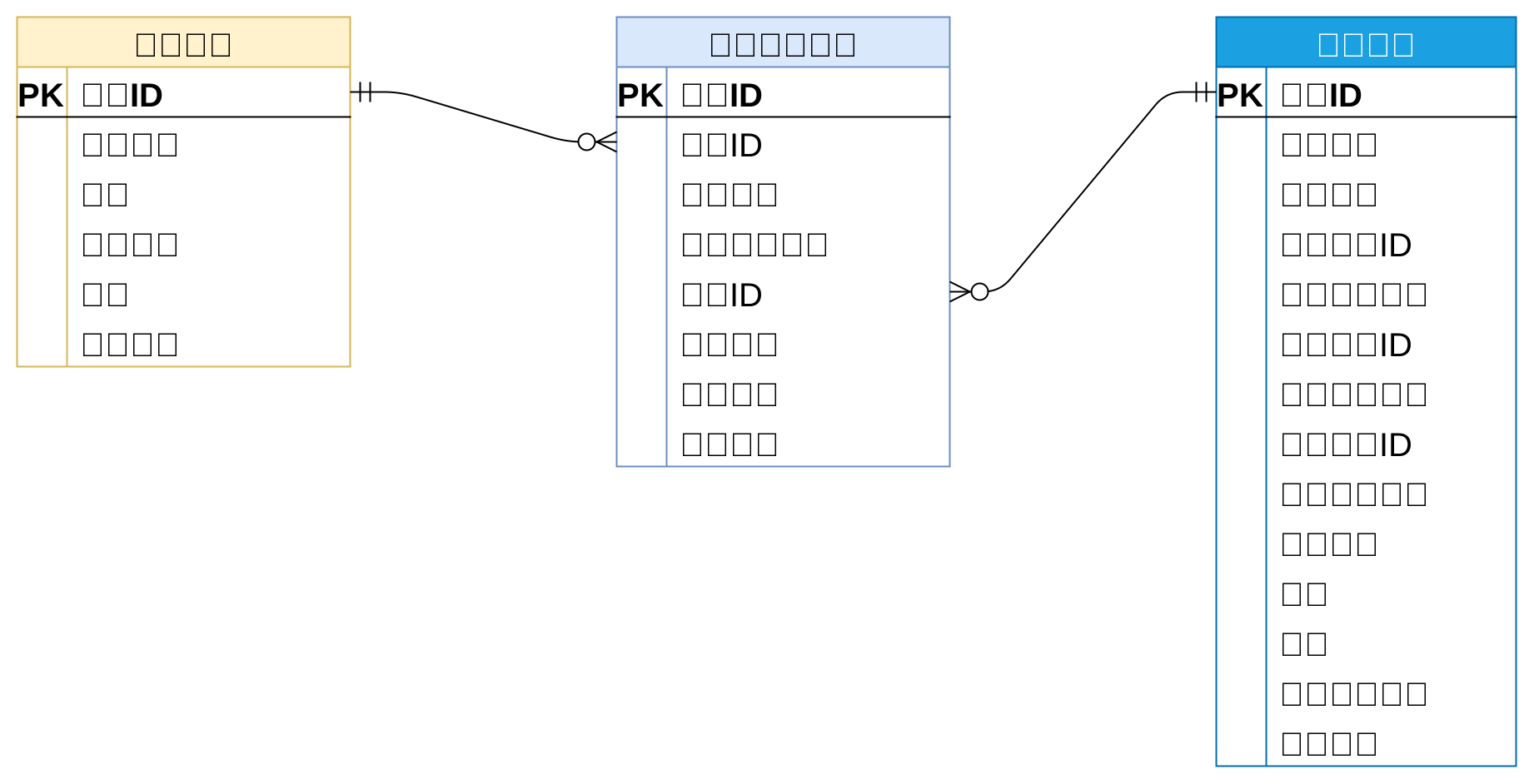
看房预约包含的属性有预约用户信息、预约公寓信息、预约时间、备注信息、预约状态,这部分的逻辑模型如下
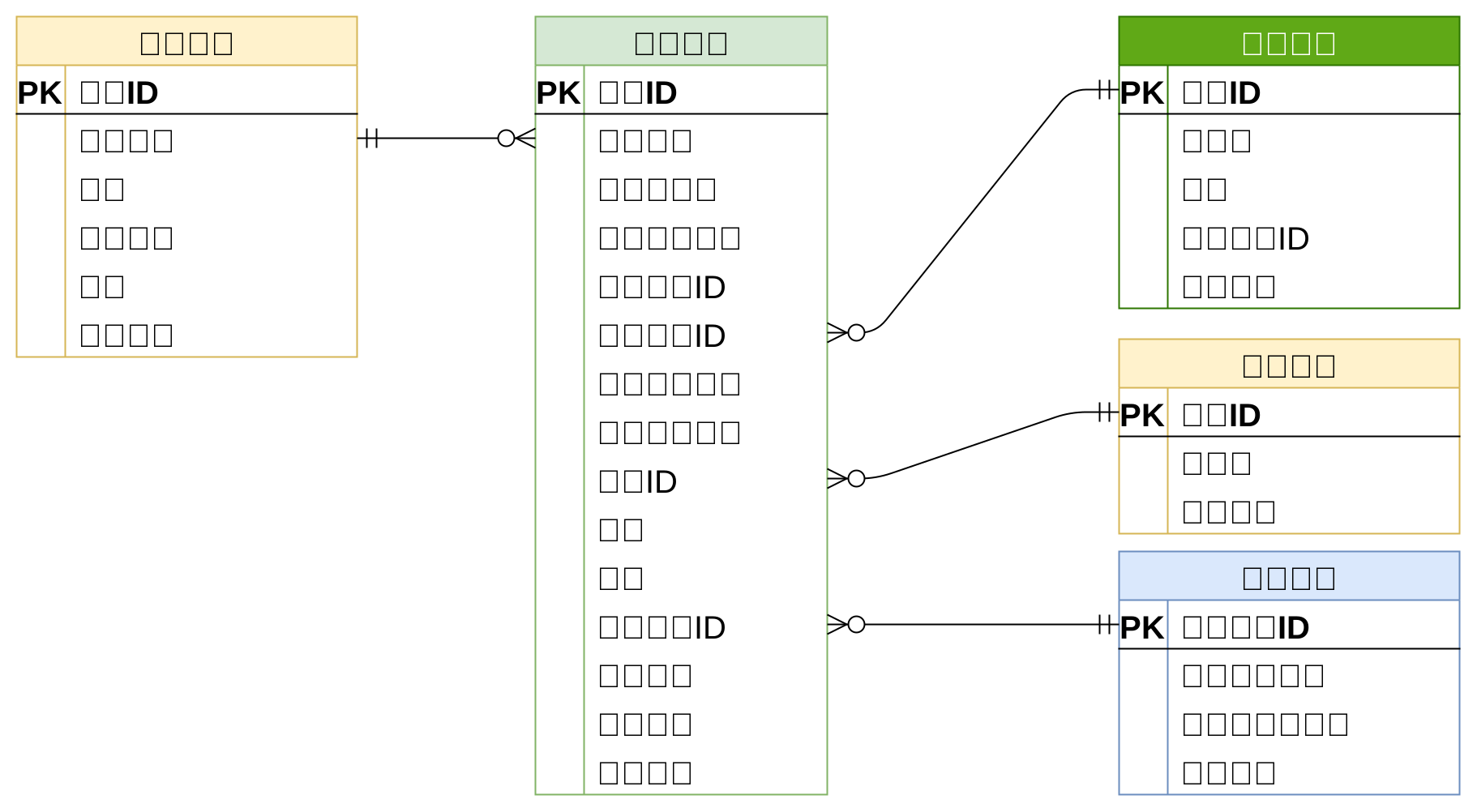
4.2.2.5 租约信息
租约信息包含签约用户信息,签约房间信息、租期、支付方式、租约来源、租金、押金,这部分的逻辑模型如下
4.2.2.6 浏览历史信息
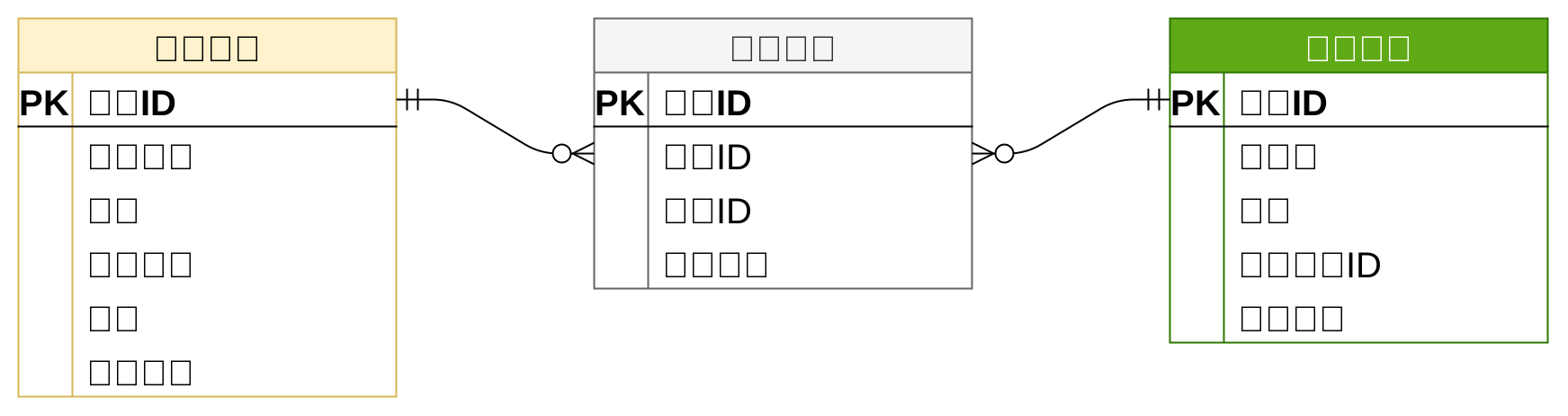
浏览历史指的是用户浏览房间详情的历史,包含的属性有用户信息、房间信息、浏览时间,这部分的逻辑模型如下
4.2.2.7 后台管理用户信息
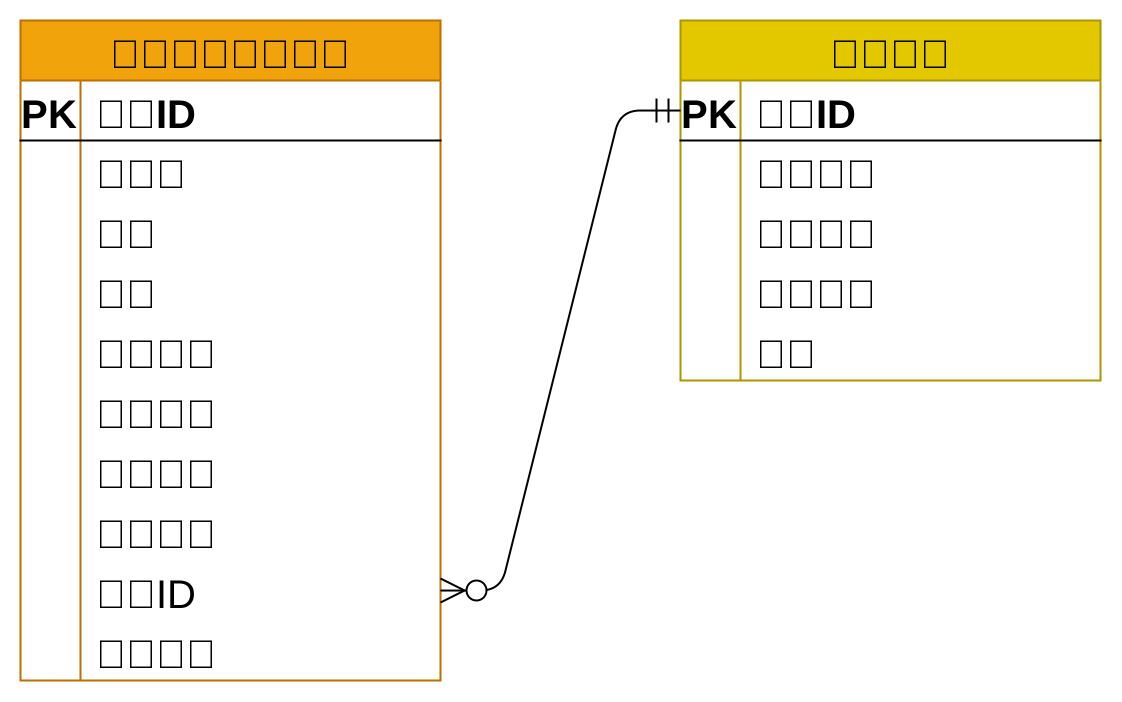
后台管理系统用户包含的属性有,这部分的逻辑模型如下
4.2.3 物理模型设计
本项目采用MySQL数据库,所有表均使用InnoDB存储引擎,完整的物理模型如下图,详细信息可参考资料中的数据库初始化文件lease.sql。

注意:
- 所有表均省略了
create_time、update_time、is_deleted三个字段。 - 所有的状态或类型字段(例如租约状态),均使用数字表示。
5. 接口定义
5.1 后台管理系统接口定义
5.1.1 公寓信息管理
5.1.1.1 属性管理
属性管理页面包含公寓和房间各种可选的属性信息,其中包括房间的可选支付方式、房间的可选租期、房间的配套、公寓的配套等等。其所需接口如下
-
房间支付方式管理
页面如下

所需接口如下
查询全部支付方式列表保存或更新支付方式根据ID删除支付方式
-
房间租期管理
页面如下

所需接口如下
查询全部租期列表保存或更新租期根据ID删除租期
-
标签管理
页面如下

所需接口如下
保存或更新标签查询标签列表根据ID删除标签
-
配套管理
页面如下

所需接口如下
保存或更新配套查询配套列表根据ID删除配套
-
房间基本属性管理
页面如下

所需接口如下
-
保存或更新属性名称 -
保存或更新属性值 -
查询全部属性名称和属性值列表 -
根据ID删除属性名称 -
根据ID删除属性值
-
-
公寓杂费管理
页面如下

所需接口如下
-
保存或更新杂费名称 -
保存或更新杂费值 -
查询全部杂费名称和杂费值列表 -
根据ID删除杂费名称 -
根据ID删除杂费值
-
5.1.1.2 公寓管理
-
公寓列表页面
页面如下

所需接口如下
-
根据条件分页查询公寓列表 -
查询条件所需接口
查询省份列表根据省份ID查询城市列表根据城市ID查询区县列表
-
根据ID修改公寓发布状态 -
根据ID删除公寓信息
-
-
公寓详情页面
页面如下

所需接口如下
-
根据ID查询公寓详细信息(用作修改时的表单回显) -
保存或更新公寓信息 -
表单所需接口
查询省份列表根据省份ID查询城市列表根据城市ID查询区县列表查询公寓配套列表查询公寓标签列表查询公寓杂费信息列表上传图片
-
5.1.1.3 房间管理
-
房间列表页面
页面如下

所需接口如下
-
根据条件分页查询房间列表 -
查询条件所需接口
查询省份列表根据省份ID查询城市列表根据城市ID查询区县列表根据区县ID查询公寓列表
-
根据ID修改房间发布状态 -
根据ID删除房间信息
-
-
房间详情页面
页面如下

所需接口如下
根据ID查询房间详细信息(用作修改时的表单回显)保存或更新房间信息- 表单所需接口
查询省份列表根据省份ID查询城市列表根据城市ID查询区县列表根据区县ID查询公寓列表查询房间属性列表查询房间标签列表查询全部支付方式列表查询租期列表上传图片
5.1.2 租赁管理
5.1.2.1 预约看房管理
-
看房预约列表页面
页面如下

所需接口如下
-
分页查询预约信息列表 -
查询条件所需接口
查询省份列表根据省份ID查询城市列表根据城市ID查询区县列表根据区县ID查询公寓列表
-
根据ID更新预约状态
-
5.1.2.2 租约管理
-
租约列表页面
页面如下

所需接口如下
-
根据条件分页查询租约信息列表 -
查询条件所需接口
查询省份列表根据省份ID查询城市列表根据城市ID查询区县列表根据区县ID查询公寓列表
-
根据ID更新租约状态 -
根据ID删除租约信息
-
-
租约详情页面
页面如下

所需接口
-
根据ID查询租约信息(用作更新租约时的表单回显) -
保存或修改租约信息 -
表单所需接口
查询省份列表根据省份ID查询城市列表根据城市ID查询区县列表根据区县ID查询公寓列表根据公寓ID查询房间列表查询可选支付方式列表查询可选租期列表
-
5.1.3 用户管理
5.1.3.1 用户列表页面
页面如下

所需接口如下
分页查询用户信息列表根据用户ID更新账号状态
5.1.4 系统管理
5.1.4.1 系统用户岗位管理
-
岗位列表页面
页面如下

所需接口如下
分页查询岗位信息列表根据ID修改岗位状态根据ID删除岗位
-
岗位详情页面
页面如下

所需接口如下
根据ID查询岗位详细信息(用作修改时的表单回显)保存或更新岗位信息
5.1.4.2 系统用户信息管理
-
系统用户列表页面
页面如下

所需接口如下
根据条件分页查询系统用户列表根据ID修改用户状态根据ID删除系统用户信息
所需接口如下
-
系统用户详情页面
页面如下

所需接口如下
根据ID查询系统用户详细信息保存或更新系统用户信息表单所需接口- 查询岗位列表
5.1.5 登录管理
5.1.5.1 登录页面
页面如下

所需接口如下
获取图形验证码请求登录获取登录用户信息
5.2 移动端接口定义
5.2.1 登录
5.2.1.1 登录页面
页面如下

所需接口如下
获取短信验证码请求登录获取登录用户基本信息
5.2.2 找房
5.2.2.1 房间列表页面
页面如下

所需接口如下
-
根据查询条件分页查询房间列表 -
查询条件所需接口
查询省份列表根据省份ID查询城市信息根据城市ID查询区县信息查询支付方式列表
5.2.2.2 房间详情页面
页面如下

所需接口如下
根据ID查询房间详细信息
5.2.2.3 公寓详情页面
页面如下

所需接口如下
根据ID查询公寓详细信息根据公寓ID查询房间列表
5.2.3 个人中心
5.2.3.1 浏览历史
页面如下

所需接口如下
查询登录用户的浏览历史列表
5.2.3.2 看房预约
-
看房预约列表页面
页面如下

所需接口如下
查询登录用户的看房预约列表
-
看房预约详情页面
页面如下

所需接口如下
根据ID查询看房预约详细信息保存或更新看房间预约信息
5.2.3.3 租约管理
-
租约列表页面
页面如下


所需接口如下
查询登录用户的租约列表根据ID修改租约状态
-
租约详情页面
页面如下

所需接口如下
根据ID查询租约详细信息保存或修改租约信息- 表单所需接口
根据房间ID查询可选支付方式列表根据房间ID查询可选租期列表
5.2.4 我的房间
略
5.2.5 圈子
略
5.2.6 消息通知
略
6. 开发准备
6.1 准备开发环境
项目开发会用到MySQL、Redis、MinIO,本章主要内容就是部署三者,部署环境为Linux虚拟机。
6.1.1 准备Linux虚拟机
6.1.1.1 Linux快速入门
Linux入门相关内容可参考尚硅谷Linux基础。
6.1.1.2 开发环境要求
准备两台Linux虚拟机——server01和server02,具体要求如下
提示
开发阶段只需要一台虚拟机即可,另外一台留到后序的项目部署阶段使用。实际操作时,可先按要求准备一台,然后直接克隆得到第二台服务器。
-
操作系统为Centos7
由于下文的安装步骤都是基于Centos7系统的,所以建议统一使用Centos7系统。
-
网络设置
虚拟机网络使用NAT模式,且使用静态IP。
-
主机名设置
为两台主机分别设置一个主机名,分别是
server01和server02,设置主机名的命令如下hostnamectl set-hostname <主机名> --static -
配置好SSH远程登录
ssh客户端不限,可使用Xshell、MobaXterm、finalshell等等
-
与网络时间保持同步
安装时间同步工具
chrony。-
执行以下命令安装
chronyyum install chrony -
执行以下命令启动
chrony,并设置为开机自启。systemctl start chronyd systemctl enable chronyd知识点
-
查看时间源
chronyc sources该命令显示结果如下
210 Number of sources = 4 MS Name/IP address Stratum Poll Reach LastRx Last sample =============================================================================== ^? ntp8.flashdance.cx 2 6 3 0 +44ms[ +44ms] +/- 93ms ^? electrode.felixc.at 2 6 5 0 +32ms[ +32ms] +/- 135ms ^* 81.16.177.123 2 6 7 1 +457us[+28800s] +/- 149ms ^- dns2.synet.edu.cn 1 6 7 2 +55ms[+28800s] +/- 28ms- MS:当前事件源的状态
- Name/IP:时间服务器地址
-
配置新的时间源
可修改
vim /etc/chrony.conf以增加新的时间源
-
-
-
关闭防火墙
关闭命令如下
#关闭防火墙 systemctl stop firewalld #禁止防火墙开机自启 systemctl disable firewalld -
关闭SElinux
SELinux,全称为Security-Enhanced Linux,是一种用于Linux操作系统的安全增强功能,为保证后序部署阶段的Nginx能够正常工作,此处关闭SELinux功能。
-
修改SELinux配置文件
打开配置文件
vim /etc/selinux/config修改内容如下
SELINUX=disabled -
重启操作系统
reboot
-
6.1.2 部署MySQL
在server01部署MySQL,具体步骤可参考文档。
-
安装MySQL yum库
-
下载yum库
下载地址为 https://dev.mysql.com/downloads/repo/yum/ 。需要根据操作系统选择相应版本,Centos7需选择
mysql80-community-release-el7-9.noarch.rpm。执行以下命令可直接下载到服务器
wget https://dev.mysql.com/get/mysql80-community-release-el7-9.noarch.rpm -
安装yum库
在上述
rpm文件所在路径执行如下命令rpm -ivh mysql80-community-release-el7-9.noarch.rpm -
配置国内镜像
修改
/etc/yum.repo.d/mysql-community.repo文件中的[mysql80-community]中的baseUrl参数,修改内容如下:[mysql80-community] name=MySQL 8.0 Community Server baseurl=https://mirrors.tuna.tsinghua.edu.cn/mysql/yum/mysql-8.0-community-el7-$basearch/ enabled=1 gpgcheck=1 gpgkey=file:///etc/pki/rpm-gpg/RPM-GPG-KEY-mysql-2022 file:///etc/pki/rpm-gpg/RPM-GPG-KEY-mysql
-
-
安装MySQL
执行如下命令安装MySQL
yum install -y mysql-community-server -
启动MySQL
执行如下命令启动MySQL服务
systemctl start mysqld执行以下命令查看MySQL运行状态
systemctl status mysqld -
root用户相关配置
-
查看root用户初始密码
MySQL启动后会将root用户的初始密码写入日志,通过以下命令可以获取密码
cat /var/log/mysqld.log | grep password -
使用初始密码登录
执行以下命令登录MySQL
mysql -uroot -p'password' -
修改root用户密码
ALTER USER 'root'@'localhost' IDENTIFIED BY 'Atguigu.123';注意:MySQL默认安装了validate_password 插件,默认情况下,要求密码要包含大写字母、小写字母、数字和特殊符号,且密码长度最小为8。若需设置简单密码,可禁用该插件,或调整该插件的密码强度级别。
-
授予root用户远程登录权限
CREATE USER 'root'@'%' IDENTIFIED BY 'Atguigu.123';
GRANT ALL PRIVILEGES ON *.* TO 'root'@'%' WITH GRANT OPTION;
FLUSH PRIVILEGES;
-
6.1.3 部署Redis
在server01部署Redis服务,安装方式采用yum在线安装,安装版本为redis-7.0.13,具体步骤如下
-
安装Redis yum仓库
-
下载yum仓库
Redis所在的仓库为remi-release,下载地址为: http://rpms.famillecollet.com/enterprise/remi-release-7.rpm ,可使用如下命令直接下载到服务器
wget http://rpms.famillecollet.com/enterprise/remi-release-7.rpm -
安装yum仓库
执行如下命令进行安装
rpm -ivh remi-release-7.rpm
-
-
安装Reids
执行以下命令安装Redis
yum --enablerepo=remi -y install redis-7.0.13注:
--enablerepo选项的作用为启用一个仓库 -
配置Redis允许远程访问
Redis服务默认只允许本地访问,若需要进行远程访问,需要做出以下配置。
修改Redis配置文件
vim /etc/redis/redis.conf修改如下参数
#监听所有网络接口,默认只监听localhost bind 0.0.0.0 #关闭保护模式,默认开启。开始保护模式后,远程访问必须进行认证后才能访问。 protected-mode no -
启动Redis
执行以下命令启动Redis
systemctl start redis执行以下命令查看Redis的运行状态
systemctl status redis执行以下命令设置Redis开机自启
systemctl enable redis
6.1.4 部署MinIO
在server01部署MinIO,安装方式采用rpm离线安装,具体步骤可参考官方文档。
-
获取MinIO安装包
下载地址如下: https://dl.min.io/server/minio/release/linux-amd64/archive/minio-20230809233022.0.0.x86_64.rpm ,通过以下命令可直接将安装包下载至服务器
wget https://dl.min.io/server/minio/release/linux-amd64/archive/minio-20230809233022.0.0.x86_64.rpm注:若下载缓慢,大家可直接使用课程资料中附带的安装包
-
安装MinIO
rpm -ivh minio-20230809233022.0.0.x86_64.rpm -
集成Systemd
-
Systemd概述
Systemd是一个广泛应用于Linux系统的系统初始化和服务管理器,其可以管理系统中的各种服务和进程,包括启动、停止和重启服务,除此之外,其还可以监测各服务的运行状态,并在服务异常退出时,自动拉起服务,以保证服务的稳定性。系统自带的防火墙服务firewalld,我们自己安装的mysqld和redis均是由Systemd进行管理的,此处将MinIO服务也交给Systemd管理。 -
编写MinIO服务配置文件
Systemd所管理的服务需要由一个配置文件进行描述,这些配置文件均位于
/etc/systemd/system/或者/usr/lib/systemd/system/目录下,下面创建MinIO服务的配置文件。执行以下命令创建并打开
minio.service文件vim /etc/systemd/system/minio.service内容如下,具体可参考MinIO官方文档。
[Unit] Description=MinIO Documentation=https://min.io/docs/minio/linux/index.html Wants=network-online.target After=network-online.target AssertFileIsExecutable=/usr/local/bin/minio [Service] WorkingDirectory=/usr/local ProtectProc=invisible EnvironmentFile=-/etc/default/minio ExecStartPre=/bin/bash -c "if [ -z \"${MINIO_VOLUMES}\" ]; then echo \"Variable MINIO_VOLUMES not set in /etc/default/minio\"; exit 1; fi" ExecStart=/usr/local/bin/minio server $MINIO_OPTS $MINIO_VOLUMES Restart=always LimitNOFILE=65536 TasksMax=infinity TimeoutStopSec=infinity SendSIGKILL=no [Install] WantedBy=multi-user.target注意:
重点关注上述文件中的以下内容即可
EnvironmentFile,该文件中可配置MinIO服务所需的各项参数ExecStart,该参数用于配置MinIO服务的启动命令,其中$MINIO_OPTS、$MINIO_VOLUMES,均引用于EnvironmentFile中的变量。MINIO_OPTS用于配置MinIO服务的启动选项,可省略不配置。MINIO_VOLUMES用于配置MinIO服务的数据存储路径。
Restart,表示自动重启
-
编写
EnvironmentFile文件执行以下命令创建并打开
/etc/default/minio文件vim /etc/default/minio内容如下,具体可参考官方文档。
MINIO_ROOT_USER=minioadmin
MINIO_ROOT_PASSWORD=minioadmin
MINIO_VOLUMES=/data
MINIO_OPTS="--console-address :9001"
注意
-
MINIO_ROOT_USER和MINIO_ROOT_PASSWORD为用于访问MinIO的用户名和密码,密码长度至少8位。 -
MINIO_VOLUMES用于指定数据存储路径,需确保指定的路径是存在的,可执行以下命令创建该路径。mkdir /data -
MINIO_OPTS中的console-address,用于指定管理页面的地址。
-
-
-
启动MinIO
执行以下命令启动MinIO
systemctl start minio执行以下命令查询运行状态
systemctl status minio设置MinIO开机自启
systemctl enable minio -
访问MinIO管理页面
管理页面的访问地址为:
http://192.168.10.101:9001注意:
ip需要根据实际情况做出修改
6.2 技术储备
6.2.1 MyBatis Plus快速入门
6.2.2.1 概述
MyBatis-Plus(简称 MP)是一个MyBatis 的增强工具,在 MyBatis 的基础上只做增强不做改变,为简化开发、提高效率而生。其突出的特性如下:
- 无侵入:只做增强不做改变,引入它不会对现有工程产生影响,如丝般顺滑
- 强大的 CRUD 操作:内置通用 Mapper、通用 Service,提供了大量的通用的CRUD方法,因此可以省去大量手写sql的语句的工作。
- 条件构造器:提供了强大的条件构造器,可以构造各种复杂的查询条件,以应对各种复杂查询。
- 内置分页插件:配置好插件之后,写分页等同于普通 List 查询,无需关注分页逻辑。
下面通过一个简单案例快速熟悉MyBatis Plus的基本使用
6.2.2.2 数据库准备
首先在数据库中准备一张表,为后序的学习做准备。
-
创建数据库
在MySQL中创建一个数据库
hello_mpCREATE DATABASE hello_mp CHARACTER SET utf8mb4 COLLATE utf8mb4_general_ci; -
创建表
在
hello-mp库中创建一个表userDROP TABLE IF EXISTS user; CREATE TABLE user ( id BIGINT(20) NOT NULL AUTO_INCREMENT COMMENT '主键ID', name VARCHAR(30) NULL DEFAULT NULL COMMENT '姓名', age INT(11) NULL DEFAULT NULL COMMENT '年龄', email VARCHAR(50) NULL DEFAULT NULL COMMENT '邮箱', PRIMARY KEY (id) ); -
插入数据
INSERT INTO user (id, name, age, email) VALUES
(1, 'Jone', 18, 'test1@baomidou.com'),
(2, 'Jack', 20, 'test2@baomidou.com'),
(3, 'Tom', 28, 'test3@baomidou.com'),
(4, 'Sandy', 21, 'test4@baomidou.com'),
(5, 'Billie', 24, 'test5@baomidou.com');
6.2.2.3 与SpringBoot集成
Mybatis Plus与SpringBoot的集成十分简单,具体操作如下
-
引入Maven 依赖
提前创建好一个SpringBoot项目,然后在项目中引入MyBatis Plus依赖
<dependency>
    <groupId>com.baomidou</groupId>
    <artifactId>mybatis-plus-boot-starter</artifactId>
    <version>3.5.3.2</version>
</dependency>
本案例完整的
pom.xml文件如下<?xml version="1.0" encoding="UTF-8"?> <project xmlns="http://maven.apache.org/POM/4.0.0" xmlns:xsi="http://www.w3.org/2001/XMLSchema-instance" xsi:schemaLocation="http://maven.apache.org/POM/4.0.0 https://maven.apache.org/xsd/maven-4.0.0.xsd"> <modelVersion>4.0.0</modelVersion> <parent> <groupId>org.springframework.boot</groupId> <artifactId>spring-boot-starter-parent</artifactId> <version>3.0.9</version> <relativePath/> <!-- lookup parent from repository --> </parent> <groupId>com.atguigu</groupId> <artifactId>hello-mp</artifactId> <version>0.0.1-SNAPSHOT</version> <name>hello-mp</name> <description>hello-mp</description> <properties> <java.version>17</java.version> </properties> <dependencies> <dependency> <groupId>org.springframework.boot</groupId> <artifactId>spring-boot-starter-web</artifactId> </dependency> <dependency> <groupId>com.mysql</groupId> <artifactId>mysql-connector-j</artifactId> <scope>runtime</scope> </dependency> <dependency> <groupId>org.projectlombok</groupId> <artifactId>lombok</artifactId> <optional>true</optional> </dependency> <dependency> <groupId>org.springframework.boot</groupId> <artifactId>spring-boot-starter-test</artifactId> <scope>test</scope> </dependency> <dependency> <groupId>com.baomidou</groupId> <artifactId>mybatis-plus-boot-starter</artifactId> <version>3.5.3.2</version> </dependency> </dependencies> <build> <plugins> <plugin> <groupId>org.springframework.boot</groupId> <artifactId>spring-boot-maven-plugin</artifactId> </plugin> </plugins> </build> </project> -
配置
application.yml文件配置数据库相关内容如下
spring:
  datasource:
    driver-class-name: com.mysql.cj.jdbc.Driver
    username: root
    password: Atguigu.123
    url: jdbc:mysql://192.168.10.101:3306/hello_mp?useUnicode=true&characterEncoding=utf-8&serverTimezone=GMT%2b8
6.2.2.4 创建实体类
创建与user表相对应的实体类,如下
@Data
@TableName("user")
public class User {

    @TableId(value = "id", type = IdType.AUTO)
    private Long id;

    @TableField("name")
    private String name;

    @TableField("age")
    private Integer age;

    @TableField("email")
    private String email;
}
知识点:
实体类中的三个注解的含义如下
-
@TableName:表名注解,用于标识实体类所对应的表value:用于声明表名
-
@TableId:主键注解,用于标识主键字段value:用于声明主键的字段名type:用于声明主键的生成策略,常用的策略有AUTO、ASSIGN_UUID、INPUT等等
-
@TableField:普通字段注解,用于标识属性所对应的表字段value:用于声明普通字段的字段名
6.2.2.4 通用Mapper
通用Mapper提供了通用的CRUD方法,使用它可以省去大量编写简单重复的SQL语句的工作,具体用法如下
-
创建Mapper接口
创建
UserMapper接口,并继承由Mybatis Plus提供的BaseMapper<T>接口,如下@Mapper public interface UserMapper extends BaseMapper<User> { }知识点:
若Mapper接口过多,可不用逐一配置
@Mapper注解,而使用@MapperScan注解指定包扫描路径进行统一管理,例如@SpringBootApplication @MapperScan("com.atguigu.hellomp.mapper") public class HelloMpApplication { public static void main(String[] args) { SpringApplication.run(HelloMpApplication.class, args); } } -
测试通用Mapper
创建
userMapperTest测试类型,内容如下@SpringBootTest class UserMapperTest { @Autowired private UserMapper userMapper; @Test public void testSelectList() { List<User> users = userMapper.selectList(null); users.forEach(System.out::println); } @Test public void testSelectById() { User user = userMapper.selectById(1); System.out.println(user); } @Test public void testInsert() { User user = new User(); user.setName("zhangsan"); user.setAge(11); user.setEmail("test@test.com"); userMapper.insert(user); } @Test public void testUpdateById() { User user = userMapper.selectById(1); user.setName("xiaoming"); userMapper.updateById(user); } @Test public void testDeleteById() { userMapper.deleteById(1); } }
6.2.2.5 通用Service
通用Service进一步封装了通用Mapper的CRUD方法,并提供了例如saveOrUpdate、saveBatch等高级方法。
-
创建Service接口
创建
UserService,内容如下public interface UserService extends IService<User> { } -
创建Service实现类
创建
UserServiceImpl,内容如下@Service public class UserServiceImpl extends ServiceImpl<UserMapper, User> implements UserService { } -
测试通用Service
创建
UserServiceImplTest测试类,内容如下@SpringBootTest class UserServiceImplTest { @Autowired private UserService userService; @Test public void testSaveOrUpdate() { User user1 = userService.getById(2); user1.setName("xiaohu"); User user2 = new User(); user2.setName("lisi"); user2.setAge(27); user2.setEmail("lisi@email.com"); userService.saveOrUpdate(user1); userService.saveOrUpdate(user2); } @Test public void testSaveBatch() { User user1 = new User(); user1.setName("dongdong"); user1.setAge(49); user1.setEmail("dongdong@email.com"); User user2 = new User(); user2.setName("nannan"); user2.setAge(29); user2.setEmail("nannan@email.com"); List<User> users = List.of(user1, user2); userService.saveBatch(users); } }
6.2.2.6 条件构造器
条件构造器用于构造复杂的查询条件,例如获取name='zhangsan'的用户。MyBatis Plus共提供了两类构造器,分别是QueryWrapper和UpdateWrapper。其中QueryWrapper主要用于查询、删除操作,UpdateWrapper主要用于更新操作,下面通过几个案例学习条件构造器的基础用法。
-
创建
WrapperTest测试类,内容如下@SpringBootTest public class WrapperTest { @Autowired private UserService userService; @Test public void testQueryWrapper() { //查询name=Tom的所有用户 QueryWrapper<User> queryWrapper1 = new QueryWrapper<>(); queryWrapper1.eq("name", "Tom"); //查询邮箱域名为baomidou.com的所有用户 QueryWrapper<User> queryWrapper2 = new QueryWrapper<>(); queryWrapper2.like("email", "baomidou.com"); //查询所有用户信息并按照age字段降序排序 QueryWrapper<User> queryWrapper3 = new QueryWrapper<>(); queryWrapper3.orderByDesc("age"); //查询age介于[20,30]的所有用户 QueryWrapper<User> queryWrapper4 = new QueryWrapper<>(); queryWrapper4.between("age", 20, 30); //查询age小于20或大于30的用户 QueryWrapper<User> queryWrapper5 = new QueryWrapper<>(); queryWrapper5.lt("age", 20).or().gt("age", 30); //邮箱域名为baomidou.com且年龄小于30或大于40且的用户 QueryWrapper<User> queryWrapper6 = new QueryWrapper<>(); queryWrapper6.like("email", "baomidou.com").and(wrapper -> wrapper.lt("age", 30).or().gt("age", 40)); List<User> list = userService.list(queryWrapper6); list.forEach(System.out::println); } @Test public void testUpdateWrapper() { //将name=Tom的用户的email改为Tom@baobidou.com UpdateWrapper<User> updateWrapper = new UpdateWrapper<>(); updateWrapper.eq("name", "Tom"); updateWrapper.set("email", "Tom@baobidou.com"); userService.update(updateWrapper); } } -
创建
LambdaWrapperTest测试类,内容如下上述的
QueryWrapper和UpdateWrapper均有一个Lambda版本,也就是LambdaQueryWrapper和LambdaUpdateWrapper,Lambda版本的优势在于,可以省去字段名的硬编码,具体案例如下:@SpringBootTest public class LambdaWrapperTest { @Autowired private UserService userService; @Test public void testLambdaQueryWrapper() { //查询name=Tom的所有用户 LambdaQueryWrapper<User> lambdaQueryWrapper = new LambdaQueryWrapper<>(); lambdaQueryWrapper.eq(User::getName, "Tom"); List<User> list = userService.list(lambdaQueryWrapper); list.forEach(System.out::println); } @Test public void testLambdaUpdateWrapper() { //将name=Tom的用户的邮箱改为Tom@tom.com LambdaUpdateWrapper<User> lambdaUpdateWrapper = new LambdaUpdateWrapper<>(); lambdaUpdateWrapper.eq(User::getName, "Tom"); lambdaUpdateWrapper.set(User::getEmail, "Tom@Tom.com"); userService.update(lambdaUpdateWrapper); } }
6.2.2.7 分页插件
分页查询是一个很常见的需求,故Mybatis-Plus提供了一个分页插件,使用它可以十分方便的完成分页查询。下面介绍Mybatis-Plus分页插件的用法,详细信息可参考官方文档。
-
配置分页插件
创建
com.atguigu.hellomp.config.MPConfiguration配置类,增加如下内容@Configuration public class MPConfiguration { @Bean public MybatisPlusInterceptor mybatisPlusInterceptor() { MybatisPlusInterceptor interceptor = new MybatisPlusInterceptor(); interceptor.addInnerInterceptor(new PaginationInnerInterceptor(DbType.MYSQL)); return interceptor; } } -
分页插件使用说明
-
构造分页对象
分页对象包含了分页的各项信息,其核心属性如下:
属性名 类型 默认值 描述 records List emptyList 查询数据列表 total Long 0 查询列表总记录数 size Long 10 每页显示条数,默认 10current Long 1 当前页 分页对象既作为分页查询的参数,也作为分页查询的返回结果,当作为查询参数时,通常只需提供
current和size属性,如下IPage<T> page = new Page<>(current, size);注:
IPage为分页接口,Page为IPage接口的一个实现类。 -
分页查询
Mybatis Plus的
BaseMapper和ServiceImpl均提供了常用的分页查询的方法,例如:-
BaseMapper的分页查询:IPage<T> selectPage(IPage<T> page,Wrapper<T> queryWrapper); -
ServiceImpl的分页查询:// 无条件分页查询 IPage<T> page(IPage<T> page); // 条件分页查询 IPage<T> page(IPage<T> page, Wrapper<T> queryWrapper); -
自定义Mapper
对于自定义SQL,也可以十分方便的完成分页查询,如下
Mapper接口:IPage<UserVo> selectPageVo(IPage<?> page, Integer state);Mapper.xml:<select id="selectPageVo" resultType="xxx.xxx.xxx.UserVo"> SELECT id,name FROM user WHERE state=#{state} </select>注意:
Mapper.xml中的SQL只需实现查询list的逻辑即可,无需关注分页的逻辑。
-
-
-
案例实操
分页查询案例如下:
创建
PageTest测试类,内容如下@SpringBootTest public class PageTest { @Autowired private UserService userService; @Autowired private UserMapper userMapper; //通用Service分页查询 @Test public void testPageService() { Page<User> page = new Page<>(2, 3); Page<User> userPage = userService.page(page); userPage.getRecords().forEach(System.out::println); } //通用Mapper分页查询 @Test public void testPageMapper() { IPage<User> page = new Page<>(2, 3); IPage<User> userPage = userMapper.selectPage(page, null); userPage.getRecords().forEach(System.out::println); } //自定义SQL分页查询 @Test public void testCustomMapper() { IPage<User> page = new Page<>(2, 3); IPage<User> userPage = userMapper.selectUserPage(page); userPage.getRecords().forEach(System.out::println); } }在UserMapper中声明分页查询方法如下
IPage<User> selectUserPage(IPage<User> page);创建
resources/mapper/UserMapper.xml文件,内容如下<?xml version="1.0" encoding="UTF-8"?> <!DOCTYPE mapper PUBLIC "-//mybatis.org//DTD Mapper 3.0//EN" "http://mybatis.org/dtd/mybatis-3-mapper.dtd"> <mapper namespace="com.atguigu.hellomp.mapper.UserMapper"> <select id="selectUserPage" resultType="com.atguigu.hellomp.entity.User"> select * from user </select> </mapper>注意:
Mybatis-Plus中
Mapper.xml文件路径默认为:classpath*:/mapper/**/*.xml,可在application.yml中配置以下参数进行修改mybatis-plus: mapper-locations: classpath*:/mapper/**/*.xml
6.2.2.8 MyBatisX插件
MyBatis Plus提供了一个IDEA插件——MybatisX,使用它可根据数据库快速生成Entity、Mapper、Mapper.xml、Service、ServiceImpl等代码,使用户更专注于业务。
下面演示具体用法
-
安装插件
在IDEA插件市场搜索
MyBatisX,进行在线安装
-
配置数据库连接
在IDEA中配置数据库连接

-
生成代码
首先将之前编写的
User、UserMapper、UserServcie、UserServiceImpl全部删除,然后按照下图指示使用插件生成代码
配置实体类相关信息

配置代码模版信息

点击Finish然后查看生成的代码。
6.2.2 MinIO快速入门
6.2.2.1 MinIO核心概念
下面介绍MinIO中的几个核心概念,这些概念在所有的对象存储服务中也都是通用的。
-
对象(Object)
对象是实际的数据单元,例如我们上传的一个图片。
-
存储桶(Bucket)
存储桶是用于组织对象的命名空间,类似于文件夹。每个存储桶可以包含多个对象。
-
端点(Endpoint)
端点是MinIO服务器的网络地址,用于访问存储桶和对象,例如
http://192.168.10.101:9000注意:
9000为MinIO的API的默认端口,前边配置的9001以为管理页面端口。 -
Access Key 和 Secret Key
Access Key是用于标识和验证访问者身份的唯一标识符,相当于用户名。
Secret Key是与Access Key关联的密码,用于验证访问者的身份。
6.2.2.2 MinIO管理页面操作
-
登录
管理页面的地址为 http://192.168.10.101:9001 ,登录的用户名和密码为部署时在
EnvironmentFile文件中配置的如下参数MINIO_ROOT_USER=minioadmin MINIO_ROOT_PASSWORD=minioadmin -
创建存储桶

-
上传图片
-
找到目标桶

-
上传图片

-
-
访问图片
-
图片URL
由于MinIO提供了HTTP访问功能,所以可以通过浏览器直接访问对象。对象URL为MinIO的
Endpoint+对象的存储路径,例如下图中的图片对象的URL为http:192.168.10.101:9000/test/公寓-外观.jpg。
-
访问权限
不出意外的话,使用浏览器访问上述URL,会得到如下响应,很显然是没有访问权限。
<Error> <Code>AccessDenied</Code> <Message>Access Denied.</Message> <Key>公寓-外观.jpg</Key> <BucketName>test</BucketName> <Resource>/test/公寓-外观.jpg</Resource> <RequestId>177BC92022FC5684</RequestId> <HostId>dd9025bab4ad464b049177c95eb6ebf374d3b3fd1af9251148b658df7ac2e3e8</HostId> </Error>若想继续访问图片,需要修改图片所在桶的访问权限,如下图所示

如上图所示,可选的访问权限共有三个选项,分别是
Private、Public和Custom,具体说明如下-
Private只允许桶的所有者对该桶进行读写。
-
Public允许所有人对该桶进行读写。
-
Custom自定义访问权限。
若想将权限设置为只允许所有者写,但允许所有人读,就需要自定义访问权限。自定义访问权限,需要使用一个规定格式的JSON字符串进行描述,具体格式可参考官方文档。
例如以下JSON字符串表达的含义是:允许(
Allow)所有人(*)读取(s3:GetObject)指定桶(test)的所有内容。{ "Statement" : [ { "Action" : "s3:GetObject", "Effect" : "Allow", "Principal" : "*", "Resource" : "arn:aws:s3:::test/*" } ], "Version" : "2012-10-17" }将
test桶访问权限设置为Custom,并添加上述内容
重新访问http:192.168.10.101:9000/test/公寓-外观.jpg,观察是否正常。
-
-
6.2.2.3 MinIO Java SDK
MinIO提供了多种语言的SDK供开发者使用,本项目需要用到Java SDK,下面通过一个简单案例熟悉一下其基本用法,具体内容可参考官方文档。
-
创建一个Maven项目
-
引入如下依赖
<dependency> <groupId>io.minio</groupId> <artifactId>minio</artifactId> <version>8.5.3</version> </dependency> -
编写如下内容
public class App { public static void main(String[] args) throws IOException, NoSuchAlgorithmException, InvalidKeyException { try { //构造MinIO Client MinioClient minioClient = MinioClient.builder() .endpoint("http://192.168.10.101:9000") .credentials("minioadmin", "minioadmin") .build(); //创建hello-minio桶 boolean found = minioClient.bucketExists(BucketExistsArgs.builder().bucket("hello-minio").build()); if (!found) { //创建hello-minio桶 minioClient.makeBucket(MakeBucketArgs.builder().bucket("hello-minio").build()); //设置hello-minio桶的访问权限 String policy = """ { "Statement" : [ { "Action" : "s3:GetObject", "Effect" : "Allow", "Principal" : "*", "Resource" : "arn:aws:s3:::hello-minio/*" } ], "Version" : "2012-10-17" }"""; minioClient.setBucketPolicy(SetBucketPolicyArgs.builder().bucket("hello-minio").config(policy).build()); } else { System.out.println("Bucket 'hello-minio' already exists."); } //上传图片 minioClient.uploadObject( UploadObjectArgs.builder() .bucket("hello-minio") .object("公寓-外观.jpg") .filename("D:\\workspace\\hello-minio\\src\\main\\resources\\公寓-外观.jpg") .build()); System.out.println("上传成功"); } catch (MinioException e) { System.out.println("Error occurred: " + e); } } } -
运行测试
运行上述代码,然后查看MinIO管理页面,观察是否上传成功。
6.2.3 Redis快速入门
6.2.3.1 Redis概述
-
Reids定义
Redis(Remote Dictionary Server)是一个基于内存的键值对存储系统,常用作缓存服务。由于Reids将数据都保存在内存中,因此其读写性能十分惊人,同时,为保证数据的可靠性,Redis会将数据备份到硬盘上,用于故障发生时的数据恢复。
-
Redis特点
- 高性能:Redis主要将数据存储在内存中,因此读写速度非常快,适合对速度有较高要求的场景。
- 支持多种数据结构:Redis中键值对的值(Value)支持多种数据结构,如字符串、哈希表、列表、集合等,这使得它可以应用于多种不同的场景。
- 持久化:Redis可以通过定期快照或者实时记录写操作日志的方式将内存中的数据持久化到硬盘,确保数据在重启后不会丢失。
- 灵活的数据过期策略:可以为每个键设置过期时间,一旦过期,Redis会自动删除。
-
Redis应用场景
Redis最为常见的一个应用场景就是用作缓存,缓存可以显著提升访问速度,降低数据库压力。

6.2.3.2 Reids客户端
-
命令行客户端
Reids提供了一个命令行客户端
redis-cli,我们可以使用它连接到Redis服务器,然后通过命令与服务器进行各种交互,例如数据的增删改查。下面介绍该命令的基本用法。-
启动客户端
redis-cli -h 127.0.0.1 -p 6379说明:
-h <hostname>选项用于声明Redis服务器的主机名或IP地址,默认值为127.0.0.1。-p <port>选项用于声明Redis服务器监听的端口号,默认值为6379。
-
测试连接状态
ping命令可用于测试连接状态,语法如下ping说明:若连接正常,则会返回pong。
-
退出客户端
quit命令可用于断开客户端与服务端的连接,并退出客户端,语法如下quit
-
-
图形化客户端
Redis官方推荐的图形化客户端为RedisInsight,该客户端开源免费,且功能强大,下面演示如何使用。
-
安装
安装包为
RedisInsight-v2-win-installer.exe,可在项目资料中获取,安装步骤比较简单,大家自行安装即可。 -
选择配置数据库连接

-
填写连接信息,并测试连接,通过后保存连接

-
点击创建好的连接

-
工作界面如下

-
6.2.3.3 Redis常用数据类型及命令
6.2.3.3.1 通用命令
-
查看所有键
keys命令可用于查看所有键,语法如下keys pattern说明:pattern用于匹配key,其中
*表示任意个任意字符,?表示一个任意字符。示例:
127.0.0.1:6379> KEYS * 1) "k3" 2) "k2" 3) "k1"注意:该命令会遍历Redis服务器中保存的所有键,因此当键很多时会影响整个Redis服务的性能,线上环境需要谨慎使用。
-
键总数
dbsize可用于查看键的总数,语法如下dbsize -
判断键是否存在
exists命令可用于判断一个键是否存在,语法如下exists key说明:若键存在则返回1,不存在则返回0。
-
删除键
del可用于删除指定键,语法如下del key [key ...]说明:返回值为删除键的个数,若删除一个不存在的键,则返回0。
-
查询键的剩余过期时间
ttl key说明:
ttl的含义为time to live,用于查询一个定时键的剩余存活时间,返回值以秒为单位。若查询的键的未设置过期时间,则返回-1,若查询的键不存在,则返回-2。 -
数据库管理命令
Redis默认有编号为0~15的16个逻辑数据库,每个数据库之间的数据是相互独立的,所有连接默认使用的都是0号数据库。
-
切换数据库
select命令可用于切换数据库,语法如下select index说明:若index超出范围,会报错
-
清空数据库
flushdb命令会清空当前所选用的数据库,flushall命令会清空0~15号所有的数据库。注意:生产环境慎用
-
6.2.3.3.2 string类型
-
概述
Redis中的string类型保存的是字节序列(Sequence of bytes),因此任意类型的数据,只要经过序列化之后都可以保存到Redis的string类型中,包括文本、数字甚至是一个对象。
-
常用命令
-
set
set命令用于添加string类型的键值对,具体语法如下SET key value [NX|XX] [EX seconds|PX milliseconds]各选项含义如下
- NX:仅在key不存在时set
- XX:仅在key存在时set
- EX seconds:设置过期时间,单位为秒
- PX milliseconds:设置过期时间,单位为毫秒
-
get
get命令用于获取某个string类型的键对应的值,具体语法如下GET key -
incr
incr命令用于对数值做自增操作,具体语法如下INCR key若key对应的value是整数,则返回自增后的结果,若不是整数则报错,若key不存在则创建并返回1。
-
decr
decr命令用于对数值做自减操作,具体语法如下DECR key若key对应的value是整数,则返回自减后的结果,若不是整数则报错,若key不存在则创建并返回-1。
-
-
应用场景
string类型常用于缓存、计数器等场景。
6.2.3.3.3 list类型
-
概述
list类型可用于存储多个string类型的元素,并且所有元素按照被添加的顺序存储。
-
常用命令
list类型相关的命令较多,下面分类进行进行介绍。
-
添加元素
向列表中添加元素的命令有
lpush、rpush、linsert,各命令的功能与用法如下
-
lpush该命令用于向list左侧添加元素,语法如下
lpush key element [element ...]示例
lpush l1 a b c -
rpush该命令用于向list右侧添加元素,语法如下
rpush key element [element ...] -
linsert该命令用于向list指定位置添加元素,语法如下
linsert key before|after pivot element示例
linsert l1 after b new
-
-
查询元素
查询list元素的命令有
lindex和lrange,各命令的功能与用法如下-
lindex该命令用于获取指定索引位置的元素,语法如下
lindex key index说明:index从左到右依次是0,1,2...,从右到左依次是-1,-2,-3...
-
lrange该命令用于获取指定范围内的元素列表,语法如下
lrange key start stop示例
获取list全部元素,命令如下
lrange l1 0 -1
-
-
删除元素
删除list元素的命令有
lpop、rpop、lrem,各命令的功能与用法如下
-
lpop该命令用于移除并返回list左侧元素,语法如下
lpop key [count]说明:count参数表示移除元素的个数
-
rpop该命令用于移除并返回list右侧的元素,语法如下
rpop key [count] -
lrem该命令用于移除list中的指定元素,语法如下
lrem key count element说明:count参数表示要移除element元素的个数(list中可以存在多个相同的元素),count的用法如下
- 若count>0,则从左到右删除最多count个element元素
- 若count<0,则从右到左删除最多count(的绝对值)个element元素
- 若count=0,则删除所有的element元素
-
-
修改元素
lset命令可用于修改指定索引位置的元素,语法如下lset key index element -
其他
llen命令可用于查看list长度,语法如下llen key
-
-
应用场景
- 社交应用中,可使用list缓存每个用户发布的最新的N条记录。
- list可用作异步消息队列。
6.2.3.3.4 set类型
-
概述
和list类型相似,set类型也可用来存储多个string类型的元素,但与list类型不同,set中的元素是无序的,且set中不会包含相同元素。
-
常用命令
-
集合内
-
sadd
该命令用于向set中添加元素,语法如下
sadd key member [member ...] -
smembers
该命令用于查询set中的全部元素,语法如下
smembers key -
srem
该命令用于移除set中的指定元素,语法如下
srem key member [member ...] -
spop
该命令随机移除并返回set中的n个元素,语法如下
spop key [count] -
srandmember
该命令随机返回set中的n个元素(不删除),语法如下
srandmember key [count] -
scard(Cardinality,基数)
该命令用于查询set中的元素个数,语法如下
scard key -
sismember
该命令用于元素是否在set中,语法如下
sismember key element
-
-
集合间
-
sinter
该命令用于计算多个集合的交集,语法如下
sinter key [key ...] -
sunion
该命令用于计算多个集合的并集,语法如下
sunion key [key ...] -
sdiff
该命令用于计算多个集合的差集,语法如下
sdiff key [key ...]
-
-
-
应用场景
set可用于计算共同关注好友,随机抽奖系统等等。
6.2.3.3.5 hash类型
-
概述
hash类型类似于Java语言中的
HashMap,可用于存储键值对。
-
常用命令
-
hset
该命令用于向hash中增加键值对,语法如下
hset key field value [field value ...] -
hget
该命令用于获取hash中某个键对应的值,语法如下
hget key field -
hdel
该命令用于删除hash中的指定的键值对,语法如下
hdel key field [field ...] -
hlen
该命令用于查询hash中的键值对个数,语法如下
hlen key -
hexists
该命令用于判断hash中的某个键是否存在,语法如下
hexists key field -
hkeys
该命令用于返回hash中所有的键,语法如下
hkeys key -
hvals
该命令用于返回hash中所有的值,语法如下
hvals key -
hgetall
该命令用于返回hash中所有的键与值,语法如下
hgetall key
-
-
应用场景
hash类型可用于缓存对象等。
6.2.3.3.6 zset类型
-
概述
zset(sorted set)被称为有序集合,同set相似,zset中也不会包含相同元素,但不同的是,zset中的元素是有序的。并且zset中的元素并非像list一样按照元素的插入顺序排序,而是按照每个元素的分数(score)排序。

-
常用命令
-
zadd
该命令用于向zset中添加元素,语法如下
ZADD key [NX|XX] score member说明:
- NX:仅当member不存在时才add
- XX:仅当member存在时才add
-
zcard
该命令用于计算zset中的元素个数,语法如下
zcard key -
zscore
改名用于查看某个元素的分数,语法如下
zscore key member -
zrank/zrevrank
这组命令用于计算元素的排名,其中zrank按照score的升序排序,zrevrank则按照降序排序,语法如下
zrank/zrevrank key member说明:名次从0开始。
-
zrem
该命令用于删除元素,语法如下
zrem key member [member ...] -
zincrby
该命令用于增加元素的分数,语法如下
zincrby key increment member -
zrange
该命令用于查询指定区间范围的元素,语法如下
zrange key start stop [byscore] [rev] [limit offset count] [withscores]说明:
- start/stop:用于指定查询区间,但是在不同模式下,其代表的含义也不相同
- 默认模式下,
start~stop表示的是名次区间,且该区间为闭区间。名次从0开始,且可为负数,-1表示倒数第一,-2表示倒数第二,以此类推。 - byscore模式下(声明了byscore参数),则
start~stop表示的就是分数区间,该区间默认仍为闭区间。在该模式下,可以在start或stop前增加(来表示开区间,例如(1 (5,表示的就是(1,5)这个开区间。除此之外,还可以使用-inf和+inf表示负无穷和正无穷。
- 默认模式下,
- byscore:用于切换到分数模式
- rev:表示降序排序。在byscore模式下使用rev参数需要注意查询区间,start应大于stop。
- limit:该选项只用于byscore模式,作用和sql语句中的limit一致
- withscores:用于打印分数
- start/stop:用于指定查询区间,但是在不同模式下,其代表的含义也不相同
-
-
应用场景
zset主要用于各种排行榜。
6.2.3.4 SpringBoot整合Redis
6.2.3.4.1 Spring Data Redis概述
Spring Data Redis 是Spring大家族中的一个子项目,主要用于Spring程序和Redis的交互。它基于的Redis Java客户端(Jedis和Lettuce)做了抽象,提供了一个统一的编程模型,使得Spring程序与Redis的交互变得十分简单。
Spring Data Redis 中有一个十分重要的类——RedisTemplate,它封装了与Redis进行的交互的各种方法,我们主要用使用它与Redis进行交互。
6.2.3.4.2 Spring Data Redis快速入门
-
创建SpringBoot项目
-
引入Maven依赖
Spring Boot提供了对Spring Data Redis的支持,在Spring Boot项目中可以直接引入
spring-boot-starter-data-redis来完成Spring Data Redis的自动配置,具体依赖如下<dependency> <groupId>org.springframework.boot</groupId> <artifactId>spring-boot-starter-data-redis</artifactId> </dependency> -
配置application.yml文件
在
application.yml文件中增加如下参数spring: data: redis: host: 192.168.10.101 port: 6379 database: 0 -
RedisTemplate使用
由于
spring-boot-starter-data-redis中提供了RedisTemplate的自动配置,所以我们可以将RedisTemplate注入自己的类中,如下边的案例所示@SpringBootTest public class TestRedisTemplate { @Autowired private RedisTemplate redisTemplate; @Test public void testRedisTemplate() { } }根据Redis的数据类型,RedisTemplate对各种交互方法做了分组,以下是常用的几个分组
分组 说明 redisTemplate.opsForValue()操作string类型的方法 redisTemplate.opsForList()操作list类型的方法 redisTemplate.opsForSet()操作set类型的方法 redisTemplate.opsForHash()操作hash类型的方法 redisTemplate.opsForZSet()操作zset类型的方法 redisTemplate通用方法 下面简单测试几个简单的方法
@SpringBootTest public class TestRedisTemplate { @Autowired private RedisTemplate redisTemplate; @Test public void testSet() { redisTemplate.opsForValue().set("key1", "value1"); } @Test public void testGet() { String result = (String) redisTemplate.opsForValue().get("key1"); System.out.println(result); } @Test public void testDel() { redisTemplate.delete("key1"); } } -
序列化问题
-
问题演示
-
问题一
使用RedisTemplate向Redis中增加一个键值对
redisTemplate.opsForValue().set("key2","value2");使用RedisTemplate查询key2所对应的value,有结果
redisTemplate.opsForValue().get("key2");使用命令行客户端查询key2所对应的value,无结果
get key2 -
问题二
在图形化客户端或者命令行客户端观察key2,显示异常
RedisInsight中的key2显示如下

命令行客户端中的key2显示如下

-
-
问题说明
上述问题的根本原因是,Redis中的key和value均是以二进制的形式存储的,因此客户端输入的key和value都会经过序列化之后才发往Redis服务端。而RedisTemplate所使用序列化方式和命令行客户端采用序列化方式不相同,进而导致序列化之后的二进制数据不同,所以才会导致上述的现象。

-
-
StringRedisTemplate使用
为解决上述问题,可使用
StringRedisTemplate代替RedisTemplate,因为StringRedisTemplate使用的序列化器和命令行所使用的序列化器是相同的。spring-boot-starter-data-redis同样提供了StringRedisTemplate的自动配置,因此我们也可以直接将其注入到自己的类中。实例代码如下@SpringBootTest public class TestStringRedisTemplate { @Autowired private StringRedisTemplate redisTemplate; @Test public void testSet() { redisTemplate.opsForValue().set("key4", "value4"); } @Test public void testGet() { String result = redisTemplate.opsForValue().get("key4"); System.out.println(result); } @Test public void testDel() { redisTemplate.delete("key4"); } }
6.2.4 Knife4j快速入门
6.2.4.1 概述
Knife4j是一个用于生成和展示API文档的工具,同时它还提供了在线调试的功能,下图是其工作界面。

了解:
- Knife4j有多个版本,最新版的Knife4j基于开源项目
springdoc-openapi,这个开源项目的核心功能就是根据SpringBoot项目中的代码自动生成符合OpenAPI规范的接口信息。 - OpenAPI规范定义接口文档的内容和格式,其前身是
Swagger规范。
6.2.4.2 与SpringBoot集成
与SpringBoot的集成相对简单,具体操作如下
-
创建SpringBoot项目
-
引入Maven 依赖
Knife4j的依赖如下
<dependency> <groupId>com.github.xiaoymin</groupId> <artifactId>knife4j-openapi3-jakarta-spring-boot-starter</artifactId> <version>4.3.0</version> </dependency>项目完整的pom.xml文件如下
<?xml version="1.0" encoding="UTF-8"?> <project xmlns="http://maven.apache.org/POM/4.0.0" xmlns:xsi="http://www.w3.org/2001/XMLSchema-instance" xsi:schemaLocation="http://maven.apache.org/POM/4.0.0 https://maven.apache.org/xsd/maven-4.0.0.xsd"> <modelVersion>4.0.0</modelVersion> <parent> <groupId>org.springframework.boot</groupId> <artifactId>spring-boot-starter-parent</artifactId> <version>3.0.9</version> <relativePath/> <!-- lookup parent from repository --> </parent> <groupId>com.atguigu</groupId> <artifactId>hello-knife4j</artifactId> <version>0.0.1-SNAPSHOT</version> <name>hello-knife4j</name> <description>hello-knife4j</description> <properties> <java.version>17</java.version> </properties> <dependencies> <dependency> <groupId>org.springframework.boot</groupId> <artifactId>spring-boot-starter-web</artifactId> </dependency> <dependency> <groupId>org.projectlombok</groupId> <artifactId>lombok</artifactId> <optional>true</optional> </dependency> <dependency> <groupId>org.springframework.boot</groupId> <artifactId>spring-boot-starter-test</artifactId> <scope>test</scope> </dependency> <dependency> <groupId>com.github.xiaoymin</groupId> <artifactId>knife4j-openapi3-jakarta-spring-boot-starter</artifactId> <version>4.3.0</version> </dependency> </dependencies> <build> <plugins> <plugin> <groupId>org.springframework.boot</groupId> <artifactId>spring-boot-maven-plugin</artifactId> </plugin> </plugins> </build> </project> -
创建配置类
创建
com.atguigu.helloknife4j.config.Knife4jConfiguration,内容如下@Configuration public class Knife4jConfiguration { @Bean public OpenAPI openAPI() { return new OpenAPI() .info(new Info() .title("hello-knife4j项目API") .version("1.0") .description("hello-knife4j项目的接口文档")); } @Bean public GroupedOpenApi userAPI() { return GroupedOpenApi.builder().group("用户信息管理"). pathsToMatch("/user/**"). build(); } @Bean public GroupedOpenApi systemAPI() { return GroupedOpenApi.builder().group("产品信息管理"). pathsToMatch("/product/**"). build(); } } -
启动项目
启动SpringBoot项目,访问 http://localhost:8080/doc.html ,观察接口文档。
6.2.4.3 基本使用
Knife4j的使用也十分简单,我们只需使用几个简单注解,对接口进行描述,Knife4j就能自动生成API文档了。具体操作如下
-
描述实体类
创建
com.atguigu.helloknife4j.entity.User,内容如下@Data @Schema(description = "用户信息实体") public class User { @Schema(description = "编号") private Long id; @Schema(description = "用户姓名") private String name; @Schema(description = "用户年龄") private Integer age; @Schema(description = "用户邮箱") private String email; }知识点:
@Schema注解用于描述作为接口参数或者返回值的实体类的数据结构。 -
描述Controller接口
创建
com.atguigu.helloknife4j.controller.HelloController,内容如下@RestController @RequestMapping("/user") @Tag(name = "用户信息管理") public class HelloController { @Operation(summary = "根据id获取用户信息") @GetMapping("getById") public User getUserById(@Parameter(description = "用户id") @RequestParam Long id) { User user = new User(); user.setId(id); user.setName("zhangsan"); user.setAge(11); user.setEmail("zhangsan@email.com"); return user; } }知识点:
@Tag注解用于对接口进行分类,相同Tag的接口会放在同一个菜单。@Operation用于对接口进行描述。@Parameter用于对HTTP请求参数进行描述
7. 项目开发
7.1 项目初始化
7.1.1 数据库初始化
-
创建数据库
在MySQL中创建一个
lease数据库,建库语句如下CREATE DATABASE lease CHARACTER SET utf8mb4 COLLATE utf8mb4_general_ci; -
导入数据库脚本
将资料中的
lease.sql脚本导入lease数据库,其中包含了建表语句和少量的原始数据。
7.1.2 创建工程
按照如下目录结构创建一个多模块的Maven工程。
lease
├── common(公共模块——工具类、公用配置等)
│ ├── pom.xml
│ └── src
├── model(数据模型——与数据库相对应地实体类)
│ ├── pom.xml
│ └── src
├── web(Web模块)
│ ├── pom.xml
│ ├── web-admin(后台管理系统Web模块——包含mapper、service、controller)
│ │ ├── pom.xml
│ │ └── src
│ └── web-app(移动端Web模块——包含mapper、service、controller)
│ ├── pom.xml
│ └── src
└── pom.xml
各模块的pom.xml文件内容如下:
1. 根模块
<?xml version="1.0" encoding="UTF-8"?>
<project xmlns="http://maven.apache.org/POM/4.0.0"
xmlns:xsi="http://www.w3.org/2001/XMLSchema-instance"
xsi:schemaLocation="http://maven.apache.org/POM/4.0.0 http://maven.apache.org/xsd/maven-4.0.0.xsd">
<modelVersion>4.0.0</modelVersion>
<groupId>com.atguigu</groupId>
<artifactId>lease</artifactId>
<version>1.0-SNAPSHOT</version>
<packaging>pom</packaging>
<modules>
<module>common</module>
<module>model</module>
<module>web</module>
</modules>
<name>lease</name>
</project>
2. common模块
<?xml version="1.0" encoding="UTF-8"?>
<project xmlns="http://maven.apache.org/POM/4.0.0"
xmlns:xsi="http://www.w3.org/2001/XMLSchema-instance"
xsi:schemaLocation="http://maven.apache.org/POM/4.0.0 http://maven.apache.org/xsd/maven-4.0.0.xsd">
<modelVersion>4.0.0</modelVersion>
<parent>
<groupId>com.atguigu</groupId>
<artifactId>lease</artifactId>
<version>1.0-SNAPSHOT</version>
</parent>
<artifactId>common</artifactId>
<properties>
<maven.compiler.source>17</maven.compiler.source>
<maven.compiler.target>17</maven.compiler.target>
<project.build.sourceEncoding>UTF-8</project.build.sourceEncoding>
</properties>
</project>
3. model模块
<?xml version="1.0" encoding="UTF-8"?>
<project xmlns="http://maven.apache.org/POM/4.0.0"
xmlns:xsi="http://www.w3.org/2001/XMLSchema-instance"
xsi:schemaLocation="http://maven.apache.org/POM/4.0.0 http://maven.apache.org/xsd/maven-4.0.0.xsd">
<modelVersion>4.0.0</modelVersion>
<parent>
<groupId>com.atguigu</groupId>
<artifactId>lease</artifactId>
<version>1.0-SNAPSHOT</version>
</parent>
<artifactId>model</artifactId>
<properties>
<maven.compiler.source>17</maven.compiler.source>
<maven.compiler.target>17</maven.compiler.target>
<project.build.sourceEncoding>UTF-8</project.build.sourceEncoding>
</properties>
</project>
4. web模块
<?xml version="1.0" encoding="UTF-8"?>
<project xmlns="http://maven.apache.org/POM/4.0.0"
xmlns:xsi="http://www.w3.org/2001/XMLSchema-instance"
xsi:schemaLocation="http://maven.apache.org/POM/4.0.0 http://maven.apache.org/xsd/maven-4.0.0.xsd">
<modelVersion>4.0.0</modelVersion>
<parent>
<groupId>com.atguigu</groupId>
<artifactId>lease</artifactId>
<version>1.0-SNAPSHOT</version>
</parent>
<artifactId>web</artifactId>
<packaging>pom</packaging>
<modules>
<module>web-admin</module>
<module>web-app</module>
</modules>
<properties>
<maven.compiler.source>17</maven.compiler.source>
<maven.compiler.target>17</maven.compiler.target>
<project.build.sourceEncoding>UTF-8</project.build.sourceEncoding>
</properties>
<dependencies>
<dependency>
<groupId>com.atguigu</groupId>
<artifactId>common</artifactId>
<version>1.0-SNAPSHOT</version>
</dependency>
<dependency>
<groupId>com.atguigu</groupId>
<artifactId>model</artifactId>
<version>1.0-SNAPSHOT</version>
</dependency>
</dependencies>
</project>
5. web-admin模块
<?xml version="1.0" encoding="UTF-8"?>
<project xmlns="http://maven.apache.org/POM/4.0.0"
xmlns:xsi="http://www.w3.org/2001/XMLSchema-instance"
xsi:schemaLocation="http://maven.apache.org/POM/4.0.0 http://maven.apache.org/xsd/maven-4.0.0.xsd">
<modelVersion>4.0.0</modelVersion>
<parent>
<groupId>com.atguigu</groupId>
<artifactId>web</artifactId>
<version>1.0-SNAPSHOT</version>
</parent>
<artifactId>web-admin</artifactId>
<properties>
<maven.compiler.source>17</maven.compiler.source>
<maven.compiler.target>17</maven.compiler.target>
<project.build.sourceEncoding>UTF-8</project.build.sourceEncoding>
</properties>
</project>
6. web-app模块
<?xml version="1.0" encoding="UTF-8"?>
<project xmlns="http://maven.apache.org/POM/4.0.0"
xmlns:xsi="http://www.w3.org/2001/XMLSchema-instance"
xsi:schemaLocation="http://maven.apache.org/POM/4.0.0 http://maven.apache.org/xsd/maven-4.0.0.xsd">
<modelVersion>4.0.0</modelVersion>
<parent>
<groupId>com.atguigu</groupId>
<artifactId>web</artifactId>
<version>1.0-SNAPSHOT</version>
</parent>
<artifactId>web-app</artifactId>
<properties>
<maven.compiler.source>17</maven.compiler.source>
<maven.compiler.target>17</maven.compiler.target>
<project.build.sourceEncoding>UTF-8</project.build.sourceEncoding>
</properties>
</project>
7.2 后台管理系统后端开发
7.2.1 项目初始配置
7.2.1.1 SpringBoot配置
1. pom文件配置
在父工程的pom.xml文件中增加如下内容
<!-- 继承Spring Boot父项目 -->
<parent>
<groupId>org.springframework.boot</groupId>
<artifactId>spring-boot-starter-parent</artifactId>
<version>3.0.5</version>
</parent>
<!-- 注意:直接替换pom文件中原有的properties -->
<properties>
<maven.compiler.source>17</maven.compiler.source>
<maven.compiler.target>17</maven.compiler.target>
<project.build.sourceEncoding>UTF-8</project.build.sourceEncoding>
<mybatis-plus.version>3.5.3.1</mybatis-plus.version>
<swagger.version>2.9.2</swagger.version>
<jwt.version>0.11.2</jwt.version>
<easycaptcha.version>1.6.2</easycaptcha.version>
<minio.version>8.2.0</minio.version>
<knife4j.version>4.1.0</knife4j.version>
<aliyun.sms.version>2.0.23</aliyun.sms.version>
</properties>
<!--配置dependencyManagement统一管理依赖版本-->
<dependencyManagement>
<dependencies>
<!--mybatis-plus-->
<!--官方文档:https://baomidou.com/pages/bab2db/ -->
<dependency>
<groupId>com.baomidou</groupId>
<artifactId>mybatis-plus-boot-starter</artifactId>
<version>${mybatis-plus.version}</version>
</dependency>
<!--knife4j文档-->
<!--官方文档:https://doc.xiaominfo.com/docs/quick-start -->
<dependency>
<groupId>com.github.xiaoymin</groupId>
<artifactId>knife4j-openapi3-jakarta-spring-boot-starter</artifactId>
<version>${knife4j.version}</version>
</dependency>
<!--JWT登录认证相关-->
<!--官方文档:https://github.com/jwtk/jjwt#install-jdk-maven -->
<dependency>
<groupId>io.jsonwebtoken</groupId>
<artifactId>jjwt-api</artifactId>
<version>${jwt.version}</version>
</dependency>
<dependency>
<groupId>io.jsonwebtoken</groupId>
<artifactId>jjwt-impl</artifactId>
<scope>runtime</scope>
<version>${jwt.version}</version>
</dependency>
<dependency>
<groupId>io.jsonwebtoken</groupId>
<artifactId>jjwt-jackson</artifactId>
<scope>runtime</scope>
<version>${jwt.version}</version>
</dependency>
<!--图形验证码-->
<!--官方文档:https://gitee.com/ele-admin/EasyCaptcha -->
<dependency>
<groupId>com.github.whvcse</groupId>
<artifactId>easy-captcha</artifactId>
<version>${easycaptcha.version}</version>
</dependency>
<!--对象存储,用于存储图像等非结构化数据-->
<!--官方文档:https://min.io/docs/minio/linux/developers/minio-drivers.html?ref=docs#java-sdk -->
<dependency>
<groupId>io.minio</groupId>
<artifactId>minio</artifactId>
<version>${minio.version}</version>
</dependency>
<!--阿里云短信客户端,用于发送短信验证码-->
<!--官方文档:https://help.aliyun.com/document_detail/215759.html?spm=a2c4g.215759.0.0.49f32807f4Yc0y -->
<dependency>
<groupId>com.aliyun</groupId>
<artifactId>dysmsapi20170525</artifactId>
<version>${aliyun.sms.version}</version>
</dependency>
</dependencies>
</dependencyManagement>
在web模块的pom.xml文件中增加如下内容
- 依赖
<!--包含spring web相关依赖-->
<dependency>
<groupId>org.springframework.boot</groupId>
<artifactId>spring-boot-starter-web</artifactId>
</dependency>
<!--包含spring test相关依赖-->
<dependency>
<groupId>org.springframework.boot</groupId>
<artifactId>spring-boot-starter-test</artifactId>
<scope>test</scope>
</dependency>
- 插件
<!-- Spring Boot Maven插件,用于打包可执行的JAR文件 -->
<build>
<plugins>
<plugin>
<groupId>org.springframework.boot</groupId>
<artifactId>spring-boot-maven-plugin</artifactId>
</plugin>
</plugins>
</build>
2. 创建application.yml文件
在web-admin模块的src/main/resources目录下创建application.yml配置文件,内容如下:
server:
port: 8080
3. 创建SpringBoot启动类
在web-admin模块下创建com.atguigu.lease.AdminWebApplication类,内容如下:
@SpringBootApplication
public class AdminWebApplication {
public static void main(String[] args) {
SpringApplication.run(AdminWebApplication.class, args);
}
}
7.2.1.2 Mybatis-Plus配置
Mybatis-Plus为公用工具,故将其配置于common模块。具体配置可参考其官方文档。
1. pom文件配置
在common模块的pom.xml文件中增加如下内容:
<!--mybatis-plus-->
<dependency>
<groupId>com.baomidou</groupId>
<artifactId>mybatis-plus-boot-starter</artifactId>
</dependency>
<!--mysql驱动-->
<dependency>
<groupId>com.mysql</groupId>
<artifactId>mysql-connector-j</artifactId>
</dependency>
在model模块的pom.xml文件中增加如下内容:
因为model模块下的实体类中需要配置Mybatis-Plus相关注解,故也需引入Mybatis-Plus依赖
<!--mybatis-plus-->
<dependency>
<groupId>com.baomidou</groupId>
<artifactId>mybatis-plus-boot-starter</artifactId>
</dependency>
2. application.yml配置
在web-admin模块的application.yml文件增加如下内容:
spring:
datasource:
type: com.zaxxer.hikari.HikariDataSource
url: jdbc:mysql://<hostname>:<port>/<database>?useUnicode=true&characterEncoding=utf-8&useSSL=false&allowPublicKeyRetrieval=true&serverTimezone=GMT%2b8
username: <username>
password: <password>
hikari:
connection-test-query: SELECT 1 # 自动检测连接
connection-timeout: 60000 #数据库连接超时时间,默认30秒
idle-timeout: 500000 #空闲连接存活最大时间,默认600000(10分钟)
max-lifetime: 540000 #此属性控制池中连接的最长生命周期,值0表示无限生命周期,默认1800000即30分钟
maximum-pool-size: 12 #连接池最大连接数,默认是10
minimum-idle: 10 #最小空闲连接数量
pool-name: SPHHikariPool # 连接池名称
#用于打印框架生成的sql语句,便于调试
mybatis-plus:
configuration:
log-impl: org.apache.ibatis.logging.stdout.StdOutImpl
注意:需根据实际情况修改hostname、port、database、username、password。
3. 配置类
在common模块下创建com.atguigu.lease.common.mybatisplus.MybatisPlusConfiguration类,内容如下:
@Configuration
@MapperScan("com.atguigu.lease.web.*.mapper")
public class MybatisPlusConfiguration {
}
注意:@MapperScan()的包路径需要根据实际情况进行修改。
7.2.1.3 Knife4j配置
1. pom文件配置
在web模块的pom.xml文件添加如下内容
因为web-app模块同样需要Knife4j依赖,故在两个的父工程引入依赖即可
<dependency>
<groupId>com.github.xiaoymin</groupId>
<artifactId>knife4j-openapi3-jakarta-spring-boot-starter</artifactId>
</dependency>
在model模块的pom.xml文件添加上述内容
因为model模块下的实体类需要配置Knife4j相关注解,故也需引入Knife4j依赖
<dependency>
<groupId>com.github.xiaoymin</groupId>
<artifactId>knife4j-openapi3-jakarta-spring-boot-starter</artifactId>
</dependency>
2. 配置类
后台管理系统和移动端的接口配置并不相同,所以需各自编写一个配置类。在web-admin模块下创建com.atguigu.lease.web.admin.custom.config.Knife4jConfiguration类,内容如下:
@Configuration
public class Knife4jConfiguration {
@Bean
public OpenAPI customOpenAPI() {
return new OpenAPI().info(
new Info()
.title("后台管理系统API")
.version("1.0")
.description("后台管理系统API"));
}
@Bean
public GroupedOpenApi systemAPI() {
return GroupedOpenApi.builder().group("系统信息管理").
pathsToMatch(
"/admin/system/**"
).
build();
}
@Bean
public GroupedOpenApi loginAPI() {
return GroupedOpenApi.builder().group("后台登录管理").
pathsToMatch(
"/admin/login/**",
"/admin/info"
).
build();
}
@Bean
public GroupedOpenApi apartmentAPI() {
return GroupedOpenApi.builder().group("公寓信息管理").
pathsToMatch(
"/admin/apartment/**",
"/admin/room/**",
"/admin/label/**",
"/admin/facility/**",
"/admin/fee/**",
"/admin/attr/**",
"/admin/payment/**",
"/admin/region/**",
"/admin/term/**",
"/admin/file/**"
).build();
}
@Bean
public GroupedOpenApi leaseAPI() {
return GroupedOpenApi.builder().group("租赁信息管理").
pathsToMatch(
"/admin/appointment/**",
"/admin/agreement/**"
).build();
}
@Bean
public GroupedOpenApi userAPI() {
return GroupedOpenApi.builder().group("平台用户管理").
pathsToMatch(
"/admin/user/**"
).build();
}
}
注意:pathsToMatch参数需要根据实际情况进行配置。
7.2.1.3 生成或导入基础代码
在完成上述配置后,便可使用一些逆向工具自动生成基础代码了(例如实体类、mapper、service等),在使用Mybatis-Plus作为存储层框架时,推荐使用IDEA中的Mybatis X插件。除了可自动生成这些代码,也可直接导入资料中提供的代码。推荐大家直接导入。
导入的代码和目标位置如下:
| 导入代码 | 模块 | 包名/路径 | 说明 |
|---|---|---|---|
| 实体类 | model | com.atguigu.lease.model.entity |
与数据库表一一对应 |
| 枚举类 | model | com.atguigu.lease.model.enums |
实体类中的某些状态类字段,使用枚举类型 |
| mapper接口 | web-admin | com.atguigu.lease.web.admin.mapper |
略 |
| mapper xml | web-admin | src/main/resources/mapper | 略 |
| service | web-admin | com.atguigu.lease.web.admin.service |
略 |
| serviceImpl | web-admin | com.atguigu.lease.web.admin.service.impl |
略 |
知识点:
-
实体类中的公共字段(例如
id、create_time、update_time、is_deleted)抽取到一个基类,进行统一管理,然后让各实体类继承该基类。 -
实体类中的状态字段(例如
status)或类型字段(例如type),全部使用枚举类型。状态(类型)字段,在数据库中通常用一个数字表示一个状态(类型)。例如:订单状态(1:待支付,2:待发货,3:待收货,4:已收货,5:已完结)。若实体类中对应的字段也用数字类型,例如
int,那么程序中就会有大量的如下代码:order.setStatus(1); if (order.getStatus() == 1) { order.setStatus(2); }这些代码后期维护起来会十分麻烦,所以本项目中所有的此类字段均使用枚举类型。例如上述订单状态可定义为以下枚举:
public enum Status { CANCEL(0, "已取消"), WAIT_PAY(1, "待支付"), WAIT_TRANSFER(2, "待发货"), WAIT_RECEIPT(3, "待收货"), RECEIVE(4, "已收货"), COMPLETE(5, "已完结"); private final Integer value; private final String desc; public Integer value() { return value; } public String desc() { return desc; } }订单实体类中的状态字段定义为
Status类型:@Data public class Order{ private Integer id; private Integer userId; private Status status; ... }这样上述代码便可调整为如下效果,后期维护起来会容易许多。
order.setStatus(Status.WAIT_PAY); -
所有的实体类均实现了
Serializable接口,方便对实体对象进行缓存。 -
所有的
Mapper接口均没有使用@Mapper注解,而是使用@MapperScan注解统一扫描。
7.2.1.4 导入接口定义代码
资料中提供了所有的Controller代码,并且Controller中定义好了每个接口(只有定义,没有实现),大家可直接导入接口定义相关的代码,然后只专注于接口逻辑的实现。
导入的代码和目标位置如下:
| 导入代码 | 模块 | 包名/路径 | 说明 |
|---|---|---|---|
| controller | web-admin | com.atguigu.lease.web.admin.controller |
略 |
| vo | web-admin | com.atguigu.lease.web.admin.vo |
View Object,用于封装或定义接口接受及返回的数据结构 |
| result | common | com.atguigu.lease.common.result |
统一定义接口返回的数据结构 |
导入完成后,便可启动SpringBoot项目,并访问接口文档了,Knife4j文档的url为: http://localhost:8080/doc.html 。
知识点:
-
vo(View Object):用于封装或定义接口接收及返回的数据的结构。
-
统一接口返回数据结构:为方便前端对接口数据进行处理,统一接口返回数据结构是一个良好的习惯。
以下是所有接口统一返回的数据结构
{ "code": 200, "message": "正常", "data": { "id": "1", "name": "zhangsan", "age": 10 } }以下是与上述结构相对应的Java类
-
Result
@Data public class Result<T> { //返回码 private Integer code; //返回消息 private String message; //返回数据 private T data; public Result() { } private static <T> Result<T> build(T data) { Result<T> result = new Result<>(); if (data != null) result.setData(data); return result; } public static <T> Result<T> build(T body, ResultCodeEnum resultCodeEnum) { Result<T> result = build(body); result.setCode(resultCodeEnum.getCode()); result.setMessage(resultCodeEnum.getMessage()); return result; } public static <T> Result<T> ok(T data) { return build(data, ResultCodeEnum.SUCCESS); } public static <T> Result<T> ok() { return Result.ok(null); } public static <T> Result<T> fail() { return build(null, ResultCodeEnum.FAIL); } public static <T> Result<T> fail(Integer code, String message) { Result<T> result = build(null); result.setCode(code); result.setMessage(message); return result; } } -
ResultCodeEnum
为方便管理,可将返回码
code和返回消息message封装到枚举类。@Getter public enum ResultCodeEnum { SUCCESS(200, "成功"), FAIL(201, "失败"), PARAM_ERROR(202, "参数不正确"), SERVICE_ERROR(203, "服务异常"), DATA_ERROR(204, "数据异常"), ILLEGAL_REQUEST(205, "非法请求"), REPEAT_SUBMIT(206, "重复提交"), DELETE_ERROR(207, "请先删除子集"), ADMIN_ACCOUNT_EXIST_ERROR(301, "账号已存在"), ADMIN_CAPTCHA_CODE_ERROR(302, "验证码错误"), ADMIN_CAPTCHA_CODE_EXPIRED(303, "验证码已过期"), ADMIN_CAPTCHA_CODE_NOT_FOUND(304, "未输入验证码"), ADMIN_LOGIN_AUTH(305, "未登陆"), ADMIN_ACCOUNT_NOT_EXIST_ERROR(306, "账号不存在"), ADMIN_ACCOUNT_ERROR(307, "用户名或密码错误"), ADMIN_ACCOUNT_DISABLED_ERROR(308, "该用户已被禁用"), ADMIN_ACCESS_FORBIDDEN(309, "无访问权限"), APP_LOGIN_AUTH(501, "未登陆"), APP_LOGIN_PHONE_EMPTY(502, "手机号码为空"), APP_LOGIN_CODE_EMPTY(503, "验证码为空"), APP_SEND_SMS_TOO_OFTEN(504, "验证法发送过于频繁"), APP_LOGIN_CODE_EXPIRED(505, "验证码已过期"), APP_LOGIN_CODE_ERROR(506, "验证码错误"), APP_ACCOUNT_DISABLED_ERROR(507, "该用户已被禁用"), TOKEN_EXPIRED(601, "token过期"), TOKEN_INVALID(602, "token非法"); private final Integer code; private final String message; ResultCodeEnum(Integer code, String message) { this.code = code; this.message = message; } }
注意:
由于
Result和ResultCodeEnum中使用@Data、@Getter注解,因此需要再common模块中引入lombok依赖。<dependency> <groupId>org.projectlombok</groupId> <artifactId>lombok</artifactId> </dependency> -
7.2.2 公寓信息管理
7.2.2.1 房间支付方式管理
房间支付方式管理共有三个接口,分别是查询全部支付方式列表、保存或更新支付方式和根据ID删除支付方式,下面逐一实现。
首先在PaymentTypeController中注入PaymentTypeService依赖,如下
@Tag(name = "支付方式管理")
@RequestMapping("/admin/payment")
@RestController
public class PaymentTypeController {
@Autowired
private PaymentTypeService service;
}
1. 查询全部支付方式列表
在PaymentTypeController中增加如下内容
@Operation(summary = "查询全部支付方式列表")
@GetMapping("list")
public Result<List<PaymentType>> listPaymentType() {
List<PaymentType> list = service.list();
return Result.ok(list);
}
知识点:
-
逻辑删除功能
由于数据库中所有表均采用逻辑删除策略,所以查询数据时均需要增加过滤条件
is_deleted=0。上述操作虽不难实现,但是每个查询接口都要考虑到,也显得有些繁琐。为简化上述操作,可以使用Mybatis-Plus提供的逻辑删除功能,它可以自动为查询操作增加
is_deleted=0过滤条件,并将删除操作转为更新语句。具体配置如下,详细信息可参考官方文档。-
步骤一:在
application.yml中增加如下内容mybatis-plus: global-config: db-config: logic-delete-field: flag # 全局逻辑删除的实体字段名(配置后可以忽略不配置步骤二) logic-delete-value: 1 # 逻辑已删除值(默认为 1) logic-not-delete-value: 0 # 逻辑未删除值(默认为 0) -
步骤二:在实体类中的删除标识字段上增加
@TableLogic注解@Data public class BaseEntity { @Schema(description = "主键") @TableId(value = "id", type = IdType.AUTO) private Long id; @Schema(description = "创建时间") @JsonIgnore private Date createTime; @Schema(description = "更新时间") @JsonIgnore private Date updateTime; @Schema(description = "逻辑删除") @JsonIgnore @TableLogic @TableField("is_deleted") private Byte isDeleted; }注意:
逻辑删除功能只对Mybatis-Plus自动注入的sql起效,也就是说,对于手动在
Mapper.xml文件配置的sql不会生效,需要单独考虑。
-
-
忽略特定字段
通常情况下接口响应的Json对象中并不需要
create_time、update_time、is_deleted等字段,这时只需在实体类中的相应字段添加@JsonIgnore注解,该字段就会在序列化时被忽略。具体配置如下,详细信息可参考Jackson官方文档。
@Data public class BaseEntity { @Schema(description = "主键") @TableId(value = "id", type = IdType.AUTO) private Long id; @Schema(description = "创建时间") @JsonIgnore @TableField(value = "create_time") private Date createTime; @Schema(description = "更新时间") @JsonIgnore @TableField(value = "update_time") private Date updateTime; @Schema(description = "逻辑删除") @JsonIgnore @TableField("is_deleted") private Byte isDeleted; }
2. 保存或更新支付方式
在PaymentTypeController中增加如下内容
@Operation(summary = "保存或更新支付方式")
@PostMapping("saveOrUpdate")
public Result saveOrUpdatePaymentType(@RequestBody PaymentType paymentType) {
service.saveOrUpdate(paymentType);
return Result.ok();
}
知识点:
保存或更新数据时,前端通常不会传入isDeleted、createTime、updateTime这三个字段,因此我们需要手动赋值。但是数据库中几乎每张表都有上述字段,所以手动去赋值就显得有些繁琐。为简化上述操作,我们可采取以下措施。
-
is_deleted字段:可将数据库中该字段的默认值设置为0。 -
create_time和update_time:可使用mybatis-plus的自动填充功能,所谓自动填充,就是通过统一配置,在插入或更新数据时,自动为某些字段赋值,具体配置如下,详细信息可参考官方文档。-
为相关字段配置触发填充的时机,例如
create_time需要在插入数据时填充,而update_time需要在更新数据时填充。具体配置如下,观察@TableField注解中的fill属性。@Data public class BaseEntity { @Schema(description = "主键") @TableId(value = "id", type = IdType.AUTO) private Long id; @Schema(description = "创建时间") @JsonIgnore @TableField(value = "create_time", fill = FieldFill.INSERT) private Date createTime; @Schema(description = "更新时间") @JsonIgnore @TableField(value = "update_time", fill = FieldFill.UPDATE) private Date updateTime; @Schema(description = "逻辑删除") @JsonIgnore @TableLogic @TableField("is_deleted") private Byte isDeleted; } -
配置自动填充的内容,具体配置如下
在common模块下创建
com.atguigu.lease.common.mybatisplus.MybatisMetaObjectHandler类,内容如下:@Component public class MybatisMetaObjectHandler implements MetaObjectHandler { @Override public void insertFill(MetaObject metaObject) { this.strictInsertFill(metaObject, "createTime", Date.class, new Date()); } @Override public void updateFill(MetaObject metaObject) { this.strictUpdateFill(metaObject, "updateTime", Date.class, new Date()); } }
在做完上述配置后,当写入数据时,Mybatis-Plus会自动将实体对象的
create_time字段填充为当前时间,当更新数据时,则会自动将实体对象的update_time字段填充为当前时间。 -
3. 根据ID删除支付方式
在PaymentTypeController中增加如下内容
@Operation(summary = "根据ID删除支付方式")
@DeleteMapping("deleteById")
public Result deletePaymentById(@RequestParam Long id) {
service.removeById(id);
return Result.ok();
}
知识点:
MybatisPlus逻辑删除功能的使用。
7.2.2.2 房间租期管理
房间租期管理共有三个接口,分别是查询全部租期列表、保存或更新租期信息和根据ID删除租期,具体实现如下。
在LeaseTermController中增加如下内容
@Tag(name = "租期管理")
@RequestMapping("/admin/term")
@RestController
public class LeaseTermController {
@Autowired
private LeaseTermService service;
@GetMapping("list")
@Operation(summary = "查询全部租期列表")
public Result<List<LeaseTerm>> listLeaseTerm() {
List<LeaseTerm> list = service.list();
return Result.ok(list);
}
@PostMapping("saveOrUpdate")
@Operation(summary = "保存或更新租期信息")
public Result saveOrUpdate(@RequestBody LeaseTerm leaseTerm) {
service.saveOrUpdate(leaseTerm);
return Result.ok();
}
@DeleteMapping("deleteById")
@Operation(summary = "根据ID删除租期")
public Result deleteLeaseTermById(@RequestParam Long id) {
service.removeById(id);
return Result.ok();
}
}
7.2.2.3 标签管理
标签管理共有三个接口,分别是[根据类型]查询标签列表、保存或更新标签信息和根据ID删除标签,下面逐一实现。
首先在LabelController中注入LabelInfoService依赖,如下
@Tag(name = "标签管理")
@RestController
@RequestMapping("/admin/label")
public class LabelController {
@Autowired
private LabelInfoService service;
}
1. [根据类型]查询标签列表
在LabelController中增加如下内容
@Operation(summary = "(根据类型)查询标签列表")
@GetMapping("list")
public Result<List<LabelInfo>> labelList(@RequestParam(required = false) ItemType type) {
LambdaQueryWrapper<LabelInfo> queryWrapper = new LambdaQueryWrapper<>();
queryWrapper.eq(type != null, LabelInfo::getType, type);
List<LabelInfo> list = service.list(queryWrapper);
return Result.ok(list);
}
知识点:
上述接口的功能是根据type(公寓/房间),查询标签列表。由于这个type字段在数据库、实体类、前后端交互的过程中有多种不同的形式,因此在请求和响应的过程中,type字段会涉及到多次类型转换。
首先明确一下type字段的各种形式:
-
数据库中
数据库中的type字段为
tinyint类型+-------------+--------------+ | Field | Type | +-------------+--------------+ | id | bigint | | type | tinyint | | name | varchar(255) | | create_time | timestamp | | update_time | timestamp | | is_deleted | tinyint | +-------------+--------------+ -
实体类
实体类中的type字段为
ItemType枚举类型LabelInfo实体类如下@Schema(description = "标签信息表") @TableName(value = "label_info") @Data public class LabelInfo extends BaseEntity { private static final long serialVersionUID = 1L; @Schema(description = "类型") @TableField(value = "type") private ItemType type; @Schema(description = "标签名称") @TableField(value = "name") private String name; }ItemType枚举类如下public enum ItemType { APARTMENT(1, "公寓"), ROOM(2, "房间"); private Integer code; private String name; ItemType(Integer code, String name) { this.code = code; this.name = name; } } -
前后端交互中
前后端交互所传递的数据中type字段为数字(1/2)。

具体转换过程如下图所示:
-
请求流程

说明
- SpringMVC中的
WebDataBinder组件负责将HTTP的请求参数绑定到Controller方法的参数,并实现参数类型的转换。 - Mybatis中的
TypeHandler用于处理Java中的实体对象与数据库之间的数据类型转换。
- SpringMVC中的
-
响应流程

说明
- SpringMVC中的
HTTPMessageConverter组件负责将Controller方法的返回值(Java对象)转换为HTTP响应体中的JSON字符串,或者将请求体中的JSON字符串转换为Controller方法中的参数(Java对象),例如下一个接口保存或更新标签信息

- SpringMVC中的
下面介绍一下每个环节的类型转换原理
-
WebDataBinder枚举类型转换
WebDataBinder依赖于Converter实现类型转换,若Controller方法声明的@RequestParam参数的类型不是String,WebDataBinder就会自动进行数据类型转换。SpringMVC提供了常用类型的转换器,例如String到Integer、String到Date,String到Boolean等等,其中也包括String到枚举类型,但是String到枚举类型的默认转换规则是根据实例名称("APARTMENT")转换为枚举对象实例(ItemType.APARTMENT)。若想实现code属性到枚举对象实例的转换,需要自定义Converter,代码如下,具体内容可参考官方文档。-
在web-admin模块自定义
com.atguigu.lease.web.admin.custom.converter.StringToItemTypeConverter@Component public class StringToItemTypeConverter implements Converter<String, ItemType> { @Override public ItemType convert(String code) { for (ItemType value : ItemType.values()) { if (value.getCode().equals(Integer.valueOf(code))) { return value; } } throw new IllegalArgumentException("code非法"); } } -
注册上述的
StringToItemTypeConverter,在web-admin模块创建com.atguigu.lease.web.admin.custom.config.WebMvcConfiguration,内容如下:@Configuration public class WebMvcConfiguration implements WebMvcConfigurer { @Autowired private StringToItemTypeConverter stringToItemTypeConverter; @Override public void addFormatters(FormatterRegistry registry) { registry.addConverter(this.stringToItemTypeConverter); } }
但是我们有很多的枚举类型都需要考虑类型转换这个问题,按照上述思路,我们需要为每个枚举类型都定义一个Converter,并且每个Converter的转换逻辑都完全相同,针对这种情况,我们使用
ConverterFactory接口更为合适,这个接口可以将同一个转换逻辑应用到一个接口的所有实现类,因此我们可以定义一个BaseEnum接口,然后另所有的枚举类都实现该接口,然后就可以自定义ConverterFactory,集中编写各枚举类的转换逻辑了。具体实现如下:-
在model模块定义
com.atguigu.lease.model.enums.BaseEnum接口public interface BaseEnum { Integer getCode(); String getName(); } -
令所有
com.atguigu.lease.model.enums包下的枚举类都实现BaseEnun接口 -
在web-admin模块自定义
com.atguigu.lease.web.admin.custom.converter.StringToBaseEnumConverterFactory@Component public class StringToBaseEnumConverterFactory implements ConverterFactory<String, BaseEnum> { @Override public <T extends BaseEnum> Converter<String, T> getConverter(Class<T> targetType) { return new Converter<String, T>() { @Override public T convert(String source) { for (T enumConstant : targetType.getEnumConstants()) { if (enumConstant.getCode().equals(Integer.valueOf(source))) { return enumConstant; } } throw new IllegalArgumentException("非法的枚举值:" + source); } }; } } -
注册上述的
ConverterFactory,在web-admin模块创建com.atguigu.lease.web.admin.custom.config.WebMvcConfiguration,内容如下:@Configuration public class WebMvcConfiguration implements WebMvcConfigurer { @Autowired private StringToBaseEnumConverterFactory stringToBaseEnumConverterFactory; @Override public void addFormatters(FormatterRegistry registry) { registry.addConverterFactory(this.stringToBaseEnumConverterFactory); } }注意:
最终采用的是
ConverterFactory方案,因此StringToItemTypeConverter相关代码可以直接删除。
-
-
TypeHandler枚举类型转换
Mybatis预置的
TypeHandler可以处理常用的数据类型转换,例如String、Integer、Date等等,其中也包含枚举类型,但是枚举类型的默认转换规则是枚举对象实例(ItemType.APARTMENT)和实例名称("APARTMENT")相互映射。若想实现code属性到枚举对象实例的相互映射,需要自定义TypeHandler。不过MybatisPlus提供了一个通用的处理枚举类型的TypeHandler。其使用十分简单,只需在
ItemType枚举类的code属性上增加一个注解@EnumValue,Mybatis-Plus便可完成从ItemType对象到code属性之间的相互映射,具体配置如下。public enum ItemType { APARTMENT(1, "公寓"), ROOM(2, "房间"); @EnumValue private Integer code; private String name; ItemType(Integer code, String name) { this.code = code; this.name = name; } } -
HTTPMessageConverter枚举类型转换
HttpMessageConverter依赖于Json序列化框架(默认使用Jackson)。其对枚举类型的默认处理规则也是枚举对象实例(ItemType.APARTMENT)和实例名称("APARTMENT")相互映射。不过其提供了一个注解@JsonValue,同样只需在ItemType枚举类的code属性上增加一个注解@JsonValue,Jackson便可完成从ItemType对象到code属性之间的互相映射。具体配置如下,详细信息可参考Jackson官方文档。@Getter public enum ItemType { APARTMENT(1, "公寓"), ROOM(2, "房间"); @EnumValue @JsonValue private Integer code; private String name; ItemType(Integer code, String name) { this.code = code; this.name = name; } }
2.保存或更新标签信息
在LabelController中增加如下内容
@Operation(summary = "保存或更新标签信息")
@PostMapping("saveOrUpdate")
public Result saveOrUpdateFacility(@RequestBody LabelInfo labelInfo) {
service.saveOrUpdate(labelInfo);
return Result.ok();
}
3. 根据ID删除标签
在LabelController中增加如下内容
@Operation(summary = "根据id删除标签信息")
@DeleteMapping("deleteById")
public Result deleteLabelById(@RequestParam Long id) {
service.removeById(id);
return Result.ok();
}
7.2.2.4 配套管理
配套管理共有三个接口,分别是[根据类型]查询配套列表、保存或更新配套信息和根据ID删除配套,具体实现如下。
在FacilityController中增加如下内容
@Tag(name = "配套管理")
@RestController
@RequestMapping("/admin/facility")
public class FacilityController {
@Autowired
private FacilityInfoService service;
@Operation(summary = "[根据类型]查询配套信息列表")
@GetMapping("list")
public Result<List<FacilityInfo>> listFacility(@RequestParam(required = false) ItemType type) {
LambdaQueryWrapper<FacilityInfo> queryWrapper = new LambdaQueryWrapper<>();
queryWrapper.eq(type != null, FacilityInfo::getType, type);
List<FacilityInfo> list = service.list(queryWrapper);
return Result.ok(list);
}
@Operation(summary = "新增或修改配套信息")
@PostMapping("saveOrUpdate")
public Result saveOrUpdate(@RequestBody FacilityInfo facilityInfo) {
service.saveOrUpdate(facilityInfo);
return Result.ok();
}
@Operation(summary = "根据id删除配套信息")
@DeleteMapping("deleteById")
public Result removeFacilityById(@RequestParam Long id) {
service.removeById(id);
return Result.ok();
}
}
7.2.2.5 基本属性管理
房间基本属性管理共有五个接口,分别是保存或更新属性名称、保存或更新属性值、查询全部属性名称和属性值列表、根据ID删除属性名称、根据ID删除属性值。下面逐一是实现。
首先在AttrController中注入AttrKeyService和AttrValueService,如下:
@Tag(name = "房间属性管理")
@RestController
@RequestMapping("/admin/attr")
public class AttrController {
@Autowired
private AttrKeyService attrKeyService;
@Autowired
private AttrValueService attrValueService;
}
1. 保存或更新属性名称
在AttrController增加如下内容
@Operation(summary = "保存或更新属性名称")
@PostMapping("key/saveOrUpdate")
public Result saveOrUpdateAttrKey(@RequestBody AttrKey attrKey) {
attrKeyService.saveOrUpdate(attrKey);
return Result.ok();
}
2. 保存或更新属性值
在AttrController中增加如下内容
@Operation(summary = "保存或更新属性值")
@PostMapping("value/saveOrUpdate")
public Result saveOrUpdateAttrValue(@RequestBody AttrValue attrValue) {
attrValueService.saveOrUpdate(attrValue);
return Result.ok();
}
3. 查询全部属性名称和属性值列表
-
查看响应的数据结构
查看web-admin模块下的
com.atguigu.lease.web.admin.vo.attr.AttrKeyVo,内容如下:@Data public class AttrKeyVo extends AttrKey { @Schema(description = "属性值列表") private List<AttrValue> attrValueList; } -
编写Controller层逻辑
在
AttrController中添加如下内容@Operation(summary = "查询全部属性名称和属性值列表") @GetMapping("list") public Result<List<AttrKeyVo>> listAttrInfo() { List<AttrKeyVo> list = attrKeyService.listAttrInfo(); return Result.ok(list); } -
编写Service层逻辑
在
AttrKeyService中增加如下内容List<AttrKeyVo> listAttrInfo();在
AttrKeyServiceImpl中增加如下内容@Autowired private AttrKeyMapper mapper; @Override public List<AttrKeyVo> listAttrInfo() { return mapper.listAttrInfo(); } -
编写Mapper层逻辑
在
AttrKeyMapper中增加如下内容List<AttrKeyVo> listAttrInfo();对应的在
AttrKeyMapper.xml中增加如下内容<resultMap id="BaseResultMap" type="com.atguigu.lease.web.admin.vo.attr.AttrKeyVo"> <id property="id" column="id"/> <result property="name" column="key_name"/> <collection property="attrValueList" ofType="com.atguigu.lease.model.entity.AttrValue"> <id column="value_id" property="id"/> <result column="value_name" property="name"/> <result column="key_id" property="attrKeyId"/> </collection> </resultMap> <select id="listAttrInfo" resultMap="BaseResultMap"> select k.id, k.name key_name, v.id value_id, v.name value_name, v.attr_key_id key_id from attr_key k left join attr_value v on k.id = v.attr_key_id and v.is_deleted = 0 where k.is_deleted = 0 </select>
4. 根据ID删除属性名称
在AttrController中增加如下内容,注意删除属性名称时,会一并删除其下的所有属性值
@Operation(summary = "根据id删除属性名称")
@DeleteMapping("key/deleteById")
public Result removeAttrKeyById(@RequestParam Long attrKeyId) {
//删除attrKey
attrKeyService.removeById(attrKeyId);
//删除attrValue
LambdaQueryWrapper<AttrValue> queryWrapper = new LambdaQueryWrapper<>();
queryWrapper.eq(AttrValue::getAttrKeyId, attrKeyId);
attrValueService.remove(queryWrapper);
return Result.ok();
}
5. 根据ID删除属性值
在AttrController中增加如下内容
@Operation(summary = "根据id删除属性值")
@DeleteMapping("value/deleteById")
public Result removeAttrValueById(@RequestParam Long id) {
attrValueService.removeById(id);
return Result.ok();
}
7.2.2.6 公寓杂费管理
房间基本属性管理共有五个接口,分别是保存或更新杂费名称、保存或更新杂费值、查询全部杂费名称和杂费值列表、根据ID删除杂费名称、根据ID删除杂费值。下面逐一实现
首先在FeeController中注入FeeKeyService和FeeValueService,如下
@Tag(name = "房间杂费管理")
@RestController
@RequestMapping("/admin/fee")
public class FeeController {
@Autowired
private FeeKeyService feeKeyService;
@Autowired
private FeeValueService feeValueService;
}
1. 保存或更新杂费名称
在FeeController中增加如下内容
@Operation(summary = "保存或更新杂费名称")
@PostMapping("key/saveOrUpdate")
public Result saveOrUpdateFeeKey(@RequestBody FeeKey feeKey) {
feeKeyService.saveOrUpdate(feeKey);
return Result.ok();
}
2. 保存或更新杂费值
在FeeController中增加如下内容
@Operation(summary = "保存或更新杂费值")
@PostMapping("value/saveOrUpdate")
public Result saveOrUpdateFeeValue(@RequestBody FeeValue feeValue) {
feeValueService.saveOrUpdate(feeValue);
return Result.ok();
}
3. 查询全部杂费名称和杂费值列表
-
查看响应的数据结构
查看web-admin模块下创的
com.atguigu.lease.web.admin.vo.fee.FeeKeyVo,内容如下@Data public class FeeKeyVo extends FeeKey { @Schema(description = "杂费value列表") private List<FeeValue> feeValueList; } -
编写Controller层逻辑
在
FeeController中增加如下内容@Operation(summary = "查询全部杂费名称和杂费值列表") @GetMapping("list") public Result<List<FeeKeyVo>> feeInfoList() { List<FeeKeyVo> list = feeKeyService.listFeeInfo(); return Result.ok(list); } -
编写Service层逻辑
-
在
FeeKeyService中增加如下内容List<FeeKeyVo> listFeeInfo(); -
在
FeeKeyServiceImpl中增加如下内容@Autowired private FeeKeyMapper mapper; @Override public List<FeeKeyVo> listFeeInfo() { return mapper.listFeeInfo(); }
-
-
编写Mapper层逻辑
-
在
FeeKeyMapper中增加如下内容List<FeeKeyVo> listFeeInfo(); -
在
FeeKeyMapper.xml中增加如下内容<resultMap id="FeeInfoList" type="com.atguigu.lease.web.admin.vo.fee.FeeKeyVo"> <id property="id" column="id"/> <result property="name" column="key_name"/> <collection property="feeValueList" ofType="com.atguigu.lease.model.entity.FeeValue"> <id column="value_id" property="id"/> <result column="value_name" property="name"/> <result column="value_unit" property="unit"/> <result column="key_id" property="feeKeyId"/> </collection> </resultMap> <select id="listFeeInfo" resultMap="FeeInfoList"> select k.id, k.name key_name, v.id value_id, v.name value_name, v.unit value_unit, v.fee_key_id key_id from fee_key k left join fee_value v on k.id = v.fee_key_id and v.is_deleted = 0 where k.is_deleted = 0 </select>
-
4. 根据ID删除杂费名称
在FeeController中增加如下内容
@Operation(summary = "根据id删除杂费名称")
@DeleteMapping("key/deleteById")
public Result deleteFeeKeyById(@RequestParam Long feeKeyId) {
//删除杂费名称
feeKeyService.removeById(feeKeyId);
//删除杂费名称下的杂费值
LambdaQueryWrapper<FeeValue> queryWrapper = new LambdaQueryWrapper<>();
queryWrapper.eq(FeeValue::getFeeKeyId, feeKeyId);
feeValueService.remove(queryWrapper);
return Result.ok();
}
5. 根据ID删除杂费值
在FeeController中增加如下内容
@Operation(summary = "根据id删除杂费值")
@DeleteMapping("value/deleteById")
public Result deleteFeeValueById(@RequestParam Long id) {
feeValueService.removeById(id);
return Result.ok();
}
7.2.2.7 地区信息管理
地区信息管理共有三个接口,分别是查询省份信息列表,根据省份ID查询城市信息列表和根据城市ID查询区县信息列表,具体实现如下
在RegionInfoController中增加如下内容
@Tag(name = "地区信息管理")
@RestController
@RequestMapping("/admin/region")
public class RegionInfoController {
@Autowired
private ProvinceInfoService provinceInfoService;
@Autowired
private CityInfoService cityInfoService;
@Autowired
private DistrictInfoService districtInfoService;
@Operation(summary = "查询省份信息列表")
@GetMapping("province/list")
public Result<List<ProvinceInfo>> listProvince() {
List<ProvinceInfo> list = provinceInfoService.list();
return Result.ok(list);
}
@Operation(summary = "根据省份id查询城市信息列表")
@GetMapping("city/listByProvinceId")
public Result<List<CityInfo>> listCityInfoByProvinceId(@RequestParam Long id) {
LambdaQueryWrapper<CityInfo> queryWrapper = new LambdaQueryWrapper<>();
queryWrapper.eq(CityInfo::getProvinceId, id);
List<CityInfo> list = cityInfoService.list(queryWrapper);
return Result.ok(list);
}
@GetMapping("district/listByCityId")
@Operation(summary = "根据城市id查询区县信息")
public Result<List<DistrictInfo>> listDistrictInfoByCityId(@RequestParam Long id) {
LambdaQueryWrapper<DistrictInfo> queryWrapper = new LambdaQueryWrapper<>();
queryWrapper.eq(DistrictInfo::getCityId, id);
List<DistrictInfo> list = districtInfoService.list(queryWrapper);
return Result.ok(list);
}
}
7.2.2.8 图片上传管理
由于公寓、房间等实体均包含图片信息,所以在新增或修改公寓、房间信息时,需要上传图片,因此我们需要实现一个上传图片的接口。
1. 图片上传流程
下图展示了新增房间或公寓时,上传图片的流程。

可以看出图片上传接口接收的是图片文件,返回的Minio对象的URL。
2. 图片上传接口开发
下面为该接口的具体实现
-
配置Minio Client
-
引入Minio Maven依赖
在common模块的
pom.xml文件增加如下内容:<dependency> <groupId>io.minio</groupId> <artifactId>minio</artifactId> </dependency> -
配置Minio相关参数
在
application.yml中配置Minio的endpoint、accessKey、secretKey、bucketName等参数minio: endpoint: http://<hostname>:<port> access-key: <access-key> secret-key: <secret-key> bucket-name: <bucket-name>注意:上述
<hostname>、<port>等信息需根据实际情况进行修改。 -
在common模块中创建
com.atguigu.lease.common.minio.MinioProperties,内容如下@ConfigurationProperties(prefix = "minio") @Data public class MinioProperties { private String endpoint; private String accessKey; private String secretKey; private String bucketName; } -
在common模块中创建
com.atguigu.lease.common.minio.MinioConfiguration,内容如下@Configuration @EnableConfigurationProperties(MinioProperties.class) public class MinioConfiguration { @Autowired private MinioProperties properties; @Bean public MinioClient minioClient() { return MinioClient.builder().endpoint(properties.getEndpoint()).credentials(properties.getAccessKey(), properties.getSecretKey()).build(); } }
-
-
开发图片上传接口
-
编写Controller层逻辑
在
FileUploadController中增加如下内容@Tag(name = "文件管理") @RequestMapping("/admin/file") @RestController public class FileUploadController { @Autowired private FileService service; @Operation(summary = "上传文件") @PostMapping("upload") public Result<String> upload(@RequestParam MultipartFile file) { String url = service.upload(file); return Result.ok(url); } }说明:
MultipartFile是Spring框架中用于处理文件上传的类,它包含了上传文件的信息(如文件名、文件内容等)。 -
编写Service层逻辑
-
在
FileService中增加如下内容String upload(MultipartFile file); -
在
FileServiceImpl中增加如下内容@Autowired private MinioProperties properties; @Autowired private MinioClient client; @Override public String upload(MultipartFile file) { try { boolean bucketExists = client.bucketExists(BucketExistsArgs.builder().bucket(properties.getBucketName()).build()); if (!bucketExists) { client.makeBucket(MakeBucketArgs.builder().bucket(properties.getBucketName()).build()); client.setBucketPolicy(SetBucketPolicyArgs.builder().bucket(properties.getBucketName()).config(createBucketPolicyConfig(properties.getBucketName())).build()); } String filename = new SimpleDateFormat("yyyyMMdd").format(new Date()) + "/" + UUID.randomUUID() + "-" + file.getOriginalFilename(); client.putObject(PutObjectArgs.builder(). bucket(properties.getBucketName()). object(filename). stream(file.getInputStream(), file.getSize(), -1). contentType(file.getContentType()).build()); return String.join("/", properties.getEndpoint(), properties.getBucketName(), filename); } catch (Exception e) { e.printStackTrace(); } return null; } private String createBucketPolicyConfig(String bucketName) { return """ { "Statement" : [ { "Action" : "s3:GetObject", "Effect" : "Allow", "Principal" : "*", "Resource" : "arn:aws:s3:::%s/*" } ], "Version" : "2012-10-17" } """.formatted(bucketName); }注意:
上述
createBucketPolicyConfig方法的作用是生成用于描述指定bucket访问权限的JSON字符串。最终生成的字符串格式如下,其表示,允许(Allow)所有人(*)获取(s3:GetObject)指定桶(<bucket-name>)的内容。{ "Statement" : [ { "Action" : "s3:GetObject", "Effect" : "Allow", "Principal" : "*", "Resource" : "arn:aws:s3:::<bucket-name>/*" } ], "Version" : "2012-10-17" }由于公寓、房间的图片为公开信息,所以将其设置为所有人可访问。
-
异常处理
-
问题说明
上述代码只是对
MinioClient方法抛出的各种异常进行了捕获,然后打印了异常信息,目前这种处理逻辑,无论Minio是否发生异常,前端在上传文件时,总是会受到成功的响应信息。可按照以下步骤进行操作,查看具体现象关闭虚拟机中的Minio服务
systemctl stop minio启动项目,并上传文件,观察接收的响应信息
-
问题解决思路
为保证前端能够接收到正常的错误提示信息,应该将Service方法的异常抛出到Controller方法中,然后在Controller方法中对异常进行捕获并处理。具体操作如下
Service层代码
@Override public String upload(MultipartFile file) throws ServerException, InsufficientDataException, ErrorResponseException, IOException, NoSuchAlgorithmException, InvalidKeyException, InvalidResponseException, XmlParserException, InternalException{ boolean bucketExists = minioClient.bucketExists( BucketExistsArgs.builder() .bucket(properties.getBucketName()) .build()); if (!bucketExists) { minioClient.makeBucket( MakeBucketArgs.builder() .bucket(properties.getBucketName()) .build()); minioClient.setBucketPolicy( SetBucketPolicyArgs.builder() .bucket(properties.getBucketName()) .config(createBucketPolicyConfig(properties.getBucketName())) .build()); } String filename = new SimpleDateFormat("yyyyMMdd").format(new Date()) + "/" + UUID.randomUUID() + "-" + file.getOriginalFilename(); minioClient.putObject( PutObjectArgs.builder() .bucket(properties.getBucketName()) .stream(file.getInputStream(), file.getSize(), -1) .object(filename) .contentType(file.getContentType()) .build()); return String.join("/",properties.getEndpoint(),properties.getBucketName(),filename); }Controller层代码
public Result<String> upload(@RequestParam MultipartFile file) { try { String url = service.upload(file); return Result.ok(url); } catch (Exception e) { e.printStackTrace(); return Result.fail(); } } -
全局异常处理
按照上述写法,所有的Controller层方法均需要增加
try-catch逻辑,使用Spring MVC提供的全局异常处理功能,可以将所有处理异常的逻辑集中起来,进而统一处理所有异常,使代码更容易维护。具体用法如下,详细信息可参考官方文档:
在common模块中创建
com.atguigu.lease.common.exception.GlobalExceptionHandler类,内容如下@ControllerAdvice public class GlobalExceptionHandler { @ExceptionHandler(Exception.class) @ResponseBody public Result error(Exception e){ e.printStackTrace(); return Result.fail(); } }上述代码中的关键注解的作用如下
@ControllerAdvice用于声明处理全局Controller方法异常的类@ExceptionHandler用于声明处理异常的方法,value属性用于声明该方法处理的异常类型@ResponseBody表示将方法的返回值作为HTTP的响应体注意:
全局异常处理功能由SpringMVC提供,因此需要在common模块的
pom.xml中引入如下依赖<!--spring-web--> <dependency> <groupId>org.springframework.boot</groupId> <artifactId>spring-boot-starter-web</artifactId> </dependency> -
修改Controller层代码
由于前文的
GlobalExceptionHandler会处理所有Controller方法抛出的异常,因此Controller层就无序关注异常的处理逻辑了,因此Controller层代码可做出如下调整。public Result<String> upload(@RequestParam MultipartFile file) throws ServerException, InsufficientDataException, ErrorResponseException, IOException, NoSuchAlgorithmException, InvalidKeyException, InvalidResponseException, XmlParserException, InternalException { String url = service.upload(file); return Result.ok(url); }
-
-
-
7.2.2.9 公寓管理
公寓管理共有六个接口,下面逐一实现。
首先在ApartmentController中注入ApartmentInfoService,如下
@Tag(name = "公寓信息管理")
@RestController
@RequestMapping("/admin/apartment")
public class ApartmentController {
@Autowired
private ApartmentInfoService service;
}
1. 保存或更新公寓信息
-
查看请求的数据结构
查看web-admin模块中的
com.atguigu.lease.web.admin.vo.apartment.ApartmentSubmitVo类,内容如下:@Schema(description = "公寓信息") @Data public class ApartmentSubmitVo extends ApartmentInfo { @Schema(description="公寓配套id") private List<Long> facilityInfoIds; @Schema(description="公寓标签id") private List<Long> labelIds; @Schema(description="公寓杂费值id") private List<Long> feeValueIds; @Schema(description="公寓图片id") private List<GraphVo> graphVoList; } -
编写Controller层逻辑
在
ApartmentController中增加如下内容@Operation(summary = "保存或更新公寓信息") @PostMapping("saveOrUpdate") public Result saveOrUpdate(@RequestBody ApartmentSubmitVo apartmentSubmitVo) { service.saveOrUpdateApartment(apartmentSubmitVo); return Result.ok(); } -
编写Service层逻辑
-
在
ApartmentInfoService中增加如下内容void saveOrUpdateApartment(ApartmentSubmitVo apartmentSubmitVo); -
在
ApartmentInfoServiceImpl中增加如下内容注意:所需
Service和Mapper的注入语句省略未写。@Override public void saveOrUpdateApartment(ApartmentSubmitVo apartmentSubmitVo) { boolean isUpdate = apartmentSubmitVo.getId()!=null; super.saveOrUpdate(apartmentSubmitVo); if (isUpdate){ //1.删除图片列表 LambdaQueryWrapper<GraphInfo> graphQueryWrapper = new LambdaQueryWrapper<>(); graphQueryWrapper.eq(GraphInfo::getItemType, ItemType.APARTMENT); graphQueryWrapper.eq(GraphInfo::getItemId,apartmentSubmitVo.getId()); graphInfoService.remove(graphQueryWrapper); //2.删除配套列表 LambdaQueryWrapper<ApartmentFacility> facilityQueryWrapper = new LambdaQueryWrapper<>(); facilityQueryWrapper.eq(ApartmentFacility::getApartmentId,apartmentSubmitVo.getId()); apartmentFacilityService.remove(facilityQueryWrapper); //3.删除标签列表 LambdaQueryWrapper<ApartmentLabel> labelQueryWrapper = new LambdaQueryWrapper<>(); labelQueryWrapper.eq(ApartmentLabel::getApartmentId,apartmentSubmitVo.getId()); apartmentLabelService.remove(labelQueryWrapper); //4.删除杂费列表 LambdaQueryWrapper<ApartmentFeeValue> feeQueryWrapper = new LambdaQueryWrapper<>(); feeQueryWrapper.eq(ApartmentFeeValue::getApartmentId,apartmentSubmitVo.getId()); apartmentFeeValueService.remove(feeQueryWrapper); } //1.插入图片列表 List<GraphVo> graphVoList = apartmentSubmitVo.getGraphVoList(); if (!CollectionUtils.isEmpty(graphVoList)){ ArrayList<GraphInfo> graphInfoList = new ArrayList<>(); for (GraphVo graphVo : graphVoList) { GraphInfo graphInfo = new GraphInfo(); graphInfo.setItemType(ItemType.APARTMENT); graphInfo.setItemId(apartmentSubmitVo.getId()); graphInfo.setName(graphVo.getName()); graphInfo.setUrl(graphVo.getUrl()); graphInfoList.add(graphInfo); } graphInfoService.saveBatch(graphInfoList); } //2.插入配套列表 List<Long> facilityInfoIdList = apartmentSubmitVo.getFacilityInfoIds(); if (!CollectionUtils.isEmpty(facilityInfoIdList)){ ArrayList<ApartmentFacility> facilityList = new ArrayList<>(); for (Long facilityId : facilityInfoIdList) { ApartmentFacility apartmentFacility = new ApartmentFacility(); apartmentFacility.setApartmentId(apartmentSubmitVo.getId()); apartmentFacility.setFacilityId(facilityId); facilityList.add(apartmentFacility); } apartmentFacilityService.saveBatch(facilityList); } //3.插入标签列表 List<Long> labelIds = apartmentSubmitVo.getLabelIds(); if (!CollectionUtils.isEmpty(labelIds)) { List<ApartmentLabel> apartmentLabelList = new ArrayList<>(); for (Long labelId : labelIds) { ApartmentLabel apartmentLabel = new ApartmentLabel(); apartmentLabel.setApartmentId(apartmentSubmitVo.getId()); apartmentLabel.setLabelId(labelId); apartmentLabelList.add(apartmentLabel); } apartmentLabelService.saveBatch(apartmentLabelList); } //4.插入杂费列表 List<Long> feeValueIds = apartmentSubmitVo.getFeeValueIds(); if (!CollectionUtils.isEmpty(feeValueIds)) { ArrayList<ApartmentFeeValue> apartmentFeeValueList = new ArrayList<>(); for (Long feeValueId : feeValueIds) { ApartmentFeeValue apartmentFeeValue = new ApartmentFeeValue(); apartmentFeeValue.setApartmentId(apartmentSubmitVo.getId()); apartmentFeeValue.setFeeValueId(feeValueId); apartmentFeeValueList.add(apartmentFeeValue); } apartmentFeeValueService.saveBatch(apartmentFeeValueList); } }
-
2. 根据条件分页查询公寓列表
-
查看请求和响应的数据结构
-
请求数据结构
-
current和size为分页相关参数,分别表示当前所处页面和每个页面的记录数。 -
ApartmentQueryVo为公寓的查询条件,详细结构如下:@Data @Schema(description = "公寓查询实体") public class ApartmentQueryVo { @Schema(description = "省份id") private Long provinceId; @Schema(description = "城市id") private Long cityId; @Schema(description = "区域id") private Long districtId; }
-
-
响应数据结构
单个公寓信息记录可查看
com.atguigu.lease.web.admin.vo.apartment.ApartmentItemVo,内容如下:@Data @Schema(description = "后台管理系统公寓列表实体") public class ApartmentItemVo extends ApartmentInfo { @Schema(description = "房间总数") private Long totalRoomCount; @Schema(description = "空闲房间数") private Long freeRoomCount; }
-
-
配置Mybatis-Plus分页插件
在common模块中的
com.atguigu.lease.common.mybatisplus.MybatisPlusConfiguration中增加如下内容:@Bean public MybatisPlusInterceptor mybatisPlusInterceptor() { MybatisPlusInterceptor interceptor = new MybatisPlusInterceptor(); interceptor.addInnerInterceptor(new PaginationInnerInterceptor(DbType.MYSQL)); return interceptor; } -
接口实现
-
编写Controller层逻辑
在
ApartmentController中增加如下内容:@Operation(summary = "根据条件分页查询公寓列表") @GetMapping("pageItem") public Result<IPage<ApartmentItemVo>> pageItem(@RequestParam long current, @RequestParam long size, ApartmentQueryVo queryVo) { IPage<ApartmentItemVo> page = new Page<>(current, size); IPage<ApartmentItemVo> list = service.pageApartmentItemByQuery(page, queryVo); return Result.ok(list); } -
编写Service层逻辑
-
在
ApartmentInfoService中增加如下内容IPage<ApartmentItemVo> pageApartmentItemByQuery(IPage<ApartmentItemVo> page, ApartmentQueryVo queryVo); -
在
ApartmentInfoServiceImpl中增加如下内容@Override public IPage<ApartmentItemVo> pageApartmentItemByQuery(IPage<ApartmentItemVo> page, ApartmentQueryVo queryVo) { return apartmentInfoMapper.pageApartmentItemByQuery(page, queryVo); }
-
-
编写Mapper层逻辑
-
在
ApartmentInfoMapper中增加如下内容IPage<ApartmentItemVo> pageApartmentItemByQuery(IPage<ApartmentItemVo> page, ApartmentQueryVo queryVo); -
在
ApartmentInfoMapper.xml中增加如下内容<select id="pageItem" resultType="com.atguigu.lease.web.admin.vo.apartment.ApartmentItemVo"> select ai.id, ai.name, ai.introduction, ai.district_id, ai.district_name, ai.city_id, ai.city_name, ai.province_id, ai.province_name, ai.address_detail, ai.latitude, ai.longitude, ai.phone, ai.is_release, ifnull(tc.cnt,0) total_room_count, ifnull(tc.cnt,0) - ifnull(cc.cnt,0) free_room_count from (select id, name, introduction, district_id, district_name, city_id, city_name, province_id, province_name, address_detail, latitude, longitude, phone, is_release from apartment_info <where> is_deleted=0 <if test="queryVo.provinceId != null"> and province_id=#{queryVo.provinceId} </if> <if test="queryVo.cityId != null"> and city_id=#{queryVo.cityId} </if> <if test="queryVo.districtId != null"> and district_id=#{queryVo.districtId} </if> </where> ) ai left join (select apartment_id, count(*) cnt from room_info where is_deleted = 0 and is_release = 1 group by apartment_id) tc on ai.id = tc.apartment_id left join (select apartment_id, count(*) cnt from lease_agreement where is_deleted = 0 and status in (2, 5) group by apartment_id) cc on ai.id = cc.apartment_id </select>
-
注意:
默认情况下Knife4j为该接口生成的接口文档如下图所示,其中的queryVo参数不方便调试

可在application.yml文件中增加如下配置,将queryVo做打平处理
springdoc: default-flat-param-object: true将
spring.default-flat-param-object参数设置为true后,效果如下。
-
3. 根据ID获取公寓详细信息
-
查看响应数据结构
查看web-admin下的
com.atguigu.lease.web.admin.vo.apartment.ApartmentDetailVo,内容如下@Schema(description = "公寓信息") @Data public class ApartmentDetailVo extends ApartmentInfo { @Schema(description = "图片列表") private List<GraphVo> graphVoList; @Schema(description = "标签列表") private List<LabelInfo> labelInfoList; @Schema(description = "配套列表") private List<FacilityInfo> facilityInfoList; @Schema(description = "杂费列表") private List<FeeValueVo> feeValueVoList; } -
编写Controller层逻辑
在
ApartmentController中增加如下内容@Operation(summary = "根据ID获取公寓详细信息") @GetMapping("getDetailById") public Result<ApartmentDetailVo> getDetailById(@RequestParam Long id) { ApartmentDetailVo apartmentInfo = service.getApartmentDetailById(id); return Result.ok(apartmentInfo); } -
编写Service层逻辑
-
在
ApartmentInfoService中增加如下内容ApartmentDetailVo getApartmentDetailById(Long id); -
在
ApartmentInfoServiceImpl中增加如下内容@Override public ApartmentDetailVo getApartmentDetailById(Long id) { //1.查询ApartmentInfo ApartmentInfo apartmentInfo = this.getById(id); if (apartmentInfo == null) { return null; } //2.查询GraphInfo List<GraphVo> graphVoList = graphInfoMapper.selectListByItemTypeAndId(ItemType.APARTMENT, id); //3.查询LabelInfo List<LabelInfo> labelInfoList = labelInfoMapper.selectListByApartmentId(id); //4.查询FacilityInfo List<FacilityInfo> facilityInfoList = facilityInfoMapper.selectListByApartmentId(id); //5.查询FeeValue List<FeeValueVo> feeValueVoList = feeValueMapper.selectListByApartmentId(id); ApartmentDetailVo adminApartmentDetailVo = new ApartmentDetailVo(); BeanUtils.copyProperties(apartmentInfo, adminApartmentDetailVo); adminApartmentDetailVo.setGraphVoList(graphVoList); adminApartmentDetailVo.setLabelInfoList(labelInfoList); adminApartmentDetailVo.setFacilityInfoList(facilityInfoList); adminApartmentDetailVo.setFeeValueVoList(feeValueVoList); return adminApartmentDetailVo; }
-
-
编写Mapper层逻辑
-
编写公寓图片查询逻辑
-
在
GraphInfoMapper中增加如下内容List<GraphVo> selectListByItemTypeAndId(ItemType itemType, Long itemId); -
在
GraphInfoMapper.xml中增加如下内容<select id="selectListByItemTypeAndId" resultType="com.atguigu.lease.web.admin.vo.graph.GraphVo"> select name, url from graph_info where is_deleted=0 and item_type=#{itemType} and item_id=#{itemId} </select>
-
-
编写公寓标签查询逻辑
-
在
LabelInfoMapper中增加如下内容List<LabelInfo> selectListByApartmentId(Long id); -
在
LabelInfoMapper.xml中增加如下内容<select id="selectListByApartmentId" resultType="com.atguigu.lease.model.entity.LabelInfo"> select id, type, name from label_info where is_deleted = 0 and id in (select label_id from apartment_label where is_deleted = 0 and apartment_id = #{id}) </select>
-
-
编写公寓配套查询逻辑
-
在
FacilityInfoMapper中增加如下内容List<FacilityInfo> selectListByApartmentId(Long id); -
在
FacilityInfoMapper.xml中增加如下内容<select id="selectListByApartmentId" resultType="com.atguigu.lease.model.entity.FacilityInfo"> select id, type, name, icon from facility_info where is_deleted = 0 and id in (select facility_id from apartment_facility where is_deleted = 0 and apartment_id = #{id}) </select>
-
-
编写公寓杂费查询逻辑
-
在
FeeValueMapper中增加如下内容List<FeeValueVo> selectListByApartmentId(Long id); -
在
FeeValueMapper.xml中增加如下内容<select id="selectListByApartmentId" resultType="com.atguigu.lease.web.admin.vo.fee.FeeValueVo"> SELECT fv.id, fv.name, fv.unit, fv.fee_key_id, fk.name AS fee_key_name FROM fee_value fv JOIN fee_key fk ON fv.fee_key_id = fk.id WHERE fv.is_deleted = 0 AND fk.is_deleted = 0 and fv.id in (select fee_value_id from apartment_fee_value where is_deleted = 0 and apartment_id = #{id}) </select>
-
-
4. 根据ID删除公寓信息
-
编写Controller层逻辑
在
ApartmentController中增加如下内容@Operation(summary = "根据id删除公寓信息") @DeleteMapping("removeById") public Result removeById(@RequestParam Long id) { service.removeApartmentById(id); return Result.ok(); } -
编写Service层逻辑
-
在
ApartmentInfoService中增加如下内容void removeApartmentById(Long id); -
在
ApartmentInfoServiceImpl中增加如下内容@Override public void removeApartmentById(Long id) { super.removeById(id); //1.删除GraphInfo LambdaQueryWrapper<GraphInfo> graphQueryWrapper = new LambdaQueryWrapper<>(); graphQueryWrapper.eq(GraphInfo::getItemType, ItemType.APARTMENT); graphQueryWrapper.eq(GraphInfo::getItemId, id); graphInfoService.remove(graphQueryWrapper); //2.删除ApartmentLabel LambdaQueryWrapper<ApartmentLabel> labelQueryWrapper = new LambdaQueryWrapper<>(); labelQueryWrapper.eq(ApartmentLabel::getApartmentId, id); apartmentLabelService.remove(labelQueryWrapper); //3.删除ApartmentFacility LambdaQueryWrapper<ApartmentFacility> facilityQueryWrapper = new LambdaQueryWrapper<>(); facilityQueryWrapper.eq(ApartmentFacility::getApartmentId, id); apartmentFacilityService.remove(facilityQueryWrapper); //4.删除ApartmentFeeValue LambdaQueryWrapper<ApartmentFeeValue> feeQueryWrapper = new LambdaQueryWrapper<>(); feeQueryWrapper.eq(ApartmentFeeValue::getApartmentId, id); apartmentFeeValueService.remove(feeQueryWrapper); }知识点:
由于公寓下会包含房间信息,因此在删除公寓时最好先判断一下该公寓下是否存在房间信息,若存在,则提醒用户先删除房间信息后再删除公寓信息,判断逻辑如下
LambdaQueryWrapper<RoomInfo> roomQueryWrapper = new LambdaQueryWrapper<>(); roomQueryWrapper.eq(RoomInfo::getApartmentId, id); Long count = roomInfoMapper.selectCount(roomQueryWrapper); if (count > 0) { //直接为前端返回如下响应:先删除房间信息再删除公寓信息 }想要直接为前端返回响应,可利用前边配置的全局异常处理功能(此处直接抛出异常,全局异常处理器捕获到异常后,便会直接为前端返回响应结果)。
为灵活设置响应信息,可自定义异常类,如下
在common模块创建
com.atguigu.lease.common.exception.LeaseException类,内容如下:@Data public class LeaseException extends RuntimeException { //异常状态码 private Integer code; /** * 通过状态码和错误消息创建异常对象 * @param message * @param code */ public LeaseException(String message, Integer code) { super(message); this.code = code; } /** * 根据响应结果枚举对象创建异常对象 * @param resultCodeEnum */ public LeaseException(ResultCodeEnum resultCodeEnum) { super(resultCodeEnum.getMessage()); this.code = resultCodeEnum.getCode(); } @Override public String toString() { return "LeaseException{" + "code=" + code + ", message=" + this.getMessage() + '}'; } }在common模块的
com.atguigu.lease.common.exception.GlobalExceptionHandler类中,增加自定义异常类的处理逻辑@ExceptionHandler(LeaseException.class) @ResponseBody public Result error(LeaseException e){ e.printStackTrace(); return Result.fail(e.getCode(), e.getMessage()); }为Result新增一个构造方法,如下
public static <T> Result<T> fail(Integer code, String message) { Result<T> result = build(null); result.setCode(code); result.setMessage(message); return result; }removeApartmentById方法的最终实现如下@Override public void removeApartmentById(Long id) { LambdaQueryWrapper<RoomInfo> roomQueryWrapper = new LambdaQueryWrapper<>(); roomQueryWrapper.eq(RoomInfo::getApartmentId, id); Long count = roomInfoMapper.selectCount(roomQueryWrapper); if (count > 0) { throw new LeaseException(ResultCodeEnum.ADMIN_APARTMENT_DELETE_ERROR); } //1.删除GraphInfo LambdaQueryWrapper<GraphInfo> graphQueryWrapper = new LambdaQueryWrapper<>(); graphQueryWrapper.eq(GraphInfo::getItemType, ItemType.APARTMENT); graphQueryWrapper.eq(GraphInfo::getItemId, id); graphInfoService.remove(graphQueryWrapper); //2.删除ApartmentLabel LambdaQueryWrapper<ApartmentLabel> labelQueryWrapper = new LambdaQueryWrapper<>(); labelQueryWrapper.eq(ApartmentLabel::getApartmentId, id); apartmentLabelService.remove(labelQueryWrapper); //3.删除ApartmentFacility LambdaQueryWrapper<ApartmentFacility> facilityQueryWrapper = new LambdaQueryWrapper<>(); facilityQueryWrapper.eq(ApartmentFacility::getApartmentId, id); apartmentFacilityService.remove(facilityQueryWrapper); //4.删除ApartmentFeeValue LambdaQueryWrapper<ApartmentFeeValue> feeQueryWrapper = new LambdaQueryWrapper<>(); feeQueryWrapper.eq(ApartmentFeeValue::getApartmentId, id); apartmentFeeValueService.remove(feeQueryWrapper); //5.删除ApartmentInfo super.removeById(id); }
-
5. 根据ID修改公寓发布状态
在ApartmentController中增加如下内容:
@Operation(summary = "根据id修改公寓发布状态")
@PostMapping("updateReleaseStatusById")
public Result updateReleaseStatusById(@RequestParam Long id, @RequestParam ReleaseStatus status) {
LambdaUpdateWrapper<ApartmentInfo> updateWrapper = new LambdaUpdateWrapper<>();
updateWrapper.eq(ApartmentInfo::getId, id);
updateWrapper.set(ApartmentInfo::getIsRelease, status);
service.update(updateWrapper);
return Result.ok();
}
6. 根据区县ID查询公寓信息列表
在ApartmentController中增加如下内容:
@Operation(summary = "根据区县id查询公寓信息列表")
@GetMapping("listInfoByDistrictId")
public Result<List<ApartmentInfo>> listInfoByDistrictId(@RequestParam Long id) {
LambdaQueryWrapper<ApartmentInfo> queryWrapper = new LambdaQueryWrapper<>();
queryWrapper.eq(ApartmentInfo::getDistrictId, id);
List<ApartmentInfo> list = service.list(queryWrapper);
return Result.ok(list);
}
7.2.2.10 房间管理
房间管理共有六个接口,下面逐一实现
首先在RoomController中注入RoomInfoService,如下
@Tag(name = "房间信息管理")
@RestController
@RequestMapping("/admin/room")
public class RoomController {
@Autowired
private RoomInfoService service;
}
1. 保存或更新房间信息
-
查看请求的数据结构
查看web-admin模块中的
com.atguigu.lease.web.admin.vo.room.RoomSubmitVo,内容如下@Data @Schema(description = "房间信息") public class RoomSubmitVo extends RoomInfo { @Schema(description = "图片列表") private List<GraphVo> graphVoList; @Schema(description = "属性信息列表") private List<Long> attrValueIds; @Schema(description = "配套信息列表") private List<Long> facilityInfoIds; @Schema(description = "标签信息列表") private List<Long> labelInfoIds; @Schema(description = "支付方式列表") private List<Long> paymentTypeIds; @Schema(description = "可选租期列表") private List<Long> leaseTermIds; } -
编写Controller层逻辑
在
RoomController中增加如下内容@Operation(summary = "保存或更新房间信息") @PostMapping("saveOrUpdate") public Result saveOrUpdate(@RequestBody RoomSubmitVo roomSubmitVo) { service.saveOrUpdateRoom(roomSubmitVo); return Result.ok(); } -
编写Service 层逻辑
在
RoomInfoService中增加如下内容void saveOrUpdateRoom(RoomSubmitVo roomSubmitVo);在
RoomInfoServiceImpl中增加如下内容@Override public void saveOrUpdateRoom(RoomSubmitVo roomSubmitVo) { boolean isUpdate = roomSubmitVo.getId() != null; super.saveOrUpdate(roomSubmitVo); //若为更新操作,则先删除与Room相关的各项信息列表 if (isUpdate) { //1.删除原有graphInfoList LambdaQueryWrapper<GraphInfo> graphQueryWrapper = new LambdaQueryWrapper<>(); graphQueryWrapper.eq(GraphInfo::getItemType, ItemType.ROOM); graphQueryWrapper.eq(GraphInfo::getItemId, roomSubmitVo.getId()); graphInfoService.remove(graphQueryWrapper); //2.删除原有roomAttrValueList LambdaQueryWrapper<RoomAttrValue> attrQueryMapper = new LambdaQueryWrapper<>(); attrQueryMapper.eq(RoomAttrValue::getRoomId, roomSubmitVo.getId()); roomAttrValueService.remove(attrQueryMapper); //3.删除原有roomFacilityList LambdaQueryWrapper<RoomFacility> facilityQueryWrapper = new LambdaQueryWrapper<>(); facilityQueryWrapper.eq(RoomFacility::getRoomId, roomSubmitVo.getId()); roomFacilityService.remove(facilityQueryWrapper); //4.删除原有roomLabelList LambdaQueryWrapper<RoomLabel> labelQueryWrapper = new LambdaQueryWrapper<>(); labelQueryWrapper.eq(RoomLabel::getRoomId, roomSubmitVo.getId()); roomLabelService.remove(labelQueryWrapper); //5.删除原有paymentTypeList LambdaQueryWrapper<RoomPaymentType> paymentQueryWrapper = new LambdaQueryWrapper<>(); paymentQueryWrapper.eq(RoomPaymentType::getRoomId, roomSubmitVo.getId()); roomPaymentTypeService.remove(paymentQueryWrapper); //6.删除原有leaseTermList LambdaQueryWrapper<RoomLeaseTerm> termQueryWrapper = new LambdaQueryWrapper<>(); termQueryWrapper.eq(RoomLeaseTerm::getRoomId, roomSubmitVo.getId()); roomLeaseTermService.remove(termQueryWrapper); } //1.保存新的graphInfoList List<GraphVo> graphVoList = roomSubmitVo.getGraphVoList(); if (!CollectionUtils.isEmpty(graphVoList)) { ArrayList<GraphInfo> graphInfoList = new ArrayList<>(); for (GraphVo graphVo : graphVoList) { GraphInfo graphInfo = new GraphInfo(); graphInfo.setItemType(ItemType.ROOM); graphInfo.setItemId(roomSubmitVo.getId()); graphInfo.setName(graphVo.getName()); graphInfo.setUrl(graphVo.getUrl()); graphInfoList.add(graphInfo); } graphInfoService.saveBatch(graphInfoList); } //2.保存新的roomAttrValueList List<Long> attrValueIds = roomSubmitVo.getAttrValueIds(); if (!CollectionUtils.isEmpty(attrValueIds)) { List<RoomAttrValue> roomAttrValueList = new ArrayList<>(); for (Long attrValueId : attrValueIds) { RoomAttrValue roomAttrValue = RoomAttrValue.builder().roomId(roomSubmitVo.getId()).attrValueId(attrValueId).build(); roomAttrValueList.add(roomAttrValue); } roomAttrValueService.saveBatch(roomAttrValueList); } //3.保存新的facilityInfoList List<Long> facilityInfoIds = roomSubmitVo.getFacilityInfoIds(); if (!CollectionUtils.isEmpty(facilityInfoIds)) { List<RoomFacility> roomFacilityList = new ArrayList<>(); for (Long facilityInfoId : facilityInfoIds) { RoomFacility roomFacility = RoomFacility.builder().roomId(roomSubmitVo.getId()).facilityId(facilityInfoId).build(); roomFacilityList.add(roomFacility); } roomFacilityService.saveBatch(roomFacilityList); } //4.保存新的labelInfoList List<Long> labelInfoIds = roomSubmitVo.getLabelInfoIds(); if (!CollectionUtils.isEmpty(labelInfoIds)) { ArrayList<RoomLabel> roomLabelList = new ArrayList<>(); for (Long labelInfoId : labelInfoIds) { RoomLabel roomLabel = RoomLabel.builder().roomId(roomSubmitVo.getId()).labelId(labelInfoId).build(); roomLabelList.add(roomLabel); } roomLabelService.saveBatch(roomLabelList); } //5.保存新的paymentTypeList List<Long> paymentTypeIds = roomSubmitVo.getPaymentTypeIds(); if (!CollectionUtils.isEmpty(paymentTypeIds)) { ArrayList<RoomPaymentType> roomPaymentTypeList = new ArrayList<>(); for (Long paymentTypeId : paymentTypeIds) { RoomPaymentType roomPaymentType = RoomPaymentType.builder().roomId(roomSubmitVo.getId()).paymentTypeId(paymentTypeId).build(); roomPaymentTypeList.add(roomPaymentType); } roomPaymentTypeService.saveBatch(roomPaymentTypeList); } //6.保存新的leaseTermList List<Long> leaseTermIds = roomSubmitVo.getLeaseTermIds(); if (!CollectionUtils.isEmpty(leaseTermIds)) { ArrayList<RoomLeaseTerm> roomLeaseTerms = new ArrayList<>(); for (Long leaseTermId : leaseTermIds) { RoomLeaseTerm roomLeaseTerm = RoomLeaseTerm.builder().roomId(roomSubmitVo.getId()).leaseTermId(leaseTermId).build(); roomLeaseTerms.add(roomLeaseTerm); } roomLeaseTermService.saveBatch(roomLeaseTerms); } }
2. 根据条件分页查询房间列表
-
查看请求和响应的数据结构
-
请求数据结构
-
current和size为分页相关参数,分别表示当前所处页面和每个页面的记录数。 -
RoomQueryVo为房间的查询条件,详细结构如下:@Schema(description = "房间查询实体") @Data public class RoomQueryVo { @Schema(description = "省份Id") private Long provinceId; @Schema(description = "城市Id") private Long cityId; @Schema(description = "区域Id") private Long districtId; @Schema(description = "公寓Id") private Long apartmentId; }
-
-
响应数据结构
单个房间信息记录可查看
com.atguigu.lease.web.admin.vo.room.RoomItemVo,内容如下:@Data @Schema(description = "房间信息") public class RoomItemVo extends RoomInfo { @Schema(description = "租约结束日期") private Date leaseEndDate; @Schema(description = "当前入住状态") private Boolean isCheckIn; @Schema(description = "所属公寓信息") private ApartmentInfo apartmentInfo; }
-
-
编写Controller层逻辑
在
RoomController中增加如下内容@Operation(summary = "根据条件分页查询房间列表") @GetMapping("pageItem") public Result<IPage<RoomItemVo>> pageItem(@RequestParam long current, @RequestParam long size, RoomQueryVo queryVo) { IPage<RoomItemVo> page = new Page<>(current, size); IPage<RoomItemVo> result = service.pageRoomItemByQuery(page, queryVo); return Result.ok(result); } -
编写Service 层逻辑
-
在
RoomInfoService中增加如下内容IPage<RoomItemVo> pageRoomItemByQuery(IPage<RoomItemVo> page, RoomQueryVo queryVo); -
在
RoomInfoServiceImpl中增加如下内容@Override public IPage<RoomItemVo> pageRoomItemByQuery(IPage<RoomItemVo> page, RoomQueryVo queryVo) { return roomInfoMapper.pageRoomItemByQuery(page, queryVo); }
-
-
编写Mapper层逻辑
-
在
RoomInfoMapper中增加如下内容IPage<RoomItemVo> pageRoomItemByQuery(IPage<RoomItemVo> page, RoomQueryVo queryVo); -
在
RoomInfoMapper.xml中增加如下内容<resultMap id="RoomItemVoMap" type="com.atguigu.lease.web.admin.vo.room.RoomItemVo" autoMapping="true"> <id property="id" column="id"/> <association property="apartmentInfo" javaType="com.atguigu.lease.model.entity.ApartmentInfo" autoMapping="true"> <id property="id" column="apart_id"/> <result property="isRelease" column="apart_is_release"/> </association> </resultMap> <select id="pageRoomItemByQuery" resultMap="RoomItemVoMap"> select ri.id, ri.room_number, ri.rent, ri.apartment_id, ri.is_release, la.room_id is not null is_check_in, la.lease_end_date, ai.id apart_id, ai.name, ai.introduction, ai.district_id, ai.district_name, ai.city_id, ai.city_name, ai.province_id, ai.province_name, ai.address_detail, ai.latitude, ai.longitude, ai.phone, ai.is_release apart_is_release from room_info ri left join lease_agreement la on ri.id = la.room_id and la.is_deleted = 0 and la.status in (2,5) left join apartment_info ai on ri.apartment_id = ai.id and ai.is_deleted = 0 <where> ri.is_deleted = 0 <if test="queryVo.provinceId != null"> apart.province_id = #{queryVo.provinceId} </if> <if test="queryVo.cityId != null"> and apart.city_id = #{queryVo.cityId} </if> <if test="queryVo.districtId != null"> and apart.district_id = #{queryVo.districtId} </if> <if test="queryVo.apartmentId != null"> and apartment_id = #{queryVo.apartmentId} </if> </where> </select>
-
3. 根据ID获取房间详细信息
-
查看响应数据结构
查看web-admin下的
com.atguigu.lease.web.admin.vo.room.RoomDetailVo,内容如下@Schema(description = "房间信息") @Data public class RoomDetailVo extends RoomInfo { @Schema(description = "所属公寓信息") private ApartmentInfo apartmentInfo; @Schema(description = "图片列表") private List<GraphVo> graphVoList; @Schema(description = "属性信息列表") private List<AttrValueVo> attrValueVoList; @Schema(description = "配套信息列表") private List<FacilityInfo> facilityInfoList; @Schema(description = "标签信息列表") private List<LabelInfo> labelInfoList; @Schema(description = "支付方式列表") private List<PaymentType> paymentTypeList; @Schema(description = "可选租期列表") private List<LeaseTerm> leaseTermList; } -
编写Controller层逻辑
在
RoomController中增加如下内容@Operation(summary = "根据id获取房间详细信息") @GetMapping("getDetailById") public Result<RoomDetailVo> getDetailById(@RequestParam Long id) { RoomDetailVo roomInfo = service.getRoomDetailById(id); return Result.ok(roomInfo); } -
编写Service 层逻辑
-
在
RoomInfoService中增加如下内容RoomDetailVo getRoomDetailById(Long id); -
在
RoomInfoServiceImpl中增加如下内容@Override public RoomDetailVo getRoomDetailById(Long id) { //1.查询RoomInfo RoomInfo roomInfo = roomInfoMapper.selectById(id); //2.查询所属公寓信息 ApartmentInfo apartmentInfo = apartmentInfoMapper.selectById(roomInfo.getApartmentId()); //3.查询graphInfoList List<GraphVo> graphVoList = graphInfoMapper.selectListByItemTypeAndId(ItemType.ROOM, id); //4.查询attrValueList List<AttrValueVo> attrvalueVoList = attrValueMapper.selectListByRoomId(id); //5.查询facilityInfoList List<FacilityInfo> facilityInfoList = facilityInfoMapper.selectListByRoomId(id); //6.查询labelInfoList List<LabelInfo> labelInfoList = labelInfoMapper.selectListByRoomId(id); //7.查询paymentTypeList List<PaymentType> paymentTypeList = paymentTypeMapper.selectListByRoomId(id); //8.查询leaseTermList List<LeaseTerm> leaseTermList = leaseTermMapper.selectListByRoomId(id); RoomDetailVo adminRoomDetailVo = new RoomDetailVo(); BeanUtils.copyProperties(roomInfo, adminRoomDetailVo); adminRoomDetailVo.setApartmentInfo(apartmentInfo); adminRoomDetailVo.setGraphVoList(graphVoList); adminRoomDetailVo.setAttrValueVoList(attrvalueVoList); adminRoomDetailVo.setFacilityInfoList(facilityInfoList); adminRoomDetailVo.setLabelInfoList(labelInfoList); adminRoomDetailVo.setPaymentTypeList(paymentTypeList); adminRoomDetailVo.setLeaseTermList(leaseTermList); return adminRoomDetailVo; }
-
-
编写Mapper层逻辑
-
编写房间属性查询逻辑
-
在
AttrValueMapper中增加如下内容List<AttrValueVo> selectListByRoomId(Long id); -
在
AttrValueMapper.xml中增加如下内容<select id="selectListByRoomId" resultType="com.atguigu.lease.web.admin.vo.attr.AttrValueVo"> select v.id, v.name, v.attr_key_id, k.name attr_key_name from attr_value v join attr_key k on v.attr_key_id = k.id where v.is_deleted = 0 and k.is_deleted = 0 and v.id in (select attr_value_id from room_attr_value where is_deleted = 0 and room_id = #{id}) </select>
-
-
编写房间配套查询逻辑
-
在
FacilityInfoMapper中增加如下内容List<FacilityInfo> selectListByRoomId(Long id); -
在
FacilityInfoMapper.xml中增加如下内容<select id="selectListByRoomId" resultType="com.atguigu.lease.model.entity.FacilityInfo"> select id, type, name, icon from facility_info where is_deleted = 0 and id in (select facility_id from room_facility where is_deleted = 0 and room_id = #{id}) </select>
-
-
编写房间标签查询逻辑
-
在
LabelInfoMapper中增加如下内容List<LabelInfo> selectListByRoomId(Long id); -
在
LabelInfoMapper.xml中增加如下内容<select id="selectListByRoomId" resultType="com.atguigu.lease.model.entity.LabelInfo"> select id, type, name from label_info where is_deleted = 0 and id in (select label_id from room_label where is_deleted = 0 and room_id = #{id}) </select>
-
-
编写房间可选支付方式查询逻辑
-
在
PaymentTypeMapper中增加如下内容List<PaymentType> selectListByRoomId(Long id); -
在
PaymentTypeMapper.xml中增加如下内容<select id="selectListByRoomId" resultType="com.atguigu.lease.model.entity.PaymentType"> select id, name, pay_month_count, additional_info from payment_type where is_deleted = 0 and id in (select payment_type_id from room_payment_type where is_deleted = 0 and room_id = #{id}) </select>
-
-
编写房间可选租期查询逻辑
-
在
Mapper中增加如下内容List<LeaseTerm> selectListByRoomId(Long id); -
在
Mapper.xml中增加如下内容<select id="selectListByRoomId" resultType="com.atguigu.lease.model.entity.LeaseTerm"> select id, month_count, unit from lease_term where is_deleted = 0 and id in (select lease_term_id from room_lease_term where is_deleted = 0 and room_id = #{id}) </select>
-
-
4. 根据ID删除房间信息
-
编写Controller层逻辑
在
RoomController中增加如下内容@Operation(summary = "根据id删除房间信息") @DeleteMapping("removeById") public Result removeById(@RequestParam Long id) { service.removeRoomById(id); return Result.ok(); } -
编写Service 层逻辑
-
在
RoomInfoService中增加如下内容void removeRoomById(Long id); -
在
RoomInfoServiceImpl中增加如下内容@Override public void removeRoomById(Long id) { //1.删除RoomInfo super.removeById(id); //2.删除graphInfoList LambdaQueryWrapper<GraphInfo> graphQueryWrapper = new LambdaQueryWrapper<>(); graphQueryWrapper.eq(GraphInfo::getItemType, ItemType.ROOM); graphQueryWrapper.eq(GraphInfo::getItemId, id); graphInfoService.remove(graphQueryWrapper); //3.删除attrValueList LambdaQueryWrapper<RoomAttrValue> attrQueryWrapper = new LambdaQueryWrapper<>(); attrQueryWrapper.eq(RoomAttrValue::getRoomId, id); roomAttrValueService.remove(attrQueryWrapper); //4.删除facilityInfoList LambdaQueryWrapper<RoomFacility> facilityQueryWrapper = new LambdaQueryWrapper<>(); facilityQueryWrapper.eq(RoomFacility::getRoomId, id); roomFacilityService.remove(facilityQueryWrapper); //5.删除labelInfoList LambdaQueryWrapper<RoomLabel> labelQueryWrapper = new LambdaQueryWrapper<>(); labelQueryWrapper.eq(RoomLabel::getRoomId, id); roomLabelService.remove(labelQueryWrapper); //6.删除paymentTypeList LambdaQueryWrapper<RoomPaymentType> paymentQueryWrapper = new LambdaQueryWrapper<>(); paymentQueryWrapper.eq(RoomPaymentType::getRoomId, id); roomPaymentTypeService.remove(paymentQueryWrapper); //7.删除leaseTermList LambdaQueryWrapper<RoomLeaseTerm> termQueryWrapper = new LambdaQueryWrapper<>(); termQueryWrapper.eq(RoomLeaseTerm::getRoomId, id); roomLeaseTermService.remove(termQueryWrapper); }
-
5. 根据id修改房间发布状态
在RoomController中增加如下内容
@Operation(summary = "根据id修改房间发布状态")
@PostMapping("updateReleaseStatusById")
public Result updateReleaseStatusById(Long id, ReleaseStatus status) {
LambdaUpdateWrapper<RoomInfo> updateWrapper = new LambdaUpdateWrapper<>();
updateWrapper.eq(RoomInfo::getId, id);
updateWrapper.set(RoomInfo::getIsRelease, status);
service.update(updateWrapper);
return Result.ok();
}
6. 根据公寓ID查询房间列表
在RoomController中增加如下内容
@GetMapping("listBasicByApartmentId")
@Operation(summary = "根据公寓id查询房间列表")
public Result<List<RoomInfo>> listBasicByApartmentId(Long id) {
LambdaQueryWrapper<RoomInfo> queryWrapper = new LambdaQueryWrapper<>();
queryWrapper.eq(RoomInfo::getApartmentId, id);
queryWrapper.eq(RoomInfo::getIsRelease, ReleaseStatus.RELEASED);
List<RoomInfo> roomInfoList = service.list(queryWrapper);
return Result.ok(roomInfoList);
}
7.2.3 租赁管理
7.2.3.1 看房预约管理
看房预约管理共有两个接口,分别是根据条件分页查询预约信息、根据ID更新预约状态,下面逐一实现
首先在ViewAppointmentController中注入ViewAppointmentService,如下
@Tag(name = "预约看房管理")
@RequestMapping("/admin/appointment")
@RestController
public class ViewAppointmentController {
@Autowired
private ViewAppointmentService service;
}
1. 根据条件分页查询预约信息
-
查看请求和响应的数据结构
-
请求数据结构
-
current和size为分页相关参数,分别表示当前所处页面和每个页面的记录数。 -
AppointmentQueryVo为看房预约的查询条件,详细结构如下:@Data @Schema(description = "预约看房查询实体") public class AppointmentQueryVo { @Schema(description="预约公寓所在省份") private Long provinceId; @Schema(description="预约公寓所在城市") private Long cityId; @Schema(description="预约公寓所在区") private Long districtId; @Schema(description="预约公寓所在公寓") private Long apartmentId; @Schema(description="预约用户姓名") private String name; @Schema(description="预约用户手机号码") private String phone; }
-
-
响应数据结构
单个看房预约信息的结构可查看web-admin模块下的
com.atguigu.lease.web.admin.vo.appointment.AppointmentVo,内容如下:@Data @Schema(description = "预约看房信息") public class AppointmentVo extends ViewAppointment { @Schema(description = "预约公寓信息") private ApartmentInfo apartmentInfo; }
-
-
编写Controller层逻辑
在
ViewAppointmentController中增加如下内容@Operation(summary = "分页查询预约信息") @GetMapping("page") public Result<IPage<AppointmentVo>> page(@RequestParam long current, @RequestParam long size, AppointmentQueryVo queryVo) { IPage<AppointmentVo> page = new Page<>(current, size); IPage<AppointmentVo> list = service.pageAppointmentByQuery(page, queryVo); return Result.ok(list); } -
编写Service层逻辑
-
在
ViewAppointmentService中增加如下内容IPage<AppointmentVo> pageAppointmentByQuery(IPage<AppointmentVo> page, AppointmentQueryVo queryVo); -
在
ViewAppointmentServiceImpl中增加如下内容@Override public IPage<AppointmentVo> pageAppointmentByQuery(IPage<AppointmentVo> page, AppointmentQueryVo queryVo) { return viewAppointmentMapper.pageAppointmentByQuery(page, queryVo); }
-
-
编写Mapper层逻辑
-
在
ViewAppointmentMapper中增加如下内容IPage<AppointmentVo> pageAppointmentByQuery(IPage<AppointmentVo> page, AppointmentQueryVo queryVo); -
在
ViewAppointmentMapper.xml中增加如下内容<resultMap id="AppointmentVoMap" type="com.atguigu.lease.web.admin.vo.appointment.AppointmentVo" autoMapping="true"> <id property="id" column="id"/> <association property="apartmentInfo" javaType="com.atguigu.lease.model.entity.ApartmentInfo" autoMapping="true"> <id property="id" column="apartment_id"/> <result property="name" column="apartment_name"/> </association> </resultMap> <select id="pageAppointmentByQuery" resultMap="AppointmentVoMap"> select va.id, va.user_id, va.name, va.phone, va.appointment_time, va.additional_info, va.appointment_status, ai.id apartment_id, ai.name apartment_name, ai.district_id, ai.district_name, ai.city_id, ai.city_name, ai.province_id, ai.province_name from view_appointment va left join apartment_info ai on va.apartment_id = ai.id and ai.is_deleted=0 <where> va.is_deleted = 0 <if test="queryVo.provinceId != null"> and ai.province_id = #{queryVo.provinceId} </if> <if test="queryVo.cityId != null"> and ai.city_id = #{queryVo.cityId} </if> <if test="queryVo.districtId != null"> and ai.district_id = #{queryVo.districtId} </if> <if test="queryVo.apartmentId != null"> and va.apartment_id = #{queryVo.apartmentId} </if> <if test="queryVo.name != null and queryVo.name != ''"> and va.name like concat('%',#{queryVo.name},'%') </if> <if test="queryVo.phone != null and queryVo.phone != ''"> and va.phone like concat('%',#{queryVo.phone},'%') </if> </where> </select>
知识点:
ViewAppointment实体类中的appointmentTime字段为Date类型,Date类型的字段在序列化成JSON字符串时,需要考虑两个点,分别是格式和时区。本项目使用JSON序列化框架为Jackson,具体配置如下-
格式
格式可按照字段单独配置,也可全局配置,下面分别介绍
-
单独配置
在指定字段增加
@JsonFormat注解,如下@JsonFormat(pattern = "yyyy-MM-dd HH:mm:ss") private Date appointmentTime; -
全局配置
在
application.yml中增加如下内容spring: jackson: date-format: yyyy-MM-dd HH:mm:ss
-
-
时区
时区同样可按照字段单独配置,也可全局配置,下面分别介绍
-
单独配置
在指定字段增加
@JsonFormat注解,如下@JsonFormat(timezone = "GMT+8") private Date appointmentTime; -
全局配置
spring: jackson: time-zone: GMT+8
-
推荐格式按照字段单独配置,时区全局配置。
-
2. 根据ID更新预约状态
在ViewAppointmentController中增加如下内容
@Operation(summary = "根据id更新预约状态")
@PostMapping("updateStatusById")
public Result updateStatusById(@RequestParam Long id, @RequestParam AppointmentStatus status) {
LambdaUpdateWrapper<ViewAppointment> updateWrapper = new LambdaUpdateWrapper<>();
updateWrapper.eq(ViewAppointment::getId, id);
updateWrapper.set(ViewAppointment::getAppointmentStatus, status);
service.update(updateWrapper);
return Result.ok();
}
7.2.3.2 租约管理
租约管理共有五个接口需要实现,除此之外,还需实现一个定时任务,用于检查租约是否到期以及修改到期状态。下面逐一实现
首先在LeaseAgreementController中注入LeaseAgreementService,如下
@Tag(name = "租约管理")
@RestController
@RequestMapping("/admin/agreement")
public class LeaseAgreementController {
@Autowired
private LeaseAgreementService service;
}
1. 保存获更新租约信息
在LeaseAgreementController中增加如下内容
@Operation(summary = "保存或修改租约信息")
@PostMapping("saveOrUpdate")
public Result saveOrUpdate(@RequestBody LeaseAgreement leaseAgreement) {
service.saveOrUpdate(leaseAgreement);
return Result.ok();
}
2. 根据条件分页查询租约列表
-
查看请求和响应的数据结构
-
请求数据结构
-
current和size为分页相关参数,分别表示当前所处页面和每个页面的记录数。 -
AgreementQueryVo为公寓的查询条件,详细结构如下:@Data @Schema(description = "租约查询实体") public class AgreementQueryVo { @Schema(description = "公寓所处省份id") private Long provinceId; @Schema(description = "公寓所处城市id") private Long cityId; @Schema(description = "公寓所处区域id") private Long districtId; @Schema(description = "公寓id") private Long apartmentId; @Schema(description = "房间号") private String roomNumber; @Schema(description = "用户姓名") private String name; @Schema(description = "用户手机号码") private String phone; }
-
-
响应数据结构
单个租约信息的结构可查看
com.atguigu.lease.web.admin.vo.agreement.AgreementVo,内容如下:@Data @Schema(description = "租约信息") public class AgreementVo extends LeaseAgreement { @Schema(description = "签约公寓信息") private ApartmentInfo apartmentInfo; @Schema(description = "签约房间信息") private RoomInfo roomInfo; @Schema(description = "支付方式") private PaymentType paymentType; @Schema(description = "租期") private LeaseTerm leaseTerm; }
-
-
编写Controller层逻辑
在
LeaseAgreementController中增加如下内容@Operation(summary = "根据条件分页查询租约列表") @GetMapping("page") public Result<IPage<AgreementVo>> page(@RequestParam long current, @RequestParam long size, AgreementQueryVo queryVo) { IPage<AgreementVo> page = new Page<>(current, size); IPage<AgreementVo> list = service.pageAgreementByQuery(page, queryVo); return Result.ok(list); } -
编写Service层逻辑
-
在
LeaseAgreementService中增加如下内容IPage<AgreementVo> pageAgreementByQuery(IPage<AgreementVo> page, AgreementQueryVo queryVo); -
在
LeaseAgreementServiceImpl中增加如下内容@Override public IPage<AgreementVo> pageAgreementByQuery(IPage<AgreementVo> page, AgreementQueryVo queryVo) { return leaseAgreementMapper.pageAgreementByQuery(page, queryVo); }
-
-
编写Mapper层逻辑
-
在
LeaseAgreementMapper中增加如下内容IPage<AgreementVo> pageAgreementByQuery(IPage<AgreementVo> page, AgreementQueryVo queryVo); -
在
LeaseAgreementMapper.xml中增加如下内容<resultMap id="agreementVoMap" type="com.atguigu.lease.web.admin.vo.agreement.AgreementVo" autoMapping="true"> <id property="id" column="id"/> <association property="apartmentInfo" javaType="com.atguigu.lease.model.entity.ApartmentInfo" autoMapping="true"> <id property="id" column="apartment_id"/> <result property="name" column="apartment_name"/> </association> <association property="roomInfo" javaType="com.atguigu.lease.model.entity.RoomInfo" autoMapping="true"> <id property="id" column="room_id"/> </association> <association property="paymentType" javaType="com.atguigu.lease.model.entity.PaymentType" autoMapping="true"> <id property="id" column="payment_type_id"/> <result property="name" column="payment_type_name"/> </association> <association property="leaseTerm" javaType="com.atguigu.lease.model.entity.LeaseTerm" autoMapping="true"> <id property="id" column="lease_term_id"/> </association> </resultMap> <select id="pageAgreementByQuery" resultMap="agreementVoMap"> select la.id, la.phone, la.name, la.identification_number, la.lease_start_date, la.lease_end_date, la.rent, la.deposit, la.status, la.source_type, la.additional_info, ai.id apartment_id, ai.name apartment_name, ai.district_id, ai.district_name, ai.city_id, ai.city_name, ai.province_id, ai.province_name, ri.id room_id, ri.room_number, pt.id payment_type_id, pt.name payment_type_name, pt.pay_month_count, lt.id lease_term_id, lt.month_count, lt.unit from lease_agreement la left join apartment_info ai on la.apartment_id = ai.id and ai.is_deleted=0 left join room_info ri on la.room_id = ri.id and ri.is_deleted=0 left join payment_type pt on la.payment_type_id = pt.id and pt.is_deleted=0 left join lease_term lt on la.lease_term_id = lt.id and lt.is_deleted=0 <where> la.is_deleted = 0 <if test="queryVo.provinceId != null"> and ai.province_id = #{queryVo.provinceId} </if> <if test="queryVo.cityId != null"> and ai.city_id = #{queryVo.cityId} </if> <if test="queryVo.districtId != null"> and ai.district_id = #{queryVo.districtId} </if> <if test="queryVo.apartmentId != null"> and la.apartment_id = #{queryVo.apartmentId} </if> <if test="queryVo.roomNumber != null and queryVo.roomNumber != ''"> and ri.room_number like concat('%',#{queryVo.roomNumber},'%') </if> <if test="queryVo.name != null and queryVo.name != ''"> and la.name like concat('%',#{queryVo.name},'%') </if> <if test="queryVo.phone != null and queryVo.phone != ''"> and la.phone like concat('%',#{queryVo.phone},'%') </if> </where> </select>
-
3. 根据ID查询租约信息
-
编写Controller层逻辑
在
LeaseAgreementController中增加如下内容@Operation(summary = "根据id查询租约信息") @GetMapping(name = "getById") public Result<AgreementVo> getById(@RequestParam Long id) { AgreementVo apartment = service.getAgreementById(id); return Result.ok(apartment); } -
编写Service层逻辑
-
在
LeaseAgreementService中增加如下内容AgreementVo getAgreementById(Long id); -
在
LeaseAgreementServiceImpl中增加如下内容@Override public AgreementVo getAgreementById(Long id) { //1.查询租约信息 LeaseAgreement leaseAgreement = leaseAgreementMapper.selectById(id); //2.查询公寓信息 ApartmentInfo apartmentInfo = apartmentInfoMapper.selectById(leaseAgreement.getApartmentId()); //3.查询房间信息 RoomInfo roomInfo = roomInfoMapper.selectById(leaseAgreement.getRoomId()); //4.查询支付方式 PaymentType paymentType = paymentTypeMapper.selectById(leaseAgreement.getPaymentTypeId()); //5.查询租期 LeaseTerm leaseTerm = leaseTermMapper.selectById(leaseAgreement.getLeaseTermId()); AgreementVo adminAgreementVo = new AgreementVo(); BeanUtils.copyProperties(leaseAgreement, adminAgreementVo); adminAgreementVo.setApartmentInfo(apartmentInfo); adminAgreementVo.setRoomInfo(roomInfo); adminAgreementVo.setPaymentType(paymentType); adminAgreementVo.setLeaseTerm(leaseTerm); return adminAgreementVo; }
-
4. 根据ID删除租约信息
在LeaseAgreementController中增加如下内容
@Operation(summary = "根据id删除租约信息")
@DeleteMapping("removeById")
public Result removeById(@RequestParam Long id) {
service.removeById(id);
return Result.ok();
}
5. 根据ID更新租约状态
后台管理系统需要多个修改租约状态的接口,例如修改租约状态为已取消、修改租约状态为已退租等等。为省去重复编码,此处将多个接口合并为一个如下,注意,在生产中应避免这样的写法。
在LeaseAgreementController中增加如下内容
@Operation(summary = "根据id更新租约状态")
@PostMapping("updateStatusById")
public Result updateStatusById(@RequestParam Long id, @RequestParam LeaseStatus status) {
LambdaUpdateWrapper<LeaseAgreement> updateWrapper = new LambdaUpdateWrapper<>();
updateWrapper.eq(LeaseAgreement::getId, id);
updateWrapper.set(LeaseAgreement::getStatus, status);
service.update(updateWrapper);
return Result.ok();
}
6. 定时检查租约状态
本节内容是通过定时任务定时检查租约是否到期。SpringBoot内置了定时任务,具体实现如下。
-
启用Spring Boot定时任务
在SpringBoot启动类上增加
@EnableScheduling注解,如下@SpringBootApplication @EnableScheduling public class AdminWebApplication { public static void main(String[] args) { SpringApplication.run(AdminWebApplication.class, args); } } -
编写定时逻辑
在web-admin模块下创建
com.atguigu.lease.web.admin.schedule.ScheduledTasks类,内容如下@Component public class ScheduledTasks { @Autowired private LeaseAgreementService leaseAgreementService; @Scheduled(cron = "0 0 0 * * *") public void checkLeaseStatus() { LambdaUpdateWrapper<LeaseAgreement> updateWrapper = new LambdaUpdateWrapper<>(); Date now = new Date(); updateWrapper.le(LeaseAgreement::getLeaseEndDate, now); updateWrapper.eq(LeaseAgreement::getStatus, LeaseStatus.SIGNED); updateWrapper.in(LeaseAgreement::getStatus, LeaseStatus.SIGNED, LeaseStatus.WITHDRAWING); leaseAgreementService.update(updateWrapper); } }知识点:
SpringBoot中的cron表达式语法如下
┌───────────── second (0-59) │ ┌───────────── minute (0 - 59) │ │ ┌───────────── hour (0 - 23) │ │ │ ┌───────────── day of the month (1 - 31) │ │ │ │ ┌───────────── month (1 - 12) (or JAN-DEC) │ │ │ │ │ ┌───────────── day of the week (0 - 7) │ │ │ │ │ │ (0 or 7 is Sunday, or MON-SUN) │ │ │ │ │ │ * * * * * *
7.2.4 用户管理
用户管理共包含两个接口,分别是根据条件分页查询用户列表和根据ID更新用户状态,下面逐一实现
首先在UserInfoController中注入UserInfoService,如下
@Tag(name = "用户信息管理")
@RestController
@RequestMapping("/admin/user")
public class UserInfoController {
@Autowired
private UserInfoService service;
}
1. 根据条件分页查询用户列表
-
查看请求的数据结构
-
current和size为分页相关参数,分别表示当前所处页面和每个页面的记录数。 -
UserInfoQueryVo为用户的查询条件,详细结构如下:@Schema(description = "用户信息查询实体") @Data public class UserInfoQueryVo { @Schema(description = "用户手机号码") private String phone; @Schema(description = "用户账号状态") private BaseStatus status; }
-
-
编写Controller层逻辑
在
UserInfoController中增加如下内容@Operation(summary = "分页查询用户信息") @GetMapping("page") public Result<IPage<UserInfo>> pageUserInfo(@RequestParam long current, @RequestParam long size, UserInfoQueryVo queryVo) { IPage<UserInfo> page = new Page<>(current, size); LambdaQueryWrapper<UserInfo> queryWrapper = new LambdaQueryWrapper<>(); queryWrapper.like(queryVo.getPhone() != null, UserInfo::getPhone, queryVo.getPhone()); queryWrapper.eq(queryVo.getStatus() != null, UserInfo::getStatus, queryVo.getStatus()); IPage<UserInfo> list = service.page(page, queryWrapper); return Result.ok(list); }知识点:
password字段属于敏感信息,因此在查询时应过滤掉,可在UserInfo实体的password字段的@TableField注解中增加一个参数select=false来实现。
2. 根据ID更新用户状态
在UserInfoController中增加如下内容
@Operation(summary = "根据用户id更新账号状态")
@PostMapping("updateStatusById")
public Result updateStatusById(@RequestParam Long id, @RequestParam BaseStatus status) {
LambdaUpdateWrapper<UserInfo> updateWrapper = new LambdaUpdateWrapper<>();
updateWrapper.eq(UserInfo::getId, id);
updateWrapper.set(UserInfo::getStatus, status);
service.update(updateWrapper);
return Result.ok();
}
7.2.5 系统管理
7.2.5.1 后台用户岗位管理
后台用户岗位管理共有六个接口,下面逐一实现
首先在SystemPostController中注入SystemPostService,如下
@RestController
@Tag(name = "后台用户岗位管理")
@RequestMapping("/admin/system/post")
public class SystemPostController {
@Autowired
private SystemPostService service;
}
1. 分页查询岗位信息
在SystemPostController中增加如下内容
@Operation(summary = "分页获取岗位信息")
@GetMapping("page")
private Result<IPage<SystemPost>> page(@RequestParam long current, @RequestParam long size) {
IPage<SystemPost> page = new Page<>(current, size);
IPage<SystemPost> systemPostPage = service.page(page);
return Result.ok(systemPostPage);
}
2. 保存或更新岗位信息
在SystemPostController中增加如下内容
@Operation(summary = "保存或更新岗位信息")
@PostMapping("saveOrUpdate")
public Result saveOrUpdate(@RequestBody SystemPost systemPost) {
service.saveOrUpdate(systemPost);
return Result.ok();
}
3. 根据ID删除岗位信息
在SystemPostController中增加如下内容
@DeleteMapping("deleteById")
@Operation(summary = "根据id删除岗位")
public Result removeById(@RequestParam Long id) {
service.removeById(id);
return Result.ok();
}
4. 获取全部岗位列表
在SystemPostController增加入下内容
@Operation(summary = "获取全部岗位列表")
@GetMapping("list")
public Result<List<SystemPost>> list() {
List<SystemPost> list = service.list();
return Result.ok(list);
}
5. 根据ID获取岗位信息
在SystemPostController中增加如下内容
@GetMapping("getById")
@Operation(summary = "根据id获取岗位信息")
public Result<SystemPost> getById(@RequestParam Long id) {
SystemPost systemPost = service.getById(id);
return Result.ok(systemPost);
}
6. 根据ID修改岗位状态
在SystemPostController中增加如下内容
@Operation(summary = "根据岗位id修改状态")
@PostMapping("updateStatusByPostId")
public Result updateStatusByPostId(@RequestParam Long id, @RequestParam BaseStatus status) {
LambdaUpdateWrapper<SystemPost> updateWrapper = new LambdaUpdateWrapper<>();
updateWrapper.eq(SystemPost::getId, id);
updateWrapper.set(SystemPost::getStatus, status);
service.update(updateWrapper);
return Result.ok();
}
7.2.5.2 后台用户信息管理
后台用户信息管理共有六个接口,下面逐一实现
首先在SystemUserController中注入SystemUserService,如下
@Tag(name = "后台用户信息管理")
@RestController
@RequestMapping("/admin/system/user")
public class SystemUserController {
@Autowired
SystemUserService service;
}
1. 根据条件分页查询后台用户列表
-
查看请求和响应的数据结构
-
请求的数据结构
-
current和size为分页相关参数,分别表示当前所处页面和每个页面的记录数。 -
SystemUserQueryVo为房间的查询条件,详细结构如下:@Data @Schema(description = "员工查询实体") public class SystemUserQueryVo { @Schema(description= "员工姓名") private String name; @Schema(description= "手机号码") private String phone; }
-
-
响应的数据结构
单个系统用户信息的结构可查看web-admin模块下的
com.atguigu.lease.web.admin.vo.system.user.SystemUserItemVo,具体内容如下:@Data @Schema(description = "后台管理系统用户基本信息实体") public class SystemUserItemVo extends SystemUser { @Schema(description = "岗位名称") @TableField(value = "post_name") private String postName; }
-
-
编写Controller层逻辑
在
SystemUserController中增加如下内容@Operation(summary = "根据条件分页查询后台用户列表") @GetMapping("page") public Result<IPage<SystemUserItemVo>> page(@RequestParam long current, @RequestParam long size, SystemUserQueryVo queryVo) { IPage<SystemUser> page = new Page<>(current, size); IPage<SystemUserItemVo> systemUserPage = service.pageSystemUserByQuery(page, queryVo); return Result.ok(systemUserPage); } -
编写Service层逻辑
-
在
SystemUserService中增加如下内容IPage<SystemUserItemVo> pageSystemUserByQuery(IPage<SystemUser> page, SystemUserQueryVo queryVo); -
在
SystemUserServiceImpl中增加如下内容@Override public IPage<SystemUserItemVo> pageSystemUserByQuery(IPage<SystemUser> page, SystemUserQueryVo queryVo) { return systemUserMapper.pageSystemUserByQuery(page, queryVo); }
-
-
编写Mapper层逻辑
-
在
SystemUserMapper中增加如下内容IPage<SystemUserItemVo> pageSystemUserByQuery(IPage<SystemUser> page, SystemUserQueryVo queryVo); -
在
SystemUserMapper.xml中增加如下内容<select id="pageSystemUserByQuery" resultType="com.atguigu.lease.web.admin.vo.system.user.SystemUserItemVo"> select su.id, username, su.name, type, phone, avatar_url, additional_info, post_id, su.status, sp.name post_name from system_user su left join system_post sp on su.post_id = sp.id and sp.is_deleted = 0 <where> su.is_deleted = 0 <if test="queryVo.name != null and queryVo.name != ''"> and su.name like concat('%',#{queryVo.name},'%') </if> <if test="queryVo.phone !=null and queryVo.phone != ''"> and su.phone like concat('%',#{queryVo.phone},'%') </if> </where> </select>知识点
password字段不要查询。
-
2. 根据ID查询后台用户信息
-
编写Controller层逻辑
在
SystemUserController中增加如下内容@Operation(summary = "根据ID查询后台用户信息") @GetMapping("getById") public Result<SystemUserItemVo> getById(@RequestParam Long id) { SystemUserItemVo systemUser = service.getSystemUserById(id); return Result.ok(systemUser); } -
编写Service层逻辑
-
在
SystemUserServcie中增加如下内容SystemUserItemVo getSystemUserById(Long id); -
在
SystemUserServcieImpl中增加如下内容@Override public SystemUserItemVo getSystemUserById(Long id) { SystemUser systemUser = systemUserMapper.selectById(id); SystemPost systemPost = systemPostMapper.selectById(systemUser.getPostId()); SystemUserItemVo systemUserItemVo = new SystemUserItemVo(); BeanUtils.copyProperties(systemPost, systemUserItemVo); systemUserItemVo.setPostName(systemUserItemVo.getPostName()); return systemUserItemVo; }知识点
system_user表中的password字段不应查询,需要在SystemUser的password字段的@TableField注解中增加select=false参数。
-
3. 保存或更新后台用户信息
-
编写Controller层逻辑
在
SystemUserController中增加如下内容@Operation(summary = "保存或更新后台用户信息") @PostMapping("saveOrUpdate") public Result saveOrUpdate(@RequestBody SystemUser systemUser) { if(systemUser.getPassword() != null){ systemUser.setPassword(DigestUtils.md5Hex(systemUser.getPassword())); } service.saveOrUpdate(systemUser); return Result.ok(); }知识点:
-
密码处理
用户的密码通常不会直接以明文的形式保存到数据库中,而是会先经过处理,然后将处理之后得到的"密文"保存到数据库,这样能够降低数据库泄漏导致的用户账号安全问题。
密码通常会使用一些单向函数进行处理,如下图所示

常用于处理密码的单向函数(算法)有MD5、SHA-256等,Apache Commons提供了一个工具类
DigestUtils,其中就包含上述算法的实现。Apache Commons是Apache软件基金会下的一个项目,其致力于提供可重用的开源软件,其中包含了很多易于使用的现成工具。
使用该工具类需引入
commons-codec依赖,在common模块的pom.xml中增加如下内容<dependency> <groupId>commons-codec</groupId> <artifactId>commons-codec</artifactId> </dependency> -
Mybatis-Plus update strategy
使用Mybatis-Plus提供的更新方法时,若实体中的字段为
null,默认情况下,最终生成的update语句中,不会包含该字段。若想改变默认行为,可做以下配置。-
全局配置
在
application.yml中配置如下参数mybatis-plus: global-config: db-config: update-strategy: <strategy>注:上述
<strategy>可选值有:ignore、not_null、not_empty、never,默认值为not_null-
ignore:忽略空值判断,不管字段是否为空,都会进行更新 -
not_null:进行非空判断,字段非空才会进行判断 -
not_empty:进行非空判断,并进行非空串("")判断,主要针对字符串类型 -
never:从不进行更新,不管该字段为何值,都不更新
-
-
局部配置
在实体类中的具体字段通过
@TableField注解进行配置,如下:@Schema(description = "密码") @TableField(value = "password", updateStrategy = FieldStrategy.NOT_EMPTY) private String password;
-
-
4. 判断后台用户名是否可用
在SystemUserController中增加如下内容
@Operation(summary = "判断后台用户名是否可用")
@GetMapping("isUserNameAvailable")
public Result<Boolean> isUsernameExists(@RequestParam String username) {
LambdaQueryWrapper<SystemUser> queryWrapper = new LambdaQueryWrapper<>();
queryWrapper.eq(SystemUser::getUsername, username);
long count = service.count(queryWrapper);
return Result.ok(count == 0);
}
5. 根据ID删除后台用户信息
在SystemUserController中增加如下内容
@DeleteMapping("deleteById")
@Operation(summary = "根据ID删除后台用户信息")
public Result removeById(@RequestParam Long id) {
service.removeById(id);
return Result.ok();
}
6. 根据ID修改后台用户状态
在SystemUserController中增加如下内容
@Operation(summary = "根据ID修改后台用户状态")
@PostMapping("updateStatusByUserId")
public Result updateStatusByUserId(@RequestParam Long id, @RequestParam BaseStatus status) {
LambdaUpdateWrapper<SystemUser> updateWrapper = new LambdaUpdateWrapper<>();
updateWrapper.eq(SystemUser::getId, id);
updateWrapper.set(SystemUser::getStatus, status);
service.update(updateWrapper);
return Result.ok();
}
7.2.6 登录管理
7.2.6.1 背景知识
1. 认证方案概述
有两种常见的认证方案,分别是基于Session的认证和基于Token的认证,下面逐一进行介绍
-
基于Session
基于Session的认证流程如下图所示

该方案的特点
- 登录用户信息保存在服务端内存中,若访问量增加,单台节点压力会较大
- 随用户规模增大,若后台升级为集群,则需要解决集群中各服务器登录状态共享的问题。
-
基于Token
基于Token的认证流程如下图所示

该方案的特点
- 登录状态保存在客户端,服务器没有存储开销
- 客户端发起的每个请求自身均携带登录状态,所以即使后台为集群,也不会面临登录状态共享的问题。
2. Token详解
本项目采用基于Token的登录方案,下面详细介绍Token这一概念。
我们所说的Token,通常指JWT(JSON Web TOKEN)。JWT是一种轻量级的安全传输方式,用于在两个实体之间传递信息,通常用于身份验证和信息传递。
JWT是一个字符串,如下图所示,该字符串由三部分组成,三部分由.分隔。三个部分分别被称为
header(头部)payload(负载)signature(签名)

各部分的作用如下
-
Header(头部)
Header部分是由一个JSON对象经过
base64url编码得到的,这个JSON对象用于保存JWT 的类型(typ)、签名算法(alg)等元信息,例如{ "alg": "HS256", "typ": "JWT" } -
Payload(负载)
也称为 Claims(声明),也是由一个JSON对象经过
base64url编码得到的,用于保存要传递的具体信息。JWT规范定义了7个官方字段,如下:- iss (issuer):签发人
- exp (expiration time):过期时间
- sub (subject):主题
- aud (audience):受众
- nbf (Not Before):生效时间
- iat (Issued At):签发时间
- jti (JWT ID):编号
除此之外,我们还可以自定义任何字段,例如
{ "sub": "1234567890", "name": "John Doe", "iat": 1516239022 } -
Signature(签名)
由头部、负载和秘钥一起经过(header中指定的签名算法)计算得到的一个字符串,用于防止消息被篡改。
7.2.6.2 登录流程
后台管理系统的登录流程如下图所示

根据上述登录流程,可分析出,登录管理共需三个接口,分别是获取图形验证码、登录、获取登录用户个人信息,除此之外,我们还需为所有受保护的接口增加验证JWT合法性的逻辑,这一功能可通过HandlerInterceptor来实现。
7.2.6.3 接口开发
首先在LoginController中注入LoginService,如下
@Tag(name = "后台管理系统登录管理")
@RestController
@RequestMapping("/admin")
public class LoginController {
@Autowired
private LoginService service;
}
1. 获取图形验证码
-
查看响应的数据结构
查看web-admin模块下的
com.atguigu.lease.web.admin.vo.login.CaptchaVo,内容如下@Data @Schema(description = "图像验证码") @AllArgsConstructor public class CaptchaVo { @Schema(description="验证码图片信息") private String image; @Schema(description="验证码key") private String key; } -
配置所需依赖
-
验证码生成工具
本项目使用开源的验证码生成工具EasyCaptcha,其支持多种类型的验证码,例如gif、中文、算术等,并且简单易用,具体内容可参考其官方文档。
在common模块的pom.xml文件中增加如下内容
<dependency> <groupId>com.github.whvcse</groupId> <artifactId>easy-captcha</artifactId> </dependency> -
Redis
在common模块的pom.xml中增加如下内容
<dependency> <groupId>org.springframework.boot</groupId> <artifactId>spring-boot-starter-data-redis</artifactId> </dependency>在
application.yml中增加如下配置spring: data: redis: host: <hostname> port: <port> database: 0注意:上述
hostname和port需根据实际情况进行修改
-
-
编写Controller层逻辑
在
LoginController中增加如下内容@Operation(summary = "获取图形验证码") @GetMapping("login/captcha") public Result<CaptchaVo> getCaptcha() { CaptchaVo captcha = service.getCaptcha(); return Result.ok(captcha); } -
编写Service层逻辑
-
在
LoginService中增加如下内容CaptchaVo getCaptcha(); -
在
LoginServiceImpl中增加如下内容@Autowired private StringRedisTemplate redisTemplate; @Override public CaptchaVo getCaptcha() { SpecCaptcha specCaptcha = new SpecCaptcha(130, 48, 4); specCaptcha.setCharType(Captcha.TYPE_DEFAULT); String code = specCaptcha.text().toLowerCase(); String key = RedisConstant.ADMIN_LOGIN_PREFIX + UUID.randomUUID(); String image = specCaptcha.toBase64(); redisTemplate.opsForValue().set(key, code, RedisConstant.ADMIN_LOGIN_CAPTCHA_TTL_SEC, TimeUnit.SECONDS); return new CaptchaVo(image, key); }知识点:
-
本项目Reids中的key需遵循以下命名规范:项目名:功能模块名:其他,例如
admin:login:123456 -
spring-boot-starter-data-redis已经完成了StringRedisTemplate的自动配置,我们直接注入即可。 -
为方便管理,可以将Reids相关的一些值定义为常量,例如key的前缀、TTL时长,内容如下。大家可将这些常量统一定义在common模块下的
com.atguigu.lease.common.constant.RedisConstant类中public class RedisConstant { public static final String ADMIN_LOGIN_PREFIX = "admin:login:"; public static final Integer ADMIN_LOGIN_CAPTCHA_TTL_SEC = 60; public static final String APP_LOGIN_PREFIX = "app:login:"; public static final Integer APP_LOGIN_CODE_RESEND_TIME_SEC = 60; public static final Integer APP_LOGIN_CODE_TTL_SEC = 60 * 10; public static final String APP_ROOM_PREFIX = "app:room:"; }
-
-
2. 登录接口
-
登录校验逻辑
用户登录的校验逻辑分为三个主要步骤,分别是校验验证码,校验用户状态和校验密码,具体逻辑如下
- 前端发送
username、password、captchaKey、captchaCode请求登录。 - 判断
captchaCode是否为空,若为空,则直接响应验证码为空;若不为空进行下一步判断。 - 根据
captchaKey从Redis中查询之前保存的code,若查询出来的code为空,则直接响应验证码已过期;若不为空进行下一步判断。 - 比较
captchaCode和code,若不相同,则直接响应验证码不正确;若相同则进行下一步判断。 - 根据
username查询数据库,若查询结果为空,则直接响应账号不存在;若不为空则进行下一步判断。 - 查看用户状态,判断是否被禁用,若禁用,则直接响应
账号被禁;若未被禁用,则进行下一步判断。 - 比对
password和数据库中查询的密码,若不一致,则直接响应账号或密码错误,若一致则进行入最后一步。 - 创建JWT,并响应给浏览器。
- 前端发送
-
接口逻辑实现
-
查看请求数据结构
查看web-admin模块下的
com.atguigu.lease.web.admin.vo.login.LoginVo,具体内容如下@Data @Schema(description = "后台管理系统登录信息") public class LoginVo { @Schema(description="用户名") private String username; @Schema(description="密码") private String password; @Schema(description="验证码key") private String captchaKey; @Schema(description="验证码code") private String captchaCode; } -
配置所需依赖
登录接口需要为登录成功的用户创建并返回JWT,本项目使用开源的JWT工具Java-JWT,配置如下,具体内容可参考官方文档。
-
引入Maven依赖
在common模块的pom.xml文件中增加如下内容
<dependency> <groupId>io.jsonwebtoken</groupId> <artifactId>jjwt-api</artifactId> </dependency> <dependency> <groupId>io.jsonwebtoken</groupId> <artifactId>jjwt-impl</artifactId> <scope>runtime</scope> </dependency> <dependency> <groupId>io.jsonwebtoken</groupId> <artifactId>jjwt-jackson</artifactId> <scope>runtime</scope> </dependency> -
创建JWT工具类
在common模块下创建
com.atguigu.lease.common.utils.JwtUtil工具类,内容如下public class JwtUtil { private static long tokenExpiration = 60 * 60 * 1000L; private static SecretKey tokenSignKey = Keys.hmacShaKeyFor("M0PKKI6pYGVWWfDZw90a0lTpGYX1d4AQ".getBytes()); public static String createToken(Long userId, String username) { String token = Jwts.builder(). setSubject("USER_INFO"). setExpiration(new Date(System.currentTimeMillis() + tokenExpiration)). claim("userId", userId). claim("username", username). signWith(tokenSignKey). compact(); return token; } }
-
-
编写Controller层逻辑
在
LoginController中增加如下内容@Operation(summary = "登录") @PostMapping("login") public Result<String> login(@RequestBody LoginVo loginVo) { String token = service.login(loginVo); return Result.ok(token); } -
编写Service层逻辑
-
在
LoginService中增加如下内容String login(LoginVo loginVo); -
在
LoginServiceImpl中增加如下内容@Override public String login(LoginVo loginVo) { //1.判断是否输入了验证码 if (!StringUtils.hasText(loginVo.getCaptchaCode())) { throw new LeaseException(ResultCodeEnum.ADMIN_CAPTCHA_CODE_NOT_FOUND); } //2.校验验证码 String code = redisTemplate.opsForValue().get(loginVo.getCaptchaKey()); if (code == null) { throw new LeaseException(ResultCodeEnum.ADMIN_CAPTCHA_CODE_EXPIRED); } if (!code.equals(loginVo.getCaptchaCode().toLowerCase())) { throw new LeaseException(ResultCodeEnum.ADMIN_CAPTCHA_CODE_ERROR); } //3.校验用户是否存在 SystemUser systemUser = systemUserMapper.selectOneByUsername(loginVo.getUsername()); if (systemUser == null) { throw new LeaseException(ResultCodeEnum.ADMIN_ACCOUNT_NOT_EXIST_ERROR); } //4.校验用户是否被禁 if (systemUser.getStatus() == BaseStatus.DISABLE) { throw new LeaseException(ResultCodeEnum.ADMIN_ACCOUNT_DISABLED_ERROR); } //5.校验用户密码 if (!systemUser.getPassword().equals(DigestUtils.md5Hex(loginVo.getPassword()))) { throw new LeaseException(ResultCodeEnum.ADMIN_ACCOUNT_ERROR); } //6.创建并返回TOKEN return JwtUtil.createToken(systemUser.getId(), systemUser.getUsername()); }
-
-
编写Mapper层逻辑
-
在
LoginMapper中增加如下内容SystemUser selectOneByUsername(String username); -
在
LoginMapper.xml中增加如下内容<select id="selectOneByUsername" resultType="com.atguigu.lease.model.entity.SystemUser"> select id, username, password, name, type, phone, avatar_url, additional_info, post_id, status from system_user where is_deleted = 0 and username = #{username} </select>
-
-
编写HandlerInterceptor
我们需要为所有受保护的接口增加校验JWT合法性的逻辑。具体实现如下
-
在
JwtUtil中增加parseToken方法,内容如下public static Claims parseToken(String token){ if (token==null){ throw new LeaseException(ResultCodeEnum.ADMIN_LOGIN_AUTH); } try{ JwtParser jwtParser = Jwts.parserBuilder().setSigningKey(secretKey).build(); return jwtParser.parseClaimsJws(token).getBody(); }catch (ExpiredJwtException e){ throw new LeaseException(ResultCodeEnum.TOKEN_EXPIRED); }catch (JwtException e){ throw new LeaseException(ResultCodeEnum.TOKEN_INVALID); } } -
编写HandlerInterceptor
在web-admin模块中创建
com.atguigu.lease.web.admin.custom.interceptor.AuthenticationInterceptor类,内容如下,有关HanderInterceptor的相关内容,可参考官方文档。@Component public class AuthenticationInterceptor implements HandlerInterceptor { @Override public boolean preHandle(HttpServletRequest request, HttpServletResponse response, Object handler) throws Exception { String token = request.getHeader("access-token"); JwtUtil.parseToken(token); return true; } }注意:
我们约定,前端登录后,后续请求都将JWT,放置于HTTP请求的Header中,其Header的key为
access-token。 -
注册HandlerInterceptor
在web-admin模块的
com.atguigu.lease.web.admin.custom.config.WebMvcConfiguration中增加如下内容@Autowired private AuthenticationInterceptor authenticationInterceptor; @Override public void addInterceptors(InterceptorRegistry registry) { registry.addInterceptor(this.authenticationInterceptor).addPathPatterns("/admin/**").excludePathPatterns("/admin/login/**"); }
-
-
Knife4j配置
在增加上述拦截器后,为方便继续调试其他接口,可以获取一个长期有效的Token,将其配置到Knife4j的全局参数中,如下图所示。

注意:每个接口分组需要单独配置
刷新页面,任选一个接口进行调试,会发现发送请求时会自动携带该header,如下图所示

-
3. 获取登录用户个人信息
-
查看请求和响应的数据结构
-
响应的数据结构
查看web-admin模块下的
com.atguigu.lease.web.admin.vo.system.user.SystemUserInfoVo,内容如下@Schema(description = "员工基本信息") @Data public class SystemUserInfoVo { @Schema(description = "用户姓名") private String name; @Schema(description = "用户头像") private String avatarUrl; } -
请求的数据结构
按理说,前端若想获取当前登录用户的个人信息,需要传递当前用户的
id到后端进行查询。但是由于请求中携带的JWT中就包含了当前登录用户的id,故请求个人信息时,就无需再传递id。
-
-
修改
JwtUtil中的parseToken方法由于需要从Jwt中获取用户
id,因此需要为parseToken方法增加返回值,如下public static Claims parseToken(String token){ if (token==null){ throw new LeaseException(ResultCodeEnum.ADMIN_LOGIN_AUTH); } try{ JwtParser jwtParser = Jwts.parserBuilder().setSigningKey(secretKey).build(); return jwtParser.parseClaimsJws(token).getBody(); }catch (ExpiredJwtException e){ throw new LeaseException(ResultCodeEnum.TOKEN_EXPIRED); }catch (JwtException e){ throw new LeaseException(ResultCodeEnum.TOKEN_INVALID); } } -
编写ThreadLocal工具类
理论上我们可以在Controller方法中,使用
@RequestHeader获取JWT,然后在进行解析,如下@Operation(summary = "获取登陆用户个人信息") @GetMapping("info") public Result<SystemUserInfoVo> info(@RequestHeader("access-token") String token) { Claims claims = JwtUtil.parseToken(token); Long userId = claims.get("userId", Long.class); SystemUserInfoVo userInfo = service.getLoginUserInfo(userId); return Result.ok(userInfo); }上述代码的逻辑没有任何问题,但是这样做,JWT会被重复解析两次(一次在拦截器中,一次在该方法中)。为避免重复解析,通常会在拦截器将Token解析完毕后,将结果保存至ThreadLocal中,这样一来,我们便可以在整个请求的处理流程中进行访问了。
ThreadLocal概述
ThreadLocal的主要作用是为每个使用它的线程提供一个独立的变量副本,使每个线程都可以操作自己的变量,而不会互相干扰,其用法如下图所示。

在common模块中创建
com.atguigu.lease.common.login.LoginUserHolder工具类public class LoginUserHolder { public static ThreadLocal<LoginUser> threadLocal = new ThreadLocal<>(); public static void setLoginUser(LoginUser loginUser) { threadLocal.set(loginUser); } public static LoginUser getLoginUser() { return threadLocal.get(); } public static void clear() { threadLocal.remove(); } }同时在common模块中创建
com.atguigu.lease.common.login.LoginUser类@Data @AllArgsConstructor public class LoginUser { private Long userId; private String username; } -
修改
AuthenticationInterceptor拦截器@Component public class AuthenticationInterceptor implements HandlerInterceptor { @Override public boolean preHandle(HttpServletRequest request, HttpServletResponse response, Object handler) throws Exception { String token = request.getHeader("access-token"); Claims claims = JwtUtil.parseToken(token); Long userId = claims.get("userId", Long.class); String username = claims.get("username", String.class); LoginUserHolder.setLoginUser(new LoginUser(userId, username)); return true; } @Override public void afterCompletion(HttpServletRequest request, HttpServletResponse response, Object handler, Exception ex) throws Exception { LoginUserHolder.clear(); } } -
编写Controller层逻辑
在
LoginController中增加如下内容@Operation(summary = "获取登陆用户个人信息") @GetMapping("info") public Result<SystemUserInfoVo> info() { SystemUserInfoVo userInfo = service.getLoginUserInfo(LoginUserHolder.getLoginUser().getUserId()); return Result.ok(userInfo); } -
编写Service层逻辑
在
LoginService中增加如下内容@Override public SystemUserInfoVo getLoginUserInfo(Long userId) { SystemUser systemUser = systemUserMapper.selectById(userId); SystemUserInfoVo systemUserInfoVo = new SystemUserInfoVo(); systemUserInfoVo.setName(systemUser.getName()); systemUserInfoVo.setAvatarUrl(systemUser.getAvatarUrl()); return systemUserInfoVo; }
7.3 后台管理系统前后端联调
7.3.1 启动后端项目
启动后端项目,供前端调用接口。
7.3.2 启动前端项目
7.3.2.1 安装Node和npm
-
部署Node和npm
Node和npm的部署比较简单,拿到安装包后按照安装向导操作即可。
-
配置npm国内镜像
为加速npm下载依赖,可以为npm配置国内镜像,在终端执行以下命令为npm配置阿里云镜像。
npm config set registry https://registry.npmmirror.com若想取消上述配置,可在终端执行以下命令删除镜像,删除后将恢复默认配置。
npm config delete registry
7.3.2.2 启动前端项目
-
导入前端项目
将后台管理系统的前端项目(rentHouseAdmin)导入
vscode或者WebStorm,打开终端,在项目根目录执行以下命令,安装所需依赖npm install -
配置后端接口地址
修改项目根目录下的
.env.development文件中的VITE_APP_BASE_URL变量的值为后端接口的地址,此处改为http://localhost:8080即可,如下VITE_APP_BASE_URL='http://localhost:8080'注意:
上述主机名和端口号需要根据实际情况进行修改。
-
启动前端项目
上述配置完成之后,便可执行以下命令启动前端项目了
npm run dev -
访问前端项目
在浏览器中访问前端项目,并逐个测试每个页面的相关功能。
7.4 移动端后端开发
7.4.1 项目初始配置
7.4.1.1 SpringBoot配置
1. 创建application.yml文件
在web-app模块的src/main/resources目录下创建application.yml配置文件,内容如下:
server:
port: 8081
2. 创建SpringBoot启动类
在web-app模块下创建com.atguigu.lease.AppWebApplication类,内容如下:
@SpringBootApplication
public class AppWebApplication {
public static void main(String[] args) {
SpringApplication.run(AppWebApplication.class);
}
}
7.4.1.2 Mybatis-Plus配置
在web-admin模块的application.yml文件增加如下内容:
spring:
datasource:
type: com.zaxxer.hikari.HikariDataSource
url: jdbc:mysql://<hostname>:<port>/<database>?useUnicode=true&characterEncoding=utf-8&useSSL=false&allowPublicKeyRetrieval=true&serverTimezone=GMT%2b8
username: <username>
password: <password>
hikari:
connection-test-query: SELECT 1 # 自动检测连接
connection-timeout: 60000 #数据库连接超时时间,默认30秒
idle-timeout: 500000 #空闲连接存活最大时间,默认600000(10分钟)
max-lifetime: 540000 #此属性控制池中连接的最长生命周期,值0表示无限生命周期,默认1800000即30分钟
maximum-pool-size: 12 #连接池最大连接数,默认是10
minimum-idle: 10 #最小空闲连接数量
pool-name: SPHHikariPool # 连接池名称
jackson:
time-zone: GMT+8
#用于打印框架生成的sql语句,便于调试
mybatis-plus:
configuration:
log-impl: org.apache.ibatis.logging.stdout.StdOutImpl
注意:需根据实际情况修改hostname、port、database、username、password。
7.4.1.3 Knife4j配置
1. 配置类
在web-app模块下创建com.atguigu.lease.web.app.custom.config.Knife4jConfiguration类,内容如下:
@Configuration
public class Knife4jConfiguration {
@Bean
public OpenAPI customOpenAPI() {
return new OpenAPI()
.info(new Info()
.title("APP接口")
.version("1.0")
.description("用户端APP接口")
.termsOfService("http://doc.xiaominfo.com")
.license(new License().name("Apache 2.0")
.url("http://doc.xiaominfo.com")));
}
@Bean
public GroupedOpenApi loginAPI() {
return GroupedOpenApi.builder().group("登录信息").
pathsToMatch("/app/login/**", "/app/info").
build();
}
@Bean
public GroupedOpenApi personAPI() {
return GroupedOpenApi.builder().group("个人信息").
pathsToMatch(
"/app/history/**",
"/app/appointment/**",
"/app/agreement/**"
).
build();
}
@Bean
public GroupedOpenApi lookForRoomAPI() {
return GroupedOpenApi.builder().group("找房信息").
pathsToMatch(
"/app/apartment/**",
"/app/room/**",
"/app/payment/**",
"/app/region/**",
"/app/term/**"
).
build();
}
}
2. application.yml配置文件
在application.yml文件中增加如下配置:
springdoc:
default-flat-param-object: true
7.2.1.4 导入基础代码
导入的代码和目标位置如下:
| 导入代码 | 模块 | 包名/路径 | 说明 |
|---|---|---|---|
| mapper接口 | web-app | com.atguigu.lease.web.app.mapper |
略 |
| mapper xml | web-app | src/main/resources/mapper | 略 |
| service | web-app | com.atguigu.lease.web.app.service |
略 |
| serviceImpl | web-app | com.atguigu.lease.web.app.service.impl |
略 |
7.2.1.5 导入接口定义代码
需要导入的代码和目标位置如下:
| 导入代码 | 模块 | 包名/路径 | 说明 |
|---|---|---|---|
| controller | web-app | com.atguigu.lease.web.app.controller |
略 |
| vo | web-app | com.atguigu.lease.web.app.vo |
View Object,用于封装或定义接口接受及返回的数据结构 |
7.2.1.6 启动项目
由于common模块中配置了MinioClient这个Bean,并且web-app模块依赖于common模块,因此在启动AppWebApplication时,SpringBoot会创建一个MinioClient实例,但是由于web-app模块的application.yml文件中并未提供MinioClient所需的参数(web-app模块暂时不需要使用MinioClient),因此MinioClient实例的创建会失败。
为解决该问题,可以为MinioClient的配置类增加一个条件注解@ConditionalOnProperty,如下,该注解表达的含义是只有当minio.endpoint属性存在时,该配置类才会生效。
@Configuration
@EnableConfigurationProperties(MinioProperties.class)
@ConditionalOnProperty(name = "minio.endpoint")
public class MinioConfiguration {
@Autowired
private MinioProperties properties;
@Bean
public MinioClient minioClient() {
return MinioClient.builder().endpoint(properties.getEndpoint()).credentials(properties.getAccessKey(), properties.getSecretKey()).build();
}
}
完成上述配置后,便可启动SpringBoot项目,并访问接口文档了,Knife4j文档的url为:http://localhost:8081/doc.html
7.4.2 登录管理
7.4.2.1 登陆流程
移动端的具体登录流程如下图所示

根据上述登录流程,可分析出,登录管理共需三个接口,分别是获取短信验证码、登录、查询登录用户的个人信息。除此之外,同样需要编写HandlerInterceptor来为所有受保护的接口增加验证JWT的逻辑。
7.4.2.2 接口开发
首先在LoginController中注入LoginService,如下
@RestController
@Tag(name = "登录管理")
@RequestMapping("/app/")
public class LoginController {
@Autowired
private LoginService service;
}
1. 获取短信验证码
该接口需向登录手机号码发送短信验证码,各大云服务厂商都提供短信服务,本项目使用阿里云完成短信验证码功能,下面介绍具体配置。
-
配置短信服务
-
配置所需依赖
如需调用阿里云的短信服务,需使用其提供的SDK,具体可参考官方文档。
在common模块的pom.xml文件中增加如下内容
<dependency> <groupId>com.aliyun</groupId> <artifactId>dysmsapi20170525</artifactId> </dependency> -
配置发送短信客户端
-
在
application.yml中增加如下内容aliyun: sms: access-key-id: <access-key-id> access-key-secret: <access-key-secret> endpoint: dysmsapi.aliyuncs.com注意:
上述
access-key-id、access-key-secret需根据实际情况进行修改。 -
在common模块中创建
com.atguigu.lease.common.sms.AliyunSMSProperties类,内容如下@Data @ConfigurationProperties(prefix = "aliyun.sms") public class AliyunSMSProperties { private String accessKeyId; private String accessKeySecret; private String endpoint; } -
在common模块中创建
com.atguigu.lease.common.sms.AliyunSmsConfiguration类,内容如下@Configuration @EnableConfigurationProperties(AliyunSMSProperties.class) @ConditionalOnProperty(name = "aliyun.sms.endpoint") public class AliyunSMSConfiguration { @Autowired private AliyunSMSProperties properties; @Bean public Client smsClient() { Config config = new Config(); config.setAccessKeyId(properties.getAccessKeyId()); config.setAccessKeySecret(properties.getAccessKeySecret()); config.setEndpoint(properties.getEndpoint()); try { return new Client(config); } catch (Exception e) { throw new RuntimeException(e); } } }
-
-
配置Redis连接参数
spring: data: redis: host: 192.168.10.101 port: 6379 database: 0 -
编写Controller层逻辑
在
LoginController中增加如下内容@GetMapping("login/getCode") @Operation(summary = "获取短信验证码") public Result getCode(@RequestParam String phone) { service.getSMSCode(phone); return Result.ok(); } -
编写Service层逻辑
-
编写发送短信逻辑
-
在
SmsService中增加如下内容void sendCode(String phone, String verifyCode); -
在
SmsServiceImpl中增加如下内容@Override public void sendCode(String phone, String code) { SendSmsRequest smsRequest = new SendSmsRequest(); smsRequest.setPhoneNumbers(phone); smsRequest.setSignName("阿里云短信测试"); smsRequest.setTemplateCode("SMS_154950909"); smsRequest.setTemplateParam("{\"code\":\"" + code + "\"}"); try { client.sendSms(smsRequest); } catch (Exception e) { throw new RuntimeException(e); } }
-
-
编写生成随机验证码逻辑
在common模块中创建
com.atguigu.lease.common.utils.VerifyCodeUtil类,内容如下public class VerifyCodeUtil { public static String getVerifyCode(int length) { StringBuilder builder = new StringBuilder(); Random random = new Random(); for (int i = 0; i < length; i++) { builder.append(random.nextInt(10)); } return builder.toString(); } } -
编写获取短信验证码逻辑
-
在
LoginServcie中增加如下内容void getSMSCode(String phone); -
在
LoginServiceImpl中增加如下内容@Override public void getSMSCode(String phone) { //1. 检查手机号码是否为空 if (!StringUtils.hasText(phone)) { throw new LeaseException(ResultCodeEnum.APP_LOGIN_PHONE_EMPTY); } //2. 检查Redis中是否已经存在该手机号码的key String key = RedisConstant.APP_LOGIN_PREFIX + phone; boolean hasKey = redisTemplate.hasKey(key); if (hasKey) { //若存在,则检查其存在的时间 Long expire = redisTemplate.getExpire(key, TimeUnit.SECONDS); if (RedisConstant.APP_LOGIN_CODE_TTL_SEC - expire < RedisConstant.APP_LOGIN_CODE_RESEND_TIME_SEC) { //若存在时间不足一分钟,响应发送过于频繁 throw new LeaseException(ResultCodeEnum.APP_SEND_SMS_TOO_OFTEN); } } //3.发送短信,并将验证码存入Redis String verifyCode = VerifyCodeUtil.getVerifyCode(6); smsService.sendCode(phone, verifyCode); redisTemplate.opsForValue().set(key, verifyCode, RedisConstant.APP_LOGIN_CODE_TTL_SEC, TimeUnit.SECONDS); }注意:
需要注意防止频繁发送短信。
-
-


2. 登录和注册接口
-
登录注册校验逻辑
- 前端发送手机号码
phone和接收到的短信验证码code到后端。 - 首先校验
phone和code是否为空,若为空,直接响应手机号码为空或者验证码为空,若不为空则进入下步判断。 - 根据
phone从Redis中查询之前保存的验证码,若查询结果为空,则直接响应验证码已过期,若不为空则进入下一步判断。 - 比较前端发送的验证码和从Redis中查询出的验证码,若不同,则直接响应
验证码错误,若相同则进入下一步判断。 - 使用
phone从数据库中查询用户信息,若查询结果为空,则创建新用户,并将用户保存至数据库,然后进入下一步判断。 - 判断用户是否被禁用,若被禁,则直接响应
账号被禁用,否则进入下一步。 - 创建JWT并响应给前端。
- 前端发送手机号码
-
接口实现
-
编写Controller层逻辑
在
LoginController中增加如下内容@PostMapping("login") @Operation(summary = "登录") public Result<String> login(LoginVo loginVo) { String token = service.login(loginVo); return Result.ok(token); } -
编写Service层逻辑
-
在
LoginService中增加如下内容String login(LoginVo loginVo); -
在
LoginServiceImpl总增加如下内容@Override public String login(LoginVo loginVo) { //1.判断手机号码和验证码是否为空 if (!StringUtils.hasText(loginVo.getPhone())) { throw new LeaseException(ResultCodeEnum.APP_LOGIN_PHONE_EMPTY); } if (!StringUtils.hasText(loginVo.getCode())) { throw new LeaseException(ResultCodeEnum.APP_LOGIN_CODE_EMPTY); } //2.校验验证码 String key = RedisConstant.APP_LOGIN_PREFIX + loginVo.getPhone(); String code = redisTemplate.opsForValue().get(key); if (code == null) { throw new LeaseException(ResultCodeEnum.APP_LOGIN_CODE_EXPIRED); } if (!code.equals(loginVo.getCode())) { throw new LeaseException(ResultCodeEnum.APP_LOGIN_CODE_ERROR); } //3.判断用户是否存在,不存在则注册(创建用户) LambdaQueryWrapper<UserInfo> queryWrapper = new LambdaQueryWrapper<>(); queryWrapper.eq(UserInfo::getPhone, loginVo.getPhone()); UserInfo userInfo = userInfoService.getOne(queryWrapper); if (userInfo == null) { userInfo = new UserInfo(); userInfo.setPhone(loginVo.getPhone()); userInfo.setStatus(BaseStatus.ENABLE); userInfo.setNickname("用户-"+loginVo.getPhone().substring(6)); userInfoService.save(userInfo); } //4.判断用户是否被禁 if (userInfo.getStatus().equals(BaseStatus.DISABLE)) { throw new LeaseException(ResultCodeEnum.APP_ACCOUNT_DISABLED_ERROR); } //5.创建并返回TOKEN return JwtUtil.createToken(userInfo.getId(), loginVo.getPhone()); }
-
-
编写HandlerInterceptor
-
编写AuthenticationInterceptor
在web-app模块创建
com.atguigu.lease.web.app.custom.interceptor.AuthenticationInterceptor,内容如下@Component public class AuthenticationInterceptor implements HandlerInterceptor { @Override public boolean preHandle(HttpServletRequest request, HttpServletResponse response, Object handler) { String token = request.getHeader("access-token"); Claims claims = JwtUtil.parseToken(token); Long userId = claims.get("userId", Long.class); String username = claims.get("username", String.class); LoginUserHolder.setLoginUser(new LoginUser(userId, username)); return true; } @Override public void afterCompletion(HttpServletRequest request, HttpServletResponse response, Object handler, Exception ex) throws Exception { LoginUserHolder.clear(); } } -
注册AuthenticationInterceptor
在web-app模块创建
com.atguigu.lease.web.app.custom.config.WebMvcConfiguration,内容如下@Configuration public class WebMvcConfiguration implements WebMvcConfigurer { @Autowired private AuthenticationInterceptor authenticationInterceptor; @Override public void addInterceptors(InterceptorRegistry registry) { registry.addInterceptor(this.authenticationInterceptor).addPathPatterns("/app/**").excludePathPatterns("/app/login/**"); } }
-
-
-
Knife4j增加认证相关配置
在增加上述拦截器后,为方便继续调试其他接口,可以获取一个长期有效的Token,将其配置到Knife4j的全局参数中。
3.查询登录用户的个人信息
-
查看响应数据结构
查看web-app模块下的
com.atguigu.lease.web.app.vo.user.UserInfoVo,内容如下@Schema(description = "用户基本信息") @Data @AllArgsConstructor public class UserInfoVo { @Schema(description = "用户昵称") private String nickname; @Schema(description = "用户头像") private String avatarUrl; } -
编写Controller层逻辑
在
LoginController中增加如下内容@GetMapping("info") @Operation(summary = "获取登录用户信息") public Result<UserInfoVo> info() { UserInfoVo info = service.getUserInfoById(LoginUserHolder.getLoginUser().getUserId()); return Result.ok(info); } -
编写Service层逻辑
-
在
LoginService中增加如下内容UserInfoVo getUserInfoId(Long id); -
在
LoginServiceImpl中增加如下内容@Override public UserInfoVo getUserInfoId(Long id) { UserInfo userInfo = userInfoService.getById(id); return new UserInfoVo(userInfo.getNickname(), userInfo.getAvatarUrl()); }
-
7.4.3 找房
7.4.3.1 地区信息
对于找房模块,地区信息共需三个接口,分别是查询省份列表、根据省份ID查询城市列表、根据城市ID查询区县列表,具体实现如下
在RegionController中增加如下内容
@Tag(name = "地区信息")
@RestController
@RequestMapping("/app/region")
public class RegionController {
@Autowired
private ProvinceInfoService provinceInfoService;
@Autowired
private CityInfoService cityInfoService;
@Autowired
private DistrictInfoService districtInfoService;
@Operation(summary="查询省份信息列表")
@GetMapping("province/list")
public Result<List<ProvinceInfo>> listProvince(){
List<ProvinceInfo> list = provinceInfoService.list();
return Result.ok(list);
}
@Operation(summary="根据省份id查询城市信息列表")
@GetMapping("city/listByProvinceId")
public Result<List<CityInfo>> listCityInfoByProvinceId(@RequestParam Long id){
LambdaQueryWrapper<CityInfo> queryWrapper = new LambdaQueryWrapper<>();
queryWrapper.eq(CityInfo::getProvinceId,id);
List<CityInfo> list = cityInfoService.list(queryWrapper);
return Result.ok(list);
}
@GetMapping("district/listByCityId")
@Operation(summary="根据城市id查询区县信息")
public Result<List<DistrictInfo>> listDistrictInfoByCityId(@RequestParam Long id){
LambdaQueryWrapper<DistrictInfo> queryWrapper = new LambdaQueryWrapper<>();
queryWrapper.eq(DistrictInfo::getCityId,id);
List<DistrictInfo> list = districtInfoService.list(queryWrapper);
return Result.ok(list);
}
}
7.4.3.2 支付方式
对于找房模块,支付方式共需一个接口,即获取全部支付方式列表,具体实现如下
在PaymentTypeController中增加如下内容
@Tag(name = "支付方式接口")
@RestController
@RequestMapping("/app/payment")
public class PaymentTypeController {
@Autowired
private PaymentTypeService service;
@Operation(summary = "获取全部支付方式列表")
@GetMapping("list")
public Result<List<PaymentType>> list() {
List<PaymentType> list = service.list();
return Result.ok(list);
}
}
7.4.3.4 房间信息
房间信息共需三个接口,分别是根据条件分页查询房间列表、根据ID查询房间详细信息、根据公寓ID分页查询房间列表,下面逐一实现
首先在RoomController中注入RoomInfoService,如下
@Tag(name = "房间信息")
@RestController
@RequestMapping("/app/room")
public class RoomController {
@Autowired
RoomInfoService roomInfoService;
}
1. 根据条件分页查询房间列表
-
查看请求和响应的数据结构
-
请求数据结构
-
current和size为分页相关参数,分别表示当前所处页面和每个页面的记录数。 -
RoomQueryVo为房间的查询条件,详细结构如下:@Data @Schema(description = "房间查询实体") public class RoomQueryVo { @Schema(description = "省份Id") private Long provinceId; @Schema(description = "城市Id") private Long cityId; @Schema(description = "区域Id") private Long districtId; @Schema(description = "最小租金") private BigDecimal minRent; @Schema(description = "最大租金") private BigDecimal maxRent; @Schema(description = "支付方式") private Long paymentTypeId; @Schema(description = "价格排序方式", allowableValues = {"desc", "asc"}) private String orderType; }
-
-
响应数据结构
单个房间信息记录可查看
com.atguigu.lease.web.app.vo.room.RoomItemVo,内容如下:@Schema(description = "APP房间列表实体") @Data public class RoomItemVo { @Schema(description = "房间id") private Long id; @Schema(description = "房间号") private String roomNumber; @Schema(description = "租金(元/月)") private BigDecimal rent; @Schema(description = "房间图片列表") private List<GraphVo> graphVoList; @Schema(description = "房间标签列表") private List<LabelInfo> labelInfoList; @Schema(description = "房间所属公寓信息") private ApartmentInfo apartmentInfo; }
-
-
编写Controller层逻辑
在
RoomController中增加如下内容@Operation(summary = "分页查询房间列表") @GetMapping("pageItem") public Result<IPage<RoomItemVo>> pageItem(@RequestParam long current, @RequestParam long size, RoomQueryVo queryVo) { Page<RoomItemVo> page = new Page<>(current, size); IPage<RoomItemVo> list = roomInfoService.pageRoomItemByQuery(page, queryVo); return Result.ok(list); } -
编写Service层逻辑
-
在
RoomInfoService中增加如下内容IPage<RoomItemVo> pageRoomItemByQuery(Page<RoomItemVo> page, RoomQueryVo queryVo); -
在
RoomInfoServiceImpl中增加如下内容@Override public IPage<RoomItemVo> pageRoomItemByQuery(Page<RoomItemVo> page, RoomQueryVo queryVo) { return roomInfoMapper.pageRoomItemByQuery(page, queryVo); }
-
-
编写Mapper层逻辑
-
在
RoomInfoMapper中增加如下内容IPage<RoomItemVo> pageRoomItemByQuery(Page<RoomItemVo> page, RoomQueryVo queryVo); -
在
RoomInfoMapper中增加如下内容<!-- result map --> <resultMap id="RoomItemVoMap" type="com.atguigu.lease.web.app.vo.room.RoomItemVo" autoMapping="true"> <id column="id" property="id"/> <!--映射公寓信息--> <association property="apartmentInfo" javaType="com.atguigu.lease.model.entity.ApartmentInfo" autoMapping="true"> <id column="id" property="id"/> </association> <!--映射图片列表--> <collection property="graphVoList" ofType="com.atguigu.lease.web.app.vo.graph.GraphVo" select="selectGraphVoListByRoomId" column="id"/> <!--映射标签列表--> <collection property="labelInfoList" ofType="com.atguigu.lease.model.entity.LabelInfo" select="selectLabelInfoListByRoomId" column="id"/> </resultMap> <!-- 根据条件查询房间列表 --> <select id="pageItem" resultMap="RoomItemVoMap"> select ri.id, ri.room_number, ri.rent, ai.id apartment_id, ai.name, ai.introduction, ai.district_id, ai.district_name, ai.city_id, ai.city_name, ai.province_id, ai.province_name, ai.address_detail, ai.latitude, ai.longitude, ai.phone, ai.is_release from room_info ri left join apartment_info ai on ri.apartment_id = ai.id and ai.is_deleted = 0 <where> ri.is_deleted = 0 and ri.is_release = 1 and ri.id not in( select room_id from lease_agreement where is_deleted = 0 and status in(2,5)) <if test="queryVo.provinceId != null"> and ai.province_id = #{queryVo.provinceId} </if> <if test="queryVo.cityId != null"> and ai.city_id = #{queryVo.cityId} </if> <if test="queryVo.districtId != null"> and ai.district_id = #{queryVo.districtId} </if> <if test="queryVo.minRent != null and queryVo.maxRent != null"> and (ri.rent >= #{queryVo.minRent} and ri.rent <= #{queryVo.maxRent}) </if> <if test="queryVo.paymentTypeId != null"> and ri.id in ( select room_id from room_payment_type where is_deleted = 0 and payment_type_id = #{queryVo.paymentTypeId} ) </if> </where> <if test="queryVo.orderType == 'desc' or queryVo.orderType == 'asc'"> order by ri.rent ${queryVo.orderType} </if> </select> <!-- 根据房间ID查询图片列表 --> <select id="selectGraphVoListByRoomId" resultType="com.atguigu.lease.web.app.vo.graph.GraphVo"> select id, name, item_type, item_id, url from graph_info where is_deleted = 0 and item_type = 2 and item_id = #{id} </select> <!-- 根据公寓ID查询标签列表 --> <select id="selectLabelInfoListByRoomId" resultType="com.atguigu.lease.model.entity.LabelInfo"> select id, type, name from label_info where is_deleted = 0 and id in (select label_id from room_label where is_deleted = 0 and room_id = #{id}) </select>知识点:
-
xml文件
<和>的转义由于xml文件中的
<和>是特殊符号,需要转义处理。原符号 转义符号 <<>> -
Mybatis-Plus分页插件注意事项
使用Mybatis-Plus的分页插件进行分页查询时,如果结果需要使用
<collection>进行映射,只能使用嵌套查询(Nested Select for Collection),而不能使用嵌套结果映射(Nested Results for Collection)。嵌套查询和嵌套结果映射是Collection映射的两种方式,下面通过一个案例进行介绍
例如有
room_info和graph_info两张表,其关系为一对多,如下
现需要查询房间列表及其图片信息,期望返回的结果如下
[ { "id": 1, "number": 201, "rent": 2000, "graphList": [ { "id": 1, "url": "http://", "roomId": 1 }, { "id": 2, "url": "http://", "roomId": 1 } ] }, { "id": 2, "number": 202, "rent": 3000, "graphList": [ { "id": 3, "url": "http://", "roomId": 2 }, { "id": 4, "url": "http://", "roomId": 2 } ] } ]为得到上述结果,可使用以下两种方式
-
嵌套结果映射
<select id="selectRoomPage" resultMap="RoomPageMap"> select ri.id room_id, ri.number, ri.rent, gi.id graph_id, gi.url, gi.room_id from room_info ri left join graph_info gi on ri.id=gi.room_id </select> <resultMap id="RoomPageMap" type="RoomInfoVo" autoMapping="true"> <id column="room_id" property="id"/> <collection property="graphInfoList" ofType="GraphInfo" autoMapping="true"> <id column="graph_id" property="id"/> </collection> </resultMap>这种方式的执行原理如下图所示

-
嵌套查询
<select id="selectRoomPage" resultMap="RoomPageMap"> select id, number, rent from room_info </select> <resultMap id="RoomPageMap" type="RoomInfoVo" autoMapping="true"> <id column="id" property="id"/> <collection property="graphInfoList" ofType="GraphInfo" select="selectGraphByRoomId" column="id"/> </resultMap> <select id="selectGraphByRoomId" resultType="GraphInfo"> select id, url, room_id from graph_info where room_id = #{id} </select>这种方法使用两个独立的查询语句来获取一对多关系的数据。首先,Mybatis会执行主查询来获取
room_info列表,然后对于每个room_info,Mybatis都会执行一次子查询来获取其对应的graph_info。
若现在使用MybatisPlus的分页插件进行分页查询,假如查询的内容是第1页,每页2条记录,则上述两种方式的查询结果分别是
-
嵌套结果映射

-
嵌套查询

显然嵌套结果映射的分页逻辑是存在问题的。
-
-
-
2. 根据ID查询房间详细信息
-
查看响应数据结构
查看web-app模块下的
com.atguigu.lease.web.app.vo.room.RoomDetailVo,内容如下@Data @Schema(description = "APP房间详情") public class RoomDetailVo extends RoomInfo { @Schema(description = "所属公寓信息") private ApartmentItemVo apartmentItemVo; @Schema(description = "图片列表") private List<GraphVo> graphVoList; @Schema(description = "属性信息列表") private List<AttrValueVo> attrValueVoList; @Schema(description = "配套信息列表") private List<FacilityInfo> facilityInfoList; @Schema(description = "标签信息列表") private List<LabelInfo> labelInfoList; @Schema(description = "支付方式列表") private List<PaymentType> paymentTypeList; @Schema(description = "杂费列表") private List<FeeValueVo> feeValueVoList; @Schema(description = "租期列表") private List<LeaseTerm> leaseTermList; } -
编写Controller层逻辑
在
RoomController中增加如下内容@Operation(summary = "根据id获取房间的详细信息") @GetMapping("getDetailById") public Result<RoomDetailVo> getDetailById(@RequestParam Long id) { RoomDetailVo roomInfo = service.getDetailById(id); return Result.ok(roomInfo); } -
编写查询房间信息逻辑
-
编写Service层逻辑
-
在
RoomInfoService中增加如下内容RoomDetailVo getDetailById(Long id); -
在
RoomInfoServiceImpl中增加如下内容@Override public RoomDetailVo getDetailById(Long id) { //1.查询房间信息 RoomInfo roomInfo = roomInfoMapper.selectById(id); if (roomInfo == null) { return null; } //2.查询图片 List<GraphVo> graphVoList = graphInfoMapper.selectListByItemTypeAndId(ItemType.ROOM, id); //3.查询租期 List<LeaseTerm> leaseTermList = leaseTermMapper.selectListByRoomId(id); //4.查询配套 List<FacilityInfo> facilityInfoList = facilityInfoMapper.selectListByRoomId(id); //5.查询标签 List<LabelInfo> labelInfoList = labelInfoMapper.selectListByRoomId(id); //6.查询支付方式 List<PaymentType> paymentTypeList = paymentTypeMapper.selectListByRoomId(id); //7.查询基本属性 List<AttrValueVo> attrValueVoList = attrValueMapper.selectListByRoomId(id); //8.查询杂费信息 List<FeeValueVo> feeValueVoList = feeValueMapper.selectListByApartmentId(roomInfo.getApartmentId()); //9.查询公寓信息 ApartmentItemVo apartmentItemVo = apartmentInfoService.selectApartmentItemVoById(roomInfo.getApartmentId()); RoomDetailVo roomDetailVo = new RoomDetailVo(); BeanUtils.copyProperties(roomInfo, roomDetailVo); roomDetailVo.setApartmentItemVo(apartmentItemVo); roomDetailVo.setGraphVoList(graphVoList); roomDetailVo.setAttrValueVoList(attrValueVoList); roomDetailVo.setFacilityInfoList(facilityInfoList); roomDetailVo.setLabelInfoList(labelInfoList); roomDetailVo.setPaymentTypeList(paymentTypeList); roomDetailVo.setFeeValueVoList(feeValueVoList); roomDetailVo.setLeaseTermList(leaseTermList); return roomDetailVo; }
-
-
编写Mapper层逻辑
-
编写查询房间图片逻辑
-
在
GraphInfoMapper中增加如下内容List<GraphVo> selectListByItemTypeAndId(ItemType itemType, Long id); -
在
GraphInfoMapper.xml增加如下内容<select id="selectListByItemTypeAndId" resultType="com.atguigu.lease.web.app.vo.graph.GraphVo"> select name, url from graph_info where is_deleted = 0 and item_type = #{itemType} and item_id = #{id} </select>
-
-
编写查询房间可选租期逻辑
-
在
LeaseTermMapper中增加如下内容List<LeaseTerm> selectListByRoomId(Long id); -
在
LeaseTermMapper.xml中增加如下内容<select id="selectListByRoomId" resultType="com.atguigu.lease.model.entity.LeaseTerm"> select id, month_count, unit from lease_term where is_deleted = 0 and id in (select lease_term_id from room_lease_term where is_deleted = 0 and room_id = #{id}) </select>
-
-
编写查询房间配套逻辑
-
在
FacilityInfoMapper中增加如下内容List<FacilityInfo> selectListByRoomId(Long id); -
在
FacilityInfoMapper.xml中增加如下内容<select id="selectListByRoomId" resultType="com.atguigu.lease.model.entity.FacilityInfo"> select id, type, name, icon from facility_info where is_deleted = 0 and id in (select facility_id from room_facility where is_deleted = 0 and room_id = #{id}) </select>
-
-
编写查询房间标签逻辑
-
在
LabelInfoMapper中增加如下内容List<LabelInfo> selectListByRoomId(Long id); -
在
LabelInfoMapper.xml中增加如下内容<select id="selectListByRoomId" resultType="com.atguigu.lease.model.entity.LabelInfo"> select id, type, name from label_info where is_deleted = 0 and id in (select label_id from room_label where is_deleted = 0 and room_id = #{id}) </select>
-
-
编写查询房间可选支付方式逻辑
-
在
PaymentTypeMapper中增加如下内容List<PaymentType> selectListByRoomId(Long id); -
在
PaymentTypeMapper.xml中增加如下内容<select id="selectListByRoomId" resultType="com.atguigu.lease.model.entity.PaymentType"> select id, name, pay_month_count, additional_info from payment_type where is_deleted = 0 and id in (select payment_type_id from room_payment_type where is_deleted = 0 and room_id = #{id}) </select>
-
-
编写查询房间属性逻辑
-
在
AttrValueMapper中增加如下内容List<AttrValueVo> selectListByRoomId(Long id); -
在
AttrValueMapper.xml中增加如下内容<select id="selectListByRoomId" resultType="com.atguigu.lease.web.app.vo.attr.AttrValueVo"> select av.id, av.name, av.attr_key_id, ak.name attr_key_name from attr_value av left join attr_key ak on av.attr_key_id = ak.id and ak.is_deleted = 0 where av.is_deleted = 0 and av.id in (select attr_value_id from room_attr_value where is_deleted = 0 and room_id = #{id}) </select>
-
-
编写查询房间杂费逻辑
-
在
FeeValueMapper中增加如下内容List<FeeValueVo> selectListByApartmentId(Long id); -
在
FeeValueMapper.xml中增加如下内容<select id="selectListByApartmentId" resultType="com.atguigu.lease.web.app.vo.fee.FeeValueVo"> select fv.id, fv.name, fv.unit, fv.fee_key_id, fk.name fee_key_name from fee_value fv left join fee_key fk on fv.fee_key_id = fk.id and fk.is_deleted = 0 where fv.is_deleted = 0 and fv.id in (select fee_value_id from apartment_fee_value where is_deleted = 0 and apartment_id = #{id}) </select>
-
-
-
-
编写查询所属公寓信息逻辑
-
编写Service层逻辑
在
ApartmentInfoService中增加如下内容ApartmentItemVo selectApartmentItemVoById(Long id);在
ApartmentInfoServiceImpl中增加如下内容@Override public ApartmentItemVo selectApartmentItemVoById(Long id) { ApartmentInfo apartmentInfo = apartmentInfoMapper.selectById(id); List<LabelInfo> labelInfoList = labelInfoMapper.selectListByApartmentId(id); List<GraphVo> graphVoList = graphInfoMapper.selectListByItemTypeAndId(ItemType.APARTMENT, id); BigDecimal minRent = roomInfoMapper.selectMinRentByApartmentId(id); ApartmentItemVo apartmentItemVo = new ApartmentItemVo(); BeanUtils.copyProperties(apartmentInfo, apartmentItemVo); apartmentItemVo.setGraphVoList(graphVoList); apartmentItemVo.setLabelInfoList(labelInfoList); apartmentItemVo.setMinRent(minRent); return apartmentItemVo; }
-
-
编写Mapper层逻辑
-
编写查询标签信息逻辑
-
在
LabelInfoMapper中增加如下内容List<LabelInfo> selectListByApartmentId(Long id); -
在
LabelInfoMapper.xml中增加如下内容<select id="selectListByApartmentId" resultType="com.atguigu.lease.model.entity.LabelInfo"> select id, type, name from label_info where is_deleted = 0 and id in (select label_id from apartment_label where is_deleted = 0 and apartment_id = #{id}) </select> -
编写查询公寓最小租金逻辑
-
在
RoomInfoMapper中增加如下内容BigDecimal selectMinRentByApartmentId(Long id); -
在
RoomInfoMapper.xml中增加如下内容<select id="selectMinRentByApartmentId" resultType="java.math.BigDecimal"> select min(rent) from room_info where is_deleted = 0 and is_release = 1 and apartment_id = #{id} </select>
-
-
-
3.根据公寓ID分页查询房间列表
-
查看请求和响应的数据结构
-
请求的数据结构
current和size为分页相关参数,分别表示当前所处页面和每个页面的记录数。id为公寓ID。
-
响应的数据结构
-
查看web-admin模块下的
com.atguigu.lease.web.app.vo.room.RoomItemVo,如下@Schema(description = "APP房间列表实体") @Data public class RoomItemVo { @Schema(description = "房间id") private Long id; @Schema(description = "房间号") private String roomNumber; @Schema(description = "租金(元/月)") private BigDecimal rent; @Schema(description = "房间图片列表") private List<GraphVo> graphVoList; @Schema(description = "房间标签列表") private List<LabelInfo> labelInfoList; @Schema(description = "房间所属公寓信息") private ApartmentInfo apartmentInfo; }
-
-
-
编写Controller层逻辑
在
RoomController中增加如下内容@Operation(summary = "根据公寓id分页查询房间列表") @GetMapping("pageItemByApartmentId") public Result<IPage<RoomItemVo>> pageItemByApartmentId(@RequestParam long current, @RequestParam long size, @RequestParam Long id) { IPage<RoomItemVo> page = new Page<>(current, size); IPage<RoomItemVo> result = service.pageItemByApartmentId(page, id); return Result.ok(result); } -
编写Service层逻辑
在
RoomInfoService中增加如下内容IPage<RoomItemVo> pageItemByApartmentId(IPage<RoomItemVo> page, Long id);在
RoomInfoServiceImpl中增加如下内容@Override public IPage<RoomItemVo> pageItemByApartmentId(IPage<RoomItemVo> page, Long id) { return roomInfoMapper.pageItemByApartmentId(page, id); } -
编写Mapper层逻辑
在
RoomInfoMapper中增加如下内容IPage<RoomItemVo> pageItemByApartmentId(IPage<RoomItemVo> page, Long id);在
RoomInfoMapper.xml中增加如下内容<select id="pageItemByApartmentId" resultMap="RoomItemVoMap"> select ri.id, ri.room_number, ri.rent, ai.id apartment_id, ai.name, ai.introduction, ai.district_id, ai.district_name, ai.city_id, ai.city_name, ai.province_id, ai.province_name, ai.address_detail, ai.latitude, ai.longitude, ai.phone, ai.is_release from room_info ri left join apartment_info ai on ri.apartment_id = ai.id and ai.is_deleted = 0 where ri.is_deleted = 0 and ri.is_release = 1 and ai.id = #{id} and ri.id not in (select room_id from lease_agreement where is_deleted = 0 and status in (2, 5)) </select>
7.4.3.5 公寓信息
公寓信息只需一个接口,即根据ID查询公寓详细信息,具体实现如下
首先在ApartmentController中注入ApartmentInfoService,如下
@RestController
@Tag(name = "公寓信息")
@RequestMapping("/app/apartment")
public class ApartmentController {
@Autowired
private ApartmentInfoService service;
}
-
查看响应的数据结构
查看web-app模块下的
com.atguigu.lease.web.app.vo.apartment.ApartmentDetailVo,内容如下@Data @Schema(description = "APP端公寓信息详情") public class ApartmentDetailVo extends ApartmentInfo { @Schema(description = "图片列表") private List<GraphVo> graphVoList; @Schema(description = "标签列表") private List<LabelInfo> labelInfoList; @Schema(description = "配套列表") private List<FacilityInfo> facilityInfoList; @Schema(description = "租金最小值") private BigDecimal minRent; } -
编写Controller层逻辑
在
ApartmentController中增加如下内容@Operation(summary = "根据id获取公寓信息") @GetMapping("getDetailById") public Result<ApartmentDetailVo> getDetailById(@RequestParam Long id) { ApartmentDetailVo apartmentDetailVo = service.getApartmentDetailById(id); return Result.ok(apartmentDetailVo); } -
编写Service层逻辑
-
在
ApartmentInfoService中增加如下内容ApartmentDetailVo getDetailById(Long id); -
在
ApartmentInfoServiceImpl中增加如下内容@Override public ApartmentDetailVo getDetailById(Long id) { //1.查询公寓信息 ApartmentInfo apartmentInfo = apartmentInfoMapper.selectById(id); //2.查询图片信息 List<GraphVo> graphVoList = graphInfoMapper.selectListByItemTypeAndId(ItemType.APARTMENT, id); //3.查询标签信息 List<LabelInfo> labelInfoList = labelInfoMapper.selectListByApartmentId(id); //4.查询配套信息 List<FacilityInfo> facilityInfoList = facilityInfoMapper.selectListByApartmentId(id); //5.查询最小租金 BigDecimal minRent = roomInfoMapper.selectMinRentByApartmentId(id); ApartmentDetailVo apartmentDetailVo = new ApartmentDetailVo(); BeanUtils.copyProperties(apartmentInfo, apartmentDetailVo); apartmentDetailVo.setGraphVoList(graphVoList); apartmentDetailVo.setLabelInfoList(labelInfoList); apartmentDetailVo.setFacilityInfoList(facilityInfoList); apartmentDetailVo.setMinRent(minRent); return apartmentDetailVo; }
-
-
编写Mapper层逻辑
-
编写查询公寓配套逻辑
-
在
FacilityInfoMapper中增加如下内容List<FacilityInfo> selectListByApartmentId(Long id); -
在
FacilityInfoMapper.xml中增加如下内容<select id="selectListByApartmentId" resultType="com.atguigu.lease.model.entity.FacilityInfo"> select id, type, name, icon from facility_info where is_deleted = 0 and id in (select facility_id from apartment_facility where is_deleted = 0 and apartment_id = #{id}) </select>
-
-
7.4.4 个人中心
7.4.4.1 浏览历史
浏览历史指的是浏览房间详情的历史,关于浏览历史,有两项工作需要完成,一是提供一个查询浏览历史列表的接口,二是在浏览完房间详情后,增加保存浏览历史的逻辑,下面分别实现。
1.分页查询浏览历史列表
首先在BrowsingHistoryController中注入BrowsingHistoryService,如下
@RestController
@Tag(name = "浏览历史管理")
@RequestMapping("/app/history")
public class BrowsingHistoryController {
@Autowired
private BrowsingHistoryService service;
}
-
查看请求和响应的数据结构
-
请求的数据结构
current和size为分页相关参数,分别表示当前所处页面和每个页面的记录数。 -
响应的数据结构
查看web-admin模块下的
com.atguigu.lease.web.app.vo.history.HistoryItemVo,如下@Data @Schema(description = "浏览历史基本信息") public class HistoryItemVo extends BrowsingHistory { @Schema(description = "房间号") private String roomNumber; @Schema(description = "租金") private BigDecimal rent; @Schema(description = "房间图片列表") private List<GraphVo> roomGraphVoList; @Schema(description = "公寓名称") private String apartmentName; @Schema(description = "省份名称") private String provinceName; @Schema(description = "城市名称") private String cityName; @Schema(description = "区县名称") private String districtName; }
-
-
编写Controller层逻辑
在
BrowsingHistoryController中增加如下内容@Operation(summary = "获取浏览历史") @GetMapping("pageItem") private Result<IPage<HistoryItemVo>> page(@RequestParam long current, @RequestParam long size) { Page<HistoryItemVo> page = new Page<>(current, size); IPage<HistoryItemVo> result = service.pageHistoryItemByUserId(page, LoginUserHolder.getLoginUser().getUserId()); return Result.ok(result); } -
编写Service层逻辑
-
在
BrowsingHistoryService中增加如下逻辑IPage<HistoryItemVo> pageHistoryItemByUserId(Page<HistoryItemVo> page, Long userId); -
在
BrowsingHistoryServiceImpl中增加如下逻辑@Override public IPage<HistoryItemVo> pageHistoryItemByUserId(Page<HistoryItemVo> page, Long userId) { return browsingHistoryMapper.pageHistoryItemByUserId(page, userId); }
-
-
编写Mapper层逻辑
-
在
BrowsingHistoryMapper中增加如下逻辑IPage<HistoryItemVo> pageHistoryItemByUserId(Page<HistoryItemVo> page, Long userId); -
在
BrowsingHistoryMapper.xml中增加如下逻辑<resultMap id="HistoryItemVoMap" type="com.atguigu.lease.web.app.vo.history.HistoryItemVo" autoMapping="true"> <id property="id" column="id"/> <result property="roomId" column="room_id"/> <collection property="roomGraphVoList" ofType="com.atguigu.lease.web.app.vo.graph.GraphVo" select="selectGraphVoByRoomId" column="room_id"/> </resultMap> <select id="pageHistoryItemByUserId" resultMap="HistoryItemVoMap"> select bh.id, bh.user_id, bh.room_id, bh.browse_time, ri.room_number, ri.rent, ai.name apartment_name, ai.district_name, ai.city_name, ai.province_name from browsing_history bh left join room_info ri on bh.room_id = ri.id and ri.is_deleted=0 left join apartment_info ai on ri.apartment_id = ai.id and ai.is_deleted=0 where bh.is_deleted = 0 and bh.user_id = #{userId} order by browse_time desc </select> <select id="selectGraphVoByRoomId" resultType="com.atguigu.lease.web.app.vo.graph.GraphVo"> select url, name from graph_info where is_deleted = 0 and item_type = 2 and item_id = #{room_id} </select>
-
2.保存浏览历史
-
触发保存浏览历史
保存浏览历史的动作应该在浏览房间详情时触发,所以在
RoomInfoServiceImpl中的getDetailById方法的最后增加如下内容browsingHistoryService.saveHistory(LoginUserContext.getLoginUser().getUserId(), id); -
编写Service层逻辑
-
在
BrowsingHistoryService中增加如下内容void saveHistory(Long userId, Long roomId); -
在
BrowsingHistoryServiceImpl中增加如下内容@Override public void saveHistory(Long userId, Long roomId) { LambdaQueryWrapper<BrowsingHistory> queryWrapper = new LambdaQueryWrapper<>(); queryWrapper.eq(BrowsingHistory::getUserId, userId); queryWrapper.eq(BrowsingHistory::getRoomId, roomId); BrowsingHistory browsingHistory = browsingHistoryMapper.selectOne(queryWrapper); if (browsingHistory != null) { browsingHistory.setBrowseTime(new Date()); browsingHistoryMapper.updateById(browsingHistory); } else { BrowsingHistory newBrowsingHistory = new BrowsingHistory(); newBrowsingHistory.setUserId(userId); newBrowsingHistory.setRoomId(roomId); newBrowsingHistory.setBrowseTime(new Date()); browsingHistoryMapper.insert(newBrowsingHistory); } }知识点:
保存浏览历史的动作不应影响前端获取房间详情信息,故此处采取异步操作。Spring Boot提供了
@Async注解来完成异步操作,具体使用方式为:-
启用Spring Boot异步操作支持
在 Spring Boot 主应用程序类上添加
@EnableAsync注解,如下@SpringBootApplication @EnableAsync public class AppWebApplication { public static void main(String[] args) { SpringApplication.run(AppWebApplication.class); } } -
在要进行异步处理的方法上添加
@Async注解,如下@Override @Async public void saveHistory(Long userId, Long roomId) { LambdaQueryWrapper<BrowsingHistory> queryWrapper = new LambdaQueryWrapper<>(); queryWrapper.eq(BrowsingHistory::getUserId, userId); queryWrapper.eq(BrowsingHistory::getRoomId, roomId); BrowsingHistory browsingHistory = browsingHistoryMapper.selectOne(queryWrapper); if (browsingHistory != null) { browsingHistory.setBrowseTime(new Date()); browsingHistoryMapper.updateById(browsingHistory); } else { BrowsingHistory newBrowsingHistory = new BrowsingHistory(); newBrowsingHistory.setUserId(userId); newBrowsingHistory.setRoomId(roomId); newBrowsingHistory.setBrowseTime(new Date()); browsingHistoryMapper.insert(newBrowsingHistory); } }
-
-
7.4.4.2 预约看房
预约看房管理共需三个接口,分别是保存或更新看房预约、查询个人预约列表和根据ID查询预约详情信息,下面逐一实现
首先在ViewAppointmentController中注入ViewAppointmentService,如下
@Tag(name = "看房预约信息")
@RestController
@RequestMapping("/app/appointment")
public class ViewAppointmentController {
@Autowired
private ViewAppointmentService service;
}
1. 保存或更新看房预约
在ViewAppointmentController中增加如下内容
@Operation(summary = "保存或更新看房预约")
@PostMapping("/saveOrUpdate")
public Result saveOrUpdate(@RequestBody ViewAppointment viewAppointment) {
viewAppointment.setUserId(LoginUserHolder.getLoginUser().getUserId());
service.saveOrUpdate(viewAppointment);
return Result.ok();
}
2. 查询个人预约看房列表
-
查看响应的数据结构
查看web-app模块下的
com.atguigu.lease.web.app.vo.appointment.AppointmentItemVo,如下@Data @Schema(description = "APP端预约看房基本信息") public class AppointmentItemVo { @Schema(description = "预约Id") private Long id; @Schema(description = "预约公寓名称") private String apartmentName; @Schema(description = "公寓图片列表") private List<GraphVo> graphVoList; @Schema(description = "预约时间") @JsonFormat(pattern = "yyyy-MM-dd HH:mm:ss") private Date appointmentTime; @Schema(description = "当前预约状态") private AppointmentStatus appointmentStatus; } -
编写Controller层逻辑
在
ViewAppointmentController中增加如下内容@Operation(summary = "查询个人预约看房列表") @GetMapping("listItem") public Result<List<AppointmentItemVo>> listItem() { List<AppointmentItemVo> list = service.listItemByUserId(LoginUserHolder.getLoginUser().getUserId()); return Result.ok(list); } -
编写Service层逻辑
-
在
ViewAppointmentService中增加如下内容List<AppointmentItemVo> listItemByUserId(Long userId); -
在
ViewAppointmentServiceImpl中增加如下内容@Override public List<AppointmentItemVo> listItemByUserId(Long userId) { return viewAppointmentMapper.listItemByUserId(userId); }
-
-
编写Mapper层逻辑
-
在
ViewAppointmentMapper中增加如下内容List<AppointmentItemVo> listItemByUserId(Long userId); -
在
ViewAppointmentMapper.xml中增加如下内容<resultMap id="AppointmentItemVoMap" type="com.atguigu.lease.web.app.vo.appointment.AppointmentItemVo" autoMapping="true"> <id column="id" property="id"/> <collection property="graphVoList" ofType="com.atguigu.lease.web.app.vo.graph.GraphVo" autoMapping="true"/> </resultMap> <select id="listItemByUserId" resultMap="AppointmentItemVoMap"> select va.id, va.appointment_time, va.appointment_status, ai.name apartment_name, gi.name, gi.url from view_appointment va left join apartment_info ai on va.apartment_id = ai.id and ai.is_deleted = 0 left join graph_info gi on gi.item_type = 1 and gi.item_id = ai.id and gi.is_deleted = 0 where va.is_deleted = 0 and va.user_id = #{userId} order by va.create_time desc </select>
-
3. 根据ID查询预约详情信息
-
查看相应的数据结构
查看
web-app模块下的com.atguigu.lease.web.app.vo.appointment.AppointmentDetailVo,内容如下@Data @Schema(description = "APP端预约看房详情") public class AppointmentDetailVo extends ViewAppointment { @Schema(description = "公寓基本信息") private ApartmentItemVo apartmentItemVo; } -
编写Controller层逻辑
在
ViewAppointmentController中增加如下内容@GetMapping("getDetailById") @Operation(summary = "根据ID查询预约详情信息") public Result<AppointmentDetailVo> getDetailById(Long id) { AppointmentDetailVo appointmentDetailVo = service.getDetailById(id); return Result.ok(appointmentDetailVo); } -
编写Service层逻辑
-
在
ViewAppointmentService中增加如下内容AppointmentDetailVo getDetailById(Long id); -
在
ViewAppointmentServiceImpl中增加如下内容@Override public AppointmentDetailVo getDetailById(Long id) { ViewAppointment viewAppointment = viewAppointmentMapper.selectById(id); ApartmentItemVo apartmentItemVo = apartmentInfoService.selectApartmentItemVoById(viewAppointment.getApartmentId()); AppointmentDetailVo agreementDetailVo = new AppointmentDetailVo(); BeanUtils.copyProperties(viewAppointment, agreementDetailVo); agreementDetailVo.setApartmentItemVo(apartmentItemVo); return agreementDetailVo; }
-
7.4.4.3 租约管理
租约管理共有六个接口,分别是获取个人租约基本信息列表、根据ID获取租约详细信息、根据ID更新租约状态、保存或更新租约、根据房间ID获取可选支付方式和根据房间ID获取可选租期,下面逐一实现
首先在LeaseAgreementController中注入LeaseAgreementService,如下
@RestController
@RequestMapping("/app/agreement")
@Tag(name = "租约信息")
public class LeaseAgreementController {
@Autowired
private LeaseAgreementService service;
}
1. 获取个人租约基本信息列表
-
查看响应的数据结构
查看web-appp模块下的
com.atguigu.lease.web.app.vo.agreement.AgreementItemVo,内容如下@Data @Schema(description = "租约基本信息") public class AgreementItemVo { @Schema(description = "租约id") private Long id; @Schema(description = "房间图片列表") private List<GraphVo> roomGraphVoList; @Schema(description = "公寓名称") private String apartmentName; @Schema(description = "房间号") private String roomNumber; @Schema(description = "租约状态") private LeaseStatus leaseStatus; @Schema(description = "租约开始日期") @JsonFormat(pattern = "yyyy-MM-dd") private Date leaseStartDate; @Schema(description = "租约结束日期") @JsonFormat(pattern = "yyyy-MM-dd") private Date leaseEndDate; @Schema(description = "租约来源") private LeaseSourceType sourceType; @Schema(description = "租金") private BigDecimal rent; } -
编写Controller层逻辑
在
LeaseAgreementController中增加如下内容@Operation(summary = "获取个人租约基本信息列表") @GetMapping("listItem") public Result<List<AgreementItemVo>> listItem() { List<AgreementItemVo> result = service.listItemByPhone(LoginUserHolder.getLoginUser().getUsername()); return Result.ok(result); } -
编写Service层逻辑
-
在
LeaseAgreementService中增加如下内容List<AgreementItemVo> listItemByPhone(String phone); -
在
LeaseAgreementServiceImpl中增加如下内容@Override public List<AgreementItemVo> listItemByPhone(String phone) { return leaseAgreementMapper.listItemByPhone(phone); }
-
-
编写Mapper层逻辑
-
在
LeaseAgreementMapper中增加如下内容List<AgreementItemVo> listItemByPhone(String phone); -
在
LeaseAgreementMapper.xml中增加如下内容<resultMap id="AgreementItemVoMap" type="com.atguigu.lease.web.app.vo.agreement.AgreementItemVo" autoMapping="true"> <id property="id" column="id"/> <collection property="roomGraphVoList" ofType="com.atguigu.lease.web.app.vo.graph.GraphVo" autoMapping="true"/> </resultMap> <select id="listItemByPhone" resultMap="AgreementItemVoMap"> select la.id, la.lease_start_date, la.lease_end_date, la.rent, la.payment_type_id, la.status lease_status, la.source_type, ai.name apartment_name, ri.room_number, gi.name, gi.url from lease_agreement la left join apartment_info ai on la.apartment_id = ai.id and ai.is_deleted = 0 left join room_info ri on la.room_id = ri.id and ri.is_deleted = 0 left join graph_info gi on gi.item_type = 2 and gi.item_id = ri.id and gi.is_deleted = 0 where la.is_deleted = 0 and la.phone = #{phone} </select>
-
2. 根据ID获取租约详细信息
-
查看响应的数据结构
查看web-app模块下的
com.atguigu.lease.web.app.vo.agreement.AgreementDetailVo,内容如下@Data @Schema(description = "租约详细信息") public class AgreementDetailVo extends LeaseAgreement { @Schema(description = "租约id") private Long id; @Schema(description = "公寓名称") private String apartmentName; @Schema(description = "公寓图片列表") private List<GraphVo> apartmentGraphVoList; @Schema(description = "房间号") private String roomNumber; @Schema(description = "房间图片列表") private List<GraphVo> roomGraphVoList; @Schema(description = "支付方式") private String paymentTypeName; @Schema(description = "租期月数") private Integer leaseTermMonthCount; @Schema(description = "租期单位") private String leaseTermUnit; } -
编写Controller层逻辑
在
LeaseAgreementController中增加如下内容@Operation(summary = "根据id获取租约详细信息") @GetMapping("getDetailById") public Result<AgreementDetailVo> getDetailById(@RequestParam Long id) { AgreementDetailVo agreementDetailVo = service.getDetailById(id); return Result.ok(agreementDetailVo); } -
编写Service层逻辑
-
在
LeaseAgreementService中增加如下内容AgreementDetailVo getDetailById(Long id); -
在
LeaseAgreementServiceImpl中增加如下内容@Override public AgreementDetailVo getDetailById(Long id) { //1.查询租约信息 LeaseAgreement leaseAgreement = leaseAgreementMapper.selectById(id); if (leaseAgreement == null) { return null; } //2.查询公寓信息 ApartmentInfo apartmentInfo = apartmentInfoMapper.selectById(leaseAgreement.getApartmentId()); //3.查询房间信息 RoomInfo roomInfo = roomInfoMapper.selectById(leaseAgreement.getRoomId()); //4.查询图片信息 List<GraphVo> roomGraphVoList = graphInfoMapper.selectListByItemTypeAndId(ItemType.ROOM, leaseAgreement.getRoomId()); List<GraphVo> apartmentGraphVoList = graphInfoMapper.selectListByItemTypeAndId(ItemType.APARTMENT, leaseAgreement.getApartmentId()); //5.查询支付方式 PaymentType paymentType = paymentTypeMapper.selectById(leaseAgreement.getPaymentTypeId()); //6.查询租期 LeaseTerm leaseTerm = leaseTermMapper.selectById(leaseAgreement.getLeaseTermId()); AgreementDetailVo agreementDetailVo = new AgreementDetailVo(); BeanUtils.copyProperties(leaseAgreement, agreementDetailVo); agreementDetailVo.setApartmentName(apartmentInfo.getName()); agreementDetailVo.setRoomNumber(roomInfo.getRoomNumber()); agreementDetailVo.setApartmentGraphVoList(apartmentGraphVoList); agreementDetailVo.setRoomGraphVoList(roomGraphVoList); agreementDetailVo.setPaymentTypeName(paymentType.getName()); agreementDetailVo.setLeaseTermMonthCount(leaseTerm.getMonthCount()); agreementDetailVo.setLeaseTermUnit(leaseTerm.getUnit()); return agreementDetailVo; }
-
3. 根据ID更新租约状态
-
编写Controller层逻辑
在
LeaseAgreementController中增加如下内容@Operation(summary = "根据id更新租约状态", description = "用于确认租约和提前退租") @PostMapping("updateStatusById") public Result updateStatusById(@RequestParam Long id, @RequestParam LeaseStatus leaseStatus) { LambdaUpdateWrapper<LeaseAgreement> updateWrapper = new LambdaUpdateWrapper<>(); updateWrapper.eq(LeaseAgreement::getId, id); updateWrapper.set(LeaseAgreement::getStatus, leaseStatus); service.update(updateWrapper); return Result.ok(); }
4. 保存或更新租约
-
编写Controller层逻辑
在
LeaseAgreementController中增加如下内容@Operation(summary = "保存或更新租约", description = "用于续约") @PostMapping("saveOrUpdate") public Result saveOrUpdate(@RequestBody LeaseAgreement leaseAgreement) { service.saveOrUpdate(leaseAgreement); return Result.ok(); }
5. 根据房间ID获取可选支付方式
-
编写Controller层逻辑
在
PaymentTypeController中增加如下内容@Operation(summary = "根据房间id获取可选支付方式列表") @GetMapping("listByRoomId") public Result<List<PaymentType>> list(@RequestParam Long id) { List<PaymentType> list = service.listByRoomId(id); return Result.ok(list); } -
编写Service层逻辑
在
PaymentTypeService中增加如下内容List<PaymentType> listByRoomId(Long id);在
PaymentTypeServiceImpl中增加如下内容@Override public List<PaymentType> listByRoomId(Long id) { return paymentTypeMapper.selectListByRoomId(id); }
6.根据房间ID获取可选租期
-
编写Controller层逻辑
在
LeaseTermController中增加如下内容@GetMapping("listByRoomId") @Operation(summary = "根据房间id获取可选获取租期列表") public Result<List<LeaseTerm>> list(@RequestParam Long id) { List<LeaseTerm> list = service.listByRoomId(id); return Result.ok(list); } -
编写Service层逻辑
在
LeaseTermServcie中曾加如下内容List<LeaseTerm> listByRoomId(Long id);在
LeaseTermServiceImpl中增加如下内容@Override public List<LeaseTerm> listByRoomId(Long id) { return leaseTermMapper.selectListByRoomId(id); }
7.5 移动端前后端联调
7.5.1 启动后端项目
启动后端项目,供前端调用接口。
7.5.2 启动前端项目
-
导入前端项目
将移动端的前端项目(rentHouseH5)导入
vscode或者WebStorm,打开终端,在项目根目录执行以下命令,安装所需依赖npm install -
配置后端接口地址
修改项目根目录下的
.env.development文件中的VITE_APP_BASE_URL变量的值为后端接口的地址,此处改为http://localhost:8081即可,如下VITE_APP_BASE_URL='http://localhost:8081'注意:
上述主机名和端口号需要根据实际情况进行修改。
-
启动前端项目
上述配置完成之后,便可执行以下命令启动前端项目了
npm run dev -
访问前端项目
在浏览器中访问前端项目,并逐个测试每个页面的相关功能。
8. 项目优化
8.1 缓存优化
8.1.1 概述
缓存优化是一个性价比很高的优化手段,多数情况下,缓存优化可以通过一些简单的操作,换来性能的大幅提升。缓存优化的核心思想就是将一些原本保存在磁盘(例如MySQL)中的、经常访问并且查询开销比较大的数据,临时保存到内存(例如Redis)中。后序再访问相同数据时,就可直接从内存中获取结果,而无需再访问磁盘,由于内存的读写速度远高于磁盘,因此就能极大的提高程序的性能。
在使用缓存优化时,有一个问题不得不提,那就是数据库和缓存数据的一致性,当数据库中的数据发生变化时,缓存中的数据也要同步更新,否则就会出现数据不一致的问题,解决该问题的方案有如下几个
- 数据发生变化时,更新数据库的同时也更新缓存
- 数据发生变化时,更新数据库的同时删除缓存
在了解了缓存优化的核心思想后,我们以移动端中的根据ID获取房间详情接口为例,进行缓存优化。该接口涉及多表查询,查询时会多次访问数据库,查询代价较高,故可采取缓存优化,加快查询速度。
8.1.2 编写缓存逻辑
1.自定义RedisTemplate
本项目使用Reids保存缓存数据,因此我们需要使用RedisTemplate进行读写操作。前文提到过,Spring-data-redis提供了StringRedisTemplate和RedisTemplate<Object,Object>两个实例,但是两个实例均不满足我们当前的需求,所以我们需要自定义RedisTemplate。
在common模块中创建com.atguigu.lease.common.redis.RedisConfiguration类,内容如下
@Configuration
public class RedisConfiguration {
@Bean
public RedisTemplate<String, Object> stringObjectRedisTemplate(RedisConnectionFactory redisConnectionFactory) {
RedisTemplate<String, Object> template = new RedisTemplate<>();
template.setConnectionFactory(redisConnectionFactory);
template.setKeySerializer(RedisSerializer.string());
template.setValueSerializer(RedisSerializer.java());
return template;
}
}
2.编写缓存逻辑
修改web-app模块中的com.atguigu.lease.web.app.service.impl.RoomInfoServiceImpl中的getDetailById方法,如下
@Override
public RoomDetailVo getDetailById(Long id) {
String key = RedisConstant.APP_ROOM_PREFIX + id;
RoomDetailVo roomDetailVo = (RoomDetailVo) redisTemplate.opsForValue().get(key);
if (roomDetailVo == null) {
//1.查询房间信息
......
//2.查询图片
......
//3.查询租期
......
//4.查询配套
......
//5.查询标签
......
//6.查询支付方式
......
//7.查询基本属性
......
//8.查询杂费信息
......
//9.查询公寓信息
......
roomDetailVo = new RoomDetailVo();
......
redisTemplate.opsForValue().set(key, roomDetailVo);
}
//10.保存浏览历史
browsingHistoryService.saveHistory(LoginUserHolder.getLoginUser().getUserId(), id);
return roomDetailVo;
}
3.编写删除缓存逻辑
为保证缓存数据的一致性,在房间信息发生变化时,需要删除相关缓存。
修改web-admin模块中的com.atguigu.lease.web.admin.service.impl.RoomInfoServiceImpl中的saveOrUpdateRoom方法,如下
@Override
public void saveOrUpdateRoom(RoomSubmitVo roomSubmitVo) {
boolean isUpdate = roomSubmitVo.getId() != null;
super.saveOrUpdate(roomSubmitVo);
//若为更新操作,则先删除与Room相关的各项信息列表
if (isUpdate) {
//1.删除原有graphInfoList
......
//2.删除原有roomAttrValueList
......
//3.删除原有roomFacilityList
......
//4.删除原有roomLabelList
......
//5.删除原有paymentTypeList
......
//6.删除原有leaseTermList
......
//7.删除缓存
redisTemplate.delete(RedisConstant.APP_LOGIN_PREFIX + roomSubmitVo.getId());
}
//1.保存新的graphInfoList
......
//2.保存新的roomAttrValueList
......
//3.保存新的facilityInfoList
......
//4.保存新的labelInfoList
......
//5.保存新的paymentTypeList
......
//6.保存新的leaseTermList
......
}
修改web-admin模块中的com.atguigu.lease.web.admin.service.impl.RoomInfoServiceImpl中的removeRoomById方法,如下
@Override
public void removeRoomById(Long id) {
//1.删除RoomInfo
......
//2.删除graphInfoList
......
//3.删除attrValueList
......
//4.删除facilityInfoList
......
//5.删除labelInfoList
......
//6.删除paymentTypeList
......
//7.删除leaseTermList
......
//8.删除缓存
redisTemplate.delete(RedisConstant.APP_ROOM_PREFIX + id);
}
8.1.3 压力测试
可使用Postman或者Apifox等工具对根据ID获取房间详情这个接口进行压力测试,下图是增加缓存前后的测试报告

9. 部署准备
9.1 部署方案
本章使用虚拟机模拟服务器,完成前后端项目的部署,我们使用两台虚拟机分别部署前端和后端项目,具体的部署方案如下图所示。

上述方案中,server-01用于部署移动端和后台管理系统的两个后端服务。server02部署Nginx,作为移动端和后台管理系统两个前端项目的web服务器,同时也作为两个后端服务的反向代理。也就是说Nginx作为所有请求的入口,若请求内容是静态资源,Nginx便直接返回;若请求的内容为动态资源(后端服务接口),Nginx便代理请求后端服务,然后将结果响应给客户端。
知识点:
代理
上述方案中提到了反向代理,下面系统的介绍一下代理(Proxy)这一概念。
这里的代理,是指在网络通信中,介于客户端和服务端之间的一个服务,客户端将请求发往代理服务,代理服务将请求转发到服务端,得到服务端响应后,再将结果响应为客户端,这一过程如下图所示。

下面介绍一下代理的两种类型——正向代理和反向代理,首先需要明确的是,两者的本质是相同的,都是位于客户端和服务端之间的一个”中间人“,只是两者代表的对象不同,正向代理是代表客户端向服务端发送请求,而反向代理是代表服务端接收客户端的请求。
下面是正向代理和反向代理的两个案例:
-
正向代理
某校园为了阻止学生沉迷于网络游戏,设计了一个防火墙,封锁了所有的游戏网站。聪明的小明同学,通过一个代理服务器,绕过了防火墙的封锁,这个代理服务器就是一个典型的正向代理。

-
反向代理
某电商平台由于日益增长的访问量,一台单一的后端服务器已经不能满足高并发的要求了,这时需要增设多个后端服务器,来分担压力。但是如何能够将客户端的请求均匀的分发到这多个后端服务器呢?一个最常用的方案便是使用代理服务,具体来讲,就是使用一个代理服务代表后端服务器接收请求,然后由代理服务将请求均匀的转发到多个后端服务器,这个代理服务就是一个典型的反向代理。

9.2 Nginx快速入门
9.2.1 Nginx安装
根据前文的部署方案,需要在server02部署Nginx。Nginx官网有详细的安装步骤,具体内容可参考官方文档。
-
配置Nginx yum存储库
创建
/etc/yum.repos.d/nginx.repo文件vim /etc/yum.repos.d/nginx.repo增加如下内容
[nginx-stable] name=nginx stable repo baseurl=http://nginx.org/packages/centos/$releasever/$basearch/ gpgcheck=1 enabled=1 gpgkey=https://nginx.org/keys/nginx_signing.key module_hotfixes=true [nginx-mainline] name=nginx mainline repo baseurl=http://nginx.org/packages/mainline/centos/$releasever/$basearch/ gpgcheck=1 enabled=0 gpgkey=https://nginx.org/keys/nginx_signing.key module_hotfixes=true -
在线安装Nginx
执行以下命令,安装Nginx
yum -y install nginx -
启动Nginx
执行以下命令启动Nginx
systemctl start nginx执行以下命令查看Nginx运行状态
systemctl status nginx执行以下命令设置开机自启
systemctl enable nginx -
访问Nginx服务默认首页
访问
http://192.168.10.102,能访问到如下页面,则证明Nginx运行正常。
9.2.2 重要的目录、文件
Nginx中有很多十分重要的目录或者文件,下面对核心内容进行介绍
- 配置文件相关
/etc/nginx/:主要的Nginx配置文件目录。/etc/nginx/nginx.conf:Nginx的主配置文件,包含全局配置信息。
- 日志相关
/var/log/nginx/:Nginx的日志文件目录,包括访问日志和错误日志。/var/log/nginx/access.log:访问日志,记录所有进入服务器的请求。/var/log/nginx/error.log:错误日志,记录服务器处理过程中的错误信息。
9.2.3 配置文件概述
-
配置文件结构
nginx.conf文件层次分明,整个文件分为多个区块(block),每个区块下可配置各种参数,也可包含其子级区块,具体结构如下图所示
nginx.conf通过include /etc/nginx/conf.d/*.conf引入了/etc/nginx/conf.d目录下的所有.conf文件,该目录下的配置文件结构如下图所示
-
重要配置说明
下面分块介绍重要的配置参数
-
main block
main block位于配置文件的最外层,其包含了影响Nginx服务器整体行为的全局参数,例如user:定义Nginx工作进程的用户和用户组。worker_processes:指定Nginx使用的工作进程数。error_log:配置全局错误日志文件路径。
-
events block
events block位于main block中,用于配置Nginx服务器的事件处理机制,主要配置Nginx如何处理客户端连接。 -
http block
http block位于main block中,用于配置HTTP服务器相关功能。例如access_log:指定访问日志的路径log_format:指定访问日志的格式
-
server block
server block位于http block,用于配置虚拟主机,一个Nginx服务可包含多个虚拟主机,每个虚拟主机都可以独立的提供服务,因此借助Nginx,我们可以在一台服务器部署多个独立的网站,如下图所示
每个虚拟主机使用一个
server block进行配置,配置的内容包括listen:虚拟主机监听的端口号。server_name:指定虚拟主机的域名或者IP。
-
location block
location block位于server block,用于配置请求的处理逻辑,一个server block中可以包含多个location block,例如server { listen 80; server_name www.atguigu.com; location /index { root /var/www/html; } location /api { proxy_pass http://backend-api; } }
-
9.2.4 静态资源服务器案例
下面完成一个简单案例,使用Nginx作为静态资源服务器。
项目资料中有一个简单的前端项目hello-nginx,其中只包含html、css等静态资源,现将其部署在server02上。
-
上传静态资源到服务器
将
hello-nginx.zip上传到server02服务器任意路径。 -
解压
hello-nginx.zip到/usr/share/nginx/html中unzip hello-nginx.zip -d /usr/share/nginx/html最终的路径结构如下
/usr └── share └── nginx └── html └── hello-nginx ├── css │ └── style.css ├── images │ └── img.png └── index.html -
配置Nginx虚拟主机
虚拟主机的配置应位于
/etc/nginx/nginx.conf的server block中,由于/etc/nginx/nginx.conf的http bolck中引入了/etc/nginx/conf.d/*.conf,所以虚拟主机在/etc/nginx/conf.d/目录下的任意.conf文件配置即可。-
创建
/etc/nginx/conf.d/hello-nginx.conf文件vim /etc/nginx/conf.d/hello-nginx.conf -
添加如下内容
server { listen 8080; server_name 192.168.10.102; location /hello-nginx { root /usr/share/nginx/html; index index.html; } } -
重新加载Nginx的配置文件
systemctl reload nginx
-
-
访问项目
访问路径为 http://192.168.10.102:8080/hello-nginx ,若部署成功,可见到如下页面

-
案例剖析
下面通过上述案例来了解Ngxin处理请求的逻辑。
-
匹配server
由于Nginx中可存在多个虚拟主机的配置,故接收到一个请求后,Nginx首先要确定请求交给哪个虚拟主机进行处理。这很显然是根据
server_name和listen进行判断的。例如上述的请求路径 http://192.168.10.102:8080/hello-nginx ,就会匹配到以下的虚拟主机server { listen 8080; server_name 192.168.10.102; ...... } -
匹配location
由于一个server block中可能包含多个location block,故Nginx在完成server匹配后,还要匹配location,location的匹配是根据请求路径进行判断的。例如以下写法
location关键字后边的/hello-nginx就是匹配规则,它表达的含义是匹配以/hello-nginx为前缀的请求,例如上述的http://192.168.10.102:8080/hello-nginx请求就会匹配到该location,而http://192.168.10.102:8080/nginx则不会。
location /hello-nginx { ...... } -
定位文件
完成location的匹配后,Nginx会以location block中的
root作为根目录,然后查找请求路径对应的资源,例如以下配置location /hello-nginx { root /usr/share/nginx/html; index index.html; }当请求http://192.168.10.102:8080/hello-nginx 时,Ngxin会在
/usr/share/nginx/html/hello-nginx路径中查找资源,由于该路径为目录(而非文件),故Nginx会在该目录下寻找index,也就是上述配置的index.html。然后将index.html响应给客户端。至此,该请求的处理就结束了。注意:上述提到的server_name和location均有多种匹配模式,例如精确匹配、前缀匹配、正则匹配,此处不再展开。
-
9.2.5 反向代理案例
下面完成一个简单案例,使用Nginx作为反向代理。
使用Nginx反向代理其他网站,比如http://www.atguigu.com。
-
配置虚拟主机
创建
/etc/nginx/conf.d/hello-proxy.conf文件vim /etc/nginx/conf.d/hello-proxy.conf内容如下
server { listen 9090; server_name 192.168.10.102; location / { proxy_pass http://www.atguigu.com; } } -
重新加载Nginx配置文件
systemctl reload nginx -
观察代理效果
使用浏览器访问 http://192.168.10.102:9090 ,观察响应结果。
注意:借助反向代理功能,Nginx可以实现负载均衡等高级功能,此处不再展开。
9.3 配置域名映射
现实生活中,几乎所有的网站都是通过域名去访问。真正的域名需要付费购买,此处在宿主机本地配置一下域名映射,模拟一下域名的效果即可。
我们准备两个域名lease.atguigu.com和admin.lease.atguigu.com,前者用于访问移动端网站,后者用于访问后台管理系统。由于两个前端项目都部署在server02上,所以两个域名均指向server02的IP。
Windows的域名映射配置文件位于C:\Windows\System32\drivers\etc\hosts,需要使用管理员身份修改。使用管理员身份运行任意文本编辑器,然后使用其打开hosts文件,并增加如下内容:
192.168.10.102 lease.atguigu.com admin.lease.atguigu.com
修改完毕记得保存。
10. 项目部署
10.1 部署后端项目
10.1.1 打包
使用IDEA的maven插件对项目进行打包,完成后,在web-admin和web-app模块的target目录下找到web-admin-1.0-SNAPSHOT.jar和web-app-1.0-SNAPSHOT.jar。
10.1.2 安装JDK
根据前文的部署方案,需要在server01部署后端服务,因此需要在server01中安装JDK,本项目采用JDK17。
- 获取JDK安装包
将资料中提前下载好的JDK上传到server01,也在服务器执行以下命令可直接下载。
wget https://download.oracle.com/java/17/archive/jdk-17.0.8_linux-x64_bin.tar.gz
- 解压JDK安装包
执行以下命令将jdk解压到/opt目录
tar -zxvf jdk-17.0.8_linux-x64_bin.tar.gz -C /opt
- 测试JDK安装效果
执行以下命令,观察输出是否正常
/opt/jdk-17.0.8/bin/java -version
10.1.3 部署
-
上传jar包
将后端项目的两个jar包上传到
server01服务器的/opt/lease目录下,若目录不存在,自行创建即可。 -
集成Systemd
为方便项目的启动、停止或者重启,我们同样使用Systemd来管理后端服务的进程。
-
移动端集成Systemd
创建
lease-app.service文件vim /etc/systemd/system/lease-app.service内容如下
[Unit] Description=lease-app After=syslog.target [Service] User=root ExecStart=/opt/jdk-17.0.8/bin/java -jar /opt/lease/web-app-1.0-SNAPSHOT.jar 1>/opt/lease/app.log 2>&1 SuccessExitStatus=143 [Install] WantedBy=multi-user.target -
后台管理系统集成Systemd
创建
lease-admin.service文件vim /etc/systemd/system/lease-admin.service内容如下
[Unit] Description=lease-admin After=syslog.target [Service] User=root ExecStart=/opt/jdk-17.0.8/bin/java -jar /opt/lease/web-admin-1.0-SNAPSHOT.jar 1>/opt/lease/admin.log 2>&1 SuccessExitStatus=143 [Install] WantedBy=multi-user.target
-
-
启动项目
执行以下命令启动两个后端项目。
systemctl start lease-app systemctl start lease-admin
10.2 部署前端项目
10.2.1 Nginx配置概述
移动端和后台管理系统的前端项目均部署在server02的Nginx中,Nginx的配置思路如下图所示

10.2.1 移动端
10.2.1.1 打包
-
明确前端请求的后端接口地址
打包之前需要明确前端请求的后台接口地址,根据前文的部署规划,前端请求后台接口时走的是Ngxin反向代理,也就是请求的地址为
http://lease.atguigu.com。所以我们需要修改
.env.production文件中VITE_APP_BASE_URL环境变量的值,修改结果如下VITE_APP_BASE_URL='http://lease.atguigu.com' -
构建项目
在项目的根目录执行以下命令
npm run build -
查看打包结果
观察项目的根目录是否出现
dist目录
10.2.1.2 部署
-
上传dist文件
将
rentHouseH5项目编译得到dist文件上传至server02服务器的/usr/share/nginx/html/app目录下。最终的目录结构为
/usr └── share └── nginx └── html └── app ├── static └── index.html └── ... -
编辑Nginx配置文件
创建
/etc/nginx/conf.d/app.conf文件vim /etc/nginx/conf.d/app.conf内容如下
server { listen 80; server_name lease.atguigu.com; location / { root /usr/share/nginx/html/app; index index.html; } location /app { proxy_pass http://192.168.10.101:8081; } } -
重新加载Nginx配置文件
执行以下命令重新加载配置文件
systemctl reload nginx -
访问项目
访问http://lease.atguigu.com
10.2.2 后台管理系统
10.2.2.1 打包
-
明确前端请求的后端接口地址
后台管理系统的前端请求后端接口时,同样会走Nginx反向代理,故其请求的接口地址为
http://admin.lease.atguigu.com。确保rentHouseAdmin项目中的
.env.production文件中的VITE_APP_BASE_URL环境变量配置为如下内容VITE_APP_BASE_URL='http://admin.lease.atguigu.com' -
打包
在项目根目录执行以下命令
npm run build -
查看打包结果
观察项目的根目录是否出现
dist目录
10.2.2.2 部署
-
上传dist文件
将
rentHouseAdmin项目编译得到dist文件上传至server02服务器的/usr/share/nginx/html/admin目录下。最终的目录结构为
/usr └── share └── nginx └── html └── admin ├── assets └── index.html └── ... -
编辑Nginx配置文件
创建
/etc/nginx/conf.d/admin.conf文件vim /etc/nginx/conf.d/admin.conf内容如下
server { listen 80; server_name admin.lease.atguigu.com; location / { root /usr/share/nginx/html/admin; index index.html; } location /admin { proxy_pass http://192.168.10.101:8080; } } -
重新加载Nginx配置文件
执行以下命令重新加载配置文件
systemctl reload nginx -
访问项目
访问http://admin.lease.atguigu.com

 浙公网安备 33010602011771号