

SOAPUI用法
soapUI用法
1、打开soapUI,然后新建一个project,如下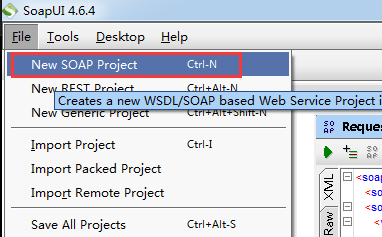
天气预报接口:http://www.webxml.com.cn/WebServices/WeatherWebService.asmx?wsdl
然后将wsdl文件放入到如下位置,然后点OK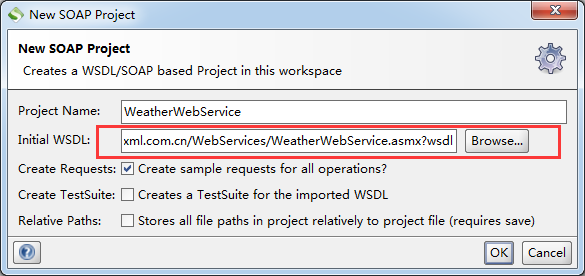
然后就可以得到如下wsdl中所有的接口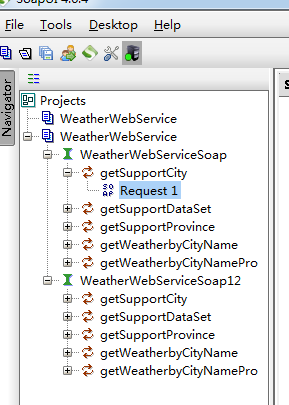
然后双击Request1,打开报文,即可对改接口进行接口测试,如下,输入Provicncename,得到Response响应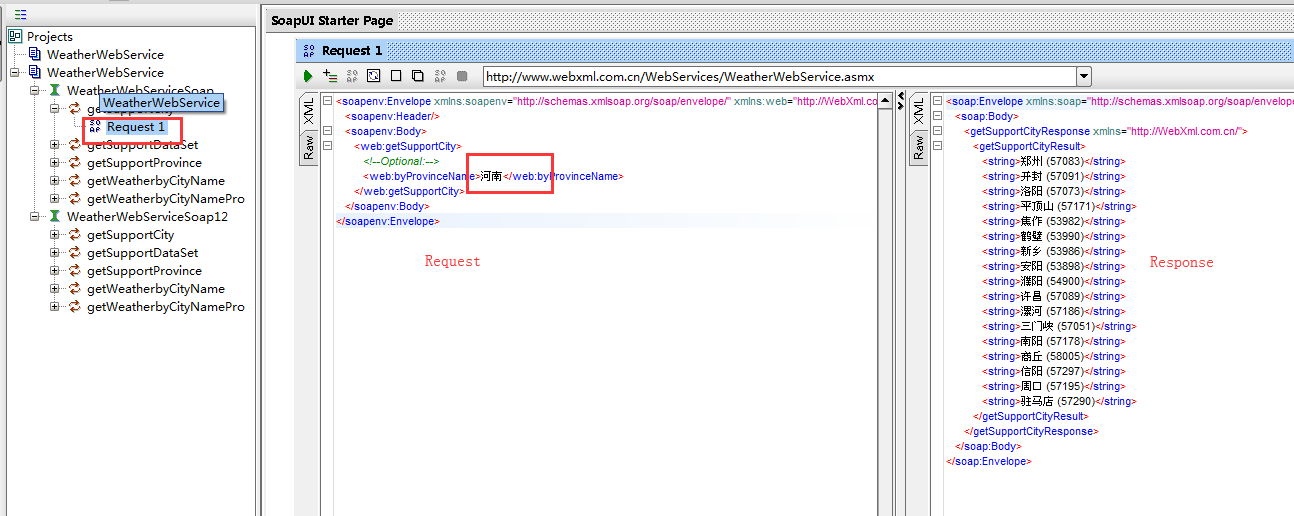
在project测试中,如果引入wsdl报如下的错误:
Error loading [http://www.webxml.com.cn/WebServices/WeatherWebService.asmx?wsdl]: org.apache.xmlbeans.XmlException: java.io.CharConversionException: Characters larger than 4 bytes are not supported: byte 0xb1 implies a length of more than 4 bytes
解决方案:关闭程序并找到SoapUI的安装位置中的SoapUI-4.6.4.vmoptions这个文件,在末尾加入 -Dfile.encoding=UTF8 可解决
网上常用的wsdl
http://hi.baidu.com/magicyzzj/item/cd45a6305f449cb9623aff58

 浙公网安备 33010602011771号