linux文件保存失误出现E325: ATTENTION
报错内容
看英文直接按照内容操作也可,
E325: ATTENTION
Found a swap file by the name ".server.properties.swp"
owned by: root dated: Thu Jan 1 12:02:39 2022
file name: /server.properties
modified: YES
user name: root host name: wang.localdomain
process ID: 10718 (still running)
While opening file “server.properties”
dated: Thu Jan 1 12:02:39 2022
(1) Another program may be editing the same file. If this is the case,
be careful not to end up with two different instances of the same
file when making changes. Quit, or continue with caution.
(2) An edit session for this file crashed.
提示 If this is the case, use “:recover” or “vim -r server.properties”
to recover the changes (see “:help recovery”).
提示 If you did this already, delete the swap file ".server.properties.swp"
to avoid this message.
首先使用(个别教程中有说删除的文件在根目录下,至少我没找到)
ls -a
查询看有没有一个打开报错文件的.swp文件
比如我打开报错的就是server.properties
在此文件目录下使用ls -a
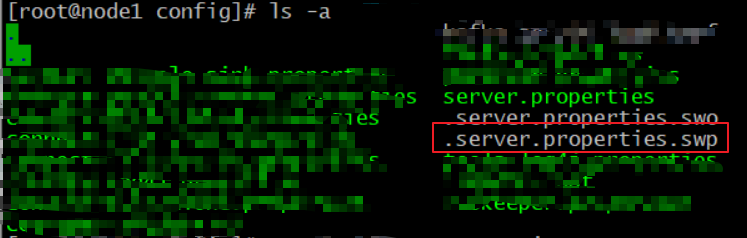
在使用rm -f

然后报错消失。
这个就是我的解决步骤

 浙公网安备 33010602011771号