I/O流
一、文件对象
文件和文件夹都是用File代表
步骤1:使用绝对路径或者相对路径创建File对象
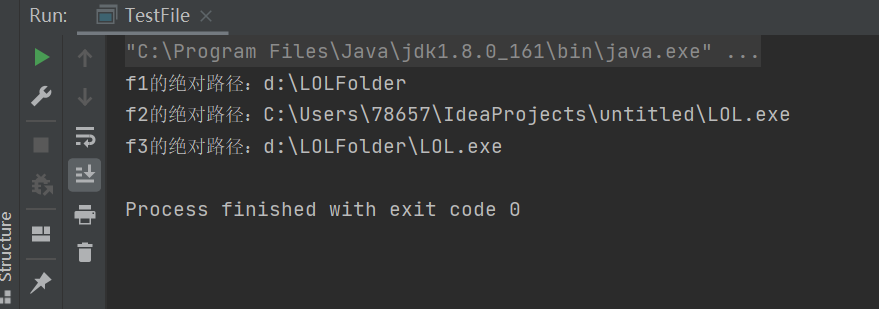
package file;

import java.io.File;

public class TestFile {

    public static void main(String[] args) {
        // 绝对路径
        File f1 = new File("d:/LOLFolder");
        System.out.println("f1的绝对路径:" + f1.getAbsolutePath());
        // 相对路径,相对于工作目录,如果在eclipse中,就是项目目录
        File f2 = new File("LOL.exe");
        System.out.println("f2的绝对路径:" + f2.getAbsolutePath());

        // 把f1作为父目录创建文件对象
        File f3 = new File(f1, "LOL.exe");

        System.out.println("f3的绝对路径:" + f3.getAbsolutePath());
    }
}
步骤2:文件常用方法1
注意1: 需要在D:\LOLFolder确实存在一个LOL.exe,才可以看到对应的文件长度、修改时间等信息
注意2: renameTo****方法用于对物理文件名称进行修改,但是并不会修改File对象的name属性。
package file;

import java.io.File;
import java.util.Date;

public class TestFile {

    public static void main(String[] args) {

        File f = new File("d:/LOLFolder/LOL.exe");
        System.out.println("当前文件是:" +f);
        //文件是否存在
        System.out.println("判断是否存在:"+f.exists());

        //是否是文件夹
        System.out.println("判断是否是文件夹:"+f.isDirectory());

        //是否是文件(非文件夹)
        System.out.println("判断是否是文件:"+f.isFile());

        //文件长度
        System.out.println("获取文件的长度:"+f.length());

        //文件最后修改时间
        long time = f.lastModified();
        Date d = new Date(time);
        System.out.println("获取文件的最后修改时间:"+d);
        //设置文件修改时间为1970.1.1 08:00:00
        f.setLastModified(0);

        //文件重命名
        File f2 =new File("d:/LOLFolder/DOTA.exe");
        f.renameTo(f2);
        System.out.println("把LOL.exe改名成了DOTA.exe");

        System.out.println("注意: 需要在D:\\LOLFolder确实存在一个LOL.exe,\r\n才可以看到对应的文件长度、修改时间等信息");
    }
}
步骤3:文件常用方法2
package file;

import java.io.File;
import java.io.IOException;

public class TestFile {

    public static void main(String[] args) throws IOException {

        File f = new File("d:/LOLFolder/skin/garen.ski");

        // 以字符串数组的形式,返回当前文件夹下的所有文件(不包含子文件及子文件夹)
        f.list();

        // 以文件数组的形式,返回当前文件夹下的所有文件(不包含子文件及子文件夹)
        File[]fs= f.listFiles();

        // 以字符串形式返回获取所在文件夹
        f.getParent();

        // 以文件形式返回获取所在文件夹
        f.getParentFile();
        // 创建文件夹,如果父文件夹skin不存在,创建就无效
        f.mkdir();

        // 创建文件夹,如果父文件夹skin不存在,就会创建父文件夹
        f.mkdirs();

        // 创建一个空文件,如果父文件夹skin不存在,就会抛出异常
        f.createNewFile();
        // 所以创建一个空文件之前,通常都会创建父目录
        f.getParentFile().mkdirs();

        // 列出所有的盘符c: d: e: 等等
        f.listRoots();

        // 刪除文件
        f.delete();

        // JVM结束的时候,刪除文件,常用于临时文件的删除
        f.deleteOnExit();

    }
}
步骤4:遍历文件夹
package file;

import java.io.File;

public class TestFile {

    public static void main(String[] args) {
        File f = new File("c:\\windows");
        File[] fs = f.listFiles();
        if(null==fs)
            return;
        long minSize = Integer.MAX_VALUE;
        long maxSize = 0;
        File minFile = null;
        File maxFile = null;
        for (File file : fs) {
            if(file.isDirectory())
                continue;
            if(file.length()>maxSize){
                maxSize = file.length();
                maxFile = file;
            }
            if(file.length()!=0 && file.length()<minSize){
                minSize = file.length();
                minFile = file;
            }
        }
        System.out.printf("最大的文件是%s,其大小是%,d字节%n",maxFile.getAbsoluteFile(),maxFile.length());
        System.out.printf("最小的文件是%s,其大小是%,d字节%n",minFile.getAbsoluteFile(),minFile.length());

    }
}
二、什么是流
什么是流(Stream),流就是一系列的数据
步骤1:什么是流
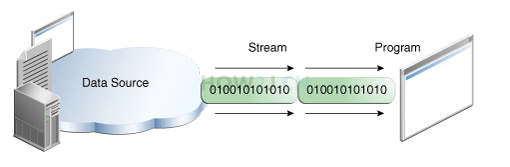
当不同的介质之间有数据交互的时候,JAVA就使用流来实现。
数据源可以是文件,还可以是数据库,网络甚至是其他的程序
比如读取文件的数据到程序中,站在程序的角度来看,就叫做输入流
输入流: InputStream
输出流:OutputStream
步骤2:文件输入流
如下代码,就建立了一个文件输入流,这个流可以用来把数据从硬盘的文件,读取到JVM(内存)。
目前代码只是建立了流,还没有开始读取。
package stream;

import java.io.File;
import java.io.FileInputStream;
import java.io.IOException;

public class TestStream {

    public static void main(String[] args) {
        try {
            File f = new File("d:/lol.txt");
            // 创建基于文件的输入流
            FileInputStream fis = new FileInputStream(f);
            // 通过这个输入流,就可以把数据从硬盘,读取到Java的虚拟机中来,也就是读取到内存中

        } catch (IOException e) {
            // TODO Auto-generated catch block
            e.printStackTrace();
        }

    }
}
三、字节流
InputStream字节输入流
OutputStream字节输出流
用于以字节的形式读取和写入数据
步骤1:ASCII码概念
所有的数据存放在计算机中都是以数字的形式存放的。 所以字母就需要转换为数字才能够存放。
比如A就对应的数字65,a对应的数字97. 不同的字母和符号对应不同的数字,就是一张码表。
ASCII是这样的一种码表。 只包含简单的英文字母,符号,数字等等。 不包含中文,德文,俄语等复杂的。
示例中列出了可见的ASCII码以及对应的十进制和十六进制数字,不可见的暂未列出
| 字符 | 十进制数字 | 十六进制数字 |
|---|---|---|
| ! | 33 | 21 |
| " | 34 | 22 |
| # | 35 | 23 |
| $ | 36 | 24 |
| % | 37 | 25 |
| & | 38 | 26 |
| ' | 39 | 27 |
| ( | 40 | 28 |
| ) | 41 | 29 |
| * | 42 | 2A |
| + | 43 | 2B |
| , | 44 | 2C |
| - | 45 | 2D |
| . | 46 | 2E |
| / | 47 | 2F |
| 0 | 48 | 30 |
| 1 | 49 | 31 |
| 2 | 50 | 32 |
| 3 | 51 | 33 |
| 4 | 52 | 34 |
| 5 | 53 | 35 |
| 6 | 54 | 36 |
| 7 | 55 | 37 |
| 8 | 56 | 38 |
| 9 | 57 | 39 |
| : | 58 | 3A |
| ; | 59 | 3B |
| < | 60 | 3C |
| = | 61 | 3D |
| > | 62 | 3E |
| @ | 64 | 40 |
| A | 65 | 41 |
| B | 66 | 42 |
| C | 67 | 43 |
| D | 68 | 44 |
| E | 69 | 45 |
| F | 70 | 46 |
| G | 71 | 47 |
| H | 72 | 48 |
| I | 73 | 49 |
| J | 74 | 4A |
| K | 75 | 4B |
| L | 76 | 4C |
| M | 77 | 4D |
| N | 78 | 4E |
| O | 79 | 4F |
| P | 80 | 50 |
| Q | 81 | 51 |
| R | 82 | 52 |
| S | 83 | 53 |
| T | 84 | 54 |
| U | 85 | 55 |
| V | 86 | 56 |
| W | 87 | 57 |
| X | 88 | 58 |
| Y | 89 | 59 |
| Z | 90 | 5A |
| [ | 91 | 5B |
| \ | 92 | 5C |
| ] | 93 | 5D |
| ^ | 94 | 5E |
| _ | 95 | 5F |
| ` | 96 | 60 |
| a | 97 | 61 |
| b | 98 | 62 |
| c | 99 | 63 |
| d | 100 | 64 |
| e | 101 | 65 |
| f | 102 | 66 |
| g | 103 | 67 |
| h | 104 | 68 |
| i | 105 | 69 |
| j | 106 | 6A |
| k | 107 | 6B |
| l | 108 | 6C |
| m | 109 | 6D |
| n | 110 | 6E |
| o | 111 | 6F |
| p | 112 | 70 |
| q | 113 | 71 |
| r | 114 | 72 |
| s | 115 | 73 |
| t | 116 | 74 |
| u | 117 | 75 |
| v | 118 | 76 |
| w | 119 | 77 |
| x | 120 | 78 |
| y | 121 | 79 |
| z | 122 | 7A |
| { | 123 | 7B |
| | | 124 | 7C |
| } | 125 | 7D |
| ~ | 126 | 7E |
步骤2:以字节流的形式读取文件内容
InputStream是字节输入流,同时也是抽象类,只提供方法声明,不提供方法的具体实现。
FileInputStream 是InputStream子类,以FileInputStream 为例进行文件读取
package stream;

import java.io.File;
import java.io.FileInputStream;
import java.io.IOException;

public class TestStream {

    public static void main(String[] args) {
        try {
            //准备文件lol.txt其中的内容是AB,对应的ASCII分别是65 66
            File f =new File("d:/lol.txt");
            //创建基于文件的输入流
            FileInputStream fis =new FileInputStream(f);
            //创建字节数组,其长度就是文件的长度
            byte[] all =new byte[(int) f.length()];
            //以字节流的形式读取文件所有内容
            fis.read(all);
            for (byte b : all) {
                //打印出来是65 66
                System.out.println(b);
            }

            //每次使用完流,都应该进行关闭
            fis.close();

        } catch (IOException e) {
            // TODO Auto-generated catch block
            e.printStackTrace();
        }

    }
}
步骤3:以字节流的形式向文件写入数据
OutputStream是字节输出流,同时也是抽象类,只提供方法声明,不提供方法的具体实现。
FileOutputStream 是OutputStream子类,以FileOutputStream 为例向文件写出数据
注: 如果文件d:/lol2.txt不存在,写出操作会自动创建该文件。
但是如果是文件 d:/xyz/lol2.txt,而目录xyz又不存在,会抛出异常
package stream;

import java.io.File;
import java.io.FileOutputStream;
import java.io.IOException;

public class TestStream {

    public static void main(String[] args) {
        try {
            // 准备文件lol2.txt其中的内容是空的
            File f = new File("d:/lol2.txt");
            // 准备长度是2的字节数组,用88,89初始化,其对应的字符分别是X,Y
            byte data[] = { 88, 89 };

            // 创建基于文件的输出流
            FileOutputStream fos = new FileOutputStream(f);
            // 把数据写入到输出流
            fos.write(data);
            // 关闭输出流
            fos.close();

        } catch (IOException e) {
            // TODO Auto-generated catch block
            e.printStackTrace();
        }

    }
}
四、关闭流的方式
所有的流,无论是输入流还是输出流,使用完毕之后,都应该关闭。 如果不关闭,会产生对资源占用的浪费。 当量比较大的时候,会影响到业务的正常开展。
步骤1:在try中关闭
在try的作用域里关闭文件输入流,在前面的示例中都是使用这种方式,这样做有一个弊端;
如果文件不存在,或者读取的时候出现问题而抛出异常,那么就不会执行这一行关闭流的代码,存在巨大的资源占用隐患。 不推荐使用
package stream;

import java.io.File;
import java.io.FileInputStream;
import java.io.IOException;

public class TestStream {

    public static void main(String[] args) {
        try {
            File f = new File("d:/lol.txt");
            FileInputStream fis = new FileInputStream(f);
            byte[] all = new byte[(int) f.length()];
            fis.read(all);
            for (byte b : all) {
                System.out.println(b);
            }
            // 在try 里关闭流
            fis.close();
        } catch (IOException e) {
            e.printStackTrace();
        }

    }
}
步骤2:在finally中关闭
这是标准的关闭流的方式
\1. 首先把流的引用声明在try的外面,如果声明在try里面,其作用域无法抵达finally.
\2. 在finally关闭之前,要先判断该引用是否为空
\3. 关闭的时候,需要再一次进行try catch处理
这是标准的严谨的关闭流的方式,但是看上去很繁琐,所以写不重要的或者测试代码的时候,都会采用上面的有隐患try的方式,因为不麻烦~
package stream;

import java.io.File;
import java.io.FileInputStream;
import java.io.IOException;

public class TestStream {

    public static void main(String[] args) {
        File f = new File("d:/lol.txt");
        FileInputStream fis = null;
        try {
            fis = new FileInputStream(f);
            byte[] all = new byte[(int) f.length()];
            fis.read(all);
            for (byte b : all) {
                System.out.println(b);
            }

        } catch (IOException e) {
            e.printStackTrace();
        } finally {
            // 在finally 里关闭流
            if (null != fis)
                try {

                    fis.close();
                } catch (IOException e) {
                    // TODO Auto-generated catch block
                    e.printStackTrace();
                }
        }

    }
}
步骤3:使用try()的方式
把流定义在try()里,try,catch或者finally结束的时候,会自动关闭
这种编写代码的方式叫做 try-with-resources, 这是从JDK7开始支持的技术
所有的流,都实现了一个接口叫做 AutoCloseable,任何类实现了这个接口,都可以在try()中进行实例化。 并且在try, catch, finally结束的时候自动关闭,回收相关资源。
package stream;

import java.io.File;
import java.io.FileInputStream;
import java.io.IOException;

public class TestStream {

    public static void main(String[] args) {
        File f = new File("d:/lol.txt");

        //把流定义在try()里,try,catch或者finally结束的时候,会自动关闭
        try (FileInputStream fis = new FileInputStream(f)) {
            byte[] all = new byte[(int) f.length()];
            fis.read(all);
            for (byte b : all) {
                System.out.println(b);
            }
        } catch (IOException e) {
            e.printStackTrace();
        }

    }
}
五、字符流
Reader字符输入流
Writer字符输出流
专门用于字符的形式读取和写入数据
步骤1:使用字符流读取文件
FileReader 是Reader子类,以FileReader 为例进行文件读取
package stream;

import java.io.File;
import java.io.FileReader;
import java.io.IOException;

public class TestStream {

    public static void main(String[] args) {
        // 准备文件lol.txt其中的内容是AB
        File f = new File("d:/lol.txt");
        // 创建基于文件的Reader
        try (FileReader fr = new FileReader(f)) {
            // 创建字符数组,其长度就是文件的长度
            char[] all = new char[(int) f.length()];
            // 以字符流的形式读取文件所有内容
            fr.read(all);
            for (char b : all) {
                // 打印出来是A B
                System.out.println(b);
            }
        } catch (IOException e) {
            // TODO Auto-generated catch block
            e.printStackTrace();
        }

    }
}
步骤2:使用字符流把字符串写入到文件
FileWriter 是Writer的子类,以FileWriter 为例把字符串写入到文件
package stream;

import java.io.File;
import java.io.FileWriter;
import java.io.IOException;

public class TestStream4 {

    public static void main(String[] args) {
        // 准备文件lol2.txt
        File f = new File("C:\\Users\\78657\\Desktop\\新建文本文档 (8).txt");
        // 创建基于文件的Writer
        try (FileWriter fr = new FileWriter(f)) {
            // 以字符流的形式把数据写入到文件中
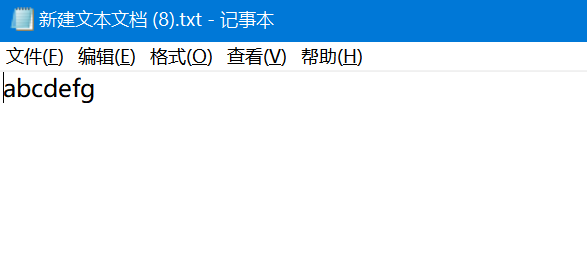
            String data="abcdefg";
            char[] cs = data.toCharArray();
            fr.write(cs);

        } catch (IOException e) {
            // TODO Auto-generated catch block
            e.printStackTrace();
        }

    }
}
六、中文问题
步骤1:编码概念
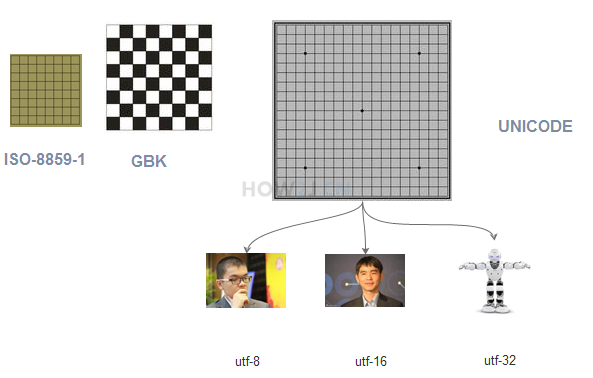
计算机存放数据只能存放数字,所有的字符都会被转换为不同的数字。
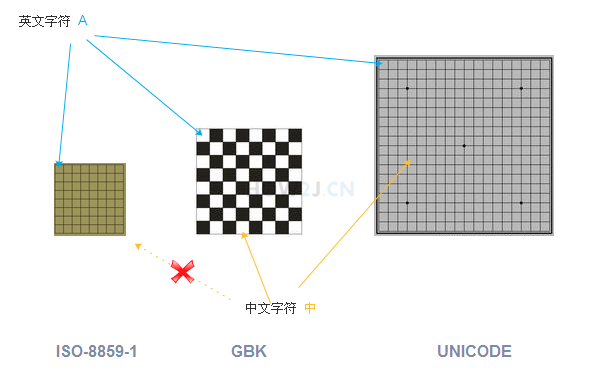
就像一个棋盘一样,不同的字,处于不同的位置,而不同的位置,有不同的数字编号。
有的棋盘很小,只能放数字和英文
有的大一点,还能放中文
有的“足够”大,能够放下世界人民所使用的所有文字和符号
如图所示,英文字符 A 能够放在所有的棋盘里,而且位置都差不多
中文字符, 中文字符 中 能够放在后两种棋盘里,并且位置不一样,而且在小的那个棋盘里,就放不下中文
步骤2:常见编码
工作后经常接触的编码方式有如下几种:
ISO-8859-1 ASCII 数字和西欧字母
GBK GB2312 BIG5 中文
UNICODE (统一码,万国码)
其中
ISO-8859-1 包含 ASCII
GB2312 是简体中文,BIG5是繁体中文,GBK同时包含简体和繁体以及日文。
UNICODE 包括了所有的文字,无论中文,英文,藏文,法文,世界所有的文字都包含其中
步骤3:UNICODE和UTF
根据前面的学习,我们了解到不同的编码方式对应不同的棋盘,而UNICODE因为要存放所有的数据,那么它的棋盘是最大的。
不仅如此,棋盘里每个数字都是很长的(4个字节),因为不仅要表示字母,还要表示汉字等。
如果完全按照UNICODE的方式来存储数据,就会有很大的浪费。
比如在ISO-8859-1中,a 字符对应的数字是0x61
而UNICODE中对应的数字是 0x00000061,倘若一篇文章大部分都是英文字母,那么按照UNICODE的方式进行数据保存就会消耗很多空间
在这种情况下,就出现了UNICODE的各种减肥子编码, 比如UTF-8对数字和字母就使用一个字节,而对汉字就使用3个字节,从而达到了减肥还能保证健康的效果
UTF-8,UTF-16和UTF-32 针对不同类型的数据有不同的减肥效果,一般说来UTF-8是比较常用的方式
UTF-8,UTF-16和UTF-32 彼此的区别在此不作赘述,有兴趣的可以参考 unicode-百度百科
步骤4:Java采用的是Unicode
写在.java源代码中的汉字,在执行之后,都会变成JVM中的字符。
而这些中文字符采用的编码方式,都是使用UNICODE. "中"字对应的UNICODE是4E2D,所以在内存中,实际保存的数据就是十六进制的0x4E2D, 也就是十进制的20013。
package stream;

public class TestStream {
    public static void main(String[] args) {
        String str = "中";
    }
}
步骤5:一个汉字使用不同编码方式的表现
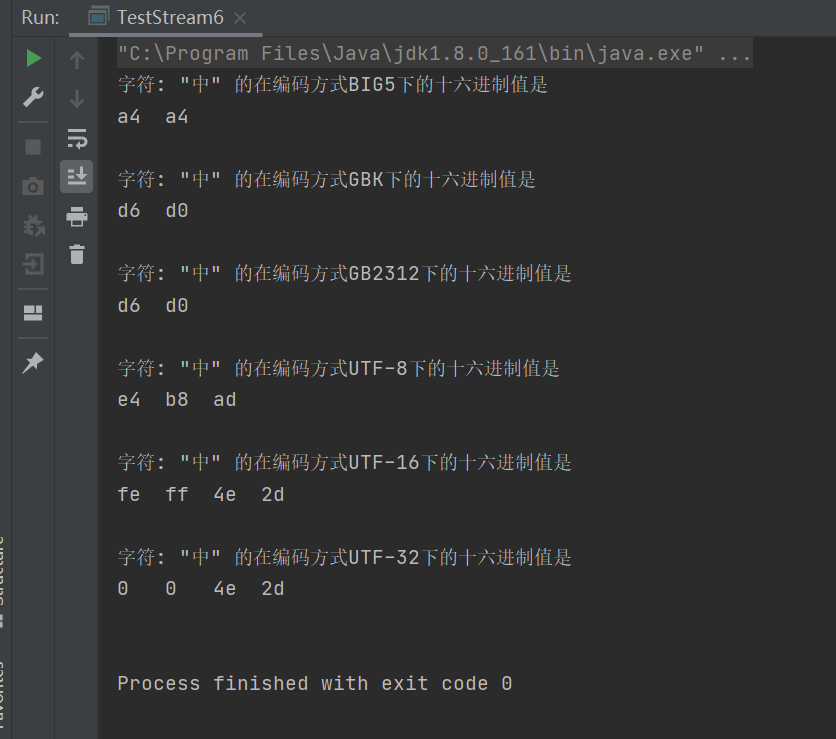
以字符 中 为例,查看其在不同编码方式下的值是多少
也即在不同的棋盘上的位置
package stream;

import java.io.UnsupportedEncodingException;

public class TestStream {

    public static void main(String[] args) {
        String str = "中";
        showCode(str);
    }

    private static void showCode(String str) {
        String[] encodes = { "BIG5", "GBK", "GB2312", "UTF-8", "UTF-16", "UTF-32" };
        for (String encode : encodes) {
            showCode(str, encode);
        }

    }

    private static void showCode(String str, String encode) {
        try {
            System.out.printf("字符: \"%s\" 的在编码方式%s下的十六进制值是%n", str, encode);
            byte[] bs = str.getBytes(encode);

            for (byte b : bs) {
                int i = b&0xff;
                System.out.print(Integer.toHexString(i) + "\t");
            }
            System.out.println();
            System.out.println();
        } catch (UnsupportedEncodingException e) {
            System.out.printf("UnsupportedEncodingException: %s编码方式无法解析字符%s\n", encode, str);
        }
    }
}
步骤6:文件的编码方式-记事本
接下来讲,字符在文件中的保存
字符保存在文件中肯定也是以数字形式保存的,即对应在不同的棋盘上的不同的数字
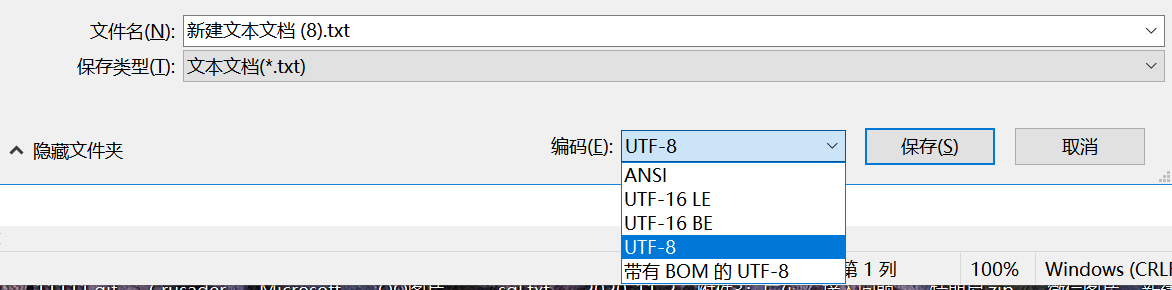
用记事本打开任意文本文件,并且另存为,就能够在编码这里看到一个下拉。
ANSI 这个不是****ASCII的意思,而是采用本地编码的意思。如果你是中文的操作系统,就会使GBK,如果是英文的就会是ISO-8859-1
Unicode UNICODE原生的编码方式
Unicode big endian 另一个 UNICODE编码方式
UTF-8 最常见的UTF-8编码方式,数字和字母用一个字节, 汉字用3个字节
步骤7:文件的编码方式-eclipse
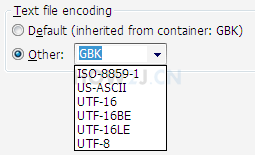
eclipse也有类似的编码方式,右键任意文本文件,点击最下面的"property"
就可以看到Text file encoding
也有ISO-8859-1,GBK,UTF-8等等选项。
其他的US-ASCII,UTF-16,UTF-16BE,UTF-16LE不常用。
步骤8:用FileInputStream字节流正确读取中文
为了能够正确的读取中文内容
\1. 必须了解文本是以哪种编码方式保存字符的
\2. 使用字节流读取了文本后,再使用对应的编码方式去识别这些数字,得到正确的字符
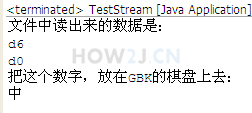
如本例,一个文件中的内容是字符中,编码方式是GBK,那么读出来的数据一定是D6D0。
再使用GBK编码方式识别D6D0,就能正确的得到字符中
注: 在GBK的棋盘上找到的中字后,JVM会自动找到中在UNICODE这个棋盘上对应的数字,并且以UNICODE上的数字保存在内存中。
package stream;

import java.io.File;
import java.io.FileInputStream;
import java.io.IOException;

public class TestStream {

    public static void main(String[] args) {
        File f = new File("E:\\project\\j2se\\src\\test.txt");
        try (FileInputStream fis = new FileInputStream(f);) {
            byte[] all = new byte[(int) f.length()];
            fis.read(all);

            //文件中读出来的数据是
            System.out.println("文件中读出来的数据是:");
            for (byte b : all)
            {
                int i = b&0x000000ff;  //只取16进制的后两位
                System.out.println(Integer.toHexString(i));
            }
            System.out.println("把这个数字,放在GBK的棋盘上去:");
            String str = new String(all,"GBK");
            System.out.println(str);
        } catch (IOException e) {
            // TODO Auto-generated catch block
            e.printStackTrace();
        }

    }
}
步骤9:用FileReader字符流正确读取中文
FileReader得到的是字符,所以一定是已经把字节根据某种编码识别成了字符了
而FileReader使用的编码方式是Charset.defaultCharset()的返回值,如果是中文的操作系统,就是GBK
FileReader是不能手动设置编码方式的,为了使用其他的编码方式,只能使用InputStreamReader来代替,像这样:
new InputStreamReader(new FileInputStream(f),Charset.forName("UTF-8"));
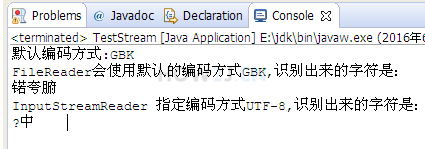
在本例中,用记事本另存为UTF-8格式,然后用UTF-8就能识别对应的中文了。
解释: 为什么中字前面有一个?
如果是使用记事本另存为UTF-8的格式,那么在第一个字节有一个标示符,叫做BOM用来标志这个文件是用UTF-8来编码的。
package stream;

import java.io.File;
import java.io.FileInputStream;
import java.io.FileNotFoundException;
import java.io.FileReader;
import java.io.IOException;
import java.io.InputStreamReader;
import java.io.UnsupportedEncodingException;
import java.nio.charset.Charset;

public class TestStream {

    public static void main(String[] args) throws UnsupportedEncodingException, FileNotFoundException {
        File f = new File("E:\\project\\j2se\\src\\test.txt");
        System.out.println("默认编码方式:"+Charset.defaultCharset());
        //FileReader得到的是字符,所以一定是已经把字节根据某种编码识别成了字符了
        //而FileReader使用的编码方式是Charset.defaultCharset()的返回值,如果是中文的操作系统,就是GBK
        try (FileReader fr = new FileReader(f)) {
            char[] cs = new char[(int) f.length()];
            fr.read(cs);
            System.out.printf("FileReader会使用默认的编码方式%s,识别出来的字符是:%n",Charset.defaultCharset());
            System.out.println(new String(cs));
        } catch (IOException e) {
            // TODO Auto-generated catch block
            e.printStackTrace();
        }
        //FileReader是不能手动设置编码方式的,为了使用其他的编码方式,只能使用InputStreamReader来代替
        //并且使用new InputStreamReader(new FileInputStream(f),Charset.forName("UTF-8")); 这样的形式
        try (InputStreamReader isr = new InputStreamReader(new FileInputStream(f),Charset.forName("UTF-8"))) {
            char[] cs = new char[(int) f.length()];
            isr.read(cs);
            System.out.printf("InputStreamReader 指定编码方式UTF-8,识别出来的字符是:%n");
            System.out.println(new String(cs));
        } catch (IOException e) {
            // TODO Auto-generated catch block
            e.printStackTrace();
        }

    }
}
七、缓存流
以介质是硬盘为例,字节流和字符流的弊端:
在每一次读写的时候,都会访问硬盘。 如果读写的频率比较高的时候,其性能表现不佳。
为了解决以上弊端,采用缓存流。
缓存流在读取的时候,会一次性读较多的数据到缓存中,以后每一次的读取,都是在缓存中访问,直到缓存中的数据读取完毕,再到硬盘中读取。
就好比吃饭,不用缓存就是每吃一口都到锅里去铲。用缓存就是先把饭盛到碗里,碗里的吃完了,再到锅里去铲
缓存流在写入数据的时候,会先把数据写入到缓存区,直到缓存区达到一定的量,才把这些数据,一起写入到硬盘中去。按照这种操作模式,就不会像字节流,字符流那样每写一个字节都访问硬盘,从而减少了IO操作
示例1:使用缓存流读取数据
缓存字符输入流 BufferedReader 可以一次读取一行数据
package stream;

import java.io.BufferedReader;
import java.io.File;
import java.io.FileReader;
import java.io.IOException;

public class TestStream {

    public static void main(String[] args) {
        // 准备文件lol.txt其中的内容是
        // garen kill teemo
        // teemo revive after 1 minutes
        // teemo try to garen, but killed again
        File f = new File("d:/lol.txt");
        // 创建文件字符流
        // 缓存流必须建立在一个存在的流的基础上
        try (
                FileReader fr = new FileReader(f);
                BufferedReader br = new BufferedReader(fr);
            )
        {
            while (true) {
                // 一次读一行
                String line = br.readLine();
                if (null == line)
                    break;
                System.out.println(line);
            }
        } catch (IOException e) {
            // TODO Auto-generated catch block
            e.printStackTrace();
        }

    }
}
示例2:使用缓存流写出数据
PrintWriter 缓存字符输出流, 可以一次写出一行数据
package stream;

import java.io.File;
import java.io.FileWriter;
import java.io.IOException;
import java.io.PrintWriter;

public class TestStream {

    public static void main(String[] args) {
        // 向文件lol2.txt中写入三行语句
        File f = new File("d:/lol2.txt");

        try (
                // 创建文件字符流
                FileWriter fw = new FileWriter(f);
                // 缓存流必须建立在一个存在的流的基础上
                PrintWriter pw = new PrintWriter(fw);
        ) {
            pw.println("garen kill teemo");
            pw.println("teemo revive after 1 minutes");
            pw.println("teemo try to garen, but killed again");
        } catch (IOException e) {
            // TODO Auto-generated catch block
            e.printStackTrace();
        }

    }
}
示例3:flush
有的时候,需要立即把数据写入到硬盘,而不是等缓存满了才写出去。 这时候就需要用到flush
package stream;

import java.io.File;
import java.io.FileWriter;
import java.io.IOException;
import java.io.PrintWriter;
public class TestStream {
    public static void main(String[] args) {
        //向文件lol2.txt中写入三行语句
        File f =new File("d:/lol2.txt");
        //创建文件字符流
        //缓存流必须建立在一个存在的流的基础上
        try(FileWriter fr = new FileWriter(f);PrintWriter pw = new PrintWriter(fr);) {
            pw.println("garen kill teemo");
            //强制把缓存中的数据写入硬盘,无论缓存是否已满
                pw.flush();
            pw.println("teemo revive after 1 minutes");
                pw.flush();
            pw.println("teemo try to garen, but killed again");
                pw.flush();
        } catch (IOException e) {
            // TODO Auto-generated catch block
            e.printStackTrace();
        }
    }
}
数据流
DataInputStream 数据输入流
DataOutputStream 数据输出流
步骤1:直接进行字符串的读写
使用数据流的writeUTF()和readUTF() 可以进行数据的格式化顺序读写
如本例,通过DataOutputStream 向文件顺序写出 布尔值,整数和字符串。 然后再通过DataInputStream 顺序读入这些数据。
注: 要用DataInputStream 读取一个文件,这个文件必须是由DataOutputStream 写出的,否则会出现EOFException,因为DataOutputStream 在写出的时候会做一些特殊标记,只有DataInputStream 才能成功的读取。
package stream;

import java.io.DataInputStream;
import java.io.DataOutputStream;
import java.io.File;
import java.io.FileInputStream;
import java.io.FileOutputStream;
import java.io.IOException;

public class TestStream {

    public static void main(String[] args) {
        write();
        read();
    }

    private static void read() {
        File f =new File("d:/lol.txt");
        try (
                FileInputStream fis  = new FileInputStream(f);
                DataInputStream dis =new DataInputStream(fis);
        ){
            boolean b= dis.readBoolean();
            int i = dis.readInt();
            String str = dis.readUTF();

            System.out.println("读取到布尔值:"+b);
            System.out.println("读取到整数:"+i);
            System.out.println("读取到字符串:"+str);

        } catch (IOException e) {
            e.printStackTrace();
        }

    }

    private static void write() {
        File f =new File("d:/lol.txt");
        try (
                FileOutputStream fos  = new FileOutputStream(f);
                DataOutputStream dos =new DataOutputStream(fos);
        ){
            dos.writeBoolean(true);
            dos.writeInt(300);
            dos.writeUTF("123 this is gareen");
        } catch (IOException e) {
            e.printStackTrace();
        }

    }
}
八、对象流
对象流指的是可以直接把一个对象以流的形式传输给其他的介质,比如硬盘
一个对象以流的形式进行传输,叫做序列化。 该对象所对应的类,必须是实现Serializable接口
步骤1:序列化一个对象
创建一个Hero对象,设置其名称为garen。
把该对象序列化到一个文件garen.lol。
然后再通过序列化把该文件转换为一个Hero对象
注:把一个对象序列化有一个前提是:这个对象的类,必须实现了Serializable接口
package charactor;

import java.io.Serializable;

public class Hero implements Serializable {
    //表示这个类当前的版本,如果有了变化,比如新设计了属性,就应该修改这个版本号
    private static final long serialVersionUID = 1L;
    public String name;
    public float hp;

}
package stream;

import java.io.File;
import java.io.FileInputStream;
import java.io.FileOutputStream;
import java.io.IOException;
import java.io.ObjectInputStream;
import java.io.ObjectOutputStream;

import charactor.Hero;

public class TestStream {

    public static void main(String[] args) {
        //创建一个Hero garen
        //要把Hero对象直接保存在文件上,务必让Hero类实现Serializable接口
        Hero h = new Hero();
        h.name = "garen";
        h.hp = 616;

        //准备一个文件用于保存该对象
        File f =new File("d:/garen.lol");

        try(
            //创建对象输出流
            FileOutputStream fos = new FileOutputStream(f);
            ObjectOutputStream oos =new ObjectOutputStream(fos);
            //创建对象输入流
            FileInputStream fis = new FileInputStream(f);
            ObjectInputStream ois =new ObjectInputStream(fis);
        ) {
            oos.writeObject(h);
            Hero h2 = (Hero) ois.readObject();
            System.out.println(h2.name);
            System.out.println(h2.hp);

        } catch (IOException e) {
            // TODO Auto-generated catch block
            e.printStackTrace();
        } catch (ClassNotFoundException e) {
            // TODO Auto-generated catch block
            e.printStackTrace();
        }

    }
}
九、System.in
System.out 是常用的在控制台输出数据的
System.in 可以从控制台输入数据
步骤1:System.in
package stream;

import java.io.IOException;
import java.io.InputStream;

public class TestStream {

    public static void main(String[] args) {
        // 控制台输入
        try (InputStream is = System.in;) {
            while (true) {
                // 敲入a,然后敲回车可以看到
                // 97 13 10
                // 97是a的ASCII码
                // 13 10分别对应回车换行
                int i = is.read();
                System.out.println(i);
            }
        } catch (IOException e) {
            e.printStackTrace();
        }
    }
}
步骤2:Scanner读取字符串
使用System.in.read虽然可以读取数据,但是很不方便
使用Scanner就可以逐行读取了
package stream;

import java.util.Scanner;

public class TestStream {

    public static void main(String[] args) {

            Scanner s = new Scanner(System.in);

            while(true){
                String line = s.nextLine();
                System.out.println(line);
            }

    }
}
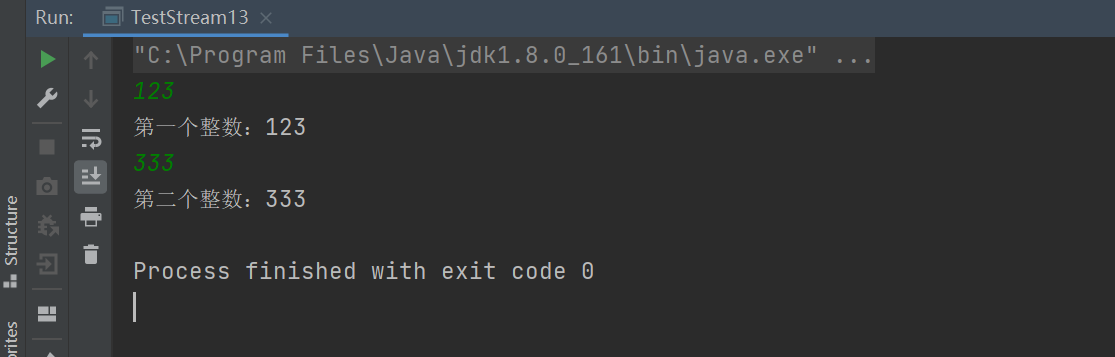
步骤3:Scanner从控制台读取整数
使用Scanner从控制台读取整数
package stream;

import java.util.Scanner;

public class TestStream {
    public static void main(String[] args) {
        Scanner s = new Scanner(System.in);
        int a = s.nextInt();
        System.out.println("第一个整数:"+a);
        int b = s.nextInt();
        System.out.println("第二个整数:"+b);
    }
十、练习
步骤1:复制文件
package stream;

import java.io.File;
import java.io.FileInputStream;
import java.io.FileOutputStream;
import java.io.IOException;

public class TestStream {
    /**
     *
     * @param srcPath 源文件
     * @param destPath 目标文件
     */
    public static void copyFile(String srcPath, String destPath){

        File srcFile = new File(srcPath);
        File destFile = new File(destPath);

        //缓存区,一次性读取1024字节
        byte[] buffer = new byte[1024];

        try (
                FileInputStream fis = new FileInputStream(srcFile);
                FileOutputStream fos = new FileOutputStream(destFile);
        ){
            while(true){
                //实际读取的长度是 actuallyReaded,有可能小于1024
                int actuallyReaded = fis.read(buffer);
                //-1表示没有可读的内容了
                if(-1==actuallyReaded)
                    break;
                fos.write(buffer, 0, actuallyReaded);
                fos.flush();
            }
        } catch (IOException e) {
            e.printStackTrace();
        }

    }

    /**
     *
     * @param srcPath 源文件夹
     * @param destPath 目标文件夹
     */
    public static void copyFolder(String srcPath, String destPath){

    }

    public static void main(String[] args) {

        copyFile("d:/lol.txt", "d:/lol2.txt");

    }
}
步骤2:复制文件夹
package stream;

import java.io.File;
import java.io.FileInputStream;
import java.io.FileNotFoundException;
import java.io.FileOutputStream;
import java.io.IOException;

public class TestStream {

    /**
     *
     * @param srcPath 源文件
     * @param destPath 目标文件
     */
    public static void copyFile(String srcPath, String destPath){

        File srcFile = new File(srcPath);
        File destFile = new File(destPath);

        //缓存区,一次性读取1024字节
        byte[] buffer = new byte[1024];

        try (
                FileInputStream fis = new FileInputStream(srcFile);
                FileOutputStream fos = new FileOutputStream(destFile);
        ){
            while(true){
                //实际读取的长度是 actuallyReaded,有可能小于1024
                int actuallyReaded = fis.read(buffer);
                //-1表示没有可读的内容了
                if(-1==actuallyReaded)
                    break;
                fos.write(buffer, 0, actuallyReaded);
                fos.flush();
            }
        } catch (FileNotFoundException e) {
            // TODO Auto-generated catch block
            e.printStackTrace();
        } catch (IOException e) {
            // TODO Auto-generated catch block
            e.printStackTrace();
        }

    }

    /**
     *
     * @param srcPath 源文件夹
     * @param destPath 目标文件夹
     */
    public static void copyFolder(String srcPath, String destPath){

        File srcFolder = new File(srcPath);
        File destFolder = new File(destPath);
        //源文件夹不存在
        if(!srcFolder.exists())
            return;
        //源文件夹不是一个文件夹
        if(!srcFolder.isDirectory())
            return;
        //目标文件夹是一个文件
        if(destFolder.isFile())
            return;
        //目标文件夹不存在
        if(!destFolder.exists())
            destFolder.mkdirs();

        //遍历源文件夹
        File[] files=  srcFolder.listFiles();
        for (File srcFile : files) {
            //如果是文件,就复制
            if(srcFile.isFile()){
                File newDestFile = new File(destFolder,srcFile.getName());
                copyFile(srcFile.getAbsolutePath(), newDestFile.getAbsolutePath());
            }
            //如果是文件夹,就递归
            if(srcFile.isDirectory()){
                File newDestFolder = new File(destFolder,srcFile.getName());
                copyFolder(srcFile.getAbsolutePath(),newDestFolder.getAbsolutePath());
            }
        }
    }
    public static void main(String[] args) {
        copyFolder("d:/LOLFolder", "d:/LOLFolder2");
    }
}
步骤3:查找文件内容
package stream;

import java.io.File;
import java.io.FileReader;
import java.io.IOException;

public class TestStream {

    /**
     * @param file 查找的目录
     * @param search 查找的字符串
     */
    public static void search(File file, String search) {
        if (file.isFile()) {
            if(file.getName().toLowerCase().endsWith(".java")){
                String fileContent = readFileConent(file);
                if(fileContent.contains(search)){
                    System.out.printf("找到子目标字符串%s,在文件:%s%n",search,file);
                }
            }
        }
        if (file.isDirectory()) {
            File[] fs = file.listFiles();
            for (File f : fs) {
                search(f, search);
            }
        }
    }

    public static String readFileConent(File file){
        try (FileReader fr = new FileReader(file)) {
            char[] all = new char[(int) file.length()];
            fr.read(all);
            return new String(all);
        } catch (IOException e) {
            e.printStackTrace();
            return null;
        }

    }

    public static void main(String[] args) {
        File folder =new File("e:\\project");
        search(folder,"Magic");
    }
}
十一、流关系图
步骤1:流关系图
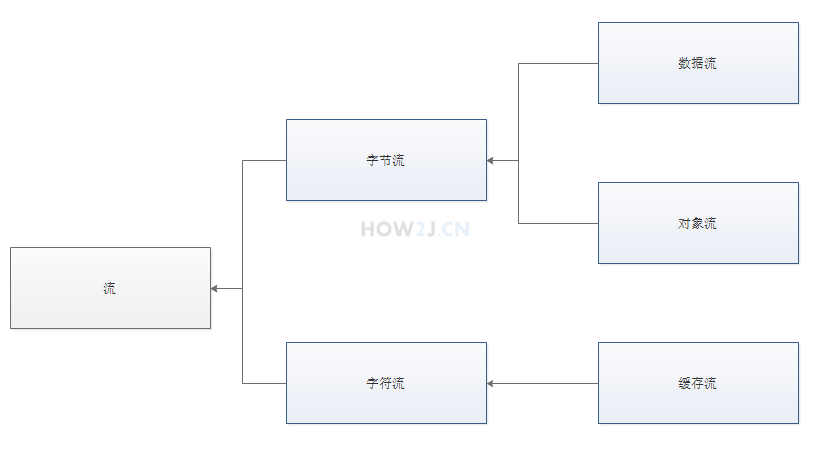
这个图把本章节学到的流关系做了个简单整理
\1. 流分为字节流和字符流
\2. 字节流下面常用的又有数据流和对象流
\3. 字符流下面常用的又有缓存流
步骤2:其他流
除了上图所接触的流之外,还有很多其他流,如图所示InputStream下面有很多的子类。 这些子类不需要立即掌握,他们大体上用法是差不多的,只是在一些特殊场合下用起来更方便,在工作中用到的时候再进行学习就行了。


 浙公网安备 33010602011771号