数字与字符串
一、拆箱装箱
步骤1:封装类
所有的基本类型,都有对应的类类型
比如int对应的类是Integer
这种类就叫做封装类
package digit;

public class TestNumber {

    public static void main(String[] args) {
        int i = 5;

        //把一个基本类型的变量,转换为Integer对象
        Integer it = new Integer(i);
        //把一个Integer对象,转换为一个基本类型的int
        int i2 = it.intValue();

    }
}
步骤2:Number类
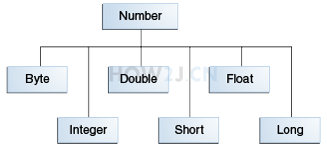
数字封装类有
Byte,Short,Integer,Long,Float,Double
这些类都是抽象类Number的子类
package digit;

public class TestNumber {

    public static void main(String[] args) {
        int i = 5;

        Integer it = new Integer(i);
        //Integer是Number的子类,所以打印true
        System.out.println(it instanceof Number);
    }
}
步骤3:基本类型转封装类
package digit;

public class TestNumber {

    public static void main(String[] args) {
        int i = 5;

        //基本类型转换成封装类型
        Integer it = new Integer(i);

    }
}
步骤4:封装类转基本类型
package digit;

public class TestNumber {

    public static void main(String[] args) {
        int i = 5;

        //基本类型转换成封装类型
        Integer it = new Integer(i);

        //封装类型转换成基本类型
        int i2 = it.intValue();

    }
}
步骤5:自动装箱
不需要调用构造方法,通过=符号****自动把 基本类型 转换为 类类型 就叫装箱
package digit;

public class TestNumber {

    public static void main(String[] args) {
        int i = 5;

        //基本类型转换成封装类型
        Integer it = new Integer(i);

        //自动转换就叫装箱
        Integer it2 = i;

    }
}
步骤6:自动拆箱
不需要调用Integer的intValue方法,通过=就自动转换成int类型,就叫拆箱
package digit;

public class TestNumber {

    public static void main(String[] args) {
        int i = 5;

        Integer it = new Integer(i);

        //封装类型转换成基本类型
        int i2 = it.intValue();

        //自动转换就叫拆箱
        int i3 = it;

    }
}
步骤7:int最大值与最小值
int的最大值可以通过其对应的封装类Integer.MAX_VALUE获取
package digit;

public class TestNumber {

    public static void main(String[] args) {

        //int的最大值
        System.out.println(Integer.MAX_VALUE);
        //int的最小值
        System.out.println(Integer.MIN_VALUE);

    }
}
二、字符串转换
步骤1:数字转字符串
方法1: 使用String类的静态方法valueOf
方法2: 先把基本类型装箱为对象,然后调用对象的toString
package digit;

public class TestNumber {

    public static void main(String[] args) {
        int i = 5;

        //方法1
        String str = String.valueOf(i);

        //方法2
        Integer it = i;
        String str2 = it.toString();

    }
}
步骤2:字符串转数字
调用Integer的静态方法parseInt
package digit;

public class TestNumber {

    public static void main(String[] args) {

        String str = "999";

        int i= Integer.parseInt(str);

        System.out.println(i);

    }
}
三、Math数学方法
java.lang.Math提供了一些常用的数学运算方法,并且都是以静态方法的形式存在
步骤1:四舍五入,随机数,开方,次方,Π,自然常熟
package digit;

public class TestNumber {

    public static void main(String[] args) {
        float f1 = 5.4f;
        float f2 = 5.5f;
        //5.4四舍五入即5
        System.out.println(Math.round(f1));
        //5.5四舍五入即6
        System.out.println(Math.round(f2));

        //得到一个0-1之间的随机浮点数(取不到1)
        System.out.println(Math.random());

        //得到一个0-10之间的随机整数 (取不到10)
        System.out.println((int)( Math.random()*10));
        //开方
        System.out.println(Math.sqrt(9));
        //次方(2的4次方)
        System.out.println(Math.pow(2,4));

        //π
        System.out.println(Math.PI);

        //自然常数
        System.out.println(Math.E);
    }
}
三、格式化输出
步骤1:格式化输出
如果不使用格式化输出,就需要进行字符串连接,如果变量比较多,拼接就会显得繁琐
使用格式化输出,就可以简洁明了
%s 表示字符串
%d 表示数字
%n 表示换行
package digit;

public class TestNumber {

    public static void main(String[] args) {

        String name ="盖伦";
        int kill = 8;
        String title="超神";

        //直接使用+进行字符串连接,编码感觉会比较繁琐,并且维护性差,易读性差
        String sentence = name+ " 在进行了连续 " + kill + " 次击杀后,获得了 " + title +" 的称号";

        System.out.println(sentence);

        //使用格式化输出
        //%s表示字符串,%d表示数字,%n表示换行
        String sentenceFormat ="%s 在进行了连续 %d 次击杀后,获得了 %s 的称号%n";
        System.out.printf(sentenceFormat,name,kill,title);

    }
}
步骤2:printf和format
printf和format能够达到一模一样的效果,如何通过eclipse查看java源代码 可以看到,在printf中直接调用了format
package digit;

public class TestNumber {

    public static void main(String[] args) {

        String name ="盖伦";
        int kill = 8;
        String title="超神";

        String sentenceFormat ="%s 在进行了连续 %d 次击杀后,获得了 %s 的称号%n";
        //使用printf格式化输出
        System.out.printf(sentenceFormat,name,kill,title);
        //使用format格式化输出
        System.out.format(sentenceFormat,name,kill,title);

    }
}
步骤3:换行符
换行符就是另起一行 --- '\n' 换行(newline)
回车符就是回到一行的开头 --- '\r' 回车(return)
在eclipse里敲一个回车,实际上是回车换行符
Java是跨平台的编程语言,同样的代码,可以在不同的平台使用,比如Windows,Linux,Mac
然而在不同的操作系统,换行符是不一样的
(1)在DOS和Windows中,每行结尾是 “\r\n”;
(2)Linux系统里,每行结尾只有 “\n”;
(3)Mac系统里,每行结尾是只有 "\r"。
为了使得同一个java程序的换行符在所有的操作系统中都有一样的表现,使用%n,就可以做到平台无关的换行
package digit;

public class TestNumber {

    public static void main(String[] args) {

        System.out.printf("这是换行符%n");
        System.out.printf("这是换行符%n");

    }
}
步骤4:总长度,左对齐,补0,千位分隔符,小数点位数,本地化表达
其他常用的格式化方式
package digit;

import java.util.Locale;

public class TestNumber {

    public static void main(String[] args) {
        int year = 2020;
        //总长度,左对齐,补0,千位分隔符,小数点位数,本地化表达

        //直接打印数字
        System.out.format("%d%n",year);
        //总长度是8,默认右对齐
        System.out.format("%8d%n",year);
        //总长度是8,左对齐
        System.out.format("%-8d%n",year);
        //总长度是8,不够补0
        System.out.format("%08d%n",year);
        //千位分隔符
        System.out.format("%,8d%n",year*10000);

        //小数点位数
        System.out.format("%.2f%n",Math.PI);

        //不同国家的千位分隔符
        System.out.format(Locale.FRANCE,"%,.2f%n",Math.PI*10000);
        System.out.format(Locale.US,"%,.2f%n",Math.PI*10000);
        System.out.format(Locale.UK,"%,.2f%n",Math.PI*10000);

    }
}
四、字符
示例1:保存一个字符的时候使用char
package character;

public class TestChar {

    public static void main(String[] args) {
        char c1 = 'a';
        char c2 = '1';//字符1,而非数字1
        char c3 = '中';//汉字字符
        char c4 = 'ab'; //只能放一个字符

    }
}
示例2:char对应的封装类
char对应的封装类是Character
装箱拆箱概念,参考 拆箱装箱
package character;

public class TestChar {

    public static void main(String[] args) {
        char c1 = 'a';
        Character c = c1; //自动装箱
        c1 = c;//自动拆箱

    }
}
示例3:Character常见方法
package character;

public class TestChar {

    public static void main(String[] args) {

        System.out.println(Character.isLetter('a'));//判断是否为字母
        System.out.println(Character.isDigit('a')); //判断是否为数字
        System.out.println(Character.isWhitespace(' ')); //是否是空白
        System.out.println(Character.isUpperCase('a')); //是否是大写
        System.out.println(Character.isLowerCase('a')); //是否是小写

        System.out.println(Character.toUpperCase('a')); //转换为大写
        System.out.println(Character.toLowerCase('A')); //转换为小写

        String a = 'a'; //不能够直接把一个字符转换成字符串
        String a2 = Character.toString('a'); //转换为字符串

    }
}
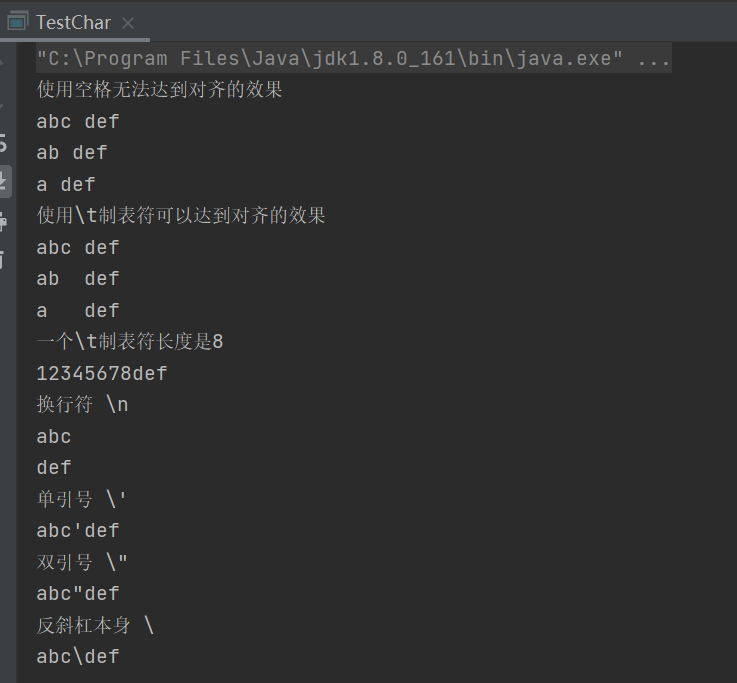
示例4:常见转义
package character;

public class TestChar {

    public static void main(String[] args) {
        System.out.println("使用空格无法达到对齐的效果");
        System.out.println("abc def");
        System.out.println("ab def");
        System.out.println("a def");

        System.out.println("使用\\t制表符可以达到对齐的效果");
        System.out.println("abc\tdef");
        System.out.println("ab\tdef");
        System.out.println("a\tdef");

        System.out.println("一个\\t制表符长度是8");
        System.out.println("12345678def");

        System.out.println("换行符 \\n");
        System.out.println("abc\ndef");

        System.out.println("单引号 \\'");
        System.out.println("abc\'def");
        System.out.println("双引号 \\\"");
        System.out.println("abc\"def");
        System.out.println("反斜杠本身 \\");
        System.out.println("abc\\def");
    }
}
五、字符串
示例1:创建字符串
字符串即字符的组合,在Java中,字符串是一个类,所以我们见到的字符串都是对象
常见创建字符串手段:
\1. 每当有一个字面值出现的时候,虚拟机就会创建一个字符串
\2. 调用String的构造方法创建一个字符串对象
\3. 通过+加号进行字符串拼接也会创建新的字符串对象
package character;

public class TestString {

    public static void main(String[] args) {
        String garen ="盖伦"; //字面值,虚拟机碰到字面值就会创建一个字符串对象

        String teemo = new String("提莫"); //创建了两个字符串对象

        char[] cs = new char[]{'崔','斯','特'};

        String hero = new String(cs);//  通过字符数组创建一个字符串对象

        String hero3 = garen + teemo;//  通过+加号进行字符串拼接
    }
}
示例2:final
String 被修饰为final,所以是不能被继承的
package character;

public class TestString {

    public static void main(String[] args) {
        MyString str = new MyString();

    }

        /*这里会报错,因为String不能被继承*/
    static class MyString extends String{

    }

}
示例3:immutable
immutable 是指不可改变的
比如创建了一个字符串对象
String garen ="盖伦";
不可改变的具体含义是指:
不能增加长度
不能减少长度
不能插入字符
不能删除字符
不能修改字符
一旦创建好这个字符串,里面的内容 永远 不能改变
String 的表现就像是一个常量
package character;

public  class TestString {

    public static void main(String[] args) {
        String garen ="盖伦";

    }
}
示例4:字符串格式化
如果不使用字符串格式化,就需要进行字符串连接,如果变量比较多,拼接就会显得繁琐
使用字符串格式化,就可以简洁明了
更多的格式化规则,参考格式化输出
package character;

public class TestString {

    public static void main(String[] args) {

        String name ="盖伦";
        int kill = 8;
        String title="超神";

        //直接使用+进行字符串连接,编码感觉会比较繁琐,并且维护性差,易读性差
        String sentence = name+ " 在进行了连续 " + kill + " 次击杀后,获得了 " + title +" 的称号";

        System.out.println(sentence);

        //格式化字符串
        //%s表示字符串,%d表示数字,%n表示换行
        String sentenceFormat ="%s 在进行了连续 %d 次击杀后,获得了 %s 的称号%n";

        String sentence2 = String.format(sentenceFormat, name,kill,title);

        System.out.println(sentence2);

    }
}
示例5:字符串长度
length方法返回当前字符串的长度
可以有长度为0的字符串,即空字符串
package character;

public class TestString {

    public static void main(String[] args) {

        String name ="盖伦";

        System.out.println(name.length());

        String unknowHero = "";

        //可以有长度为0的字符串,即空字符串
        System.out.println(unknowHero.length());

    }
}
六、操纵字符串
| 关键字 | 简介 |
|---|---|
| charAt | 获取字符 |
| toCharArray | 获取对应的字符数组 |
| subString | 截取子字符串 |
| split | 分隔 |
| trim | 去掉首尾空格 |
| toLowerCase toUpperCase |
大小写 |
| indexOf lastIndexOf contains |
定位 |
| replaceAll replaceFirst |
替换 |
示例1:获取字符
charAt(int index)获取指定位置的字符
package character;

public class TestString {

    public static void main(String[] args) {

        String sentence = "盖伦,在进行了连续8次击杀后,获得了 超神 的称号";

        char c = sentence.charAt(0);

        System.out.println(c);

    }
}
示例2:获取对应的字符数组
toCharArray()
获取对应的字符数组
package character;

public class TestString {

    public static void main(String[] args) {

        String sentence = "盖伦,在进行了连续8次击杀后,获得了超神 的称号";

        char[] cs = sentence.toCharArray(); //获取对应的字符数组

        System.out.println(sentence.length() == cs.length);

    }
}
示例3:截取子字符串
subString
截取子字符串
package character;

public class TestString {

    public static void main(String[] args) {

        String sentence = "盖伦,在进行了连续8次击杀后,获得了 超神 的称号";

        //截取从第3个开始的字符串 (基0)
        String subString1 = sentence.substring(3);

        System.out.println(subString1);

        //截取从第3个开始的字符串 (基0)
        //到5-1的位置的字符串
        //左闭右开
        String subString2 = sentence.substring(3,5);

        System.out.println(subString2);

    }
示例4:分隔
split
根据分隔符进行分隔
package character;

public class TestString {

    public static void main(String[] args) {

        String sentence = "盖伦,在进行了连续8次击杀后,获得了 超神 的称号";

        //根据,进行分割,得到3个子字符串
        String subSentences[] = sentence.split(",");
        for (String sub : subSentences) {
            System.out.println(sub);
        }

    }
}
示例5:去掉首位空格
trim
去掉首尾空格
package character;

public class TestString {

    public static void main(String[] args) {

        String sentence = "        盖伦,在进行了连续8次击杀后,获得了 超神 的称号      ";

        System.out.println(sentence);
        //去掉首尾空格
        System.out.println(sentence.trim());
    }
}
示例6:大小写
toLowerCase 全部变成小写
toUpperCase 全部变成大写
package character;

public class TestString {

    public static void main(String[] args) {

        String sentence = "Garen";

        //全部变成小写
        System.out.println(sentence.toLowerCase());
        //全部变成大写
        System.out.println(sentence.toUpperCase());

    }
}
示例7:定位
indexOf 判断字符或者子字符串出现的位置
contains 是否包含子字符串
package character;

public class TestString {

    public static void main(String[] args) {

        String sentence = "盖伦,在进行了连续8次击杀后,获得了超神 的称号";

        System.out.println(sentence.indexOf('8')); //字符第一次出现的位置

        System.out.println(sentence.indexOf("超神")); //字符串第一次出现的位置

        System.out.println(sentence.lastIndexOf("了")); //字符串最后出现的位置

        System.out.println(sentence.indexOf(',',5)); //从位置5开始,出现的第一次,的位置

        System.out.println(sentence.contains("击杀")); //是否包含字符串"击杀"

    }
}
示例8:替换
replaceAll 替换所有的
replaceFirst 只替换第一个
package character;

public class TestString {

    public static void main(String[] args) {

        String sentence = "盖伦,在进行了连续8次击杀后,获得了超神 的称号";

        String temp = sentence.replaceAll("击杀", "被击杀"); //替换所有的

        temp = temp.replaceAll("超神", "超鬼");

        System.out.println(temp);

        temp = sentence.replaceFirst(",","");//只替换第一个

        System.out.println(temp);

    }
}
七、比较字符串
示例1:是否同一个对象
str1和str2的内容一定是一样的!
但是,并不是同一个字符串对象
package character;

public class TestString {

    public static void main(String[] args) {

        String str1 = "the light";

        String str2 = new String(str1);

        //==用于判断是否是同一个字符串对象
        System.out.println( str1  ==  str2);

    }

}
示例2:是否同一个对象-特例
str1 = "the light";
str3 = "the light";
一般说来,编译器每碰到一个字符串的字面值,就会创建一个新的对象
所以在第6行会创建了一个新的字符串"the light"
但是在第7行,编译器发现已经存在现成的"the light",那么就直接拿来使用,而没有进行重复创建
package character;

public class TestString {

    public static void main(String[] args) {
        String str1 = "the light";
        String str3 = "the light";
        System.out.println( str1  ==  str3);
    }

}
示例3:内容是否相同
使用equals进行字符串内容的比较,必须大小写一致
equalsIgnoreCase,忽略大小写判断内容是否一致
package character;

public class TestString {

    public static void main(String[] args) {

        String str1 = "the light";

        String str2 = new String(str1);

        String str3 = str1.toUpperCase();

        //==用于判断是否是同一个字符串对象
        System.out.println( str1  ==  str2);

        System.out.println(str1.equals(str2));//完全一样返回true

        System.out.println(str1.equals(str3));//大小写不一样,返回false
        System.out.println(str1.equalsIgnoreCase(str3));//忽略大小写的比较,返回true

    }

}
示例4:是否以子字符串开始或者结束
startsWith //以...开始
endsWith //以...结束
package character;

public class TestString {

    public static void main(String[] args) {
        String str1 = "the light";

        String start = "the";
        String end = "Ight";

        System.out.println(str1.startsWith(start));//以...开始
        System.out.println(str1.endsWith(end));//以...结束

    }
示例5:练习-比较字符串
创建一个长度是100的字符串数组
使用长度是2的随机字符填充该字符串数组
统计这个字符串数组里重复的字符串有多少种
package character;

public class TestString {

    public static void main(String[] args) {

        String[] ss = new String[100];
        // 初始化
        for (int i = 0; i < ss.length; i++) {
            ss[i] = randomString(2);
        }
        // 打印
        for (int i = 0; i < ss.length; i++) {
            System.out.print(ss[i] + " ");
            if (19 == i % 20)
                System.out.println();
        }

        for (String s1 : ss) {
            int repeat = 0;
            for (String s2 : ss) {
                if (s1.equalsIgnoreCase(s2)) {
                    repeat++;
                    if (2 == repeat) {
                        // 当repeat==2的时候,就找打了一个非己的重复字符串

                        putIntoDuplicatedArray(s1);
                        break;
                    }
                }
            }
        }

        System.out.printf("总共有 %d种重复的字符串%n", pos);
        if (pos != 0) {
            System.out.println("分别是:");
            for (int i = 0; i < pos; i++) {
                System.out.print(foundDuplicated[i] + " ");
            }
        }
    }

    static String[] foundDuplicated = new String[100];
    static int pos;

    private static void putIntoDuplicatedArray(String s) {
        for (int i = 0; i < pos; i++){
            if (foundDuplicated[i].equalsIgnoreCase(s))
                return;
        }

        foundDuplicated[pos++] = s;
    }

    private static String randomString(int length) {
        String pool = "";
        for (short i = '0'; i <= '9'; i++) {
            pool += (char) i;
        }
        for (short i = 'a'; i <= 'z'; i++) {
            pool += (char) i;
        }
        for (short i = 'A'; i <= 'Z'; i++) {
            pool += (char) i;
        }
        char cs[] = new char[length];
        for (int i = 0; i < cs.length; i++) {
            int index = (int) (Math.random() * pool.length());
            cs[i] = pool.charAt(index);
        }
        String result = new String(cs);
        return result;
    }

}
八、StringBuffer
StringBuffer是可变长的字符串
| 关键字 | 简介 |
|---|---|
| append delete insert reverse | 追加 删除 插入 反转 |
| length capacity | 长度 容量 |
示例1:追加,删除,插入,反转
append追加
delete 删除
insert 插入
reverse 反转
package character;

public class TestString {

    public static void main(String[] args) {
        String str1 = "let there ";

        StringBuffer sb = new StringBuffer(str1); //根据str1创建一个StringBuffer对象
        sb.append("be light"); //在最后追加

        System.out.println(sb);

        sb.delete(4, 10);//删除4-10之间的字符

        System.out.println(sb);

        sb.insert(4, "there ");//在4这个位置插入 there

        System.out.println(sb);

        sb.reverse(); //反转

        System.out.println(sb);

    }

}
示例2:长度,容量
为什么StringBuffer可以变长?
和String内部是一个字符数组一样,StringBuffer也维护了一个字符数组。 但是,这个字符数组,留有冗余长度
比如说new StringBuffer("the"),其内部的字符数组的长度,是19,而不是3,这样调用插入和追加,在现成的数组的基础上就可以完成了。
如果追加的长度超过了19,就会分配一个新的数组,长度比原来多一些,把原来的数据复制到新的数组中,看上去 数组长度就变长了 参考MyStringBuffer
length: “the”的长度 3
capacity: 分配的总空间 19
注: 19这个数量,不同的JDK数量是不一样的
package character;

public class TestString {

    public static void main(String[] args) {
        String str1 = "the";

        StringBuffer sb = new StringBuffer(str1);

        System.out.println(sb.length()); //内容长度

        System.out.println(sb.capacity());//总空间

    }

}
九、MyStringBuffer
StringBuffer第二道练习题答案
步骤1:IStringBuffer接口
package character;

public interface IStringBuffer {
    public void append(String str); //追加字符串
    public void append(char c);  //追加字符
    public void insert(int pos,char b); //指定位置插入字符
    public void insert(int pos,String b); //指定位置插入字符串
    public void delete(int start); //从开始位置删除剩下的
    public void delete(int start,int end); //从开始位置删除结束位置-1
    public void reverse(); //反转
    public int length(); //返回长度
}
步骤2:value和capacity
value:用于存放字符数组
capacity: 容量
无参构造方法: 根据容量初始化value
public MyStringBuffer(){
value = new char[capacity];
}
package character;

public class MyStringBuffer implements IStringBuffer{

    int capacity = 16;
    int length = 0;
    char[] value;
    public MyStringBuffer(){
        value = new char[capacity];
    }

    @Override
    public void append(String str) {
        // TODO Auto-generated method stub

    }

    @Override
    public void append(char c) {
        // TODO Auto-generated method stub

    }

    @Override
    public void insert(int pos, char b) {
        // TODO Auto-generated method stub

    }

    @Override
    public void delete(int start) {
        // TODO Auto-generated method stub

    }

    @Override
    public void delete(int start, int end) {
        // TODO Auto-generated method stub

    }

    @Override
    public void reverse() {
        // TODO Auto-generated method stub

    }

    @Override
    public int length() {
        // TODO Auto-generated method stub
        return 0;
    }

}
步骤3:带参构造方法
package character;

public class MyStringBuffer implements IStringBuffer{

    int capacity = 16;
    int length = 0;
    char[] value;
    public MyStringBuffer(){
        value = new char[capacity];
    }

    //有参构造方法
    public MyStringBuffer(String str){
        if(null!=str)
            value =str.toCharArray();

        length = value.length;

        if(capacity<value.length)
            capacity  = value.length*2;
    }

    @Override
    public void append(String str) {
        // TODO Auto-generated method stub

    }

    @Override
    public void append(char c) {
        // TODO Auto-generated method stub

    }

    @Override
    public void insert(int pos, char b) {

    }

    @Override
    public void delete(int start) {
        // TODO Auto-generated method stub

    }

    @Override
    public void delete(int start, int end) {
        // TODO Auto-generated method stub

    }

    @Override
    public void reverse() {
        // TODO Auto-generated method stub

    }

    @Override
    public int length() {
        // TODO Auto-generated method stub
        return length;
    }

    @Override
    public void insert(int pos, String b) {

    }

}
步骤4:反转reverse
package character;

public class MyStringBuffer implements IStringBuffer {

    int capacity = 16;
    int length = 0;
    char[] value;

    public MyStringBuffer() {
        value = new char[capacity];
    }

    // 有参构造方法
    public MyStringBuffer(String str) {
        this();
        if (null == str)
            return;

        if (capacity < str.length()) {
            capacity = value.length * 2;
            value = new char[capacity];
        }

        if (capacity >= str.length())
            System.arraycopy(str.toCharArray(), 0, value, 0, str.length());

        length = str.length();

    }

    @Override
    public void reverse() {
        for (int i = 0; i < length / 2; i++) {
            char temp = value[i];
            value[i] = value[length - i - 1];
            value[length - i - 1] = temp;
        }
    }

    @Override
    public void append(String str) {
        // TODO Auto-generated method stub

    }

    @Override
    public void append(char c) {
        // TODO Auto-generated method stub

    }

    @Override
    public void insert(int pos, char b) {
        // TODO Auto-generated method stub

    }

    @Override
    public void insert(int pos, String b) {
        // TODO Auto-generated method stub

    }

    @Override
    public void delete(int start) {
        // TODO Auto-generated method stub

    }

    @Override
    public void delete(int start, int end) {
        // TODO Auto-generated method stub

    }

    @Override
    public int length() {
        // TODO Auto-generated method stub
        return length;
    }

    public String toString() {
        char[] realValue = new char[length];

        System.arraycopy(value, 0, realValue, 0, length);

        return new String(realValue);
    }

    public static void main(String[] args) {
        MyStringBuffer sb = new MyStringBuffer("there light");

        sb.reverse();
        System.out.println(sb);

    }

}
步骤5:插入insert和append
边界条件判断
插入之前,首先要判断的是一些边界条件。 比如插入位置是否合法,插入的字符串是否为空
扩容
\1. 要判断是否需要扩容。 如果插入的字符串加上已经存在的内容的总长度超过了容量,那么就需要扩容。
\2. 数组的长度是固定的,不能改变的,数组本身不支持扩容。 我们使用变通的方式来解决这个问题。
\3. 根据需要插入的字符串的长度和已经存在的内容的长度,计算出一个新的容量。 然后根据这个容量,创建一个新的数组,接着把原来的数组的内容,复制到这个新的数组中来。并且让value这个引用,指向新的数组,从而达到扩容的效果。
插入字符串
\1. 找到要插入字符串的位置,从这个位置开始,把原数据看成两段,把后半段向后挪动一个距离,这个距离刚好是插入字符串的长度
\2. 然后把要插入的数据,插入这个挪出来的,刚刚好的位置里。
修改length的值
最后修改length的值,是原来的值加上插入字符串的长度
insert(int, char)
参数是字符的insert方法,通过调用insert(int, String) 也就实现了。
append
追加,就是在最后位置插入。 所以不需要单独开发方法,直接调用insert方法,就能达到最后位置插入的效果
package character;

public class MyStringBuffer implements IStringBuffer{

    int capacity = 16;
    int length = 0;
    char[] value;
    public MyStringBuffer(){
        value = new char[capacity];
    }

    //有参构造方法
    public MyStringBuffer(String str){
        this();
        if(null==str)
            return;

        if(capacity<str.length()){
            capacity  = value.length*2;
            value=new char[capacity];
        }

        if(capacity>=str.length())
            System.arraycopy(str.toCharArray(), 0, value, 0, str.length());

        length = str.length();

    }

    @Override
    public void append(String str) {
        insert(length,str);
    }

    @Override
    public void append(char c) {
        append(String.valueOf(c));

    }

    @Override
    public void insert(int pos, char b) {
        insert(pos,String.valueOf(b));
    }

    @Override
    public void delete(int start) {
        // TODO Auto-generated method stub

    }

    @Override
    public void delete(int start, int end) {
        // TODO Auto-generated method stub

    }

    @Override
    public void reverse() {
        for (int i = 0; i < length/2; i++) {
            char temp = value[i];
            value[i] = value[length-i-1];
            value[length-i-1] = temp;
        }
    }

    @Override
    public int length() {
        // TODO Auto-generated method stub
        return length;
    }

    @Override
    public void insert(int pos, String b) {

        //边界条件判断
        if(pos<0)
            return;

        if(pos>length)
            return;

        if(null==b)
            return;

        //扩容
        while(length+b.length()>capacity){
            capacity = (int) ((length+b.length())*1.5f);
            char[] newValue = new char[capacity];
            System.arraycopy(value, 0, newValue, 0, length);
            value = newValue;
        }

        char[] cs = b.toCharArray();

        //先把已经存在的数据往后移

        System.arraycopy(value, pos, value,pos+ cs.length, length-pos);
        //把要插入的数据插入到指定位置
        System.arraycopy(cs, 0, value, pos, cs.length);

        length = length+cs.length;

    }

    public String toString(){

        char[] realValue = new char[length];

        System.arraycopy(value, 0, realValue, 0, length);

        return new String(realValue);

    }

    public static void main(String[] args) {
        MyStringBuffer sb = new MyStringBuffer("there light");
        System.out.println(sb);
        sb.insert(0, "let ");
        System.out.println(sb);

        sb.insert(10, "be ");
        System.out.println(sb);
        sb.insert(0, "God Say:");
        System.out.println(sb);
        sb.append("!");
        System.out.println(sb);
        sb.append('?');
        System.out.println(sb);
        sb.reverse();
        System.out.println(sb);

    }

}
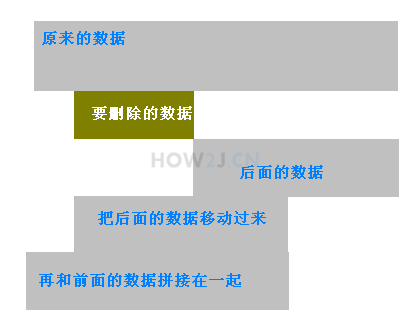
步骤6:删除delete
package character;

public class MyStringBuffer implements IStringBuffer{

    int capacity = 16;
    int length = 0;
    char[] value;
    public MyStringBuffer(){
        value = new char[capacity];
    }

    //有参构造方法
    public MyStringBuffer(String str){
        this();
        if(null==str)
            return;

        if(capacity<str.length()){
            capacity  = value.length*2;
            value=new char[capacity];
        }

        if(capacity>=str.length())
            System.arraycopy(str.toCharArray(), 0, value, 0, str.length());

        length = str.length();

    }

    @Override
    public void append(String str) {

        insert(length,str);
    }

    @Override
    public void append(char c) {
        append(String.valueOf(c));

    }

    @Override
    public void insert(int pos, char b) {
        insert(pos,String.valueOf(b));
    }

    @Override
    public void delete(int start) {

        delete(start,length);
    }

    @Override
    public void delete(int start, int end) {
        //边界条件判断
        if(start<0)
            return;

        if(start>length)
            return;

        if(end<0)
            return;

        if(end>length)
            return;

        if(start>=end)
            return;

        System.arraycopy(value, end, value, start, length- end);
        length-=end-start;

    }

    @Override
    public void reverse() {

        for (int i = 0; i < length/2; i++) {

            char temp = value[i];
            value[i] = value[length-i-1];
            value[length-i-1] = temp;
        }

    }

    @Override
    public int length() {
        // TODO Auto-generated method stub
        return length;
    }

    @Override
    public void insert(int pos, String b) {

        //边界条件判断
        if(pos<0)
            return;

        if(pos>length)
            return;

        if(null==b)
            return;

        //扩容
        while(length+b.length()>capacity){
            capacity = (int) ((length+b.length())*1.5f);
            char[] newValue = new char[capacity];
            System.arraycopy(value, 0, newValue, 0, length);
            value = newValue;
        }

        char[] cs = b.toCharArray();

        //先把已经存在的数据往后移

        System.arraycopy(value, pos, value,pos+ cs.length, length-pos);
        //把要插入的数据插入到指定位置
        System.arraycopy(cs, 0, value, pos, cs.length);

        length = length+cs.length;

    }

    public String toString(){

        char[] realValue = new char[length];

        System.arraycopy(value, 0, realValue, 0, length);

        return new String(realValue);

    }

    public static void main(String[] args) {
        MyStringBuffer sb = new MyStringBuffer("there light");
        System.out.println(sb);
        sb.insert(0, "let ");
        System.out.println(sb);

        sb.insert(10, "be ");
        System.out.println(sb);
        sb.insert(0, "God Say:");
        System.out.println(sb);
        sb.append("!");
        System.out.println(sb);
        sb.append('?');
        System.out.println(sb);
        sb.reverse();
        System.out.println(sb);

        sb.reverse();
        System.out.println(sb);

        sb.delete(0,4);
        System.out.println(sb);
        sb.delete(4);
        System.out.println(sb);

    }

}

 浙公网安备 33010602011771号