
asp.net_ListBox应用
记录ListBox的基本应用
使用的数据库文件:
链接:https://pan.baidu.com/s/1w_3qnRU7zcCfJEIYq3Ik-g
提取码:l4y0
一、实现获取ListBox内容并输出到文本框
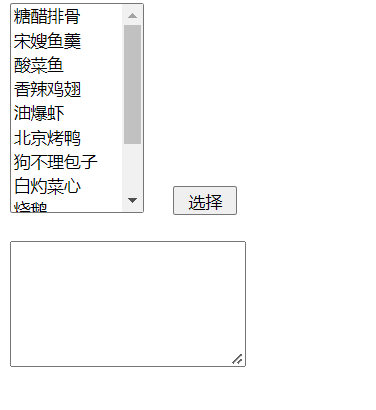
前端代码:
1 <%@ Page Language="C#" AutoEventWireup="true" CodeFile="test01.aspx.cs" Inherits="test01" %> 2 3 <!DOCTYPE html PUBLIC "-//W3C//DTD XHTML 1.0 Transitional//EN" "http://www.w3.org/TR/xhtml1/DTD/xhtml1-transitional.dtd"> 4 5 <html xmlns="http://www.w3.org/1999/xhtml"> 6 <head runat="server"> 7 <title></title> 8 </head> 9 <body> 10 <form id="form1" runat="server"> 11 <div> 12 <asp:ListBox ID="ListBox1" runat="server" DataSourceID="AccessDataSource1" SelectionMode="Multiple" 13 DataTextField="CAI_NAME" DataValueField="ID" Height="168px" Width="107px"></asp:ListBox> 14 15 <asp:Button ID="Button1" runat="server" Text="选择" Height="23px" 16 onclick="Button1_Click" Width="51px" /> 17 <asp:AccessDataSource ID="AccessDataSource1" runat="server" 18 DataFile="~/test.mdb" SelectCommand="SELECT * FROM [TB_CAI]"> 19 </asp:AccessDataSource> 20 <br /> 21 <br /> 22 <asp:TextBox ID="TextBox1" runat="server" Height="95px" Width="183px" 23 TextMode="MultiLine"></asp:TextBox> 24 <br /> 25 <br /> 26 </div> 27 </form> 28 </body> 29 </html>
1.如何绑定数据源:
https://blog.csdn.net/weixin_45905039/article/details/123730187
2.SelectionMode="Multiple"表示此ListBox是可以多选的,而TextMode="MultiLine"代表多行文本框
后端代码:
 1 using System;
 2 using System.Collections.Generic;
 3 using System.Linq;
 4 using System.Web;
 5 using System.Web.UI;
 6 using System.Web.UI.WebControls;
 7
 8 public partial class test01 : System.Web.UI.Page
 9 {
10     protected void Page_Load(object sender, EventArgs e)
11     {
12
13     }
14     protected void Button1_Click(object sender, EventArgs e)
15     {
16         //one
17         //TextBox1.Text = "";
18         //for (int i = 0; i < ListBox1.Items.Count;i++ )
19         //{
20         //    if(ListBox1.Items[i].Selected)
21         //    {
22         //        TextBox1.Text += ListBox1.Items[i].Text + ",";
23         //    }
24         //}
25
26         //two
27
28         foreach(ListItem li in ListBox1.Items)
29         {
30             if(li.Selected)
31             {
32                 TextBox1.Text += li.Text + ",";
33             }
34         }
35
36     }
37 }
one注释的代码代表的是另一种方法,即使用for循环,但是相对于foreach来说需要写更多代码,复杂度更高
二、击按钮事件实现ListBox内容调换
这个示例有点像很多软件的自定义功能选择等等,先上图
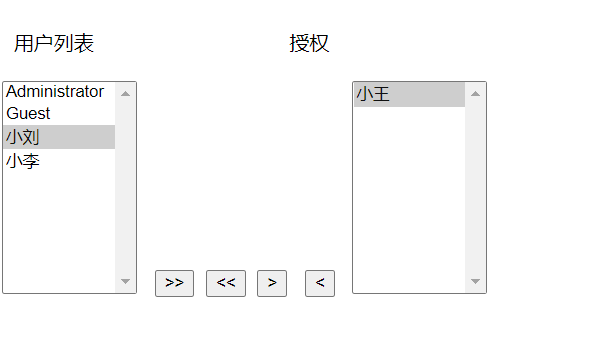
单选或者多选用户列表的选项,点击按钮,就会变更到授权列表。
前端代码:
1 <%@ Page Language="C#" AutoEventWireup="true" CodeFile="test02.aspx.cs" Inherits="test02" %> 2 3 <!DOCTYPE html PUBLIC "-//W3C//DTD XHTML 1.0 Transitional//EN" "http://www.w3.org/TR/xhtml1/DTD/xhtml1-transitional.dtd"> 4 5 <html xmlns="http://www.w3.org/1999/xhtml"> 6 <head runat="server"> 7 <title></title> 8 </head> 9 <body> 10 <form id="form1" runat="server"> 11 <div> 12 <br /> 13 用户列表 14 授权<br /> 15 <br /> 16 <asp:ListBox ID="ListBox1" runat="server" Height="170px" Width="108px" SelectionMode ="Multiple" ></asp:ListBox> 17 18 <asp:Button ID="Button1" runat="server" Text=">>" onclick="Button1_Click" /> 19 <asp:Button ID="Button2" runat="server" Text="<<" onclick="Button2_Click" /> 20 <asp:Button ID="Button3" runat="server" onclick="Button3_Click" 21 Text=">" /> 22 23 <asp:Button ID="Button4" runat="server" Text="<" onclick="Button4_Click" /> 24 25 <asp:ListBox ID="ListBox2" runat="server" Height="170px" Width="108px" SelectionMode ="Multiple"> 26 </asp:ListBox> 27 </div> 28 </form> 29 </body> 30 </html>
后端代码:
 1 using System;
 2 using System.Collections.Generic;
 3 using System.Linq;
 4 using System.Web;
 5 using System.Web.UI;
 6 using System.Web.UI.WebControls;
 7
 8 public partial class test02 : System.Web.UI.Page
 9 {
10     protected void Page_Load(object sender, EventArgs e)
11     {
12         if (!IsPostBack)
13         {
14             ListBox1.Items.Add("Administrator");
15             ListBox1.Items.Add("Guest");
16             ListBox1.Items.Add("小王");
17             ListBox1.Items.Add("小刘");
18             ListBox1.Items.Add("小李");
19
20         }
21     }
22     protected void Button1_Click(object sender, EventArgs e)
23     {
24         //int count = ListBox1.Items.Count;
25         for (int i = ListBox1.Items.Count - 1; i >= 0; i--)
26         {
27             ListItem li = ListBox1.Items[0];
28             ListBox1.Items.Remove(li);
29             ListBox2.Items.Add(li);
30         }
31     }
32     protected void Button2_Click(object sender, EventArgs e)
33     {
34         //int count = ListBox2.Items.Count;
35         for (int i = ListBox2.Items.Count - 1; i >= 0; i--)
36         {
37             ListItem li = ListBox2.Items[0];
38             ListBox2.Items.Remove(li);
39             ListBox1.Items.Add(li);
40         }
41     }
42     protected void Button3_Click(object sender, EventArgs e)
43     {
44         //int count = ListBox1.Items.Count;
45         //int index = 0;
46         for (int i = ListBox1.Items.Count - 1; i >= 0; i--)
47         {
48             ListItem li = ListBox1.Items[i];
49             if (ListBox1.Items[i].Selected)
50             {
51                 ListBox1.Items.Remove(li);
52                 ListBox2.Items.Add(li);
53                 //index--;
54             }
55             //index++;
56         }
57     }
58     protected void Button4_Click(object sender, EventArgs e)
59     {
60         //int count = ListBox2.Items.Count;
61         //int index = 0;
62         for (int i = ListBox2.Items.Count - 1; i >= 0; i--)
63         {
64             ListItem li = ListBox2.Items[i];
65             if (ListBox2.Items[i].Selected)
66             {
67                 ListBox2.Items.Remove(li);
68                 ListBox1.Items.Add(li);
69                 //index--;
70             }
71             //index++;
72         }
73     }
74 }
拿button3按钮举例(’>’),基本思路是使用for循环去遍历用户列表的所有选项,然后每个选项判断是否被选中(ListBox1.Items[i].Selected),如果选中,在用户列表中删除这个选项,并在另一个列表增加此选项。
理论上这样的方法是行得通的,但是会出现一个bug:假设for循环遍历到第一个选项,即items[0],并假设确实选中了它,此选项被删除并添加到了另一个列表,但与此同时,下一个选项items[1]也就向上挪了一位,变成了items[0],导致我们在选中连续的n个选项的时候没办法全部进行转移,始终会漏几个选项。
所以在for循环的时候就可以改用从下遍历到上,即从最大遍历到最小。
for (int i = ListBox2.Items.Count - 1; i >= 0; i--)
ListBox1.Items.Count-1的作用是防止越界
这样操作的话就可以避免上面的bug出现

 浙公网安备 33010602011771号