
超级简单的 DeepSeek API 中文写作查错脚本
 如题,这个脚本可以用来给论文、小说等中文文本纠错,检查文章中是否存在错别字之类的错误,也可以根据需求自己修改 Prompt 来实现不同的效果。因为没有找到合适的能够并入中文写作工作流的中文文本查错工具,所以写了这个脚本。目前支持 Markdown、TeX、和纯文本 TXT 文件,而且前几天做了 `.docx` 格式的适配,现在这个脚本能够检查 Word 文档了。
如题,这个脚本可以用来给论文、小说等中文文本纠错,检查文章中是否存在错别字之类的错误,也可以根据需求自己修改 Prompt 来实现不同的效果。因为没有找到合适的能够并入中文写作工作流的中文文本查错工具,所以写了这个脚本。目前支持 Markdown、TeX、和纯文本 TXT 文件,而且前几天做了 .docx 格式的适配,现在这个脚本能够检查 Word 文档了。
使用步骤
这个脚本的使用方法极其简单,对于有 Python 使用经验的人来说,几乎无需赘述。但是考虑到使用这个脚本的还有很多纯新人,我简单说一下使用方法,有需要的可以用这个脚本检查自己的小说。
DeepSeek API 配置
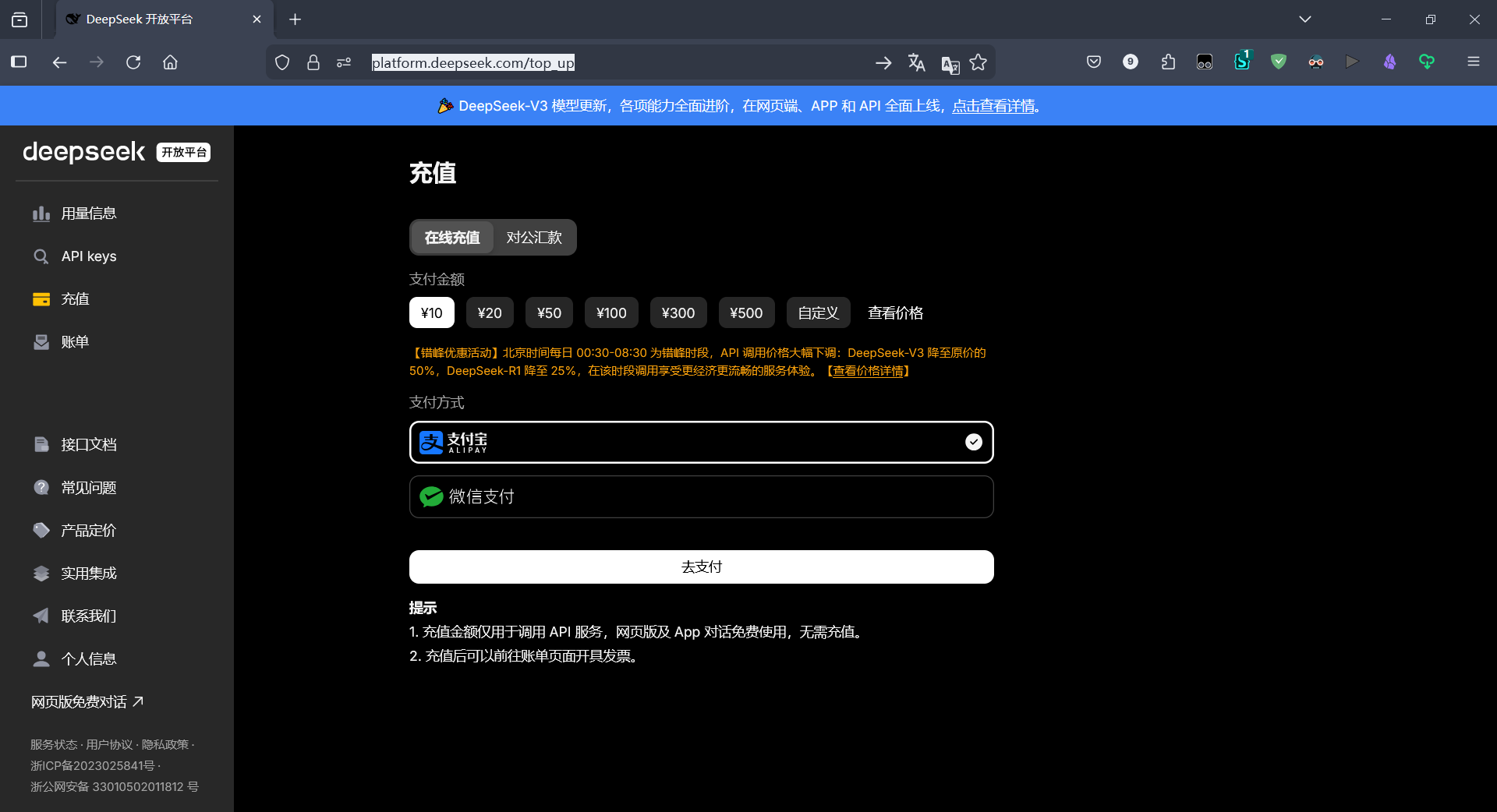
首先你需要一个 DeepSeek API 账号,上 DeepSeek 开放平台 注册一个账号并实名认证。或者直接搜“Deepseek 开放平台 API”进官网也能找到。然后在 这个页面 这里充值 10 块钱。如下图所示。
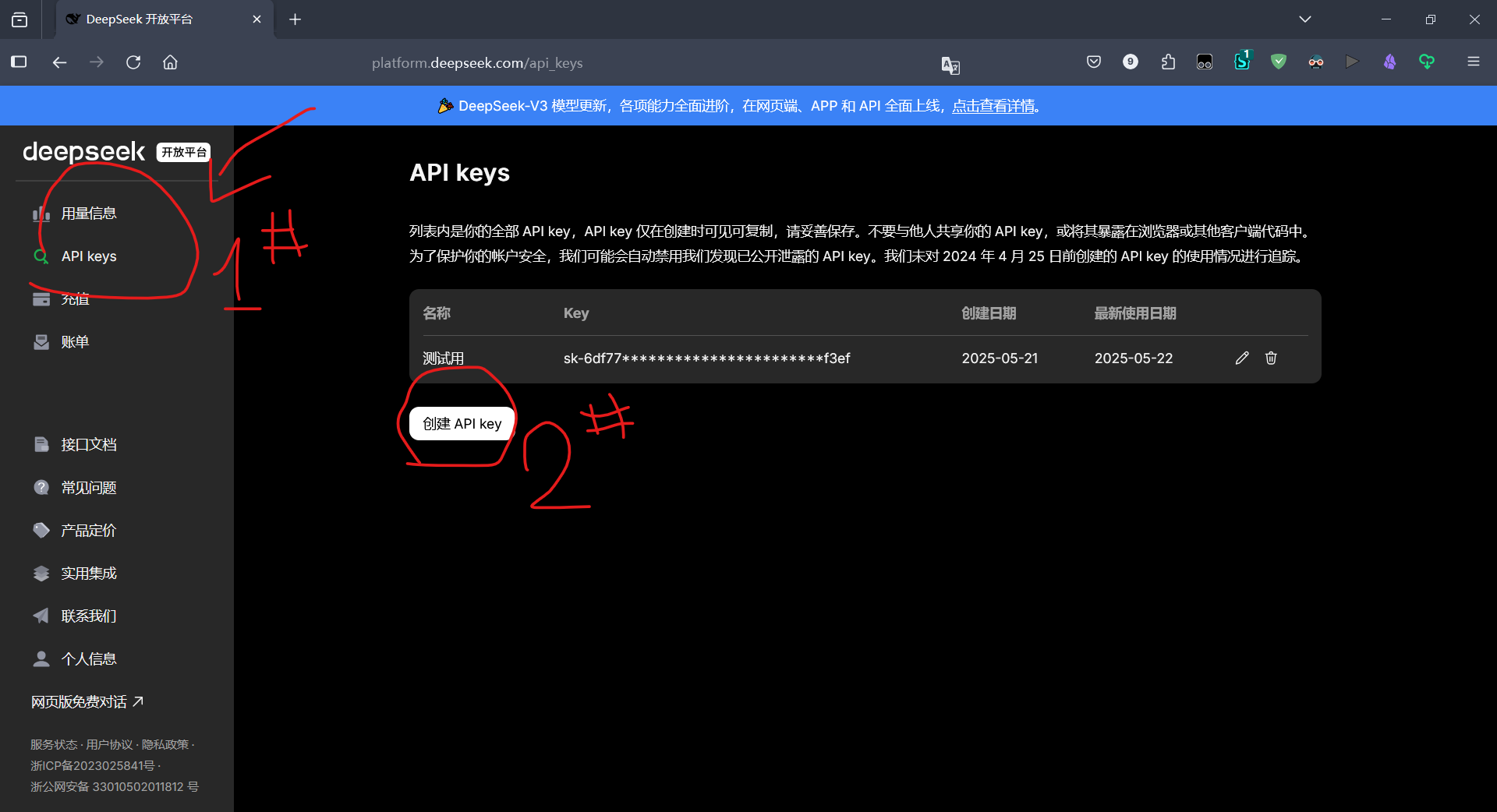
接下来点击左侧的 API Keys,点击“创建 API”。弹出 API 窗口之后立刻复制保存,API 只会展示一次,如果没保存的话就要重新生成。
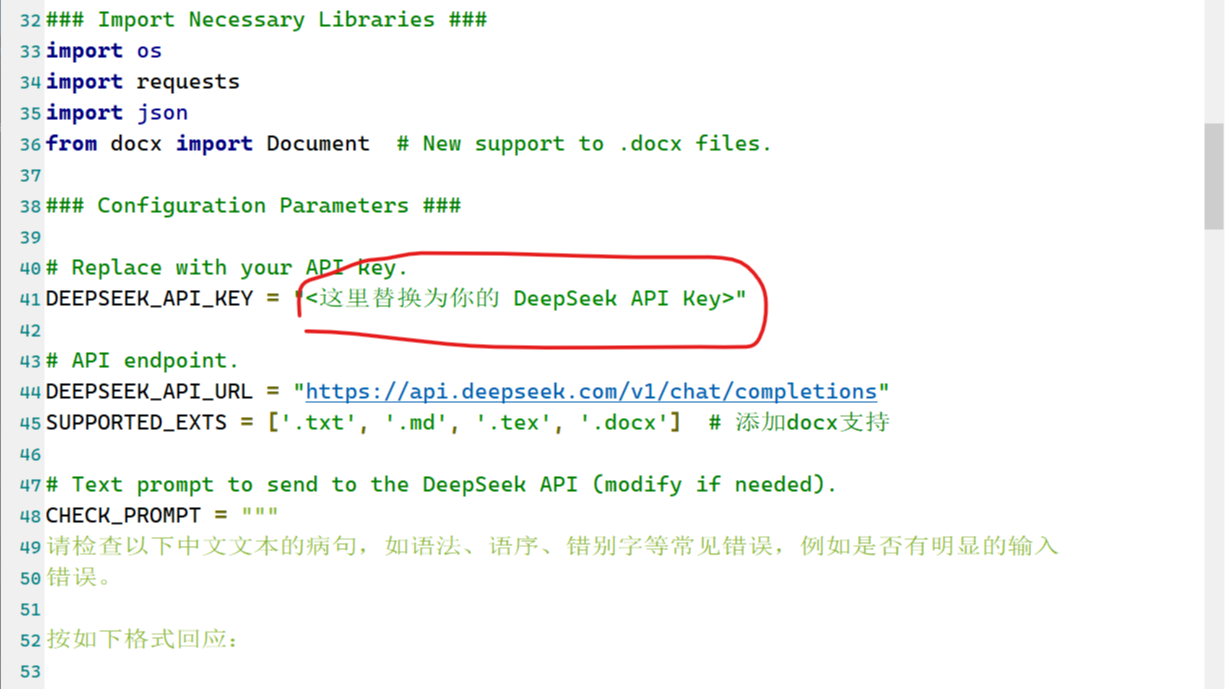
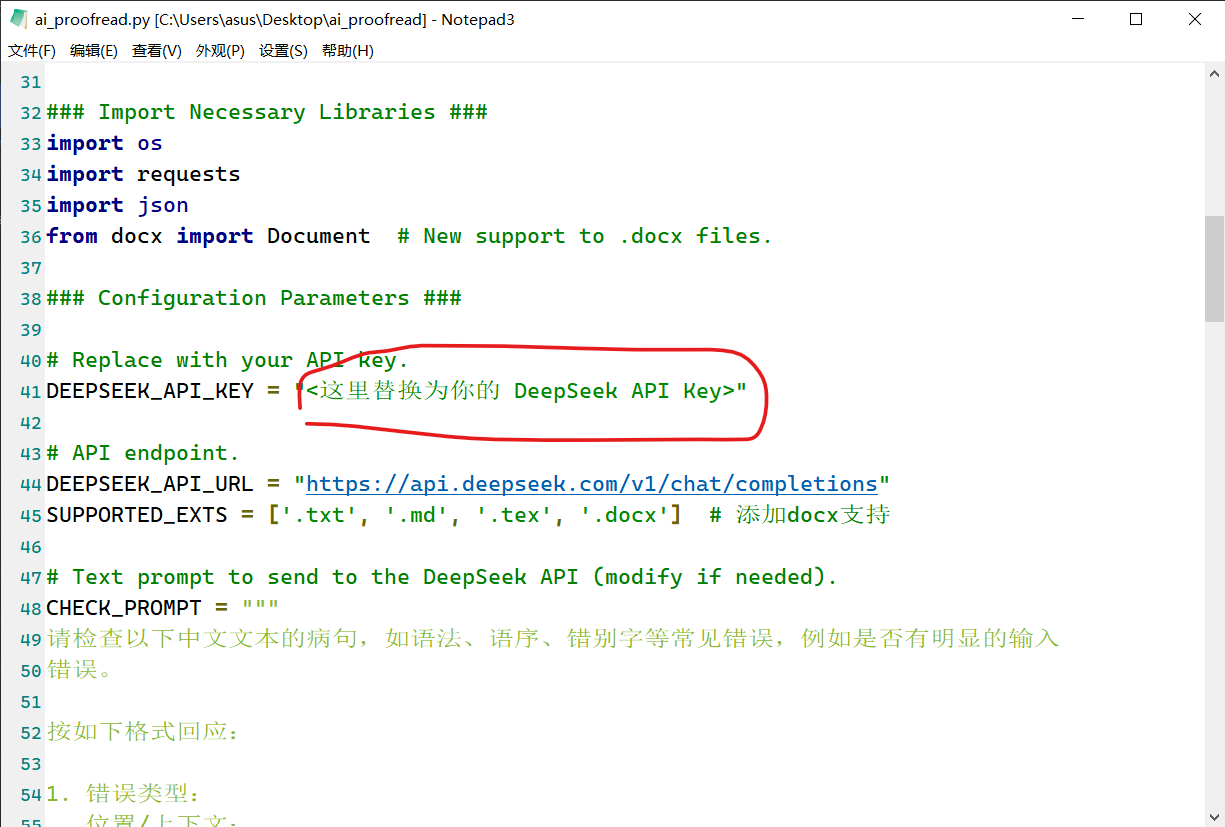
然后把 API 复制黏贴到脚本里面的这个位置:
环境配置需求
安装 Python
脚本在电脑上可以用记事本打开。然后你需要安装一个 Python:在 Python 官网上 上下载一个安装包,建议版本在 3.6 以上的。具体安装配置步骤我就不赘述了,大家自行上网搜索教程操作。实在不会找教程的参考 这篇文章 的步骤安装就好。注意不要安装到名字里有 Program Files 的文件夹下面 (个人经验之谈)。
安装必要的工具包
接下来需要安装 python-docx 这个 Python 包,打开电脑里内置的 CMD 或者 Powershell,输入 (或者直接复制粘贴) 如下命令:
pip install python-docx
运行脚本
最后把脚本和你写好的小说放在一起,建议新人用户启动 Python 自带的 IDLE 运行脚本。
这里让你输入目标文件,不要直接输入文件名,而是输入你的中文文本所在的文件夹的名字。比如假如你要检查你自己写的小说:
- 如果你的小说和脚本放在同一个文件夹下面,就输入一个点“.”表示当前文件夹。
- 如果你的脚本放在你的一个文件夹下面,然后小说放在这个文件夹下面的另一个文件夹“小说”下面,你就输入“小说”。脚本会自动检查文件夹里面的每个 Word 文档。
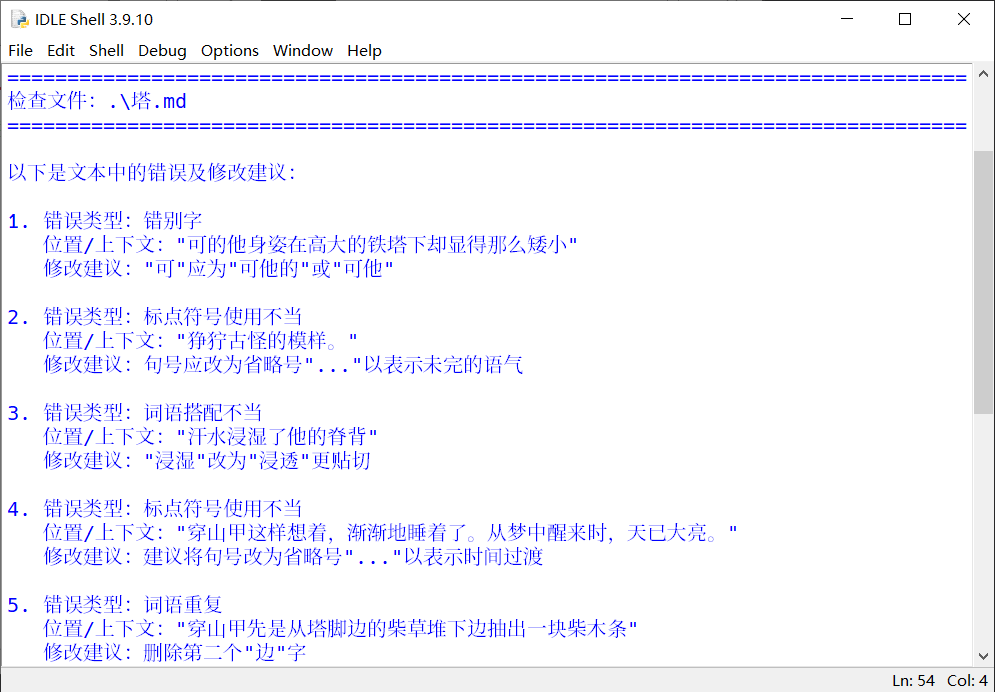
最终 DeepSeek 会返回中文文本的检查结果,实现效果如图所示。
项目与许可证
脚本根据 MIT 许可证发布。项目地址位于 Github Gist 41bd3cbd3eec4918842c480fa16e9455。同时在其他平台发布的本文也会附上脚本内容,但是如果有新版本各个文章可能不会全部及时更新。建议在 Gist 上获取该脚本的最新版本。
附件
以下是脚本的完整实现。
"""
This script processes text files in a specified directory, sends their content
to the DeepSeek API for proofreading, and prints the results. The script is
designed to check for grammatical errors, typos, and other common issues in
Chinese text written in Markdown format.

Date: 2025-05-22
Version: 0.0.1.2
License: MIT

Copyright (c) Githubonline1396529 <yyg249942899@163.com>

Permission is hereby granted, free of charge, to any person obtaining a copy
of this software and associated documentation files (the "Software"), to deal
in the Software without restriction, including without limitation the rights
to use, copy, modify, merge, publish, distribute, sublicense, and/or sell
copies of the Software, and to permit persons to whom the Software is
furnished to do so, subject to the following conditions:

The above copyright notice and this permission notice shall be included in all
copies or substantial portions of the Software.

THE SOFTWARE IS PROVIDED "AS IS", WITHOUT WARRANTY OF ANY KIND, EXPRESS OR
IMPLIED, INCLUDING BUT NOT LIMITED TO THE WARRANTIES OF MERCHANTABILITY,
FITNESS FOR A PARTICULAR PURPOSE AND NONINFRINGEMENT. IN NO EVENT SHALL THE
AUTHORS OR COPYRIGHT HOLDERS BE LIABLE FOR ANY CLAIM, DAMAGES OR OTHER
LIABILITY, WHETHER IN AN ACTION OF CONTRACT, TORT OR OTHERWISE, ARISING FROM,
OUT OF OR IN CONNECTION WITH THE SOFTWARE OR THE USE OR OTHER DEALINGS IN THE
SOFTWARE.
"""

### Import Necessary Libraries ###
import os
import requests
import json
from docx import Document  # New support to .docx files.

### Configuration Parameters ###

# Replace with your API key.
VERSION = "0.0.1.2"  # Current version of the file.
DEEPSEEK_API_KEY = "<这里替换为你的 DeepSeek API Key>"

# API endpoint.
DEEPSEEK_API_URL = "https://api.deepseek.com/v1/chat/completions"
SUPPORTED_EXTS = ['.txt', '.md', '.tex', '.docx']  # 添加docx支持

# Text prompt to send to the DeepSeek API (modify if needed).
CHECK_PROMPT = """
请检查以下中文文本的病句,如语法、语序、错别字等常见错误,例如是否有明显的输入
错误。

按如下格式回应:

1. 错误类型:
   位置/上下文:
   修改建议:

如果没有发现错误,请回复“未发现明显错误”。文本内容:

"""

def read_docx(filepath: str) -> str:
    """Read the text content in an .docx file.

    Args:
        filepath (str): The file path to the .docx file.

    Returns:
        str: The text content of the .docx file.
    """
    try:
        doc = Document(filepath)
        full_text = []
        for para in doc.paragraphs:
            full_text.append(para.text)
        return '\n'.join(full_text)
    except Exception as e:
        raise ValueError(f"读取docx文件失败: {str(e)}")

def check_text_with_deepseek(text: str) -> str:
    headers = {
        "Authorization": f"Bearer {DEEPSEEK_API_KEY}",
        "Content-Type": "application/json; charset=utf-8"
    }  # Use specified encoding UTF-8.

    payload = {
        "model": "deepseek-chat",
        "messages": [
            {"role": "user", "content": CHECK_PROMPT + text[:3000]}
        ],
        "temperature": 0.1
    }

    try:
        # Use json argument to deal with encoding automantically.
        response = requests.post(
            DEEPSEEK_API_URL,
            headers=headers,
            json=payload
            # The key modification to solve the error: replacing the
            # `data=json.dumps` with `payload`.
        )
        response.raise_for_status()
        return response.json()['choices'][0]['message']['content'].strip()
    except Exception as e:
        return f"API请求失败:{str(e)}"

def process_directory(directory: str):
    """Processes all supported files in the given directory and its sub-
    directories.

     Args:
          directory (str): The path to the directory to process.
     """
    for root, _, files in os.walk(directory):
        for filename in files:
            if os.path.splitext(filename)[1].lower() in SUPPORTED_EXTS:
                filepath = os.path.join(root, filename)
                process_file(filepath)

def process_file(filepath: str):
    """Processes a single file by reading its content, sending it to the given
    DeepSeek API, and printing the proofreading results.

     Args:
          filepath (str): The path to the file to process.
     """
    try:
        # Read file accroding to file types.
        ext = os.path.splitext(filepath)[1].lower()

        if ext == '.docx':
            content = read_docx(filepath)
        else:
            with open(filepath, 'r', encoding='utf-8') as f:
                content = f.read()

        if not content.strip():
            return

        print(f"\n{'='*80}\n检查文件:{filepath}\n{'='*80}")
        result = check_text_with_deepseek(content)

        # 打印检查结果
        print(f"\n{result}")

    except UnicodeDecodeError:
        print(f"无法读取文件(编码问题):{filepath}")
    except ValueError as e:  # 捕获docx读取错误
        print(f"处理文件失败:{filepath},错误:{str(e)}")
    except Exception as e:
        print(f"处理文件失败:{filepath},错误:{str(e)}")

if __name__ == "__main__":
    print(
        f"""
        欢迎使用基于 DeepSeek API 的写作检查工具!当前版本 {VERSION}。
        DeepSeek 开放平台网址:<https://platform.deepseek.com>。

        作者:Githubonline1396529

        有以下注意事项:
          [1] 此处需要输入存放文件的目录名称,而不是直接输入文件名。
          [2] 请确保已经正确配置 DeepSeek API。
          [3] 可根据需求修改脚本文件中的 Prompt 行,指导 DeepSeek 回复。
        """
    )
    print("="*80)
    target_dir = input("请输入要检查的目录路径 > ")
    if os.path.isdir(target_dir):
        process_directory(target_dir)
    else:
        print("错误:输入的路径不是有效目录")

 浙公网安备 33010602011771号