


用VB.Net用编写地锚容许抗拔力计算程序
1.理论计算模型
程序的理论计算模型如下:
地锚的容许抗拔力\(P\)按下式计算:
\[\begin{align*}
P &\le \frac{0.00981V_b \gamma_0}{K\sin\alpha} \\
V_b&= \left[dl+(d+l)h\tan\phi_1+\frac{4}{3}h^2\tan\phi_1 \right]h \\
\end{align*}
\]
\[\begin{array}{l}
V_b \to\text{地锚抗拔的土壤体积,}m^{3} \text{;}\\
l\to\text{地锚的长度,}m\text{;}\\
d\to\text{地锚的宽度或圆地锚的直径,}m\text{;}\\
h\to\text{地锚的埋置深度,}m\text{;} \\
\phi_1\to\text{土壤的计算抗拔角,按下表选用,}kg/m \text{;} \\
\alpha\to \text{地锚的受力方向与地面的夹角,°;}\\
K\to地锚的抗拔安全系数,一般取2.0\text{。}
\end{array}
\]
| 项目 | 特坚土 | 坚土 | 次坚土 | 普通土 | 软土 |
|---|---|---|---|---|---|
| 密度\(\gamma_0(kg/m^3)\) | 1900 | 1800 | 1700 | 1600 | 1500 |
| 计算抗拔角\(\phi_1(°)\) | 30 | 25 | 20 | 15 | 10 |
2.程序主界面
程序已编译完毕,运行界面如下:
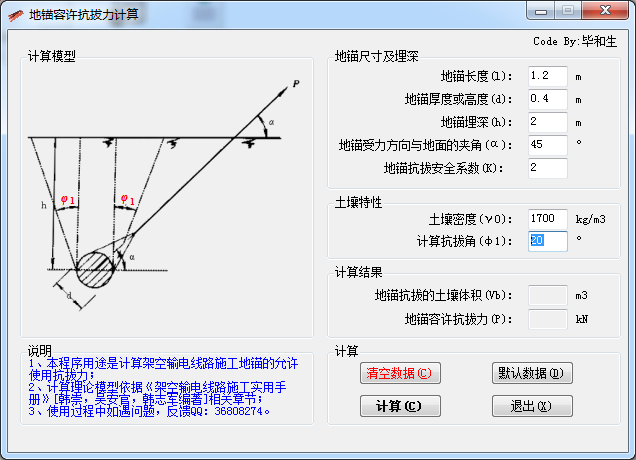
有以下功能:
- [√] 内置常用数据,并可一键恢复为默认数据
- [√] 有输入提示
- [√] 非数字的输入,程序会纠错
- [√] 输入数据时,示意图上对应的参数会变红提示
3.程序源代码
源代码共9个文件,只列出核心部分代码,其他的懒得提供了
FrmMain.vb
Public Class FrmMain
    Private Sub BtnCalc_Click(sender As Object, e As EventArgs) Handles BtnCalc.Click
        On Error Resume Next
        If Txt_d.Text = "" Or Txt_l.Text = "" Or Txt_h.Text = "" Or Txt_Alpha.Text = "" Or Txt_phi1.Text = "" Or Txt_Gamma.Text = "" Or Txt_K.Text = "" Then
            MsgBox("数据不完整!" & vbCrLf & "请检查输入数据,确保每个数据完整有效。" & vbCrLf & vbCrLf & "程序将使用默认数据。", vbExclamation, "警告")
            Txt_l.Text = 1.2
            Txt_d.Text = 0.4
            Txt_h.Text = 2
            Txt_Alpha.Text = 45
            Txt_phi1.Text = 20
            Txt_Gamma.Text = 1700
            Txt_K.Text = 2
        End If
        Dim d, l, h, α, Vb, φ1, γ0, P, Vb_2, P_2 As Double
        Dim K As Single
        d = Txt_d.Text
        l = Txt_l.Text
        h = Txt_h.Text
        α = Txt_Alpha.Text
        φ1 = Txt_phi1.Text
        γ0 = Txt_Gamma.Text
        K = Txt_K.Text
        Vb = (d * l + (d + l) * h * System.Math.Tan(φ1 / 180 * System.Math.PI) + 4 / 3 * h ^ 2 * System.Math.Tan(φ1 / 180 * System.Math.PI)) * h
        P = 0.00981 * Vb * γ0 / K / System.Math.Sin(α / 180 * System.Math.PI)
        Vb_2 = Math.Round(Vb, 1)
        P_2 = Math.Round(P, 1)
        Txt_Vb.Text = Vb_2
        Txt_Out.Text = P_2
        Cmt_P.Show()
    End Sub
    Private Sub CmdExit_Click(sender As Object, e As EventArgs) Handles CmdExit.Click
        Me.Close()
    End Sub
    Private Sub Btn_Default_Click(sender As Object, e As EventArgs) Handles Btn_Default.Click
        Txt_l.Text = 1.2
        Txt_d.Text = 0.4
        Txt_h.Text = 2
        Txt_Alpha.Text = 45
        Txt_phi1.Text = 20
        Txt_Gamma.Text = 1700
        Txt_K.Text = 2
    End Sub


    Private Sub Btn_Clear_Click(sender As Object, e As EventArgs) Handles Btn_Clear.Click
        If MsgBox("您确定要清空数据吗?", vbYesNo + vbQuestion, "询问") = MsgBoxResult.Yes Then
            Txt_l.Text = ""
            Txt_d.Text = ""
            Txt_h.Text = ""
            Txt_Alpha.Text = ""
            Txt_K.Text = ""
            Txt_Gamma.Text = ""
            Txt_phi1.Text = ""
            Txt_Vb.Text = ""
            Txt_Out.Text = ""
            Cmt_P.Hide()
        Else
            Exit Sub
        End If
    End Sub

    Private Sub FrmMain_Load(sender As Object, e As EventArgs) Handles MyBase.Load
        Cmt_d.Hide()
        Cmt_h.Hide()
        Cmt_Alpha_1.Hide()
        Cmt_Alpha_2.Hide()
        Cmt_Phi1_1.Hide()
        Cmt_1.Hide()
        Cmt_Phi1_2.Hide()
        Cmt_2.Hide()
        Cmt_P.Hide()
        Txt_Vb.ReadOnly = True
        Txt_Out.ReadOnly = True
    End Sub

    Private Sub Txt_d_GotFocus(sender As Object, e As EventArgs) Handles Txt_d.GotFocus
        Cmt_d.Show()
    End Sub

    Private Sub Txt_d_LostFocus(sender As Object, e As EventArgs) Handles Txt_d.LostFocus
        If IsNumeric(Txt_d.Text) = False Then
            MsgBox("程序检测到:地锚宽度数据为无效数据!" & vbCrLf & "请输入有效的数据。", MsgBoxStyle.Critical, "数据出错")
        End If
        Cmt_d.Hide()
    End Sub

    Private Sub Txt_Alpha_LostFocus(sender As Object, e As EventArgs) Handles Txt_Alpha.LostFocus
        If IsNumeric(Txt_Alpha.Text) = False Then
            MsgBox("程序检测到:地锚受力方向与地面夹角数据为无效数据!" & vbCrLf & "请输入有效的数据。", MsgBoxStyle.Critical, "数据出错")
        End If
        Cmt_Alpha_1.Hide()
        Cmt_Alpha_2.Hide()
    End Sub

    Private Sub Txt_Alpha_GotFocus(sender As Object, e As EventArgs) Handles Txt_Alpha.GotFocus
        Cmt_Alpha_1.Show()
        Cmt_Alpha_2.Show()
    End Sub

    Private Sub Txt_h_GotFocus(sender As Object, e As EventArgs) Handles Txt_h.GotFocus
        Cmt_h.Show()
    End Sub

    Private Sub Txt_h_LostFocus(sender As Object, e As EventArgs) Handles Txt_h.LostFocus
        Cmt_h.Hide()
        If IsNumeric(Txt_h.Text) = False Then
            MsgBox("程序检测到:地锚埋深数据为无效数据!" & vbCrLf & "请输入有效的数据。", MsgBoxStyle.Critical, "数据出错")
        End If
    End Sub

    Private Sub Txt_phi1_GotFocus(sender As Object, e As EventArgs) Handles Txt_phi1.GotFocus
        Cmt_Phi1_1.Show()
        Cmt_1.Show()
        Cmt_Phi1_2.Show()
        Cmt_2.Show()
        Cmt_h.Hide()
    End Sub

    Private Sub Txt_phi1_LostFocus(sender As Object, e As EventArgs) Handles Txt_phi1.LostFocus
        Cmt_Phi1_1.Hide()
        Cmt_1.Hide()
        Cmt_Phi1_2.Hide()
        Cmt_2.Hide()
        If IsNumeric(Txt_phi1.Text) = False Then
            MsgBox("程序检测到:土壤计算抗拔角数据为无效数据!" & vbCrLf & "请输入有效的数据。", MsgBoxStyle.Critical, "数据出错")
        End If
    End Sub

    Private Sub Txt_l_LostFocus(sender As Object, e As EventArgs) Handles Txt_l.LostFocus
        If IsNumeric(Txt_l.Text) = False Then
            MsgBox("程序检测到:地锚长度数据为无效数据!" & vbCrLf & "请输入有效的数据。", MsgBoxStyle.Critical, "数据出错")
        End If
    End Sub

    Private Sub Txt_K_LostFocus(sender As Object, e As EventArgs) Handles Txt_K.LostFocus
        If IsNumeric(Txt_K.Text) = False Then
            MsgBox("程序检测到:地锚抗拔安全系数为无效数据!" & vbCrLf & "请输入有效的数据。", MsgBoxStyle.Critical, "数据出错")
        End If
    End Sub

    Private Sub Txt_Gamma_LostFocus(sender As Object, e As EventArgs) Handles Txt_Gamma.LostFocus
        If IsNumeric(Txt_Gamma.Text) = False Then
            MsgBox("程序检测到:土壤密度数据为无效数据!" & vbCrLf & "请输入有效的数据。", MsgBoxStyle.Critical, "数据出错")
        End If
    End Sub
End Class

 浙公网安备 33010602011771号