
步骤1:
同上
步骤2:建立相关目录。
cd workdir/linux/application
mkdir 6-gcc
步骤3:代码拷贝(Ctrl+空格 切换输入法)
cp /mnt/hgfs/share/2.\Linux系统部分/03.\Linux系统GCC编译器的使用实验/实验代码/* 6-gcc/ -a
cd 6-gcc/
ls
步骤4:编译代码
arm-cortex_a8-linux-gnueabi-gcc helloworld.c -o hello
mkdir /source/rootfs/app
cp hello /source/rootfs/app/
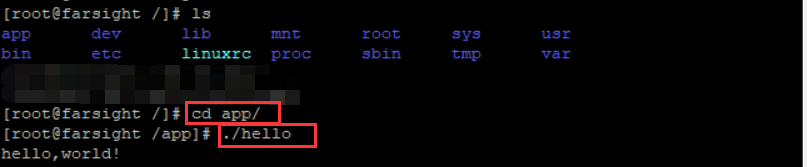
步骤5:执行代码
开启开发板(Fs-210)在终端执行以下代码
cd /app
./hello
附1:HelloWorld源码(需在虚拟机中查看,外部终端不可进行)
vim -n workdir/linux/application/6-gcc/helloworld.c
1 #include <stdio.h>
2
3 int main (int argc,char **argv)
4 {
5     printf("hello,world!\n");
6
7     return 0;
8 }

 浙公网安备 33010602011771号