
layout_column属性在新版本中去掉
1.开发环境
SDK版本35
2.关于Button组件没有了layout_column属性
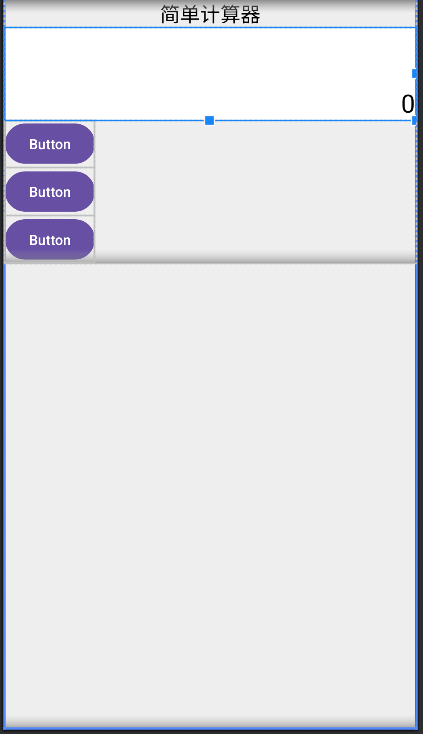
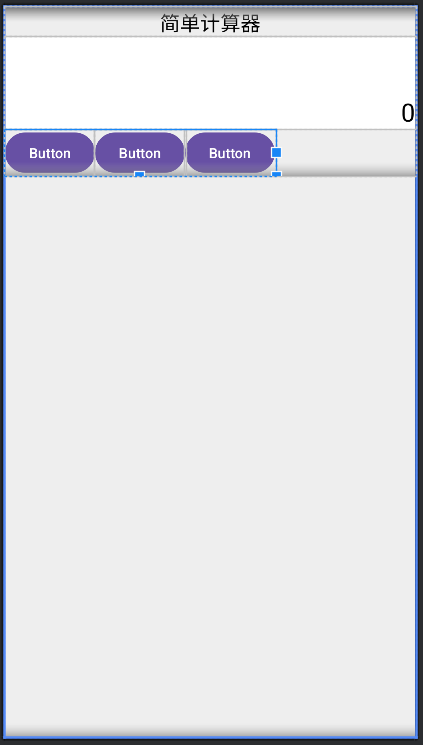
在此版本中 GridLayout 会根据 android:orientation="vertical" 属性自动按行或列根据最大值向右或向下进行排列因此无需layout_column属性。
代码和效果如下:
垂直方向:
<?xml version="1.0" encoding="utf-8"?>
<LinearLayout xmlns:android="http://schemas.android.com/apk/res/android"
    xmlns:app="http://schemas.android.com/apk/res-auto"
    xmlns:tools="http://schemas.android.com/tools"
    android:id="@+id/main"
    android:layout_width="match_parent"
    android:layout_height="match_parent"
    android:background="#eeeeee"
    android:orientation="vertical"
    tools:context=".CalculatorActivity">

    <ScrollView
        android:layout_width="match_parent"
        android:layout_height="wrap_content">

        <LinearLayout
            android:layout_width="match_parent"
            android:layout_height="wrap_content"
            android:orientation="vertical">

            <TextView
                android:layout_width="match_parent"
                android:layout_height="wrap_content"
                android:gravity="center"
                android:text="@string/simple_calculator"
                android:textColor="@color/black"
                android:textSize="20sp" />

            <TextView
                android:id="@+id/tv_result"
                android:layout_width="match_parent"
                android:layout_height="wrap_content"
                android:background="@color/white"
                android:gravity="right|bottom"
                android:lines="3"
                android:text="0"
                android:textColor="@color/black"
                android:textSize="25sp" />

            <GridLayout
                android:layout_width="wrap_content"
                android:layout_height="wrap_content"
                android:orientation="vertical"
                android:columnCount="4"
                android:rowCount="5" >


                <Button
                    android:id="@+id/button5"
                    android:layout_width="match_parent"
                    android:layout_height="wrap_content"
                    android:text="Button" />

                <Button
                    android:id="@+id/button3"
                    android:layout_width="match_parent"
                    android:layout_height="wrap_content"
                    android:text="Button" />

                <Button
                    android:id="@+id/button4"
                    android:layout_width="match_parent"
                    android:layout_height="wrap_content"
                    android:text="Button" />

            </GridLayout>


        </LinearLayout>
    </ScrollView>

</LinearLayout>
效果图:
水平方向:
<?xml version="1.0" encoding="utf-8"?>
<LinearLayout xmlns:android="http://schemas.android.com/apk/res/android"
    xmlns:app="http://schemas.android.com/apk/res-auto"
    xmlns:tools="http://schemas.android.com/tools"
    android:id="@+id/main"
    android:layout_width="match_parent"
    android:layout_height="match_parent"
    android:background="#eeeeee"
    android:orientation="vertical"
    tools:context=".CalculatorActivity">

    <ScrollView
        android:layout_width="match_parent"
        android:layout_height="wrap_content">

        <LinearLayout
            android:layout_width="match_parent"
            android:layout_height="wrap_content"
            android:orientation="vertical">

            <TextView
                android:layout_width="match_parent"
                android:layout_height="wrap_content"
                android:gravity="center"
                android:text="@string/simple_calculator"
                android:textColor="@color/black"
                android:textSize="20sp" />

            <TextView
                android:id="@+id/tv_result"
                android:layout_width="match_parent"
                android:layout_height="wrap_content"
                android:background="@color/white"
                android:gravity="right|bottom"
                android:lines="3"
                android:text="0"
                android:textColor="@color/black"
                android:textSize="25sp" />

            <GridLayout
                android:layout_width="wrap_content"
                android:layout_height="wrap_content"
                android:orientation="horizontal"
                android:columnCount="4"
                android:rowCount="5" >


                <Button
                    android:id="@+id/button5"
                    android:layout_width="match_parent"
                    android:layout_height="wrap_content"
                    android:text="Button" />

                <Button
                    android:id="@+id/button3"
                    android:layout_width="match_parent"
                    android:layout_height="wrap_content"
                    android:text="Button" />

                <Button
                    android:id="@+id/button4"
                    android:layout_width="match_parent"
                    android:layout_height="wrap_content"
                    android:text="Button" />

            </GridLayout>


        </LinearLayout>
    </ScrollView>

</LinearLayout>
效果图:

 浙公网安备 33010602011771号