
智能搜索
11.4 智能搜索
#搜索
一种高效查找内容的方式,让用户直达目的地。
#搜索步骤
搜索入口:搜索框或图标等代表搜索入口。
搜索前:聚焦搜索,不要有太多的干扰项,可提供快捷方式(历史记录,热门关键词等)
搜索中:尽量减少用户输入内容的时间,可采用搜索词匹配,快速定位搜索词等方式帮助用户快速完成输入
搜索结果:让用户快速找到想要的内容,必要时提供筛选功能。搜索不到结果时,应及时反馈,避免用户搜索不到时产生消极情绪
#常用搜索入口
注意:下方为常用的搜索入口展示,请参考
入口样式长度可以跟具实际情况俩边加图标,或者搜索入口仅为一个图标等等
基本样式
1、当全局背景为白色时,搜索框输入为浅灰色,如下1;
2、当背景为灰色,搜索输入框则使用浅白色#ffffff,效果如下2;
3、当背景为黑色时,搜索输入框则使用白色#ffffff透明度20%,效果如下3;

拓展样式

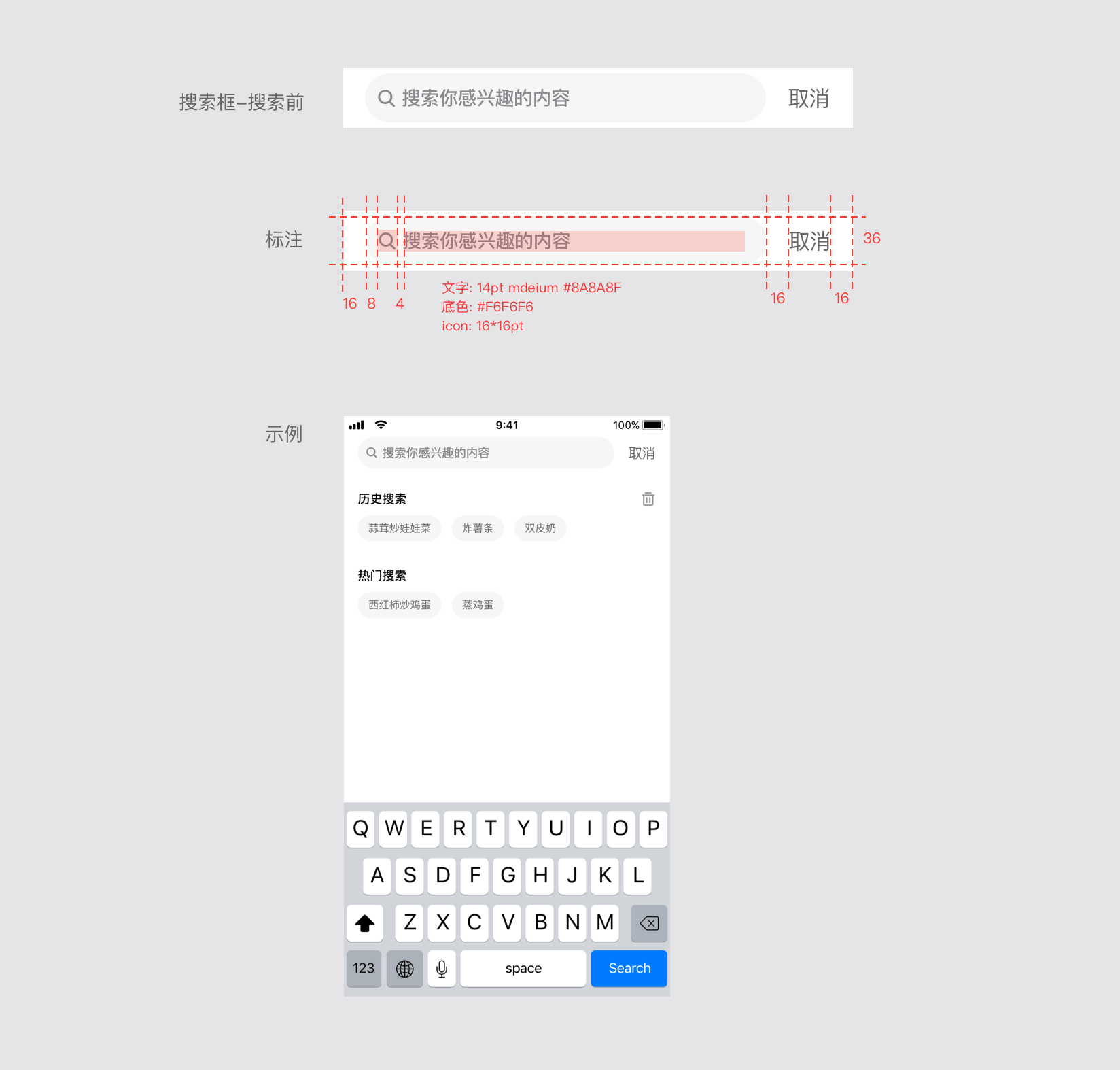
#搜索前
包含内容:
1.搜索输入框,内部包含搜索图标和搜索提示信息(比如输入哪些内容进行搜索)
2.取消搜索的按钮;
选配内容:
1.历史记录
2.热点关键词推荐
3.分类搜索(前置筛选)
4.根据用户信息进行推荐内容
其他
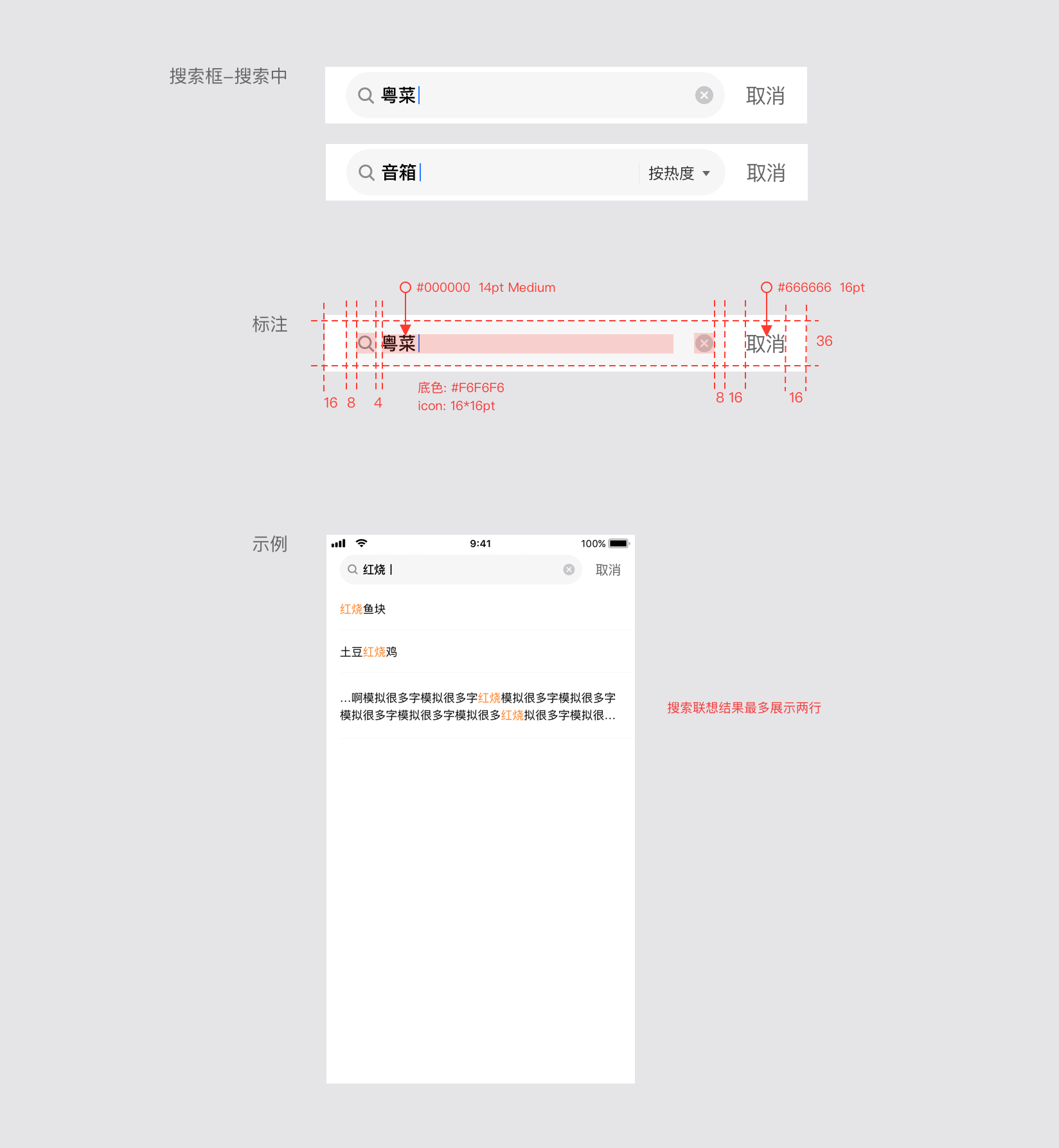
#搜索中
包含内容:
1.搜索输入框,内部包含输入的内容,搜索图标和一键删除已输入内容的按钮
2.取消搜索的按钮;
选配内容:
1.动态搜索内容
其他
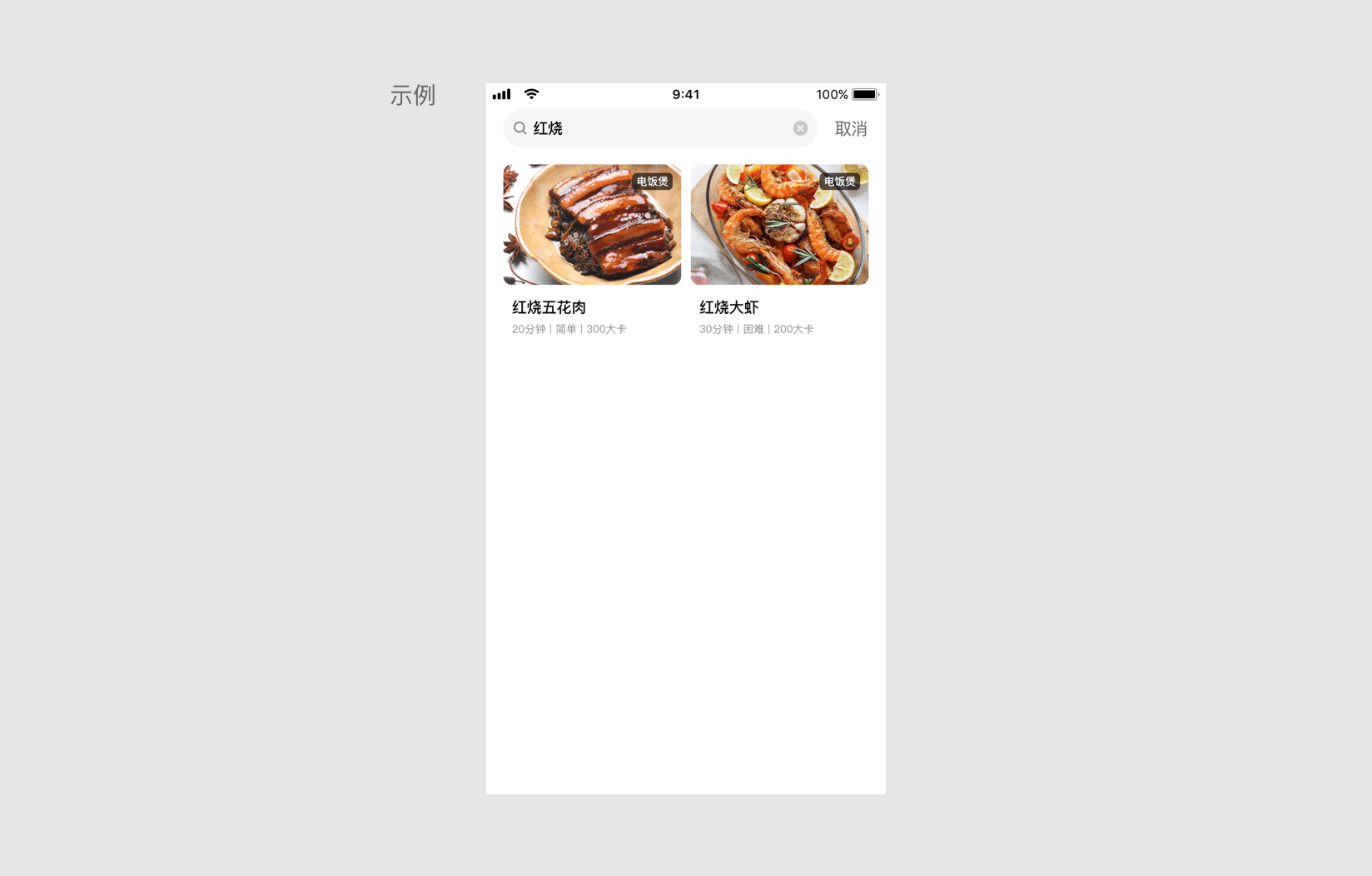
#搜索结果
分为搜索有结果和搜索为空俩种情况

搜索有结果
包含内容:
1.搜索输入框,内部包含输入的内容,搜索图标和一键删除已输入内容的按钮
2.取消搜索的按钮;
3.搜索出来的结果;
选配内容:
1.分类搜索(后置筛选)
搜索结果排序
其他
说明:输入焦点放入输入框的时候,搜索页面重新回到搜索前的页面。下方示例中搜索结果仅供参考,以实际需求为准。
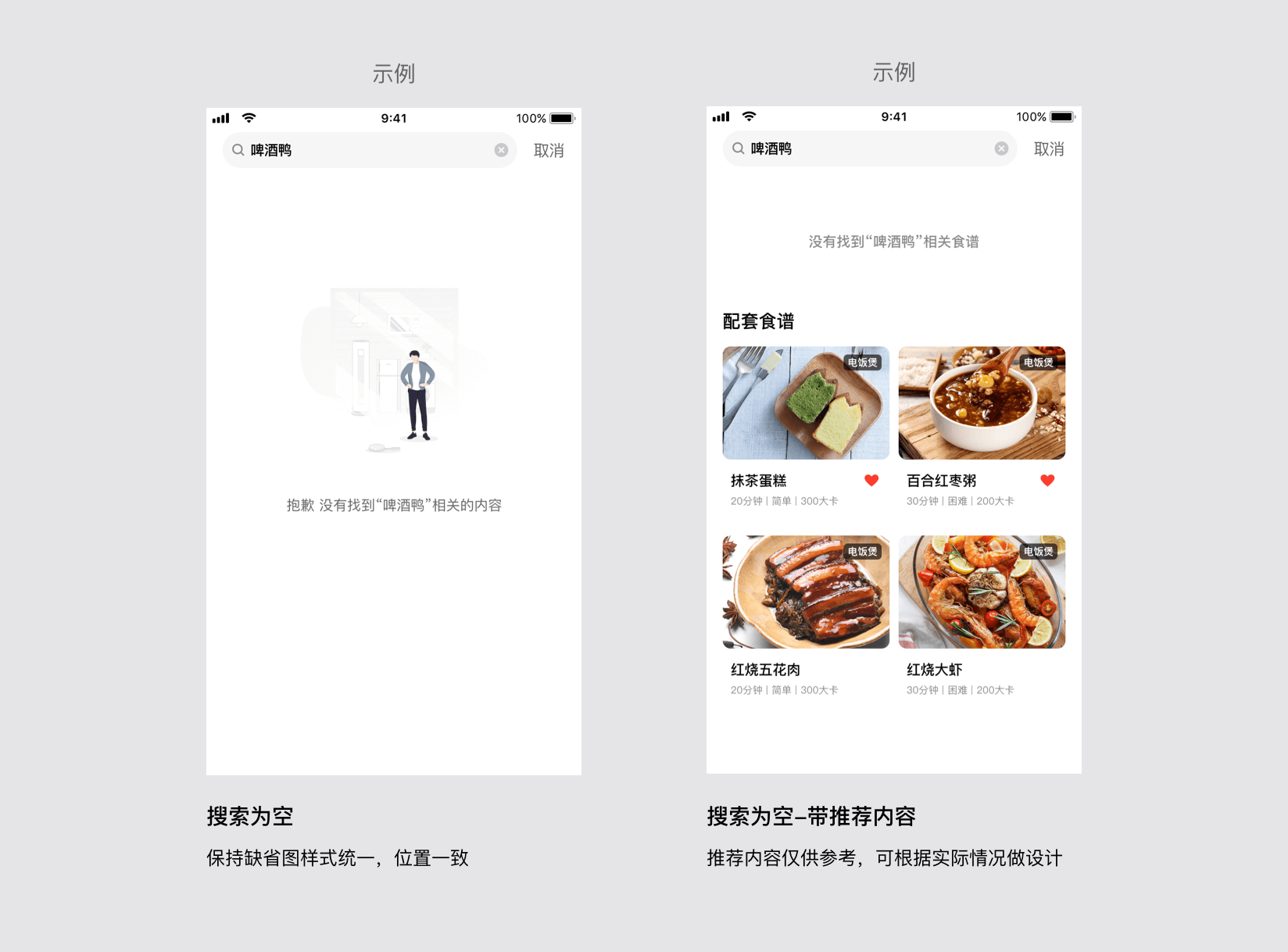
搜索为空
包含内容:
1.搜索输入框,内部包含输入的内容,搜索图标和一键删除已输入内容的按钮
2.取消搜索的按钮;
3.缺省图和提示文案
选配内容:
1.推介的内容
其他
说明:输入焦点放入输入框的时候,搜索页面重新回到搜索前的页面
#实例
#基础用法
<template>
    <div :style="newBarStyle">
      <div :class="['dof-search-bar']" >
        <input
             autofocus=false
             disabled=false
             return-key-type="search"
             singleline=true
             @return="rightBtnClicked"
             @focus="inputFocus"
             ref="search-input"
             v-model="inputContent"
             :placeholder="placeholder"
             :style="{ width:'582px'}"
             :class="['search-bar-input']"
             />
        <image class="search-bar-icon"
             :aria-hidden="true"
             :src="searchIcon"></image>
        <image class="search-bar-clear"
            v-if="inputContent&&inputContent!=''"
            :aria-hidden="true"
            @click="clearClicked"
            :src="clearIcon"></image>
        <text :class="['search-bar-button']"
            @click="rightBtnClicked">{{rightLabel}}</text>
      </div>
      <scroller class="scroller"
        offset-accuracy="20"
        :loadmoreoffset="offsetValue"
        @loadmore="onloadmore">
        <auto-complete
          :keyword="inputContent"
          :autocompleteList="menuList"
          @dofAutoCompleteClicked="autoCompleteClicked"
        ></auto-complete>

        <capsule-list
          v-if="(menuList&&menuList.length==0)&&(recipeData&&recipeData.length==0)&&!noResult"
          :title="title1"
          :capsule-list="list1"
          @dofCapsuleClicked="dofCapsuleClick"
          @dofDeliconClicked="dofDeliconClick">
        </capsule-list>
        <capsule-list
          v-if="(menuList&&menuList.length==0)&&(recipeData&&recipeData.length==0)&&!noResult"
          :title="title2"
          :capsule-list="list2"
          :show-del="false"
          @dofCapsuleClicked="dofCapsuleClick"
          @dofDeliconClicked="dofDeliconClick">
        </capsule-list>
        <!-- 结果列表 -->
        <div v-if="noResult" class="empty-box" :style="{'margin-top':isRecommend?'128px':'300px'}">
          <image v-if="!isRecommend" class="empty-image" :src="noResultImg"></image>
          <div class="empty-text-box">
            <text class="empty-text">没有找到“</text><text class="empty-text">{{inputContent}}</text><text class="empty-text">”相关的内容</text>
          </div>
        </div>
        <flow-card
          v-if="recipeData&&recipeData.length>0&&!isRecommend"
          :recipe-data="recipeData"
          :keyword="inputContent"
        ></flow-card>

        <div v-if="isRecommend">
          <text class="title">配套食谱</text>
          <flow-card
            :recipe-data="recommendData"
            :keyword="inputContent"
          ></flow-card>
        </div>
      </scroller>
    </div>
</template>

<script>
import nativeService from 'src/service/nativeService.js'
import { SEARCH_ICON, CLEAR_ICON } from './icon';
import capsuleList from './capsule'
import autoComplete from './autocomplete'
import flowCard from './flowCard'

export default {
  components: { capsuleList, autoComplete, flowCard },
  data:()=>({
    noResult:false,
    noResultImg:'../../assets/image/platform/platform-search/img_no_commodity@3x.png',
    searchIcon: SEARCH_ICON,
    clearIcon: CLEAR_ICON,
    placeholder:"搜索你感兴趣的内容",
    inputContent:"",
    rightLabel:"",
    isImmersion:true,
    // capsuleShow:true,
    title1:"历史搜索",
    list1:["蒜茸炒娃娃菜", "炸薯条", "双皮奶"],
    title2:"热门搜索",
    list2:["西红柿炒鸡蛋", "蒸鸡蛋"],
    menuList:[],
    offsetValue:0,
    recipeData:[],
    isRecommend:false,   //是否展示推荐
    isSetMenuList:true   //解决点击autocomplete点击后,inputcontent 变化引起的menulist重新赋值
  }),

  mounted(){
    if (this.inputContent&&this.inputContent!="") {
      this.rightLabel = "搜索"
    }else{
      this.rightLabel = "取消"
    }
  },

  methods:{
    dofCapsuleClick(item){
      console.log("item", item)
      this.inputContent = item.text
      this.rightBtnClicked()   //发起请求
    },

    dofDeliconClick(params){
      console.log("dofDeliconClick",params)
      if(params.title == this.title1){
        this.title1 = ""
        this.list1 = []
      }else{
        this.title2 = ""
        this.list2 = []
      }
    },

    clearClicked(){
      this.inputContent&&this.inputContent!=""?this.inputContent="":""
      this.recipeData = []
      this.menuList = []
      this.noResult = false
      this.isRecommend = false
    },

    autoCompleteClicked(params){
      console.log("autoCompleteClicked params", params)
      this.inputContent = params.text
      // this.menuList = []  // 这里置空无效,因为inputContent变了,watch中会重新给menulist赋值
      this.isSetMenuList = false
      this.rightBtnClicked()
    },

    rightBtnClicked(){
      nativeService.killKeyboard()
      const { inputContent,rightLabel } = this
      if (rightLabel=='取消') return false
      if(inputContent=="西红柿炒鸡蛋"){ this.isRecommend = true}else{ this.isRecommend= false }   //展示无结果和推荐菜单的效果
      this.noResult = false
      if (inputContent == "红烧"||inputContent == "红"||inputContent == "烧") {
        new Promise((resolve, reject)=>{
          let data = [],
              food1={
                recipeThumb:'../../assets/image/platform/platform-search/food.jpg',
                applianceCate:'电饼铛',
                recipeName:'红烧煎饼果子',
                costTime:'5',
                difficulty:2,
                kcal:'200',
                likeFlag:true,
                progress:1,
                autoPlay:false
              },
              food2={
                recipeThumb:'../../assets/image/platform/platform-search/food2.jpg',
                applianceCate:'电饭煲',
                recipeName:'香菇红烧鸡肉',
                costTime:'40',
                difficulty:3,
                kcal:'350',
                likeFlag:false,
                progress:1,
                autoPlay:false
              }
          for (var index = 0; index < 10; index++) {
              let randomNum = Math.floor(Math.random() * 11)
              randomNum>5?data.push(food1):data.push(food2)
          }
          let response = { data }
          setTimeout(function(){
              resolve(response);
          }, 250);
        })
        .then((res)=>{
          console.log("responseList", res)
          this.menuList = []
          this.recipeData = res.data   //模拟异步数据赋值
        }).catch((err)=>{
          console.log(err)
        })
      }else{
        this.recipeData = []
        this.menuList = []
        this.noResult = true
      }
    },

    inputFocus(){
      const { inputContent } = this
      // this.noResult = false
      // this.isRecommend = false
    },
    onloadmore(){},
    swipe(e) {
      //监听手势, 刷新loadmoreoffset为0 ,不触发加载更多bug
      if (!e || !e.direction) return
      if (e.direction == 'down') {
        this.offsetValue = 0
      } else {
        this.offsetValue = 1
      }
    },
  },

  computed:{
    statusBarHeight: function() {
      let result = '20'
      if (weex.config.env.statusBarHeight) {
        if (weex.config.env.platform === 'iOS') {
          // iOS使用pt为单位
          result = weex.config.env.statusBarHeight
        } else {
          // 安卓使用px为单位
          result = weex.config.env.statusBarHeight / weex.config.env.scale
        }
      }
      return result
    },

    newBarStyle() {
      let result
      if (this.isImmersion) {
        // 全屏显示,weex自行处理状态栏高度
        result = {
          paddingTop: this.statusBarHeight + 'wx'
          //   height: +this.statusBarHeight + 44 + 'wx',
        }
      } else {
        // 非全屏显示,app已处理状态栏高度
        result = {
          height: '44wx'
        }
      }
      return result
    },

    // 推荐菜谱
    recommendData(){
      let recommendList=[], food={
            recipeThumb:'../../assets/image/platform/platform-search/food.jpg',
            applianceCate:'电饼铛',
            recipeName:'红烧煎饼果子',
            costTime:'5',
            difficulty:2,
            kcal:'200',
            likeFlag:true,
            progress:1,
            autoPlay:false
          }
      for (let index = 0; index < 6; index++) {
        recommendList.push(food)
      }
      return recommendList
    }
  },

  watch:{
    inputContent(newVal, oldVal){
      const { recipeData } = this
      recipeData==[]?this.noResult = true:this.noResult = false
      this.isRecommend = false
      if (newVal&&newVal!='') {
        this.rightLabel = "搜索"
        this.recipeData = []
        if (newVal == "红烧"||newVal == "红"||newVal == "烧") {
          // setTimeout模拟服务端异步数据
          new Promise((resolve, reject)=>{
            let response = {
              data:["红烧", "红烧鱼块", "红土豆红烧鸡土豆红烧鸡土豆红烧鸡土豆红烧鸡土豆红烧鸡土豆红烧鸡土豆红烧鸡", "红烧肥牛"]
            }
            setTimeout(function(){
                resolve(response);
            }, 250);
          })
          .then((res)=>{
            console.log("responseList", res)
            this.isSetMenuList?this.menuList = res.data:''   //模拟异步数据赋值, 解决点击autocomplete点击后,inputcontent 变化引起的menulist重新赋值
            this.isSetMenuList = true

          }).catch((err)=>{
            console.log(err)
          })
        }else{
         this.menuList = []
        }
      }else{
        this.rightLabel = "取消"
        this.noResult = false
        this.isRecommend= false
        this.menuList = []
        this.recipeData = []
      }
    }
  }
}
</script>


<style scoped>
.dof-search-bar {
  padding-left: 32px;
  padding-right: 32px;
  background-color: #ffffff;
  width: 750px;
  height: 88px;
  flex-direction: row;
  align-items: center;
}

.search-bar-input {
  position: absolute;
  top: 8px;
  padding-top: 0;
  padding-bottom: 0;
  padding-right: 40px;
  padding-left: 60px;
  font-size: 28px;
  width: 624px;
  height: 72px;
  line-height: 72px;
  background-color: #F6F6F6;
  border-radius: 36px;
  /* color: #8A8A8F; */
}

::-webkit-input-placeholder { /* WebKit, Blink, Edge */
    color:#267AFF;
    font-weight: bold;
}

.search-bar-icon {
  position: absolute;
  width: 32px;
  height: 32px;
  left: 50px;
  top: 28px;
}
.search-bar-clear {
  position: absolute;
  width: 32px;
  height: 32px;
  right: 152px;
  top: 28px;
}
.search-bar-button {
  width: 72px;
  font-size: 32px;
  text-align: center;
  line-height: 88px;
  margin-right: 0;
  color: #666666;
  position: absolute;
  right: 32px;
}

.scroller{
  flex: 1;
}

.noResultScroller{
  flex-direction: row;
  justify-content: center;
  align-items: center;
}

.empty-box{
  margin-top: 300px;
  flex-direction: column;
  justify-content: center;
  align-items: center;
}
.empty-image{
  width: 480px;
  height: 400px;
}
.empty-text-box{
  flex-direction: row;
  justify-content: center;
}
.empty-text{
  margin-top: 32px;
  font-size: 28px;
  line-height: 36px;
  color: #666666;
}

.title{
  font-size: 36px;
  line-height: 32px;
  margin-top: 128px;
  margin-left: 32px;
  font-weight: bold;
}
</style>
capsule.vue
<template>
    <div v-if="show" class="capsule-wrap">
        <div class="head">
            <text class="title">{{title}}</text>
            <image v-if="showDel&&capsuleList.length>0" :src="delIcon" class="img" @click="delIconClicked"></image>
        </div>
        <div class="capsule-bar">
            <text class="capsule" @click="selectItem(item, index)" v-for="(item, index) in capsuleList" :key="index">{{item}}</text>
        </div>
    </div>
</template>

<script>
import { DEL_ICON } from './icon';
export default {
    data:()=>({
        delIcon: DEL_ICON,
        show:true
    }),
    props:{
        title:{
            type:String,
            default:""
        },
        capsuleList:{
            type:Array,
            default:()=>([])
        },
        showDel:{
            type:Boolean,
            default:true
        }
    },
    methods:{
        selectItem(item, index){
            const text = item
            if (item) {
                this.$emit('dofCapsuleClicked', {text, index})
            }
        },
        delIconClicked(){
            console.info("delIconClicked")
            const { title, capsuleList } = this
            this.show = false
            this.$emit("dofDeliconClicked", {title, capsuleList})
        }
    }
}
</script>

<style scoped>
.capsule-wrap{
    margin-top: 48px;
}
.head{
    flex-direction: row;
    margin-left: 32px;
    margin-right: 32px;
    /* margin-top: 48px; */
    margin-bottom: 32px;
    justify-content: space-between;
    align-items: center;
}
.title{
    /* margin-left: 32px; */
    font-size: 28px;
}
.img{
    width: 36px;
    height: 36px;
}
.capsule-bar{
    flex-direction: row;
    justify-content: flex-start;
}
.capsule{
    font-size: 24px;
    height: 60px;   /* padding-top, padding-bottom  18 */
    line-height: 60px;
    padding-left: 18px;
    padding-right: 18px;
    color:#666666;
    background-color: #F6F6F6;
    border-radius: 48px;
    margin-left: 32px;
}
</style>
autocomplete.vue
<template>
    <div class="wrap">
        <div class="item" v-for="(item, index) in list" :key="index"  @click="selectItem(index)">
            <text class="completeItem" v-for="(content, i) in item" :key="i" :style="{color: content.type === 1?'#FF8225':''}"
            >{{content.value}}</text>
        </div>
    </div>
</template>

<script>
export default {
    data:()=>({
        test:'',
        showList:[]
    }),
    props:{
        keyword:{
            type:String,
            default:""
        },
        autocompleteList:{
            type:Array,
            default:()=>([])
        }
    },

    computed:{
        list(){
            const { keyword, autocompleteList } = this
            let finalKey = `(${keyword})`,  list=[]
            var reg = new RegExp(finalKey,'g')
            for (let i = 0; i < autocompleteList.length; i++) {
                let temp = []
                var arr = autocompleteList[i].replace(reg,'&$1&').split('&').filter(e => e !=='')
                for (let index = 0; index < arr.length; index++) {
                   if (arr[index] == keyword) {
                       var finalItemArrKey = arr[index].split('').map(function(item,index,arr){
                           return { type:1, value:item }
                       })
                   }else{
                       var finalItemArrKey = arr[index].split('').map(function(item,index,arr){
                            return { type:0, value:item }
                       })
                   }
                   for (let index = 0; index < finalItemArrKey.length; index++) {
                       temp.push(finalItemArrKey[index])
                   }
                }
                list.push(temp)
            }
            this.showList = list
            return list
        }
    },

    methods:{
        selectItem(index){
            console.log("index", index)
            const { autocompleteList } = this
            let item = { text:autocompleteList[index], index}
            this.$emit('dofAutoCompleteClicked', item)
        }
    }
}
</script>

<style scoped>
.item{
    flex-direction: row;
    /* flex-wrap: nowrap; */
    flex-wrap: wrap;
    margin-left: 32px;
    border-bottom-width: 1px;
    border-bottom-color: #F2F2F2;
    padding-top: 32px;
    padding-bottom: 32px;
    max-height: 144px;
}
.completeItem{
    font-size: 28px;
    line-height: 40px;
    color: #000000;
}
</style>
flowCard.vue
<template>
  <div class="recipe-info">
    <div class="content-list">
      <div
        class="collect-item"
        v-for="(item, index) in recipeList"
        :key="index"
      >
        <div class="collect-img-box">
          <image
            class="collect-image"
            resize="cover"
            placeholder="../../assets/image/platform/platform-search/loading_ic_bglogo@2x.png"
            :src="item.recipeThumb ? item.recipeThumb + '?x-oss-process=image/resize,l_512' : ''"
          ></image>
          <div class="collect-tool-box">
            <text class="collect-tool">{{ item.applianceCate }}</text>
          </div>
        </div>
        <div class="collect-desc">
          <div class="collect-title-box">
            <text class="collect-title">{{ item.recipeName }}</text>
          </div>
          <div class="collect-time-box">
            <text class="time-text">{{ item.costTime }}分钟</text>
            <text class="time-text">|</text>
            <text class="time-text">{{ showDiff(item.difficulty) }}</text>
            <text class="time-text">|</text>
            <text class="time-text">{{ item.kcal }}千卡</text>
          </div>
        </div>
        <div class="lottie-box">
          <midea-lottie-view
            class="lottie"
            :data="item.likeFlag ? likeImg : unLikeImg"
            :loop="false"
            :progress="item.progress"
            :autoPlay="item.autoPlay"
            @click="animationControl(index)"
          ></midea-lottie-view>
        </div>
      </div>
      <!-- <div class="work-empty" v-if="!recipeList.length">
        <text class="empty-text">{{noResult}}</text>
      </div> -->
    </div>
  </div>
</template>

<script>
import likeImgSrc from '../../assets/lottie/heart/recipes_ic_like.json'
import unlikeImgSrc from '../../assets/lottie/heart/recipes_ic_unlike.json'
export default {
  name: 'recipeInfo',
  components: {},
  props: ['recipeData', 'keyword'],
  data() {
    return {
      likeImg: JSON.stringify(likeImgSrc),
      unLikeImg: JSON.stringify(unlikeImgSrc),
      recipeList: [],
      progress: 1
    }
  },
  computed: {
      noResult(){
          const { keyword } = this
          return `没有找到“${keyword}”相关食谱`
      }
  },
  created() {},
  mounted() {
    let self = this
  },
  watch: {
    recipeData: {
      handler: function(val) {
        this.recipeList = JSON.parse(JSON.stringify(val))
      },
      immediate: true, //关键
      deep: true
    }
  },

  methods: {
    //heart clicked
    animationControl(index) {
      let self = this
      let likeFlag = self.recipeList[index]['likeFlag']
      if (likeFlag) {
        self.favorCancel(index, likeFlag)
      } else {
        self.favorAdd(index, likeFlag)
      }
    },
    //收藏
    favorAdd(index, likeFlag) {
        let self = this
        Vue.set(self.recipeList[index], 'likeFlag', !likeFlag)
        Vue.set(self.recipeList[index], 'autoPlay', true)
        this.$toast('收藏成功')
    },
    //取消收藏
    favorCancel(index, likeFlag) {
        let self = this
        Vue.set(self.recipeList[index], 'likeFlag', !likeFlag)
        Vue.set(self.recipeList[index], 'autoPlay', true)
        this.$toast('取消收藏成功')
    },
    //食谱的难易程度
    showDiff(num) {
      let result = ''
      if (num == 1) {
        result = '简单'
      } else if (num == 2) {
        result = '较简单'
      } else if (num == 3) {
        result = '中等'
      } else if (num == 4) {
        result = '较困难'
      } else {
        result = '困难'
      }
      return result
    }
  }
}
</script>
<style scoped>
.recipe-info {
  padding: 0 32px;
  margin-top: 32px;
}
.content-list {
  display: flex;
  flex-wrap: wrap;
  flex-direction: row;
  justify-content: space-between;
}
.collect-item {
  width: 334px;
  position: relative;
  margin-bottom: 48px;
}
.collect-image {
  width: 334px;
  height: 226px;
  border-radius: 16px;
}
.collect-desc {
  margin-top: 24px;
}
.collect-tool-box {
  position: absolute;
  right: 16px;
  top: 16px;
  padding: 4px 10px;
  background-color: rgba(0, 0, 0, 0.6);
  border-radius: 16px;
}
.collect-tool {
  font-size: 20px;
  color: #ffffff;
}
.collect-title-box {
  padding-right: 80px;
  margin-bottom: 12px;
}
.collect-title {
  font-size: 28px;
  color: #000000;
  lines: 1;
  text-overflow: ellipsis;
}
.collect-time-box {
  display: flex;
  flex-direction: row;
}
.time-text {
  font-size: 20px;
  line-height: 20px;
  color: #8a8a8f;
  margin-right: 8px;
}
.empty-box {
  width: 686px;
  margin-bottom: 48px;
  display: flex;
  flex-direction: row;
  justify-content: center;
}
.empty-image {
  width: 480px;
  height: 400px;
}
.empty-text {
  font-size: 28px;
  color: #666666;
  text-align: center;
}
.lottie {
  width: 80px;
  height: 80px;
  position: absolute;
  right: 0;
  top: 0;
}
.lottie-box {
  width: 160px;
  height: 160px;
  position: absolute;
  right: 0;
  top: 226px;
  z-index: 100;
}
.collect-img-box {
  width: 334px;
  height: 226px;
  background-color: #F9F9F9;
  border-radius: 16px;
  position: relative;
}
</style>
icon.js
base64icon

export const SEARCH_ICON = 'xxx'
export const CLEAR_ICON = 'xxx'
export const DEL_ICON = 'xxx'
#FAQ
tip
自动完成的搜索关键字为:'红烧'
含有推荐菜单的搜索关键字为:'西红柿炒鸡蛋'

 浙公网安备 33010602011771号