5.3 卡片-按钮
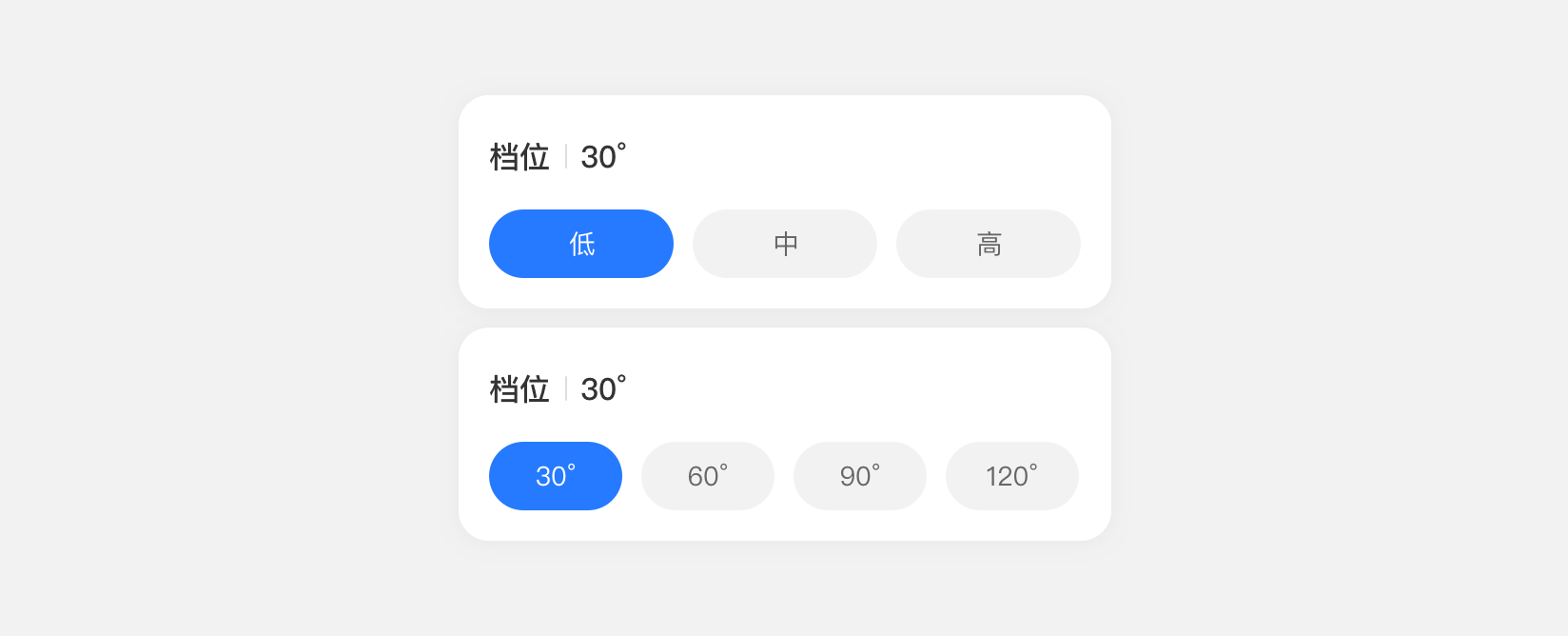
当设备只需进行分段档位/级别操作时,推荐使用本控件
#交互原则
数值或程度可分段;数值变化精度相对较低;仅支持单选,不可同时多选项操作
#基础样式
![img]()
![img]()
#基础用法
<template>
  <div class="page">
    <dof-minibar
      :left-button="leftButton"
      title="卡片-按钮"
      text-color="#ffffff"
      background-color="rgba(38,122,255,1)"
      @dofMinibarLeftButtonClicked="back"
    ></dof-minibar>
    <scroller class="content">
      <dof-board title="示例">
        <dof-row class="m-b-10">
          <dof-col>
            <dof-card>
              <div class="f-r f-a-c">
                <text class="c-333 f-s-32 txt-med f-w-500 m-r-6">档位</text>
                <text class="f-s-32 txt c-ddd">|</text>
                <text class="f-s-32 txt-med f-w-500 c-333 m-l-6">{{ temp1 }}</text>
              </div>
              <div class="a-flex">
                <text class="a-item" :class="[value1 == 0 ? 'active' : '']" @click="value1 = 0">低</text>
                <text class="a-item" :class="[value1 == 1 ? 'active' : '']" @click="value1 = 1">中</text>
                <text class="a-item" :class="[value1 == 2 ? 'active' : '']" @click="value1 = 2">高</text>
              </div>
            </dof-card>
          </dof-col>
        </dof-row>
        <div style="height: 20px;"></div>
        <dof-row class="m-b-10">
          <dof-col>
            <dof-card>
              <div class="f-r f-a-c">
                <text class="c-333 f-s-32 txt-med f-w-500 m-r-6">档位</text>
                <text class="f-s-32 txt c-ddd">|</text>
                <text class="f-s-32 txt-med f-w-500 c-333 m-l-6">{{ temp2 }}°</text>
              </div>
              <div class="a-flex">
                <text class="a-item" :class="[value2 == 0 ? 'active' : '']" @click="selectHandle(0, 30)">30°</text>
                <text class="a-item" :class="[value2 == 1 ? 'active' : '']" @click="selectHandle(1, 60)">60°</text>
                <text class="a-item" :class="[value2 == 2 ? 'active' : '']" @click="selectHandle(2, 90)">90°</text>
                <text class="a-item" :class="[value2 == 3 ? 'active' : '']" @click="selectHandle(3, 120)">120°</text>
              </div>
            </dof-card>
          </dof-col>
        </dof-row>
      </dof-board>
    </scroller>
  </div>
</template>
<script>
import { DofRow, DofCol, DofCard, DofMinibar, DofBoard } from 'dolphin-weex-ui'

export default {
  components: {
    DofMinibar,
    DofRow,
    DofCol,
    DofCard,
    DofBoard
  },
  computed: {
    temp1() {
      return this.value1 == 0 ? '低' : this.value1 == 1 ? '中' : '高'
    }
  },
  data() {
    return {
      value1: 0,
      value2: 0,
      temp2: 30
    }
  },
  methods: {
    selectHandle(value, temp) {
      this.value2 = value
      this.temp2 = temp
    }
  }
}
</script>

<style scoped>
.page {
  background-color: #f9f9f9;
}
.a-flex {
  display: flex;
  flex-direction: row;
  margin-top: 40px;
}
.a-item {
  flex: 1;
  height: 72px;
  background-color: #f2f2f2;
  border-radius: 36px;
  margin-right: 10px;
  font-size: 28px;
  line-height: 72px;
  text-align: center;
}
.active {
  color: #ffffff;
  background-color: #267aff;
}
.safe {
  padding-top: 88px;
}

.scroller {
  flex: 1;
}

.placeholder {
  height: 100px;
}

.caption {
  flex-direction: row;
  align-items: center;
}

.caption-title {
  flex: 1;
  font-family: PingFangSC-Regular;
  font-size: 12px;
  color: #666666;
  text-align: center;
  font-weight: 400;
  text-align: left;
}

.caption-desc {
  font-family: PingFangSC-Regular;
  font-size: 12px;
  color: #8a8a8f;
  letter-spacing: 0;
  text-align: right;
  font-weight: 400;
}

.caption-arrow {
  width: 16px;
  height: 16px;
  margin-left: 4px;
}

.caption-o {
  margin-bottom: 16px;
  flex-direction: row;
  align-items: center;
}

.caption-o-title {
  flex: 1;
  font-family: PingFangSC-Semibold;
  font-size: 18px;
  color: #333333;
  letter-spacing: 0;
  font-weight: 600;
}

.caption-o-desc {
  font-family: PingFangSC-Regular;
  font-size: 14px;
  color: #8a8a8f;
  letter-spacing: 0;
  text-align: right;
  font-weight: 400;
}

.f-r {
  flex-direction: row;
}

.f-a-c {
  align-items: center;
}

.f-a-s {
  align-items: flex-start;
}

.f-a-e {
  align-items: flex-end;
}

.f-j-s {
  justify-content: flex-start;
}

.f-j-c {
  justify-content: center;
}

.f-j-e {
  justify-content: flex-end;
}

.f-1 {
  flex: 1;
}
.m-l-n-16 {
  margin-left: -16px;
}

.m-r-n-16 {
  margin-right: -16px;
}

.m-l-6 {
  margin-left: 6px;
}

.m-r-6 {
  margin-right: 6px;
}

.m-r-4 {
  margin-right: 4px;
}

.m-r-15 {
  margin-right: 15px;
}

.m-b-1 {
  margin-bottom: 1px;
}

.m-b-2 {
  margin-bottom: 2px;
}

.m-b-3 {
  margin-bottom: 3px;
}

.m-b-4 {
  margin-bottom: 4px;
}

.m-b-5 {
  margin-bottom: 5px;
}

.m-b-6 {
  margin-bottom: 6px;
}

.m-b-8 {
  margin-bottom: 8px;
}

.m-b-10 {
  margin-bottom: 10px;
}

.m-b-12 {
  margin-bottom: 12px;
}

.m-b-16 {
  margin-bottom: 16px;
}

.m-b-20 {
  margin-bottom: 20px;
}

.m-b-25 {
  margin-bottom: 25px;
}

.m-b-30 {
  margin-bottom: 30px;
}

.m-b-32 {
  margin-bottom: 32px;
}

.m-t-8 {
  margin-top: 8px;
}

.m-t-12 {
  margin-top: 12px;
}

.m-t-20 {
  margin-top: 20px;
}

.p-b-3 {
  padding-bottom: 3px;
}

.h-76 {
  height: 76px;
}

.h-84 {
  height: 84px;
}

.h-90 {
  height: 90px;
}

.h-108 {
  height: 108px;
}

.h-147 {
  height: 147px;
}

.sz-32 {
  width: 32px;
  height: 32px;
}

.sz-48 {
  width: 48px;
  height: 48px;
}

.p-l-16 {
  padding-left: 16px;
}

.p-r-16 {
  padding-right: 16px;
}

.p-hor-16 {
  padding-left: 16px;
  padding-right: 16px;
}

.txt-med {
  font-family: PingFangSC-Medium;
}

.txt {
  font-family: PingFangSC-Regular;
}

.txt-bold {
  font-family: DINAlternate-Bold;
}

.c-000 {
  color: #000000;
}

.c-333 {
  color: #333333;
}

.c-666 {
  color: #666666;
}

.c-8a {
  color: #8a8a8f;
}

.c-ddd {
  color: #dddddd;
}

.f-s-10 {
  font-size: 10px;
}

.f-s-12 {
  font-size: 12px;
}

.f-s-16 {
  font-size: 16px;
}

.f-s-22 {
  font-size: 22px;
}

.f-s-32 {
  font-size: 32px;
}

.f-s-36 {
  font-size: 36px;
}

.f-s-72 {
  font-size: 72px;
}

.f-w-400 {
  font-weight: 400;
}

.f-w-500 {
  font-weight: 500;
}

.f-w-700 {
  font-weight: 700;
}

.b-r {
  border-right-color: #f2f2f2;
  border-right-style: solid;
  border-right-width: 1px;
}

.b-b {
  border-bottom-color: #f2f2f2;
  border-bottom-style: solid;
  border-bottom-width: 1px;
}

.btn {
  background-color: rgba(38, 122, 255, 0.1);
  border-radius: 12px;
  width: 64px;
  height: 24px;
  align-items: center;
  justify-content: center;
}

.btn-text {
  font-family: PingFangSC-Medium;
  font-size: 12px;
  color: #267aff;
  text-align: right;
  font-weight: 500;
}
.press-btn:active {
  background-color: #f2f2f2;
}
</style>
#Api
#Props
| Prop |
Type |
Required |
Default |
Description |
| collapsable |
Boolean |
N |
false |
是否可折叠 |
| collapsed |
Boolean |
N |
false |
是否折叠 |
| selectable |
Boolean |
N |
false |
是否可选择 |
| selected (v-model) |
Boolean |
N |
false |
是否选中 |
| tag |
String |
N |
right |
选中时,展示的图标的位置 |
| value |
`String |
Number` |
N |
`` |
#Events
| 事件名 |
说明 |
回调参数 |
select |
可选择时,点击时触发 |
e :Boolean |
collaspe |
可折叠式,点击折叠图标时触发 |
e: Boolean |
#Slots
| 插槽名 |
说明 |
| default |
卡片内容 |
| body |
卡片可折叠时, 卡的下拉内容 |
#DofCardItem
#Slots
#DofCardGroup
#Props
| Prop |
Type |
Required |
Default |
Description |
| value(v-model) |
`String |
Number` |
Y |
- |
#Events
| 事件名 |
说明 |
回调参数 |
change |
card 组件选中时触发 |
e :`String |
#Slots



 浙公网安备 33010602011771号