
搜索框(Search box)
4.9 搜索框(Search box)
用于页面的加载中状态。
#基本样式
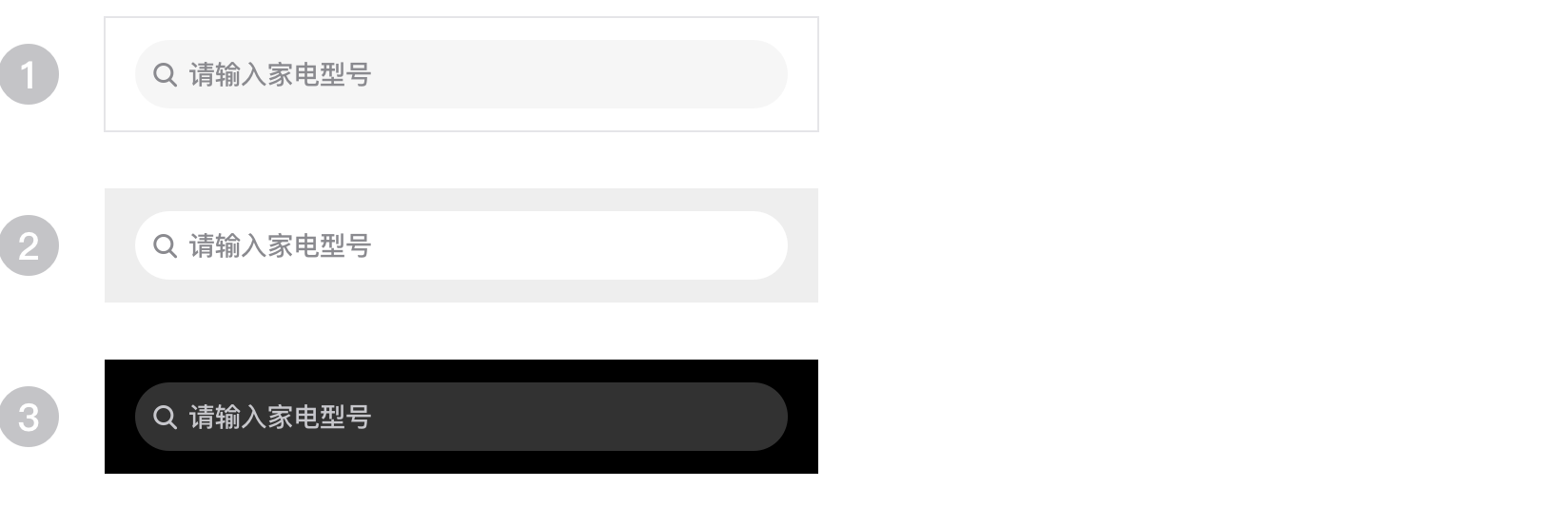
搜索框主要样式为如下基本样式中的 3 个:
#使用方法
1、当全局背景为白色时,搜索框输入为浅灰色,如基本样式 1 ;
2、当背景为灰色,搜索输入框则使用白色#ffffff,效果如基本样式 2 ;
3、当背景为黑色时,搜索输入框则使用白色# ffffff 透明度20%,效果如基本样式 3 ;
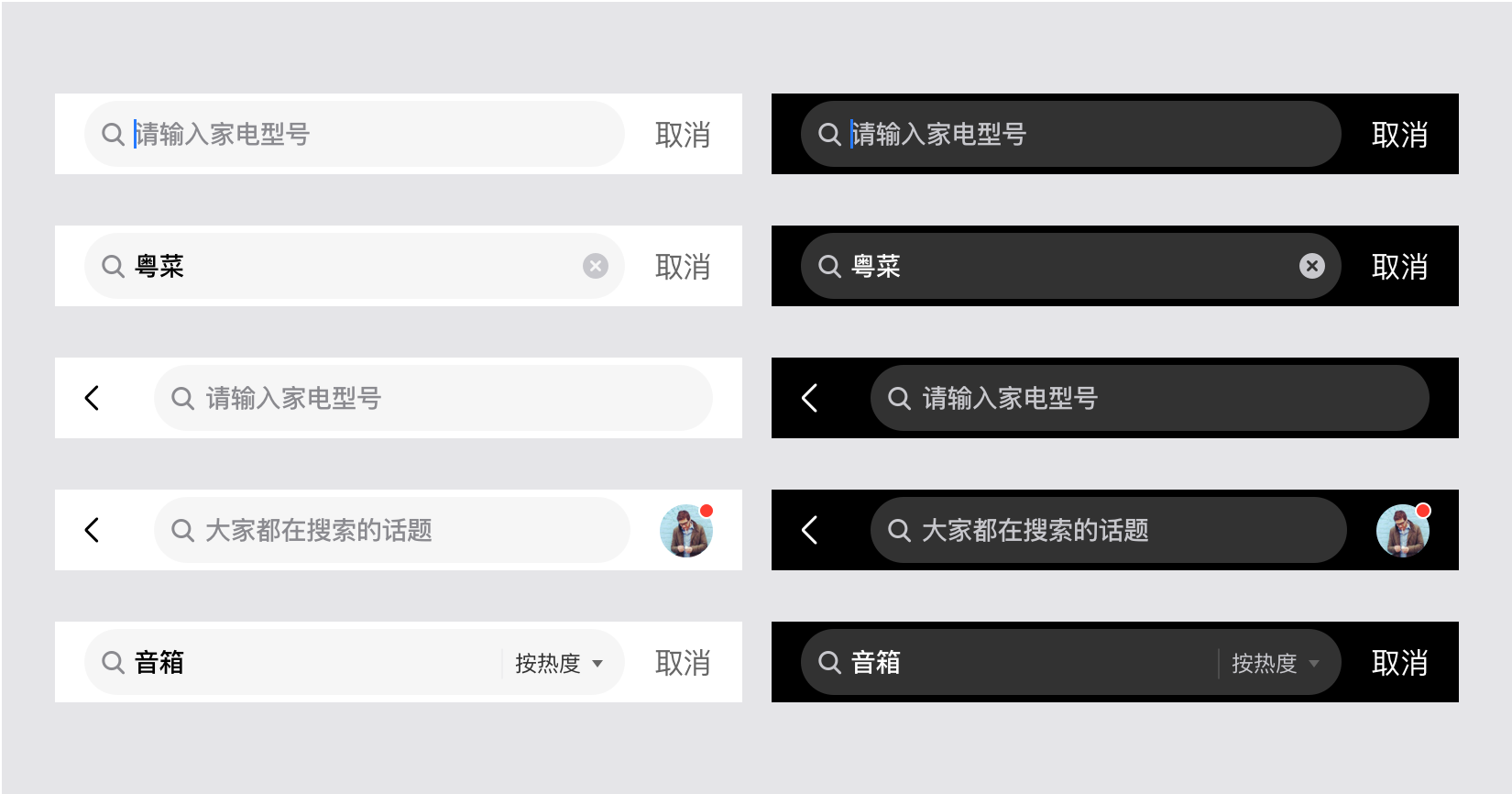
#拓展样式
#dof-search-bar 组件
搜索栏组件
- 一般可位于 NavBar 下方
- 支持更改主题色,设置内容,一键清空等功能
- 支持带下拉选项形式的搜索
#实例
#基础用法
<template>
  <div class="dof-demo">
    <div class="wrapper">
        <title title="dof-searchbar"></title>
        <category title="使用案例"></category>
    </div>
      <text class="describeText" @click="setValue">点我可设置输入框内容</text>
      <text class="describeText">输入的内容是:{{value}}</text>
      <div class="demo">
        <text class="describeText">theme="white"</text>
        <dof-searchbar ref="dof-searchbar"
                       placeholder="请输入家电型号"
                       right-label="取消"
                       @dofSearchbarRightClicked="dofSearchbarRightClicked"
                       @dofSearchbarInputReturned="dofSearchbarInputReturned"
                       @dofSearchbarInputOnInput="dofSearchbarInputOnInput"
                       @dofSearchbarClearClicked="dofSearchbarClearClicked"
                       @dofSearchbarInputOnFocus="dofSearchbarInputOnFocus"
                       @dofSearchbarInputOnBlur="dofSearchbarInputOnBlur"></dof-searchbar>
      </div>
      <div class="demo">
        <dof-searchbar placeholder="请输入家电型号"
                       theme="gray"
                       right-label="取消"
                       @dofSearchbarRightClicked="dofSearchbarRightClicked"
                       @dofSearchbarInputReturned="dofSearchbarInputReturned"
                       @dofSearchbarClearClicked="dofSearchbarClearClicked"
                       @dofSearchbarInputOnFocus="dofSearchbarInputOnFocus"
                       @dofSearchbarInputOnBlur="dofSearchbarInputOnBlur">
        </dof-searchbar>
      </div>
      <div class="demo">
        <dof-searchbar placeholder="请输入家电型号"
                       theme="black"
                       @dofSearchbarRightClicked="dofSearchbarRightClicked"
                       @dofSearchbarInputReturned="dofSearchbarInputReturned"
                       @dofSearchbarClearClicked="dofSearchbarClearClicked"
                       @dofSearchbarInputOnFocus="dofSearchbarInputOnFocus"
                       @dofSearchbarInputOnBlur="dofSearchbarInputOnBlur">
        </dof-searchbar>
      </div>

      <text class="describeText">取消按钮常驻,同时theme="white"</text>
      <div class="demo">
        <dof-searchbar placeholder="请输入家电型号"
                       show-right-content=true
                       right-label="取消"
                       @dofSearchbarRightClicked="dofSearchbarRightClicked"
                       @dofSearchbarInputReturned="dofSearchbarInputReturned"
                       @dofSearchbarClearClicked="dofSearchbarClearClicked"
                       @dofSearchbarInputOnFocus="dofSearchbarInputOnFocus"
                       @dofSearchbarInputOnBlur="dofSearchbarInputOnBlur">
        </dof-searchbar>
      </div>
      <div class="demo">
        <dof-searchbar placeholder="请输入家电型号"
                       show-right-content=true
                       right-label="搜索"
                       @dofSearchbarRightClicked="dofSearchbarRightClicked"
                       @dofSearchbarInputReturned="dofSearchbarInputReturned"
                       @dofSearchbarClearClicked="dofSearchbarClearClicked"
                       @dofSearchbarInputOnFocus="dofSearchbarInputOnFocus"
                       @dofSearchbarInputOnBlur="dofSearchbarInputOnBlur">
        </dof-searchbar>
      </div>

      <text class="describeText">带有backArrow,同时theme="white"</text>
      <div class="demo">
        <dof-searchbar placeholder="请输入家电型号"
                       theme="white"
                       back-arrow=true
                       @dofBackArrowClicked="dofBackArrowClicked"
                       @dofSearchbarRightClicked="dofSearchbarRightClicked"
                       @dofSearchbarInputReturned="dofSearchbarInputReturned"
                       @dofSearchbarClearClicked="dofSearchbarClearClicked"
                       @dofSearchbarInputOnFocus="dofSearchbarInputOnFocus"
                       @dofSearchbarInputOnBlur="dofSearchbarInputOnBlur">
        </dof-searchbar>
      </div>

      <text class="describeText">带有backArrow,右侧按钮常驻,同时theme="white"</text>
      <div class="demo">
        <dof-searchbar placeholder="请输入家电型号"
                       theme="white"
                       back-arrow=true
                       show-right-content=true
                       right-label="搜索"
                       @dofBackArrowClicked="dofBackArrowClicked"
                       @dofSearchbarRightClicked="dofSearchbarRightClicked"
                       @dofSearchbarInputReturned="dofSearchbarInputReturned"
                       @dofSearchbarClearClicked="dofSearchbarClearClicked"
                       @dofSearchbarInputOnFocus="dofSearchbarInputOnFocus"
                       @dofSearchbarInputOnBlur="dofSearchbarInputOnBlur">
        </dof-searchbar>
      </div>
      <text class="describeText">带有backArrow,右侧按钮常驻,同时theme="black"</text>
      <div class="demo">
        <dof-searchbar placeholder="请输入家电型号"
                       theme="black"
                       back-arrow=true
                       show-right-content=true
                       right-label="搜索"
                       @dofBackArrowClicked="dofBackArrowClicked"
                       @dofSearchbarRightClicked="dofSearchbarRightClicked"
                       @dofSearchbarInputReturned="dofSearchbarInputReturned"
                       @dofSearchbarClearClicked="dofSearchbarClearClicked"
                       @dofSearchbarInputOnFocus="dofSearchbarInputOnFocus"
                       @dofSearchbarInputOnBlur="dofSearchbarInputOnBlur">
        </dof-searchbar>
      </div>

      <text class="describeText">带有backArrow,右侧插槽自定义,同时theme="black"</text>
      <div class="demo">
        <dof-searchbar placeholder="大家都在搜索的话题"
                       theme="white"
                       back-arrow=true
                       show-right-content=true
                       right-label="搜索"
                       @dofBackArrowClicked="dofBackArrowClicked"
                       @dofSearchbarRightClicked="dofSearchbarRightClicked"
                       @dofSearchbarInputReturned="dofSearchbarInputReturned"
                       @dofSearchbarClearClicked="dofSearchbarClearClicked"
                       @dofSearchbarInputOnFocus="dofSearchbarInputOnFocus"
                       @dofSearchbarInputOnBlur="dofSearchbarInputOnBlur">
                       <div class="rightContent" slot="rightContent">
                          <image class="right-arrow"
                                  :aria-hidden="true"
                                  @click="avatarClicked"
                                  :src="avatar">
                          </image>
                       </div>
        </dof-searchbar>
      </div>

      <text class="describeText">带有下拉选项的输入框、theme="white"</text>
      <div class="demo">
        <dof-searchbar mod="hasSelect"
                      placeholder="搜索产品"
                      theme="white"
                      show-right-content=true
                      right-label="搜索"
                      :list="list"
                      :selected-text="selectedText"
                      @dofSearchbarInputDisabledClicked="dofSearchbarInputDisabledClicked"
                      @dofSearchbarRightClicked="dofSearchbarRightClicked"
                      @dofSelectItemClicked="dofSelectItemClicked">
        </dof-searchbar>
      </div>

      <div class="demo">
        <dof-searchbar mod="hasSelect"
                      placeholder="搜索产品"
                      theme="gray"
                      show-right-content=true
                      right-label="搜索"
                      :list="list"
                      :selected-text="selectedText"
                      @dofSearchbarInputDisabledClicked="dofSearchbarInputDisabledClicked"
                      @dofSelectItemClicked="dofSelectItemClicked">
        </dof-searchbar>
      </div>


      <div class="demo">
        <dof-searchbar mod="hasSelect"
                      placeholder="搜索产品"
                      theme="black"
                      show-right-content=true
                      right-label="搜索"
                      :list="list"
                      :selected-text="selectedText"
                      @dofSearchbarInputDisabledClicked="dofSearchbarInputDisabledClicked"
                      @dofSearchbarRightClicked="dofSearchbarRightClicked"
                      @dofSelectItemClicked="dofSelectItemClicked">
        </dof-searchbar>
      </div>
  </div>
</template>

<style scoped>
.dof-demo {
    position: absolute;
    top: 0;
    bottom: 0;
    left: 0;
    right: 0;
    background-color: #F6F9F8;
  }
  .scroller {
    flex: 1;
    padding-bottom: 300px;
  }

  .demo {
    margin-top: 20px;
    margin-bottom: 20px;
  }

  .describeText{
    margin-left: 32px;
    font-size: 24px;
    color: #333333;
  }

  .rightContent{
    position: absolute;
    right: 32px;
    border-radius: 32px;
  }

  .right-arrow{
    width: 64px;
    height: 64px;
    border-radius: 32px;
  }
</style>

<script>
const modal = weex.requireModule('modal');
import { DofSearchbar } from 'dolphin-weex-ui'

export default {
  components: { DofSearchbar },
  data: () => ({
    value: '',
    list:['按热度','按销量','按价格'],
    selectedText:'按热度',
    avatar:'http://dolphin-weex-dev.msmartlife.cn/cdn/images/funs/ico_sleeping@3x.png'
  }),
  methods: {
    setValue () {
      this.$refs['dof-searchbar'].setValue('点击了手动设置输入框内容的开关');
    },

    dofSearchbarInputOnFocus () {
      modal.toast({ 'message': 'onfocus', 'duration': 1 });
    },
    dofSearchbarInputOnBlur () {
      modal.toast({ 'message': 'onbulr', 'duration': 1 });
    },
    dofSearchbarClearClicked () {
      modal.toast({ 'message': 'clear.click', 'duration': 1 });
    },
    dofSearchbarInputOnInput (e) {
      this.value = e.value;
      modal.toast({ 'message': 'OnInput', 'duration': 1 });
    },
    dofSearchbarRightClicked () {
      modal.toast({ 'message': 'right.click', 'duration': 1 });
    },
    dofSearchbarInputDisabledClicked () {
      modal.toast({ 'message': 'inputDisbled.onclick', 'duration': 1 });
    },

    dofSearchbarInputReturned() {
      modal.toast({ 'message': 'dofSearchbarInputReturned', 'duration': 1 });
    },

    dofBackArrowClicked(){
      modal.toast({ 'message': 'dofBackArrowClicked', 'duration': 1 });
    },

    dofSelectItemClicked(e){
      modal.toast({ 'message': `dofSelectItemClicked,选择了 ${e.item}`, 'duration': 1 });
    },

    avatarClicked(){
      modal.toast({ 'message': 'dofBackArrowClicked', 'duration': 1 });
    }
  }
}
</script>
#Attributes
| Prop | Type | Required | Default | Description |
|---|---|---|---|---|
| mod | String |
Y |
default |
默认值为default, 有下拉框的可选择hasSelect |
| theme | String |
N |
white |
searchbar主题色white\gray\black |
| autofocus | Boolean |
N |
false |
input是否自动获得焦点 |
bar-style Object |
N |
{} |
searchbar样式配置 | |
| default-value | String |
N |
- |
searchbar input默认值 |
| placeholder | String |
N |
- |
searchbar input填充文本 |
| show-right-content | Boolean |
N |
false |
是否显示右侧的搜索按钮 |
| right-label | String |
N |
搜索 |
searchbar 右侧的文本文案内容, 长度限制两个汉字 其width=36pt |
| back-arrow | Boolean |
N |
false |
是否显示searchbar左侧的箭头 |
| list | Array |
N |
[] |
mod='hasSelect'时的下拉选项列表项集合 |
| selected-text | String |
N |
- |
mod='hasSelect'时默认选中项文本 |
| input-type | String |
N |
text |
input类型 text\password |
| return-key-type | String |
N |
defalut |
改变键盘返回键的类型,支持defalut\go\next\search\send\done |
| disabled | Boolean |
N |
false |
是否被禁用 |
#Events
| 事件名 | 说明 | 回调参数 |
|---|---|---|
dofSearchbarRightClicked |
搜索框右侧按钮点击事件 | event |
dofSearchbarInputReturned |
搜索框键盘换行事件 | event |
dofSearchbarInputOnInput |
搜索框输入时执行 | event |
dofSearchbarClearClicked |
搜索框清空事件 | event |
dofSearchbarInputOnFocus |
搜索框获取焦点事件 | event |
dofSearchbarInputOnBlur |
搜索框失焦事件 | event |
dofBackArrowClicked |
返回箭头点击事件 | event |
dofSelectItemClicked |
带有选择功能的下拉选择事件 | event |
dofSearchbarInputDisabledClicked |
禁用输入框后输入框的点击事件 | event |

 浙公网安备 33010602011771号