
步骤条(Progress bar)
4.7 步骤条(Progress bar)
多用于插件页日志图标中详细日志展示
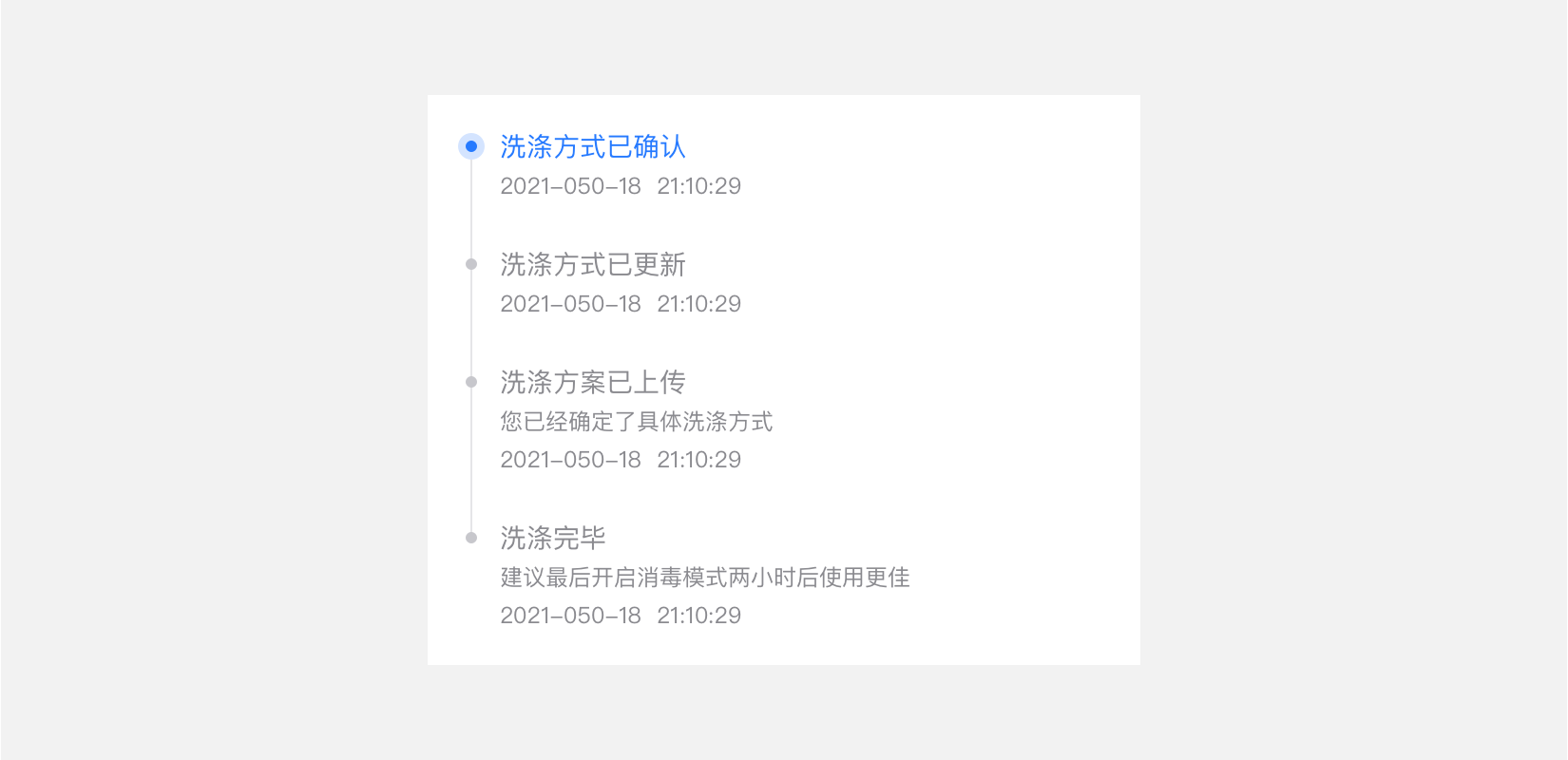
#含标题、描述、时间的流程图
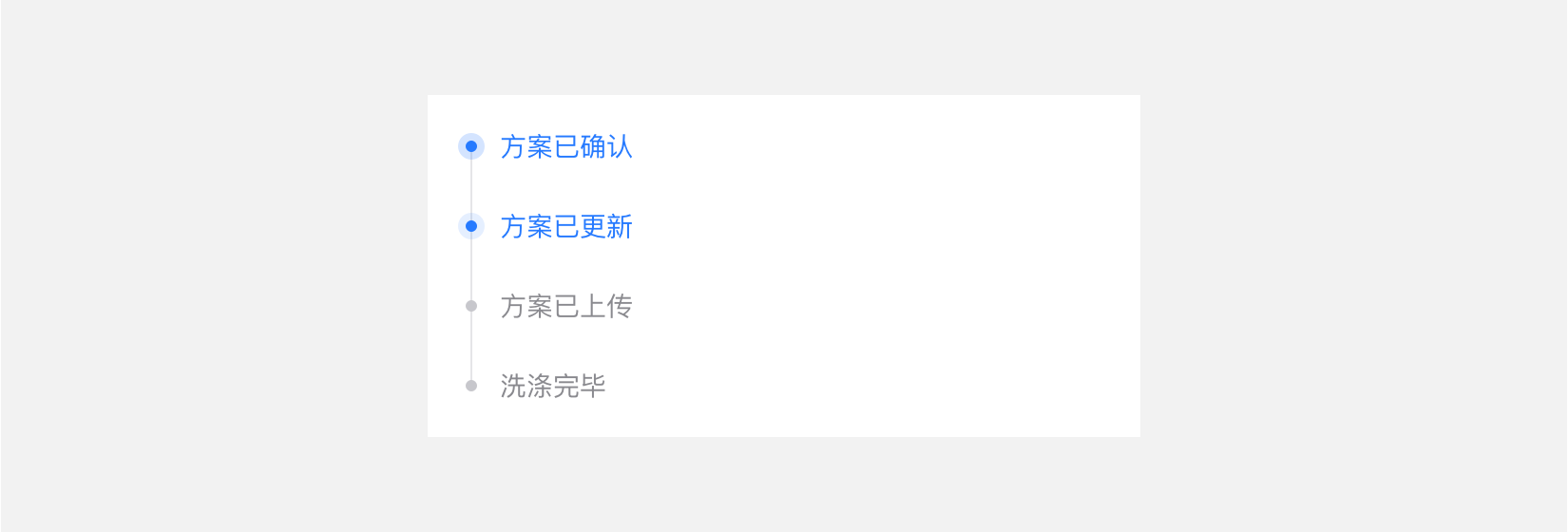
#可只显示标题,也支持多个高亮
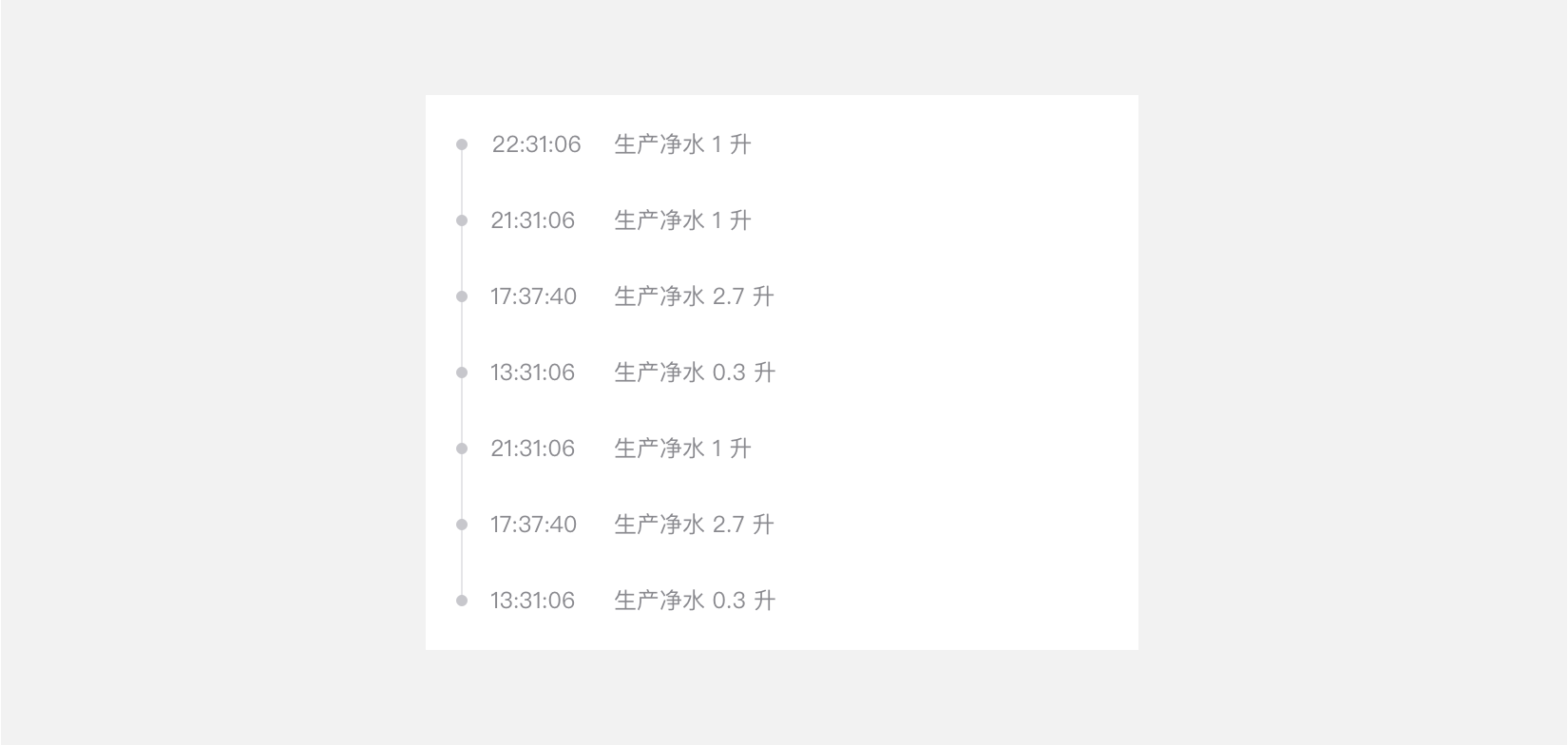
#可配置字体大小,背景色
#dof-simple-flow 组件
steps流程组件
- 可设置主题色,如高亮,字体颜色等
#实例
#基础用法
<template>
  <div class="dof-demo">
    <dof-minibar
      title="Simple flow"
      background-color="#0092d7"
      text-color="#ffffff"
      :isImage="true"
      :left-button="leftButton"
      @dofMinibarLeftButtonClicked="back"
    ></dof-minibar>
    <scroller class="scroller">
      <title title="dof-simple-flow"></title>
      <category title="使用案例"></category>
      <text class="title">含标题、描述、时间的简易流程图</text>
      <dof-simple-flow :list="testData1"></dof-simple-flow>

      <text class="title">可只显示标题,也支持显示多个高亮</text>
      <dof-simple-flow :list="testData2"></dof-simple-flow>

      <text class="title">可配置主题色</text>
      <dof-simple-flow :list="testData1" :flow-config="flowConfig"></dof-simple-flow>

      <text class="title">横向单行显示, 可配置字体大小,背景色</text>
      <div class="horizontalFlow">
       <dof-simple-flow :list="testData3" :flow-config="flowConfig1"></dof-simple-flow>
      </div>

      <text class="title">支持流程图动态更新</text>
      <dof-simple-flow :list="folding ? testData4 : testData4.slice(0, 4)"></dof-simple-flow>
      <div class="btnWrap">
        <dof-button :text="folding ? '模拟动态更新-减少' : '模拟动态更新-增加'" @dofButtonClicked="()=>folding=!folding"></dof-button>
      </div>
    </scroller>
  </div>
</template>

<style scoped>
.dof-demo {
  position: absolute;
  top: 0;
  bottom: 0;
  left: 0;
  right: 0;
  background-color: #ffffff;
}

.scroller {
  flex: 1;
}

.title {
  padding-top: 20px;
  padding-bottom: 20px;
  text-align: center;
  font-size: 26px;
  color: #333333;
  background-color: #eeeeee;
  font-weight: bold;
}
.btnWrap{
  flex-direction: row;
  justify-content: center;
  margin-top: 120px;
  margin-bottom: 120px;
}

.horizontalFlow{
  background-color: #f9f9f9;
}
</style>

<script>
import { DofSimpleFlow, DofMinibar, DofButton } from 'dolphin-weex-ui'
import Title from 'src/_mods/title.vue'
import Category from 'src/_mods/catalog'

export default {
  components: { Title, Category, DofSimpleFlow, DofMinibar, DofButton },
  data: () => ({
    leftButton: '/assets/image/header/back_white@2x.png',
    folding: false,
    flowConfig: {
      lineColor: '#00CBB8',
      pointInnerColor: '#00CBB8',
      highlightTitleColor: '#00CBB8',
      highlightPointInnerColor: '#00CBB8',
    },

    flowConfig1: {
      lineColor: '#E5E5E8',
      pointInnerColor: '#C7C7CC',
      highlightTitleColor: '#8A8A8F',
      highlightPointInnerColor: '#C7C7CC',
      titleSize:'24px'
    },
    testData1: [
      {
        'date': '2017-05-24 21:10:29',
        'highlight': true,
        'title': '洗涤方式已确认',
        'desc': ''
      },
      {
        'date': '2017-05-24 19:54:28',
        'title': '洗涤时间已更新',
        'desc': ''
      },
      {
        'date': '2017-05-24 19:50:21',
        'title': '洗涤方案已上传',
        'desc': '您已经确定了具体的方案'
      },
      {
        'date': '2017-05-24 19:49:03',
        'title': '洗涤完毕',
        'desc': '建议最后开启消毒模式两小时后使用更佳'
      }
    ],
    testData2: [
      {
        'highlight': true,
        'title': '方案已确认'
      },
      {
        'highlight': true,
        'title': '方案已更新'
      },
      {
        'title': '方案已上传'
      },
      {
        'title': '商家已接单'
      }
    ],

    testData3: [
      {
        'title': '22:31:06   加热 6 分钟,用电 0.3 度'
      },
      {
        'title': '21:31:06   加热 6 分钟,用电 0.3 度'
      },
      {
        'title': '17:37:40   加热 9 分钟,用电 0.7 度'
      },
      {
        'title': '13:31:06   加热 6 分钟,用电 0.3 度'
      },
      {
        'title': '21:31:06   加热 3 分钟,用电 0.4 度'
      },
      {
        'title': '21:10:29   加热 3 分钟,用电 0.4 度'
      }
    ],

    testData4: [
      {
        'date': '2017-05-24 21:10:43',
        'highlight': true,
        'title': '预付款已支付',
        'desc': ''
      },
      {
        'date': '2017-05-24 21:10:43',
        'title': '预付款已支付',
        'desc': ''
      },
      {
        'date': '2017-05-24 21:10:41',
        'title': '订单待付款',
        'desc': ''
      },
      {
        'date': '2017-05-24 21:10:29',
        'title': '方案已确认',
        'desc': '',
      },
      {
        'date': '2017-05-24 19:54:28',
        'title': '方案已更新',
        'desc': ''
      },
      {
        'date': '2017-05-24 19:50:21',
        'title': '方案已上传',
        'desc': '您以确定了方案'
      },
      {
        'date': '2017-05-24 19:49:03',
        'title': '订单配送中',
        'desc': '配送员会在30分钟内电话或联系您,配送员会在30分钟内电话或联系您,配送员正在赶来的路上。'
      }
    ]
  }),

  methods: {}
}
</script>
#Attributes
| Prop | Type | Required | Default | Description |
|---|---|---|---|---|
| list | Array |
Y |
- |
simple-flow组件内容, 见注1 |
| flow-config | Object |
N |
{} |
主题色,参照data中flowConfig对象,见注2 |
| leftContent | Boolean |
N |
false |
步骤条左边是否自定义内容 |
| leftContentStyle | Object |
N |
{} |
步骤条左边自定义内容样式对象 |
#Slots
| 名称 | 说明 |
|---|---|
| leftContent | 步骤条左边自定义内容 |
注1: list
| Prop | Type | Required | Default | Description |
|---|---|---|---|---|
| title | String |
Y |
- |
标题 |
| desc | String |
N |
- |
描述 |
| date | String |
N |
- |
日期 |
| highlight | Boolean |
N |
false |
是否高亮当前项 |
| leftContentDate | String |
N |
'' | 步骤条左边默认slot的内容-日期 |
注2: flow-config
| Prop | Type | Required | Default | Description |
|---|---|---|---|---|
| lineColor | String |
N |
#267AFF |
时间轴颜色 |
| titleSize | String |
N |
28px |
标题字体大小 |
| highlightTitleColor | String |
N |
#267AFF |
高亮标题颜色 |
| pointInnerColor | String |
N |
#267AFF |
时间节点Point颜色 |
| highlightPointInnerColor | String |
N |
#267AFF |
高亮时间节点Point颜色 |
#Attention
可动态修改 dof-simple-flow list属性的绑定对象,以改变其流程和状态

 浙公网安备 33010602011771号