

按钮(Button)
4.1 按钮(Button)
指导用户采取你希望他们采取的行动。
#按钮尺寸
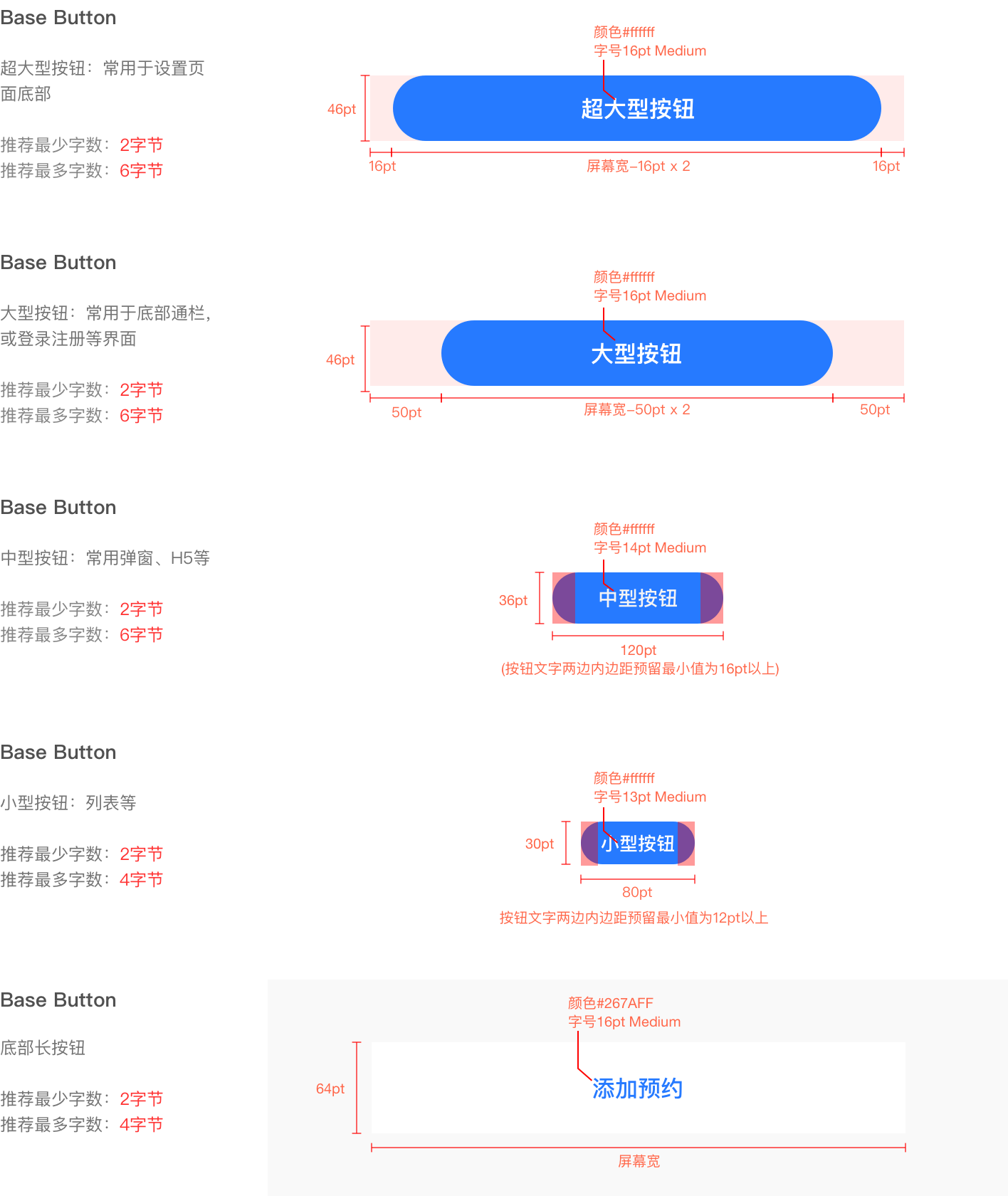
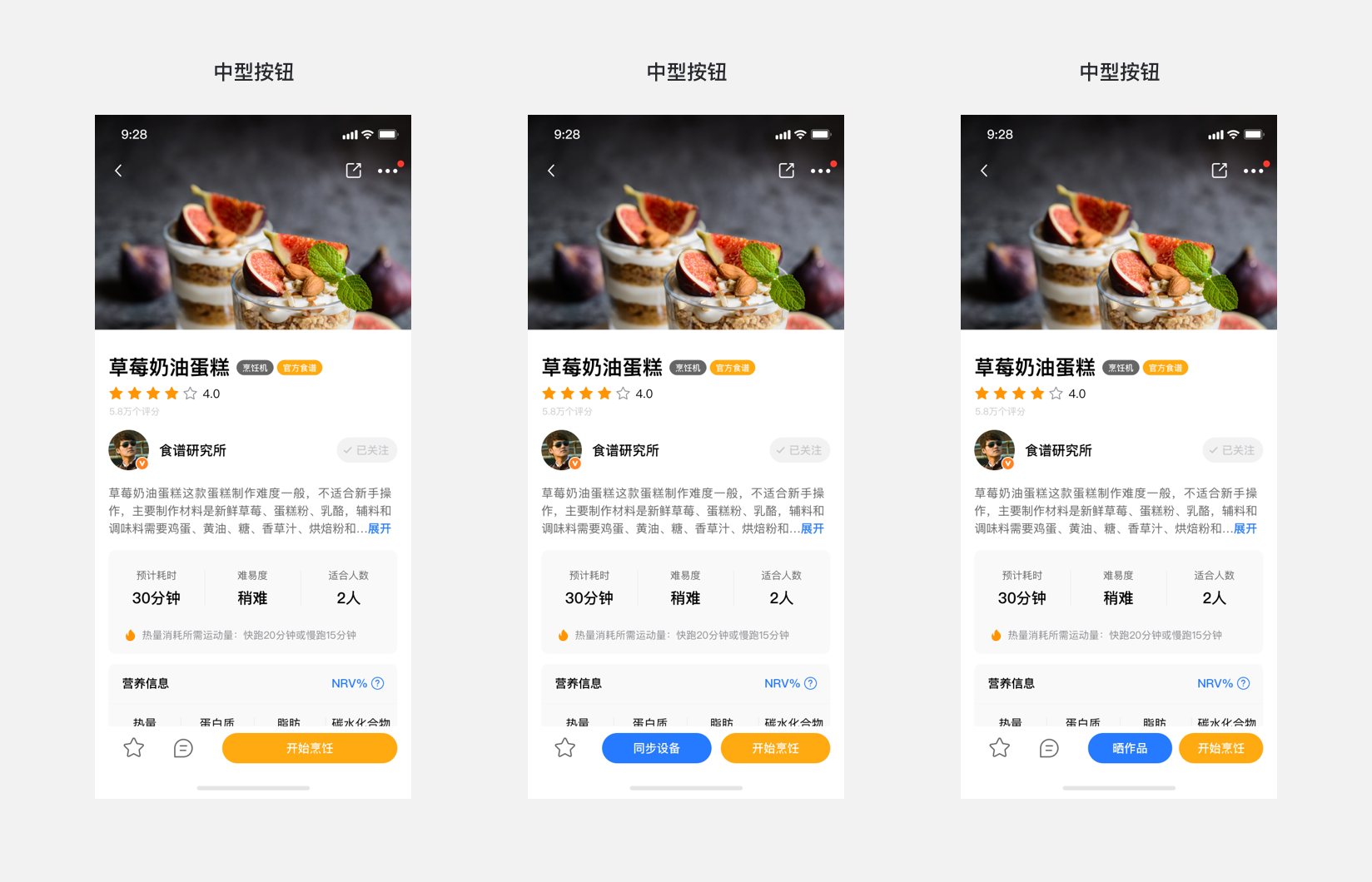
新版规范中按钮将使用圆角设计,提供四种为常用的尺寸大小参考,特殊情况下可按具体实际场景进行宽度定义。
#按钮状态
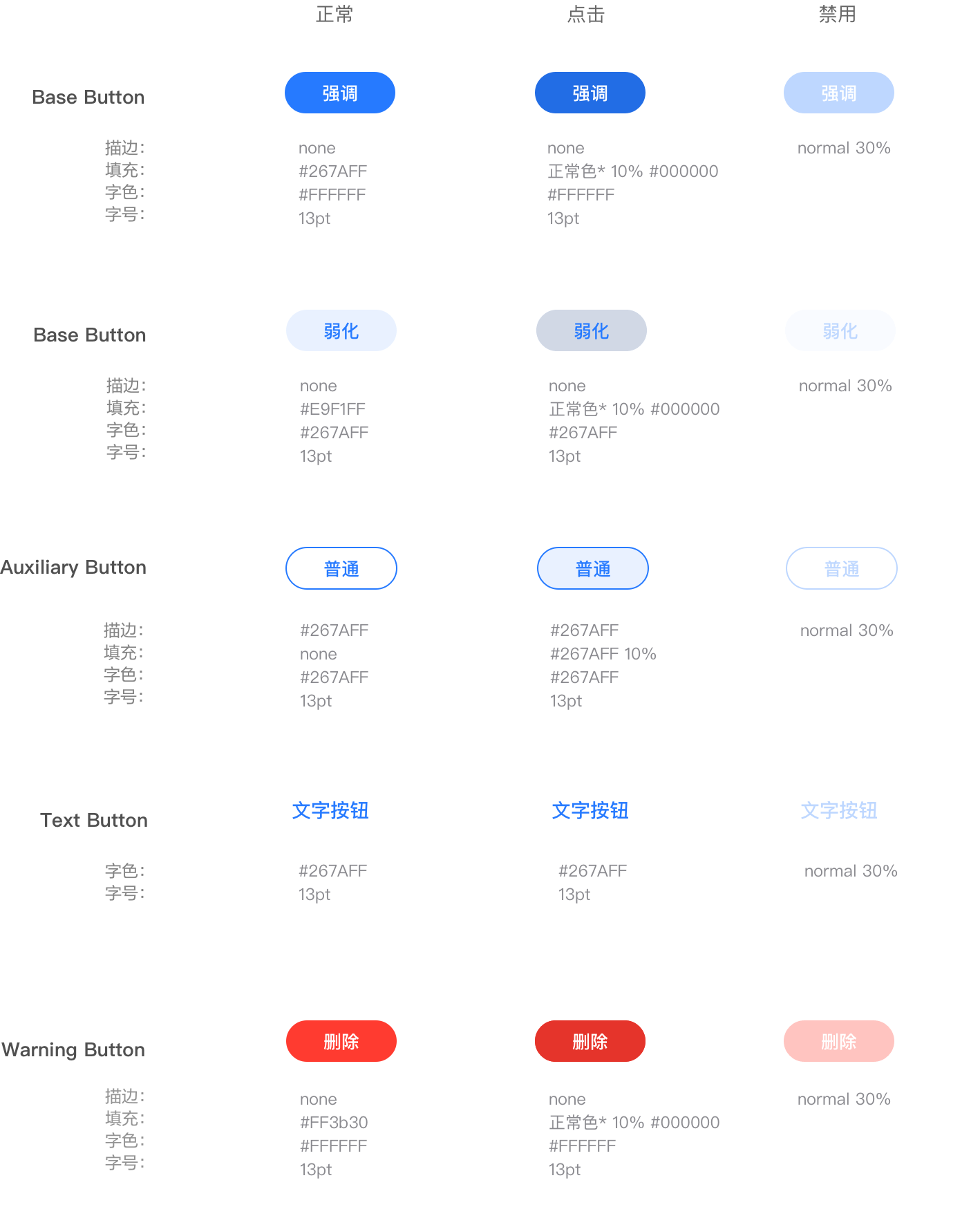
按钮样式分为正常、点击、禁用状态三种:
默认状态:按钮处于可点击时的状态
点击状态:按钮点击时的反馈状态(所有点击状态底色均为正常效果下叠加黑色10%)
禁用状态:当条件不足时,点击无反馈,不执行任何指令
#按钮颜色(用与插件页其他辅助色时)
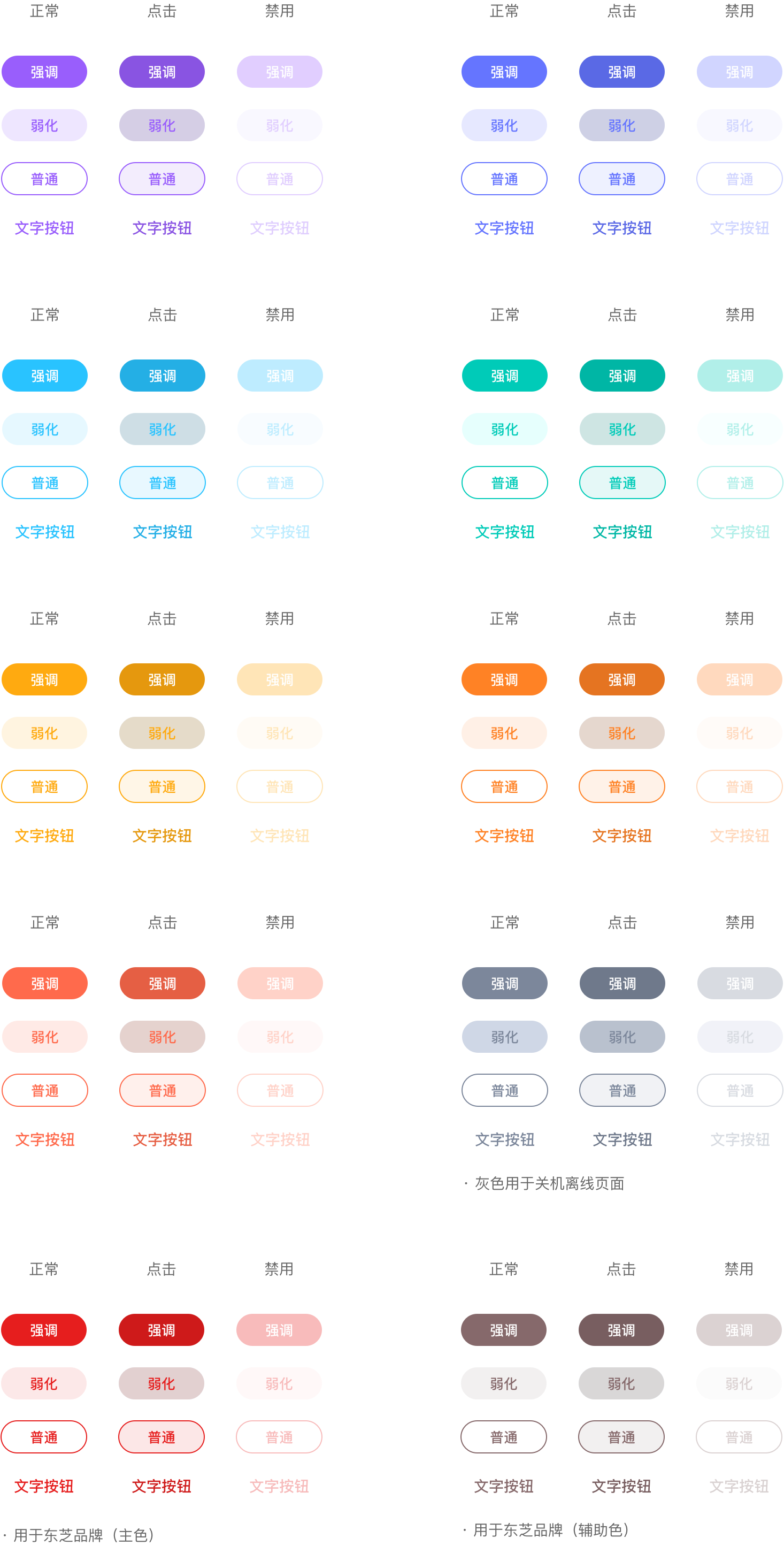
颜色样式参照上方颜色状态,如遇到插件页特殊使用场景时,按钮根据需要可使用插件页本身主色,如下方规范辅助色
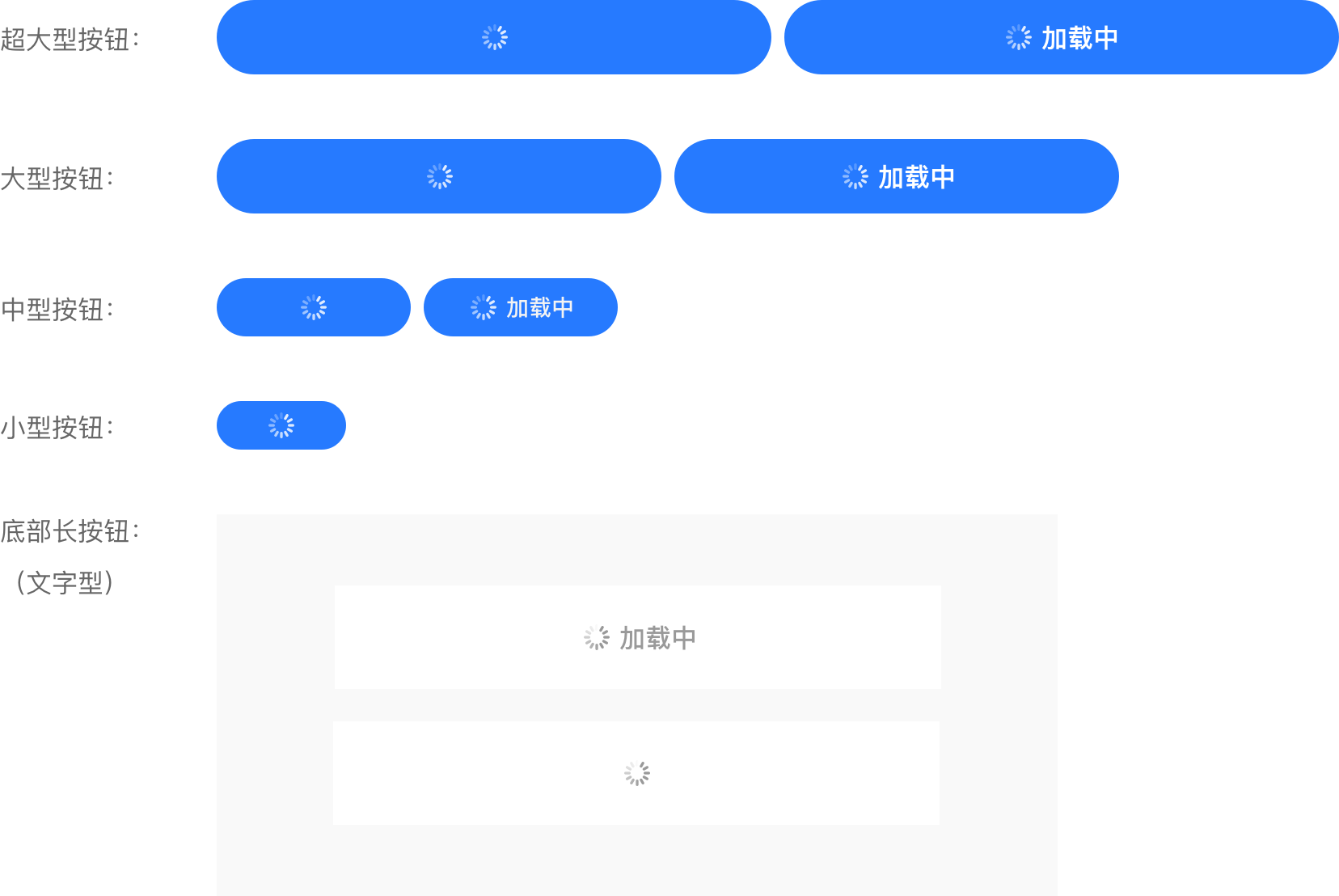
#按钮中加载样式
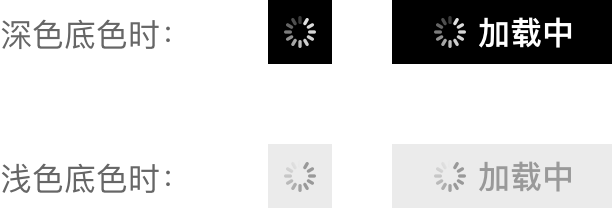
一般用于异步操作等待反馈的时候,根据具体需求选择使用。点击按钮后进行数据加载,在按钮上显示加载状态,加载时按钮点击无反馈且不执行任何指令,避免数据多次提交。
#1、基础样式
分别白色和灰色两种加载样式,切图尺寸:18px * 18px
#2、不同颜色按钮中应用

#3、不同类型按钮中应用
#应用示例


#dof-button
按钮组件,支持 5 种基本类型 button,可自定义样式
#实例
#基础用法
<template>
  <div class="dof-demo">
    <dof-minibar
      title="Button"
      background-color="#267AFF"
      text-color="#ffffff"
      :left-button="leftButton"
      @dofMinibarLeftButtonClicked="back"
    >
    </dof-minibar>
    <scroller class="scroller">
      <dof-catalog title="基础样式" background-color="#daf9ca" :has-margin="true"></dof-catalog>
      <div class="button-list">
        <text class="button-text left-10">不同按钮尺寸</text>
        <div class="item-list-left">
          <dof-button type="primary" text="超大型按钮" size="full" @dofButtonClicked="dofButtonClicked"></dof-button>
        </div>
        <text class="button-text"></text>
        <div class="item-list-left">
          <dof-button type="primary" text="大型按钮" size="big" @dofButtonClicked="dofButtonClicked"></dof-button>
        </div>
        <text class="button-text"></text>
        <div class="item-list-left">
          <dof-button type="primary" text="中型按钮" size="medium" @dofButtonClicked="dofButtonClicked"></dof-button>
        </div>
        <text class="button-text"></text>
        <div class="item-list-left">
          <dof-button type="primary" text="小型按钮" size="small" @dofButtonClicked="dofButtonClicked"></dof-button>
        </div>
        <text class="button-text"></text>
        <dof-button type="gray" pattern="text" size="flexiable" text="文字按钮" @dofButtonClicked="dofButtonClicked">
        </dof-button>
        <text class="button-text left-10">不同按钮样式</text>
        <text class="button-text"></text>
        <div class="size">
          <dof-button size="small" type="primary" text="强调" @dofButtonClicked="dofButtonClicked"></dof-button>
          <dof-button size="small" pattern="base" text="弱化" @dofButtonClicked="dofButtonClicked"></dof-button>
          <dof-button size="small" pattern="plain" text="普通" @dofButtonClicked="dofButtonClicked"></dof-button>
          <dof-button size="small" type="red" text="强调" @dofButtonClicked="dofButtonClicked"></dof-button>
        </div>
        <text class="button-text"></text>
        <div style="padding-left: 10px;">
          <dof-button type="gray" pattern="text" size="small" text="文字按钮" @dofButtonClicked="dofButtonClicked">
          </dof-button>
        </div>
      </div>
      <dof-catalog title="按钮状态" background-color="#daf9ca" :has-margin="true"></dof-catalog>
      <div class="button-list">
        <div class="item-list">
          <dof-button type="primary" text="按钮-正常" @dofButtonClicked="dofButtonClicked"></dof-button>
        </div>
        <div class="item-list">
          <dof-button type="primary" text="按钮-点击" @dofButtonClicked="dofButtonClicked"></dof-button>
        </div>
        <div class="item-list">
          <dof-button
            type="primary"
            :disabled="true"
            text="按钮-禁用"
            @dofButtonClicked="dofButtonClicked"
          ></dof-button>
        </div>
      </div>
      <dof-catalog title="按钮颜色" background-color="#daf9ca" :has-margin="true"></dof-catalog>
      <text class="button-text"></text>
      <div class="button-list">
        <div class="size">
          <dof-button type="purple" size="medium" text="中型按钮" @dofButtonClicked="dofButtonClicked"></dof-button>
          <dof-button type="primary" size="medium" text="中型按钮" @dofButtonClicked="dofButtonClicked"></dof-button>
        </div>
      </div>
      <div class="button-list">
        <div class="size">
          <dof-button type="aqua" size="medium" text="中型按钮" @dofButtonClicked="dofButtonClicked"></dof-button>
          <dof-button type="turquoise" size="medium" text="中型按钮" @dofButtonClicked="dofButtonClicked"></dof-button>
        </div>
      </div>
      <div class="button-list">
        <div class="size">
          <dof-button type="yellow" size="medium" text="中型按钮" @dofButtonClicked="dofButtonClicked"></dof-button>
          <dof-button type="orange" size="medium" text="中型按钮" @dofButtonClicked="dofButtonClicked"></dof-button>
        </div>
      </div>
      <div class="button-list">
        <div class="size">
          <dof-button type="tomato" size="medium" text="中型按钮" @dofButtonClicked="dofButtonClicked"></dof-button>
          <dof-button type="gray" size="medium" text="中型按钮" @dofButtonClicked="dofButtonClicked"></dof-button>
        </div>
      </div>
      <text class="button-text" style="padding-left: 40px;margin-bottom: 30px;">用于东芝品牌</text>
      <div class="button-list">
        <div class="size">
          <dof-button type="red" size="medium" text="中型按钮" @dofButtonClicked="dofButtonClicked"></dof-button>
          <dof-button type="brown" size="medium" text="中型按钮" @dofButtonClicked="dofButtonClicked"></dof-button>
        </div>
      </div>

      <dof-catalog title="按钮中加载样式" background-color="#daf9ca" :has-margin="true"></dof-catalog>
      <div class="button-list">
        <div class="size loading_space">
          <div class="item-list">
            <dof-button type="primary" text="按钮" @dofButtonClicked="dofButtonClicked"></dof-button>
          </div>
          <div class="item-list">
            <dof-button type="primary" size="full" :loading="true" text="" @dofButtonClicked="dofButtonClicked">
            </dof-button>
          </div>
          <text class="button-text" style="font-size: 32px;color: #979797;">or</text>
          <div class="item-list">
            <dof-button type="primary" size="full" :loading="true" text="加载中" @dofButtonClicked="dofButtonClicked">
            </dof-button>
          </div>
        </div>
        <text class="button-text"></text>
        <div class="size loading_space">
          <div class="item-list">
            <dof-button pattern="base" text="按钮" @dofButtonClicked="dofButtonClicked"></dof-button>
          </div>
          <div class="item-list">
            <dof-button pattern="base" size="full" :loading="true" text="" @dofButtonClicked="dofButtonClicked">
            </dof-button>
          </div>
          <text class="button-text" style="font-size: 32px;color: #979797;">or</text>
          <div class="item-list">
            <dof-button
              pattern="base"
              size="full"
              :loading="true"
              text="加载中"
              :textStyle="{ color: '#999999' }"
              @dofButtonClicked="dofButtonClicked"
            >
            </dof-button>
          </div>
        </div>
      </div>

      <dof-catalog title="组合使用示例" background-color="#daf9ca" :has-margin="true"></dof-catalog>
      <div class="button-list">
        <div class="size">
          <dof-button pattern="base" size="medium" text="购买滤芯" @dofButtonClicked="dofButtonClicked"></dof-button>
          <dof-button type="primary" size="medium" text="查看教程" @dofButtonClicked="dofButtonClicked"></dof-button>
        </div>
      </div>
      <text class="button-text"></text>
      <div style="display: flex;flex-direction: row;align-items: center;justify-content: space-around;">
        <image :src="best_ic_collect_off" style="width: 52px;height: 52px;"></image>
        <image :src="cookbook_ic_comment24" style="width: 52px;height: 52px;"></image>
        <dof-button type="yellow" size="big" text="开始烹饪" @dofButtonClicked="dofButtonClicked"></dof-button>
      </div>
      <text class="button-text"></text>
      <div style="display: flex;flex-direction: row;align-items: center;justify-content: space-around;">
        <image :src="best_ic_collect_off" style="width: 52px;height: 52px;"></image>
        <dof-button type="primary" size="medium" text="同步设备" @dofButtonClicked="dofButtonClicked"></dof-button>
        <dof-button type="yellow" size="medium" text="开始烹饪" @dofButtonClicked="dofButtonClicked"></dof-button>
      </div>
      <text class="button-text"></text>
      <div style="display: flex;flex-direction: row;align-items: center;justify-content: space-around;">
        <image :src="best_ic_collect_off" style="width: 52px;height: 52px;"></image>
        <image :src="cookbook_ic_comment24" style="width: 52px;height: 52px;"></image>
        <dof-button type="primary" size="small" text="晒作品" @dofButtonClicked="dofButtonClicked"></dof-button>
        <dof-button type="yellow" size="small" text="开始烹饪" @dofButtonClicked="dofButtonClicked"></dof-button>
      </div>
      <div class="button-list"></div>
      <dof-catalog title="无障碍示例" background-color="#daf9ca" :has-margin="true"></dof-catalog>
      <div class="button-list">
        <div class="item-list-left">
          <dof-button type="primary" text="设置" size="full" @dofButtonClicked="dofButtonClicked"></dof-button>
        </div>
      </div>
    </scroller>
  </div>
</template>

<style scoped>
.right-img-wrapper {
  padding: 5px 0;
}

.dof-demo {
  position: absolute;
  top: 0;
  right: 0;
  left: 0;
  bottom: 0;
  background-color: #f9f9f9;
}

.button-list {
  padding-bottom: 30px;
}

.button-text {
  margin-top: 40px;
  margin-left: 8px;
  margin-bottom: 16px;
}

.item-list {
  padding: 10px 0;
  flex-direction: row;
  justify-content: center;
}

.item-list-left {
  padding: 10px 30px;
  flex-direction: row;
}

.scroller {
  flex: 1;
  padding-bottom: 80px;
}

.demo {
  align-items: center;
  margin-top: 40px;
  margin-bottom: 40px;
}

.input {
  width: 500px;
  text-align: right;
  font-size: 28px;
}

.size {
  flex-direction: row;
  justify-content: space-around;
}

.dark-wall {
  background-color: #f9f9f9;
  padding: 50px 0;
}

.button-size-text {
  margin-left: 24px;
  margin-bottom: 24px;
  margin-top: 40px;
}

.diy-demo {
  flex-direction: row;
  justify-content: space-around;
}

.loading_space {
  flex-direction: column;
  align-items: center;
}

.item_space {
  width: 750px;
  justify-content: space-around;
}

.left-10 {
  padding-left: 10px;
}
</style>

<script>
import { DofMinibar, DofIcon, Core, DofCatalog, DofButton } from 'dolphin-weex-ui'

export default {
  components: { DofButton, DofMinibar, DofIcon, Core, DofCatalog },
  data: () => ({
    leftButton: 'http://dolphin-weex-dev.msmartlife.cn/cdn/images/header/icon_back_white@3x.png',
    type: 'red',
    text: '按钮文字',
    width: '702px',
    height: '88px',
    disabled: false,
    backgroundColor: '#267aff',
    borderColor: '#267aff',
    borderRadius: '8px',
    fontSize: '36px',
    color: '#000000',
    btnLoginStyle: {
      width: '620px',
      height: '94px',
      // fontSize: '100px',//不起作用(bug)
      borderRadius: '94px',
      backgroundColor: '#008D92' // 3B444D
    },
    currentIndex: 0,
    best_ic_collect_off: 'http://dolphin-weex-dev.msmartlife.cn/cdn/images/common/best_ic_collect_off@2x.png',
    cookbook_ic_comment24: 'http://dolphin-weex-dev.msmartlife.cn/cdn/images/common/cookbook_ic_comment24@2x.png',
    steps: [
      {
        sn: 0,
        title: '一'
      },
      {
        sn: 1,
        title: '二'
      },
      {
        sn: 2,
        title: '三'
      }
    ]
  }),
  computed: {},
  created() {},
  methods: {
    dofButtonClicked(e) {
      const { type, pattern = 'default', disabled } = e

      this.$toast({
        message: disabled ? `disabled=${disabled}` : `type=${type}~pattern=${pattern}`
      })
    },
    back() {},
    reloadHandler() {
      Core.reload()
    },
    btnClickedHandler(i) {
      //   this.$toast(i)
      this.currentIndex = i
    }
  }
}
</script>
#Attributes
| Prop | Type | Required | Default | Description |
|---|---|---|---|---|
text |
String |
Y |
确认 |
展现的文字 |
type |
String |
N |
primary |
颜色主题: primary #267AFF purple #995EFC slate [#6575FF] aqua [#29C3FF] turquoise [#00CBB8] yellow [#FFAA10] orange [#FF8225] tomato [#FF6A4C] gray [#7C879B] colmo [#B35336] |
pattern |
String |
N |
default |
模式: default 默认/base 弱化/plain 普通/text 文字 |
size |
String |
N |
full |
尺寸:flexiable/full/big/medium/small |
disabled |
Boolean |
N |
false |
禁用:是否 disabled(注1) |
isHighlight |
Boolean |
N |
true |
是否高亮显示 |
btnStyle |
Object |
N |
{} |
自定义按钮的样式(对象) |
textStyle |
Object |
N |
{} |
文字的样式对象 |
loading |
Boolean |
N |
false |
是否显示loading图标 |
- 注1:disabled 样式会覆盖掉默认样式
#Events
| 事件名称 | 说明 | 回调参数 |
|---|---|---|
dofButtonClicked |
按钮点击事件 | e, type, disabled |

 浙公网安备 33010602011771号