
标签页 (Tab)
3.2 标签页 (Tab)
用于让用户在不同的视图中进行切换。
#一级 Tab(插件首页)
多用于插件页首页顶部一级导航内
标签文字:建议控制在 2-4 个字内
标签数量:2 个
文案命名:默认显示设备名称,设备命名为设备简称,例如”立式空调”;用户自定义后,优先显示用户自定义名称

#一级 Tab(二级页面中)
用于一级导航中已含有 Tab 时
标签文字:建议控制在 2-4 个字内
标签数量:超过 4 个,支持左右滑动

#二级 Tab 样式1
用于二级 tab 导航
标签文字:建议控制在 2-4 个字内
标签数量:2-5 个为固定,超过5个左右滑动

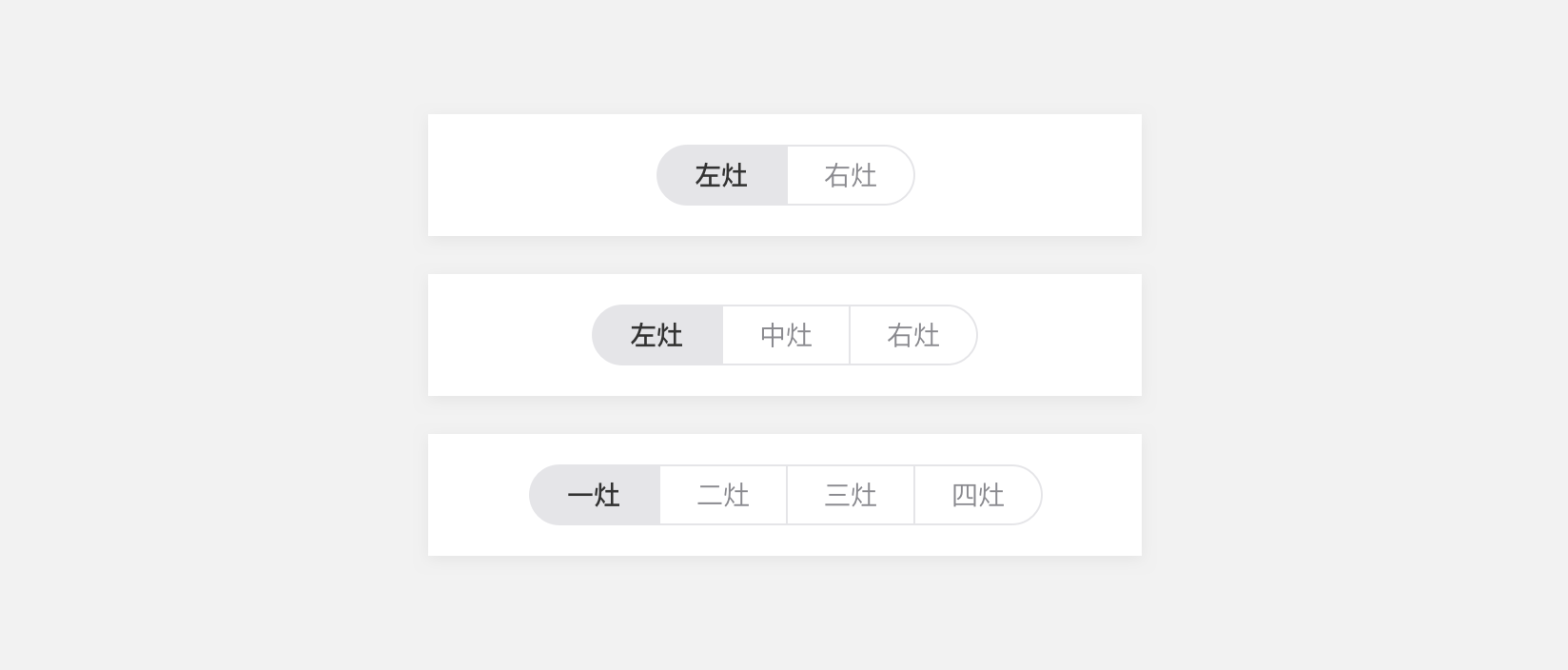
#二级 Tab 样式2
用于二级 tab 导航
标签文字:建议控制在 2-4 个字内
标签数量:最多 4 个
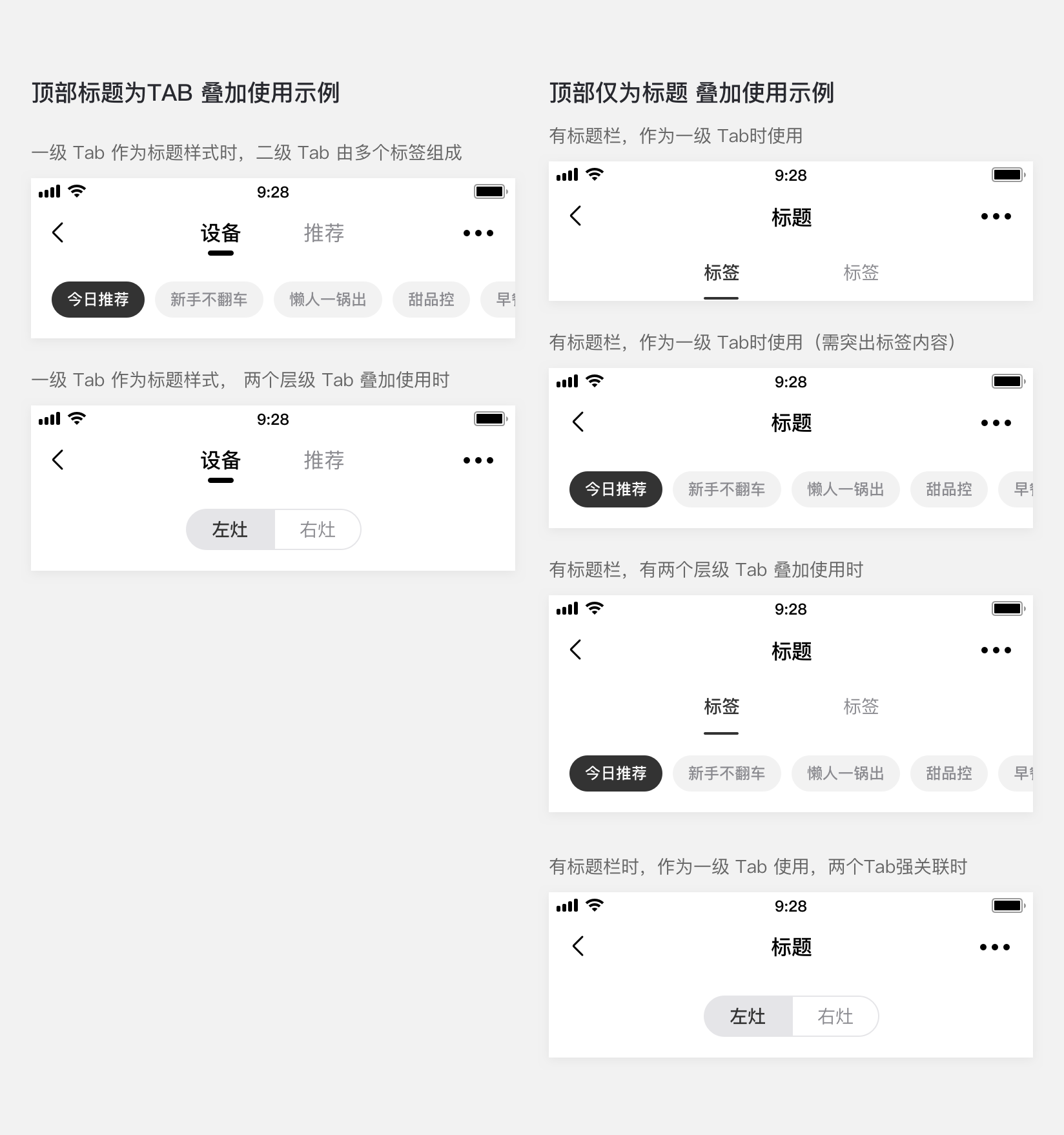
#组合使用应用示例
#dof-tab-page 组件
页面滑动切换组件
- 允许对头部进行配置,支持 Binding 手势跟随效果
- 常用于 Tab 切换页面,目前支持icon、text形式的顶栏,详细可见config.js
- 支持一级、二级、三级tab样式
#实例
#基础用法
<template>
  <div class="wrapper">
    <dof-minibar
      title="Tab-page"
      background-color="#267AFF"
      text-color="#ffffff"
      :left-button="leftButton"
      @dofMinibarRightButtonClicked="reloadHandler"
    >
      <div slot="right" class="right-img-wrapper">
        <dof-icon :iconStyle="{ fontSize: '32px', color: '#fff' }" name="refresh"></dof-icon>
      </div>
    </dof-minibar>
    <scroller class="content-container">
      <div class="split-gap"></div>
      <dof-catalog title="样式一" background-color="#daf9ca" :has-margin="true"></dof-catalog>
      <dof-minibar class="minibar-demo" :right-button="rightButtonBlack" @dofMinibarRightButtonClicked="reloadHandler">
        <dof-tab-page
          type="primary"
          slot="middle"
          :is-slot="true"
          ref="dof-tab-page"
          :tab-titles="navTabTitles"
          @dofTabSelected="tabChangeHandler"
        ></dof-tab-page>
      </dof-minibar>
      <div class="split-gap"></div>
      <dof-minibar
        background-color="#267AFF"
        text-color="#ffffff"
        :left-button="leftButton"
        :right-button="rightButton"
        @dofMinibarRightButtonClicked="reloadHandler"
      >
        <dof-tab-page
          type="primary"
          slot="middle"
          :is-slot="true"
          ref="dof-tab-page"
          :tab-titles="navTabTitles"
          :tab-styles="tabStyles2"
          @dofTabSelected="tabChangeHandler"
        ></dof-tab-page>
      </dof-minibar>

      <dof-catalog title="样式二" background-color="#daf9ca" :has-margin="true"></dof-catalog>
      <dof-tab-page
        v-for="(item, index) in secondaryTabTitle"
        :key="index"
        ref="dof-tab-page"
        :tab-titles="item"
        :has-margin="true"
        @dofTabSelected="tabChangeHandler"
      ></dof-tab-page>
      <dof-tab-page
        v-for="(item, index) in secondaryTabTitle"
        :key="index"
        ref="dof-tab-page"
        theme="primary"
        :tab-titles="item"
        :has-margin="true"
        @dofTabSelected="tabChangeHandler"
      ></dof-tab-page>

      <dof-catalog title="样式三" background-color="#daf9ca" :has-margin="true"></dof-catalog>
      <dof-tab-page
        ref="dof-tab-page"
        type="third"
        :tab-titles="thirdTabTitles1"
        :tab-checked-index="0"
        :has-margin="true"
        @dofTabSelected="tabChangeHandler"
      ></dof-tab-page>
      <dof-tab-page
        v-for="(item, index) in colorArray" :key="index"
        ref="dof-tab-page"
        type="third"
        :tab-titles="thirdTabTitles1"
        :tab-styles="TrendStyle(index)"
        :tab-checked-index="0"
        :has-margin="true"
        @dofTabSelected="tabChangeHandler"
      ></dof-tab-page>
      <dof-catalog title="样式三 有图标" background-color="#daf9ca" :has-margin="true"></dof-catalog>
      <dof-tab-page
        ref="dof-tab-page"
        type="third"
        :tab-titles="thirdTabTitles2"
        tab-checked-index="0"
        :has-margin="true"
        @dofTabSelected="tabChangeHandler"
      ></dof-tab-page>
      <dof-tab-page
        v-for="(item, index) in colorArray" :key="index"
        ref="dof-tab-page"
        type="third"
        :tab-titles="createTabTitles(index)"
        :tab-styles="TrendStyle(index)"
        tab-checked-index="0"
        :has-margin="true"
        @dofTabSelected="tabChangeHandler"
      ></dof-tab-page>

      <div class="split-gap"></div>
      <dof-catalog title="样式四" background-color="#daf9ca" :has-margin="true"></dof-catalog>
      <dof-tab-page
        theme="default"
        type="third-group"
        :tab-checked-index="0"
        :tabTitles="btnGroup[0]"
        @dofTabSelected="tabChangeHandler"
      ></dof-tab-page>
      <div v-for="(theme, index) in themeArray" :key="index">
        <dof-tab-page
          :theme="theme"
          type="third-group"
          :tab-checked-index="0"
          :tabTitles="btnGroup[0]"
          @dofTabSelected="tabChangeHandler"
        ></dof-tab-page>
        <div class="split-gap"></div>
      </div>

      <div class="split-gap"></div>
      <dof-catalog title="叠加使用示例一" background-color="#daf9ca" :has-margin="true"></dof-catalog>
      <dof-minibar
        background-color="#FFFFFF"
        text-color="#000000"
        :right-button="rightButtonBlack"
        @dofMinibarRightButtonClicked="reloadHandler"
      >
      </dof-minibar>
      <dof-tab-page
        type="secondary"
        ref="dof-tab-page"
        :tab-titles="navTabTitles"
        @dofTabSelected="tabChangeHandler"
      ></dof-tab-page>
      <div class="split-gap"></div>
      <div v-for="(item, index) in colorArray" :key="index">
        <dof-minibar
          :background-color="item"
          text-color="#ffffff"
          :left-button="leftButton"
          :right-button="rightButton"
          @dofMinibarRightButtonClicked="reloadHandler"
        >
        </dof-minibar>
        <dof-tab-page
          type="secondary"
          :theme="themeArray[index]"
          ref="dof-tab-page"
          :tab-titles="navTabTitles"
          :tab-styles="tabStyles2"
          @dofTabSelected="tabChangeHandler"
        ></dof-tab-page>
        <div class="split-gap"></div>
      </div>
      <dof-catalog title="叠加使用示例二" background-color="#daf9ca" :has-margin="true"></dof-catalog>
      <dof-minibar
        background-color="#FFFFFF"
        text-color="#000000"
        :right-button="rightButtonBlack"
        @dofMinibarRightButtonClicked="reloadHandler"
      >
      </dof-minibar>
      <dof-tab-page
        ref="dof-tab-page"
        type="third"
        :tab-titles="thirdTabTitles1"
        :tab-checked-index="0"
        :has-margin="true"
        @dofTabSelected="tabChangeHandler"
      ></dof-tab-page>
      <div v-for="(item, index) in colorArray" :key="index">
        <dof-minibar
          :background-color="item"
          text-color="#ffffff"
          :left-button="leftButton"
          :right-button="rightButton"
          @dofMinibarRightButtonClicked="reloadHandler"
        >
        </dof-minibar>
        <dof-tab-page
          ref="dof-tab-page"
          type="third"
          :tab-titles="thirdTabTitles1"
          :tab-styles="TrendStyle(index)"
          :tab-checked-index="0"
          :has-margin="true"
          @dofTabSelected="tabChangeHandler"
        ></dof-tab-page>
      </div>

      <div class="split-gap"></div>
      <dof-catalog title="叠加使用示例三" background-color="#daf9ca" :has-margin="true"></dof-catalog>
      <div v-for="(item, index) in btnGroup" :key="index">
        <dof-minibar :right-button="rightButtonBlack" @dofMinibarRightButtonClicked="reloadHandler">
          <dof-tab-page
            type="primary"
            slot="middle"
            :is-slot="true"
            ref="dof-tab-page"
            :tab-titles="navTabTitles"
            @dofTabSelected="tabChangeHandler"
          ></dof-tab-page>
        </dof-minibar>
        <dof-tab-page
          theme="default"
          type="third-group"
          :tab-checked-index="0"
          :tabTitles="item"
          @dofTabSelected="tabChangeHandler"
        ></dof-tab-page>
        <div class="split-gap"></div>
      </div>
      <div v-for="(item, index) in btnGroup" :key="index">
        <dof-minibar :background-color="bgColor" :left-button="leftButton" :right-button="rightButton" @dofMinibarRightButtonClicked="reloadHandler">
          <dof-tab-page
            type="primary"
            :theme="theme"
            slot="middle"
            :is-slot="true"
            ref="dof-tab-page"
            :tab-titles="navTabTitles"
            @dofTabSelected="tabChangeHandler"
          ></dof-tab-page>
        </dof-minibar>
        <dof-tab-page
          :theme="theme"
          type="third-group"
          :tab-checked-index="0"
          :tabTitles="item"
          @dofTabSelected="tabChangeHandler"
        ></dof-tab-page>
        <div class="split-gap"></div>
      </div>
      <dof-button type="primary" class="changeBtn" pattern="plain" text="切换主题" @dofButtonClicked="dofButtonClicked"></dof-button>

      <div class="split-gap"></div>
      <dof-catalog title="叠加使用示例四" background-color="#daf9ca" :has-margin="true"></dof-catalog>
      <dof-minibar :right-button="rightButtonBlack" @dofMinibarRightButtonClicked="reloadHandler">
        <dof-tab-page
          type="primary"
          slot="middle"
          :is-slot="true"
          ref="dof-tab-page"
          :tab-titles="navTabTitles"
          @dofTabSelected="tabChangeHandler"
        ></dof-tab-page>
      </dof-minibar>
      <dof-tab-page
        ref="dof-tab-page"
        type="third"
        :tab-titles="thirdTabTitles1"
        :tab-checked-index="0"
        :has-margin="true"
        @dofTabSelected="tabChangeHandler"
      ></dof-tab-page>
      <div v-for="(color, index) in colorArray" :key="index">
        <dof-minibar
          :background-color="color"
          text-color="#ffffff"
          :left-button="leftButton"
          :right-button="rightButton"
          @dofMinibarRightButtonClicked="reloadHandler"
        >
        <dof-tab-page
            type="primary"
            slot="middle"
            theme="themeArray(index)"
            :is-slot="true"
            ref="dof-tab-page"
            :tab-titles="navTabTitles"
            @dofTabSelected="tabChangeHandler"
          ></dof-tab-page>
        </dof-minibar>
        <dof-tab-page
          ref="dof-tab-page"
          type="third"
          :tab-titles="thirdTabTitles1"
          :tab-styles="TrendStyle(index)"
          :tab-checked-index="0"
          :has-margin="true"
          @dofTabSelected="tabChangeHandler"
        ></dof-tab-page>
      </div>

      <dof-tab-page
        ref="dof-tab-page"
        type="third"
        :tab-titles="thirdTabTitles3"
        :tab-checked-index="currentTabIndex"
        :has-margin="true"
        @dofTabSelected="tabChangeHandler"
      ></dof-tab-page>
      <div class="btn-container">
        <dof-button text="切换 Tab" @dofButtonClicked="tabTrigger"></dof-button>
      </div>
    </scroller>
  </div>
</template>

<style scoped>
.wrapper {
  background-color: #f9f9f9;
}
.split-gap {
  padding: 8px 0;
}
.minibar-demo {
  margin-bottom: 16px;
}
.btn-container {
  padding: 20px;
  justify-content: center;
  align-items: center;
}
.changeBtn{
  margin-top: 48px;
  margin-bottom: 48px;
  margin-left: 32px;
}
</style>
<script>
import { DofMinibar, DofTabPage, DofIcon, DofCatalog, DofButton, Utils, Core } from 'dolphin-weex-ui'

import Config, { demo1, demo1x, demo2, demo2x, demo3, demo4, demo5, demo6, demo7, demo8 } from './config'

export default {
  components: {
    DofTabPage,
    DofMinibar,
    DofIcon,
    DofCatalog,
    DofButton
  },
  data: () => ({
    leftButton: './assets/image/header/icon_back_white@3x.png',
    rightButton: './assets/image/header/title_more_icon_white.png',
    rightButtonBlack: './assets/image/header/icon_more_black@3x.png',
    dolphinIcon: 'http://dolphin-weex-dev.msmartlife.cn/cdn/images/common/dolphin.png',
    tabStyles: Config.tabStyles,
    tabStyles2: {
      bgColor: '#267aff',
      titleColor: 'rgba(255,255,255,0.7)',
      activeTitleColor: '#ffffff',
      isActiveTitleBold: true,
      activeBottomColor: '#ffffff'
    },
    tabTitles: demo1,
    navTabTitles: demo1,
    secondaryTabTitles: demo2,
    secondaryTabTitles2: demo3,
    secondaryTabTitles3: demo4,
    thirdTabTitles1: demo5,
    thirdTabTitles2: demo6,
    thirdTabTitles3: demo7,
    thirdTabTitles4: demo8,
    currentTabIndex: 0,
    secondaryTabTitle:[demo1x, demo2, demo2x, demo3, demo4],
    btnGroup:[
      ['左灶', '右灶'],['左灶', '中灶', '右灶'], ['一灶', '二灶', '三灶', '四灶']
    ],
    colorArray:["#267AFF","#995EFC","#4F62FF","#29C3FF","#00CBB8","#FFAA10 ","#FF8225","#FF6A4C","#7C879B"],
    themeArray:["primary","purple","slate","aqua","turquoise","tomato","orange","yellow","gray"],
    bgColor:"#267aff",
    theme:"primary",
    index:0,
    titleType:[]
  }),
  created() {},
  mounted(){
    console.log("secondaryTabTitle",this.secondaryTabTitle)
  },
  methods: {
    tabChangeHandler(e) {
      const self = this
      const { index } = e
      this.$toast(index)
    },
    reloadHandler() {
      this.$reload()
    },
    tabTrigger() {
      this.currentTabIndex > 6 ? (this.currentTabIndex = 0) : this.currentTabIndex++
    },
    dofButtonClicked(){
      let { index, colorArray, themeArray } = this
      index<colorArray.length-1?this.index++:this.index=0
      this.bgColor = this.colorArray[index]
      this.theme = this.themeArray[index]
    },
    // 按钮组事件
    groupButtonClicked(index){
      Core.toast(`btn:${index}`)
    },

    TrendStyle(i){
      let bColor;
      switch (i) {
        case 0: bColor = '267AFF'; break;
        case 1: bColor = '995EFC'; break;
        case 2: bColor = '4F62FF'; break;
        case 3: bColor = '29C3FF'; break;
        case 4: bColor = '00CBB8'; break;
        case 5: bColor = 'FFAA10'; break;
        case 6: bColor = 'FF8225'; break;
        case 7: bColor = 'FF6A4C'; break;
        case 8: bColor = '7C879B'; break;
        default:bColor = 'FFFFFF';
          break;
      }
      return {
        bgColor: `#${bColor}`,
        titleColor: 'rgba(255,255,255,0.7)',
        activeTitleColor: `#${bColor}`,
        isActiveTitleBold: true,
        activeBottomColor: '#ffffff',
        boxBgColor: 'rgba(255,255,255,0.1)',
        activeBoxBgColor: '#ffffff'
      }
    },
    // 创建动态title 带有不同颜色图标的tabtitle
    createTabTitles(i){
      let currentUIColor;
      switch (i) {
        case 0: currentUIColor="blue"; break;
        case 1: currentUIColor="violet"; break;
        case 2: currentUIColor="bluish"; break;
        case 3: currentUIColor="sky"; break;
        case 4: currentUIColor="green"; break;
        case 5: currentUIColor="yellow"; break;
        case 6: currentUIColor="orange"; break;
        case 7: currentUIColor="red"; break;
        default: currentUIColor="gray";
          break;
      }
      return [
        {
          title: '起居',
          icon: 'http://dolphin-weex-dev.msmartlife.cn/cdn/images/scene/icon_scene_living_visited@3x.png',
          activeIcon: `./assets/image/tabpage/icon_scene_living_${currentUIColor}@3x.png`
        },
        {
          title: '厨房',
          icon: 'http://dolphin-weex-dev.msmartlife.cn/cdn/images/scene/icon_scene_kitchen_visited@3x.png',
          activeIcon: `./assets/image/tabpage/icon_scene_kitchen_${currentUIColor}@3x.png`
        },
        {
          title: '安防',
          icon: 'http://dolphin-weex-dev.msmartlife.cn/cdn/images/scene/icon_scene_security_visited@3x.png',
          activeIcon: `./assets/image/tabpage/icon_scene_security_${currentUIColor}@3x.png`
        },
        {
          title: '卫浴',
          icon: 'http://dolphin-weex-dev.msmartlife.cn/cdn/images/scene/icon_scene_bathroom_visited@3x.png',
          activeIcon: `./assets/image/tabpage/icon_scene_bathroom_${currentUIColor}@3x.png`
        }
      ]
    }
  }
}
</script>
config.js文件内容,如下:
export const demo1 = [
  {
    title: '设备'
  },
  {
    title: '推荐'
  }
]

export const demo1x = [
  {
    title: '标签'
  },
  {
    title: '标签'
  }
]

export const demo2 = [
  {
    title: '标签'
  },
  {
    title: '标签'
  },
  {
    title: '标签'
  }
]

export const demo2x = [
  {
    title: '标签'
  },
  {
    title: '标签'
  },
  {
    title: '标签'
  },
  {
    title: '标签'
  }
]

export const demo3 = [
  {
    title: '标签'
  },
  {
    title: '标签'
  },
  {
    title: '标签'
  },
  {
    title: '标签'
  },
  {
    title: '标签'
  }
]

export const demo4 = [
  {
    title: '空调'
  },
  {
    title: '冰箱'
  },
  {
    title: '洗衣机'
  },
  {
    title: '热水器'
  },
  {
    title: '电饭煲'
  },
  {
    title: '电烤箱'
  },
  {
    title: '扫地机'
  },
  {
    title: '洗碗机'
  },
  {
    title: '油烟机'
  },
  {
    title: '净水器'
  }
]
export const demo5 = [
  {
    title: '空调'
  },
  {
    title: '冰箱'
  },
  {
    title: '洗衣机'
  },
  {
    title: '热水器'
  },
  {
    title: '电饭煲'
  },
  {
    title: '电烤箱'
  },
  {
    title: '扫地机'
  },
  {
    title: '洗碗机'
  },
  {
    title: '油烟机'
  },
  {
    title: '净水器'
  }
]
export const demo6 = [
  {
    title: '起居',
    icon: 'http://dolphin-weex-dev.msmartlife.cn/cdn/images/scene/icon_scene_living@3x.png',
    activeIcon: 'http://dolphin-weex-dev.msmartlife.cn/cdn/images/scene/icon_scene_living_visited@3x.png'
  },
  {
    title: '厨房',
    icon: 'http://dolphin-weex-dev.msmartlife.cn/cdn/images/scene/icon_scene_kitchen@3x.png',
    activeIcon: 'http://dolphin-weex-dev.msmartlife.cn/cdn/images/scene/icon_scene_kitchen_visited@3x.png'
  },
  {
    title: '安防',
    icon: 'http://dolphin-weex-dev.msmartlife.cn/cdn/images/scene/icon_scene_security@3x.png',
    activeIcon: 'http://dolphin-weex-dev.msmartlife.cn/cdn/images/scene/icon_scene_security_visited@3x.png'
  },
  {
    title: '卫浴',
    icon: 'http://dolphin-weex-dev.msmartlife.cn/cdn/images/scene/icon_scene_bathroom@3x.png',
    activeIcon: 'http://dolphin-weex-dev.msmartlife.cn/cdn/images/scene/icon_scene_bathroom_visited@3x.png'
  }
]
export const demo7 = [
  {
    title: '起居',
    icon: 'http://dolphin-weex-dev.msmartlife.cn/cdn/images/scene/icon_scene_living@3x.png',
    activeIcon: 'http://dolphin-weex-dev.msmartlife.cn/cdn/images/scene/icon_scene_living_visited@3x.png'
  },
  {
    title: '厨房',
    icon: 'http://dolphin-weex-dev.msmartlife.cn/cdn/images/scene/icon_scene_kitchen@3x.png',
    activeIcon: 'http://dolphin-weex-dev.msmartlife.cn/cdn/images/scene/icon_scene_kitchen_visited@3x.png'
  },
  {
    title: '安防',
    icon: 'http://dolphin-weex-dev.msmartlife.cn/cdn/images/scene/icon_scene_security@3x.png',
    activeIcon: 'http://dolphin-weex-dev.msmartlife.cn/cdn/images/scene/icon_scene_security_visited@3x.png'
  },
  {
    title: '卫浴',
    icon: 'http://dolphin-weex-dev.msmartlife.cn/cdn/images/scene/icon_scene_bathroom@3x.png',
    activeIcon: 'http://dolphin-weex-dev.msmartlife.cn/cdn/images/scene/icon_scene_bathroom_visited@3x.png'
  },
  {
    title: '起居',
    icon: 'http://dolphin-weex-dev.msmartlife.cn/cdn/images/scene/icon_scene_living@3x.png',
    activeIcon: 'http://dolphin-weex-dev.msmartlife.cn/cdn/images/scene/icon_scene_living_visited@3x.png'
  },
  {
    title: '厨房',
    icon: 'http://dolphin-weex-dev.msmartlife.cn/cdn/images/scene/icon_scene_kitchen@3x.png',
    activeIcon: 'http://dolphin-weex-dev.msmartlife.cn/cdn/images/scene/icon_scene_kitchen_visited@3x.png'
  },
  {
    title: '安防',
    icon: 'http://dolphin-weex-dev.msmartlife.cn/cdn/images/scene/icon_scene_security@3x.png',
    activeIcon: 'http://dolphin-weex-dev.msmartlife.cn/cdn/images/scene/icon_scene_security_visited@3x.png'
  },
  {
    title: '卫浴',
    icon: 'http://dolphin-weex-dev.msmartlife.cn/cdn/images/scene/icon_scene_bathroom@3x.png',
    activeIcon: 'http://dolphin-weex-dev.msmartlife.cn/cdn/images/scene/icon_scene_bathroom_visited@3x.png'
  }
]
#Attributes
| Prop | Type | Required | Default | Description |
|---|---|---|---|---|
| tab-titles | Array |
Y |
[] |
顶部 显示配置, 详见注1 |
| type | String |
N |
secondary |
tab类型 primary(一级)/secondary(二级)/third(三级) |
| is-slot | Boolean |
N |
false |
是否作为插槽使用,如一级tab页面中作为minibar组件的插槽中使用 |
| has-margin | Boolean |
N |
false |
是否设置margin-bottom为16px |
| tab-checked-index | Number |
N |
0 |
当前选中的的标签 |
| theme | String |
N |
default |
颜色主题:default/primary/purple/slate/aqua/turquoise/tomato/orange/yellow/gray |
| tabStyles | Object |
N |
{} |
tab自定义样式,多用于三级tab, 详见注2 |
注1: tab-titles
| Prop | Type | Required | Default | Description |
|---|---|---|---|---|
| title | String |
N |
- |
标题 |
| hasDotTip | Boolean |
N |
- |
徽标badge,显示为dot点 |
| hasDotNum | Number String |
N |
- |
徽标badge数字 |
| badgeMax | Number |
N |
- |
徽标内容最大值,如设置99, 则显示'99+' |
| badgeColor | String |
N |
red |
自定义徽标背景颜色 |
注2: tabStyles
| Prop | Type | Required | Default | Description |
|---|---|---|---|---|
| bgColor | String |
N |
#ffffff |
背景色 |
| titleColor | String |
N |
#8a8a8f |
标题色 |
| activeTitleColor | String |
N |
#000000 |
标题高亮色 |
| isActiveTitleBold | Boolean |
N |
True |
标题高亮是否加错 |
| activeBottomColor | String |
N |
#000000 |
标题下划线颜色 |
#Events
| 事件名称 | 说明 | 回调参数 |
|---|---|---|
dofTabSelected |
选择并进入当前页面事件, 返回参数为:当前选中项index | index |

 浙公网安备 33010602011771号