
首页上划
2.3 首页上划
顶部保留原本默认时的色彩,另外留出 20px 过渡到透明。划动到最底部时,为保证浏览体验,保证至少留出40px。
#基础样式
首页上划时,底部渐变背景位置保持不变,顶部状态栏和标题栏渐显出现一个固定色,并跟随一个高度20px的渐变条(如下图)。
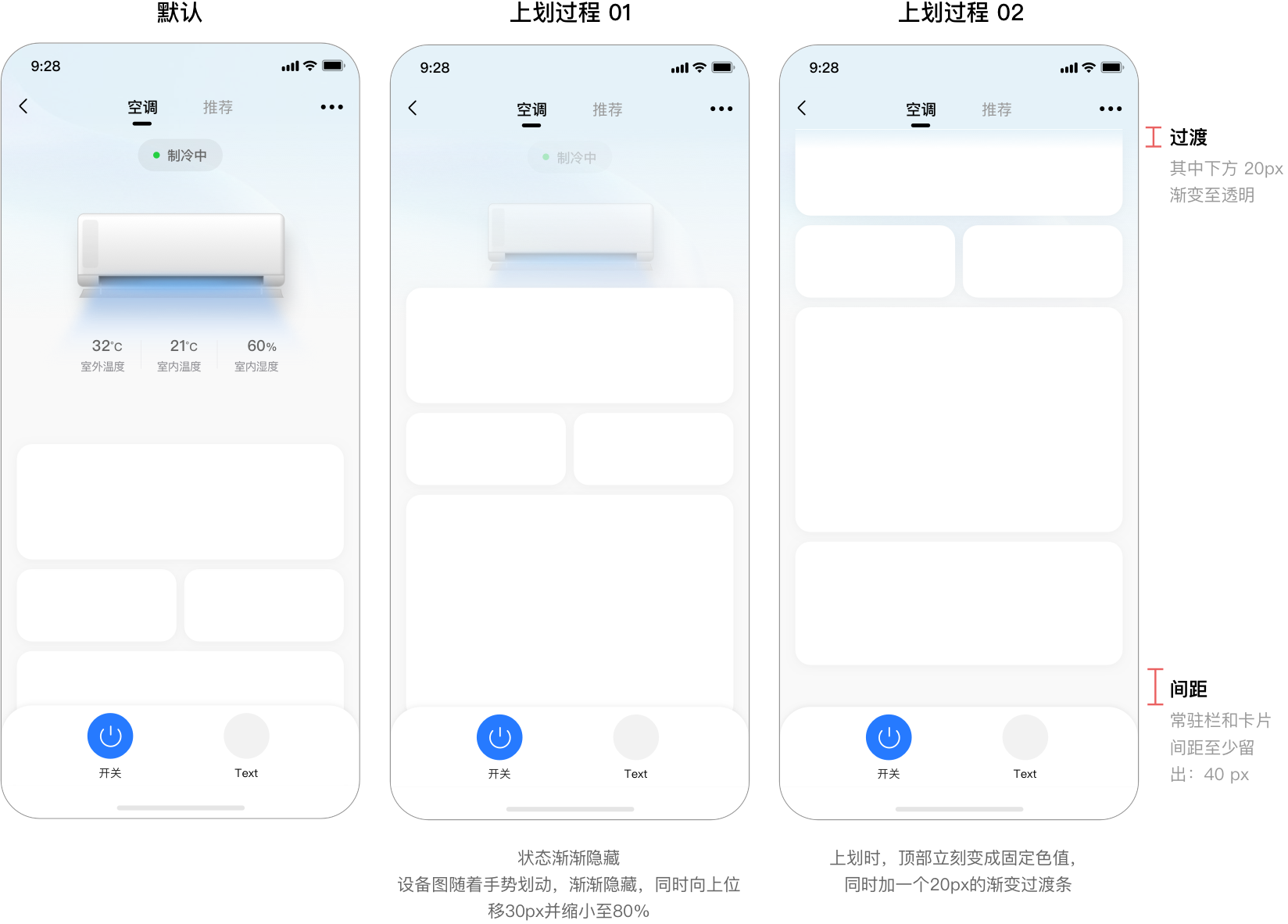
#顶部信息常驻
首页上划,有关键信息展示时,可置顶固定在顶部,方便快速浏览到信息。
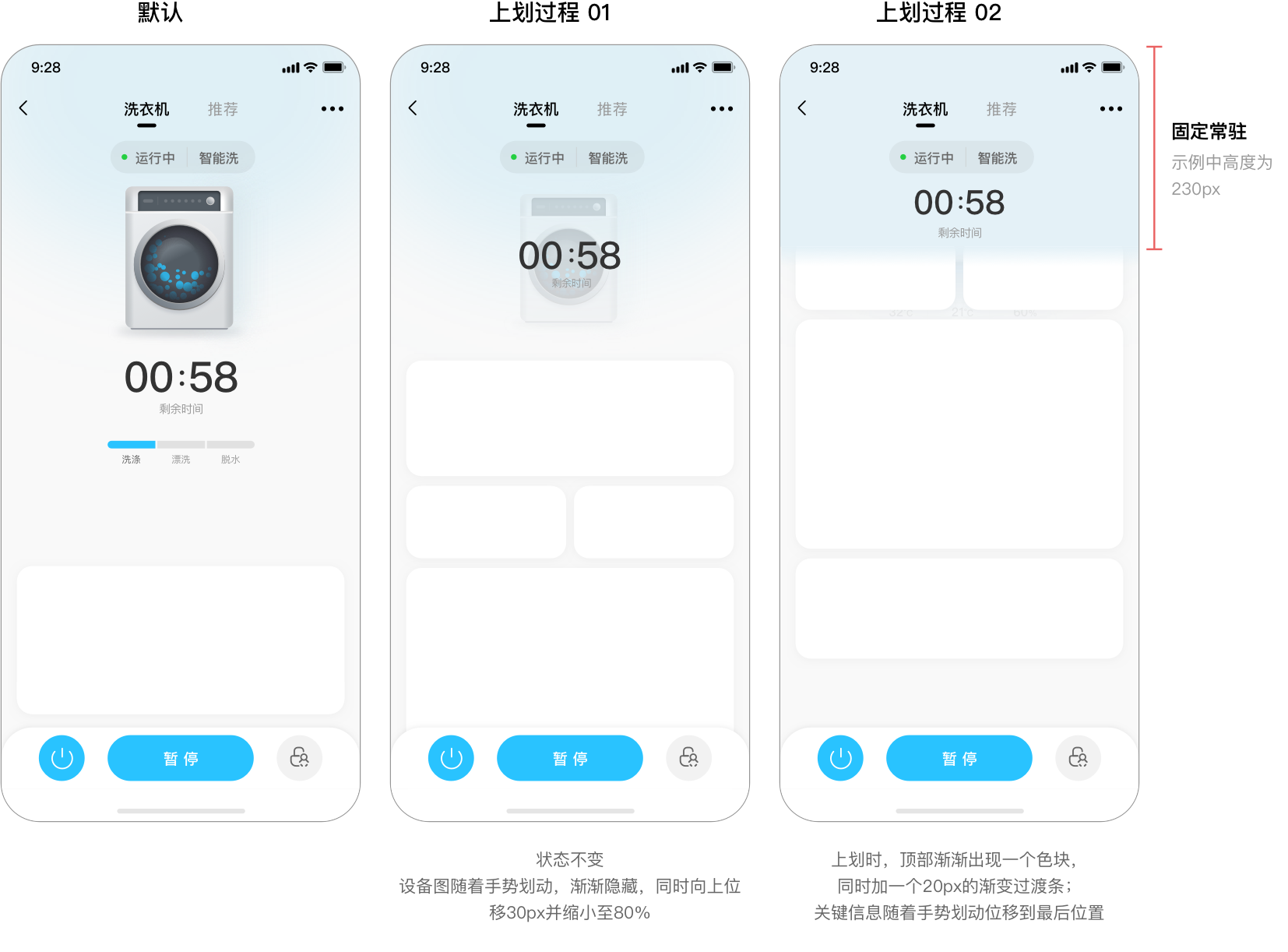
#基础实例
#用法
<template>
  <div class="wrapper">
    <dof-minibar
      title="空调"
      :background-color="startColor"
      text-color="#ffffff"
      :left-button="leftButton"
      @dofMinibarLeftButtonClicked="back"
      right-text=""
    ></dof-minibar>
    <scroller
      class="scroller"
      @scroll="scrollHandler"
      show-scrollbar="false"
      :style="{ 'background-color': startColor }"
    >
      <dof-gradient :startColor="startColor" :height="mainContentHeight"></dof-gradient>
      <div class="main-content" ref="mainContent">
        <!-- 滑动时需处理的部分---start -->
        <div class="content-detail" ref="contentDetail" :style="{ transform: elementStyle.transform }">
          <div class="cold-box">
            <div class="cold-box-dot"></div>
            <text class="cold-box-text">制冷中</text>
          </div>
          <image :src="air_conditioner_img" class="main-image" :style="{ opacity: elementStyle.opacity }"></image>
          <div class="temp-box">
            <div class="temp-box-div">
              <text class="temp-box-num">32°C</text>
              <text class="temp-box-text">室外温度</text>
            </div>
            <div class="temp-line"></div>
            <div class="temp-box-div">
              <text class="temp-box-num">21°C</text>
              <text class="temp-box-text">室内温度</text>
            </div>
            <div class="temp-line"></div>
            <div class="temp-box-div">
              <text class="temp-box-num">60%</text>
              <text class="temp-box-text">室内湿度</text>
            </div>
          </div>
        </div>
      </div>
      <!-- 滑动时需处理的部分---end -->
      <div class="board-box">
        <dof-board>
          <dof-card class="m-b-10">
            <div class="placeholder"></div>
          </dof-card>
          <dof-row class="m-b-10">
            <dof-col>
              <dof-card>
                <div class="placeholder"></div>
              </dof-card>
            </dof-col>
            <dof-col>
              <dof-card>
                <div class="placeholder"></div>
              </dof-card>
            </dof-col>
          </dof-row>
          <dof-row class="m-b-10">
            <dof-col>
              <dof-card>
                <div class="placeholder"></div>
              </dof-card>
            </dof-col>
          </dof-row>
          <dof-row class="m-b-10">
            <dof-col>
              <dof-card>
                <div class="placeholder"></div>
              </dof-card>
            </dof-col>
            <dof-col>
              <dof-card>
                <div class="placeholder"></div>
              </dof-card>
            </dof-col>
          </dof-row>
          <dof-row class="m-b-10">
            <dof-col>
              <dof-card>
                <div class="placeholder"></div>
              </dof-card>
            </dof-col>
          </dof-row>
        </dof-board>
      </div>
      <div class="h-300px"></div>
      <dof-bottom-bar :tabGroups="tabTitles"></dof-bottom-bar>
    </scroller>
  </div>
</template>

<style scoped>
.wrapper {
  position: relative;
}
.scroller {
  position: relative;
  flex: 1;
  width: 750px;
  height: 2000px;
}
.h-300px {
  width: 750px;
  height: 0;
  padding-bottom: 300px;
  background-color: #f9f9f9;
  position: relative;
  top: -2px;
}
.main-content {
  width: 750px;
  position: absolute;
  top: 0;
  left: 0;
  z-index: 100;
  padding-bottom: 100px;
}
.board-box {
  padding-top: 100px;
  background-color: #f9f9f9;
}

.m-b-10 {
  margin-bottom: 20px;
}

.placeholder {
  height: 160px;
}
.main-image {
  width: 660px;
  height: 440px;
}
.content-detail {
  position: relative;
  display: flex;
  justify-content: center;
  align-items: center;
  transition-property: all;
  transition-duration: 0.3s;
  transition-delay: 0s;
  transition-timing-function: cubic-bezier(0.25, 0.1, 0.25, 1);
  transform: scale(1, 1);
  opacity: 1;
}
.cold-box {
  padding: 20px 32px;
  background-color: #eadede;
  margin: 24px auto;
  border-radius: 40px;
  display: flex;
  flex-direction: row;
  justify-content: center;
  align-items: center;
}
.cold-box-dot {
  width: 14px;
  height: 14px;
  border-radius: 14px;
  margin-right: 16px;
  background-color: #25cf42;
}
.cold-box-text {
  font-size: 28px;
  color: #666666;
}
.temp-box {
  display: flex;
  flex-direction: row;
  align-items: center;
  justify-content: center;
  color: #666666;
  font-size: 32px;
}
.temp-box-num {
  color: #666666;
  text-align: center;
}
.temp-box-text {
  color: #8a8a8f;
  font-size: 24px;
  margin-top: 16px;
  text-align: center;
}
.temp-box-div {
  padding-right: 33px;
  padding-left: 33px;
}
.temp-line {
  width: 2px;
  height: 60px;
  background-color: #e5e5e8;
}
</style>

<script>
import Title from 'src/_mods/title.vue'
import Category from 'src/_mods/catalog'
const dom = weex.requireModule('dom')
import {
  DofMinibar,
  DofGradient,
  DofBoard,
  DofRow,
  DofCol,
  DofCardGroup,
  DofCard,
  DofCardItem,
  DofBottomBar
} from 'dolphin-weex-ui'
const modal = weex.requireModule('modal')

module.exports = {
  components: {
    Title,
    Category,
    DofMinibar,
    DofGradient,
    DofBoard,
    DofRow,
    DofCol,
    DofCardGroup,
    DofCard,
    DofCardItem,
    DofBottomBar
  },
  data() {
    return {
      air_conditioner_img: 'http://dolphin-weex-dev.msmartlife.cn/cdn/images/common/air_conditioner.png',
      leftButton: 'http://dolphin-weex-dev.msmartlife.cn/cdn/images/header/icon_back_white@3x.png',
      width: '750',
      height: '700',
      startColor: '#29C3FF',
      endColor: '#ffffff',
      value: '0',
      tabTitles: [
        {
          type: 'power',
          title: 'power',
          text: '开关',
          iconColor: '#267AFF',
          disabled: false,
          icon: 'http://dolphin-weex-dev.msmartlife.cn/cdn/images/sample/water_heater/calorifier_icon_on@3x.png'
        },
        {
          type: 'timing',
          title: 'timing',
          text: '预约',
          iconColor: '#f2f2f2',
          iconTextColor: '#666666',
          disabled: false,
          icon:
            'http://dolphin-weex-dev.msmartlife.cn/cdn/images/sample/water_heater/calorifier_icon_timingoffbai@3x.png'
        }
      ],
      preScrollY: 0,
      mainContentHeight: 0
    }
  },

  mounted() {
    this.$nextTick(() => {
      let ele = this.$refs.mainContent
      this.getEleHeight(ele.children[0])
    })
  },
  methods: {
    back() {},
    scrollHandler(e) {
      let currScrollY = parseInt(e.contentOffset.y)
      if (currScrollY > this.preScrollY) {
        //页面向下滑
        this.scrollDirection = 'down'
      } else {
        //页面向上滑
        this.scrollDirection = 'up'
      }
      this.preScrollY = currScrollY
    },
    getEleHeight(ele) {
      let self = this
      dom.getComponentRect(ele, result => {
        let size = result.size || {}
        let height = parseInt(size.height)
        if (!height) {
          self.getEleHeight(ele)
        } else {
          self.mainContentHeight = height
        }
      })
    }
  },

  computed: {
    elementStyle() {
      let { preScrollY, mainContentHeight } = this
      let scrollTop = preScrollY * -1
      let currScale = parseFloat(1 - parseFloat(scrollTop / mainContentHeight).toFixed(2)).toFixed(2)
      if (scrollTop >= mainContentHeight) {
        currScale = 1
      }
      if (currScale <= 0.8) {
        currScale = 0.8
      }
      if (currScale >= 1) {
        currScale = 1
      }
      return {
        transform: `scale(${currScale}, ${currScale})`,
        opacity: currScale
      }
    }
  }
}
</script>
#固定顶部实例
#用法
<template>
  <div class="wrapper">
    <div ref="titleBar">
      <dof-minibar
        title="洗衣机"
        :background-color="startColor"
        text-color="#ffffff"
        :left-button="leftButton"
        @dofMinibarLeftButtonClicked="back"
        right-text=""
      ></dof-minibar>
    </div>
    <scroller
      class="scroller"
      @scroll="scrollHandler"
      show-scrollbar="false"
      :style="{ 'background-color': startColor }"
    >
      <dof-gradient :startColor="startColor" :height="mainContentHeight"></dof-gradient>
      <!-- sticky部分 -->
      <div class="sticy-box" :style="{ top: titleBarHeight + 'px', opacity: stickyEleOpacity }">
        <dof-gradient :startColor="startColor" :height="300"></dof-gradient>
        <div class="sticky-content">
          <div class="cold-box cold-box-sticky">
            <div class="cold-box-dot"></div>
            <text class="cold-box-text">运行中</text>
            <text class="cold-box-line"></text>
            <text class="cold-box-text">智能洗</text>
          </div>
          <div>
            <div class="time-box">
              <text class="time-box-text">00</text>
              <div class="time-box-text time-box-dot-section">
                <text class="time-box-dot"></text>
                <text class="time-box-dot"></text>
              </div>
              <text class="time-box-text">58</text>
            </div>
            <text class="left-time-text">剩余时间</text>
          </div>
        </div>
      </div>
      <!-- 滑动时需处理的部分---start -->
      <div class="main-content" ref="mainContent">
        <div class="content-detail" ref="contentDetail" :style="{ transform: elementStyle.transform }">
          <div class="cold-box">
            <div class="cold-box-dot"></div>
            <text class="cold-box-text">运行中</text>
            <text class="cold-box-line"></text>
            <text class="cold-box-text">智能洗</text>
          </div>
          <image :src="wash_clothes_img" class="main-image" :style="{ opacity: elementStyle.opacity }"></image>
          <div class="">
            <div class="time-box">
              <text class="time-box-text">00</text>
              <div class="time-box-text time-box-dot-section">
                <text class="time-box-dot"></text>
                <text class="time-box-dot"></text>
              </div>
              <text class="time-box-text">58</text>
            </div>
            <text class="left-time-text">剩余时间</text>
          </div>

          <div class="flow-box" ref="handleBox">
            <div class="flow-box-div">
              <div class="flow-bar flow-1"></div>
              <text class="flow-text">洗涤</text>
            </div>
            <div class="flow-box-div">
              <div class="flow-bar flow-2"></div>
              <text class="flow-text">漂洗</text>
            </div>
            <div class="flow-box-div">
              <div class="flow-bar flow-3"></div>
              <text class="flow-text">脱水</text>
            </div>
          </div>
        </div>
      </div>
      <!-- 滑动时需处理的部分---end -->
      <div class="board-box">
        <dof-board>
          <dof-card class="m-b-10">
            <div class="placeholder"></div>
          </dof-card>
          <dof-row class="m-b-10">
            <dof-col>
              <dof-card>
                <div class="placeholder"></div>
              </dof-card>
            </dof-col>
            <dof-col>
              <dof-card>
                <div class="placeholder"></div>
              </dof-card>
            </dof-col>
          </dof-row>
          <dof-row class="m-b-10">
            <dof-col>
              <dof-card>
                <div class="placeholder"></div>
              </dof-card>
            </dof-col>
          </dof-row>
          <dof-row class="m-b-10">
            <dof-col>
              <dof-card>
                <div class="placeholder"></div>
              </dof-card>
            </dof-col>
            <dof-col>
              <dof-card>
                <div class="placeholder"></div>
              </dof-card>
            </dof-col>
          </dof-row>
          <dof-row class="m-b-10">
            <dof-col>
              <dof-card>
                <div class="placeholder"></div>
              </dof-card>
            </dof-col>
          </dof-row>
        </dof-board>
      </div>
      <div class="h-300px"></div>
      <dof-bottom-bar :tabGroups="tabTitles"></dof-bottom-bar>
    </scroller>
  </div>
</template>

<style scoped>
.wrapper {
  background-color: #f9f9f9;
  position: relative;
}
.scroller {
  position: relative;
  flex: 1;
  background-color: #f9f9f9;
  width: 750px;
  height: 2000px;
}
.h-300px {
  width: 750px;
  height: 0;
  padding-bottom: 300px;
  background-color: #f9f9f9;
  position: relative;
  top: -2px;
}
.main-content {
  width: 750px;
  position: absolute;
  top: 0;
  left: 0;
}
.m-b-10 {
  margin-bottom: 20px;
}

.placeholder {
  height: 160px;
}
.main-image {
  width: 476px;
  height: 476px;
  opacity: 1;
}
.content-detail {
  position: relative;
  display: flex;
  justify-content: center;
  align-items: center;
  transition-property: all;
  transition-duration: 0.3s;
  transition-delay: 0s;
  transition-timing-function: cubic-bezier(0.25, 0.1, 0.25, 1);
  transform: scale(1, 1);
}
.cold-box {
  padding: 20px 32px;
  background-color: #eadede;
  margin: 24px auto 0;
  border-radius: 40px;
  display: flex;
  flex-direction: row;
  justify-content: center;
  align-items: center;
}
.cold-box-dot {
  width: 14px;
  height: 14px;
  border-radius: 14px;
  margin-right: 16px;
  background-color: #25cf42;
}
.cold-box-text {
  font-size: 28px;
  color: #666666;
}
.cold-box-line {
  margin: 0 24px;
  width: 2px;
  height: 40px;
  background-color: #c9c9c9;
}
.time-box {
  display: flex;
  flex-direction: row;
  align-items: center;
  justify-content: center;
}
.time-box-text {
  font-size: 88px;
  color: #333333;
  margin-right: 10px;
  display: flex;
  flex-direction: column;
  align-items: center;
  justify-content: space-around;
}
.time-box-dot-section {
  width: 20px;
  height: 50px;
}
.time-box-dot {
  width: 10px;
  height: 10px;
  background-color: #333333;
  border-radius: 10px;
}
.left-time-text {
  font-size: 24px;
  color: #999999;
  margin: 10px 0 56px;
  text-align: center;
}
.flow-box {
  display: flex;
  flex-direction: row;
}
.flow-box-div {
  margin-right: 4px;
}
.flow-bar {
  width: 100px;
  height: 16px;
  background-color: #e1e1e1;
}
.flow-1 {
  background-color: #29c3ff;
  border-top-left-radius: 16px;
  border-bottom-left-radius: 16px;
}
.flow-3 {
  border-top-right-radius: 16px;
  border-bottom-right-radius: 16px;
}
.flow-text {
  font-size: 20px;
  color: #666666;
  margin-top: 10px;
  text-align: center;
}

.sticy-box {
  position: fixed;
  left: 0;
  z-index: 100;
  width: 750px;
  height: 500px;
  opacity: 0;
  transition-property: all;
  transition-duration: 0.2s;
  transition-delay: 0s;
  transition-timing-function: cubic-bezier(0.25, 0.1, 0.25, 1);
}
.sticky-content {
  position: absolute;
  left: 0;
  top: 0;
  width: 750px;
  height: 500px;
  display: flex;
  align-items: center;
}
.cold-box-sticky {
  margin-bottom: 30px;
}
</style>

<script>
import Title from 'src/_mods/title.vue'
import Category from 'src/_mods/catalog'
const dom = weex.requireModule('dom')
import {
  DofMinibar,
  DofGradient,
  DofBoard,
  DofRow,
  DofCol,
  DofCardGroup,
  DofCard,
  DofCardItem,
  DofBottomBar
} from 'dolphin-weex-ui'
const modal = weex.requireModule('modal')

module.exports = {
  components: {
    Title,
    Category,
    DofMinibar,
    DofGradient,
    DofBoard,
    DofRow,
    DofCol,
    DofCardGroup,
    DofCard,
    DofCardItem,
    DofBottomBar
  },
  data() {
    return {
      wash_clothes_img: 'http://dolphin-weex-dev.msmartlife.cn/cdn/images/common/wash-clothes.png',
      leftButton: 'http://dolphin-weex-dev.msmartlife.cn/cdn/images/header/icon_back_white@3x.png',
      width: '750',
      height: '700',
      startColor: '#29C3FF',
      endColor: '#ffffff',
      value: '0',
      tabTitles: [
        {
          type: 'power',
          title: 'power',
          text: '开关',
          iconColor: '#267AFF',
          disabled: false,
          icon: 'http://dolphin-weex-dev.msmartlife.cn/cdn/images/sample/water_heater/calorifier_icon_on@3x.png'
        },
        {
          type: 'timing',
          title: 'timing',
          text: '预约',
          iconColor: '#f2f2f2',
          iconTextColor: '#666666',
          disabled: false,
          icon:
            'http://dolphin-weex-dev.msmartlife.cn/cdn/images/sample/water_heater/calorifier_icon_timingoffbai@3x.png'
        }
      ],
      preScrollY: 0,
      mainContentHeight: 0,
      titleBarHeight: 0,
      handleBoxTop: 0,
      stickyEleOpacity: 0
    }
  },

  mounted() {
    this.$nextTick(() => {
      let ele1 = this.$refs.mainContent
      let ele2 = this.$refs.titleBar
      let ele3 = this.$refs.handleBox
      this.getEleHeight(ele1.children[0], 'mainContent')
      this.getEleHeight(ele2.children[0], 'title')
      this.getEleHeight(ele3.children[0], 'handleBox')
    })
  },
  methods: {
    back() {},
    scrollHandler(e) {
      let currScrollY = parseInt(e.contentOffset.y)
      if (currScrollY > this.preScrollY) {
        //页面向下滑
        this.scrollDirection = 'down'
      } else {
        //页面向上滑
        this.scrollDirection = 'up'
      }
      this.preScrollY = currScrollY
      this.geta()
    },
    getEleHeight(ele, str) {
      let self = this
      dom.getComponentRect(ele, result => {
        let size = result.size || {}
        let height = parseInt(size.height)
        if (!height) {
          self.getEleHeight(ele)
        } else {
          if (str == 'mainContent') {
            self.mainContentHeight = height
          } else if (str == 'title') {
            self.titleBarHeight = height
          } else if (str == 'handleBox') {
            self.handleBoxTop = parseFloat(size.top / 2).toFixed(1)
          }
        }
      })
    },
    geta() {
      let { preScrollY, handleBoxTop, titleBarHeight } = this
      let scrollTop = parseInt(preScrollY * -1) - titleBarHeight
      this.stickyEleOpacity = scrollTop != 0 && scrollTop >= handleBoxTop ? 1 : 0
    }
  },

  computed: {
    elementStyle() {
      let { preScrollY, mainContentHeight } = this
      let scrollTop = preScrollY * -1
      let currScale = parseFloat(1 - parseFloat(scrollTop / mainContentHeight).toFixed(2)).toFixed(2)
      if (scrollTop >= mainContentHeight) {
        currScale = 1
      }
      if (currScale <= 0.8) {
        currScale = 0.8
      }
      if (currScale >= 1) {
        currScale = 1
      }
      return {
        transform: `scale(${currScale}, ${currScale})`,
        opacity: currScale
      }
    },
    stickyEleStyle() {
      let { preScrollY, handleBoxTop, titleBarHeight } = this
      let scrollTop = preScrollY * -1 - titleBarHeight
      return {
        opacity: scrollTop != 0 && scrollTop >= handleBoxTop ? 1 : 0
      }
    }
  }
}
</script>

 浙公网安备 33010602011771号