
文件上传过大问题
说明:以下是学习黑马乐优商城总结,如果侵权,请联系删除
项目场景:
在黑马乐优商城中,有一个文件上传微服务,此文章就是总结文件上传微服务中碰见的问题。
为了方便文件上传服务,创建了一个独立的微服务,专门处理各种上传。
步骤一: 搭建图片上传服务
1.1 创建module

1.2 依赖
<dependencies>
    <dependency>
        <groupId>org.springframework.cloud</groupId>
        <artifactId>spring-cloud-starter-netflix-eureka-client</artifactId>
    </dependency>
    <dependency>
        <groupId>org.springframework.boot</groupId>
        <artifactId>spring-boot-starter-web</artifactId>
    </dependency>
    <dependency>
        <groupId>org.springframework.boot</groupId>
        <artifactId>spring-boot-starter-test</artifactId>
    </dependency>
    <dependency>
        <artifactId>ly_common</artifactId>
        <groupId>com.leyou</groupId>
        <version>1.0-SNAPSHOT</version>
    </dependency>
</dependencies>
<build>
    <plugins>
        <plugin>
            <groupId>org.springframework.boot</groupId>
            <artifactId>spring-boot-maven-plugin</artifactId>
        </plugin>
    </plugins>
</build>
1.3 编写配置
server:
  port: 8082
spring:
  application:
    name: upload-service
  servlet:
    multipart:
      max-file-size: 5MB # 限制文件上传的大小
# Eureka
eureka:
  client:
    service-url:
      defaultZone: http://127.0.0.1:10086/eureka
    registry-fetch-interval-seconds: 15
  instance:
    ip-address: 127.0.0.1
    prefer-ip-address: true
注意:限制了文件的大小
1.4 启动类
package com.leyou;

import org.springframework.boot.SpringApplication;
import org.springframework.boot.autoconfigure.SpringBootApplication;
import org.springframework.cloud.client.discovery.EnableDiscoveryClient;

/**
 * @Author: heboxuan
 * @Date: Created in 11:10 2021/2/10
 */
@SpringBootApplication
@EnableDiscoveryClient
public class LyUploadApplication {
    public static void main(String[] args) {
        SpringApplication.run(LyUploadApplication.class,args);
    }
}
1.5 在网关的配置文件增加ly_upload的路由映射
zuul:
  prefix: /api # 添加路由前缀
  routes:
    item-service: #这里是路由id,随便写
      path: /item/** # 将商品微服务映射到/item/**
      serviceId: item-service
    upload-service:
      path: /upload/**
      serviceId: upload-service
步骤二: 实现本地图片上传

2.1 编写上传功能

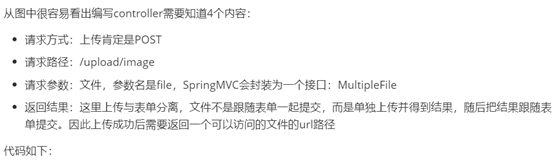
controller
package com.leyou.upload.controller;

import com.leyou.upload.service.UploadService;
import org.springframework.beans.factory.annotation.Autowired;
import org.springframework.http.ResponseEntity;
import org.springframework.web.bind.annotation.PostMapping;
import org.springframework.web.bind.annotation.RequestParam;
import org.springframework.web.bind.annotation.RestController;
import org.springframework.web.multipart.MultipartFile;

/**
 * @Author: heboxuan
 * @Date: Created in 11:22 2021/2/10
 */
@RestController
public class UploadController {
    @Autowired
    private UploadService uploadService;

    /**
     * 上传图片功能
     * @param file
     * @return url路径
     */
    @PostMapping("image")
    public ResponseEntity<String> uploadImage(@RequestParam("file")MultipartFile file) {
        // 返回200,并且携带url路径
        return ResponseEntity.ok(uploadService.uploadImage(file));
    }
}
service
package com.leyou.upload.service;

import com.leyou.common.exception.LyException;
import com.leyou.common.exception.enums.ExceptionEnum;
import org.springframework.stereotype.Service;
import org.springframework.web.multipart.MultipartFile;

import javax.imageio.ImageIO;
import java.awt.image.BufferedImage;
import java.io.File;
import java.io.IOException;
import java.util.Arrays;
import java.util.List;
import java.util.UUID;

/**
 * @Author: heboxuan
 * @Date: Created in 11:23 2021/2/10
 */
@Service
public class UploadService {

    //支持文件类型
    private static final List<String> suffixes= Arrays.asList("image/png", "image/jpeg", "image/bmp");

    /**
     * 本地上传
     * @param file
     * @return
     */
    public String uploadImage(MultipartFile file) {
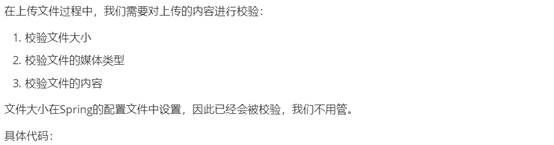
        //检查文件类型是否支持
        String contentType = file.getContentType();
        if (!suffixes.contains(contentType)) {
            throw new LyException(ExceptionEnum.INVALID_FILE_TYPE);
        }
        //检查当前文件是否是图片,使用java提供的ImageIO工具类
        try {
            BufferedImage bufferedImage = ImageIO.read(file.getInputStream());
            //如果bufferedImage有值,说明是图片,如果不是,上传错误
            if (bufferedImage==null) {
                throw new LyException(ExceptionEnum.INVALID_FILE_TYPE);
            }
        } catch (IOException e) {
            e.printStackTrace();
            throw new LyException(ExceptionEnum.INVALID_FILE_TYPE);
        }
        //原文件名
        String originalFilename = file.getOriginalFilename();
        //获取文件的后缀
        String suffix = originalFilename.substring(originalFilename.lastIndexOf("."));
        //构造新的文件名,名字不重复
        String newFileName=UUID.randomUUID().toString()+ suffix;
        //上传文件,存在nginx下
        String filePath = "D:\live\nginx-1.14.0\html ";
        File dir = new File(filePath);
        //检查上传目录是否存在
        if (!dir.exists()) {
            //如果目录不存在,创建目录
            dir.mkdir();
        }
        //把文件上传到本地目录,使用IO流
        try {
            file.transferTo(new File(dir,newFileName));
        } catch (Exception e) {
            e.printStackTrace();
            throw new LyException(ExceptionEnum.FILE_UPLOAD_ERROR);
        }
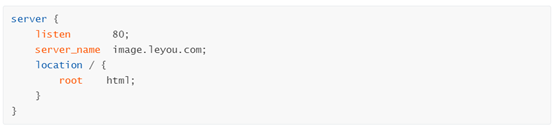
        //http://image.leyou.com/XXXXXX.jpg
        String url="http://image.leyou.com/"+newFileName;
        return url;
    }

}


测试上传

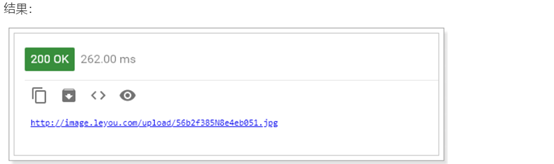
2.2 Nginx的请求大小


2.3 绕过网关缓存
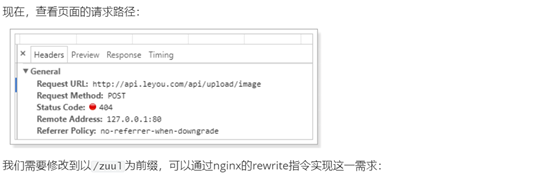
对于文件上传的微服务没必要经过网关,如果同时多个大文件上传经过网关,网关处理这些请求既耗时,也可能造成网关崩溃(因为请求携带数据,数据包含文件,文件过大),所以当是文件上传的请求时,绕过网关,不处理。





总结


 浙公网安备 33010602011771号