

VuePress使用
快速上手
VuePress中文文档:https://www.vuepress.cn/
VuePress 需要 Node.js >= 8.6
安装 VuePress
npm install -D vuepress
创建项目
创建项目文件夹,并进入到该文件。
mkdir vuepress-starter
cd vuepress-starter
初始化
npm init [-y] # -y表示确定
此时该文件下生成一个package.json文件,配置package.json,添加下述兩行
{
  "scripts": {
    "docs:dev": "vuepress dev docs",
    "docs:build": "vuepress build docs"
  }
}
创建你的第一个文件。
创建文件夹,然后在次文件夹中创建README文件。
mkdir docs
cd docs
type nul > README.md
启动服务器
npm run docs:dev
生成静态文件,默认情况下,放置在docs/.vuepress/dist目录中。
npm run docs:build
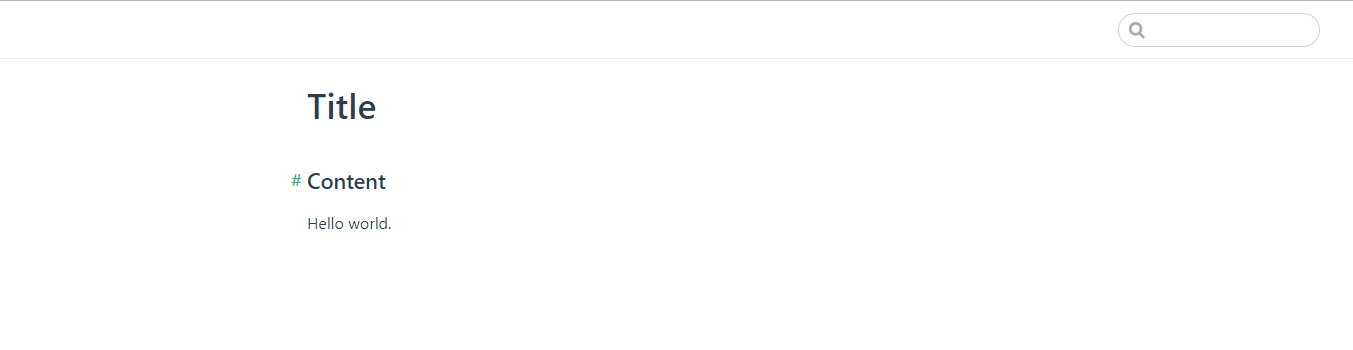
此时就可以访问项目了,项目地址为http://localhost:8080/。
目录结构
VuePress 遵循 “约定优于配置” 的原则,推荐的目录结构如下:
.
├── docs
│   ├── .vuepress (可选的)
│   │   ├── components (可选的)
│   │   ├── theme (可选的)
│   │   │   └── Layout.vue
│   │   ├── public (可选的)
│   │   ├── styles (可选的)
│   │   │   ├── index.styl
│   │   │   └── palette.styl
│   │   ├── templates (可选的, 谨慎配置)
│   │   │   ├── dev.html
│   │   │   └── ssr.html
│   │   ├── config.js (可选的)
│   │   └── enhanceApp.js (可选的)
│   │
│   ├── README.md
│   ├── guide
│   │   └── README.md
│   └── config.md
│
└── package.json
docs/.vuepress: 用于存放全局的配置、组件、静态资源等。docs/.vuepress/components: 该目录中的 Vue 组件将会被自动注册为全局组件。docs/.vuepress/theme: 用于存放本地主题。docs/.vuepress/styles: 用于存放样式相关的文件。docs/.vuepress/styles/index.styl: 将会被自动应用的全局样式文件,会生成在最终的 CSS 文件结尾,具有比默认样式更高的优先级。docs/.vuepress/styles/palette.styl: 用于重写默认颜色常量,或者设置新的 stylus 颜色常量。docs/.vuepress/public: 静态资源目录。docs/.vuepress/templates: 存储 HTML 模板文件。docs/.vuepress/templates/dev.html: 用于开发环境的 HTML 模板文件。docs/.vuepress/templates/ssr.html: 构建时基于 Vue SSR 的 HTML 模板文件。docs/.vuepress/config.js: 配置文件的入口文件,也可以是YML或toml。docs/.vuepress/enhanceApp.js: 客户端应用的增强。
基本配置
如果没有任何配置,这个网站将会是非常局限的,用户也无法在你的网站上自由导航。让我们首先在你的文档目录下创建一个 .vuepress 目录,所有 VuePress 相关的文件都将会被放在这里。你的项目结构可能是这样:
.
├─ docs
│  ├─ README.md
│  └─ .vuepress
│     └─ config.js
└─ package.json
一个 VuePress 网站必要的配置文件是 .vuepress/config.js,它应该导出一个 JavaScript 对象:
module.exports = {
  title: 'Hello VuePress',
  description: 'Just playing around'
}
对于上述的配置,如果你运行起 dev server,你应该能看到一个页面,它包含一个页头,里面包含一个标题和一个搜索框。VuePress 内置了基于 headers 的搜索 —— 它会自动为所有页面的标题、h2 和 h3 构建起一个简单的搜索索引。
配置导航栏
导航栏可能包含你的页面标题、搜索框、 导航栏链接、多语言切换、仓库链接,它们均取决于你的配置。
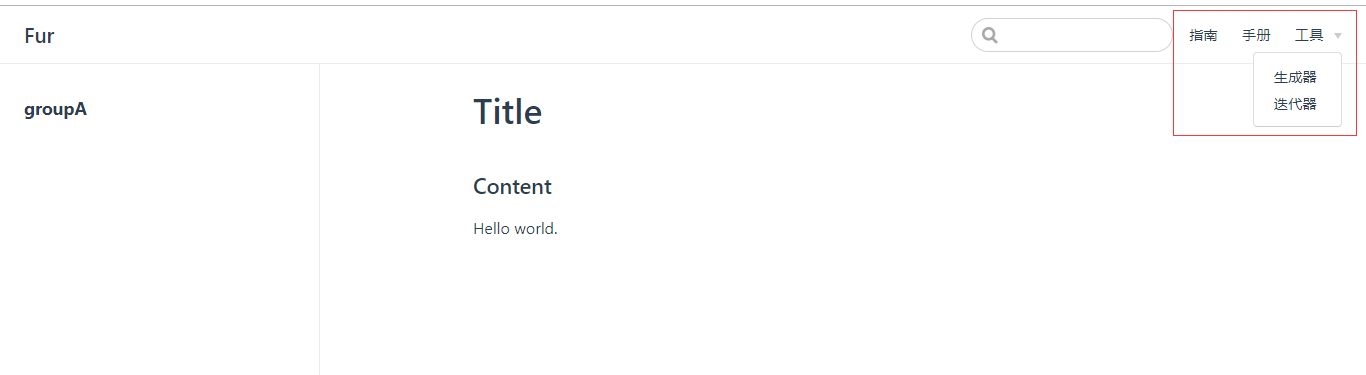
你可以通过 themeConfig.nav 增加一些导航栏链接:
themeConfig: {
    nav: [
      {
        text: "指南",
        link: "/guide/指南.md",
      },
      {
        text: "手册",
        link: "/handbook/手册.md",
      },
      {
        text: "工具",
        items: [
            { text: "生成器", link: "/guide/生成器.md" },
            { text: "迭代器", link: "/guide/迭代器.md" },
        ],
      },
    ],
}
添加后的界面效果
此时的目录结构为
.
├── docs
│   ├── .vuepress
│   │   ├── config.js
│   │
│   ├── README.md
│   ├── guide
│   │   └── 指南.md
│   │   └── 迭代器.md
│   │   └── 生成器.md
│   ├── handbook
│   │   └── 手册.md
└── package.json
配置侧边栏
想要使 侧边栏(Sidebar)生效,需要配置 themeConfig.sidebar.
themeConfig: {
  sidebar: {
    '/guide/': [{
      title: 'groupA',
      collapsable: false,
      children: [
        'test'
      ]
      }]
  }
},
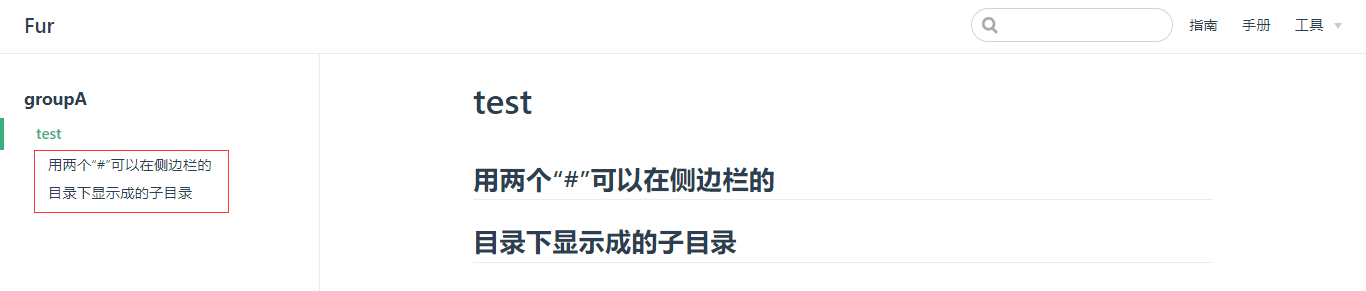
添加后的界面效果

目录结构:
.
├── docs
│   ├── .vuepress
│   │   ├── config.js
│   │
│   ├── README.md
│   ├── guide
│   │   └── 指南.md
│   │   └── 迭代器.md
│   │   └── 生成器.md
│   │   └── test.md
│   ├── handbook
│   │   └── 手册.md
└── package.json
在markedown中用两个“#”的标题,将会成为侧边栏的子目录。

 浙公网安备 33010602011771号