docker基础用法
docker基础用法
Docker是什么?
《Docker开发实践》中讲了个故事:20世纪60年代以前的海运,货物都放置在一起,很容易挤压受损。同时,不同的运输方式之间的转运也很麻烦,例如从码头和火车汽车转运卸货时。不同货物和不同交通工具之间的组合是一个巨大的二维矩阵。海运界最后达成了一致,制定了国际标准集装箱来解决这个棘手的问题。所有货物都打包进集装箱互相隔离,所有交通工具都通过集装箱转运,极大地提供了运输的安全性和效率。
在软件开发中我们也经常碰到同样的问题,使用了各种各样技术框架的应用程序,从前端静态网站到后端数据库,从PHP到Java,以及多种多样的部署环境,从测试服务器到线上环境,从虚拟机到公有云等等。Docker,正是这个集装箱,而Docker的logo也的确是个集装箱。
Docker与容器和虚拟机
很自然地我们会问,Docker跟虚拟机有什么区别啊?这个问题可以拆成两部分。因为Docker并不是什么完全独创的技术,而是属于很早便有了的容器技术,所以第一个问题就是容器与虚拟机的区别?同属于容器技术,Docker的兄弟姐妹还有Solaris Zones、BSD jails、LXC等。但Docker现在这么火,自然有它的独到之处,所以第二个问题就是Docker与其他容器的区别?
关于第一个问题比较简单,容器是一种轻量级的虚拟技术。它不像虚拟机那样具有一套完整的CPU、内存和磁盘,对操作系统有绝对的权限。容器和宿主主机共享内核,所有容器共享操作系统,在一台物理机上可以运行成百上千的容器。第二个问题稍麻烦一些,与LXC相比,Docker对配置进行了抽象,使应用在任何平台上的运行环境都一致。同时提供了版本控制、镜像托管等类似Git的现代化设施和生态圈。
总体来看,Docker的应用场景有:
- 加速本地开发:快速搭建好开发环境和运行环境
- 自动打包和部署应用
- 创建轻量级的私有Paas环境
- 自动化测试和持续集成
- 创建安全沙盒
OCI&OCF
OCI
Open Container-initiative(开源的容器的一个建议或倡导)
-
由Linux基金会主导于2015年6月创立
-
旨在围绕容器格式和运行时制定一个开放的工业化标准
-
contains two specifications
-
the Runtime Specification(runtime-spec)运行时规范
- the Image Specification(image-spec)形象规范
OCF
开源的容器的格式 runC是一个命令行工具,是用于根据OCI规范生成和运行容器
- 容器作为runC的子进程启动,可以嵌入到各种其他系统中,而无需运行守护进程
- runC构建在libcontainer上,这项容器技术为数百万Docker引擎安装提供了动力
docker提供了一个专门容纳容器镜像的站点:https://hub.docker.com/
docker架构
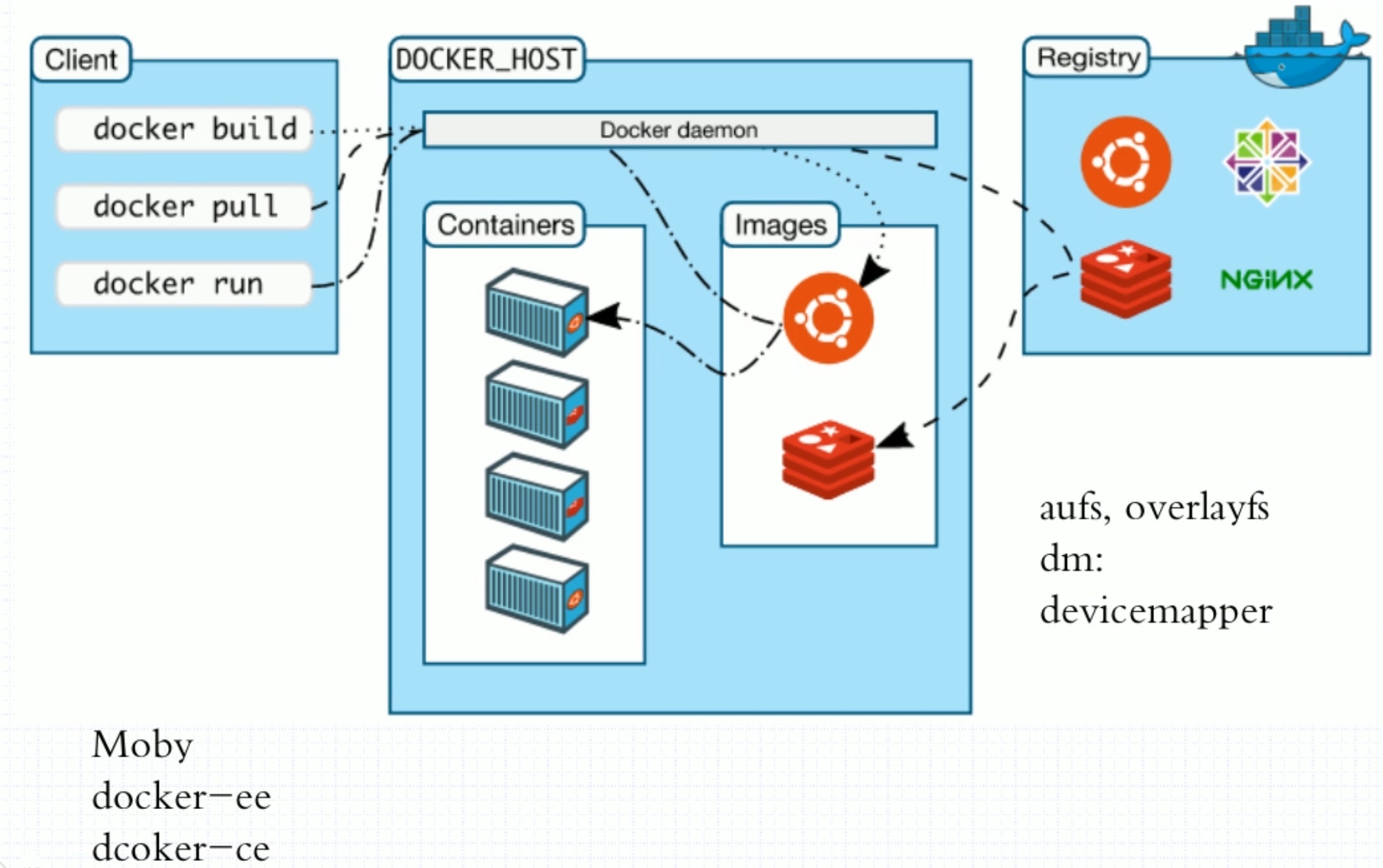
docker镜像与镜像仓库
为什么镜像仓库名字是Registry而不是repository?在docker中仓库的名字是以应用的名称取名的。
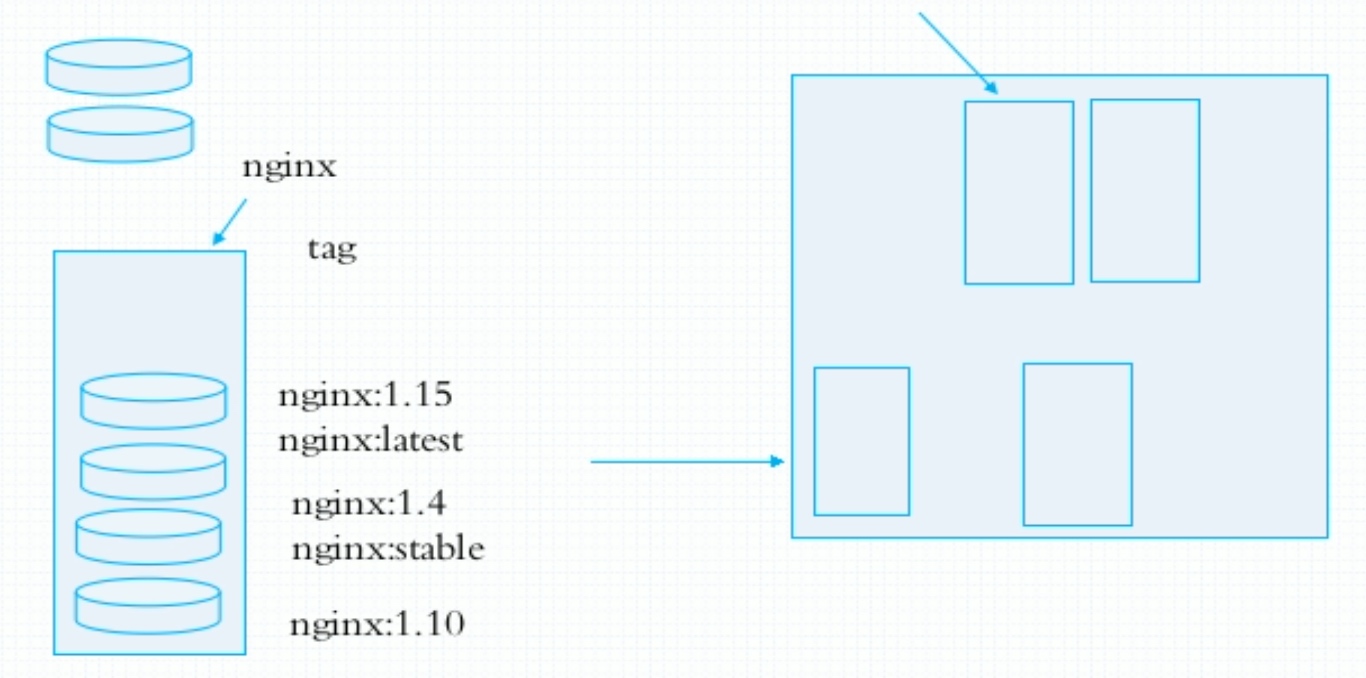
镜像是静态的,而容器是动态的,容器有其生命周期,镜像与容器的关系类似于程序与进程的关系。镜像类似于文件系统中的程序文件,而容器则类似于将一个程序运行起来的状态,也即进程。所以容器是可以删除的,容器被删除后其镜像是不会被删除的。
docker对象
使用docker时,您正在创建和使用图像、容器、网络、卷、插件和其他对象。
-
图像
- 图像是只读模板,其中包含创建docker容器的说明。
- 通常,一个图像基于另一个图像,并进行一些额外的自定义。
- 您可以创建自己的图像,也可以只使用其他人创建并在注册表中发布的图像。
-
容器
- conntainer是映像的可运行实例。 您可以使用docker API或CLI创建、运行、停止、移动或删除容器。
- 您可以将容器连接到一个或多个网络,将存储连接到容器,甚至可以基于其当前状态创建新映像。
安装及使用docker
————————————————
[root@master ~]# cd /etc/yum.repos.d/
[root@master yum.repos.d]# ls
CentOS-Linux-AppStream.repo          CentOS-Linux-HighAvailability.repo
CentOS-Linux-BaseOS.repo             CentOS-Linux-Media.repo
CentOS-Linux-ContinuousRelease.repo  CentOS-Linux-Plus.repo
CentOS-Linux-Debuginfo.repo          CentOS-Linux-PowerTools.repo
CentOS-Linux-Devel.repo              CentOS-Linux-Sources.repo
CentOS-Linux-Extras.repo             salt.repo
CentOS-Linux-FastTrack.repo
[root@master yum.repos.d]# curl -o docker-ce.repo https://mirrors.tuna.tsinghua.edu.cn/docker-ce/linux/centos/docker-ce.repo
  % Total    % Received % Xferd  Average Speed   Time    Time     Time  Current
                                 Dload  Upload   Total   Spent    Left  Speed
100  1919  100  1919    0     0   6505      0 --:--:-- --:--:-- --:--:--  6505
[root@master yum.repos.d]# ls
CentOS-Linux-AppStream.repo          CentOS-Linux-HighAvailability.repo
CentOS-Linux-BaseOS.repo             CentOS-Linux-Media.repo
CentOS-Linux-ContinuousRelease.repo  CentOS-Linux-Plus.repo
CentOS-Linux-Debuginfo.repo          CentOS-Linux-PowerTools.repo
CentOS-Linux-Devel.repo              CentOS-Linux-Sources.repo
CentOS-Linux-Extras.repo             docker-ce.repo
CentOS-Linux-FastTrack.repo          salt.repo
[root@master yum.repos.d]# sed -i 's@https://download.docker.com@https://mirrors.tuna.tsinghua.edu.cn/docker-ce@g' docker-ce.repo
[root@master yum.repos.d]# yum clean all
Failed to set locale, defaulting to C.UTF-8
26 files removed
[root@master yum.repos.d]# yum makecache
[root@master ~]# yum -y install docker-ce

[root@master ~]# tee /etc/docker/daemon.json <<-'EOF'
> {
>     "registry-mirrors": ["https://docker.mirrors.ustc.edu.cn/"]
> }
> EOF
{
    "registry-mirrors": ["https://docker.mirrors.ustc.edu.cn/"]
}
[root@master ~]# cat /etc/docker/daemon.json
{
    "registry-mirrors": ["https://docker.mirrors.ustc.edu.cn/"]
}

[root@master ~]# docker info
Client:
 Context:    default
 Debug Mode: false
 Plugins:
  app: Docker App (Docker Inc., v0.9.1-beta3)
  buildx: Build with BuildKit (Docker Inc., v0.6.3-docker)
  scan: Docker Scan (Docker Inc., v0.9.0)

Server:
 Containers: 0
  Running: 0
  Paused: 0
  Stopped: 0
 Images: 0
 Server Version: 20.10.11
 Storage Driver: overlay2
  Backing Filesystem: xfs
  Supports d_type: true
  Native Overlay Diff: true
  userxattr: false
 Logging Driver: json-file
 Cgroup Driver: cgroupfs
 Cgroup Version: 1
 Plugins:
  Volume: local
  Network: bridge host ipvlan macvlan null overlay
  Log: awslogs fluentd gcplogs gelf journald json-file local logentries splunk syslog
 Swarm: inactive
 Runtimes: io.containerd.runc.v2 io.containerd.runtime.v1.linux runc
 Default Runtime: runc
 Init Binary: docker-init
 containerd version: 7b11cfaabd73bb80907dd23182b9347b4245eb5d
 runc version: v1.0.2-0-g52b36a2
 init version: de40ad0
 Security Options:
  seccomp
   Profile: default
 Kernel Version: 4.18.0-305.3.1.el8.x86_64
 Operating System: CentOS Linux 8
 OSType: linux
 Architecture: x86_64
 CPUs: 4
 Total Memory: 7.561GiB
 Name: master
 ID: STJ5:7XDT:LWUF:OZDV:T54I:FQEF:PL6Q:NNIV:Y72B:7KH6:YQJP:TD2S
 Docker Root Dir: /var/lib/docker
 Debug Mode: false
 Registry: https://index.docker.io/v1/
 Labels:
 Experimental: false
 Insecure Registries:
  127.0.0.0/8
 Live Restore Enabled: false

[root@master ~]# systemctl daemon-reload
[root@master ~]# systemctl restart docker
[root@master ~]# docker info
Client:
 Context:    default
 Debug Mode: false
 Plugins:
  app: Docker App (Docker Inc., v0.9.1-beta3)
  buildx: Build with BuildKit (Docker Inc., v0.6.3-docker)
  scan: Docker Scan (Docker Inc., v0.9.0)

Server:
 Containers: 0
  Running: 0
  Paused: 0
  Stopped: 0
 Images: 0
 Server Version: 20.10.11
 Storage Driver: overlay2
  Backing Filesystem: xfs
  Supports d_type: true
  Native Overlay Diff: true
  userxattr: false
 Logging Driver: json-file
 Cgroup Driver: cgroupfs
 Cgroup Version: 1
 Plugins:
  Volume: local
  Network: bridge host ipvlan macvlan null overlay
  Log: awslogs fluentd gcplogs gelf journald json-file local logentries splunk syslog
 Swarm: inactive
 Runtimes: io.containerd.runc.v2 io.containerd.runtime.v1.linux runc
 Default Runtime: runc
 Init Binary: docker-init
 containerd version: 7b11cfaabd73bb80907dd23182b9347b4245eb5d
 runc version: v1.0.2-0-g52b36a2
 init version: de40ad0
 Security Options:
  seccomp
   Profile: default
 Kernel Version: 4.18.0-305.3.1.el8.x86_64
 Operating System: CentOS Linux 8
 OSType: linux
 Architecture: x86_64
 CPUs: 4
 Total Memory: 7.561GiB
 Name: master
 ID: H7BS:C42K:OBNS:WRKG:XW42:YPXI:3O73:IAMQ:GQVV:T4QE:7CZZ:NQTK
 Docker Root Dir: /var/lib/docker
 Debug Mode: false
 Registry: https://index.docker.io/v1/
 Labels:
 Experimental: false
 Insecure Registries:
  127.0.0.0/8
 Registry Mirrors:
  https://docker.mirrors.ustc.edu.cn/
 Live Restore Enabled: false

[root@master ~]# docker version
Client: Docker Engine - Community
 Version:           20.10.11
 API version:       1.41
 Go version:        go1.16.9
 Git commit:        dea9396
 Built:             Thu Nov 18 00:36:58 2021
 OS/Arch:           linux/amd64
 Context:           default
 Experimental:      true

Server: Docker Engine - Community
 Engine:
  Version:          20.10.11
  API version:      1.41 (minimum version 1.12)
  Go version:       go1.16.9
  Git commit:       847da18
  Built:            Thu Nov 18 00:35:20 2021
  OS/Arch:          linux/amd64
  Experimental:     false
 containerd:
  Version:          1.4.12
  GitCommit:        7b11cfaabd73bb80907dd23182b9347b4245eb5d
 runc:
  Version:          1.0.2
  GitCommit:        v1.0.2-0-g52b36a2
 docker-init:
  Version:          0.19.0
  GitCommit:        de40ad0
常规操作
[root@master ~]# docker search nginx
NAME                              DESCRIPTION                                     STARS     OFFICIAL   AUTOMATED
nginx                             Official build of Nginx.                        15899     [OK]
jwilder/nginx-proxy               Automated Nginx reverse proxy for docker con…   2098                 [OK]
richarvey/nginx-php-fpm           Container running Nginx + PHP-FPM capable of…   819                  [OK]
jc21/nginx-proxy-manager          Docker container for managing Nginx proxy ho…   285
linuxserver/nginx                 An Nginx container, brought to you by LinuxS…   160
tiangolo/nginx-rtmp               Docker image with Nginx using the nginx-rtmp…   147                  [OK]
jlesage/nginx-proxy-manager       Docker container for Nginx Proxy Manager        144                  [OK]
alfg/nginx-rtmp                   NGINX, nginx-rtmp-module and FFmpeg from sou…   110                  [OK]
nginxdemos/hello                  NGINX webserver that serves a simple page co…   79                   [OK]
privatebin/nginx-fpm-alpine       PrivateBin running on an Nginx, php-fpm & Al…   60                   [OK]
nginx/nginx-ingress               NGINX and  NGINX Plus Ingress Controllers fo…   57
nginxinc/nginx-unprivileged       Unprivileged NGINX Dockerfiles                  54
nginxproxy/nginx-proxy            Automated Nginx reverse proxy for docker con…   28
staticfloat/nginx-certbot         Opinionated setup for automatic TLS certs lo…   25                   [OK]
nginx/nginx-prometheus-exporter   NGINX Prometheus Exporter for NGINX and NGIN…   22
schmunk42/nginx-redirect          A very simple container to redirect HTTP tra…   19                   [OK]
centos/nginx-112-centos7          Platform for running nginx 1.12 or building …   16
centos/nginx-18-centos7           Platform for running nginx 1.8 or building n…   13
flashspys/nginx-static            Super Lightweight Nginx Image                   11                   [OK]
mailu/nginx                       Mailu nginx frontend                            9                    [OK]
sophos/nginx-vts-exporter         Simple server that scrapes Nginx vts stats a…   7                    [OK]
ansibleplaybookbundle/nginx-apb   An APB to deploy NGINX                          3                    [OK]
arnau/nginx-gate                  Docker image with Nginx with Lua enabled on …   1                    [OK]
wodby/nginx                       Generic nginx                                   1                    [OK]
centos/nginx-110-centos7          Platform for running nginx 1.10 or building …   0

[root@master ~]# docker pull nginx:1.20.2
1.20.2: Pulling from library/nginx
eff15d958d66: Pull complete
1f3e1e3ef6aa: Pull complete
231009cab23f: Pull complete
b2ef879f0046: Pull complete
5495a7eec709: Pull complete
ddde57a4eac9: Pull complete
Digest: sha256:6ce65dd1f3bf44fa60a0212f0f893b78a706f20f09c884b43de50037067d9f5d
Status: Downloaded newer image for nginx:1.20.2
docker.io/library/nginx:1.20.2

docker images  列出镜像的详细信息
[root@master ~]# docker images
REPOSITORY   TAG       IMAGE ID       CREATED       SIZE
nginx        1.20.2    aedf7f31bdab   2 weeks ago   141MB

docker create  创建一个新的容器
[root@master ~]# docker create nginx
Unable to find image 'nginx:latest' locally
latest: Pulling from library/nginx
eff15d958d66: Already exists
1e5351450a59: Pull complete
2df63e6ce2be: Pull complete
9171c7ae368c: Pull complete
020f975acd28: Pull complete
266f639b35ad: Pull complete
Digest: sha256:097c3a0913d7e3a5b01b6c685a60c03632fc7a2b50bc8e35bcaa3691d788226e
Status: Downloaded newer image for nginx:latest
28c96de20ae344bfd23b7bbe899081891a51d38d031ee2852bf2de5870f363fb

[root@master ~]# docker create busybox sleep 3600
Unable to find image 'busybox:latest' locally
latest: Pulling from library/busybox
3aab638df1a9: Pull complete
Digest: sha256:52817dece4cfe26f581c834d27a8e1bcc82194f914afe6d50afad5a101234ef1
Status: Downloaded newer image for busybox:latest
a76bbe95785826e82d5d7878a7ad660124589835b5b2a08cd55d6bb7fc2a6242
[root@master ~]# docker ps -a
CONTAINER ID   IMAGE     COMMAND                  CREATED          STATUS    PORTS     NAMES
a76bbe957858   busybox   "sleep 3600"             7 seconds ago    Created             nostalgic_edison
28c96de20ae3   nginx     "/docker-entrypoint.…"   32 seconds ago   Created             dreamy_taussig
[root@master ~]# docker start a76bbe957858
a76bbe957858
[root@master ~]# docker ps
CONTAINER ID   IMAGE     COMMAND        CREATED          STATUS         PORTS     NAMES
a76bbe957858   busybox   "sleep 3600"   51 seconds ago   Up 8 seconds             nostalgic_edison

docker ps  列出容器
[root@master ~]# docker ps -a   列出所以容器
CONTAINER ID   IMAGE     COMMAND                  CREATED              STATUS          PORTS     NAMES
a76bbe957858   busybox   "sleep 3600"             About a minute ago   Up 39 seconds             nostalgic_edison
28c96de20ae3   nginx     "/docker-entrypoint.…"   About a minute ago   Created                   dreamy_taussig

docker start 启动一个或多个停止的容器
[root@master ~]# docker start a76bbe957858
a76bbe957858
[root@master ~]# docker ps
CONTAINER ID   IMAGE     COMMAND        CREATED         STATUS         PORTS     NAMES
a76bbe957858   busybox   "sleep 3600"   3 minutes ago   Up 2 minutes             nostalgic_edison

docker restart  重新启动容器
[root@master ~]# docker restart a76bbe957858
a76bbe957858
[root@master ~]# docker ps
CONTAINER ID   IMAGE     COMMAND        CREATED         STATUS         PORTS     NAMES
a76bbe957858   busybox   "sleep 3600"   3 minutes ago   Up 4 seconds             nostalgic_edison

docker stop  停止一个或多个正在运行的容器
[root@master ~]# docker stop a76bbe957858
a76bbe957858
[root@master ~]# docker ps
CONTAINER ID   IMAGE     COMMAND   CREATED   STATUS    PORTS     NAMES

docker kill  杀死一个或多个正在运行的容器
[root@master ~]# docker start a76bbe957858
a76bbe957858
[root@master ~]# docker kill a76bbe957858
a76bbe957858
[root@master ~]# docker ps -a
CONTAINER ID   IMAGE     COMMAND                  CREATED         STATUS                       PORTS     NAMES
a76bbe957858   busybox   "sleep 3600"             6 minutes ago   Exited (137) 5 seconds ago             nostalgic_edison
28c96de20ae3   nginx     "/docker-entrypoint.…"   6 minutes ago   Created                                dreamy_taussig

docker run  在新容器中运行命令
[root@master ~]# docker run -it busybox /bin/sh
/ # ls
bin   dev   etc   home  proc  root  sys   tmp   usr   var

[root@master ~]# docker run -d httpd
Unable to find image 'httpd:latest' locally
latest: Pulling from library/httpd
eff15d958d66: Already exists
ba1caf8ba86c: Pull complete
ab86dc02235d: Pull complete
0d58b11d2867: Pull complete
e88da7cb925c: Pull complete
Digest: sha256:1d71eef54c08435c0be99877c408637f03112dc9f929fba3cccdd15896099b02
Status: Downloaded newer image for httpd:latest
3bffd1458f09d041b13b75049182ebdcfc2cde2d40052cccc8b9ba945debee7a
[root@master ~]# docker ps
CONTAINER ID   IMAGE     COMMAND              CREATED         STATUS        PORTS     NAMES
3bffd1458f09   httpd     "httpd-foreground"   3 seconds ago   Up 1 second   80/tcp    infallible_williams

docker logs  获取容器的日志
[root@master ~]# docker logs 3bffd1458f09
AH00558: httpd: Could not reliably determine the server's fully qualified domain name, using 172.17.0.2. Set the 'ServerName' directive globally to suppress this message
AH00558: httpd: Could not reliably determine the server's fully qualified domain name, using 172.17.0.2. Set the 'ServerName' directive globally to suppress this message
[Thu Dec 02 05:02:45.085769 2021] [mpm_event:notice] [pid 1:tid 139700460145984] AH00489: Apache/2.4.51 (Unix) configured -- resuming normal operations
[Thu Dec 02 05:02:45.085879 2021] [core:notice] [pid 1:tid 139700460145984] AH00094: Command line: 'httpd -D FOREGROUND'

docker rm  卸下一个或多个容器
[root@master ~]# docker rm -f 3bffd1458f09
3bffd1458f09
[root@master ~]# docker ps
CONTAINER ID   IMAGE     COMMAND   CREATED   STATUS    PORTS     NAMES
[root@master ~]# docker ps -a
CONTAINER ID   IMAGE     COMMAND                  CREATED          STATUS                       PORTS     NAMES
4543fe8b6cfd   busybox   "/bin/sh"                2 minutes ago    Exited (0) 2 minutes ago               wizardly_panini
a76bbe957858   busybox   "sleep 3600"             9 minutes ago    Exited (137) 3 minutes ago             nostalgic_edison
28c96de20ae3   nginx     "/docker-entrypoint.…"   10 minutes ago   Created                                dreamy_taussig

[root@master ~]# docker ps -aq
4543fe8b6cfd
a76bbe957858
28c96de20ae3
[root@master ~]# docker rm $(docker ps -aq)
4543fe8b6cfd
a76bbe957858
28c96de20ae3
[root@master ~]# docker ps -a
CONTAINER ID   IMAGE     COMMAND   CREATED   STATUS    PORTS     NAMES

docker exec  在正在运行的容器中运行命令

docker info  显示系统范围的信息
[root@master ~]# docker info
Client:
 Context:    default
 Debug Mode: false
 Plugins:
  app: Docker App (Docker Inc., v0.9.1-beta3)
  buildx: Build with BuildKit (Docker Inc., v0.6.3-docker)
  scan: Docker Scan (Docker Inc., v0.9.0)

Server:
 Containers: 2
  Running: 0
  Paused: 0
  Stopped: 2
 Images: 4
 Server Version: 20.10.11
 Storage Driver: overlay2
  Backing Filesystem: xfs
  Supports d_type: true
  Native Overlay Diff: true
  userxattr: false
 Logging Driver: json-file
 Cgroup Driver: cgroupfs
 Cgroup Version: 1
 Plugins:
  Volume: local
  Network: bridge host ipvlan macvlan null overlay
  Log: awslogs fluentd gcplogs gelf journald json-file local logentries splunk syslog
 Swarm: inactive
 Runtimes: io.containerd.runc.v2 io.containerd.runtime.v1.linux runc
 Default Runtime: runc
 Init Binary: docker-init
 containerd version: 7b11cfaabd73bb80907dd23182b9347b4245eb5d
 runc version: v1.0.2-0-g52b36a2
 init version: de40ad0
 Security Options:
  seccomp
   Profile: default
 Kernel Version: 4.18.0-305.3.1.el8.x86_64
 Operating System: CentOS Linux 8
 OSType: linux
 Architecture: x86_64
 CPUs: 4
 Total Memory: 7.561GiB
 Name: master
 ID: H7BS:C42K:OBNS:WRKG:XW42:YPXI:3O73:IAMQ:GQVV:T4QE:7CZZ:NQTK
 Docker Root Dir: /var/lib/docker
 Debug Mode: false
 Registry: https://index.docker.io/v1/
 Labels:
 Experimental: false
 Insecure Registries:
  127.0.0.0/8
 Registry Mirrors:
  https://docker.mirrors.ustc.edu.cn/
 Live Restore Enabled: false

docker inspect  返回有关Docker对象的低级信息
[root@master ~]# docker start 031a2f8d3141
031a2f8d3141
[root@master ~]# docker inspect 031a2f8d3141
[
    {
        "Id": "031a2f8d31413ddd5f41e636400fb14afb4d947b73fcad7b1472fe9d01b46d10",
        "Created": "2021-12-02T05:05:55.178269462Z",
        "Path": "httpd-foreground",
        "Args": [],
        "State": {
            "Status": "running",
            "Running": true,
            "Paused": false,
            "Restarting": false,
            "OOMKilled": false,
            "Dead": false,
            "Pid": 104338,
            "ExitCode": 0,
            "Error": "",
            "StartedAt": "2021-12-02T05:11:31.274069596Z",
            "FinishedAt": "2021-12-02T05:06:41.377032061Z"
        },
        "Image": "sha256:ad17c88403e2cedd27963b98be7f04bd3f903dfa7490586de397d0404424936d",
        "ResolvConfPath": "/var/lib/docker/containers/031a2f8d31413ddd5f41e636400fb14afb4d947b73fcad7b1472fe9d01b46d10/resolv.conf",
        "HostnamePath": "/var/lib/docker/containers/031a2f8d31413ddd5f41e636400fb14afb4d947b73fcad7b1472fe9d01b46d10/hostname",
        "HostsPath": "/var/lib/docker/containers/031a2f8d31413ddd5f41e636400fb14afb4d947b73fcad7b1472fe9d01b46d10/hosts",
        "LogPath": "/var/lib/docker/containers/031a2f8d31413ddd5f41e636400fb14afb4d947b73fcad7b1472fe9d01b46d10/031a2f8d31413ddd5f41e636400fb14afb4d947b73fcad7b1472fe9d01b46d10-json.log",
        "Name": "/festive_jones",
        "RestartCount": 0,
        "Driver": "overlay2",
        "Platform": "linux",
        "MountLabel": "",
        "ProcessLabel": "",
        "AppArmorProfile": "",
        "ExecIDs": null,
        "HostConfig": {
            "Binds": null,
            "ContainerIDFile": "",
            "LogConfig": {
                "Type": "json-file",
                "Config": {}
            },
            "NetworkMode": "default",
            "PortBindings": {},
            "RestartPolicy": {
                "Name": "no",
                "MaximumRetryCount": 0
            },
            "AutoRemove": false,
            "VolumeDriver": "",
            "VolumesFrom": null,
            "CapAdd": null,
            "CapDrop": null,
            "CgroupnsMode": "host",
            "Dns": [],
            "DnsOptions": [],
            "DnsSearch": [],
            "ExtraHosts": null,
            "GroupAdd": null,
            "IpcMode": "private",
            "Cgroup": "",
            "Links": null,
            "OomScoreAdj": 0,
            "PidMode": "",
            "Privileged": false,
            "PublishAllPorts": false,
            "ReadonlyRootfs": false,
            "SecurityOpt": null,
            "UTSMode": "",
            "UsernsMode": "",
            "ShmSize": 67108864,
            "Runtime": "runc",
            "ConsoleSize": [
                0,
                0
            ],
            "Isolation": "",
            "CpuShares": 0,
            "Memory": 0,
            "NanoCpus": 0,
            "CgroupParent": "",
            "BlkioWeight": 0,
            "BlkioWeightDevice": [],
            "BlkioDeviceReadBps": null,
            "BlkioDeviceWriteBps": null,
            "BlkioDeviceReadIOps": null,
            "BlkioDeviceWriteIOps": null,
            "CpuPeriod": 0,
            "CpuQuota": 0,
            "CpuRealtimePeriod": 0,
            "CpuRealtimeRuntime": 0,
            "CpusetCpus": "",
            "CpusetMems": "",
            "Devices": [],
            "DeviceCgroupRules": null,
            "DeviceRequests": null,
            "KernelMemory": 0,
            "KernelMemoryTCP": 0,
            "MemoryReservation": 0,
            "MemorySwap": 0,
            "MemorySwappiness": null,
            "OomKillDisable": false,
            "PidsLimit": null,
            "Ulimits": null,
            "CpuCount": 0,
            "CpuPercent": 0,
            "IOMaximumIOps": 0,
            "IOMaximumBandwidth": 0,
            "MaskedPaths": [
                "/proc/asound",
                "/proc/acpi",
                "/proc/kcore",
                "/proc/keys",
                "/proc/latency_stats",
                "/proc/timer_list",
                "/proc/timer_stats",
                "/proc/sched_debug",
                "/proc/scsi",
                "/sys/firmware"
            ],
            "ReadonlyPaths": [
                "/proc/bus",
                "/proc/fs",
                "/proc/irq",
                "/proc/sys",
                "/proc/sysrq-trigger"
            ]
        },
        "GraphDriver": {
            "Data": {
                "LowerDir": "/var/lib/docker/overlay2/3d990cd615ae2906eacf0f993130a46abb6530dcb86edb5de3472dc5c51c8ddf-init/diff:/var/lib/docker/overlay2/7ef982c162606c0a8da3f08aec24a5f7909ca2f41a18839ce8fe2d9bc15f9ee1/diff:/var/lib/docker/overlay2/408692bd1a12a54077884a7bb77a2fe3465a8ec0568c86b66dcecb7675ea0371/diff:/var/lib/docker/overlay2/1553511188edf9188fe93cc4293240825f85fdfc375de397e1de72cc07a150c4/diff:/var/lib/docker/overlay2/cbb5fac7cbbdbaab7c8cabe719087b615072d6e302185bc0d4171c5b304d23e6/diff:/var/lib/docker/overlay2/759523812ada49ebcf88d5359e4aac546962ef50b55607c0a686301954c6fc8d/diff",
                "MergedDir": "/var/lib/docker/overlay2/3d990cd615ae2906eacf0f993130a46abb6530dcb86edb5de3472dc5c51c8ddf/merged",
                "UpperDir": "/var/lib/docker/overlay2/3d990cd615ae2906eacf0f993130a46abb6530dcb86edb5de3472dc5c51c8ddf/diff",
                "WorkDir": "/var/lib/docker/overlay2/3d990cd615ae2906eacf0f993130a46abb6530dcb86edb5de3472dc5c51c8ddf/work"
            },
            "Name": "overlay2"
        },
        "Mounts": [],
        "Config": {
            "Hostname": "031a2f8d3141",
            "Domainname": "",
            "User": "",
            "AttachStdin": false,
            "AttachStdout": false,
            "AttachStderr": false,
            "ExposedPorts": {
                "80/tcp": {}
            },
            "Tty": false,
            "OpenStdin": false,
            "StdinOnce": false,
            "Env": [
                "PATH=/usr/local/apache2/bin:/usr/local/sbin:/usr/local/bin:/usr/sbin:/usr/bin:/sbin:/bin",
                "HTTPD_PREFIX=/usr/local/apache2",
                "HTTPD_VERSION=2.4.51",
                "HTTPD_SHA256=20e01d81fecf077690a4439e3969a9b22a09a8d43c525356e863407741b838f4",
                "HTTPD_PATCHES="
            ],
            "Cmd": [
                "httpd-foreground"
            ],
            "Image": "httpd",
            "Volumes": null,
            "WorkingDir": "/usr/local/apache2",
            "Entrypoint": null,
            "OnBuild": null,
            "Labels": {},
            "StopSignal": "SIGWINCH"
        },
        "NetworkSettings": {
            "Bridge": "",
            "SandboxID": "66c75f078b330247d433808b246bd752282a7e43138c264b0309995a5c5b9339",
            "HairpinMode": false,
            "LinkLocalIPv6Address": "",
            "LinkLocalIPv6PrefixLen": 0,
            "Ports": {
                "80/tcp": null
            },
            "SandboxKey": "/var/run/docker/netns/66c75f078b33",
            "SecondaryIPAddresses": null,
            "SecondaryIPv6Addresses": null,
            "EndpointID": "53442821c73d2f99cfe895a1387c05c10be2cb9171517ce743f203dce3eae7d8",
            "Gateway": "172.17.0.1",
            "GlobalIPv6Address": "",
            "GlobalIPv6PrefixLen": 0,
            "IPAddress": "172.17.0.2",
            "IPPrefixLen": 16,
            "IPv6Gateway": "",
            "MacAddress": "02:42:ac:11:00:02",
            "Networks": {
                "bridge": {
                    "IPAMConfig": null,
                    "Links": null,
                    "Aliases": null,
                    "NetworkID": "f51c0a4c804924007188ef7c5d60b42e782875cde6dc4301a6f31feb3915049c",
                    "EndpointID": "53442821c73d2f99cfe895a1387c05c10be2cb9171517ce743f203dce3eae7d8",
                    "Gateway": "172.17.0.1",
                    "IPAddress": "172.17.0.2",
                    "IPPrefixLen": 16,
                    "IPv6Gateway": "",
                    "GlobalIPv6Address": "",
                    "GlobalIPv6PrefixLen": 0,
                    "MacAddress": "02:42:ac:11:00:02",
                    "DriverOpts": null
                }
            }
        }
    }
]
[root@master ~]# curl 172.17.0.2
<html><body><h1>It works!</h1></body></html>
码头加速
docker-ce 的配置文件是/etc/docker/daemon.json,这个文件默认不存在,需要我们手动创建并进行配置,而docker的加速就是通过配置这个文件来实现的。
码头的加速有多种方式:
- 码头工人
- 中国科技大学加速器
- 阿里云加速器(通过阿里云开发者平台注册需要,免费使用个人智能的加速器)
tee /etc/docker/daemon.json <<-'EOF'
{
    "registry-mirrors": ["https://docker.mirrors.ustc.edu.cn/"]
}
EOF
 浙公网安备 33010602011771号