haproxy配置负载均衡
haproxy配置负载均衡
haproxy介绍
HAProxy 提供高可用性、负载均衡以及基于 TCP 和 HTTP 应用的代理,支持虚拟主机,它是免费、快速并且可靠的一种解决方案.HAProxy 特别适用于那些负载特大的 web 站点, 这些站点通常又需要会话保持或七层处理.HAProxy 运行在当前的硬件上,完全可以支持数以万计的并发连接.并且它的运行模式使得它可以很简单安全的整合进您当前的架构中, 同时可以保护你的 web 服务器不被暴露到网络上.
haproxy安装
在RS配置httpd服务
[root@RS1 ~]# systemctl disable --now firewalld.service
Removed /etc/systemd/system/multi-user.target.wants/firewalld.service.
Removed /etc/systemd/system/dbus-org.fedoraproject.FirewallD1.service.
[root@RS1 ~]# getenforce
Disabled
[root@RS1 ~]# yum -y install httpd
[root@RS1 ~]# systemctl enable --now httpd
Created symlink /etc/systemd/system/multi-user.target.wants/httpd.service → /usr/lib/systemd/system/httpd.service.
[root@RS1 ~]# echo "123" > /var/www/html/index.html

[root@RS2 ~]# systemctl disable --now firewalld.service
Removed /etc/systemd/system/multi-user.target.wants/firewalld.service.
Removed /etc/systemd/system/dbus-org.fedoraproject.FirewallD1.service.
[root@RS2 ~]# getenforce
Disabled
[root@RS2 ~]# yum -y install httpd
[root@RS2 ~]# systemctl enable --now httpd
Created symlink /etc/systemd/system/multi-user.target.wants/httpd.service → /usr/lib/systemd/system/httpd.service.
[root@RS2 ~]# echo "456" > /var/www/html/index.html

配置DR
[root@DR ~]# systemctl disable --now firewalld.service
Removed /etc/systemd/system/multi-user.target.wants/firewalld.service.
Removed /etc/systemd/system/dbus-org.fedoraproject.FirewallD1.service.
[root@DR ~]# getenforce
Disabled

安装服务
[root@DR ~]# yum -y install openssl make gcc pcre-devel bzip2-devel openssl-devel systemd-devel

创建用户
[root@DR ~]# useradd -r -M -s /sbin/nologin haproxy

上传压缩包
[root@DR ~]# ls
公共  视频  文档  音乐  anaconda-ks.cfg       initial-setup-ks.cfg
模板  图片  下载  桌面  haproxy-2.4.0.tar.gz
解压压缩包
[root@DR ~]# tar xf haproxy-2.4.0.tar.gz
[root@DR ~]# ls
公共  视频  文档  音乐  anaconda-ks.cfg  haproxy-2.4.0.tar.gz
模板  图片  下载  桌面  haproxy-2.4.0    initial-setup-ks.cfg

[root@DR haproxy-2.4.0]# ls
addons    CHANGELOG     doc       include  MAINTAINERS  reg-tests  src      VERDATE
admin     CONTRIBUTING  examples  INSTALL  Makefile     ROADMAP    SUBVERS  VERSION
BRANCHES  dev           haproxy   LICENSE  README       scripts    tests
[root@DR haproxy-2.4.0]# make clean
[root@DR haproxy-2.4.0]# make -j $(nproc) TARGET=linux-glibc USE_OPENSSL=1 USE_PCRE=1 USE_SYSTEMD=1         //过程省略
[root@DR haproxy-2.4.0]# make install PREFIX=/usr/local/haproxy

配置内核参数
[root@DR ~]# echo 'net.ipv4.ip_nonlocal_bind = 1' >>  /etc/sysctl.conf
[root@DR ~]# echo 'net.ipv4.ip_forward = 1' >> /etc/sysctl.conf
[root@DR ~]# sysctl  -p
net.ipv4.ip_nonlocal_bind = 1
net.ipv4.ip_forward = 1

提供配置文件
[root@DR ~]# mkdir /etc/haproxy
[root@DR ~]# cd /etc/haproxy/
[root@DR haproxy]# cat > /etc/haproxy/haproxy.cfg <<EOF
#--------------全局配置----------------
global
    log 127.0.0.1 local0  info
    #log loghost local0 info
    maxconn 20480
#chroot /usr/local/haproxy
    pidfile /var/run/haproxy.pid
    #maxconn 4000
    user haproxy
    group haproxy
    daemon
#---------------------------------------------------------------------
#common defaults that all the 'listen' and 'backend' sections will
#use if not designated in their block
#---------------------------------------------------------------------
defaults
    mode http
    log global
    option dontlognull
    option httpclose
    option httplog
    #option forwardfor
    option redispatch
    balance roundrobin
    timeout connect 10s
    timeout client 10s
    timeout server 10s
    timeout check 10s
    maxconn 60000
    retries 3
#--------------统计页面配置------------------
listen admin_stats
    bind 0.0.0.0:8189
    stats enable
    mode http
    log global
    stats uri /haproxy_stats
    stats realm Haproxy\ Statistics
    stats auth admin:admin
    #stats hide-version
    stats admin if TRUE
    stats refresh 30s
#---------------web设置-----------------------
listen webcluster
    bind 0.0.0.0:80
    mode http
    #option httpchk GET /index.html
    log global
    maxconn 3000
    balance roundrobin
    cookie SESSION_COOKIE insert indirect nocache
    server web01 192.168.145.170:80 check inter 2000 fall 5
    #server web02 192.168.145.171:80 cookie web01 check inter 2000 fall 5
EOF

haproxy.service文件编写
[root@DR ~]# cat > /usr/lib/systemd/system/haproxy.service <<EOF
[Unit]
Description=HAProxy Load Balancer
After=syslog.target network.target

[Service]
ExecStartPre=/usr/local/haproxy/sbin/haproxy -f /etc/haproxy/haproxy.cfg   -c -q
ExecStart=/usr/local/haproxy/sbin/haproxy -Ws -f /etc/haproxy/haproxy.cfg  -p /var/run/haproxy.pid
ExecReload=/bin/kill -USR2 $MAINPID

[Install]
WantedBy=multi-user.target
EOF
[root@DR ~]# systemctl daemon-reload

开启日志
[root@DR ~]# vim /etc/rsyslog.conf
local0.* /var/log/haproxy.log       加入此行

设置开机自启
[root@DR ~]# systemctl enable --now haproxy
Created symlink /etc/systemd/system/multi-user.target.wants/haproxy.service → /usr/lib/systemd/system/haproxy.service.
[root@DR ~]# systemctl status haproxy.service
● haproxy.service - HAProxy Load Balancer
   Loaded: loaded (/usr/lib/systemd/system/haproxy.service; enabled; vendor preset: >
   Active: active (running) since Mon 2021-10-18 02:01:59 CST; 5s ago
  Process: 106583 ExecStartPre=/usr/local/haproxy/sbin/haproxy -f /etc/haproxy/hapro>
 Main PID: 106585 (haproxy)
    Tasks: 2 (limit: 23862)
   Memory: 7.7M
   CGroup: /system.slice/haproxy.service
           ├─106585 /usr/local/haproxy/sbin/haproxy -Ws -f /etc/haproxy/haproxy.cfg >
           └─106588 /usr/local/haproxy/sbin/haproxy -Ws -f /etc/haproxy/haproxy.cfg >

10月 18 02:01:59 DR systemd[1]: Starting HAProxy Load Balancer...
10月 18 02:01:59 DR systemd[1]: Started HAProxy Load Balancer.
10月 18 02:01:59 DR haproxy[106585]: [NOTICE]   (106585) : New worker #1 (106588) fo>
[root@DR ~]# ss -antl
State     Recv-Q     Send-Q          Local Address:Port         Peer Address:Port
LISTEN    0          32              192.168.122.1:53                0.0.0.0:*
LISTEN    0          128                   0.0.0.0:22                0.0.0.0:*
LISTEN    0          5                   127.0.0.1:631               0.0.0.0:*
LISTEN    0          128                   0.0.0.0:8189              0.0.0.0:*
LISTEN    0          128                   0.0.0.0:111               0.0.0.0:*
LISTEN    0          128                   0.0.0.0:80                0.0.0.0:*
LISTEN    0          128                      [::]:22                   [::]:*
LISTEN    0          5                       [::1]:631                  [::]:*
LISTEN    0          128                      [::]:111                  [::]:*
![]()
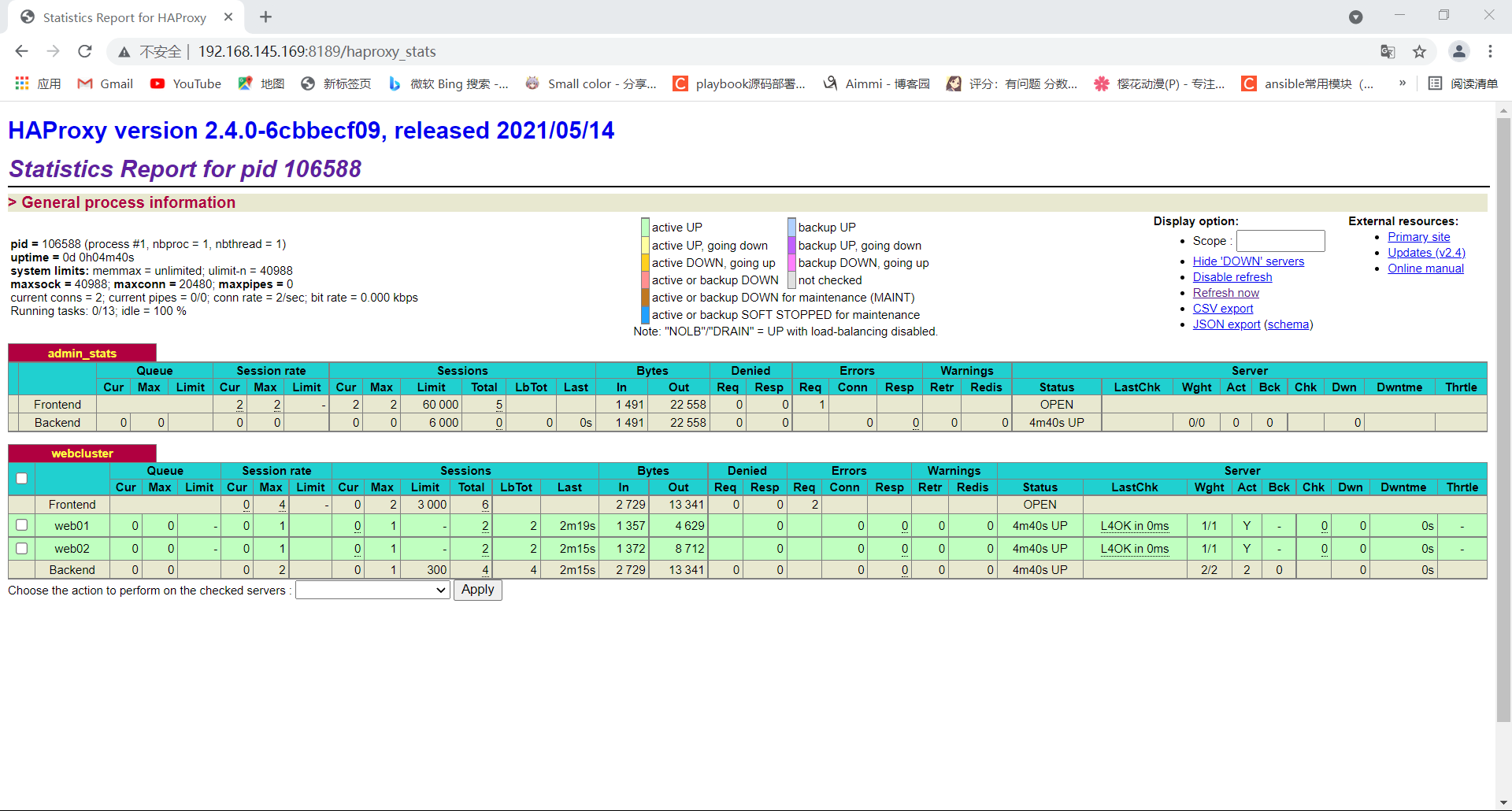


证书生成
[root@RS1 ~]# yum -y install openssl
Updating Subscription Management repositories.
Unable to read consumer identity
This system is not registered to Red Hat Subscription Management. You can use subscription-manager to register.
上次元数据过期检查:0:14:21 前,执行于 2021年10月18日 星期一 13时33分07秒。
Package openssl-1:1.1.1-8.el8.x86_64 is already installed.
依赖关系解决。
无需任何处理。
完毕!
[root@RS1 ~]# mkdir ~/keys
[root@RS1 ~]# cd keys/
[root@RS1 keys]# openssl genrsa -out passport.com.key 2048
Generating RSA private key, 2048 bit long modulus (2 primes)
...............................................+++++
.....+++++
e is 65537 (0x010001)
[root@RS1 keys]# openssl req -new -key passport.com.key -out passport.com.csr
You are about to be asked to enter information that will be incorporated
into your certificate request.
What you are about to enter is what is called a Distinguished Name or a DN.
There are quite a few fields but you can leave some blank
For some fields there will be a default value,
If you enter '.', the field will be left blank.
-----
Country Name (2 letter code) [XX]:cn
State or Province Name (full name) []:hb
Locality Name (eg, city) [Default City]:wh
Organization Name (eg, company) [Default Company Ltd]:zs
Organizational Unit Name (eg, section) []:test
Common Name (eg, your name or your server's hostname) []:localhost
Email Address []:

Please enter the following 'extra' attributes
to be sent with your certificate request
A challenge password []:zs123
An optional company name []:
[root@RS1 keys]# openssl x509 -req -days 3650 -in passport.com.csr -signkey passport.com.key -out passport.com.crt
Signature ok
subject=C = cn, ST = hb, L = wh, O = zs, OU = test, CN = localhost
Getting Private key

[root@RS1 keys]# ls
passport.com.crt  passport.com.csr  passport.com.key
将文件传输到RS2上面去
[root@RS1 keys]# scp passport.com.crt passport.com.key 192.168.145.171:/root/
The authenticity of host '192.168.145.171 (192.168.145.171)' can't be established.
ECDSA key fingerprint is SHA256:t40x15ktcpMljOGJDYGl/mBzhl7pKNTCrzQ4D5mLaos.
Are you sure you want to continue connecting (yes/no)? yes
Warning: Permanently added '192.168.145.171' (ECDSA) to the list of known hosts.
root@192.168.145.171's password:
passport.com.crt                                   100% 1172     2.9MB/s   00:00
passport.com.key                                   100% 1679     4.8MB/s   00:00

[root@RS2 ~]# ls
公共  视频  文档  音乐  anaconda-ks.cfg       passport.com.crt
模板  图片  下载  桌面  initial-setup-ks.cfg  passport.com.key

RS1和RS2上配置https
RS1
[root@RS1 ~]# yum -y install mod_ssl
[root@RS1 ~]# mkdir /etc/httpd/ssl
[root@RS1 keys]# mv passport.com.* /etc/httpd/ssl/
[root@RS1 keys]# cd /etc/httpd/ssl/
[root@RS1 ssl]# ls
passport.com.crt  passport.com.csr  passport.com.key
[root@RS1 ssl]# cd ..
[root@RS1 httpd]# ls
conf  conf.d  conf.modules.d  logs  modules  run  ssl  state
[root@RS1 httpd]# cd conf.d/
[root@RS1 conf.d]# ls
autoindex.conf  README  ssl.conf  userdir.conf  welcome.conf
[root@RS1 conf.d]# vim ssl.conf
DocumentRoot "/var/www/html"            //去掉注释
ServerName www.example.com:443          //去掉注释

SSLCertificateFile /etc/httpd/ssl/passport.com.crt          //修改文件位置
SSLCertificateKeyFile /etc/httpd/ssl/passport.com.key       //修改文件位置

重启
[root@RS1 ~]# systemctl restart httpd
[root@RS1 ~]# ss -antl
State     Recv-Q     Send-Q          Local Address:Port         Peer Address:Port
LISTEN    0          32              192.168.122.1:53                0.0.0.0:*
LISTEN    0          128                   0.0.0.0:22                0.0.0.0:*
LISTEN    0          5                   127.0.0.1:631               0.0.0.0:*
LISTEN    0          128                   0.0.0.0:111               0.0.0.0:*
LISTEN    0          128                      [::]:22                   [::]:*
LISTEN    0          5                       [::1]:631                  [::]:*
LISTEN    0          128                         *:443                     *:*
LISTEN    0          128                      [::]:111                  [::]:*
LISTEN    0          128                         *:80                      *:*

RS2
[root@RS2 ~]# yum -y install mod_ssl
[root@RS2 ~]# mkdir /etc/httpd/ssl
[root@RS2 ~]# mv passport.com.* /etc/httpd/ssl/
[root@RS2 ~]# cd /etc/httpd/ssl/
[root@RS2 ssl]# ls
passport.com.crt  passport.com.key
[root@RS2 ssl]# cd ..
[root@RS2 httpd]# ls
conf  conf.d  conf.modules.d  logs  modules  run  ssl  state
[root@RS2 httpd]# cd conf.d/
[root@RS2 conf.d]# ls
autoindex.conf  README  ssl.conf  userdir.conf  welcome.conf
[root@RS2 conf.d]# vim ssl.conf
DocumentRoot "/var/www/html"            //去掉注释
ServerName www.example.com:443          //去掉注释

SSLCertificateFile /etc/httpd/ssl/passport.com.crt          //修改文件位置
SSLCertificateKeyFile /etc/httpd/ssl/passport.com.key       //修改文件位置

重启
[root@RS2 ~]# systemctl restart httpd
[root@RS2 ~]# ss -antl
State     Recv-Q     Send-Q          Local Address:Port         Peer Address:Port
LISTEN    0          32              192.168.122.1:53                0.0.0.0:*
LISTEN    0          128                   0.0.0.0:22                0.0.0.0:*
LISTEN    0          5                   127.0.0.1:631               0.0.0.0:*
LISTEN    0          128                   0.0.0.0:111               0.0.0.0:*
LISTEN    0          128                      [::]:22                   [::]:*
LISTEN    0          5                       [::1]:631                  [::]:*
LISTEN    0          128                         *:443                     *:*
LISTEN    0          128                      [::]:111                  [::]:*
LISTEN    0          128                         *:80                      *:*

修改配置文件
[root@DR haproxy]# vim haproxy.cfg
[root@DR haproxy]# cat haproxy.cfg
#--------------全局配置----------------
global
    log 127.0.0.1 local0  info
    #log loghost local0 info
    maxconn 20480
#chroot /usr/local/haproxy
    pidfile /var/run/haproxy.pid
    #maxconn 4000
    user haproxy
    group haproxy
    daemon
#---------------------------------------------------------------------
#common defaults that all the 'listen' and 'backend' sections will
#use if not designated in their block
#---------------------------------------------------------------------
defaults
    mode tcp                //修改为tcp
    log global
    option dontlognull
    option httpclose
    option httplog
    #option forwardfor
    option redispatch
    balance roundrobin
    timeout connect 10s
    timeout client 10s
    timeout server 10s
    timeout check 10s
    maxconn 60000
    retries 3
#--------------统计页面配置------------------
listen admin_stats
    bind 0.0.0.0:8189
    stats enable
    mode http
    log global
    stats uri /haproxy_stats
    stats realm Haproxy\ Statistics
    stats auth admin:admin
    #stats hide-version
    stats admin if TRUE
    stats refresh 30s
#---------------web设置-----------------------
listen webcluster
    bind 0.0.0.0:443            端口修改为443
    mode tcp                    修改为tcp
    #option httpchk GET /index.html
    log global
    maxconn 3000
    balance roundrobin
    server web01 192.168.145.170:443    //修改端口443 check inter 2000 fall 5
    server web02 192.168.145.171:443    //修改端口443 cookie web01 check inter 2000 fall 5

重启服务
[root@DR ~]# systemctl restart haproxy.service



 浙公网安备 33010602011771号