
Wpf:定义行列和对应的颜色
<Grid>
        <Grid.RowDefinitions>
            <RowDefinition  Height="2*"/>
            <RowDefinition/>
        </Grid.RowDefinitions>

        <Grid.ColumnDefinitions>
            <ColumnDefinition/>
            <ColumnDefinition/>
        </Grid.ColumnDefinitions>

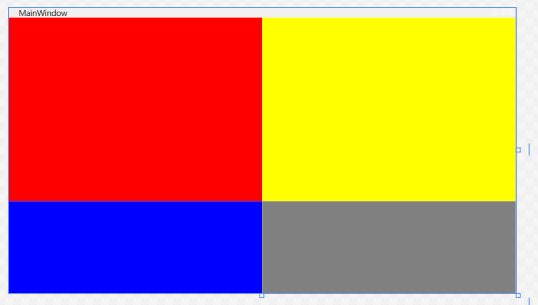
        <Border Background="red"></Border>
        <Border Grid.Column="1" Background="yellow"></Border>
        <Border Grid.Row="1" Background="blue"></Border>
        <Border Grid.Column="1" Grid.Row="1" Background="gray"></Border>
    </Grid>
解析:
1.Grid.RowDefinitions 这里只起到一个定义的作用,在上面声明高度是没用的,需要在里面的RowDefinition里面声明Height等
2.这里的Height="2*"表示第一行是第二行的两倍高度,这里也可以设置成auto或者固定的高度
3.在声明每个格子对应的颜色的时候,使用了Grid.Row和Grid.Column,他们的参数是从0开始的
最终的演示图如下
记录编程的点滴,体会学习的乐趣

 浙公网安备 33010602011771号