
vue加node,使用socket.io模块完成即使通信系统(一)
首先是先把先把包安装好
vue里面安装
npm i vue-socket.io socket.io-client
node里面安装
npm i socket.io express
随后先开始部署后端
node里面先导入所要用的模块
const express = require('express');
const http = require('http');
const socketIO = require('socket.io');
const app = express();
const server = http.createServer(app);
const io = socketIO(server, {//可能会出现的跨域问题
cors: { origin: '*' }
});
然后先写好作为客户端连接之后,接受到客户端发送过来的消息的对应方法,同时向所有客户端进行广播
io.on("connection", (socket) => {//连接socket服务
    console.log("接入socket服务");
    socket.on("message", data => {
        console.log("接收到发送的消息:" + data);
        socket.broadcast.emit("broadcastMessages", { style: 1, msg: data[0], msg_time: data[1],username:data[2] })//广播发送信息[为系统信息,消息内容,时间,用户名字]
    })
})
server.listen(3000, () => { console.log("连接到socket服务器,端口为3000"); })
然后部署前端
熟悉的在main.js里面导入包然后进行对应的设置
import SocketIO from 'socket.io-client';
import vueSocketio from 'vue-socket.io';
Vue.use(new vueSocketio({

  debug: true,

  connection: SocketIO('http://localhost:3000'),
}))
再相应的新建好一个页面,然后绑定一下要发的消息,和一个聊天记录列表
  data() {
    return {
      message: "",
      msgList: [],
    };
  },
连接服务器
mounted() {
    this.$socket.emit("connection", 1); //触发socket连接
  },
发送消息
  methods: {
    sendMessage() {
      //发送信息
      if (this.message.trim()) {
        //判断信息是否为空
        let message = this.message;
        let now_time = getTime(); //获取发送消息的时间,这是我自己写的一个方法
        this.pushMessages({
          //加入信息列表
          style: 0,
          msg: message,
          msg_time: now_time,
          username: this.$route.query.name, //传过来的名字
        });
        this.message = "";
        //向后台发送要发送的消息
        this.$socket.emit("message", [
          //消息,时间,名字
          message,
          now_time,
          this.$route.query.name,//这个是用户名字
        ]);
      }
    },
    //消息加入消息记录的方法
    pushMessages(data) {
      console.log(data);
      this.msgList.push(data);
    },
  },
然后在mounted和methods这些的同级下,这是接受到的服务器传过来的广播消息
  sockets: {
    //接受到的用户发送的广播消息
    broadcastMessages(data) {
      this.pushMessages(data);
    },
  },
这样就完成了最基础的通信了,然后打开两个浏览器测试一下
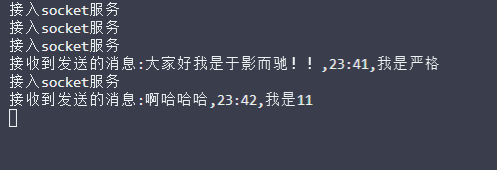
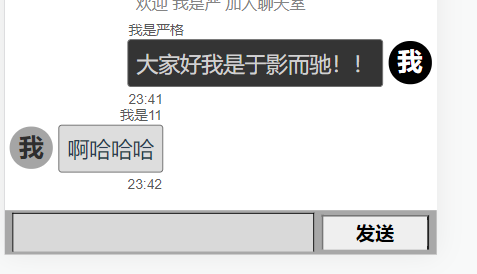
可以看到已经可以通信了,这就是最基础的即时聊天系统了

 浙公网安备 33010602011771号