
01_三层架构项目搭建(按开发步骤)(ResultSetHandler接口)
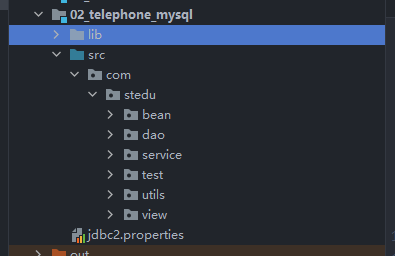
1.三层架构项目搭建(按开发步骤)
-
utils包存放工具类(JdbcUtils)
-
entity包存放实体类(Telephone)
-
dao包存放Dao接口(TelephoneDao)
- impl存放DAO接口实现类(TelephoneDaoImpl)
-
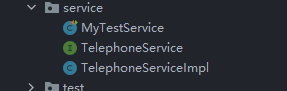
service存放Service接口(TelephoneService)
- impl存放Service接口实现类(TelephoneServiceImpl)
-
view 存放程序启动类(main)
-
程序设计时,考虑易修改、易扩展,为Service层和DAO层设计接口,便于未来更换实现类
实体类
开发时按照顺序先创建实体类(实体类要和数据库对应)

package com.stedu.bean;
import java.util.Objects;
public class Telephone {
    private Integer id;
    private String name;
    private Integer age;
    private String gender;
    private String tel;
    private String qq;
    private String addr;


    public Telephone() {
    }

    public Telephone(Integer id, String name, Integer age, String gender, String tel, String qq, String addr) {
        this.id = id;
        this.name = name;
        this.age = age;
        this.gender = gender;
        this.tel = tel;
        this.qq = qq;
        this.addr = addr;
    }
 }
Dao层

package com.stedu.dao;

import com.stedu.bean.Telephone;

import java.sql.SQLException;
import java.util.List;

//Dao层
public interface TelephoneDao {
    //添加数据
    int add(Telephone item) throws SQLException;
    //根据编号删除数据
    int del(Integer i) throws SQLException;
    //根据编号修改数据
    int update(Telephone t) throws SQLException;
    //查询所有数据
    List<Telephone> findAll() throws SQLException;

}
package com.stedu.dao.impl;

import com.stedu.bean.Telephone;
import com.stedu.dao.TelephoneDao;
import com.stedu.utils.JdbcUtil;
import org.apache.commons.dbutils.QueryRunner;
import org.apache.commons.dbutils.handlers.BeanListHandler;

import java.sql.SQLException;
import java.util.List;

public class TelephoneDaoImpl implements TelephoneDao {


    public TelephoneDaoImpl() throws SQLException {
    }

    @Override
    public int add(Telephone item) throws SQLException {
        QueryRunner qr = new QueryRunner(JdbcUtil.getDataSource());

        String sql = "INSERT INTO `telephone` (`name`,`gender`,`age`,`tel`,`qq`,`addr`)VALUES(?,?,?,?,?,?)";
        int result = 0;
        Object[] params = {item.getName(), item.getGender(), item.getAge(), item.getTel(), item.getQq(), item.getAddr()};
        result = qr.update(sql, params);
        return result;
/*
        PreparedStatement preparedStatement = connection.prepareStatement(sql);
        preparedStatement.setString(1, item.getName());
        preparedStatement.setString(2, item.getGender());
        preparedStatement.setInt(3, item.getAge());
        preparedStatement.setString(4, item.getTel());
        preparedStatement.setString(5, item.getQq());
        preparedStatement.setString(6, item.getAddr());
        int p = preparedStatement.executeUpdate();
        JdbcUtil.close(connection, preparedStatement, null);
        return p;
 */
    }
    @Override
    public int del(Integer i) throws SQLException {
        QueryRunner queryRunner = new QueryRunner(JdbcUtil.getDataSource());
        String sql = "DELETE FROM `telephone` WHERE `id` = ?";
        int result = 0;
        result = queryRunner.update(sql, i);
        return result;
        //PreparedStatement preparedStatement = connection.prepareStatement(sql);
        //preparedStatement.setInt(1, i);
        //int p = preparedStatement.executeUpdate();
        //JdbcUtil.close(connection, preparedStatement, null);
        //return p;
    }

    //修改数据
    @Override
    public int update(Telephone t) throws SQLException {
        QueryRunner queryRunner = new QueryRunner(JdbcUtil.getDataSource());
        String sql = "UPDATE `telephone` SET `name` = ?,`gender` = ?,`age` = ?,`tel` = ?,`addr` = ? ,`qq` = ? WHERE `id` = ?";
        Object[] param = {t.getName(), t.getGender(), t.getAge(), t.getTel(), t.getQq(), t.getAddr(), t.getId()};
        int result = 0;
        result = queryRunner.update(sql, param);
        return result;
        //Connection connection = JdbcUtil.getConnection();
        //String sql = "UPDATE `telephone` SET `name` = ?,`gender` = ?,`age` = ?,`tel` = ?,`addr` = ? ,`qq` = ? WHERE `id` = ?";
        //PreparedStatement preparedStatement = connection.prepareStatement(sql);
        //preparedStatement.setString(1, t.getName());
        //preparedStatement.setString(2, t.getGender());
        //preparedStatement.setInt(3, t.getAge());
        //preparedStatement.setString(4, t.getTel());
        //preparedStatement.setString(5, t.getQq());
        //preparedStatement.setString(6, t.getAddr());
        //preparedStatement.setInt(7, t.getId());
        //int p = preparedStatement.executeUpdate();
        //JdbcUtil.close(connection, preparedStatement, null);
        //return p;
    }

    @Override
    public List<Telephone> findAll() throws SQLException {
        //    int i = 0;
        //    Connection connection = JdbcUtil.getConnection();
        //    ArrayList<Telephone> telephones = new ArrayList<>();
        //    String sql = "SELECT * FROM `telephone`";
        //    PreparedStatement preparedStatement = connection.prepareStatement(sql);
        //    ResultSet resultSet = preparedStatement.executeQuery();
        //    while (resultSet.next()) {
        //        Telephone telephone = new Telephone();
        //        telephone.setId(resultSet.getInt("id"));
        //        telephone.setName(resultSet.getString("name"));
        //        telephone.setAddr(resultSet.getString("addr"));
        //        telephone.setTel(resultSet.getString("tel"));
        //        telephone.setGender(resultSet.getString("gender"));
        //        telephone.setQq(resultSet.getString("qq"));
        //        telephones.add(telephone);
        //    }
        //    JdbcUtil.close(connection, preparedStatement, null);
        //    return telephones;
        //}
        QueryRunner queryRunner = new QueryRunner(JdbcUtil.getDataSource());
        String sql = "SELECT * FROM `telephone`";
        List<Telephone> list = null;
        list = queryRunner.query(sql, new BeanListHandler<Telephone>(Telephone.class));
        return list;

    }
}
注释掉的部分是没用dbutils工具类的
Service层
package com.stedu.service;

import com.stedu.bean.Telephone;

import java.sql.SQLException;
import java.util.List;

public interface TelephoneService {
    //添加数据
    int add(Telephone item) throws SQLException;
    //根据编号删除数据
    int del(Integer i) throws SQLException;
    //根据编号修改数据
    int update(Telephone t) throws SQLException;
    //查询所有数据
    List<Telephone> findAll() throws SQLException;

}
package com.stedu.service;

import com.stedu.bean.Telephone;
import com.stedu.dao.TelephoneDao;
import com.stedu.dao.impl.TelephoneDaoImpl;

import java.sql.SQLException;
import java.util.List;

public class TelephoneServiceImpl implements TelephoneService {
    private TelephoneDao telephoneDao = new TelephoneDaoImpl();

    public TelephoneServiceImpl() throws SQLException {
    }


    @Override
    public int add(Telephone item) throws SQLException {
        return telephoneDao.add(item);
    }

    @Override
    public int del(Integer i) throws SQLException {
        return telephoneDao.del(i);
    }

    @Override
    public int update(Telephone t) throws SQLException {
        return telephoneDao.update(t);
    }

    @Override
    public List<Telephone> findAll() throws SQLException {
        return telephoneDao.findAll();
    }
}
单元测试
测试一部分代码的功能
在所有测试之前运行
@Before
在所有测试之后进行
@After
工具类
简化连接
package com.stedu.utils;

import com.alibaba.druid.pool.DruidDataSourceFactory;

import javax.sql.DataSource;
import java.io.FileInputStream;
import java.sql.Connection;
import java.sql.ResultSet;
import java.sql.SQLException;
import java.sql.Statement;
import java.util.Properties;

public class JdbcUtil {
    private static DataSource dataSource;

    static {
        try {
            Properties prop = new Properties();
            //加载配置文件
            prop.load(new FileInputStream("jdbc2.properties"));

            //创建连接池
            dataSource = DruidDataSourceFactory.createDataSource(prop);
        } catch (Exception e) {
            e.printStackTrace();
        }
    }

    //get方法,获取连接池,使用DBUtils接收连接池,简化代码
    public static DataSource getDataSource(){
        return  dataSource;
    }

    //获取连接
    public static Connection getConnection() throws SQLException {
        return dataSource.getConnection();
    }

    //释放资源
    public static void close(Connection connection, Statement statement, ResultSet rSet) {
        try {
            if(rSet != null) {
                rSet.close();
            }

            if(statement != null) {
                statement.close();
            }

            if(connection != null) {
                connection.close();
            }
        } catch (SQLException throwables) {
            throwables.printStackTrace();
        }
    }
}
View层
用户进行交互
2.DBUtils
简介
DBUtils是Apache Commons组件中的一员,开源免费。是对JDBC的简单封装,但是它还是被很多公司使用。
主要功能:用来操作数据库,简化JDBC的操作。
在使用的时候要和数据库连接池、MySQL的jar包配合使用。
使用
导入jar包
在工具类里面提供get连接池的方法
//get方法,获取连接池,使用DBUtils接收连接池,简化代码
public static DataSource getDataSource(){
    return  dataSource;
}
public int add(Telephone item) throws SQLException {
    //调用
        QueryRunner qr = new QueryRunner(JdbcUtil.getDataSource());
        String sql = "INSERT INTO `telephone` (`name`,`gender`,`age`,`tel`,`qq`,`addr`)VALUES(?,?,?,?,?,?)";
        int result = 0;
        Object[] params = {item.getName(), item.getGender(), item.getAge(), item.getTel(), item.getQq(), item.getAddr()};
    //传入sql语句和参数列表
        result = qr.update(sql, params);
        return result;

    }
主要类和方法
QueryRunner:执行sql语句的类
- 创建QueryRunner
- 构造器:
QueryRunner(),在事务里面使用;--- 之后学 - 构造器:
QueryRunner(连接池对象)
- 构造器:
update():执行INSERT、UPDATE、DELETEquery():执行SELECT
增删改
int update(String sql, Object... params): 可执行增、删、改语句
int update(Connection con, String sql, Object... parmas):需要调用者提供Connection,支持事务
ResultSetHandler接口
BeanHandler(单行):构造器需要一个Class类型的参数,用来把一行结果转换成指定类型的javaBean对象;
BeanListHandler(多行):构造器也是需要一个Class类型的参数,用来把一行结果集转换成一个javabean,那么多行就是转换成List对象,一堆javabean;
MapHandler(单行):把一行结果集转换Map对象;
MapListHandler(多行):把一行记录转换成一个Map,多行就是多个Map,即List<Map>;
ScalarHandler(单行单列):通常用与select count(*) from t_stu语句!结果集是单行单列的!它返回一个Object 聚合函数。
@Override
public List<Telephone> findAll() throws SQLException {
    QueryRunner queryRunner = new QueryRunner(JdbcUtil.getDataSource());
    String sql = "SELECT * FROM `telephone`";
    List<Telephone> list = null;
    //构造器也是需要一个Class类型的参数,用来把一行结果集转换成一个javabean,那么多行就是转换成List对象,一堆javabean
    list = queryRunner.query(sql, new BeanListHandler<Telephone>(Telephone.class));
    return list;

}

 浙公网安备 33010602011771号