

Java基础语法
注释
Java中的注释有三种:
-
单行注释 //
-
多行注释
/*
*/
-
文档注释
/**
*/
Java关键字
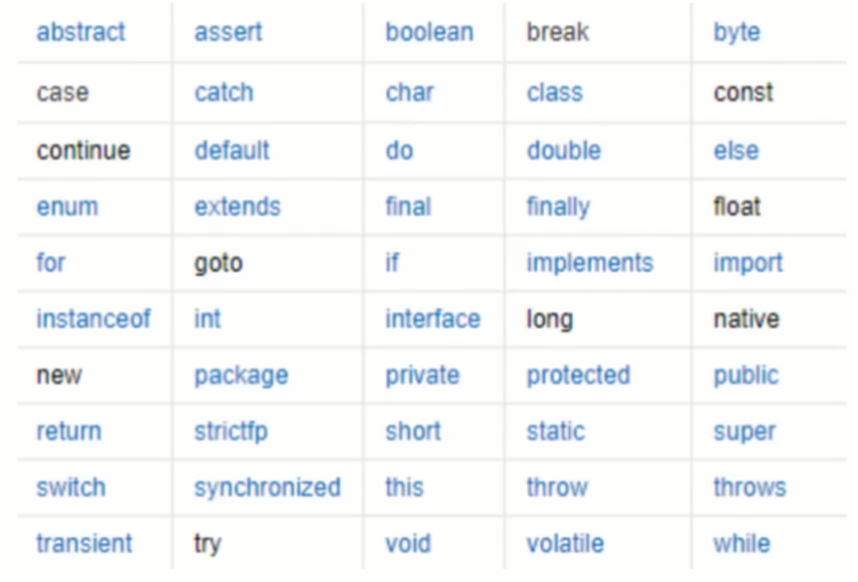
Java所有的组成部分都需要名字。类名、变量名以及方法都被称为标识符。
标识符注意点
- 所有的标识符都应该以字母(A-Z 或者 a-z),美元符($)、或者下划线(_)开始
- 首字符之后可以是字母(A-Z 或者 a-z),美元符($)、下划线(_)或数字的任何字符组合
- 不能使用关键字作为变量名或方法名
- 标识符是大小写敏感的
- 可以使用中文命名,但是一般不建议这样使用,也不建议用拼音
数据类型
强类型语言
- 要求变量的使用要严格符合规定,所有变量都必须先定义后才能使用
弱类型语言
- 要求变量的使用符合规定
Java数据类型
- 基本类型(primitive type)
- 引用类型(reference type)

字节
-
位(bit):是计算机 内部数据 储存的最小单位,11001100是一个八位二进制数。
-
字节(byte):是计算机中 数据处理 的最基本单位,习惯上用大写B来表示
-
1B(byte,字节)= 8bit(位)
-
字符:是指计算机中使用的字母数字
-
1bit表示1位
-
1Byte表示一个字节 1B = 8b
-
1024B = 1KB
-
1024KB = 1M
-
1024M = 1G
扩展
public class Demo03 {
    public static void main(String[] args) {
        //整数拓展:     进制      二进制0b       十进制

        int i = 10;
        int i2 = 010; //八进制0
        int i3 = 0x10; //十六进制0x     0~9 A~F

        System.out.println(i);
        System.out.println(i2);
        System.out.println(i3);
        System.out.println("====================================");
        //=================================
        //浮点数拓展?  银行业务怎么表示?钱
        // BigDecimal  数学工具类
        //=================================
        //float
        //double
        //最好完全使用浮点数进行比较

        float f = 0.1f;  //0.1
        double d = 1.0/10; //0.1

        System.out.println(f == d); //false

        float d1 = 23131312312312313f;
        float d2 = d1 + 1;

        System.out.println(d1 == d2); //true


        //==============================
        //字符拓展?
        //==============================
        char c1 = 'a';
        char c2 = '中';

        System.out.println(c1);

        System.out.println((int)c1); //强制转换

        System.out.println(c2);

        System.out.println((int)c2); //强制转换

        //所有的字符本质还是数字
        //编码 Unicode 表:(97 = a 65 = A)    2字节  0-65536   Excel  2^16 = 65536

        // U0000  UFFFF

        char c3 = '\u0061';

        System.out.println(c3); //a

        //转义字符
        // \t   制表符
        // \n   换行
        // ...

        System.out.println("Hello\nWorld");

        //
        String sa = new String("hello world");
        String sb = new String("hello world");
        System.out.println(sa == sb);

        String sc = "hello world";
        String sd = "hello world";
        System.out.println(sc == sd);
        //对象  从内存分析

        //布尔值扩展
        boolean flag = true;
        if (flag){}
        //Less is More!  代码要精简易读
    }
}
类型转换
-
由于Java是强类型语言,所以要进行有些运算的时候,需要用到类型转换
低 -------------------------------> 高 byte,short,char -> int -> long -> float -> double -
运算中,不同类型的数据先转化为同一类型,然后进行运算
-
强制类型转换
-
自动类型转换
public class Demo04 {
    public static void main(String[] args) {
        int i = 128;
        byte b = (byte)i; //内存溢出
        //double c = i;

        //强制转换  (类型)变量名  高--低
        //自动转换     低--高

        System.out.println(i);
        System.out.println(b);

        /*
        注意点:
        1. 不能对布尔值进行转换
        2. 不能把对象类型转换为不相干的类型
        3. 在把高容量转换到低容量的时候,强制转换
        4. 转换的时候可能存在内存溢出,或者精度问题
         */

        System.out.println("================");
        System.out.println((int)23.7); //23
        System.out.println((int)-45.89f); //45

        System.out.println("================");
        char c = 'a';
        int d = c+1;
        System.out.println(c);
        System.out.println((char)d);
    }
}
public class Demo05 {
    public static void main(String[] args) {
        //操作比较大的数的时候,注意溢出问题
        //数字之间可以用下划线分隔
        int money = 10_0000_0000;
        int years = 20;
        int total = money*years; //-1474836480
        long total2 = money*years; //默认是int

        long total3 = money*(long)years;
        System.out.println(total);
        System.out.println(total2);
        System.out.println(total3);
    }
}
变量
-
变量是什么:就是可以变化的量!
-
Java是一种强制类型语言,每个变量都必须声明其类型
-
Java变量是程序中最基本的储存单元,其要素包括变量名,变量类型和【作用域】
type varName [=value] [{,varName[=value]}]; //数据类型 变量名 = 值;可以使用逗号隔开来声明多个同类型变量 **不建议一行定义多个变量** -
注意事项:
- 每个变量都有类型,类型可以是基本类型,也可以是引用类型
- 变量名必须是合法的标识符
- 变量声明是一条完整的语句,因此每一个声明都必须以分号结束
public class Demo06 {
    public static void main(String[] args) {
        //int a,b,c;
        //int a=1,b=2,c=3; //程序可读性
        String name = "wk";
        char x = 'X';
        double pi = 3.14;
    }
}
变量作用域
-
类变量
-
实例变量
-
局部变量
public static Varaible{
    static int allClicks = 0; // 类变量
    String str = "hello world";	// 实例变量

    publice void method(){
        int i = 0; // 局部变量
    }
}
public class Demo07 { //类变量 static static double salary = 2500; //属性:变量 //实例变量:从属于对象;如果不进行初始化,这个类型的默认值0 0.0 //布尔值:默认是false //除了基本类型,其余的默认值都是null; String name; int age; //main方法 public static void main(String[] args) { //局部变量:必须声明和初始化值 int i = 10; System.out.println(i); //变量类型 变量名 = new Demo07(); Demo07 demo07 = new Demo07(); System.out.println(demo07.age); System.out.println(demo07.name); //类变量 static System.out.println(salary); } //其他方法 public void add(){ } }
常量
-
常量(Constant):初始化(initialize)后不能再改变值!不会变动的值
-
所谓常量可以理解成一种特殊的变量,它的值被设定后,在程序运行过程中不允许被改变
final 常量名=值; final double PI=3.14; -
常量名一般使用大写字符
public class Demo08 {

   //修饰符,不存在先后顺序
    static final double PI = 3.14;
    //final static double PI = 3.14;

    public static void main(String[] args) {
        System.out.println(PI);
    }
}
变量的命名规范
- 所有变量、方法、类型:见名知意
- 类成员变量:首字母小写和驼峰原则:monthSalary 除了第一个单词以外,后面的首字母大写 lastname lastName
- 局部变量:首字母小写和驼峰原则
- 常量:大写字母和下划线:MAX_VALUE
- 类名:首字母大写和驼峰原则:Man,GoodMan
- 方法名:首字母小写和驼峰原则:run(),runRun()
运算符
-
Java语言支持如下运算符: 优先级()
- 算数运算符:+,-,*,/,%,++,--
- 赋值运算符:=
- 关系运算符:>,<,>=,<=,==,!=,instanceof
- 逻辑运算符:&&,||,!
- 位运算符:&,|,^,~,>>,<<,>>>(了解!!!)
- 条件运算符:?:
- 扩展复制运算符:+=,-=,*=,/=
package operator;

public class Demo01 {
    public static void main(String[] args) {
        // 二元运算符
        // Ctrl + D:复制当前行到下一行
        int a = 10;
        int b = 20;
        int c = 25;
        int d = 25;

        System.out.println(a+b);
        System.out.println(a-b);
        System.out.println(a*b);
        System.out.println(a/(double)b);
    }
}
package operator; public class Dome02 { public static void main(String[] args) { long a = 123123123123123L; int b = 123; short c = 10; byte d = 8; System.out.println(a+b+c+d); //Long System.out.println(b+c+d); //Int System.out.println(c+d); //Int } }package operator; public class Demo03 { public static void main(String[] args) { //关系运算符返回的结果:正确,错误 布尔值 // if int a = 10; int b = 20; int c = 21; //取余,模运算 System.out.println(c%a); //c / a 21 / 10 = 2 ... 1 System.out.println(a>b); System.out.println(a<b); System.out.println(a==b); System.out.println(a!=b); } }package operator; import javax.sound.midi.Soundbank; public class Demo04 { public static void main(String[] args) { //++ -- 自增,自减 一元运算符 int a = 3; int b = a++; //执行完这行代码后,先给b赋值,再自增 //a = a + 1 System.out.println(a); //a = a + 1 int c = ++a; //执行完这行代码前,先自增,再给b赋值 System.out.println(a); System.out.println(b); System.out.println(c); //幂运算 2^3 2*2*2 = 8 很多运算,我们会使用一些工具类来操作 double pow = Math.pow(3, 2); System.out.println(pow); } }package operator; public class Demo05 { public static void main(String[] args) { // 与(and) 或(or) 非(取反) boolean a = true; boolean b = false; System.out.println("a && b: "+(a&&b)); //逻辑与运算:两个变量都为真,结果才为true System.out.println("a || b: "+(a||b)); //逻辑或运算:两个变量有一个为真,则结果才为true System.out.println("!(a && b): "+!(a&&b)); //如果是真,则变为假,如果是假,则变为真 //短路运算 int c = 5; boolean d = (c<4)&&(c++<4); System.out.println(d); System.out.println(c); } }package operator; import java.sql.SQLOutput; public class Demo06 { public static void main(String[] args) { /* A = 0011 1100 B = 0000 1101 -------------------- A&B = 0000 1100 A|B = 00111101 A^B = 0011 0001 ~B = 1111 0010 2*8 = 16 2*2*2*2 << *2 >> /2 0000 0000 0 0000 0001 1 0000 0010 2 0000 0011 3 0000 0100 4 0000 1000 8 0001 0000 16 */ System.out.println(2<<3); } }package operator; public class Demo07 { public static void main(String[] args) { int a = 10; int b = 20; a+=b; //a = a+b a-=b; //a = a-b System.out.println(a); //字符串连接符 + , String System.out.println(""+a+b); System.out.println(a+b+""); } }package operator; //三元运算符 public class Demo08 { public static void main(String[] args) { // x ? y : z //如果x==true,则结果为y,否则结果为z int score = 80; String type = score < 60 ? "不及格" : "及格";//必须掌握 // if System.out.println(type); } }

 浙公网安备 33010602011771号