第二次blog作业
前言:作业都是迭代,所以感觉每一次作业都很重要,不然会有一种一步差步步差的感觉。
新学到的东西,先想到的是正则表达式,感觉有点强,跟别的代码都不太一样。
开门见山,先看一下pta练习正则表达式的题目:
学号检测:首先学号为8位数字,并且具体有以下要求
- 只针对2020级
- 其中软件工程专业班级分别为:202011~17、61,物联网工程专业班级为202071~202073,数据科学与大数据专业班级为202081~82
- 每个班级学号后两位为01~40
也就是说在学号的不同部位(第几位号码)是有具体的不同要求的,那么先要来明白正则表达式是个什么东西,它为什么可以检验这样比较复杂的情况。
正则表达式:是对字符串操作的一种逻辑公式,就是用事先定义好的一些特定字符、及这些特定字符的组合,组成一个“规则字符串”,这个“规则字符串”用来表达对字符串的一种过滤逻辑。
其中常用的元字符
| 代码 | 说明 |
|---|---|
| . | 匹配除换行符以外的任意字符 |
| \w | 匹配字母或数字或下划线或汉字 |
| \s | 匹配任意的空白符 |
| \d | 匹配数字 |
| \b | 匹配单词的开始或结束 |
| ^ | 匹配字符串的开始(在集合字符里[^a]表示非(不匹配)的意思 |
| $ | 匹配字符串的结束 |
并且要了解两个正则表达式的类Pattern和Matcher
Pattern: 一个Pattern是一个正则表达式经编译后的表现模式。
Matcher: 一个Matcher对象是一个状态机器,它依据Pattern对象做为匹配模式对字符串展开匹配检查。
首先一个Pattern实例订制了一个所用语法与PERL的类似的正则表达式经编译后的模式,然后一个Matcher实例在这个给定的Pattern实例的模式控制下进行字符串的匹配工作
那么对于这道题写出如下的源码(部分):
String str = in.nextLine();
String pattern = ("^2020((1[1-7])|(61)|(7[1-3]))((0-3)(1-9))|(40)$");
Pattern p = Pattern.compile(pattern);
Matcher m = p.matcher(str);
if(m.matches()) {
System.out.print("正确");
} else {
System.out.print("错误");
}
还比如判断验证码(随机由数字和大写或小写的字母构成4位)我们的代码(部分):
String str = in.nextLine();
String pattern = "^[a-zA-Z0-9]{4}$";
Pattern p = Pattern.compile(pattern);
Matcher m = p.matcher(str);
if(m.matches()) {
System.out.print(str + "属于验证码");
} else {
System.out.print(str + "不属于验证码");
}
踩坑:感觉正则表达式挺抽象的,但不算很难,因为不太熟悉,得多练一练。^开头¥结尾,或和且都是一个&,|,剩下的看要求具体写。
然后这次作业的要求说必须分析一下图形类设计的题目、超星中链表类练习题目以及期中考试的三道题目。那就按照时间顺序来分析一下。
图形类设计
这个题目我来写分为图形卡片分组和图形卡片排序这两道题目(还有一个蔡柯老师的一堆测试点的那个,有点难,我不会,就不在这里写了)
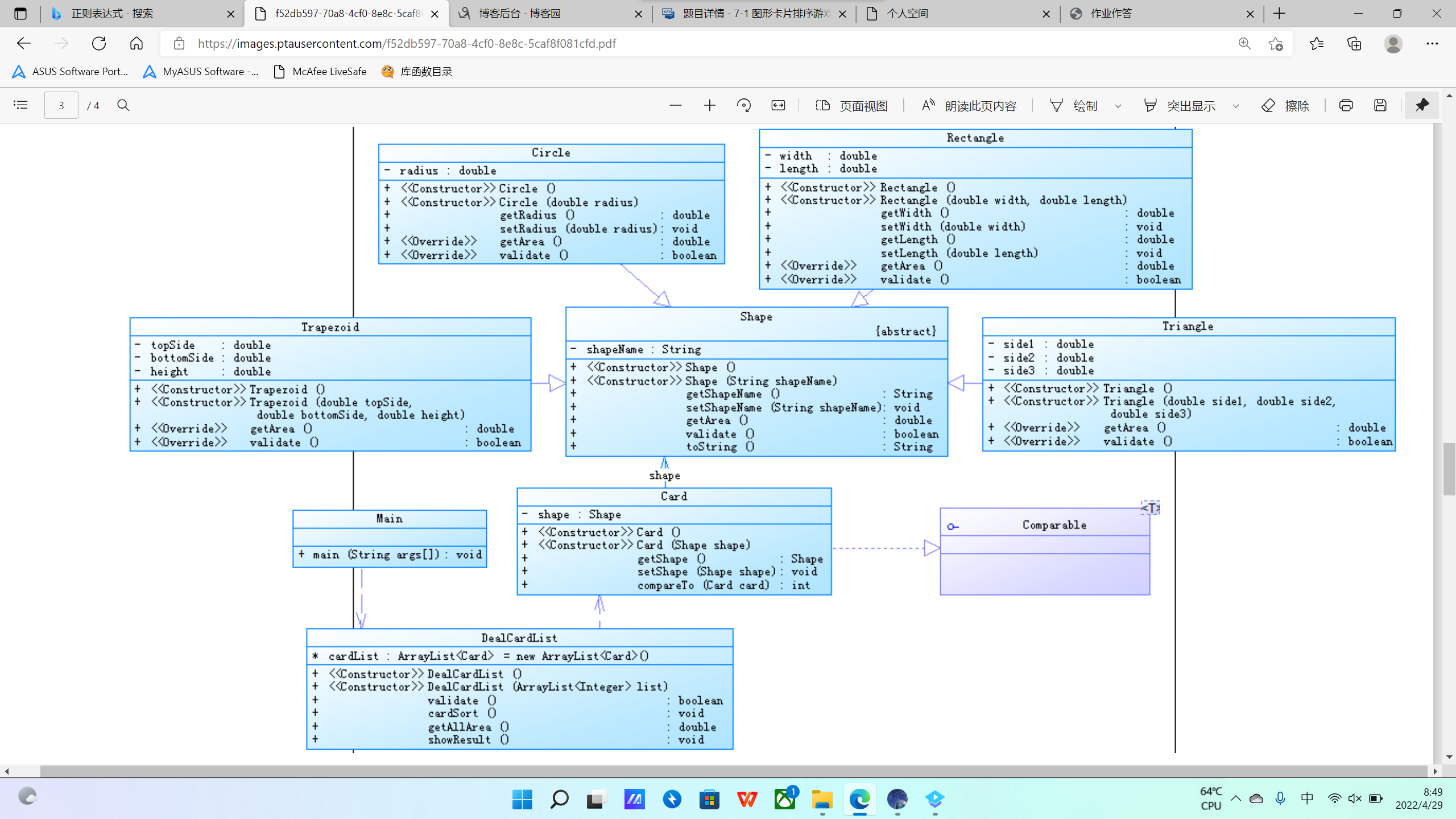
这是大概的类图,抽象的Shape类被具体的图形继承,每个图形都有名字,得到面积(getArea)和判断是否可以构成图形(validate)的方法。因为最后要对图形卡片进行排序,我们就要写一个能装下这些图形的ArrayList。并且声明一个接口。在DealCardList这个类中进行具体排序的数据处理和排序实现。这是第一次具体写接口。根据不同的图形把他们放在不同的列中。先判断图形的输入是否合法,那就根据它们的名字,放入不同的列进行各自不同(调用自己的方法)判断。然后按照面积的大小进行排列,每个自己的类中都能得到各自的面积(调用自己的方法),我们只需要输入数据,输出。再比较大小,输出。再计算出总面积就可以得到结果。下面给出我写的DealCardList函数的源码:
class DealcardList {
ArrayList<Card> cardList = new ArrayList<>();
public DealcardList(){
}
public DealcardList(ArrayList<Integer> card) {
for(Integer a:card) {
if(a == 0) {
break;
}
else {
switch(a) {
case 1 :{
Shape circle = new Circle(Main.input.nextDouble());
Card card1 = new Card(circle);
card1.getShape().setShapeName("Circle");
cardList.add(card1);
break;
}
case 2 : {
Card card2 = new Card(new Rectangle(Main.input.nextDouble(), Main.input.nextDouble()));
card2.getShape().setShapeName("Rectangle");
cardList.add(card2);
break;
}
case 3 : {
Card card3 = new Card(new Triangle(Main.input.nextDouble(), Main.input.nextDouble(), Main.input.nextDouble()));
card3.getShape().setShapeName("Triangle");
cardList.add(card3);
break;
}
case 4 : {
Card card4 = new Card(new Trapezoid(Main.input.nextDouble(), Main.input.nextDouble(), Main.input.nextDouble()));
card4.getShape().setShapeName("Trapezoid");
cardList.add(card4);
break;
}
}
}
}
}
public boolean validate() {
boolean ju = true;
for(Card a:cardList) {
if(!a.getShape().validate()) {
ju = false;
break;
}
}
return ju;
}
public void cardSort() {
TreeSet<Card> card = new TreeSet<>(cardList);
for(Card a : card) {
System.out.print(a.getShape());
}
}
public double getAllArea() {
double all = 0;
for(Card a : cardList) {
all = all + a.getShape().getArea();
}
return all;
}
public void showResult() {
System.out.println("The original list:");
for(Card a : cardList) {
System.out.print(a.getShape());
}
System.out.println("\nThe sorted list:");
cardSort();
System.out.printf("\nSum of area:%.2f\n",getAllArea());
}
}
其中的建列的时候我记得好多错误,卡了大概20分钟,不仔细的问题,还是算好解决。觉得最难的就是把每个不一样的图形都放在不同的列中(Card)而且我写代码在这次作业前有一个问题,我喜欢在各自的类中进行输入,这是不对的,应该在最后的控制类或主类将数据输入,我们输入数据,构造参数,传进去赋值就好,剩下的像判断,得到面积这些都比较简单,没什么说的。
然后就是卡片分组,那就写四个方法,每个方法写一个TreeSet。用字符串的equals判断是否相同,然后将它们输入TreeSet。之后就跟排序差不多。
链表类设计
链表是一种常见数据结构。链表可以动态的进行存储分配,也就是说,链表是一个功能极为强大的数组,他可以在节点中定义多种数据类型,还可以根据需要随意增添,删除,插入节点。链表都有一个头指针,一般以head来表示,存放的是一个地址。链表中的节点分为两类,头结点和一般节点,头结点是没有数据域的。链表中每个节点都分为两部分,一个数据域,一个是指针域。说到这里你应该就明白了,链表就如同车链子一样,head指向第一个元素:第一个元素又指向第二个元素;……,直到最后一个元素,该元素不再指向其它元素,它称为“表尾”,它的地址部分放一个“NULL”(表示“空地址”),链表到此结束。
所以先要有一个头节点,将其初始化:
public List() {
this.head = new Node<>(null, null);
this.size = 0;
}
我们可以看出来,插入节点就是用插入前节点的指针域链接上插入节点的数据域,再把插入节点的指针域链接上插入后节点的数据域。根据图,插入节点也就是:e->next = head->next; head->next = e;
增加链表节点用到了两个结构体指针和一个int数据。
并且根据链表的特点,上一个节点会指向下一个节点,头节点指向第一个节点,最后一个节点指向尾巴,依次类推。并且还有增加,删除的功能,增加就让前一个指向它,它再指向原来的下一个。删除就是让被删除节点的前一个直接指向被删除节点的下一个。做一个接口,方便写其他的链表(双向链表)。还有输出链表的功能,并且有判断链表是否为空的判断,就可以完成。
踩坑:我的判断写的有问题,一开始什么都输出不了,下一个为原来的头,按照那样的写法,怎么判断都会是空的链表。以下是我能运行的链表源码:
public class List<E> implements DoubleLinkedListlmpl<E> {
private Node<E> head,current,tail,pre,after;
private int size;
public List() {
this.head = new Node<>(null, null);
this.size = 0;
}
@Override
public boolean isEmpty() {
if(head == null)
return true;
else
return false;
}
@Override
public int size() {
return size;
}
@Override
public E get(int index) {
current = head;
for (int i = 0; i < index; i++) {
current = current.getNext();
}
return current.getO();
}
@Override
public void remove(int index) {
if (isEmpty()) {
System.out.println("remove false :empty list");
}
if (index > size || index < 1) {
System.out.println("remove index:" + index + " out of index");
} else {
pre = head;
for (int i = 0; i < index - 1; i++) {
pre = pre.getNext();
}
current = pre.getNext();
after = current.getNext();
if (after != null) {
pre.setNext(after);
}
size--;
}
}
@Override
public void add(int index, E theElement) {
if (index > size + 1 || index < 1) {
System.out.println("add " + theElement + " out of index");
} else {
pre = head;
for (int i = 0; i < index - 1; i++) {
pre = pre.getNext();
}
current = pre.getNext();
pre.setNext(new Node<>(theElement, current));
size++;
}
}
@Override
public void add(E element) {
tail = head;
while (tail.getNext() != null) {
tail = tail.getNext();
}
tail.setNext(new Node<E>(element,null));
size++;
}
@Override
public void printList() {
current = head;
for (int i = 1; i <= size; i++) {
System.out.print(get(i) + " ");
if (i == size) {
System.out.println();
}
}
}
期中考试
期中考试要求设计点和线,点去组成线,在线中得到点的两个坐标后进行输出。有getColor和getDistance两个方法。并且在主函数里调用自己Display方法进行输出。
在做题的时候,我判断输出有碰到问题,当判断超出边界后,应该停止整个程序System.exit(0);在这里浪费了一些时间。另外点传参传x1,y1自己的点,线传参是传点的参,一开始数据传不进去,这里也浪费了不少时间。
import java.util.Scanner;
import java.lang.Math;
class Point{
private double x;
private double y;
public Point(){
}
public Point(double x,double y){
this.x = x;
this.y = y;
}
public double getX() {
return x;
}
public void setX(double x) {
this.x = x;
}
public double getY() {
return y;
}
public void setY(double y) {
this.y = y;
}
public void display(){
System.out.println("("+String.format("%.2f", x)+","+String.format("%.2f", y)+")");
}
}
class Line {
private Point p1;
private Point p2;
private String color;
static Point point = new Point();
public Line(){
}
public Line(Point p1,Point p2,String color){
this.p1 = p1;
this.p2 = p2;
this.color = color;
}
public Point getP1() {
return p1;
}
public void setP1(Point p1) {
this.p1 = p1;
}
public Point getP2() {
return p2;
}
public void setP2(Point p2) {
this.p2 = p2;
}
public String getColor(){
return color;
}
public void setColor(String color){
this.color = color;
}
public double getDistance(){
return Math.sqrt((p1.getY() - p2.getY()) * (p1.getY() - p2.getY()) + (p1.getX() - p2.getX())* (p1.getX() - p2.getX()));
}
public void display(){
System.out.println("The line's color is:"+color);
System.out.println("The line's begin point's Coordinate is:");
p1.display();
System.out.println("The line's end point's Coordinate is:");
p2.display();
System.out.print("The line's length is:"+ String.format("%.2f", getDistance()));
}
}
class Main{
public static void main(String[] args) {
Scanner input = new Scanner(System.in);
double x1 = input.nextDouble();
double y1 = input.nextDouble();
double x2 = input.nextDouble();
double y2 = input.nextDouble();
if(x1 > 200 || x1 <= 0 || y1 > 200 || y1 <= 0){
System.out.println("Wrong Format");
System.exit(0);
}
if(x2 > 200 || x2 <= 0 || y2 > 200 || y2 <= 0){
System.out.println("Wrong Format");
System.exit(0);
}
String color = input.next();
Point point1 = new Point(x1,y1);
Point point2 = new Point(x2,y2);
Line line = new Line(point1,point2,color);
line.display();
}
}
第二题要迭代,将点和线的方法做成子类,继承抽象方法。抽象方法(Element)还有面类(Plane),面类也有color,继承display,进行输出
import java.util.Scanner;
import java.lang.Math;
abstract class Element{
public Element(){
}
public abstract void display();
}
class Point extends Element{
private double x;
private double y;
public Point(){
}
public Point(double x,double y){
this.x = x;
this.y = y;
}
public double getX() {
return x;
}
public void setX(double x) {
this.x = x;
}
public double getY() {
return y;
}
public void setY(double y) {
this.y = y;
}
@Override
public void display(){
System.out.println("("+String.format("%.2f", x)+","+String.format("%.2f", y)+")");
}
}
class Line extends Element{
private Point p1;
private Point p2;
private String color;
static Point point = new Point();
public Line(){
}
public Line(Point p1,Point p2,String color){
this.p1 = p1;
this.p2 = p2;
this.color = color;
}
public Point getP1() {
return p1;
}
public void setP1(Point p1) {
this.p1 = p1;
}
public Point getP2() {
return p2;
}
public void setP2(Point p2) {
this.p2 = p2;
}
public String getColor(){
return color;
}
public void setColor(String color){
this.color = color;
}
public double getDistance(){
return Math.sqrt((p1.getY() - p2.getY()) * (p1.getY() - p2.getY()) + (p1.getX() - p2.getX())* (p1.getX() - p2.getX()));
}
@Override
public void display(){
System.out.println("The line's color is:"+color);
System.out.println("The line's begin point's Coordinate is:");
p1.display();
System.out.println("The line's end point's Coordinate is:");
p2.display();
System.out.println("The line's length is:"+ String.format("%.2f", getDistance()));
}
}
class Main{
public static void main(String[] args) {
Scanner input = new Scanner(System.in);
double x1 = input.nextDouble();
double y1 = input.nextDouble();
double x2 = input.nextDouble();
double y2 = input.nextDouble();
if(x1 > 200 || x1 <= 0 || y1 > 200 || y1 <= 0){
System.out.println("Wrong Format");
System.exit(0);
}
if(x2 > 200 || x2 <= 0 || y2 > 200 || y2 <= 0){
System.out.println("Wrong Format");
System.exit(0);
}
String color = input.next();
Point point1 = new Point(x1,y1);
Point point2 = new Point(x2,y2);
Line line = new Line(point1,point2,color);
point1.display();
point2.display();
line.display();
System.out.print("The Plane's color is:"+line.getColor());
}
}

 浙公网安备 33010602011771号