
IO流字节流、字符流
字节流:
字节输出流:OutputStream
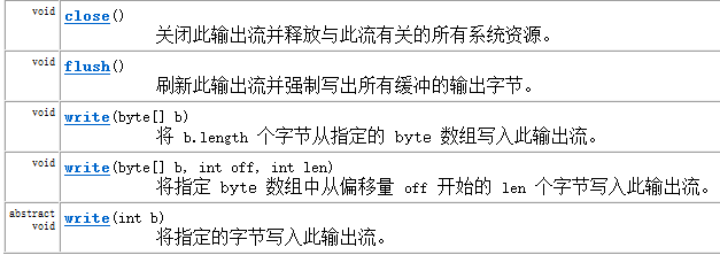
OutputStream的子类 FileOutputStream文件输出流可以将字节输出写入文件,使用write方法


形参boolean填写true可以使用续写功能,false则不可以续写。
字节输入流:InputStream

int read()读取下一个字节,如果返回值为-1则没有下一个字节。
int read(byte[ ] b)读取字节存储在数组中,返回字节数。
InputStream的子类FileInputStream类:

FileInputStream同样有与父类一样的int read()方法。
读取数据:
单个字节读取:
    public static void main(String[] args) throws IOException {
//        明确数据源
        FileInputStream fis = new FileInputStream("D:\\java\\demo01.txt");
        int len = 0;
        while((len = fis.read()) != -1){
            System.out.println((char)len);
        }
//        释放资源
        fis.close();
    }
字节数组[1024]读取:
    public static void main(String[] args) throws IOException {
//        明确数据源
        FileInputStream fis = new FileInputStream("D:\\java\\demo01.txt");
                byte[] b = new byte[1024];
        int len = 0;
        while((len = fis.read(b)) != -1){
            System.out.println((char)len);
        }
//        释放资源
        fis.close();
    }
使用字节输入流和输出流复制文件
    public static void main(String[] args) throws IOException {
//        单字节复制
//        明确数据源
        FileInputStream fis = new FileInputStream("D:\\java
\\demo01.txt");
//        明确目的地
        FileOutputStream fos = new FileOutputStream("D:\\io\\hello\\demo01.txt");
        int len = 0;
        while((len = fis.read()) != -1){
            fos.write(len);
        }
//        释放资源
        fis.close();
        fos.close();
    }
        public static void main(String[] args) throws IOException {
//        单字符数组复制
//        明确数据源
        FileInputStream fis = new FileInputStream("D:\\java
\\demo01.txt");
//        明确目的地
        FileOutputStream fos = new FileOutputStream("D:\\io\\hello\\demo01.txt");
                byte [] b = new byte[1024];
        int len = 0;
        while((len = fis.read(b)) != -1){
            fos.write(len);
        }
//        释放资源
        fis.close();
        fos.close();
    }
字符流:
字符输出流:Writer
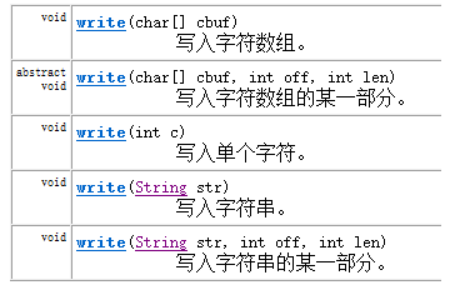
Write的子类FIleWriter可以用来将字符写入文件
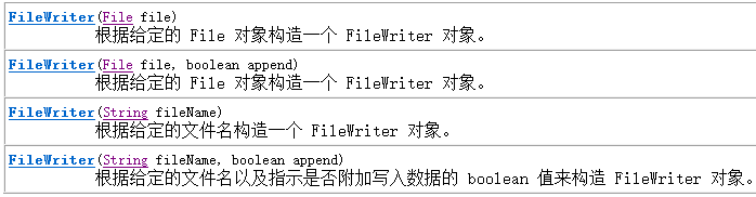
    public static void main(String[] args) throws IOException {
//              写入数据
//        明确目的地
        FileWriter fw = new FileWriter("D:\\java\\demo02.txt");
//        写入一个字符
        fw.write(100);
        fw.flush();
//        写入一个字符数组
        char [] ch = {'你','好','棒'};
        fw.write(ch);
        fw.flush();
        fw.write(ch,1,2);
        fw.flush();
        fw.write("海绵宝宝");
        fw.flush();
        fw.write("派大星",0,1);

        fw.close();
    }
字符输入流:Reader
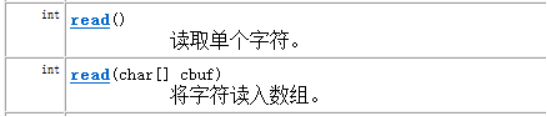
Reader的子类FIleReader可以读取文件中的字符

    public static void main(String[] args) throws IOException {
                //读取数据
//        明确数据源
        FileReader fr = new FileReader("D:\\java\\demo01.txt");
//        一个字符一个字符读
        int len = 0;
        while((len = fr.read()) != -1){
            System.out.print((char)len);
        }
//        释放资源
        fr.close();
    }
}
字符流同样可以复制文件,但复制的视频音频文件无法打开,所以字符流应用来复制文本文件。
字符流复制文件:
public static void main(String[] args) throws IOException {
//        明确数据源
        FileReader fr = new FileReader("D:\\java\\demo02.txt");
//        明确目的地
        FileWriter fw = new FileWriter("D:\\io\\copy.txt");
        char [] ch = new char [1024];
//        一个字符数组一个字符数组复制
        int len = 0;
        while((len = fr.read(ch))!= -1){
            fw.write(ch,0,len);
            fw.flush();
        }
//        释放资源
        fw.close();
        fr.close();
    }

 浙公网安备 33010602011771号