
Swagger 接口文档配置信息
using System.Web.Http;
using Swashbuckle.Application;
using System;
using Swashbuckle.Swagger;
using System.Web.Http.Description;
using System.Collections.Concurrent;
using System.Xml;
using System.IO;
using System.Linq;
using System.Collections.Generic;
using System.Web;
using WebAPI;
[assembly: PreApplicationStartMethod(typeof(SwaggerConfig), "Register")]
namespace WebAPI
{
public class SwaggerConfig
{
public static void Register()
{
if (Convert.ToBoolean(System.Configuration.ConfigurationManager.AppSettings["EnableSwagger"]) == false)
{
return;
}
var thisAssembly = typeof(SwaggerConfig).Assembly;
GlobalConfiguration.Configuration
.EnableSwagger(c =>
{
// By default, the service root url is inferred from the request used to access the docs.
// However, there may be situations (e.g. proxy and load-balanced environments) where this does not
// resolve correctly. You can workaround this by providing your own code to determine the root URL.
//
//c.RootUrl(req => GetRootUrlFromAppConfig());
// If schemes are not explicitly provided in a Swagger 2.0 document, then the scheme used to access
// the docs is taken as the default. If your API supports multiple schemes and you want to be explicit
// about them, you can use the "Schemes" option as shown below.
//
//c.Schemes(new[] { "http", "https" });
// Use "SingleApiVersion" to describe a single version API. Swagger 2.0 includes an "Info" object to
// hold additional metadata for an API. Version and title are required but you can also provide
// additional fields by chaining methods off SingleApiVersion.
//
c.SingleApiVersion("v2", "");
// If you want the output Swagger docs to be indented properly, enable the "PrettyPrint" option.
//
//c.PrettyPrint();
// If your API has multiple versions, use "MultipleApiVersions" instead of "SingleApiVersion".
// In this case, you must provide a lambda that tells Swashbuckle which actions should be
// included in the docs for a given API version. Like "SingleApiVersion", each call to "Version"
// returns an "Info" builder so you can provide additional metadata per API version.
//
//c.MultipleApiVersions(
// (apiDesc, targetApiVersion) => ResolveVersionSupportByRouteConstraint(apiDesc, targetApiVersion),
// (vc) =>
// {
// vc.Version("v2", "Swashbuckle Dummy API V2");
// vc.Version("v1", "Swashbuckle Dummy API V1");
// });
// You can use "BasicAuth", "ApiKey" or "OAuth2" options to describe security schemes for the API.
// See https://github.com/swagger-api/swagger-spec/blob/master/versions/2.0.md for more details.
// NOTE: These only define the schemes and need to be coupled with a corresponding "security" property
// at the document or operation level to indicate which schemes are required for an operation. To do this,
// you'll need to implement a custom IDocumentFilter and/or IOperationFilter to set these properties
// according to your specific authorization implementation
//
//c.BasicAuth("basic")
// .Description("Basic HTTP Authentication");
//
// NOTE: You must also configure 'EnableApiKeySupport' below in the SwaggerUI section
//c.ApiKey("apiKey")
// .Description("API Key Authentication")
// .Name("apiKey")
// .In("header");
//
//c.OAuth2("oauth2")
// .Description("OAuth2 Implicit Grant")
// .Flow("implicit")
// .AuthorizationUrl("http://petstore.swagger.wordnik.com/api/oauth/dialog")
// //.TokenUrl("https://tempuri.org/token")
// .Scopes(scopes =>
// {
// scopes.Add("read", "Read access to protected resources");
// scopes.Add("write", "Write access to protected resources");
// });
// Set this flag to omit descriptions for any actions decorated with the Obsolete attribute
//c.IgnoreObsoleteActions();
// Each operation be assigned one or more tags which are then used by consumers for various reasons.
// For example, the swagger-ui groups operations according to the first tag of each operation.
// By default, this will be controller name but you can use the "GroupActionsBy" option to
// override with any value.
//
//c.GroupActionsBy(apiDesc => apiDesc.HttpMethod.ToString());
// You can also specify a custom sort order for groups (as defined by "GroupActionsBy") to dictate
// the order in which operations are listed. For example, if the default grouping is in place
// (controller name) and you specify a descending alphabetic sort order, then actions from a
// ProductsController will be listed before those from a CustomersController. This is typically
// used to customize the order of groupings in the swagger-ui.
//
//c.OrderActionGroupsBy(new DescendingAlphabeticComparer());
// If you annotate Controllers and API Types with
// Xml comments (http://msdn.microsoft.com/en-us/library/b2s063f7(v=vs.110).aspx), you can incorporate
// those comments into the generated docs and UI. You can enable this by providing the path to one or
// more Xml comment files.
//
//c.IncludeXmlComments(GetXmlCommentsPath());
//c.IncludeXmlComments(string.Format("{0}/bin/XGPhone.XML", System.AppDomain.CurrentDomain.BaseDirectory));
c.IncludeXmlComments(string.Format("{0}/bin/WebAPI.XML", System.AppDomain.CurrentDomain.BaseDirectory));
c.IncludeXmlComments(string.Format("{0}/bin/Models.XML", System.AppDomain.CurrentDomain.BaseDirectory));
c.IncludeXmlComments(string.Format("{0}/bin/Common.XML", System.AppDomain.CurrentDomain.BaseDirectory));
// Swashbuckle makes a best attempt at generating Swagger compliant JSON schemas for the various types
// exposed in your API. However, there may be occasions when more control of the output is needed.
// This is supported through the "MapType" and "SchemaFilter" options:
//
// Use the "MapType" option to override the Schema generation for a specific type.
// It should be noted that the resulting Schema will be placed "inline" for any applicable Operations.
// While Swagger 2.0 supports inline definitions for "all" Schema types, the swagger-ui tool does not.
// It expects "complex" Schemas to be defined separately and referenced. For this reason, you should only
// use the "MapType" option when the resulting Schema is a primitive or array type. If you need to alter a
// complex Schema, use a Schema filter.
//
//c.MapType<ProductType>(() => new Schema { type = "integer", format = "int32" });
// If you want to post-modify "complex" Schemas once they've been generated, across the board or for a
// specific type, you can wire up one or more Schema filters.
//
//c.SchemaFilter<ApplySchemaVendorExtensions>();
// In a Swagger 2.0 document, complex types are typically declared globally and referenced by unique
// Schema Id. By default, Swashbuckle does NOT use the full type name in Schema Ids. In most cases, this
// works well because it prevents the "implementation detail" of type namespaces from leaking into your
// Swagger docs and UI. However, if you have multiple types in your API with the same class name, you'll
// need to opt out of this behavior to avoid Schema Id conflicts.
//
//c.UseFullTypeNameInSchemaIds();
// Alternatively, you can provide your own custom strategy for inferring SchemaId's for
// describing "complex" types in your API.
//
//c.SchemaId(t => t.FullName.Contains('`') ? t.FullName.Substring(0, t.FullName.IndexOf('`')) : t.FullName);
// Set this flag to omit schema property descriptions for any type properties decorated with the
// Obsolete attribute
//c.IgnoreObsoleteProperties();
// In accordance with the built in JsonSerializer, Swashbuckle will, by default, describe enums as integers.
// You can change the serializer behavior by configuring the StringToEnumConverter globally or for a given
// enum type. Swashbuckle will honor this change out-of-the-box. However, if you use a different
// approach to serialize enums as strings, you can also force Swashbuckle to describe them as strings.
//
//c.DescribeAllEnumsAsStrings();
// Similar to Schema filters, Swashbuckle also supports Operation and Document filters:
//
// Post-modify Operation descriptions once they've been generated by wiring up one or more
// Operation filters.
//
//c.OperationFilter<AddDefaultResponse>();
// c.OperationFilter<AddAuthorizationHeader>();
//
// If you've defined an OAuth2 flow as described above, you could use a custom filter
// to inspect some attribute on each action and infer which (if any) OAuth2 scopes are required
// to execute the operation
//
//c.OperationFilter<AssignOAuth2SecurityRequirements>();
// Post-modify the entire Swagger document by wiring up one or more Document filters.
// This gives full control to modify the final SwaggerDocument. You should have a good understanding of
// the Swagger 2.0 spec. - https://github.com/swagger-api/swagger-spec/blob/master/versions/2.0.md
// before using this option.
//
c.DocumentFilter<HiddenApiFilter>();
// In contrast to WebApi, Swagger 2.0 does not include the query string component when mapping a URL
// to an action. As a result, Swashbuckle will raise an exception if it encounters multiple actions
// with the same path (sans query string) and HTTP method. You can workaround this by providing a
// custom strategy to pick a winner or merge the descriptions for the purposes of the Swagger docs
//
// c.ResolveConflictingActions(apiDescriptions => apiDescriptions.First());
// Wrap the default SwaggerGenerator with additional behavior (e.g. caching) or provide an
// alternative implementation for ISwaggerProvider with the CustomProvider option.
//
c.CustomProvider((defaultProvider) => new CachingSwaggerProvider(defaultProvider));
})
.EnableSwaggerUi(c =>
{
// Use the "DocumentTitle" option to change the Document title.
// Very helpful when you have multiple Swagger pages open, to tell them apart.
//
c.DocumentTitle("xx科技有限公司网站接口文档");
// Use the "InjectStylesheet" option to enrich the UI with one or more additional CSS stylesheets.
// The file must be included in your project as an "Embedded Resource", and then the resource's
// "Logical Name" is passed to the method as shown below.
//
//c.InjectStylesheet(containingAssembly, "Swashbuckle.Dummy.SwaggerExtensions.testStyles1.css");
// Use the "InjectJavaScript" option to invoke one or more custom JavaScripts after the swagger-ui
// has loaded. The file must be included in your project as an "Embedded Resource", and then the resource's
// "Logical Name" is passed to the method as shown above.
//
c.InjectJavaScript(thisAssembly, "WebAPI.Scripts.swagger_lang.js");
// The swagger-ui renders boolean data types as a dropdown. By default, it provides "true" and "false"
// strings as the possible choices. You can use this option to change these to something else,
// for example 0 and 1.
//
//c.BooleanValues(new[] { "0", "1" });
// By default, swagger-ui will validate specs against swagger.io's online validator and display the result
// in a badge at the bottom of the page. Use these options to set a different validator URL or to disable the
// feature entirely.
//c.SetValidatorUrl("http://localhost/validator");
//c.DisableValidator();
// Use this option to control how the Operation listing is displayed.
// It can be set to "None" (default), "List" (shows operations for each resource),
// or "Full" (fully expanded: shows operations and their details).
//
//c.DocExpansion(DocExpansion.List);
// Specify which HTTP operations will have the 'Try it out!' option. An empty paramter list disables
// it for all operations.
//
//c.SupportedSubmitMethods("GET", "HEAD");
// Use the CustomAsset option to provide your own version of assets used in the swagger-ui.
// It's typically used to instruct Swashbuckle to return your version instead of the default
// when a request is made for "index.html". As with all custom content, the file must be included
// in your project as an "Embedded Resource", and then the resource's "Logical Name" is passed to
// the method as shown below.
//
//c.CustomAsset("index", containingAssembly, "YourWebApiProject.SwaggerExtensions.index.html");
// If your API has multiple versions and you've applied the MultipleApiVersions setting
// as described above, you can also enable a select box in the swagger-ui, that displays
// a discovery URL for each version. This provides a convenient way for users to browse documentation
// for different API versions.
//
//c.EnableDiscoveryUrlSelector();
// If your API supports the OAuth2 Implicit flow, and you've described it correctly, according to
// the Swagger 2.0 specification, you can enable UI support as shown below.
//
//c.EnableOAuth2Support(
// clientId: "test-client-id",
// clientSecret: null,
// realm: "test-realm",
// appName: "Swagger UI"
// //additionalQueryStringParams: new Dictionary<string, string>() { { "foo", "bar" } }
//);
// If your API supports ApiKey, you can override the default values.
// "apiKeyIn" can either be "query" or "header"
//
//Bearer 添加swagger对OAuth的支持
c.EnableApiKeySupport("Authorization", "header");
});
}
/// <summary>
/// 控制器描述和接口文档缓存
/// </summary>
public class CachingSwaggerProvider : ISwaggerProvider
{
private static ConcurrentDictionary<string, SwaggerDocument> _cache =
new ConcurrentDictionary<string, SwaggerDocument>();
private readonly ISwaggerProvider _swaggerProvider;
public CachingSwaggerProvider(ISwaggerProvider swaggerProvider)
{
_swaggerProvider = swaggerProvider;
}
public SwaggerDocument GetSwagger(string rootUrl, string apiVersion)
{
var cacheKey = string.Format("{0}_{1}", rootUrl, apiVersion);
SwaggerDocument srcDoc = null;
//只读取一次
if (!_cache.TryGetValue(cacheKey, out srcDoc))
{
srcDoc = _swaggerProvider.GetSwagger(rootUrl, apiVersion);
srcDoc.vendorExtensions = new Dictionary<string, object> { { "ControllerDesc", GetControllerDesc() } };
_cache.TryAdd(cacheKey, srcDoc);
}
return srcDoc;
}
/// <summary>
/// 从API文档中读取控制器描述
/// </summary>
/// <returns>所有控制器描述</returns>
public static ConcurrentDictionary<string, string> GetControllerDesc()
{
string xmlpath = string.Format("{0}/bin/WebAPI.XML", System.AppDomain.CurrentDomain.BaseDirectory);
ConcurrentDictionary<string, string> controllerDescDict = new ConcurrentDictionary<string, string>();
if (File.Exists(xmlpath))
{
XmlDocument xmldoc = new XmlDocument();
xmldoc.Load(xmlpath);
string type = string.Empty, path = string.Empty, controllerName = string.Empty;
string[] arrPath;
int length = -1, cCount = "Controller".Length;
XmlNode summaryNode = null;
foreach (XmlNode node in xmldoc.SelectNodes("//member"))
{
type = node.Attributes["name"].Value;
if (type.StartsWith("T:"))
{
//控制器
arrPath = type.Split('.');
length = arrPath.Length;
controllerName = arrPath[length - 1];
if (controllerName.EndsWith("Controller"))
{
//获取控制器注释
summaryNode = node.SelectSingleNode("summary");
string key = controllerName.Remove(controllerName.Length - cCount, cCount);
if (summaryNode != null && !string.IsNullOrEmpty(summaryNode.InnerText) && !controllerDescDict.ContainsKey(key))
{
controllerDescDict.TryAdd(key, summaryNode.InnerText.Trim());
}
}
}
}
}
return controllerDescDict;
}
}
}
[AttributeUsage(AttributeTargets.Method | AttributeTargets.Class)]
public partial class HiddenApiAttribute : Attribute { }
public class HiddenApiFilter : IDocumentFilter
{
/// <summary>
/// 重写Apply方法,移除隐藏接口的生成
/// </summary>
/// <param name="swaggerDoc">swagger文档文件</param>
/// <param name="schemaRegistry"></param>
/// <param name="apiExplorer">api接口集合</param>
public void Apply(SwaggerDocument swaggerDoc, SchemaRegistry schemaRegistry, IApiExplorer apiExplorer)
{
foreach (ApiDescription apiDescription in apiExplorer.ApiDescriptions)
{
if (Enumerable.OfType<HiddenApiAttribute>(apiDescription.GetControllerAndActionAttributes<HiddenApiAttribute>()).Any())
{
string key = "/" + apiDescription.RelativePath;
if (key.Contains("?"))
{
int idx = key.IndexOf("?", StringComparison.Ordinal);
key = key.Substring(0, idx);
}
swaggerDoc.paths.Remove(key);
}
}
}
}
[AttributeUsage(AttributeTargets.Class, AllowMultiple = false)]
public class ControllerGroupAttribute : Attribute
{
/// <summary>
/// 当前Controller所属模块 请用中文
/// </summary>
public string GroupName { get; private set; }
/// <summary>
/// 当前controller用途 请用中文
/// </summary>
public string Useage { get; private set; }
/// <summary>
/// Controller描述信息 构造
/// </summary>
/// <param name="groupName">模块名称</param>
/// <param name="useage">当前controller用途</param>
public ControllerGroupAttribute(string groupName, string useage)
{
if (string.IsNullOrEmpty(groupName) || string.IsNullOrEmpty(useage))
{
throw new ArgumentNullException("groupName||useage");
}
GroupName = groupName;
Useage = useage;
}
}
}
swagger_lang.js
///	<summary>
/// 中文转换
///	</summary>
var SwaggerTranslator = (function () {
    //定时执行检测是否转换成中文,最多执行500次  即500*50/1000=25s
    var iexcute = 0,
        //中文语言包
        _words = {
            "Warning: Deprecated": "警告:已过时",
            "Implementation Notes": "实现备注",
            "Response Class": "响应类",
            "Status": "状态",
            "Parameters": "参数",
            "Parameter": "参数",
            "Value": "值",
            "Description": "描述",
            "Parameter Type": "参数类型",
            "Data Type": "数据类型",
            "Response Messages": "响应消息",
            "HTTP Status Code": "HTTP状态码",
            "Reason": "原因",
            "Response Model": "响应模型",
            "Request URL": "请求URL",
            "Response Body": "响应体",
            "Response Code": "响应码",
            "Response Headers": "响应头",
            "Hide Response": "隐藏响应",
            "Headers": "头",
            "Try it out!": "试一下!",
            "Show/Hide": "显示/隐藏",
            "List Operations": "显示操作",
            "Expand Operations": "展开操作",
            "Raw": "原始",
            "can't parse JSON.  Raw result": "无法解析JSON. 原始结果",
            "Model Schema": "模型架构",
            "Model": "模型",
            "apply": "应用",
            "Username": "用户名",
            "Password": "密码",
            "Terms of service": "服务条款",
            "Created by": "创建者",
            "See more at": "查看更多:",
            "Contact the developer": "联系开发者",
            "api version": "api版本",
            "Response Content Type": "响应Content Type",
            "fetching resource": "正在获取资源",
            "fetching resource list": "正在获取资源列表",
            "Explore": "浏览",
            "Show Swagger Petstore Example Apis": "显示 Swagger Petstore 示例 Apis",
            "Can't read from server.  It may not have the appropriate access-control-origin settings.": "无法从服务器读取。可能没有正确设置access-control-origin。",
            "Please specify the protocol for": "请指定协议:",
            "Can't read swagger JSON from": "无法读取swagger JSON于",
            "Finished Loading Resource Information. Rendering Swagger UI": "已加载资源信息。正在渲染Swagger UI",
            "Unable to read api": "无法读取api",
            "from path": "从路径",
            "Click to set as parameter value": "点击设置参数",
            "server returned": "服务器返回"
        },

        //定时执行转换
        _translator2Cn = function () {
            if ($("#resources_container .resource").length > 0) {
                _tryTranslate();
            }

            if ($("#explore").text() == "Explore" && iexcute < 500) {
                iexcute++;
                setTimeout(_translator2Cn, 50);
            }
        },

        //设置控制器注释
        _setControllerSummary = function () {
            $.ajax({
                type: "get",
                async: true,
                url: $("#input_baseUrl").val(),
                dataType: "json",
                success: function (data) {
                    var summaryDict = data.ControllerDesc;
                    var id, controllerName, strSummary;
                    $("#resources_container .resource").each(function (i, item) {
                        id = $(item).attr("id");
                        if (id) {
                            controllerName = id.substring(9);
                            strSummary = summaryDict[controllerName];
                            if (strSummary) {
                                var option = $(item).children(".heading").children(".options");
                                if ($(option).children(".controller-summary").length > 0) {
                                    $(option).children(".controller-summary").remove();
                                }
                                $(option).prepend('<li class="controller-summary" title="' + strSummary + '">' + strSummary + '</li>');
                            }
                        }
                    });
                }
            });
        },

        //尝试将英文转换成中文
        _tryTranslate = function () {
            $('[data-sw-translate]').each(function () {
                $(this).html(_getLangDesc($(this).html()));
                $(this).val(_getLangDesc($(this).val()));
                $(this).attr('title', _getLangDesc($(this).attr('title')));
            });
        },
        _getLangDesc = function (word) {
            return _words[$.trim(word)] !== undefined ? _words[$.trim(word)] : word;
        };

    return {
        Translator: function () {
            $("#logo").html("公司名称").attr("href", "http://www.xx.com");
            $('body').append('<style type="text/css">.controller-summary{color:#10a54a !important;word-break:keep-all;white-space:nowrap;overflow:hidden;text-overflow:ellipsis;max-width:250px;text-align:right;cursor:default;} </style>');
            //设置控制器描述
            _setControllerSummary();
            _translator2Cn();
        },
        translate: function () {
            this.Translator();
        }
    }
})();
//执行转换
SwaggerTranslator.Translator();
效果预览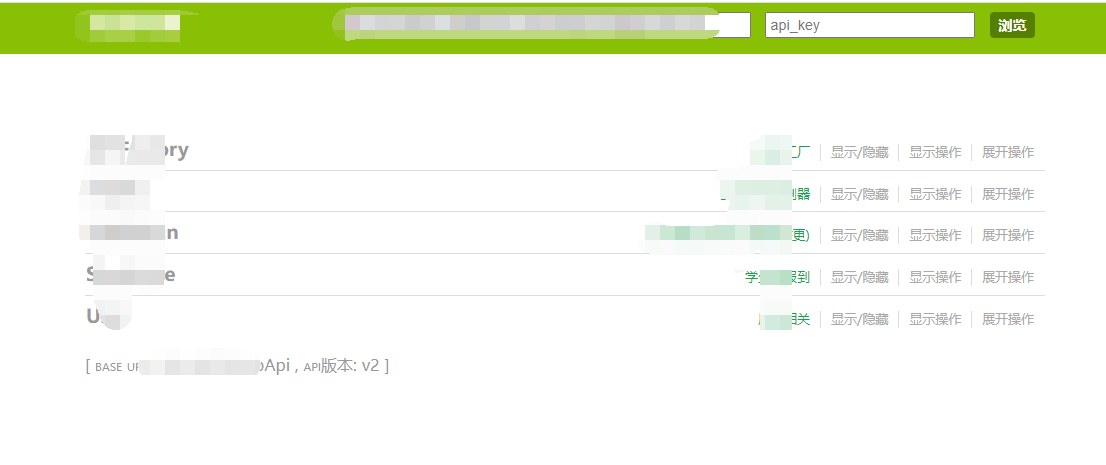

 浙公网安备 33010602011771号