
torchvision、opencv 中的resize行为“不一致”
问题
最近在”炼丹“的过程中遇到一个很奇怪的问题。训练分类模型时,在测试集上能够达到99%的准确率,然而将模型导出为onnx在测试集上测试时,得到的模型准确率只有50%。这显然是不正确的。
分析
这种问题一般都是输入数据的差异(训练数据与测试数据的差异)导致的,一般排查预处理代码即可发现存在的问题。。常见的情况有:
- 未对输入图片进行归一化处理,或归一化处理的方式不一致。
- 输入图片的颜色通道排列顺序不一致。使用opencv读取的默认通道顺序为BGR,PIL读取的顺序为RGB。
- 在测试时,漏掉训练时使用的预处理操作。如,某些模型会对输入图片进行直方图均衡等处理。
当然,也有可能是在模型导出为onnx的过程中或后处理的过程中出现的问题。由于,导出onnx时并未报错且后处理部分简单,分析问题时并未考虑。
定位
分析后,初步定位问题出现在图片预处理的过程中。两种不同的推导方式使用的预处理代码并不完全相同,关键代码如下所示:
import cv2 as cv
import torch

from torchvision.transforms import transforms

INPUT_SIZE = (100,100)

# 训练过程中的预处理代码
img = PIL.Image.open(img_path)
preprocess_fun = transforms.Compose([transforms.Resize(INPUT_SIZE), transforms.ToTensor(),])
img = preprocess_fun(img)

# 使用onnx推导的预处理代码
img = cv.imread(img_path)
img = cv.resize(img, INPUT_SIZE)
img = cv.cvtColor(img, cv.COLOR_BGR2RGB)
img = img.astype(np.float32) / 255
上述两端代码的功能很好理解:都是读取图片->缩放->归一化。但就是这看似功能相同的代码却暗藏玄机。既然问题出在这里,那么代码中的某些操作是未按照预期进行的。使用相同的图片对上述两端代码的不同部分进行输出比对后,发现了问题的所在:两种resize的行为不一致。查阅了torchvision.transforms.Resize文档,发现如下内容。
The output image might be different depending on its type: when downsampling, the interpolation of PIL images and tensors is slightly different, because PIL applies antialiasing. This may lead to significant differences in the performance of a network. Therefore, it is preferable to train and serve a model with the same input types. See also below the antialias parameter, which can help making the output of PIL images and tensors closer.
不同的输入类型可能会有不同的输出图像?这不正是遇到的问题吗!于是针对antialias这个参数,有了如下的验证代码。
import torchvision
from torchvision.transforms import InterpolationMode
from torchvision.transforms import transforms
import torch

SIZE = (400, 400)

def transform_resize(img, interpolation=InterpolationMode.BILINEAR, antialias=False):
    img = transforms.Resize(SIZE, interpolation, antialias=antialias)(
        torch.from_numpy(img).permute(2, 0, 1)
    )
    img = img.permute(1, 2, 0).numpy().astype(np.uint8)
    return img

cv_img = cv.imread(img_path)
cv_img_rgb = cv.cvtColor(cv_img, cv.COLOR_BGR2RGB)

cv_resize = cv.resize(cv_img_rgb, SIZE, interpolation=cv.INTER_LINEAR)

tf_resize_antialias_true = transform_resize(cv_img_rgb, InterpolationMode.BILINEAR, antialias=True)
tf_resize_antialias_false = transform_resize(cv_img_rgb, InterpolationMode.BILINEAR, antialias=False)
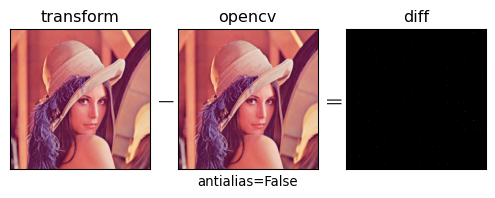
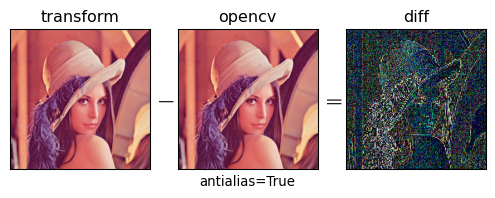
将不同的antialias参数的torchvision.transforms.Resize结果与opencv reize函数的结果做差,即可得到下图。从图片中我们可以很清楚的看出,使用了抗锯齿的参数后resize后的图片与opencv resize的图片有明显的差异。
解决
既然定位了问题,那么解决问题就很简单了。从torchvision.transforms.Resize中的antialias参数文档,我们可以发现抗锯齿仅在输入为PIL图像,且InterpolationMode为bilinear或bicubic才会被使用。
on PIL images, antialiasing is always applied on bilinear or bicubic modes
因此我们只需将输入调整为torch的Tensor对象即可解决这个问题,修改的方法也很简单,在resize操作前将PIL图像使用ToTensor()转换为Tensor。
preprocess_fun = transforms.Compose([transforms.ToTensor(),transforms.Resize(INPUT_SIZE), ])

 浙公网安备 33010602011771号