

$substr,$substrBytes,$substrCP是aggregate的管道操作符,主要可用在project中,
$substr在版本3.4后最好使用$substrBytes
substr
db.getCollection("table_name").aggregate({
    $project: {
        "new_string": {
            $substr: [< string > , < start > , < length > ]
        }
    }
})
其中< string >是需截取的字符串,若为表内字段可用$加字段名。
< start >截取开始的位置,为整数,整数从0开始。若数字为负数或大于< string >的长度,则返回空字符串""。
< length >截取字符串长度,为整数。若数字为负数则返回< start >后的全部的字符串。
substrBytes
db.getCollection("table_name").aggregate({
    $project: {
        "new_string": {
            $substrBytes : [< string  expression >,< byte  index >,< byte  count >]
        }
    }
})
其中< string expression >是需截取的字符串,若为表内字段可用$加字段名。
< byte index >截取开始的位置,为整数,整数从0开始。若数字为负数或大于< string >的长度,则返回空字符串""。
< byte count >截取字符串长度,为整数。若数字为负数则返回< start >后的全部的字符串。
substrCP
db.getCollection("table_name").aggregate({
    $project: {
        "new_string": {
            $substrCP:[< string  expression >,< code  point  index >,< code  point  count >]
        }
    }
})
其中< string expression >是需截取的字符串,若为表内字段可用$加字段名。
< code point index >截取开始的位置,为整数,整数从0开始。若数字为负数或大于< string >的长度,则返回空字符串""。
< code point count >截取字符串长度,为整数。若数字为负数则返回< start >后的全部的字符串。
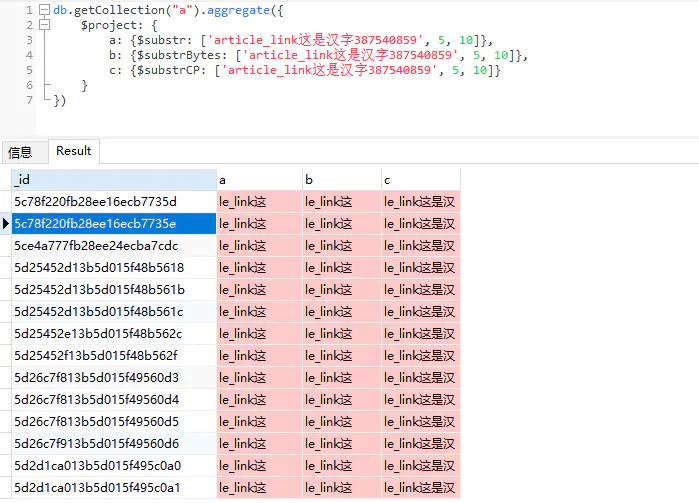
示例:
1.截取字符串
$substr与$substrBytes结果相同,会将汉字的字符长度视为2。
$substrCP将汉字的字符长度视为1。
2.截取字段内容

作者:沧海2122537190
链接:https://www.jianshu.com/p/8aa8794101e3
来源:简书
著作权归作者所有。商业转载请联系作者获得授权,非商业转载请注明出处。

 浙公网安备 33010602011771号