
1. 查询磁盘空间使用超额分区
root@ub20:~# df -h| awk -F'[ %]+' '{size=0;}{size=size+$5;}{if(size>80){label="$1";print $0"\nlabel="$6" percent="$5"%"}}'
/dev/mapper/data01-data 300G 244G 57G 82% /logs
label=/logs percent=82%
2. 按类型统计网络tcp连接
netstat -an|awk '/^tcp/{++s[$NF]}END{for(a in s)print a,s[a]}'
3. 从非标题行开始匹配筛选异常行,$3为当前值,$4为期望值
awk 'NR > 0 && ($3!=$4 || $3=0) {print}'
参考资料:https://www.cnblogs.com/ginvip/p/6352157.html
awk简介
awk其名称得自于它的创始人 Alfred Aho 、Peter Weinberger 和 Brian Kernighan 姓氏的首个字母。实际上 AWK 的确拥有自己的语言:AWK 程序设计语言 ,三位创建者已将它正式定义为“样式扫描和处理语言”。它允许您创建简短的程序,这些程序读取输入文件、为数据排序、处理数据、对输入执行计算以及生成报表,还有无数其他的功能。
awk 是一种很棒的语言,它适合文本处理和报表生成,其语法较为常见,借鉴了某些语言的一些精华,如 C 语言等。在 linux 系统日常处理工作中,发挥很重要的作用,掌握了 awk将会使你的工作变的高大上。 awk 是三剑客的老大,利剑出鞘,必会不同凡响。
使用方法
|
1
|
awk '{pattern + action}' {filenames} |
尽管操作可能会很复杂,但语法总是这样,其中 pattern 表示 AWK 在数据中查找的内容,而 action 是在找到匹配内容时所执行的一系列命令。花括号({})不需要在程序中始终出现,但它们用于根据特定的模式对一系列指令进行分组。pattern就是要表示的正则表达式,用斜杠括起来。
awk语言的最基本功能是在文件或者字符串中基于指定规则浏览和抽取信息,awk抽取信息后,才能进行其他文本操作。完整的awk脚本通常用来格式化文本文件中的信息。
通常,awk是以文件的一行为处理单位的。awk每接收文件的一行,然后执行相应的命令,来处理文本。
awk 的原理
通过一个简短的命令,我们来了解其工作原理。
|
1
2
3
4
5
6
7
8
9
10
11
12
13
|
[root@Gin scripts]# awk '{print $0}' /etc/passwdroot:x:0:0:root:/root:/bin/bashbin:x:1:1:bin:/bin:/sbin/nologin...............................................[root@Gin scripts]# echo hhh|awk '{print "hello,world"}'hello,world[root@Gin scripts]# awk '{print "hiya"}' /etc/passwdhiyahiyahiya............................................... |
你将会见到/etc/passwd 文件的内容出现在眼前。现在,解释 awk 做了些什么。调用 awk时,我们指定/etc/passwd 作为输入文件。执行 awk 时,它依次对/etc/passwd 中的每一行执行 print 命令。
所有输出都发送到 stdout,所得到的结果与执行 cat /etc/passwd 完全相同。
现在,解释{ print }代码块。在 awk 中,花括号用于将几块代码组合到一起,这一点类似于 C 语言。在代码块中只有一条 print 命令。在 awk 中,如果只出现 print 命令,那么将打印当前行的全部内容。
再次说明, awk 对输入文件中的每一行都执行这个脚本。

|
1
2
3
4
|
$ awk -F":" '{ print $1 }' /etc/passwd$ awk -F":" '{ print $1 $3 }' /etc/passwd$ awk -F":" '{ print $1 " " $3 }' /etc/passwd$ awk -F":" '{ print "username: " $1 "\t\tuid:" $3" }' /etc/passwd |
-F参数:指定分隔符,可指定一个或多个
print 后面做字符串的拼接
下面通过几实例来了解下awk的工作原理:
实例一:只查看test.txt文件(100行)内第20到第30行的内容(企业面试)
|
1
2
3
4
5
6
7
8
9
10
11
12
|
[root@Gin scripts]# awk '{if(NR>=20 && NR<=30) print $0}' test.txt 2021222324252627282930 |
实例二:已知test.txt文件内容为:
|
1
2
|
[root@Gin scripts]# cat test.txtI am Poe,my qq is 33794712 |
请从该文件中过滤出'Poe'字符串与33794712,最后输出的结果为:Poe 33794712
|
1
2
|
[root@Gin scripts]# awk -F '[ ,]+' '{print $3" "$7}' test.txtPoe 33794712 |
BEGIN 和 END 模块
通常,对于每个输入行,awk 都会执行每个脚本代码块一次。然而,在许多编程情况中,可能需要在 awk 开始处理输入文件中的文本之前执行初始化代码。对于这种情况,awk 允许您定义一个 BEGIN 块。
因为 awk 在开始处理输入文件之前会执行 BEGIN 块,因此它是初始化 FS(字段分隔符)变量、打印页眉或初始化其它在程序中以后会引用的全局变量的极佳位置。
awk 还提供了另一个特殊块,叫作 END 块。awk 在处理了输入文件中的所有行之后执行这个块。通常,END 块用于执行最终计算或打印应该出现在输出流结尾的摘要信息。
实例一:统计/etc/passwd的账户人数
|
1
2
3
4
|
[root@Gin scripts]# awk '{count++;print $0;} END{print "user count is ",count}' passwdroot:x:0:0:root:/root:/bin/bash...................................user count is 27 |
count是自定义变量。之前的action{}里都是只有一个print,其实print只是一个语句,而action{}可以有多个语句,以 ; 号隔开。这里没有初始化count,虽然默认是0,但是妥当的做法还是初始化为0:
|
1
2
3
4
5
|
[root@Gin scripts]# awk 'BEGIN {count=0;print "[start] user count is ",count} {count=count+1;print $0} END{print "[end] user count is ",count}' passwd[start] user count is 0root:x:0:0:root:/root:/bin/bash...................................[end] user count is 27 |
实例二:统计某个文件夹下的文件占用的字节数
|
1
2
|
[root@Gin scripts]# ll |awk 'BEGIN {size=0;} {size=size+$5;} END{print "[end]size is ",size}'[end]size is 1489 |
如果以M为单位显示:
|
1
2
|
[root@Gin scripts]# ll |awk 'BEGIN{size=0;} {size=size+$5;} END{print "[end]size is ",size/1024/1024,"M"}' [end]size is 0.00142002 M |
awk运算符
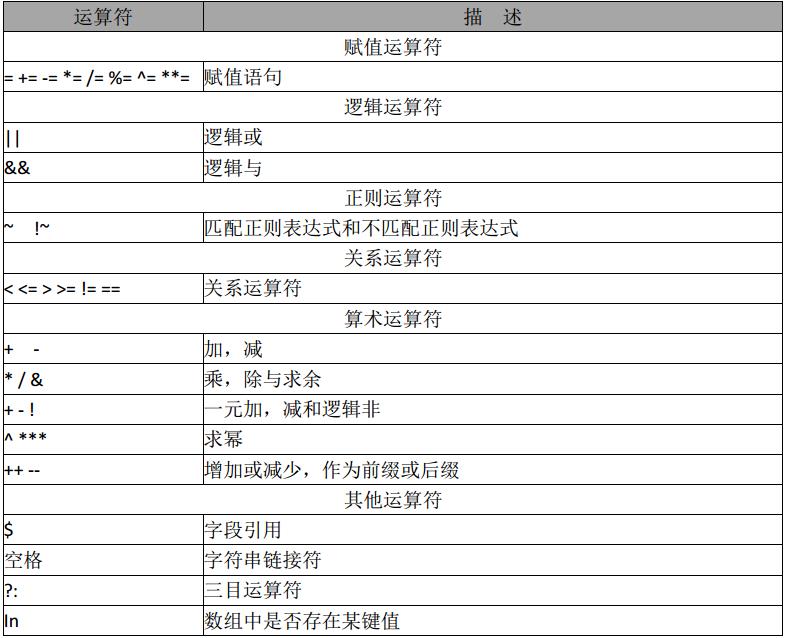
awk赋值运算符:a+=5; 等价于:a=a+5; 其他同类
|
1
2
|
[root@Gin scripts]# awk 'BEGIN{a=5;a+=5;print a}'10 |
awk逻辑运算符:
|
1
2
|
[root@Gin scripts]# awk 'BEGIN{a=1;b=2;print (a>2&&b>1,a=1||b>1)}'0 1 |
判断表达式 a>2&&b>1为真还是为假,后面的表达式同理
awk正则运算符:
|
1
2
|
[root@Gin scripts]# awk 'BEGIN{a="100testaa";if(a~/100/) {print "ok"}}'ok |
|
1
2
|
[root@Gin scripts]# echo|awk 'BEGIN{a="100testaaa"}a~/test/{print "ok"}'ok |
关系运算符:
如:> < 可以作为字符串比较,也可以用作数值比较,关键看操作数,如果是字符串就会转换为字符串比较。两个都为数字才转为数值比较。字符串比较:按照ascii码顺序比较。
|
1
2
3
4
5
|
[root@Gin scripts]# awk 'BEGIN{a="11";if(a>=9){print "ok"}}' #无输出[root@Gin scripts]# awk 'BEGIN{a=11;if(a>=9){print "ok"}}' ok[root@Gin scripts]# awk 'BEGIN{a;if(a>=b){print "ok"}}'ok |
awk 算术运算符:
说明,所有用作算术运算符进行操作,操作数自动转为数值,所有非数值都变为0。
|
1
2
3
4
|
[root@Gin scripts]# awk 'BEGIN{a="b";print a++,++a}'0 2[root@Gin scripts]# awk 'BEGIN{a="20b4";print a++,++a}'20 22 |
这里的a++ , ++a与javascript语言一样:a++是先赋值加++;++a是先++再赋值
三目运算符 ?:
|
1
2
3
4
|
[root@Gin scripts]# awk 'BEGIN{a="b";print a=="b"?"ok":"err"}'ok[root@Gin scripts]# awk 'BEGIN{a="b";print a=="c"?"ok":"err"}'err |
常用 awk 内置变量

注:内置变量很多,参阅相关资料
字段分隔符 FS
FS="\t" 一个或多个 Tab 分隔
|
1
2
3
4
|
[root@Gin scripts]# cat tab.txtww CC IDD[root@Gin scripts]# awk 'BEGIN{FS="\t+"}{print $1,$2,$3}' tab.txtww CC IDD |
FS="[[:space:]+]" 一个或多个空白空格,默认的
|
1
2
3
4
5
6
|
[root@Gin scripts]# cat space.txtwe are studing awk now![root@Gin scripts]# awk -F [[:space:]+] '{print $1,$2,$3,$4,$5}' space.txtwe are [root@Gin scripts]# awk -F [[:space:]+] '{print $1,$2}' space.txtwe are |
FS="[" ":]+" 以一个或多个空格或 : 分隔
|
1
2
3
4
|
[root@Gin scripts]# cat hello.txtroot:x:0:0:root:/root:/bin/bash[root@Gin scripts]# awk -F [" ":]+ '{print $1,$2,$3}' hello.txtroot x 0 |
字段数量 NF
|
1
2
3
4
5
|
[root@Gin scripts]# cat hello.txtroot:x:0:0:root:/root:/bin/bashbin:x:1:1:bin:/bin:/sbin/nologin:888[root@Gin scripts]# awk -F ":" 'NF==8{print $0}' hello.txtbin:x:1:1:bin:/bin:/sbin/nologin:888 |
记录数量 NR
|
1
2
|
[root@Gin scripts]# ifconfig eth0|awk -F [" ":]+ 'NR==2{print $4}' ## NR==2也就是取第2行192.168.17.129 |
RS 记录分隔符变量
将 FS 设置成"\n"告诉 awk 每个字段都占据一行。通过将 RS 设置成"",还会告诉 awk每个地址记录都由空白行分隔。
|
1
2
3
4
5
6
7
8
9
10
11
12
13
14
15
16
17
18
19
20
|
[root@Gin scripts]# cat recode.txtJimmy the Weasel100 Pleasant DriveSan Francisco,CA 123456Big Tony200 Incognito Ave.Suburbia,WA 64890[root@Gin scripts]# cat awk.txt#!/bin/awkBEGIN { FS="\n" RS=""}{ print $1","$2","$3}[root@Gin scripts]# awk -f awk.txt recode.txtJimmy the Weasel,100 Pleasant Drive,San Francisco,CA 123456Big Tony,200 Incognito Ave.,Suburbia,WA 64890 |
OFS 输出字段分隔符
|
1
2
3
4
5
6
7
8
9
|
[root@Gin scripts]# cat hello.txtroot:x:0:0:root:/root:/bin/bashbin:x:1:1:bin:/bin:/sbin/nologin:888[root@Gin scripts]# awk 'BEGIN{FS=":"}{print $1","$2","$3}' hello.txtroot,x,0bin,x,1[root@Gin scripts]# awk 'BEGIN{FS=":";OFS="#"}{print $1,$2,$3}' hello.txtroot#x#0bin#x#1 |
ORS 输出记录分隔符
|
1
2
3
4
5
6
7
8
9
10
11
12
13
14
15
16
17
18
19
20
21
22
|
[root@Gin scripts]# cat recode.txtJimmy the Weasel100 Pleasant DriveSan Francisco,CA 123456Big Tony200 Incognito Ave.Suburbia,WA 64890[root@Gin scripts]# cat awk.txt#!/bin/awkBEGIN { FS="\n" RS="" ORS="\n\n"}{ print $1","$2","$3}[root@Gin scripts]# awk -f awk.txt recode.txtJimmy the Weasel,100 Pleasant Drive,San Francisco,CA 123456Big Tony,200 Incognito Ave.,Suburbia,WA 64890 |
awk 正则

正则应用
规则表达式
awk '/REG/{action} ' file,/REG/为正则表达式,可以将$0 中,满足条件的记录送入到:action 进行处理
|
1
2
3
4
5
6
7
8
9
|
[root@Gin scripts]# awk '/root/{print $0}' passwd ##匹配所有包含root的行root:x:0:0:root:/root:/bin/bashoperator:x:11:0:operator:/root:/sbin/nologin[root@Gin scripts]# awk -F: '$5~/root/{print $0}' passwd ## 以分号作为分隔符,匹配第5个字段是root的行root:x:0:0:root:/root:/bin/bash[root@Gin scripts]# ifconfig eth0|awk 'BEGIN{FS="[[:space:]:]+"} NR==2{print $4}'192.168.17.129 |
布尔表达式
awk '布尔表达式{action}' file 仅当对前面的布尔表达式求值为真时, awk 才执行代码块。
|
1
2
3
4
|
[root@Gin scripts]# awk -F: '$1=="root"{print $0}' passwdroot:x:0:0:root:/root:/bin/bash[root@Gin scripts]# awk -F: '($1=="root")&&($5=="root") {print $0}' passwdroot:x:0:0:root:/root:/bin/bash |
awk 的 if、循环和数组
条件语句
awk 提供了非常好的类似于 C 语言的 if 语句。
|
1
2
3
4
5
6
7
8
9
10
11
12
13
|
{ if ($1=="foo"){ if($2=="foo"){ print "uno" }else{ print "one" } }elseif($1=="bar"){ print "two" }else{ print "three" }} |
使用 if 语句还可以将代码:
|
1
|
! /matchme/ { print $1 $3 $4 } |
转换成:
|
1
2
3
4
5
|
{ if ( $0 !~ /matchme/ ) { print $1 $3 $4 }} |
循环结构
我们已经看到了 awk 的 while 循环结构,它等同于相应的 C 语言 while 循环。awk 还有"do...while"循环,它在代码块结尾处对条件求值,而不像标准 while 循环那样在开始处求值。
它类似于其它语言中的"repeat...until"循环。以下是一个示例:
do...while 示例
|
1
2
3
4
5
|
{ count=1 do { print "I get printed at least once no matter what" } while ( count !=1 )} |
与一般的 while 循环不同,由于在代码块之后对条件求值, "do...while"循环永远都至少执行一次。换句话说,当第一次遇到普通 while 循环时,如果条件为假,将永远不执行该循环。
for 循环
awk 允许创建 for 循环,它就象 while 循环,也等同于 C 语言的 for 循环:
|
1
2
3
|
for ( initial assignment; comparison; increment ) { code block} |
以下是一个简短示例:
|
1
2
3
|
for ( x=1;x<=4;x++ ) { print "iteration", x} |
此段代码将打印:
|
1
2
3
4
|
iteration1iteration2iteration3iteration4 |
break 和 continue
此外,如同 C 语言一样, awk 提供了 break 和 continue 语句。使用这些语句可以更好地控制 awk 的循环结构。以下是迫切需要 break 语句的代码片断:
|
1
2
3
4
5
|
# while 死循环while (1) { print "forever and ever..."}# while 死循环:1 永远代表是真,这个 while 循环将永远运行下去。 |
以下是一个只执行十次的循环:
|
1
2
3
4
5
6
7
8
9
|
# break 语句示例x=1while(1) { print "iteration", x if ( x==10 ) { break } x++} |
这里,break 语句用于“逃出”最深层的循环。"break"使循环立即终止,并继续执行循环代码块后面的语句。
continue 语句补充了 break,其作用如下:
|
1
2
3
4
5
6
7
8
9
10
11
12
|
x=1while (1) { if ( x==4 ) { x++ continue } print "iteration", x if ( x>20 ) { break } x++} |
这段代码打印"iteration1"到"iteration21","iteration4"除外。如果迭代等于 4,则增加 x,并调用 continue 语句,该语句立即使 awk 开始执行下一个循环迭代,而不执行代码块的其余部分。如同 break 一样,continue 语句适合各种 awk 迭代循环。在 for 循环主体中使用时,continue 将使循环控制变量自动增加。以下是一个等价循环:
|
1
2
3
4
5
6
|
for ( x=1;x<=21;x++ ) { if ( x==4 ) { continue } print "iteration", x} |
在while 循环中时,在调用 continue 之前没有必要增加 x,因为 for 循环会自动增加 x。
数组
AWK 中的数组都是关联数组,数字索引也会转变为字符串索引
|
1
2
3
4
5
6
7
8
9
10
11
|
{ cities[1]="beijing" cities[2]="shanghai" cities["three"]="guangzhou" for( c in cities) { print cities[c] } print cities[1] print cities["1"] print cities["three"]} |
for…in 输出,因为数组是关联数组,默认是无序的。所以通过 for…in 得到是无序的数组。如果需要得到有序数组,需要通过下标获得。
数组的典型应用
用 awk 中查看服务器连接状态并汇总
|
1
2
3
|
netstat -an|awk '/^tcp/{++s[$NF]}END{for(a in s)print a,s[a]}'ESTABLISHED 1LISTEN 20 |
统计 web 日志访问流量,要求输出访问次数,请求页面或图片,每个请求的总大小,总访问流量的大小汇总
|
1
2
3
4
5
6
7
8
|
awk '{a[$7]+=$10;++b[$7];total+=$10}END{for(x in a)print b[x],x,a[x]|"sort -rn -k1";print"total size is :"total}' /app/log/access_logtotal size is :17223021 /icons/poweredby.png 8307614 / 705468 /icons/apache_pb.gif 18608a[$7]+=$10 表示以第 7 列为下标的数组( $10 列为$7 列的大小),把他们大小累加得到$7 每次访问的大小,后面的 for 循环有个取巧的地方,a 和 b 数组的下标相同,所以一条 for 语句足矣 |
常用字符串函数


gsub 和 sub 的区别是,sub只替换正则匹配的第一个字段,gsub是全局替换正则匹配的所有字段。
字符串函数的应用
替换
|
1
2
3
|
awk 'BEGIN{info="this is a test2010test!";gsub(/[0-9]+/,"!",info);print info}' this is a test!test!# 在 info 中查找满足正则表达式,/[0-9]+/ 用“!”替换,并且替换后的值,赋值给 info。未给 info 值,默认是$0 |
查找
|
1
2
|
awk 'BEGIN{info="this is a test2010test!";print index(info,"test")?"ok":"no found";}'ok # 未找到,返回 0 |
匹配查找
|
1
2
|
awk 'BEGIN{info="this is a test2010test!";print match(info,/[0-9]+/)?"ok":"no found";}'ok # 如果查找到数字则匹配成功返回 ok,否则失败,返回未找到 |
截取
|
1
2
|
awk 'BEGIN{info="this is a test2010test!";print substr(info,4,10);}'s is a tes # 从第 4 个字符开始,截取 10 个长度字符串 |
分割
|
1
2
3
4
5
6
7
|
awk 'BEGIN{info="this is a test";split(info,tA," ");print length(tA);for(k in tA){print k,tA[k];}}'41 this2 is3 a4 test# 分割 info,动态创建数组 tA,awk for…in 循环,是一个无序的循环。并不是从数组下标 1…n 开始 |

 浙公网安备 33010602011771号