
Stream4Flow
 转自 https://github.com/CSIRT-MU/Stream4Flow

A framework for the real-time IP flow data analysis built on Apache Spark Streaming, a modern distributed stream processing system.
一个基于现代分布式流处理系统 Apache Spark Streaming 的实时IP流数据分析框架。
This project is no longer maintained
这个项目已不再维护
⚠ Project Stream4Flow is no longer maintained as the used frameworks are constantly evolving, and it is not in our capacity to continually update the installation scripts. If you're interested in other network data processing tools and our current research, check out CSIRT-MU repositories.
因为所依赖框架的不断演变,Stream4Flow项目已不再维护,因此我们也不再继续更新它的安装脚本。如果你对其他网络数据处理工具,以及对我们当前的研究感兴趣,可以查看 CSIRT-MU 仓库。
About Stream4Flow
关于 Stream4Flow
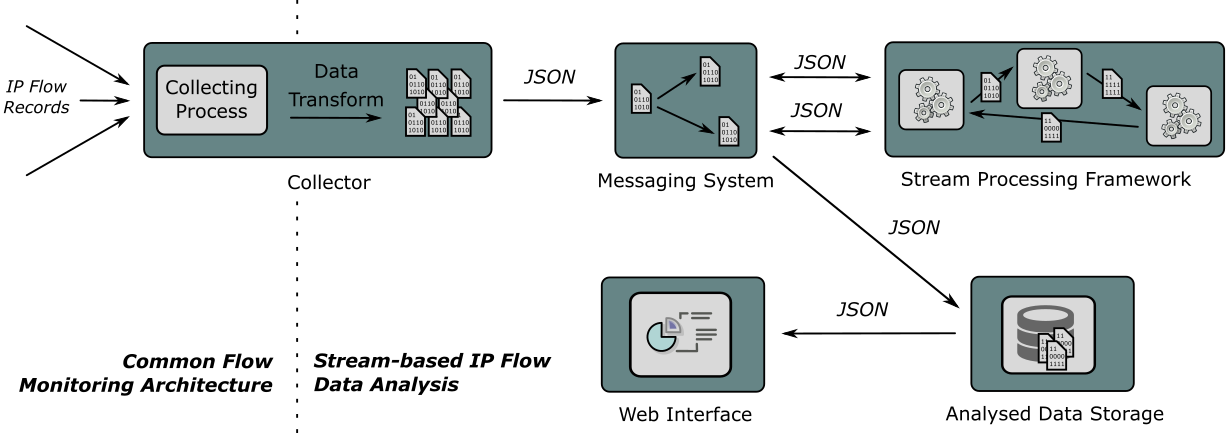
The basis of the Stream4Flow framework is formed by the IPFIXCol collector, Kafka messaging system, Apache Spark, and Elastic Stack. IPFIXCol is able to receive IP flows from a majority of network Netflow/IPFIX probes (e.g., Flowmon Probe, softflowd, etc.). IPFIXCol enables incoming IP flow records to be transformed into the JSON format provided to the Kafka messaging system. The selection of Kafka was based on its scalability and partitioning possibilities, which provide sufficient data throughput. Apache Spark was selected as the data stream processing framework for its quick IP flow data throughput, available programming languages (Scala, Java, or Python) and MapReduce programming model. The analysis results are stored in Elastic Stack containing Logstash, Elasticsearch, and Kibana, which enable storage, querying, and visualizing the results. The Stream4Flow framework also contains the additional web interface to make administration easier and visualize complex results of the analysis.
Stream4Flow框架 的基础是由 IPFIXCol收集器,Kafka消息系统,Apache Spark 和 Elastic Stack 组成。IPFIXCol 能够接收大部分网络Netflow/IPFIX探测器的IP流(例如 Flowmon Probe, softflowd 等)。IPFIXCol 能够将流入的IP流记录转换成可以提供给Kafka消息系统的JSON格式。选择kafka主要是基于它的可扩展性和分区可能性,这些特性可以提供足够的数据吞吐能力。而选择Apache Spark,主要是因为它能快速处理IP流数据,支持多种编程语言(如Scala, Java, or Python),并且采用的是MapReduce的编程模式,因为被作为数据流处理框架。然后分析结果存储在Elastic Stack中,该工具包含Logstash, Elasticsearch, 和Kibana等组件,能进行分析结果存储、查询和可视化查看。Stream4Flow框架同样包含额外的web界面,这让管理更加方便的同时,也可以直观查看复杂的分析结果。
Framework Features
框架特性
-
Full Stack Solution : The framework provides full stack solution for IP flow analysis prototyping. It is possible to connect to the majority of IP flow network probes. The framework integrates tools for data collection, data processing, manipulation, storage, and presentation. It is compatible with common network probes for IP flow monitoring and export.
全栈的解决方案:该框架为IP流数据分析原型提供了全栈的解决方案,它可以连接到大部分的IP流网络探测器,该框架集成了用于数据收集,数据处理,操作,存储和展示等工具。它兼容通用的,可用于IP流监控与导出的网络探测器。 -
Easy Deployment: The deployment of the framework is fully automated for cloud deployment using cutting-edge technologies for software orchestration. The deployment comes with example prototype applications and initial tests to further ease the prototype development.
容易部署:该框架的部署方式是完全自动化的,它采用了前沿的软件编排技术来进行云部署。 -
High Performance: Thanks to the scalability of the framework, it is fitted for processing network traffic in a wide range of networks from small company network to large-scale, high-speed networks of ISPs. Its distributed nature enables computationally intensive analyses.
-
Real-time Analysis: The stream-based approach provides results of IP flow analysis prototype with only a few seconds delay. The results can be explored in various ways in a user interface in real time. IP analysis prototype can be immediately improved according to provided results.
Use-cases
- Stream-Based Network Monitoring: The framework enables to run analyses in data streams. It is suitable for various data pre-processing, continuous queries.
- Real-time Attack Detection: The stream-based approach enables to detect attacks with only a few seconds delay. An instant attack detection provides time to set up a defense and lowers harms caused by an attack. Sample detections are provided, and you can easily create custom detection method.
- Host Profiling: Apart from monitoring of the whole network, the monitoring can be focused on individual hosts. No host agents are needed, and the monitoring is transparent. You can get a long-term profile for each host connected to your network and explore its behavior.
- Situational Awareness: Data from network monitoring, attack detection, and host profiling can be gathered together to provide complex situational awareness over your network. The advanced analysis of the collected data can reveal information important both from security and business perspective.
More on stream-based IP flow analysis is described in our paper titled Toward Stream-Based IP Flow Analysis.
Getting started
开始
We have it all prepared for you. Everything is preconfigured. You have to only choose the deployment variant.
我们已经为你准备好了,所有内容都已预先配置,你只需要选择要部署的方式。
Deployment
部署
Default machine configuration
默认机器配置
-
Producer - a machine for receiving data from network and probes, and providing data for Spark Cluster via Apache Kafka.
Producer - 从网络和探测器接收数据,并通过 Apache Kafka 提供数据给Spark集群的服务器。- producer default IP address - 192.168.0.2
-
Consumer - a machine receives results from Spark Cluster, stores the results, and runs the web server with framework frontend.
Consumer - 从Spark集群接收结果并存储,并通过框架前端运行web服务的服务器。- consumer default IP address - 192.168.0.3
-
Spark Cluster- cluster of machines for data stream processing. Spark Master machine manages the Spark Cluster and provides a control interface for the cluster. Spark Slaves serves mainly for data processing. The number of Spark Slaves can be changed in configuration files.
Spark Cluste - 用于数据流处理的服务器集群。Spark Maste 服务器负责Spark集群的管理,并为集群提供控制接口。Spark Slave 服务器主要用来进行数据处理。Spark Slaves 数量可以在配置文件中修改。- Spark Master default IP address - 192.168.0.100
- Spark Slave default IP address - 192.168.0.101
Default login credentials
默认登录凭证
- user: spark
- login: Stream4Flow
Requirements
依赖
We support two types of deployment:
我们支持两种部署方式
-
Standalone deployment: Stream4Flow will be deployed into virtual machines on your physical machine using Vagrant
单机部署:Stream4Flow 将通过Vagrant部署到你物理机上的虚拟机中。 -
Cluster deployment: you can deploy Stream4Flow on your cluster using Ansible
集群部署:你可以使用 Ansible 在集群上部署 Stream4Flow。- requirement: Debian-based OS
依赖:Debian-based OS
- requirement: Debian-based OS
Standalone deployment
单机部署
Note: The minimum hardware requirement is 12GB of RAM
注意:最小硬件要求为12G内存。
- download repository
下载仓库 - go to folder provisioning/
进入 provisioning/ 目录 - (optional) update guests configuration in configuration.yml
(可选项)修改 configuration.yml 中的 guests 相关配置(和Vagrant相关)。 - run vagrant provisioning:
vagrant upor start guests separatelyvagrant up <guest-name>
运行 vagrant provisioning:vagrant up或者单独启动guestsvagrant up <guest-name> - upload your SSH key to guests or allow password based SSH login (use
vagrant ssh <guest-name>)
上传你的ssh密钥(SSH key)到 guests 中或者允许基于密码的SSH登录(使用vagrant ssh <guest-name>)
See provision/README.md for additional information about provisioning and Vagrant usage.
关于配置额外信息和Vagrant用法可参阅文档 provision/README.md 。
Cluster deployment
集群部署
Note: machines in the cluster must run Debian OS with systemd
注意:集群服务器必须运行在带有systemd的Debian操作系统。
- download repository
下载仓库 - go to folder provisioning/ansible
进入目录 provisioning/ansible - supply your inventory file with you cluster deployment according to file inventory.ini.example
根据文件 inventory.ini.example 提供集群部署的库存文件 - run ansible
ansible-playbook -i <your inventory file> site.yml --user <username> --ask-pass(consult ansible docs for further information)
运行ansibleansible-playbook -i <your inventory file> site.yml --user <username> --ask-pass(更多信息请参阅 ansible 文档)
Usage
用法
| Usage 用法 | Description 描述 | Usage information 用法信息 |
|---|---|---|
| Input data 输入数据 |
Input point for network monitoring data in IPFIX/Netflow format 网络数据输入点使用 IPFIX/Netflow 格式 |
* producer IP address * default IP is 192.168.0.2 * port UDP/4739 |
| Stream4Flow Web Interface Stream4Flow web界面 |
Web interface for application for viewing data 用于查看数据的程序web界面 |
* consumer IP address * default IP address is http://192.168.0.3/ * default login:Stream4Flow * default password:Stream4Flow |
| Spark Web Interface Spark web界面 |
Apache Spark streaming interface for application control 用于程序控制的 Apache Spark streaming 接口 |
* Spark master IP address:8080 * default IP address is http://192.168.0.100:8080/ |
| Kibana Web Interface Kibana web界面 |
Elastic Kibana web interface for Elasticsearch data 用于查看 Elasticsearch 数据的 Elastic Kibana 界面 |
* index name: spark-* * consumer IP address:5601 * default IP address is http://192.168.0.3:5601/ |
Run an example application protocols_statistics
运行一个示例应用 protocols_statistics
- login to Spark Master machine via ssh
ssh spark@192.168.0.100
使用ssh登录 Spark Master 主机ssh spark@192.168.0.100 - go to application directory
cd /home/spark/applications/
进入应用目录cd /home/spark/applications/ - run example application
./run-application.sh
./statistics/protocols_statistics/spark/protocols_statistics.py -iz producer:2181 -it ipfix.entry -oz producer:9092 -ot results.output
运行示例应用./run-application.sh
./statistics/protocols_statistics/spark/protocols_statistics.py -iz producer:2181 -it ipfix.entry -oz producer:9092 -ot results.output
Send data to Stream4Flow
发送数据到 Stream4Flow
Stream4Flow is compatible with any Netflow v5/9 or IPFIX network probe. To measure your first data for Stream4Flow, you can use either commercial solution such as Flowmon Probe or an open-source alternative softflowd
Stream4Flow 兼容任意 Netflow v5/9 或 IPFIX 网络探测器。你可以使用商业解决方案如 Flowmon Probe,或者开源替代方案 softflowd 来测量 Stream4Flow 的第一个数据。
- Install softflowd
sudo apt-get install softflowd
安装 softflowdsudo apt-get install softflowd - Start data export
开启数据导出- Standalone deployment
softflowd -i <your interface> -D -n 192.168.0.2:4739
单机部署softflowd -i <your interface> -D -n 192.168.0.2:4739 - Cluster deployment
softflowd -i <your interface> -D -n <IP address of producer>:4739
集群部署softflowd -i <your interface> -D -n <IP address of producer>:4739 - for more softflowd options see man pages
更多 softflowd 选项请参阅 man pages
- Standalone deployment
How to reference
如何参考
Bibtex
  author={Jirsik, Tomas and Cermak, Milan and Tovarnak, Daniel and Celeda, Pavel},
  journal={IEEE Communications Magazine},
  title={Toward Stream-Based IP Flow Analysis},
  year={2017},
  volume={55},
  number={7},
  pages={70-76},
  doi={10.1109/MCOM.2017.1600972},
  ISSN={0163-6804},
}
Plain text
T. Jirsik, M. Cermak, D. Tovarnak and P. Celeda, "Toward Stream-Based IP Flow Analysis," in IEEE Communications Magazine, vol. 55, no. 7, pp. 70-76, 2017.doi: 10.1109/MCOM.2017.1600972
Related Publications
相关出版物
- Toward Stream-Based IP Flow Analysis
- A Performance Benchmark for NetFlow Data Analysis on Distributed Stream Processing Systems
- Real-time analysis of NetFlow data for generating network traffic statistics using Apache Spark
Acknowledgement
答谢
The SecurityCloud project is supported by the Technology Agency of the Czech Republic under No. TA04010062 Technology for processing and analysis of network data in big data concept.
SecurityCloud 项目由捷克共和国技术局支持,技术编号TA04010062,用于处理和分析大数据概念中的网络数据。

 浙公网安备 33010602011771号