
短视频批量下载工具F2辅助Web界面
安装好f2,保证终端可以直接f2运行,然后启动web就行:python f2web.py
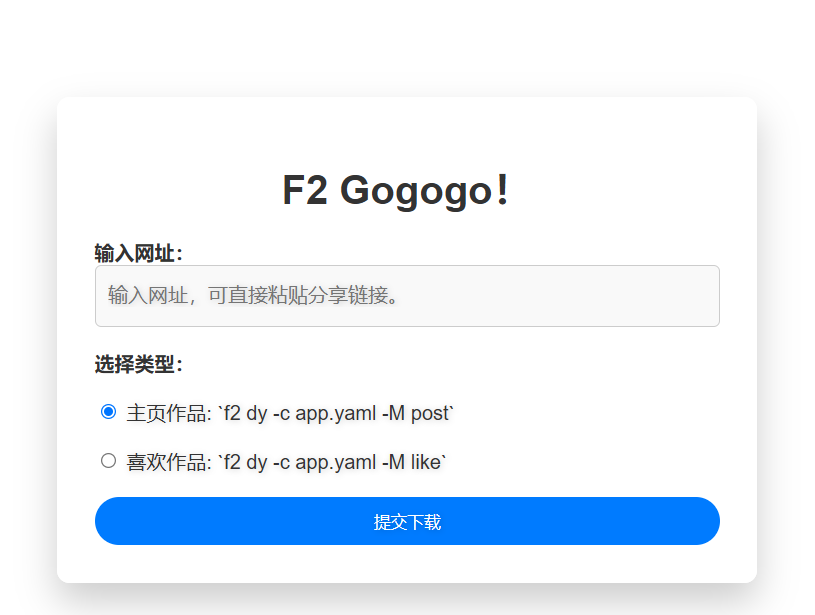
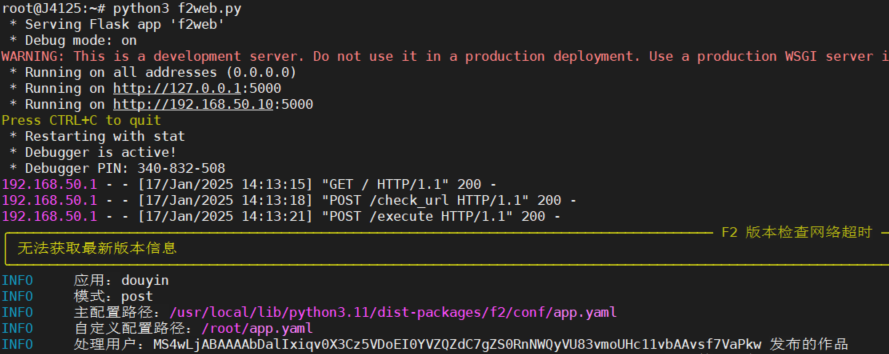
也可以后台运行:nohup python3.11 f2web.py >> /temp/dy.log 2>&1 &
附上代码:f2web.py
import subprocess
import threading
import shlex
import os

app = Flask(__name__)

# 定义HTML模板,用户只需输入网址
HTML_TEMPLATE = '''
<!DOCTYPE html>
<html lang="en">
<head>
    <meta charset="UTF-8">
    <meta name="viewport" content="width=device-width, initial-scale=1.0">
    <title>F2</title>
    <!-- 引入Bootstrap CSS -->
    <link href="https://cdn.jsdelivr.net/npm/bootstrap@5.3.0-alpha1/dist/css/bootstrap.min.css" rel="stylesheet" integrity="sha384-KyZXEJ5bJ6B3n1RACzRskJbgfeZ9bVmsmOeGVHXlz6bDe2f5w5jr5NNdjr5dKnAk" crossorigin="anonymous">
    <!-- 引入Animate.css 动画库 -->
    <link rel="stylesheet" href="https://cdnjs.cloudflare.com/ajax/libs/animate.css/4.1.1/animate.min.css">
    <style>
        body {
            font-family: 'Arial', sans-serif;
            background-image: url(' https://source.unsplash.com/1920x1080/?nature ,landscape');
            background-size: cover;
            background-position: center;
            height: 100vh;
            display: flex;
            justify-content: center;
            align-items: center;
            margin: 0;
            color: #fff;
        }

        .container {
            background-color: rgba(255, 255, 255, 0.9);
            padding: 30px;
            border-radius: 10px;
            box-shadow: 0 15px 30px rgba(0, 0, 0, 0.2);
            max-width: 500px;
            width: 100%;
            animation: fadeIn 1s ease-in-out;
        }

        h1 {
            text-align: center;
            margin-bottom: 20px;
            color: #333;
            font-size: 2rem;
        }

        .form-label {
            font-weight: bold;
            color: #333;
        }

        .form-check-label {
            font-size: 1rem;
            color: #333;
        }

        .form-control {
            border-radius: 5px;
            border: 1px solid #ccc;
            background-color: #f9f9f9;
            color: #333;
            width: 100%;
            height: 50px;
            font-size: 1rem;
            padding: 10px;
            box-sizing: border-box;
        }

        .btn {
            border-radius: 50px;
            padding: 10px 30px;
            width: 100%;
            transition: background-color 0.3s ease;
            background-color: #007bff;
            border: none;
            color: white;
        }

        .btn:hover {
            background-color: #0056b3;
        }

        .btn:active {
            transform: scale(0.98);
            transition: transform 0.2s;
        }

        @keyframes fadeIn {
            0% { opacity: 0; }
            100% { opacity: 1; }
        }

        .form-check-label, .form-control, .btn {
            text-shadow: 1px 1px 5px rgba(0, 0, 0, 0.2);
        }
    </style>
</head>
<body>
    <div class="container animate__animated animate__fadeInUp">
        <h1>F2 Gogogo!</h1>
        <form id="commandForm">
            <div class="mb-3">
                <label for="url" class="form-label">输入网址:</label>
                <br>
                <input type="text" class="form-control" id="url" placeholder="输入网址,可直接粘贴分享链接。" required>
            </div>
            <div class="mb-3">
            <br>
                <label class="form-label">选择类型:</label><br>
                <br>
                <div class="form-check">
                    <input class="form-check-input" type="radio" name="template" id="template1" value="template1" checked>
                    <label class="form-check-label" for="template1">
                        主页作品: `f2 dy -c app.yaml -M post`
                    </label>
                </div>
                <br>
                <div class="form-check">
                    <input class="form-check-input" type="radio" name="template" id="template2" value="template2">
                    <label class="form-check-label" for="template2">
                        喜欢作品: `f2 dy -c app.yaml -M like`
                    </label>
                </div>
            </div>
            <br>
            <button type="submit" class="btn">提交下载</button>
        </form>
    </div>

    <script>
        document.getElementById("commandForm").addEventListener("submit", async function(event) {
            event.preventDefault();
            let inputText = document.getElementById('url').value;

            const urlMatch = inputText.match(/https?:\/\/[^\s]+/);

            if (!urlMatch) {
                alert("请输入有效的网址");
                return;
            }

            const url = urlMatch[0];
            const template = document.querySelector('input[name="template"]:checked').value;

            // 检查 URL 是否已存在
            const checkResponse = await fetch('/check_url', {
                method: 'POST',
                headers: {
                    'Content-Type': 'application/json'
                },
                body: JSON.stringify({ url })
            });

            const checkResult = await checkResponse.json();
            if (checkResponse.ok && checkResult.exists) {
                const confirmExecute = confirm('URL 已存在,是否继续执行命令?');
                if (!confirmExecute) {
                    //alert('操作已取消');
                    return;
                }
            }

            const response = await fetch('/execute', {
                method: 'POST',
                headers: {
                    'Content-Type': 'application/json'
                },
                body: JSON.stringify({ url, template })
            });

            const result = await response.json();
            if (response.ok) {
                alert('命令提交成功,正在后台执行');
                document.getElementById('url').value = '';
            } else {
                alert(`错误: ${result.error}`);
            }
        });
    </script>
</body>
</html>
'''

@app.route('/')
def index():
    return render_template_string(HTML_TEMPLATE)

def remove_duplicates_from_log():
    """去重url.log文件中的URL"""
    if os.path.exists('url.log'):
        with open('url.log', 'r') as log_file:
            urls = log_file.readlines()

        # 去重并保持原始顺序
        unique_urls = list(dict.fromkeys(url.strip() for url in urls))

        with open('url.log', 'w') as log_file:
            log_file.write('\n'.join(unique_urls) + '\n')

def execute_command_in_background(url, template):
    command_templates = {
        'template1': f"f2 dy -c app.yaml -M post -i all -u {shlex.quote(url)}",
        'template2': f"f2 dy -c app.yaml -M like -i all -u {shlex.quote(url)}"
    }

    command_template = command_templates.get(template)
    if not command_template:
        print("无效的模板")
        return

    try:
        with open('url.log', 'a') as log_file:
            log_file.write(f"{url}\n")

        # 去重操作
        remove_duplicates_from_log()

        subprocess.run(command_template, shell=True, check=True)
    except subprocess.CalledProcessError as e:
        print(f"命令执行失败: {str(e)}")

@app.route('/check_url', methods=['POST'])
def check_url():
    data = request.json
    url = data.get('url')

    if not url:
        return jsonify({'error': 'URL 参数缺失'}), 400

    if os.path.exists('url.log'):
        with open('url.log', 'r') as log_file:
            if url in log_file.read():
                return jsonify({'exists': True})

    return jsonify({'exists': False})

@app.route('/execute', methods=['POST'])
def execute_command():
    data = request.json
    url = data.get('url')
    template = data.get('template')

    if url and template:
        threading.Thread(target=execute_command_in_background, args=(url, template)).start()
        return jsonify({'message': '命令提交成功,正在后台执行'})
    else:
        return jsonify({'error': '缺少必要的参数'}), 400

if __name__ == '__main__':
    app.run(debug=True, host='0.0.0.0', port=5000)

 浙公网安备 33010602011771号