1.1GET请求代码解析(前端)
<!DOCTYPE html>
<html lang="en">
    <head>
        <meta charset="UTF-8">
        <title>Title</title>
    </head>
    <body>
        hello page1
        <div>
            <a href="#" id="link1">link1</a>
        </div>
        <!---->
        <div>
            <form action="/form2" method="post" id="f2" >
                用户名:<input type="text" name="username" id="username"><br>
                密码:<input type="password" name="password" id="password"><br>
                <input type="submit" value="提交"><br>

            </form>
            <script src="/js/axios/axios1.13.4.js"></script>
        </div>
        <script>
            document.getElementById("link1").onclick=function (e){
                e.preventDefault();
            console.log("link1 clicked")
                //通过ajax发出get请求 ajax不会进行页面跳转只是从controller返回数值属于异步
                //同步可以进行页面跳转异步不行
         axios.get('/link1', {//传递参数
//params不带引号说明他是一个js对象,如果有引号就说明是一个json对象
         params: {
                    id: 12345,
                    name:"MAP"
       }//then是从controller返回之后调用的方法
      }).then(function (res) {
            console.log(res)//从controller    返回后调用的方法                        console.log(res.data);                 document.getElementById("link1").
			innerText=res.data.name+""+res.data.id;
  }).catch(function (error) {
      console.log(error);
  })
 }
1.1.1绑定事件
document.getElementById("link1").onclick = function (e) {
1.1.2阻止默认行为
e.preventDefault();
1.1.3发送GET请求
axios.get('/link1', {
    params: {
        id: 12345,
        name: "MAP"
    }
})
1.1.4处理响应
.then(function (res) {
    console.log(res.data);
    // 处理返回数据
})
.catch(function (error) {
    console.log(error);
})
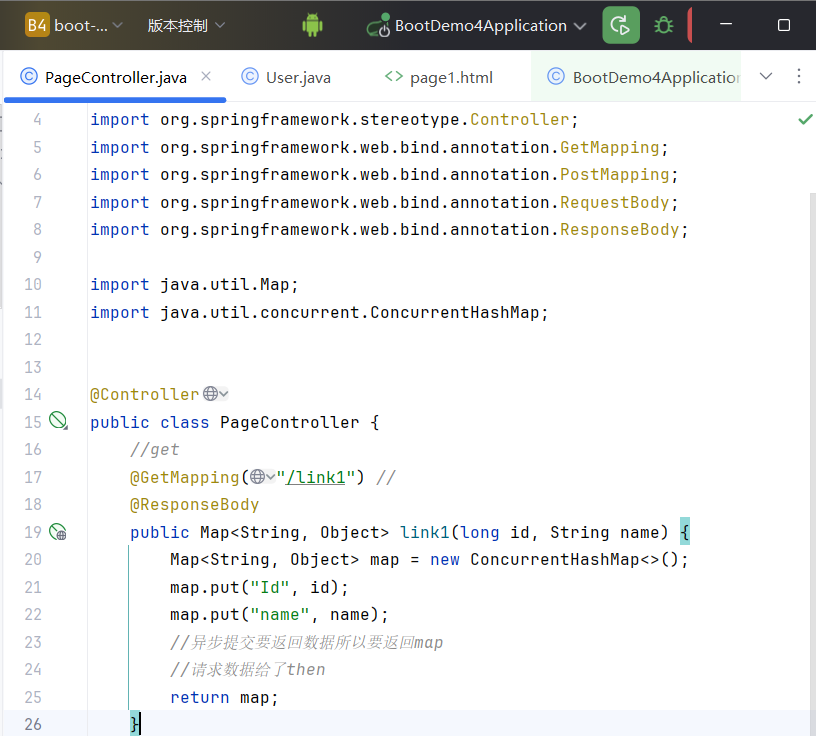
1.2.GET请求代码解析(后端)
![image]()
1.2.1标记这是一个Spring MVC控制器类,Spring会自动扫描并管理这个类
@Controller
1.2.2映射GET请求到/link1路径
@GetMapping("/link1")
1.2.3将方法返回值直接转换为JSON格式响应给前端,而不是跳转到页面
@ResponseBody
1.2.4创建一个线程安全的Map集合,用来存储要返回给前端的数据
Map<String, Object> map = new ConcurrentHashMap<>();
1.2.5用put将接收到的参数放到Map中
map.put("Id", id);
map.put("name", name);
1.2.6返回Map对象,Spring会自动将其转换为JSON格式:
return map;
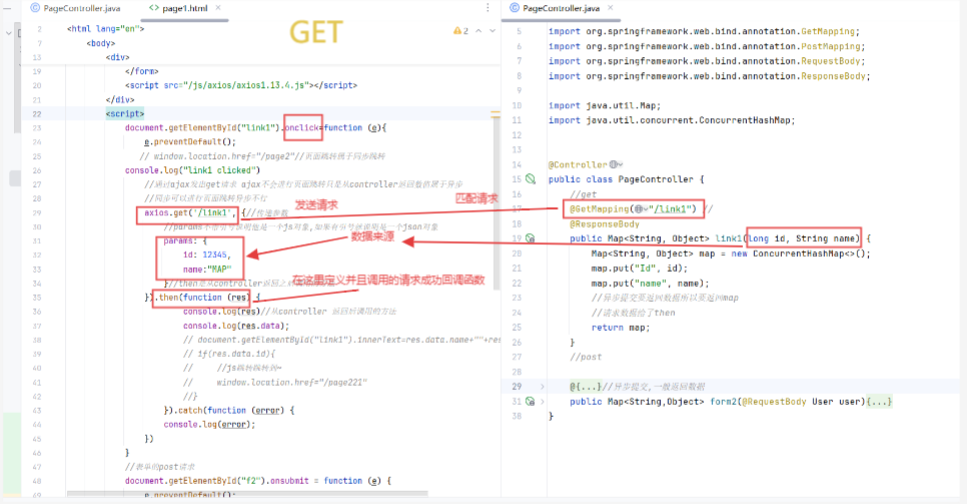
1.2.7代码对比图 1.2.7代码对比图
![屏幕截图 2026-02-02 203534]()
2. post请求解析(后端)
  //表单的post请求
            document.getElementById("f2").onsubmit = function (e) {
                e.preventDefault();
                console.log(e.target.action);
                console.log("form2 submit");
                if (!document.getElementById("username").value) {
                    console.log("用户名不能为空");
                    return;
                }
                if (!document.getElementById("password").value) {
                    console.log("密码不能为空");
                    return;
                }
                let data = {
                    //获取表单的数据
                    username: document.getElementById("username").value,
                    password: document.getElementById("password").value
                }
                axios.post(e.target.action, data, {
                    headers:{
                        "Content-Type":"application/json"//表单提交的格式
                    }
                })
                    .then(function (res) {//从controller 返回后调用的方法
                        console.log(res.data);

                        document.getElementById("username").value = "hello "+res.data.username;
                        document.getElementById("password").value = "hello "+res.data.password;

                    })
                    .catch(function (error) {
                        console.log(error);
                    })}
2.1.1绑定表单
document.getElementById("f2").onsubmit = function (e) {}
2.1.2阻止默认提交行为
e.preventDefault();
2.1.3表单验证判定是否为空如果用户名和密码为空则输出用户名或者密码不能为空否则继续执行获取表单输入的值将其构造成js对象
 if (!document.getElementById("username").value) {
                    console.log("用户名不能为空");
                    return;
                }
                if (!document.getElementById("password").value) {
                    console.log("密码不能为空");
                    return;
                }
                let data = {
                    //获取表单的数据
                    username: document.getElementById("username").value,
                    password: document.getElementById("password").value
                }
2.14 发送表单
axios.post(e.target.action, data, {
    headers:{
        "Content-Type":"application/json"
    }
})
2.15处理成功响应
.then(function (res) {
    console.log(res.data);
    document.getElementById("username").value = "hello "+res.data.username;
    document.getElementById("password").value = "hello "+res.data.password;
}
2.16捕获并处理请求中的错误用catch
.catch(function (error) {
    console.log(error);
}
2.2 post请求解析(前端)
   @PostMapping("/form2")//前端post请求
    @ResponseBody//异步提交,一般返回数据
    public Map<String,Object> form2(@RequestBody User user){

        Map<String,Object> map = new ConcurrentHashMap<>();
        map.put("username",user.getUsername());
        map.put("password",user.getPassword());
        return map;//把返回的数据给前面页面page1的then方法了
    }
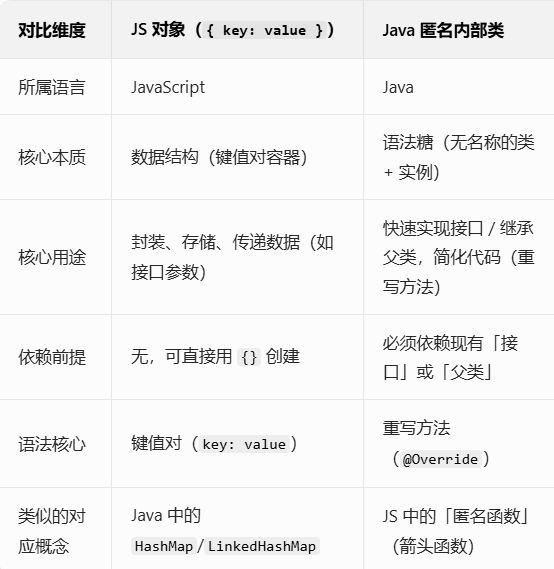
3解析javaScript(js)对象和匿名内部类
![image]()

 浙公网安备 33010602011771号