
java IO流
IO流总结(初级)
1.继承关系图(Inpustream Outpustream Reader Wrier 均为抽象类)
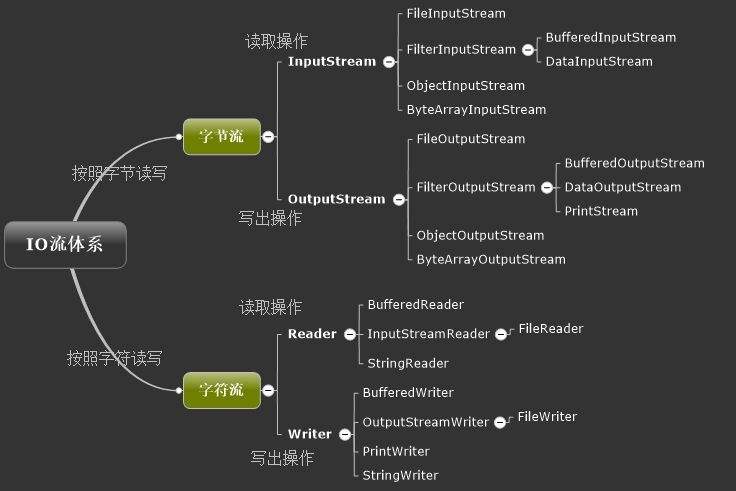
2.具体使用背景以及案例(含常用方法)
2.1 文件字节流
2.1.1读取文件内容 FileInputStream
public static void main(String[] args) throws IOException {

        FileInputStream fis = new FileInputStream("D:\\test.txt");
        //得到文件的字节字节数
        int count = fis.available();
        System.out.println(count);
     public static void main(String[] args) throws IOException {

        FileInputStream fis = new FileInputStream("D:\\test.txt");
        //得到文件的字节大小
        int count = fis.available();
        System.out.println(count);
        //从该输入流读取一个字节的数据。 如果没有输入可用,此方法将阻止。
        int read = fis.read();

        //第一种
//        int buf =0;
//        while ((buf = fis.read())!= -1) {
//            System.out.println((char) buf   );
//        }
        //第二种
       // 从输入流读取一些字节数,并将它们存储到缓冲区b 。 实际读取的字节数作为整数返回。 该方法阻塞直到输入数据可用,检测到文件结束或抛出异常。
        byte[] buf = new byte[1024];
        int len = 0;
        while ((len=fis.read(buf))!=-1){
            System.out.println(new String(buf,0,len));
        }
        fis.close();
    }
2.1.2 写内容到文件 FileOutputStream
public static void main(String[] args) {
        FileOutputStream fos = null;
        try {
            fos = new FileOutputStream("D:\\outtest.txt",true);
        } catch (FileNotFoundException e) {
            e.printStackTrace();
        }
        try {
            byte [] buf="我要进阿里".getBytes();
            fos.write(97);
            fos.write(buf);
            //与上面一行同效
            fos.write(buf,0,buf.length);
        } catch (IOException e) {
            e.printStackTrace();
        }
        try {
            fos.close();
        } catch (IOException e) {
            e.printStackTrace();
        }
    }
2.1.3 使用文件字节流实现复制
  public static void main(String[] args) throws IOException {
        FileInputStream fis = new FileInputStream("D:\\test.txt");
        FileOutputStream fos = new FileOutputStream("D:\\outtest.txt", true);
        //第一种方式
//        int len=0;
//        while((len=fis.read())!=-1){
//            fos.write(len);
//        }
//        fos.close();
//        fis .close();
        int len = 0;
        byte[] buf = new byte[1024];
        while ((len = fis.read(buf)) != -1) {
            fos.write(buf, 0, len);
            //以上等同于fos.write(buf);
        }
        fos.close();
        fis.close();
    }
2.2 文件字符流
2.2.1 Reader 读取文件内容
 public static void main(String[] args) throws IOException {
        FileReader reader = new FileReader("D:\\test.txt");
        int len = 0;
        len=reader.read();
        System.out.println((char)len);
//        char[] cbuf = new char[1024];
//        while ((len = reader.read(cbuf)) != -1) {
//            System.out.println(new String(cbuf, 0, len));
//        }
        reader.close();
    }
2.2.2 Writer 写内容到文件
public static void main(String[] args) throws IOException {
        FileReader reader = new FileReader("D:\\test.txt");
        int len = 0;
        len=reader.read();
        System.out.println((char)len);
//        char[] cbuf = new char[1024];
//        while ((len = reader.read(cbuf)) != -1) {
//            System.out.println(new String(cbuf, 0, len));
//        }
        reader.close();
    }
2.3 缓冲字节流_缓冲字符流
2.3.1 缓冲字节流 copy文件
public static void main(String[] args) throws IOException {
        BufferedInputStream bis = new BufferedInputStream(new FileInputStream("D:\\test.txt"));
        BufferedOutputStream bos = new BufferedOutputStream(new FileOutputStream("D:\\outtest.txt"));
        byte[] buf = new byte[1024];
        int len = 0;
        while ((len = bis.read(buf)) != -1) {
            bos.write(buf, 0, len);
            bos.flush();
        }
        bos.close();
        bis.close();
    }
2.3.2 缓冲字符流copy文件 适合纯文本
public static void main(String[] args) throws IOException {
        BufferedReader bir= new BufferedReader(new FileReader("D:\\test.txt"));
        BufferedWriter bow= new BufferedWriter(new FileWriter("D:\\outtest.txt"));
        String line=null;
        while((line=bir.readLine())!=null){
            bow.write(line);
            bow.newLine();
            bow.flush();
        }
        bow.close();
        bir.close();
    }//该方法适合于纯文本copy
2.4 转换流
2.4.1 InputStreamReader OutputStreamWriter 将字节流转换成字符流 (字符流操作文本更方便)
public static void main(String[] args) throws IOException {
        //数据源是从键盘进入
        InputStream is= System.in;
        //使用转换流转换
        InputStreamReader isr=new InputStreamReader(is,"utf-8");
        //提高读取效率
        BufferedReader br =new BufferedReader(isr);
        BufferedWriter bw=new BufferedWriter(new OutputStreamWriter(new FileOutputStream("D:\\outtesr.txt"),"utf-8"));
        String line=null;
        while(!"over".equals((line=br.readLine()))){
            bw.write(line);
            bw.newLine();
            bw.flush();
        }
        bw.close();
        br.close();
    }
2.5 打印流
2.5.1 PrintStream(通常用于输出文本内容) PrintWriter 打印到文件内 有自动刷新功能(使用 PrintWriter 代替 BufferedWriter 完
成, 更简单 )两者都不抛出IO异常
public static void main(String[] args) throws IOException {
//        PrintStream ps =System.err;
        //无需类型转换 他会制动转换成string 19 在通过Printstrem 就是 '1'  '9'
        PrintStream ps = System.out;
        ps.println(1);
        ps.println("偶买噶");
        PrintWriter pw = new PrintWriter(new FileOutputStream("D:\\god.txt"), true);
        pw.println("aaaaaaaaaaaaaaaaaaaaaaa");
        pw.write("baby china");
        pw.write(520);
        pw.flush();
        pw.close();
        BufferedWriter br = new BufferedWriter(new FileWriter("D:\\a.txt"));
        br.write("我的baby china");
        br.close();
    }
2.6 数据流 (提供了读取写入数据类型的能力)
2.6.1 DataInputStream DataOutputStream
 public static void main(String[] args) throws IOException {
        write();
        read();
    }

    public static void write() throws IOException {
        //处理流, 只针对字节流, 二进制文件
        DataOutputStream dos = new DataOutputStream(new BufferedOutputStream(new FileOutputStream("D:\\data.txt")));
        dos.writeInt(520);
        dos.writeChar('中');
        dos.close();
    }

    public static void read() throws IOException {
        DataInputStream dis = new DataInputStream(new BufferedInputStream(new FileInputStream("D:\\data.txt")));
        System.out.println(dis.readInt());;
        System.out.println(dis.readChar());
        dis.close();
    }
2.7 对象流 对象必须实现Serializable接口 才可序列化
public class Person implements Serializable {
    private String name;
    private int age;

    public Person(String name, int age) {
        super();
        this.name = name;
        this.age = age;
    }

    public void setName(String name) {
        this.name = name;
    }

    public void setAge(int age) {
        this.age = age;
    }

    public String getName() {
        return name;
    }

    public int getAge() {
        return age;
    }

    @Override
    public String toString() {
        return "Person{" +
                "name='" + name + '\'' +
                ", age=" + age +
                '}';
    }

    public Person() {
        super();
    }
}
 public static void main(String[] args) throws IOException, ClassNotFoundException {
        //以什么格式写进去 就以什么格式读出来
        write();
        read();
    }

    public static void write() throws IOException {
        ObjectOutputStream oos = new ObjectOutputStream(new FileOutputStream("D:\\object.txt"));
        oos.writeObject(new Person());
        oos.close();
    }

    public static void read() throws IOException, ClassNotFoundException {
        ObjectInputStream ois = null;
        try {
            ois = new ObjectInputStream(new FileInputStream("D:\\object.txt"));
        } catch (IOException e) {
            e.printStackTrace();
        }
        Person p = (Person) ois.readObject();
        System.out.println(p);
        if(ois!=null){
            try {
                ois.close();
            } catch (IOException e) {
                e.printStackTrace();
            }
        }
    }
2.8 序列化 与 反序列化 序列化以后的对象可以保存到磁盘上, 也可以在网络上传输, 使得不同的计算机可以共享对象.(序列化的字节序列是平台无关的)
public class Student implements Serializable {
    //加了下
    private String name;
    private int age;
    //不愿被序列化的 可以加transient  加 staic 也不会被序列化
    private transient String  schoolname;

    public Student(String name, int age, String schoolname) {
        super();
        this.name = name;
        this.age = age;
        this.schoolname = schoolname;
    }

    public String getName() {
        return name;
    }

    public void setName(String name) {
        this.name = name;
    }

    public int getAge() {
        return age;
    }

    public void setAge(int age) {
        this.age = age;
    }

    public String getSchoolname() {
        return schoolname;
    }

    public void setSchoolname(String schoolname) {
        this.schoolname = schoolname;
    }

    @Override
    public String toString() {
        return "Student{" +
                "name='" + name + '\'' +
                ", age=" + age +
                ", schoolname='" + schoolname + '\'' +
                '}';
    }

    public Student() {
        super();
    }
}
 public static void main(String[] args) throws IOException, ClassNotFoundException {
        write();
        read();
    }

    public static void write() throws IOException {
        ObjectOutputStream oos = new ObjectOutputStream(new FileOutputStream("D:\\ser.txt"));
        oos.writeObject(new Student("小明", 18, "南山实验"));
        oos.close();
    }

    public static void read() throws IOException, ClassNotFoundException {
        ObjectInputStream ois = new ObjectInputStream(new FileInputStream("D:\\ser.txt"));
        Student st = (Student) ois.readObject();
        System.out.println("st.getName()" + st.getName() + "st.getAge()" + st.getAge() + "st.getSchoolname()" + st.getSchoolname());
    }
2.9 文件夹复制
   public static void main(String[] args) throws IOException {
        //copy文件
//        File scFile = new File("D:\\国青调研.docx");
//        File target = new File("E:\\国青调研.docx");
//        copyFile(scFile, target);
        //copydir
        File scrdir = new File("D:\\scr");
        File targetdir = new File("D:\\baby");
        copydir(scrdir, targetdir);
    }

    public static void copydir(File scrDir, File targetDir) throws IOException {
        if (!targetDir.exists()) {
            targetDir.mkdir();
        }
        File[] files = scrDir.listFiles();
        for (File file : files) {
            if (file.isFile()) {
                copyFile(new File(scrDir + "\\" + file.getName()), new File(targetDir + "\\" + file.getName()));
            } else {
                //递归调用
                copydir(new File(scrDir + "\\" + file.getName()), new File(targetDir + "\\" + file.getName()));
            }
        }
    }

    public static void copyFile(File scFile, File targetFile) throws IOException {
        BufferedInputStream bis = new BufferedInputStream(new FileInputStream(scFile));
        BufferedOutputStream bos = new BufferedOutputStream(new FileOutputStream(targetFile));
        int len = 0;
        byte[] buf = new byte[1024];
        while ((len = bis.read(buf)) != -1) {
            bos.write(buf, 0, len);
        }
        bos.close();
        bis.close();
    }
2.10 字节数组流 数据源或目的地为: 字节数组 只有字节流, 没有字符流 是节点流
public static void main(String[] args) throws IOException {
        byte[] buf = buf = write();
        read(buf);
    }

    private static void read(byte[] buf) throws IOException {
        ByteArrayInputStream bais = new ByteArrayInputStream(buf);
        ObjectInputStream ois = new ObjectInputStream(bais);
        System.out.println(ois.readChar());
        ois.close();
    }

    private static byte[] write() throws IOException {
        ByteArrayOutputStream baos = new ByteArrayOutputStream();//创建字节数组流对象 目的地是字节数组  底层次自动创建
        //ObjectOutputStream(OutputStream out)
        //创建一个写入指定的OutputStream的ObjectOutputStream。
        ObjectOutputStream oos = oos = new ObjectOutputStream(baos);
        oos.writeChar('a');
        oos.close();
        return baos.toByteArray();
    }

 浙公网安备 33010602011771号