
hbase启动问题
首先启动顺序:先启动zookeeper,然后启动hadoop 在启动hbase
我启动睡的时候一直报错,然后找错,首先保证hbase.site.xml文件内容如下
<?xml version="1.0"?>
<?xml-stylesheet type="text/xsl" href="configuration.xsl"?>
<!--
/*
 * Licensed to the Apache Software Foundation (ASF) under one
 * or more contributor license agreements.  See the NOTICE file
 * distributed with this work for additional information
 * regarding copyright ownership.  The ASF licenses this file
 * to you under the Apache License, Version 2.0 (the
 * "License"); you may not use this file except in compliance
 * with the License.  You may obtain a copy of the License at
 *
 *     http://www.apache.org/licenses/LICENSE-2.0
 *
 * Unless required by applicable law or agreed to in writing, software
 * distributed under the License is distributed on an "AS IS" BASIS,
 * WITHOUT WARRANTIES OR CONDITIONS OF ANY KIND, either express or implied.
 * See the License for the specific language governing permissions and
 * limitations under the License.
 */
-->
<configuration>
  <!--
    The following properties are set for running HBase as a single process on a
    developer workstation. With this configuration, HBase is running in
    "stand-alone" mode and without a distributed file system. In this mode, and
    without further configuration, HBase and ZooKeeper data are stored on the
    local filesystem, in a path under the value configured for `hbase.tmp.dir`.
    This value is overridden from its default value of `/tmp` because many
    systems clean `/tmp` on a regular basis. Instead, it points to a path within
    this HBase installation directory.

    Running against the `LocalFileSystem`, as opposed to a distributed
    filesystem, runs the risk of data integrity issues and data loss. Normally
    HBase will refuse to run in such an environment. Setting
    `hbase.unsafe.stream.capability.enforce` to `false` overrides this behavior,
    permitting operation. This configuration is for the developer workstation
    only and __should not be used in production!__

    See also https://hbase.apache.org/book.html#standalone_dist
  -->

        <!-- HBase数据在HDFS中的存放的路径 -->
        <property>
            <name>hbase.rootdir</name>
            <value>hdfs://node1.itcast.cn:8020/hbase</value>
        </property>
        <!-- Hbase的运行模式。false是单机模式,true是分布式模式。若为false,Hbase和Zookeeper会运行在同一个JVM里面 -->
        <property>
            <name>hbase.cluster.distributed</name>
            <value>true</value>
        </property>
        <!-- ZooKeeper的地址 -->
        <property>
            <name>hbase.zookeeper.quorum</name>
            <value>node1.itcast.cn,node2.itcast.cn,node3.itcast.cn</value>
        </property>
        <!-- ZooKeeper快照的存储位置 -->
        <property>
            <name>hbase.zookeeper.property.dataDir</name>
            <value>/export/data/zkdata</value>
        </property>
        <!--  V2.1版本,在分布式情况下, 设置为false -->
        <property>
            <name>hbase.unsafe.stream.capability.enforce</name>
            <value>false</value>
        </property>

 <!-- 支持HBase命名空间映射 -->
<property>
    <name>phoenix.schema.isNamespaceMappingEnabled</name>
    <value>true</value>
</property>
<!-- 支持索引预写日志编码 -->
<property>
  <name>hbase.regionserver.wal.codec</name>
  <value>org.apache.hadoop.hbase.regionserver.wal.IndexedWALEditCodec</value>
</property>
  <property>
    <name>hbase.tmp.dir</name>
    <value>./tmp</value>
  </property>

</configuration>
存放路径的名称一样,还有zookeeper的映射位置不再是zookeeper的安装目录
然后
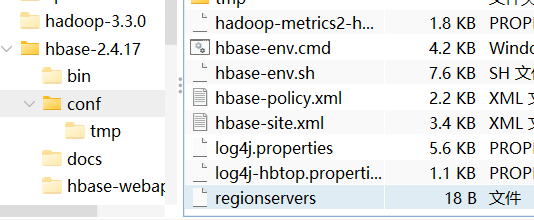
这个regionservers文件里面的必须为node1node2就是你打开窗口上面的名字
还有就是
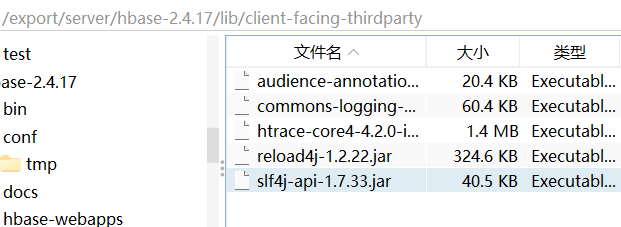
这个路径下面必须长这样,多余的文件删掉
然后还启动不成功就使用命令
:
/export/server/zookeeper/bin/zkCli.sh
进入zookeeper命令
输入:
ls /
然后如果有hbase执行:

rmr /hbase

如果rmr命令没用就换成
deleteall /hbase

然后上面的命令:
hdfs dfs -rm -r /hbase
执行成功之后,重启hbase就行了。
参考:https://blog.csdn.net/qq_46548855/article/details/106203616

 浙公网安备 33010602011771号