

社区疫疫情控助手App
此项目为学校课程 移动应用程序开发 期末大作业。时值2020年5月,老师紧跟防疫常态化之趋势给出了项目要求,在此基础之上完成了需求分析、UI设计、代码编写及测试等工作。
项目要求
社区疫情防控助手App,该App提供给社区防控人员使用,可以:
- 接收上级任务推送,完成任务确认(“推送”与“确认”使用本地数据库模拟);
- 填报受检人员的身份信息和健康状况,并上报(“上报”使用本地数据库模拟);
- 查询一定筛选条件下的人员信息(“查询”使用本地数据库模拟);
- 其它可以想到的功能(这个功能老师让我们自由发挥,我想到的是一个简易编辑备忘录的功能);
成果展示
相关代码
看到B站有小伙伴求代码,之前一直忙着搞毕设(虽然现在还没搞完但是今天登录了B站账号看到评论,顿时觉得不管了先来贴代码吧哈哈哈哈,希望能帮助到需要的人),我也是参考了很多博主的代码写的,之后会把他们的博客链接贴上供大家参考。
项目目录结构
目录结构
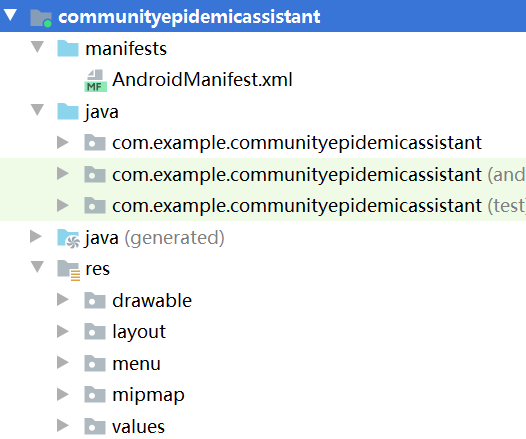
有下图这么些java文件。
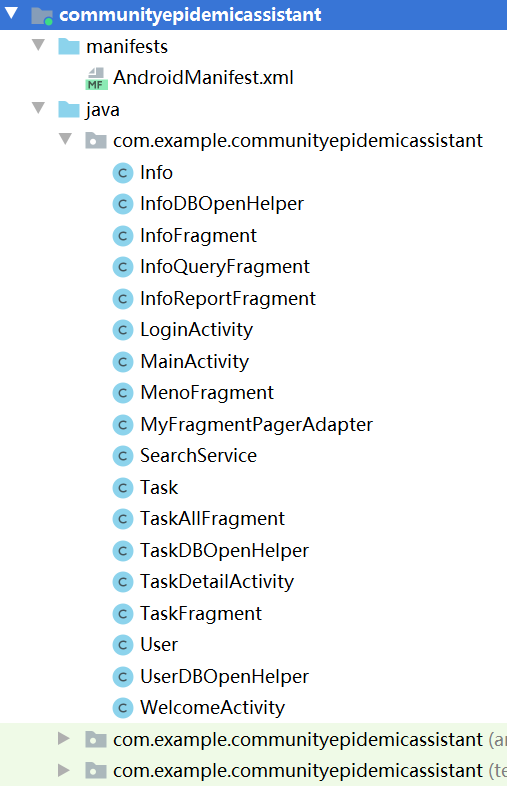
有下图这么些xml文件。
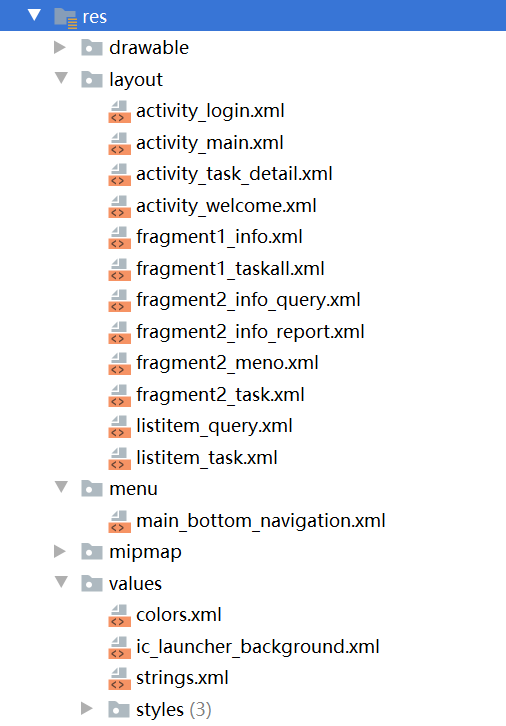
对应页面代码
这边直接把对应页面xml和java代码,逻辑什么的以后再有空的话理一理,斯米马赛。
1. 欢迎页
activity_weclome.xml如下:
<?xml version="1.0" encoding="utf-8"?>
<LinearLayout xmlns:android="http://schemas.android.com/apk/res/android"
    xmlns:app="http://schemas.android.com/apk/res-auto"
    xmlns:tools="http://schemas.android.com/tools"
    android:layout_width="match_parent"
    android:layout_height="match_parent"
    tools:context=".WelcomeActivity"
    android:background="@drawable/bc4">
    <RelativeLayout
        android:layout_width="match_parent"
        android:layout_height="wrap_content">
        <TextView
            android:id="@+id/tv"
            android:layout_width="wrap_content"
            android:layout_height="wrap_content"
            android:layout_alignParentRight="true"
            android:layout_marginRight="20dp"
            android:layout_marginTop="10dp"
            android:textSize="20sp" />
    </RelativeLayout>
</LinearLayout>
WelcomeActivity.java如下:
package com.example.communityepidemicassistant;
import android.content.Intent;
import android.os.Bundle;
import android.os.Handler;
import android.support.v7.app.AppCompatActivity;
import android.view.View;
import android.widget.TextView;
import java.util.Timer;
import java.util.TimerTask;

public class WelcomeActivity extends AppCompatActivity implements View.OnClickListener {

    private int recLen = 4;//跳过倒计时提示4秒
    private TextView tv;
    Timer timer = new Timer();
    private Handler handler;
    private Runnable runnable;


    @Override
    protected void onCreate(Bundle savedInstanceState) {
        super.onCreate(savedInstanceState);

        setContentView(R.layout.activity_welcome);
        initView();
        timer.schedule(task, 1000, 1000);//等待时间一秒,停顿时间一秒
        /**
         * 正常情况下不点击跳过
         */
        handler = new Handler();
        handler.postDelayed(runnable = new Runnable() {
            @Override
            public void run() {
                //从闪屏界面跳转到首界面
                Intent intent = new Intent(WelcomeActivity.this, LoginActivity.class);
                startActivity(intent);
                finish();
            }
        }, 5000);//延迟5S后发送handler信息
    }
    private void initView() {
        tv = findViewById(R.id.tv);//跳过
        tv.setOnClickListener(this);//跳过监听
    }
    TimerTask task = new TimerTask() {
        @Override
        public void run() {
            runOnUiThread(new Runnable() { // UI thread
                @Override
                public void run() {
                    recLen--;
                    tv.setText("跳过 " + recLen);
                    if (recLen < 0) {
                        timer.cancel();
                        tv.setVisibility(View.GONE);//倒计时到0隐藏字体
                    }
                }
            });
        }
    };
    /**
     * 点击跳过
     */
    @Override
    public void onClick(View view) {
        switch (view.getId()) {
            case R.id.tv:
                //从闪屏界面跳转到首页界面
                Intent intent = new Intent(WelcomeActivity.this, LoginActivity.class);
                startActivity(intent);
                finish();
                if (runnable != null) {
                    handler.removeCallbacks(runnable);
                }
                break;
            default:
                break;
        }
    }
}
2. 登录页
activity_login.xml:
<?xml version="1.0" encoding="utf-8"?>
<LinearLayout xmlns:android="http://schemas.android.com/apk/res/android"
    xmlns:app="http://schemas.android.com/apk/res-auto"
    xmlns:tools="http://schemas.android.com/tools"
    android:layout_width="match_parent"
    android:layout_height="match_parent"
    tools:context=".LoginActivity"
    android:orientation="vertical"
    android:gravity="center"
    android:background="@color/colorBackGroundWhite">
    <EditText
        android:id="@+id/et_loginactivity_username"
        android:layout_width="320dp"
        android:layout_height="75dp"
        android:hint="社区账号"
        android:singleLine="true"
        android:textSize="22dp"
        android:theme="@style/MyEditText"/>
    <EditText
        android:id="@+id/et_loginactivity_password"
        android:layout_width="320dp"
        android:layout_height="75dp"
        android:hint="社区密码"
        android:singleLine="true"
        android:inputType="textPassword"
        android:textSize="22dp"
        android:theme="@style/MyEditText"/>
    <Button
        android:id="@+id/bt_loginactivity_login"
        android:layout_width="320dp"
        android:layout_height="wrap_content"
        android:layout_marginTop="25dp"
        android:text="登录"
        android:background="@drawable/bt_login_shape"
        android:textColor="#ffffff"
        android:textSize="25dp"
        android:onClick="onClick"
        />
</LinearLayout>
LoginActivity.java:
package com.example.communityepidemicassistant;

import android.content.Intent;
import android.os.Build;
import android.os.Bundle;
import android.support.v7.app.AppCompatActivity;
import android.text.TextUtils;
import android.view.View;
import android.widget.Button;
import android.widget.EditText;
import android.widget.Toast;

import java.util.ArrayList;

//implements View.OnClickListener 之后,
//就可以把onClick事件写到onCreate()方法之外
//这样,onCreate()方法中的代码就不会显得很冗余
public class LoginActivity extends AppCompatActivity implements View.OnClickListener {

    private UserDBOpenHelper mUserDBOpenHelper;     //声明UserDBOpenHelper对象,这玩意儿用来创建数据表
    private Button mBtLogin;
    private EditText mEtUsername;
    private EditText mEtPassword;
    @Override
    protected void onCreate(Bundle savedInstanceState) {
        super.onCreate(savedInstanceState);
        setContentView(R.layout.activity_login);    //把视图层 View 也就是 layout 的内容放到 Activity 中进行显示

        if (android.os.Build.VERSION.SDK_INT >= Build.VERSION_CODES.M) {
            //修改为深色
            this.getWindow().getDecorView().setSystemUiVisibility(View.SYSTEM_UI_FLAG_LIGHT_STATUS_BAR);
        }

        initView();
        mUserDBOpenHelper = new UserDBOpenHelper(this);     //实例化DBOpenhelper,进行登录验证的时候要用来进行数据查询
//        mUserDBOpenHelper.add("001","2222");
//        mUserDBOpenHelper.add("西门社区","12345");

    }

    private void initView(){
        //初始化视图中的控件对象
        mBtLogin= findViewById(R.id.bt_loginactivity_login);
        mBtLogin.setOnClickListener(this);      //设置点击事件监听器
        mEtUsername= findViewById(R.id.et_loginactivity_username);
        mEtPassword=findViewById(R.id.et_loginactivity_password);
    }

    public void onClick(View view){
        String name = mEtUsername.getText().toString().trim();
        String password = mEtPassword.getText().toString().trim();
        if (!TextUtils.isEmpty(name) && !TextUtils.isEmpty(password)) {
            ArrayList<User> data = mUserDBOpenHelper.getAllData();
            boolean match = false;
            for (int i = 0; i < data.size(); i++) {
                User user = data.get(i);
                if (name.equals(user.getName()) && password.equals(user.getPassword())) {
                    match = true;
                    break;
                } else {
                    match = false;
                }
            }
            if (match) {
                Toast.makeText(this, "登录成功", Toast.LENGTH_SHORT).show();
                Intent intent = new Intent(this, MainActivity.class);
                startActivity(intent);
                finish();//销毁此Activity
            } else {
                Toast.makeText(this, "用户名或密码不正确,请重新输入", Toast.LENGTH_SHORT).show();
            }
        } else {
            Toast.makeText(this, "请输入你的用户名或密码", Toast.LENGTH_SHORT).show();
        }
    }
}
因为登录要用到数据库存用户信息(账号和密码),所以还要搞个User类,还要弄个UserDBOpenHelper类。
User.java:
package com.example.communityepidemicassistant;

public class User {
    private String name;            //用户名
    private String password;        //密码

    public User(String name, String password) {
        this.name = name;
        this.password = password;

    }

    public String getName() {
        return name;
    }
    public void setName(String name) {
        this.name = name;
    }
    public String getPassword() {
        return password;
    }
    public void setPassword(String password) {
        this.password = password;
    }
    @Override
    public String toString() {
        return "User{" +
                "name='" + name + '\'' +
                ", password='" + password + '\'' +

                '}';
    }
}
UserDBOpenHelper.java:
package com.example.communityepidemicassistant;

import android.content.Context;
import android.database.Cursor;
import android.database.sqlite.SQLiteDatabase;
import android.database.sqlite.SQLiteOpenHelper;

import java.util.ArrayList;

public class UserDBOpenHelper extends SQLiteOpenHelper {

    private SQLiteDatabase db;      //声明一个AndroidSDK自带的数据库变量db

    public UserDBOpenHelper(Context context){       //构造函数
        super(context,"db_test",null,1);
        db = getReadableDatabase();      //把数据库设置成可写入状态
    }

    @Override
    public void onCreate(SQLiteDatabase db) {
        //社区账号密码表
        db.execSQL("CREATE TABLE IF NOT EXISTS user(" +
                "_id INTEGER PRIMARY KEY AUTOINCREMENT," +
                "name TEXT," +
                "password TEXT)");
    }

    @Override
    public void onUpgrade(SQLiteDatabase db, int oldVersion, int newVersion) {
        db.execSQL("DROP TABLE IF EXISTS user");
        onCreate(db);
    }

    //社区账号密码表的增删改查
    public void add(String name,String password){
        db.execSQL("INSERT INTO user (name,password) VALUES(?,?)",new Object[]{name,password});
    }

    public void delete(String name,String password){
        db.execSQL("DELETE FROM user WHERE name = AND password ="+name+password);
    }
    public void update(String password){
        db.execSQL("UPDATE user SET password = ?",new Object[]{password});
    }

    public ArrayList<User> getAllData(){
        ArrayList<User> list = new ArrayList<User>();
        Cursor cursor = db.query("user",null,null,null,null,null,"name DESC");
        while(cursor.moveToNext()){
            String name = cursor.getString(cursor.getColumnIndex("name"));
            String password = cursor.getString(cursor.getColumnIndex("password"));
            list.add(new User(name,password));
        }
        return list;
    }
}
3. 登录后首页的四个fragment切换
MainActivity中有6个Fragment,包括两个一级Fragment和四个二级Fragment,一级Fragment下各有两个二级Fragment。
有点绕,结合上头的成果展示图和下面我从实验报告里翻出来的图,可能会比较好理解一点。

activity_main.xml:
<?xml version="1.0" encoding="utf-8"?>
<LinearLayout xmlns:android="http://schemas.android.com/apk/res/android"
xmlns:app="http://schemas.android.com/apk/res-auto"
xmlns:tools="http://schemas.android.com/tools"
android:layout_width="match_parent"
android:layout_height="match_parent"
tools:context=".MainActivity"
android:fitsSystemWindows="true"
android:orientation="vertical"
android:gravity="bottom"
android:background="@color/colorBackGroundWhite">

<!--    LinearLayout用来填充一级fragment实现底部导航栏切换页面-->
<LinearLayout
    android:id="@+id/mainview"
    android:layout_width="match_parent"
    android:layout_height="match_parent"
    android:layout_weight="1"
    android:orientation="vertical"
    android:background="@color/colorWhiteSmoke"></LinearLayout>

<!--    底部导航栏,app:menu对应的是导航栏的组成内容-->
<android.support.design.widget.BottomNavigationView
    android:id="@+id/bv_bottomNavigation"
    android:layout_width="match_parent"
    android:layout_height="70dp"
    android:layout_alignParentBottom="true"
    android:background="@color/colorBackGroundWhite"
    app:itemIconTint="@drawable/bottom_navigation_item_selector"
    app:itemTextColor="@drawable/bottom_navigation_item_selector"
    app:menu="@menu/main_bottom_navigation" />
</LinearLayout>
main_bottom_navigation.xml:
<?xml version="1.0" encoding="utf-8"?>
<menu xmlns:android="http://schemas.android.com/apk/res/android">
<item
    android:id="@+id/menu_task"
    android:enabled="true"
    android:icon="@mipmap/task"
    android:title="抗疫工作" />
<item
    android:id="@+id/menu_info"
    android:enabled="true"
    android:icon="@mipmap/info"
    android:title="人员信息" />
</menu>
fragment1_taskall.xml:
<?xml version="1.0" encoding="utf-8"?>
<LinearLayout xmlns:android="http://schemas.android.com/apk/res/android"
    android:orientation="vertical" android:layout_width="match_parent"
    android:layout_height="match_parent">

    <!--一级fragment布局-->
    <LinearLayout
        android:layout_width="match_parent"
        android:layout_height="wrap_content"
        android:baselineAligned="false"
        android:gravity="center_vertical"
        android:orientation="horizontal"
        android:paddingTop="12dp"
        android:background="@color/colorBackGroundWhite"
        android:paddingBottom="10dp">

        <!--顶部滑动选项卡 上级任务-->
        <TextView
            android:id="@+id/tv_taskactivity_task"
            android:layout_width="0dp"
            android:layout_height="match_parent"
            android:layout_weight="1"
            android:gravity="center"
            android:text="接受任务"
            android:textColor="@color/colorPrimaryDark"
            android:clickable="false"
            android:textSize="24dp"/>

        <!--顶部滑动选项卡 工作备忘-->
        <TextView
            android:id="@+id/tv_taskactivity_meno"
            android:layout_width="0dp"
            android:layout_height="match_parent"
            android:layout_weight="1"
            android:gravity="center"
            android:text="@string/memo"
            android:textColor="@color/colorPrimaryDark"
            android:textSize="24dp"/>
    </LinearLayout>
    <android.support.v4.view.ViewPager
        android:id="@+id/mainViewPager"
        android:layout_width="match_parent"
        android:layout_height="match_parent"
        android:background="@color/colorWhiteSmoke"/>
</LinearLayout>
fragment1_info.xml:
<?xml version="1.0" encoding="utf-8"?>
<LinearLayout xmlns:android="http://schemas.android.com/apk/res/android"
    android:orientation="vertical" android:layout_width="match_parent"
    android:layout_height="match_parent">

    <!--一级fragment布局-->
    <LinearLayout
        android:layout_width="match_parent"
        android:layout_height="wrap_content"
        android:baselineAligned="false"
        android:gravity="center_vertical"
        android:orientation="horizontal"
        android:paddingTop="12dp"
        android:paddingBottom="10dp"
        android:background="@color/colorBackGroundWhite">

        <!--顶部滑动选项卡 上级任务-->
        <TextView
            android:id="@+id/tv_info_report"
            android:layout_width="0dp"
            android:layout_height="match_parent"
            android:layout_weight="1"
            android:gravity="center"
            android:text="@string/report"
            android:textColor="@color/colorPrimaryDark"
            android:textSize="24dp"/>

        <!--顶部滑动选项卡 工作备忘-->
        <TextView
            android:id="@+id/tv_info_query"
            android:layout_width="0dp"
            android:layout_height="match_parent"
            android:layout_weight="1"
            android:gravity="center"
            android:text="@string/query"
            android:textColor="@color/colorPrimaryDark"
            android:textSize="24dp"/>
    </LinearLayout>
    <android.support.v4.view.ViewPager
        android:id="@+id/mainViewPager_info"
        android:layout_width="match_parent"
        android:layout_height="match_parent" />
</LinearLayout>
fragment2_task.xml:
<?xml version="1.0" encoding="utf-8"?>
<LinearLayout xmlns:android="http://schemas.android.com/apk/res/android"
    xmlns:tools="http://schemas.android.com/tools"
    android:orientation="vertical"
    android:layout_width="match_parent"
    android:layout_height="match_parent"
    android:gravity="center"
    tools:context=".TaskFragment"
    android:background="@color/colorWhiteSmoke">

    <ListView
        android:layout_marginTop="10dp"
        android:id="@+id/listView_task"
        android:layout_marginLeft="5dp"
        android:layout_marginRight="5dp"
        android:layout_width="match_parent"
        android:layout_height="match_parent"
        android:divider="@color/colorWhiteSmoke"
        android:dividerHeight="1dp"
        android:scrollbars="none"/>
</LinearLayout>
listitem_task.xml(一个列表里有很多子列表项,这就是一个子列表项的布局,数据库里的任务信息要加载到子列表项里,有几条任务就加载几个列表项,即动态显示列表):
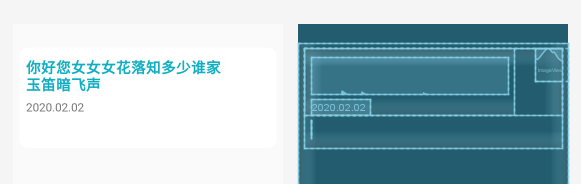
<?xml version="1.0" encoding="utf-8"?>
<LinearLayout xmlns:android="http://schemas.android.com/apk/res/android"
    android:layout_width="match_parent"
    android:layout_height="match_parent"
    android:layout_marginTop="30dp">

    <LinearLayout
        android:orientation="vertical"
        android:layout_marginHorizontal="10dp"
        android:layout_width="match_parent"
        android:layout_height="wrap_content"
        android:background="@drawable/shape_list"
        android:layout_marginVertical="6dp">

        <LinearLayout
            android:layout_width="match_parent"
            android:layout_height="wrap_content"
            android:orientation="horizontal"
            android:layout_gravity="top">
            <LinearLayout
                android:layout_width="320dp"
                android:layout_height="wrap_content"
                android:layout_marginRight="17dp"
                android:orientation="vertical">
                <TextView
                    android:id="@+id/tv_listitem_title"
                    android:layout_width="wrap_content"
                    android:layout_height="wrap_content"
                    android:textSize="22dp"
                    android:text="你好您女女女花落知多少谁家玉笛暗飞声"
                    android:fontFamily="sans-serif-black"
                    android:textColor="@color/colorAccent"
                    android:letterSpacing="0.02"
                    android:layout_marginTop="15dp"
                    android:layout_marginHorizontal="10dp" />
                <TextView
                    android:id="@+id/tv_listitem_date"
                    android:layout_width="wrap_content"
                    android:layout_height="wrap_content"
                    android:layout_marginTop="7dp"
                    android:text="2020.02.02"
                    android:textSize="18dp"
                    android:layout_marginHorizontal="10dp"/>
            </LinearLayout>
            <ImageView
                android:id="@+id/iv_iffinished"
                android:layout_width="50dp"
                android:layout_height="50dp"
                android:layout_gravity="end"
                android:layout_marginRight="0dp"
                android:layout_marginLeft="15dp" />
        </LinearLayout>

        <TextView
            android:id="@+id/tv_listitem_abstract"
            android:layout_width="wrap_content"
            android:layout_height="wrap_content"
            android:textSize="20dp"
            android:layout_marginTop="7dp"
            android:layout_marginHorizontal="10dp"
            android:layout_marginBottom="10dp"/>
    </LinearLayout>
</LinearLayout>
fragment2_memo.xml:
<?xml version="1.0" encoding="utf-8"?>
<android.support.design.widget.CoordinatorLayout xmlns:android="http://schemas.android.com/apk/res/android"
    xmlns:fab="http://schemas.android.com/apk/res-auto"
    android:orientation="vertical"
    android:layout_width="match_parent"
    android:layout_height="match_parent"
    android:id="@+id/root">

    <EditText
        android:id="@+id/et_mono"
        android:layout_width="match_parent"
        android:layout_height="565dp"
        android:layout_marginHorizontal="20dp"
        android:layout_marginTop="10dp"
        android:gravity="left|top"
        android:hint="@string/clickAndWrite"
        android:inputType="textMultiLine"
        android:minLines="20"
        android:textColor="@color/black"
        android:scrollbars="vertical"
        android:textSize="20dp" />

        <com.getbase.floatingactionbutton.FloatingActionsMenu
            android:id="@+id/fab_menu"
            android:layout_width="wrap_content"
            android:layout_height="wrap_content"
            android:layout_marginRight="20dp"
            android:layout_marginBottom="10dp"
            android:layout_gravity="bottom|end"
            fab:fab_addButtonColorNormal="@color/colorAccent"
            fab:fab_addButtonColorPressed="@color/youyu"
            fab:fab_expandDirection="up"
            fab:fab_labelStyle="@style/menu_labels_style"
            fab:fab_labelsPosition="left">

            <com.getbase.floatingactionbutton.FloatingActionButton
                android:id="@+id/fab_1"
                android:layout_width="wrap_content"
                android:layout_height="wrap_content"
                fab:fab_colorNormal="@color/colorAccent"
                fab:fab_colorPressed="@color/youyu"
                fab:fab_icon="@drawable/done"
                fab:fab_size="mini"
                fab:fab_title="保存" />

            <com.getbase.floatingactionbutton.FloatingActionButton
                android:id="@+id/fab_2"
                android:layout_width="wrap_content"
                android:layout_height="wrap_content"
                fab:fab_colorNormal="@color/colorAccent"
                fab:fab_colorPressed="@color/youyu"
                fab:fab_icon="@drawable/del"
                fab:fab_size="mini"
                fab:fab_title="清空" />
        </com.getbase.floatingactionbutton.FloatingActionsMenu>
</android.support.design.widget.CoordinatorLayout>
fragment2_info_report.xml:
<?xml version="1.0" encoding="utf-8"?>
<LinearLayout xmlns:android="http://schemas.android.com/apk/res/android"
android:orientation="vertical" android:layout_width="match_parent"
android:layout_height="match_parent"
android:background="@color/colorWhiteLight">
<ScrollView
android:layout_width="match_parent"
android:layout_height="match_parent">
<LinearLayout
android:layout_width="match_parent"
android:layout_height="wrap_content"
android:orientation="vertical"
android:layout_marginHorizontal="30dp">
<TextView
android:layout_gravity="center"
android:layout_width="wrap_content"
android:layout_height="wrap_content"
android:layout_marginTop="25dp"
android:layout_marginBottom="15dp"
android:text="社区居民健康情况登记"
android:fontFamily="sans-serif-black"
android:textSize="30dp"
android:textColor="@color/dianzilan"/>
<TextView
android:layout_width="wrap_content"
android:layout_height="wrap_content"
android:layout_marginLeft="5dp"
android:layout_marginVertical="5dp"
android:text="填报日期:"
android:textColor="@color/colorBlueDark"
android:textSize="20dp"/>
<EditText
android:id="@+id/et_InfoReport_Date"
android:hint="请输入填报日期"
android:textSize="22dp"
android:inputType="none"
android:focusable="true"
android:focusableInTouchMode="true"
android:layout_width="match_parent"
android:layout_height="wrap_content"
android:background="@drawable/shape_edittext"/>
<TextView
android:layout_width="wrap_content"
android:layout_height="wrap_content"
android:layout_marginLeft="5dp"
android:layout_marginTop="10dp"
android:layout_marginBottom="5dp"
android:text="姓名:"
android:textColor="@color/colorBlueDark"
android:textSize="20dp"/>
<EditText
android:id="@+id/et_InfoReport_Name"
android:hint="请输入您的姓名"
android:singleLine="true"
android:textSize="22dp"
android:layout_width="match_parent"
android:layout_height="wrap_content"
android:background="@drawable/shape_edittext"/>
<TextView
android:layout_width="wrap_content"
android:layout_height="wrap_content"
android:layout_marginLeft="5dp"
android:layout_marginTop="10dp"
android:layout_marginBottom="5dp"
android:text="证件号:"
android:textColor="@color/colorBlueDark"
android:textSize="20dp"/>
<EditText
android:id="@+id/et_InfoReport_Id"
android:hint="请输入身份证号"
android:maxLength="18"
android:singleLine="true"
android:textSize="22dp"
android:layout_width="match_parent"
android:layout_height="wrap_content"
android:background="@drawable/shape_edittext"/>
<TextView
android:layout_width="wrap_content"
android:layout_height="wrap_content"
android:layout_marginLeft="5dp"
android:layout_marginTop="10dp"
android:layout_marginBottom="5dp"
android:text="联系方式:"
android:textColor="@color/colorBlueDark"
android:textSize="20dp"/>
<EditText
android:id="@+id/et_InfoReport_Phone"
android:hint="请输入联系电话"
android:maxLength="11"
android:drawableRight="@drawable/yesok"
android:drawablePadding="5dp"
android:singleLine="true"
android:textSize="22dp"
android:layout_width="match_parent"
android:layout_height="43dp"
android:background="@drawable/shape_edittext"/>
<TextView
android:layout_width="wrap_content"
android:layout_height="wrap_content"
android:layout_marginLeft="5dp"
android:layout_marginTop="10dp"
android:layout_marginBottom="5dp"
android:text="家庭住址:"
android:textColor="@color/colorBlueDark"
android:textSize="20dp"/>
<EditText
android:id="@+id/et_InfoReport_Address"
android:hint="请输入家庭住址"
android:singleLine="true"
android:textSize="22dp"
android:layout_width="match_parent"
android:layout_height="wrap_content"
android:background="@drawable/shape_edittext"/>
<TextView
android:layout_width="wrap_content"
android:layout_height="wrap_content"
android:layout_marginLeft="5dp"
android:layout_marginTop="15dp"
android:layout_marginBottom="5dp"
android:text="是否发烧:"
android:textColor="@color/colorBlueDark"
android:textSize="20dp"/>
<LinearLayout
android:layout_width="match_parent"
android:layout_height="wrap_content"
android:orientation="horizontal">
<RadioGroup
android:id="@+id/rg_iffever"
android:layout_width="wrap_content"
android:layout_height="wrap_content"
android:orientation="horizontal"
android:layout_gravity="center">
<RadioButton
android:id="@+id/rb_iffever_yes"
android:layout_width="wrap_content"
android:layout_height="wrap_content"
android:text="是"
android:textSize="22dp"/>
<RadioButton
android:id="@+id/rb_iffever_no"
android:layout_width="wrap_content"
android:layout_height="wrap_content"
android:text="否"
android:textSize="22dp"
android:layout_marginLeft="40dp"/>
</RadioGroup>
<EditText
android:id="@+id/et_InfoReport_Tem"
android:layout_width="wrap_content"
android:layout_height="wrap_content"
android:layout_marginLeft="45dp"
android:layout_gravity="center"
android:gravity="center"
android:hint="填写体温"
android:inputType="numberDecimal"
android:singleLine="true"
android:textSize="22dp"
android:background="@drawable/shape_edittext"/>
<TextView
android:layout_width="wrap_content"
android:layout_height="wrap_content"
android:layout_marginLeft="10dp"
android:layout_gravity="center"
android:text="℃"
android:textSize="28dp"/>
</LinearLayout>
<TextView
android:layout_width="wrap_content"
android:layout_height="wrap_content"
android:layout_marginTop="10dp"
android:layout_marginBottom="5dp"
android:layout_gravity="center"
android:text="温馨提示:体温在37.3℃~38℃为低烧,体温在38℃~39℃为中烧,体温在39℃以上为高烧"
android:textColor="@color/colorPrimaryDark"
android:textSize="17dp"/>
<TextView
android:layout_width="wrap_content"
android:layout_height="wrap_content"
android:layout_marginLeft="5dp"
android:layout_marginTop="15dp"
android:layout_marginBottom="5dp"
android:text="是否有接触确证、疑似病例:"
android:textColor="@color/colorBlueDark"
android:textSize="20dp"/>
<LinearLayout
android:layout_width="match_parent"
android:layout_height="wrap_content"
android:orientation="horizontal">
<RadioGroup
android:id="@+id/rg_iftouch"
android:layout_width="wrap_content"
android:layout_height="wrap_content"
android:orientation="horizontal"
android:layout_gravity="center">
<RadioButton
android:id="@+id/rb_iftouch_yes"
android:layout_width="wrap_content"
android:layout_height="wrap_content"
android:text="是"
android:textSize="22dp"/>
<RadioButton
android:id="@+id/rb_iftouch_no"
android:layout_width="wrap_content"
android:layout_height="wrap_content"
android:text="否"
android:textSize="22dp"
android:layout_marginLeft="40dp"/>
</RadioGroup>
</LinearLayout>
<TextView
android:layout_width="wrap_content"
android:layout_height="wrap_content"
android:layout_marginTop="10dp"
android:layout_marginBottom="5dp"
android:layout_gravity="center"
android:text="温馨提示:确诊和疑似病例是指卫健部门认定的病例"
android:textColor="@color/colorPrimaryDark"
android:textSize="17dp"/>
<TextView
android:id="@+id/tv_InfoReport_TouchName"
android:layout_width="wrap_content"
android:layout_height="wrap_content"
android:layout_marginLeft="5dp"
android:layout_marginTop="15dp"
android:layout_marginBottom="5dp"
android:text="接触者姓名:"
android:textColor="@color/colorBlueDark"
android:textSize="20dp"/>
<EditText
android:id="@+id/et_InfoReport_TouchName"
android:hint="请输入接触者姓名"
android:singleLine="true"
android:textSize="22dp"
android:layout_width="match_parent"
android:layout_height="wrap_content"
android:background="@drawable/shape_edittext"/>
<TextView
android:id="@+id/tv_InfoReport_TouchPhone"
android:layout_width="wrap_content"
android:layout_height="wrap_content"
android:layout_marginLeft="5dp"
android:layout_marginTop="15dp"
android:layout_marginBottom="5dp"
android:text="接触者联系电话:"
android:textColor="@color/colorBlueDark"
android:textSize="20dp"/>
<EditText
android:id="@+id/et_InfoReport_TouchPhone"
android:hint="请输入接触者联系电话"
android:drawableRight="@drawable/yesok"
android:maxLength="11"
android:singleLine="true"
android:textSize="22dp"
android:layout_width="match_parent"
android:layout_height="43dp"
android:background="@drawable/shape_edittext"/>
<TextView
android:id="@+id/tv_InfoReport_TouchDate"
android:layout_width="wrap_content"
android:layout_height="wrap_content"
android:layout_marginLeft="5dp"
android:layout_marginTop="15dp"
android:layout_marginBottom="5dp"
android:text="接触日期:"
android:textColor="@color/colorBlueDark"
android:textSize="20dp"/>
<EditText
android:id="@+id/et_InfoReport_TouchDate"
android:hint="请输入接触日期"
android:singleLine="true"
android:textSize="22dp"
android:layout_width="match_parent"
android:layout_height="wrap_content"
android:focusable="true"
android:focusableInTouchMode="true"
android:background="@drawable/shape_edittext"/>
<LinearLayout
android:layout_marginVertical="40dp"
android:layout_width="match_parent"
android:layout_height="wrap_content"
android:orientation="horizontal"
android:gravity="center">
<Button
android:id="@+id/bt_InfoReport_cancel"
android:layout_width="160dp"
android:layout_height="wrap_content"
android:layout_marginHorizontal="10dp"
android:layout_gravity="center"
android:text="取消"
android:textSize="20dp"
android:background="@drawable/shape_edittext"/>
<Button
android:id="@+id/bt_InfoReport_submit"
android:layout_width="160dp"
android:layout_height="wrap_content"
android:layout_marginHorizontal="10dp"
android:layout_gravity="center"
android:text="提交"
android:textSize="20dp"
android:textColor="@color/colorBackGroundWhite"
android:background="@drawable/button_tijiao"/>
</LinearLayout>
</LinearLayout>
</ScrollView>
</LinearLayout>
fragment2_info_query.xml:
<?xml version="1.0" encoding="utf-8"?>
<LinearLayout xmlns:android="http://schemas.android.com/apk/res/android"
android:orientation="vertical" android:layout_width="match_parent"
android:layout_height="match_parent" android:background="@color/colorWhiteSmoke">
    <SearchView
        android:id="@+id/sv_search"
        android:queryHint="请输入姓名搜索"
        android:searchHintIcon="@drawable/search"
        android:layout_width="match_parent"
        android:layout_height="wrap_content"
        android:layout_marginTop="15dp"
        android:layout_marginHorizontal="25dp"
        android:background="@drawable/bt_login_shape" />

    <HorizontalScrollView
        android:layout_width="wrap_content"
        android:layout_height="match_parent"
        android:scrollbars="none"
        android:layout_marginHorizontal="15dp"
        android:layout_marginTop="15dp"
        android:layout_marginBottom="15dp"
        android:background="@drawable/shape_list">
        <LinearLayout
            android:layout_width="wrap_content"
            android:layout_height="match_parent"
            android:orientation="vertical"
            >
            <LinearLayout
                android:layout_width="wrap_content"
                android:layout_height="70dp"
                android:orientation="horizontal"
                android:layout_marginTop="10dp"
                android:gravity="center">
                <TextView
                    android:layout_width="100dp"
                    android:layout_height="match_parent"
                    android:layout_marginRight="5dp"
                    android:gravity="center"
                    android:layout_gravity="center"
                    android:text="姓名"
                    android:textColor="@color/shilv"
                    android:fontFamily="sans-serif-black"
                    android:textSize="20sp" />
                <TextView
                    android:layout_width="50dp"
                    android:layout_height="match_parent"
                    android:layout_marginHorizontal="15dp"
                    android:gravity="center"
                    android:layout_gravity="center"
                    android:text="填报日期"
                    android:textColor="@color/shilv"
                    android:fontFamily="sans-serif-black"
                    android:textSize="20sp"/>
                <TextView
                    android:layout_width="50dp"
                    android:layout_height="wrap_content"
                    android:layout_marginHorizontal="15dp"
                    android:gravity="center"
                    android:layout_gravity="center"
                    android:text="是否发烧"
                    android:textColor="@color/shilv"
                    android:fontFamily="sans-serif-black"
                    android:textSize="20sp"/>
                <TextView
                    android:layout_width="120dp"
                    android:layout_height="wrap_content"
                    android:layout_marginHorizontal="5dp"
                    android:gravity="center"
                    android:text="是否接触疑似/确诊病例"
                    android:textColor="@color/shilv"
                    android:fontFamily="sans-serif-black"
                    android:textSize="20sp"/>

                <TextView
                    android:layout_width="240dp"
                    android:layout_height="wrap_content"
                    android:text="身份证号码"
                    android:textColor="@color/shilv"
                    android:fontFamily="sans-serif-black"
                    android:gravity="center"
                    android:layout_gravity="center"
                    android:textSize="20sp"
                    android:layout_marginHorizontal="5dp"/>
                <TextView
                    android:layout_width="155dp"
                    android:layout_height="wrap_content"
                    android:text="联系电话"
                    android:textColor="@color/shilv"
                    android:fontFamily="sans-serif-black"
                    android:gravity="center"
                    android:layout_gravity="center"
                    android:textSize="20sp"
                    android:layout_marginHorizontal="5dp"/>
                <TextView
                    android:layout_width="270dp"
                    android:layout_height="wrap_content"
                    android:text="家庭地址"
                    android:textColor="@color/shilv"
                    android:fontFamily="sans-serif-black"
                    android:gravity="center"
                    android:layout_gravity="center"
                    android:textSize="20sp"
                    android:layout_marginHorizontal="5dp"/>
            </LinearLayout>

            <ListView
                android:id="@+id/listView_info"
                android:layout_width="wrap_content"
                android:layout_height="match_parent"
                android:scrollbars="none"
                android:dividerHeight="1dp"
                android:divider="@color/colorWhiteSmoke"/>
        </LinearLayout>
    </HorizontalScrollView>
</LinearLayout>
listitem_query.xml:
也是由于要动态加载列表,所以要弄个列表项布局
<?xml version="1.0" encoding="utf-8"?>
<LinearLayout xmlns:android="http://schemas.android.com/apk/res/android"
    android:orientation="vertical" android:layout_width="match_parent"
    android:layout_height="match_parent">

<HorizontalScrollView
    android:layout_width="wrap_content"
    android:layout_height="wrap_content"
    android:layout_marginRight="20dp"
    android:layout_marginTop="10dp"
    android:scrollbars="none">
    <LinearLayout
        android:layout_width="wrap_content"
        android:layout_height="wrap_content"
        android:orientation="horizontal"
        android:layout_marginBottom="7dp">
        <TextView
            android:id="@+id/tv_listitem_infoName"
            android:layout_width="100dp"
            android:layout_height="match_parent"
            android:gravity="center"
            android:layout_gravity="center"
            android:textSize="20sp" />

        <TextView
            android:id="@+id/tv_listitem_infoDate"
            android:layout_width="95dp"
            android:layout_height="match_parent"
            android:layout_marginRight="5dp"
            android:gravity="center"
            android:layout_gravity="center"
            android:textSize="20sp"/>
        <TextView
            android:id="@+id/tv_listitem_infoIfFever"
            android:layout_width="50dp"
            android:layout_height="wrap_content"
            android:layout_marginHorizontal="5dp"
            android:gravity="center"
            android:layout_gravity="center"
            android:textSize="20sp" />
        <TextView
            android:id="@+id/tv_listitem_infoIfTouch"
            android:layout_width="120dp"
            android:layout_height="wrap_content"
            android:layout_marginLeft="8dp"
            android:layout_marginRight="5dp"
            android:gravity="center"
            android:layout_gravity="center"
            android:textSize="20sp"/>

        <TextView
            android:id="@+id/tv_listitem_infoID"
            android:layout_width="240dp"
            android:layout_height="wrap_content"
            android:text="35082119990110084X"
            android:gravity="center"
            android:layout_gravity="center"
            android:textSize="20sp"
            android:layout_marginLeft="8dp"
            android:layout_marginRight="5dp"/>

        <TextView
            android:id="@+id/tv_listitem_infoPhone"
            android:layout_width="155dp"
            android:layout_height="wrap_content"
            android:text="18751965792"
            android:gravity="center"
            android:layout_gravity="center"
            android:textSize="20sp"
            android:layout_marginHorizontal="5dp"/>
        <TextView
            android:id="@+id/tv_listitem_infoAddress"
            android:layout_width="250dp"
            android:layout_height="wrap_content"
            android:gravity="center"
            android:layout_gravity="center"
            android:textSize="20sp"
            android:layout_marginLeft="10dp"
            android:layout_marginRight="5dp"/>
    </LinearLayout>

</HorizontalScrollView>
</LinearLayout>
下面是java代码
MainActivity.java:
package com.example.communityepidemicassistant;
import android.os.Build;
import android.os.Bundle;
import android.support.annotation.NonNull;
import android.support.design.widget.BottomNavigationView;
import android.support.v4.app.Fragment;
import android.support.v4.app.FragmentTransaction;
import android.support.v7.app.AppCompatActivity;
import android.view.MenuItem;
import android.view.View;
import android.view.WindowManager;

public class MainActivity extends AppCompatActivity {

    private BottomNavigationView mBottomNavigationView;
    private TaskAllFragment taskAllFragment;
    private InfoFragment infoFragment;
    private Fragment[] fragments;
    private int lastfragment;   //用于记录上个选择的Fragment

    @Override
    protected void onCreate(Bundle savedInstanceState) {
        super.onCreate(savedInstanceState);
        getWindow().setSoftInputMode(WindowManager.LayoutParams.SOFT_INPUT_ADJUST_PAN); //让底部导航栏不被软键盘顶起
        setContentView(R.layout.activity_main);

        if (android.os.Build.VERSION.SDK_INT >= Build.VERSION_CODES.M) {
            //修改为深色
            this.getWindow().getDecorView().setSystemUiVisibility(View.SYSTEM_UI_FLAG_LIGHT_STATUS_BAR);
        }

        init();

    }

    //初始化函数 初始化2个fragment和bottomNavigationView和一个初始显示的fragment
    public void init() {
        taskAllFragment=new TaskAllFragment();
        infoFragment=new InfoFragment();
        fragments=new Fragment[]{taskAllFragment,infoFragment};
        lastfragment=0; //表示上个被选中的导航栏item
        getSupportFragmentManager().beginTransaction().replace(R.id.mainview,taskAllFragment).show(taskAllFragment).commit();
        mBottomNavigationView = findViewById(R.id.bv_bottomNavigation);

        //mbottomNavigationView 绑定的一个点击监听的函数changeFragment
        mBottomNavigationView.setOnNavigationItemSelectedListener(changeFragment);

    }

    //监听函数changeFragment
    private BottomNavigationView.OnNavigationItemSelectedListener changeFragment=new BottomNavigationView.OnNavigationItemSelectedListener() {
        //对点击的item的id做判断,然后通过switchFragment函数来进行界面的操作
        @Override
        public boolean onNavigationItemSelected(@NonNull MenuItem menuItem) {
            switch (menuItem.getItemId())
            {
                case R.id.menu_task:
                {
                    if(lastfragment!=0)
                    {
                        switchFragment(lastfragment,0);
                        lastfragment=0;
                    }
                    return true;
                }
                case R.id.menu_info:
                {
                    if (lastfragment!=1)
                    {
                        switchFragment(lastfragment,1);
                        lastfragment=1;
                    }
                    return true;
                }
            }
            return false;
        }
    };

    //switchFragment函数,隐藏上个fragment显示选中的fragment
    private void switchFragment(int lastfragment,int index){
        FragmentTransaction transaction=getSupportFragmentManager().beginTransaction();
        transaction.hide(fragments[lastfragment]);  //隐藏上个Fragment
        if(fragments[index].isAdded()==false)
        {
            transaction.add(R.id.mainview,fragments[index]);
        }
        transaction.show(fragments[index]).commitAllowingStateLoss();
    }
}
TaskAllFragment.java:
package com.example.communityepidemicassistant;

import android.graphics.Color;
import android.os.Bundle;
import android.support.annotation.NonNull;
import android.support.annotation.Nullable;
import android.support.v4.app.Fragment;
import android.support.v4.view.ViewPager;
import android.view.LayoutInflater;
import android.view.View;
import android.view.ViewGroup;
import android.widget.TextView;

import java.util.ArrayList;
import java.util.List;

//和一级fragment fragment1_taskall对应的Java类,作用是实现切换顶部选项卡
public class TaskAllFragment extends Fragment implements View.OnClickListener {  // implements View.OnClickListener

    private List<Fragment> mList = new ArrayList<Fragment>();
    private MyFragmentPagerAdapter myFragmentPagerAdapter;

    @Override
    public void onCreate(@Nullable Bundle savedInstanceState) {
        super.onCreate(savedInstanceState);
        mList.add(new TaskFragment());
        mList.add(new MenoFragment());
    }

    @Nullable
    @Override
    public View onCreateView(@NonNull LayoutInflater inflater, @Nullable ViewGroup container, @Nullable Bundle savedInstanceState) {
        View view = inflater.inflate(R.layout.fragment1_taskall, container, false);
        return view;
    }

    TextView home_textView;
    TextView meno_textView;
    ViewPager home_viewPager;

    public void onViewCreated(View view,Bundle savedInstanceState){
        super.onViewCreated(view,savedInstanceState);

        home_textView=(TextView)view.findViewById(R.id.tv_taskactivity_task);
        meno_textView=(TextView)view.findViewById(R.id.tv_taskactivity_meno);
        home_viewPager=(ViewPager)view.findViewById(R.id.mainViewPager);
        home_textView.setOnClickListener(this);
        meno_textView.setOnClickListener(this);

        //在FragmentManger中设置FragmentPagerAdapter必须使用getChildFragmentManger
        myFragmentPagerAdapter=new MyFragmentPagerAdapter(this.getChildFragmentManager(), mList);

        home_viewPager.setOffscreenPageLimit(2);//ViewPager的缓存为2帧
        home_viewPager.setAdapter(myFragmentPagerAdapter);
        home_viewPager.setCurrentItem(0);
        home_textView.setTextColor(Color.parseColor("#d42517"));

        home_viewPager.addOnPageChangeListener(new ViewPager.OnPageChangeListener() {
            @Override
            public void onPageScrolled(int position, float positionOffset, int positionOffsetPixels) {
            }

            @Override
            public void onPageSelected(int position) {
                changeTextColor(position);
            }

            @Override
            public void onPageScrollStateChanged(int state) {

            }
        });


    }

    private void changeTextColor(int position){
        if(position==0){
            home_textView.setTextColor(Color.parseColor("#d42517"));
            meno_textView.setTextColor(Color.parseColor("#696969"));
        }else if(position==1) {
            meno_textView.setTextColor(Color.parseColor("#d42517"));
            home_textView.setTextColor(Color.parseColor("#696969"));
        }
    }

    @Override
    public void onClick(View v) {
        switch (v.getId()){
            case R.id.tv_taskactivity_task:
                home_viewPager.setCurrentItem(0,true);
                break;
            case R.id.tv_taskactivity_meno:
                home_viewPager.setCurrentItem(1,true);
                break;
        }
    }
}
InfoFragment.java:
package com.example.communityepidemicassistant;

import android.graphics.Color;
import android.os.Bundle;
import android.support.annotation.NonNull;
import android.support.annotation.Nullable;
import android.support.v4.app.Fragment;
import android.support.v4.view.ViewPager;
import android.view.LayoutInflater;
import android.view.View;
import android.view.ViewGroup;
import android.widget.TextView;

import java.util.ArrayList;
import java.util.List;

//和一级fragment fragment1_info对应的Java类,作用是实现切换顶部选项卡
public class InfoFragment extends Fragment implements View.OnClickListener{

    private List<Fragment> mList = new ArrayList<Fragment>();
    private MyFragmentPagerAdapter myFragmentPagerAdapter;
    @Override
    public void onCreate(@Nullable Bundle savedInstanceState) {
        super.onCreate(savedInstanceState);
        mList.add(new InfoReportFragment());
        mList.add(new InfoQueryFragment());
    }

    //重写onCreateview方法,将对应的fragment1_info动态加载进来
    @Nullable
    @Override
    public View onCreateView(@NonNull LayoutInflater inflater, @Nullable ViewGroup container, @Nullable Bundle savedInstanceState) {
        return inflater.inflate(R.layout.fragment1_info,container,false);
    }

    TextView home_textView;
    TextView query_textView;
    ViewPager home_viewPager;

    public void onViewCreated(View view,Bundle savedInstanceState){
        super.onViewCreated(view,savedInstanceState);

        home_textView=(TextView)view.findViewById(R.id.tv_info_report);
        query_textView=(TextView)view.findViewById(R.id.tv_info_query);
        home_viewPager=(ViewPager)view.findViewById(R.id.mainViewPager_info);
        home_textView.setOnClickListener(this);
        query_textView.setOnClickListener(this);

        //在FragmentManger中设置FragmentPagerAdapter必须使用getChildFragmentManger
        myFragmentPagerAdapter=new MyFragmentPagerAdapter(this.getChildFragmentManager(), mList);
        home_viewPager.setOffscreenPageLimit(2);//ViewPager的缓存为2帧
        home_viewPager.setAdapter(myFragmentPagerAdapter);
        home_viewPager.setCurrentItem(0);
        home_textView.setTextColor(Color.parseColor("#d42517"));

        home_viewPager.addOnPageChangeListener(new ViewPager.OnPageChangeListener() {
            @Override
            public void onPageScrolled(int position, float positionOffset, int positionOffsetPixels) {
            }

            @Override
            public void onPageSelected(int position) {
                changeTextColor(position);
            }

            @Override
            public void onPageScrollStateChanged(int state) {

            }
        });

    }

    private void changeTextColor(int position){
        if(position==0){
            home_textView.setTextColor(Color.parseColor("#d42517"));
            query_textView.setTextColor(Color.parseColor("#696969"));
        }else if(position==1) {
            query_textView.setTextColor(Color.parseColor("#d42517"));
            home_textView.setTextColor(Color.parseColor("#696969"));
        }
    }

    @Override
    public void onClick(View v) {
        switch (v.getId()){
            case R.id.tv_info_report:
                home_viewPager.setCurrentItem(0,true);
                break;
            case R.id.tv_info_query:
                home_viewPager.setCurrentItem(1,true);
                break;
        }
    }
}
MyFragmentPagerAdapter.java:
package com.example.communityepidemicassistant;
import android.support.v4.app.Fragment;
import android.support.v4.app.FragmentManager;
import android.support.v4.app.FragmentPagerAdapter;
import java.util.List;

public class MyFragmentPagerAdapter extends FragmentPagerAdapter {
    List<Fragment> mList;
    public MyFragmentPagerAdapter(FragmentManager fm, List<Fragment>mList) {
        super(fm);
        this.mList=mList;
    }
    @Override
    public Fragment getItem(int position) {
        return mList.get(position);
    }
    @Override
    public int getCount() {
        return mList.size();
    }
}
上面的代码实现了点击底部导航栏+滑动顶部滑动选项卡的切换“接受任务”页、“工作备忘”页、“信息填报”页、“信息上报”页的切换。
下面的代码是这四个页里的具体功能的实现。
4. 浏览任务页
用到了数据库,所以又弄了个任务信息类Task和一个TaskDBOpenHelper。
TaskFragment.java:
import android.os.Bundle;
import android.support.annotation.NonNull;
import android.support.annotation.Nullable;
import android.support.v4.app.Fragment;
import android.support.v7.app.AlertDialog;
import android.view.LayoutInflater;
import android.view.View;
import android.view.ViewGroup;
import android.widget.AdapterView;
import android.widget.ImageView;
import android.widget.ListView;
import android.widget.SimpleAdapter;
import android.widget.Toast;

import java.util.ArrayList;
import java.util.HashMap;
import java.util.List;
import java.util.Map;

//二级Fragment,用于显示任务列表的TaskFragment,实现从本地数据库加载任务信息摘要到列表中和点击任务列表的一项跳转到任务明细activity的功能,以及长按某一列表项删除该任务的功能
public class TaskFragment extends Fragment {
    SimpleAdapter mSimpleAdapter;
    private ListView listView_task;
    private TaskDBOpenHelper mTaskDBOpenHelper;     //声明TaskDBOpenHelper对象,这玩意儿用来创建数据表
    SQLiteDatabase dbr;
    private List mData;
    private ImageView iv_iffinished;

    private List<Map<String, Object>> list;
    private Integer imgId;

    @Override
    public void onCreate(@Nullable Bundle savedInstanceState) {
        super.onCreate(savedInstanceState);

        mTaskDBOpenHelper=new TaskDBOpenHelper(getContext());
//        mTaskDBOpenHelper.add("关于加强新型冠状病毒感染的肺炎疫情社区防控工作的通知","2020-01-20","社区疫情防控必须从严做好,容不得任何丝毫大意。",
//                "       一、完善网格化管理。防控疫情在基层社区蔓延,应严格实行地毯式追踪、网格化管理,将防控措施落实到户、落实到人,做到“防输入、防蔓延、防输出”,实现“早发现、早报告、早隔离、早诊断、早治疗”,有效遏制疫情扩散。\n" +
//                        "       二、加强医疗力量配备。农村等基层社区的医疗资源相对薄弱,遇到疫情,更显专业力量不足。各地应探索建设专兼职结合的工作队伍,充分发挥街道(乡镇)和社区(村)干部、基层医疗卫生机构医务人员和家庭医生队伍的合力,积极借助大数据、互联网等先进科技手段,提高医疗服务的精细化程度。各级医疗卫生机构应与社区加强配合,积极指导社区做好疫情的发现、防控和应急处置,有效落实密切接触者的排查等措施,做到无缝衔接。\n" +
//                        "       三、加强环境卫生整治力度。除了医疗条件薄弱,个别地方的环境卫生状况不容乐观。必须在防范疫情传播、打击非法贩卖野生动物的同时,及时广泛地开展一场爱国卫生运动,加强卫生知识宣传,管理好基层社区、农贸市场、垃圾中转站等病菌易生多发地点的环境卫生,把环境治理举措落实到每一个社区和家庭。\n" +
//                        "       四、各地有关部门应做好相应保障工作,确保社区群众必要的生产生活物资供应不受太大影响。","no", R.drawable.unfinished);
//        mTaskDBOpenHelper.add("各社区做好防疫抗疫工作","2020-01-15","迅速行动、主动担当、多措并举,积极开展各项防疫工作。",
//                "       当前是抗击新冠肺炎疫情的关键时刻,基层社区既是前沿阵地,也是抗疫的重要战场,响应中央号召,结合本地实际,迅速行动、主动担当、多措并举,积极开展各项防疫工作。\n" +
//                        "       各社区应组织相关工作小组,开展社区自排自查,加强社区管理。对排查到的重点地区人员,社区卫生服务中心医务人员应第一时间上门,进行体温测量,告知隔离健康观察相关要求,填写《隔离健康观察承诺书》。" +
//                        "对无相关症状的重点地区来沪人员实施隔离健康观察,指导做好家庭消毒和防控措施。对于体温出现异常的,按程序转运至本市医疗机构发热门诊。重点地区来沪人员的隔离健康观察期为14天。" +
//                        "隔离观察期满后,无异样症状的,解除隔离。隔离期间,体温出现异常或出现相关症状的被隔离人员,按规范流程,转至本市医疗机构发热门诊作进一步诊疗,社区对其居所按规范进行消毒。","no",
//                R.drawable.unfinished);//
//        mTaskDBOpenHelper.add("积极进行防疫宣传","2020-01-12","依托新媒体平台开展防疫宣传工作。",
//                "       为深入贯彻落实***关于新型冠状病毒感染肺炎疫情防控的一系列重要指示精神," +
//                        "全面落实市、区委关于疫情防控的工作部署,社区充分发挥共青团作为党的助手和后备军的积极作用," +
//                        "社区应积极进行防疫宣传,尤其应依托新媒体平台开展防疫宣传工作,根据防控工作需要,不定期推送信息。","no",R.drawable.unfinished);//
//        mTaskDBOpenHelper.add("为节后出省务工和返岗农民工提供免费健康服务","2020-01-14","启动2020年春节后出省务工和返岗农民工行前免费健康服务工作,用暖心之举为农民工保驾护航。",
//                "       启动2020年春节后出省务工和返岗农民工行前免费健康服务工作,用暖心之举为农民工保驾护航,用务实之策细化疫情防控。\n" +
//                        "       卫生健康和人力资源社会保障部门加强配合,制定细化的实施方案和操作指南。\n" +
//                        "       卫生健康部门负责组织乡镇卫生院和社区卫生服务中心家庭医生团队提供免费服务," +
//                        "内容包括流行病史咨询,体温、血压、心率测量,呼吸道症状筛查和职业健康防护建议等," +
//                        "并为其出具《2020年春节后出省务工和返岗农民工健康状况随访记录表》。\n" +
//                        "       人力资源社会保障部门负责宣传和组织报名,确保服务工作有序开展。","no",R.drawable.unfinished);
//        mTaskDBOpenHelper.add("疫情防控中建立“三人小组”","2020-01-06","建立由(社区、村委会)干部、乡村医生、基层民警组成的“三人小组”,加强基层机构感染防控。",
//                "       加强基层机构感染防控,在疫情防控中建立由(社区、村委会)干部、乡村医生、基层民警组成的“三人小组”,明确乡村医生在网络化管理和三人小组中的职责分工。\n" +
//                        "       由基层医务人员负责医学检查,社区干部负责引路介绍,基层民警保障人员配合。同时,乡村医生协助社区(村)开展电话问询、摸排登记、派发宣传资料、开展居家医学观察者生活保障等工作。\n" +
//                        "       为更好的指导乡村医生开展防控工作,提高村医防控和防护能力,开通全省乡村医生短信免费群发功能,根据防控工作需要,不定期推送信息。","no",R.drawable.unfinished);
//        mTaskDBOpenHelper.add("关于充分发挥家庭医生在新冠肺炎疫情防控中作用的通知","2020-01-02","充分发挥家庭医生在疫情防控中的作用,让家庭医生当好“三师一员”,助力疫情防控。",
//                "       一当好家庭健康的保健师。\n      疫情防控期间,家庭医生应通过电话、微信、家庭医生签约APP等方式至少开展一次随访,指导签约居民加强个人防护、家庭消毒,宣传防控知识,做好心理疏导。对行动不便的重点人员,可提供上门服务。对居家隔离的签约对象加强指导,做好医学观察。\n" +
//                        "       二当好常见病多发病的治疗师。\n        对高血压、糖尿病等慢病特病患者,可提供一个月长处方;对行动不便的患者,可由家庭医生代购药品送药上门。\n" +
//                        "       三当好疾病恢复期的康复师。\n     对康复出院的新冠肺炎患者,第一时间与其签订家庭医生服务协议,与定点医院医生组成家庭医生团队,指导做好至少14天的居家医学观察及记录,通知患者定期到定点医院开展复查。\n" +
//                        "       四是当好就医转诊的引导员。\n     对有发热症状的患者首先由家庭医生进行有效排查,引导其到定点发热门诊就医,减少签约居民就医转诊的盲目性,尽力避免交叉感染。","no", R.drawable.unfinished);
//
    }

    @Override
    public void onResume() {
        super.onResume();

        refresh();
        dbr = mTaskDBOpenHelper.getReadableDatabase();
        mData=getData();
        mSimpleAdapter= new SimpleAdapter(getContext(),
                mData,
                R.layout.listitem_task,
                new String[]{"title","date","abstract","img"},
                new int[]{R.id.tv_listitem_title,R.id.tv_listitem_date,R.id.tv_listitem_abstract,R.id.iv_iffinished}
        );
        listView_task.setAdapter(mSimpleAdapter);

        listView_task.setOnItemClickListener(new AdapterView.OnItemClickListener() {
            @Override
            public void onItemClick(AdapterView<?> parent, View view, int position, long id) {
                Intent intent = new Intent();
                intent.putExtra(TaskDetailActivity.EXTRA_ID,(int)id);
                intent.setClass(getContext(),TaskDetailActivity.class);
                startActivity(intent);
            }
        });

        listView_task.setOnItemLongClickListener(new AdapterView.OnItemLongClickListener() {
            @Override
            public boolean onItemLongClick(AdapterView<?> parent, View view, final int position, long id) {

                HashMap<Integer,Integer> map = (HashMap<Integer,Integer>) parent.getItemAtPosition(position);
                imgId=map.get("img");

                AlertDialog.Builder builder=new AlertDialog.Builder(getContext());
                builder.setIcon(R.drawable.warns);
                builder.setTitle("删除任务");
                builder.setMessage("确认删除任务?");
                builder.setPositiveButton("确认",new DialogInterface.OnClickListener() {
                    @SuppressLint("ResourceAsColor")
                    public void onClick(DialogInterface dialog, int which) {
                        //点确定时判断任务是否已确认完成,若完成则删除并隐藏此对话框;若未完成则提示先确认完成任务
                        int img=2131165326;  //未完成的图片id
                        if(imgId==img){
                            Toast.makeText(getContext(),"该任务未确认完成,不可删除!",Toast.LENGTH_SHORT).show();
                            dialog.dismiss();
                        }else{
                            list.remove(position);   //删除item
                            mSimpleAdapter.notifyDataSetChanged();
                            Toast.makeText(getContext(),"删除成功!",Toast.LENGTH_SHORT).show();
                            dialog.dismiss();
                        }
                    }
                }).setNegativeButton("取消",new DialogInterface.OnClickListener() {
                    @Override
                    public void onClick(DialogInterface dialog, int which) {
                        //点击取消时只隐藏对话框
                        dialog.dismiss();
                    }
                });
                builder.create().show();


                return true;//return true才不会和click冲突
            }
        });

    }

    //重写onCreateview方法,将fragment2_task动态加载进来
    //在此方法中初始化页面
    @Override
    public View onCreateView(@NonNull LayoutInflater inflater, @Nullable ViewGroup container, @Nullable Bundle savedInstanceState) {
        View view=inflater.inflate(R.layout.fragment2_task,container,false);

        iv_iffinished=(ImageView)view.findViewById(R.id.iv_iffinished);
        listView_task=(ListView)view.findViewById(R.id.listView_task);
        return view;
    }

    private void init(){
        mData=getData();
        mSimpleAdapter= new SimpleAdapter(getContext(),
                mData,
                R.layout.listitem_task,
                new String[]{"title","date","abstract","img"},
                new int[]{R.id.tv_listitem_title,R.id.tv_listitem_date,R.id.tv_listitem_abstract,R.id.iv_iffinished}
        );
        listView_task.setAdapter(mSimpleAdapter);
    }

    public List<Map<String,Object>> getData() {
        list = new ArrayList<>();
        //查询数据
        Cursor c = dbr.query("task", //query函数返回一个游标c
                null,
                null,  //筛选条件
                null,  //筛选值
                null,
                null,
                "iffinished,date DESC");

        if (c.getCount() > 0) {
            c.moveToFirst();
            for (int i = 0; i < c.getCount(); i++) {
                String title = c.getString(c.getColumnIndexOrThrow("title"));
                String date = c.getString(c.getColumnIndexOrThrow("date"));
                String task_abstract = c.getString(c.getColumnIndexOrThrow("abstract"));
                String task_iffinished=c.getString(c.getColumnIndexOrThrow("iffinished"));
                String task_img=c.getString(c.getColumnIndexOrThrow("img"));
                int img=Integer.parseInt(task_img);
                //把值添加到listview的数据集中
                Map<String, Object> map = new HashMap<>();
                map.put("title", title);
                map.put("date", date);
                map.put("abstract", task_abstract);
                map.put("iffinished",task_iffinished);
                map.put("img",img);
                list.add(map);
                c.moveToNext();
            }
        }
        c.close();
        dbr.close();
        return list;
    }

    private void refresh(){
        onCreate(null);
    }
}
Task.java:
package com.example.communityepidemicassistant;

public class Task {
    private String task_title;
    private String task_date;
    private String task_abstract;
    private String task_detail;
    private String task_iffinished;
    private String task_img;

    public Task(String task_title, String task_date, String task_abstract,String task_detail,String task_iffinished,String task_img) {
        this.task_title = task_title;
        this.task_date = task_date;
        this.task_abstract = task_abstract;
        this.task_detail = task_detail;
        this.task_iffinished=task_iffinished;
        this.task_img=task_img;
    }

    public String getTask_title() {
        return task_title;
    }
    public void setTask_title(String task_title) {
        this.task_title = task_title;
    }

    public String getTask_date() {
        return task_date;
    }
    public void setTask_date(String task_date) {
        this.task_date = task_date;
    }

    public String getTask_abstract() {
        return task_abstract;
    }
    public void setTask_abstract(String task_abstract) {
        this.task_abstract = task_abstract;
    }

    public String getTask_detail() {
        return task_detail;
    }

    public void setTask_iffinished(String task_iffinished) {
        this.task_iffinished = task_iffinished;
    }

    public String getTask_iffinished() {
        return task_iffinished;
    }

    public void setTask_detail(String task_detail) {
        this.task_detail = task_detail;
    }

    public String toString(){
        return "Task{" +
                "title='" + task_title + '\'' +
                ", date='" + task_date + '\'' +
                ",abstract'"+task_abstract+'\''+
                ",detail'"+task_detail+'\''+
                ",iffinished'"+task_iffinished+'\''+
                ",img'"+task_img+'\''+
                '}';
    }
}
TaskDBOpenHelper.java:
package com.example.communityepidemicassistant;

import android.content.Context;
import android.database.Cursor;
import android.database.sqlite.SQLiteDatabase;
import android.database.sqlite.SQLiteOpenHelper;

import java.util.ArrayList;

public class TaskDBOpenHelper extends SQLiteOpenHelper {

    private SQLiteDatabase db;

    public TaskDBOpenHelper(Context context){
        super(context,"db_task",null,2);
        db=getReadableDatabase();
    }

    @Override
    public void onCreate(SQLiteDatabase db) {
        db.execSQL("CREATE TABLE IF NOT EXISTS task(" +
                "_id INTEGER PRIMARY KEY AUTOINCREMENT," +
                "title TEXT," +
                "date DATE," +
                "abstract TEXT," +
                "detail TEXT," +
                "iffinished TEXT," +
                "img TEXT)");
    }

    @Override
    public void onUpgrade(SQLiteDatabase db, int oldVersion, int newVersion) {
        db.execSQL("DROP TABLE IF EXISTS task");
        onCreate(db);
    }

    //增删改查
    public void add(String task_title,String task_date,String task_abstract,String task_detail,String task_iffinished,int icon){
        java.sql.Date sqlDate = java.sql.Date.valueOf(task_date);
        db.execSQL("INSERT INTO task (title,date,abstract,detail,iffinished,img) VALUES(?,?,?,?,?,?)",new Object[]{task_title,task_date,task_abstract,task_detail,task_iffinished,String.valueOf(icon)});
    }
    public void delete(String task_title){
        db.execSQL("DELETE FROM task WHERE title ="+task_title);
    }
    public void update(String iffinished,int icon,String title){
        db.execSQL("UPDATE task SET iffinished = ?,img=? WHERE title=?",new Object[]{iffinished,String.valueOf(icon),title});
    }
    public ArrayList<Task> getAllData(){//把表中所有数据放到list中
        ArrayList<Task> list = new ArrayList<Task>();
        Cursor cursor = db.query("task",null,null,null,null,null,"title DESC");
        while(cursor.moveToNext()){
            String title = cursor.getString(cursor.getColumnIndex("title"));
            String date = cursor.getString(cursor.getColumnIndex("date"));
            String task_abstract=cursor.getString(cursor.getColumnIndex("abstract"));
            String detail=cursor.getString(cursor.getColumnIndex("detail"));
            String iffinished=cursor.getString(cursor.getColumnIndex("iffinished"));
            String img=cursor.getString(cursor.getColumnIndexOrThrow("img"));
            list.add(new Task(title,date,task_abstract,detail,iffinished,img)); //把task对象保存至list中
        }
        return list;
    }
}
5. 任务明细页
activity_task_detail.xml:
<?xml version="1.0" encoding="utf-8"?>
<LinearLayout xmlns:android="http://schemas.android.com/apk/res/android"
    xmlns:app="http://schemas.android.com/apk/res-auto"
    xmlns:tools="http://schemas.android.com/tools"
    android:layout_width="match_parent"
    android:layout_height="match_parent"
    tools:context=".TaskDetailActivity"
    android:orientation="vertical">

    <LinearLayout
        android:layout_width="match_parent"
        android:layout_height="wrap_content"
        android:paddingTop="12dp"
        android:paddingBottom="10dp"
        android:orientation="horizontal"
        android:background="@color/colorBackGroundWhite">
        <Button
            android:id="@+id/bt_taskdetail_back"
            android:layout_width="24dp"
            android:layout_height="25dp"
            android:layout_marginLeft="10dp"
            android:layout_gravity="center_vertical"
            android:background="@drawable/arrow_left" />
        <TextView
            android:layout_width="300dp"
            android:layout_height="wrap_content"
            android:text="任务明细"
            android:textSize="24dp"
            android:paddingLeft="45dp"
            android:gravity="center_horizontal"
            android:layout_gravity="center_vertical"
            android:textColor="@color/black"
            />
    </LinearLayout>

    <ScrollView
        android:layout_width="match_parent"
        android:layout_height="match_parent">
        <LinearLayout
            android:layout_width="match_parent"
            android:layout_height="wrap_content"
            android:orientation="vertical"
            android:layout_marginLeft="15dp"
            android:layout_marginRight="12dp">
            <TextView
                android:id="@+id/tv_taskdetail_title"
                android:layout_width="wrap_content"
                android:layout_height="wrap_content"
                android:text="title"
                android:textSize="24dp"
                android:fontFamily="sans-serif-black"
                android:textColor="@color/dianzilan"
                android:letterSpacing="0.05"
                android:layout_marginHorizontal="20dp"
                android:layout_marginTop="25dp"
                android:layout_gravity="center_horizontal"
                android:gravity="center"/>
            <TextView
                android:id="@+id/tv_taskdetail_date"
                android:layout_width="wrap_content"
                android:layout_height="wrap_content"
                android:text="date"
                android:textSize="20dp"
                android:layout_marginTop="10dp"
                android:layout_gravity="center_horizontal"/>
            <TextView
                android:id="@+id/tv_taskdetail_details"
                android:layout_width="wrap_content"
                android:layout_height="wrap_content"
                android:text="details"
                android:textSize="22dp"
                android:textColor="@color/colorPrimaryDark"
                android:lineSpacingExtra="8dp"
                android:letterSpacing="0.05"
                android:layout_marginBottom="40dp"
                android:layout_marginTop="10dp"
                android:layout_marginHorizontal="10dp"
                android:layout_gravity="center_horizontal"/>

            <Button
                android:id="@+id/bt_taskdetail_finish"
                android:layout_width="250dp"
                android:layout_height="wrap_content"
                android:layout_gravity="center"
                android:background="@drawable/bt_login_shape"
                android:layout_marginBottom="40dp"
                android:text="完成确认"
                android:letterSpacing="0.08"
                android:textSize="22dp"
                android:textColor="@color/colorBackGroundWhite"
                android:fontFamily="sans-serif-black"/>
        </LinearLayout>
    </ScrollView>
</LinearLayout>
TaskDetailActivity.java:
package com.example.communityepidemicassistant;

import android.annotation.SuppressLint;
import android.content.DialogInterface;
import android.database.Cursor;
import android.database.sqlite.SQLiteDatabase;
import android.os.Build;
import android.os.Bundle;
import android.support.v7.app.AlertDialog;
import android.support.v7.app.AppCompatActivity;
import android.view.View;
import android.widget.Button;
import android.widget.TextView;
import android.widget.Toast;

public class TaskDetailActivity extends AppCompatActivity {

    public static final String EXTRA_ID = "tasksId";
    SQLiteDatabase dbr;
    private TaskDBOpenHelper mTaskDBOpenHelper;
    private Button bt_back;
    private TextView tv_taskdetail_detail;
    private TextView tv_taskdetail_date;
    private TextView tv_taskdetail_title;
    private Button bt_taskdetail_finished;

    @Override
    protected void onCreate(Bundle savedInstanceState) {
        super.onCreate(savedInstanceState);
        setContentView(R.layout.activity_task_detail);


        if (android.os.Build.VERSION.SDK_INT >= Build.VERSION_CODES.M) {
            //修改为深色
            this.getWindow().getDecorView().setSystemUiVisibility(View.SYSTEM_UI_FLAG_LIGHT_STATUS_BAR);
        }

        init();
        bt_back.setOnClickListener(new View.OnClickListener() {
            public void onClick(View view) {
                finish();
            }

        });
    }

    @Override
    protected void onResume() {
        super.onResume();

        int tasksId;///////////////////////
        tasksId = getIntent().getExtras().getInt(EXTRA_ID);///////////////////////
        Cursor c = dbr.query("task", //query函数返回一个游标c
                null,
                null,  //筛选条件
                null,  //筛选值
                null,
                null,
                "iffinished,date DESC");
        getValueByColumnId(c,tasksId);

        bt_taskdetail_finished.setOnClickListener(new View.OnClickListener() {
            @Override
            public void onClick(View v) {
                dbr=mTaskDBOpenHelper.getWritableDatabase();
                creatdialog();
            }
        });
    }

    public void creatdialog() {
        AlertDialog.Builder builder=new AlertDialog.Builder(this);
        builder.setIcon(R.drawable.warns);
        builder.setTitle("提示");
        builder.setMessage("确认完成任务?");
        builder.setPositiveButton("确认",new DialogInterface.OnClickListener() {

            @SuppressLint("ResourceAsColor")
            public void onClick(DialogInterface dialog, int which) {
                //点确定时修改数据库并隐藏此对话框
                    mTaskDBOpenHelper.update("yes",R.drawable.finished,tv_taskdetail_title.getText().toString());
                    Toast.makeText(getBaseContext(),"确认成功!",Toast.LENGTH_SHORT).show();
                    dialog.dismiss();
            }
        }).setNegativeButton("取消",new DialogInterface.OnClickListener() {

            @Override
            public void onClick(DialogInterface dialog, int which) {
                //点击取消时只隐藏对话框
                dialog.dismiss();
            }
        });
        builder.create().show();
    }

    private void init() {
        mTaskDBOpenHelper = new TaskDBOpenHelper(this);//////////////////////////
        dbr = mTaskDBOpenHelper.getReadableDatabase();////////////////
        bt_back = (Button) findViewById(R.id.bt_taskdetail_back);
        tv_taskdetail_title = (TextView) findViewById(R.id.tv_taskdetail_title);
        tv_taskdetail_date = (TextView) findViewById(R.id.tv_taskdetail_date);
        tv_taskdetail_detail = (TextView) findViewById(R.id.tv_taskdetail_details);
        bt_taskdetail_finished=(Button)findViewById(R.id.bt_taskdetail_finish);
    }

    public void getValueByColumnId(Cursor c, int id){
            c.moveToPosition(id);
            tv_taskdetail_title.setText(c.getString(c.getColumnIndexOrThrow("title")));
            tv_taskdetail_date.setText(c.getString(c.getColumnIndexOrThrow("date")));
            tv_taskdetail_detail.setText(c.getString(c.getColumnIndexOrThrow("detail")));
    }
}
6. 工作备忘页
MenoFragment.js:
package com.example.communityepidemicassistant;

import android.content.Context;
import android.content.DialogInterface;
import android.os.Bundle;
import android.support.annotation.NonNull;
import android.support.annotation.Nullable;
import android.support.v4.app.Fragment;
import android.support.v7.app.AlertDialog;
import android.view.LayoutInflater;
import android.view.View;
import android.view.ViewGroup;
import android.view.inputmethod.InputMethodManager;
import android.widget.EditText;
import android.widget.Toast;

import com.getbase.floatingactionbutton.FloatingActionButton;

import java.io.FileInputStream;
import java.io.FileOutputStream;

public class MenoFragment extends Fragment {
    private EditText et_meno;
    private FloatingActionButton fab_save;
    private FloatingActionButton fab_del;
    private FileOutputStream fos = null;
    private Boolean ifclose=true;

    //重写onCreateView 将fragment_meno动态加载进来
    @Nullable
    @Override
    public View onCreateView(@NonNull LayoutInflater inflater, @Nullable ViewGroup container, @Nullable Bundle savedInstanceState) {
        View view= inflater.inflate(R.layout.fragment2_meno,container,false);

        et_meno=(EditText)view.findViewById(R.id.et_mono);
        fab_save=(FloatingActionButton)view.findViewById(R.id.fab_1);
        fab_del=(FloatingActionButton)view.findViewById(R.id.fab_2);
        onload();

        et_meno.setOnClickListener(new View.OnClickListener() {
            @Override
            public void onClick(View v) {
                et_meno.setCursorVisible(true);
                if(ifclose){
                    closeKeybord(et_meno,getContext());
                    ifclose=false;
                }else {
                    ifclose=true;
                }
            }
        });


        fab_save.setOnClickListener(new View.OnClickListener() {
            @Override
            public void onClick(View view) {
                try{
                    fos = getActivity().openFileOutput("txt", Context.MODE_PRIVATE);//数据保存到文件
                    String text = et_meno.getText().toString();
                    fos.write(text.getBytes());
                }catch (Exception e){
                    e.printStackTrace();
                }finally {
                    try{
                        if(fos!=null){
                            fos.flush();
                            Toast.makeText(getContext(),"保存成功!",Toast.LENGTH_SHORT).show();
                            hideInputMethod(getContext(), getView());
                            fos.close();
                            et_meno.setCursorVisible(false);
                        }
                    }catch(Exception e){
                        e.printStackTrace();
                    }
                }
            }
        });

        fab_del.setOnClickListener(new View.OnClickListener() {
            @Override
            public void onClick(View view) {
                creatdialog();
                FileOutputStream fos = null;
                try{
                    fos = getActivity().openFileOutput("txt", Context.MODE_PRIVATE);
                    String text = "";
                    fos.write(text.getBytes());
                }catch (Exception e){
                    e.printStackTrace();
                }finally {
                    try{
                        if(fos!=null){
                            fos.flush();
                            fos.close();
                        }
                    }catch(Exception e){
                        e.printStackTrace();
                    }
                }
            }
        });

        return view;
    }

    public void onload(){
        FileInputStream fis = null;
        try{
            fis = getActivity().openFileInput("txt");//在fragment中,调用getActivity()才能调用openFileInput
            if(fis.available()==0){
                return;
            }else{
                byte[] con = new byte[fis.available()];
                while(fis.read(con)!=-1){

                }
                et_meno.setText(new String(con));
                et_meno.setSelection(et_meno.getText().length());
                et_meno.setCursorVisible(false);
            }
        }catch(Exception e){
            e.printStackTrace();
        }
    }

    private void creatdialog() {
        AlertDialog.Builder b=new AlertDialog.Builder(getContext());
        //设置提示框内容
        b.setMessage("确认清空备忘录内容么?再想想?");
        //设置标题栏
        b.setTitle("提示");
        b.setIcon(R.drawable.warns);
        b.setPositiveButton("确认",new DialogInterface.OnClickListener() {

            public void onClick(DialogInterface dialog, int which) {
                //点确定时隐藏此对话框并将EditText清空
                dialog.dismiss();
                et_meno.setText("");
                hideInputMethod(getContext(), getView());
            }
        }).setNegativeButton("取消",new DialogInterface.OnClickListener() {

            @Override
            public void onClick(DialogInterface dialog, int which) {
                //点击取消时只隐藏对话框
                dialog.dismiss();
            }
        });
        b.create().show();
    }

    public static Boolean hideInputMethod(Context context, View v) {
        InputMethodManager imm = (InputMethodManager) context.getSystemService(Context.INPUT_METHOD_SERVICE);
        if (imm != null) {
            return imm.hideSoftInputFromWindow(v.getWindowToken(), 0);
        }
        return false;
    }

    public static void closeKeybord(EditText mEditText, Context mContext) {
        InputMethodManager imm = (InputMethodManager) mContext
                .getSystemService(Context.INPUT_METHOD_SERVICE);
        imm.hideSoftInputFromWindow(mEditText.getWindowToken(), 0);
    }
}
7. 信息填报页
又要用到数据库,所以还是弄了个Info类和InfoDBOpenHelper类。
InfoReportFragment.java:
package com.example.communityepidemicassistant;
import android.app.DatePickerDialog;
import android.graphics.drawable.Drawable;
import android.os.Bundle;
import android.os.Handler;
import android.support.annotation.NonNull;
import android.support.annotation.Nullable;
import android.support.v4.app.Fragment;
import android.text.Editable;
import android.text.InputType;
import android.text.TextUtils;
import android.text.TextWatcher;
import android.text.method.DigitsKeyListener;
import android.view.LayoutInflater;
import android.view.View;
import android.view.ViewGroup;
import android.view.WindowManager;
import android.widget.Button;
import android.widget.DatePicker;
import android.widget.EditText;
import android.widget.RadioButton;
import android.widget.RadioGroup;
import android.widget.TextView;
import android.widget.Toast;
import java.text.SimpleDateFormat;
import java.util.Calendar;
import java.util.GregorianCalendar;
import java.util.HashMap;
import java.util.Map;
import java.util.regex.Matcher;
import java.util.regex.Pattern;
public class InfoReportFragment extends Fragment {
private EditText et_InfoReport_Date;
private EditText et_InfoReport_Name;
private EditText et_InfoReport_Id;
private EditText et_InfoReport_Phone;
private EditText et_InfoReport_Address;
private RadioGroup rg_iffever;
private RadioButton rb_iffever_yes;
private RadioButton rb_iffever_no;
private EditText et_InfoReport_Tem;
private RadioGroup rg_iftouch;
private RadioButton rb_iftouch_yes;
private RadioButton rb_iftouch_no;
private EditText et_InfoReport_TouchName;
private EditText et_InfoReport_TouchPhone;
private EditText et_InfoReport_TouchDate;
private TextView tv_InfoReport_TouchName;
private TextView tv_InfoReport_TouchPhone;
private TextView tv_InfoReport_TouchDate;
private Button bt_InfoReport_cancel;
private Button bt_InfoReport_submit;
Handler handler = new Handler();
Runnable runnable;
private Drawable drawable_phone;
private InfoDBOpenHelper infoDBOpenHelper;
@Nullable
@Override
public View onCreateView(@NonNull LayoutInflater inflater, @Nullable ViewGroup container, @Nullable Bundle savedInstanceState) {
return inflater.inflate(R.layout.fragment2_info_report, container, false);
}
public void onViewCreated(View view, Bundle savedInstanceState) {
super.onViewCreated(view, savedInstanceState);
getActivity().getWindow().setSoftInputMode(WindowManager.LayoutParams.SOFT_INPUT_ADJUST_PAN);
init();
infoDBOpenHelper = new InfoDBOpenHelper(getContext());
//为EditText控件设置了两种监听事件,setOnClickListener()和setOnFocusChangeListener()
// 如果不设置setOnFocusChangeListener()需要点击两次EditText控件,第一次获得焦点,第二次点击才会触发setOnClickListener()
// 所以为了点击一次就能弹出日期选择框,需要设置setOnFocusChangeListener()
et_InfoReport_Date.setOnFocusChangeListener(new View.OnFocusChangeListener() {
@Override
public void onFocusChange(View v, boolean hasFocus) {
if (hasFocus) {
showDatePickerDialog(et_InfoReport_Date);
}
}
});
et_InfoReport_Date.setOnClickListener(new View.OnClickListener() {
@Override
public void onClick(View v) {
showDatePickerDialog(et_InfoReport_Date);
}
});
et_InfoReport_TouchDate.setOnFocusChangeListener(new View.OnFocusChangeListener() {
@Override
public void onFocusChange(View v, boolean hasFocus) {
if (hasFocus) {
showDatePickerDialog(et_InfoReport_TouchDate);
}
}
});
et_InfoReport_TouchDate.setOnClickListener(new View.OnClickListener() {
@Override
public void onClick(View v) {
showDatePickerDialog(et_InfoReport_TouchDate);
}
});
rb_iftouch_yes.setOnClickListener(new View.OnClickListener() {
@Override
public void onClick(View v) {
tv_InfoReport_TouchName.setVisibility(View.VISIBLE);
tv_InfoReport_TouchPhone.setVisibility(View.VISIBLE);
tv_InfoReport_TouchDate.setVisibility(View.VISIBLE);
et_InfoReport_TouchName.setVisibility(View.VISIBLE);
et_InfoReport_TouchPhone.setVisibility(View.VISIBLE);
et_InfoReport_TouchDate.setVisibility(View.VISIBLE);
}
});
rb_iftouch_no.setOnClickListener(new View.OnClickListener() {
@Override
public void onClick(View v) {
tv_InfoReport_TouchName.setVisibility(View.GONE);
tv_InfoReport_TouchPhone.setVisibility(View.GONE);
tv_InfoReport_TouchDate.setVisibility(View.GONE);
et_InfoReport_TouchName.setVisibility(View.GONE);
et_InfoReport_TouchPhone.setVisibility(View.GONE);
et_InfoReport_TouchDate.setVisibility(View.GONE);
}
});
et_InfoReport_Phone.addTextChangedListener(new TextWatcher() {
@Override
public void beforeTextChanged(CharSequence s, int start, int count, int after) {
}
@Override
public void onTextChanged(CharSequence s, int start, int before, int count) {
}
@Override
public void afterTextChanged(Editable s) {
if (runnable != null) {
handler.removeCallbacks(runnable);
}
runnable = new Runnable() {
@Override
public void run() {
//结束后进行操作
String phone=et_InfoReport_Phone.getText().toString().trim();
Pattern p= Pattern.compile("^((13[0-9])|(15[^4])|(18[0-9])|(17[0-8])|(147,145))\\d{8}$");
Matcher m=p.matcher(phone);
if(m.matches()){
et_InfoReport_Phone.setCompoundDrawables(null,null, drawable_phone,null);
}else{
Toast.makeText(getContext(), "请输入正确的手机号码", Toast.LENGTH_SHORT).show();
et_InfoReport_Phone.setCompoundDrawables(null,null,null,null);
}
}
};
handler.postDelayed(runnable, 500);
}
});
et_InfoReport_TouchPhone.addTextChangedListener(new TextWatcher() {
@Override
public void beforeTextChanged(CharSequence s, int start, int count, int after) {
}
@Override
public void onTextChanged(CharSequence s, int start, int before, int count) {
}
@Override
public void afterTextChanged(Editable s) {
if (runnable != null) {
handler.removeCallbacks(runnable);
}
runnable = new Runnable() {
@Override
public void run() {
//结束后进行操作
String phone=et_InfoReport_TouchPhone.getText().toString().trim();
Pattern p= Pattern.compile("^((13[0-9])|(15[^4])|(18[0-9])|(17[0-8])|(147,145))\\d{8}$");
Matcher m=p.matcher(phone);
if(m.matches()){
et_InfoReport_TouchPhone.setCompoundDrawables(null,null, drawable_phone,null);
}else{
Toast.makeText(getContext(), "请输入真实信息", Toast.LENGTH_SHORT).show();
et_InfoReport_TouchPhone.setCompoundDrawables(null,null,null,null);
}
}
};
handler.postDelayed(runnable, 500);
}
});
et_InfoReport_Id.addTextChangedListener(new TextWatcher() {
@Override
public void beforeTextChanged(CharSequence s, int start, int count, int after) {
}
@Override
public void onTextChanged(CharSequence s, int start, int before, int count) {
}
@Override
public void afterTextChanged(Editable s) {
if (runnable != null) {
handler.removeCallbacks(runnable);
}
runnable = new Runnable() {
@Override
public void run() {
String idCard=et_InfoReport_Id.getText().toString().trim();
if (IDCardValidate(idCard)==true){
et_InfoReport_Id.setCompoundDrawables(null,null, drawable_phone,null);
}else {
Toast.makeText(getContext(), "请输入真实信息", Toast.LENGTH_SHORT).show();
et_InfoReport_Id.setCompoundDrawables(null,null,null,null);
}
}
};
handler.postDelayed(runnable, 1000);
}
});
bt_InfoReport_cancel.setOnClickListener(new View.OnClickListener() {
@Override
public void onClick(View v) {
et_InfoReport_Date.setText("");
et_InfoReport_Name.setText("");
et_InfoReport_Id.setText("");
et_InfoReport_Phone.setText(null);
et_InfoReport_Address.setText("");
rg_iffever.clearCheck();
et_InfoReport_Tem.setText("");
rg_iftouch.clearCheck();
et_InfoReport_TouchName.setText("");
et_InfoReport_TouchPhone.setText(null);
et_InfoReport_TouchDate.setText("");
}
});
bt_InfoReport_submit.setOnClickListener(new View.OnClickListener() {
@Override
public void onClick(View v) {
String rdate=et_InfoReport_Date.getText().toString().trim();
String rname=et_InfoReport_Name.getText().toString().trim();
String ridCard=et_InfoReport_Id.getText().toString().trim();
String rphone=et_InfoReport_Phone.getText().toString().trim();
String raddress=et_InfoReport_Address.getText().toString().trim();
String rtem=et_InfoReport_Tem.getText().toString().trim();
String rifFever;
if(rb_iffever_no.isChecked()&&!TextUtils.isEmpty(rtem)){
if(Double.parseDouble(rtem)>=36.1&&Double.parseDouble(rtem)<=37.3){
rifFever="否";
}else if((Double.parseDouble(rtem)<=36.1&&Double.parseDouble(rtem)>=14.2)|(Double.parseDouble(rtem)>=37.3&&Double.parseDouble(rtem)<=46.5)){
rifFever="是";
}
else {
rifFever="error";
}
// rifFever="否";
}else if(rb_iffever_yes.isChecked()&&!TextUtils.isEmpty(rtem)){
if(Double.parseDouble(rtem)>=36.1&&Double.parseDouble(rtem)<=37.3){
rifFever="否";
}else if((Double.parseDouble(rtem)<=36.1&&Double.parseDouble(rtem)>=14.2)|(Double.parseDouble(rtem)>=37.3&&Double.parseDouble(rtem)<=46.5)){
rifFever="是";
}else {
rifFever="error";
}
// rifFever="是";
}else {
rifFever="空";
}
String rifTouch;
if(rb_iftouch_no.isChecked()){
rifTouch="否";
}else if(rb_iftouch_yes.isChecked()){
rifTouch ="是";
}else {
rifTouch="";
}
String rtouchName=et_InfoReport_TouchName.getText().toString().trim();
String rtouchPhone=et_InfoReport_TouchPhone.getText().toString().trim();
String rtouchDate=et_InfoReport_TouchDate.getText().toString().trim();
if(rifTouch=="是"){
if (!TextUtils.isEmpty(rdate) && !TextUtils.isEmpty(rname)&&
!TextUtils.isEmpty(ridCard)&& !TextUtils.isEmpty(rphone)&&
!TextUtils.isEmpty(raddress)&& !TextUtils.isEmpty(rifFever)&&
!TextUtils.isEmpty(rtem)&& !TextUtils.isEmpty(rifTouch)&&
!TextUtils.isEmpty(rtouchDate)&& !TextUtils.isEmpty(rtouchPhone)&&
!TextUtils.isEmpty(rtouchDate) && rifFever!="空"){
if(rifFever=="error"){
Toast.makeText(getContext(), "体温超过人体极限,请重新填写!", Toast.LENGTH_SHORT).show();
}else{
infoDBOpenHelper.infoAdd(rdate,rname,ridCard,rphone,raddress,rifFever,rtem,rifTouch,
rtouchName,rtouchPhone,rtouchDate);
Toast.makeText(getContext(), "提交成功", Toast.LENGTH_SHORT).show();
setDrawableRightGone();
clearAll();
}
}else {
Toast.makeText(getContext(), "提交失败,请完善信息", Toast.LENGTH_SHORT).show();
setDrawableRightGone();
}
}else if(rifTouch=="否"){
if (!TextUtils.isEmpty(rdate) && !TextUtils.isEmpty(rname)&&
!TextUtils.isEmpty(ridCard)&& !TextUtils.isEmpty(rphone)&&
!TextUtils.isEmpty(raddress)&& !TextUtils.isEmpty(rifFever)&&
!TextUtils.isEmpty(rtem)&&rifFever!="空"){
if(rifFever=="error"){
Toast.makeText(getContext(), "体温超过人体极限,请重新填写!", Toast.LENGTH_SHORT).show();
}else{
infoDBOpenHelper.infoAdd(rdate,rname,ridCard,rphone,raddress,rifFever,rtem,rifTouch,
rtouchName,rtouchPhone,rtouchDate);
Toast.makeText(getContext(), "提交成功", Toast.LENGTH_SHORT).show();
setDrawableRightGone();
clearAll();
}
}else {
Toast.makeText(getContext(), "提交失败,请完善信息", Toast.LENGTH_SHORT).show();
setDrawableRightGone();
}
}
else {
Toast.makeText(getContext(), "提交失败,请完善信息", Toast.LENGTH_SHORT).show();
setDrawableRightGone();
}
}
});
}
private void setDrawableRightGone(){
et_InfoReport_Id.setCompoundDrawables(null,null,null,null);
et_InfoReport_Phone.setCompoundDrawables(null,null,null,null);
et_InfoReport_TouchPhone.setCompoundDrawables(null,null,null,null);
}
//初始化
private void init() {
et_InfoReport_Date = (EditText) getView().findViewById(R.id.et_InfoReport_Date);
et_InfoReport_Name = (EditText) getView().findViewById(R.id.et_InfoReport_Name);
et_InfoReport_Id = (EditText) getView().findViewById(R.id.et_InfoReport_Id);
et_InfoReport_Phone = (EditText) getView().findViewById(R.id.et_InfoReport_Phone);
et_InfoReport_Address = (EditText) getView().findViewById(R.id.et_InfoReport_Address);
rg_iffever = (RadioGroup) getView().findViewById(R.id.rg_iffever);
rb_iffever_yes = (RadioButton) getView().findViewById(R.id.rb_iffever_yes);
rb_iffever_no = (RadioButton) getView().findViewById(R.id.rb_iffever_no);
et_InfoReport_Tem = (EditText) getView().findViewById(R.id.et_InfoReport_Tem);
rg_iftouch = (RadioGroup) getView().findViewById(R.id.rg_iftouch);
rb_iftouch_yes = (RadioButton) getView().findViewById(R.id.rb_iftouch_yes);
rb_iftouch_no = (RadioButton) getView().findViewById(R.id.rb_iftouch_no);
et_InfoReport_TouchName = (EditText) getView().findViewById(R.id.et_InfoReport_TouchName);
et_InfoReport_TouchPhone = (EditText) getView().findViewById(R.id.et_InfoReport_TouchPhone);
et_InfoReport_TouchDate = (EditText) getView().findViewById(R.id.et_InfoReport_TouchDate);
tv_InfoReport_TouchName = (TextView) getView().findViewById(R.id.tv_InfoReport_TouchName);
tv_InfoReport_TouchPhone = (TextView) getView().findViewById(R.id.tv_InfoReport_TouchPhone);
tv_InfoReport_TouchDate = (TextView) getView().findViewById(R.id.tv_InfoReport_TouchDate);
bt_InfoReport_cancel = (Button) getView().findViewById(R.id.bt_InfoReport_cancel);
bt_InfoReport_submit = (Button) getView().findViewById(R.id.bt_InfoReport_submit);
drawable_phone = getResources().getDrawable(R.drawable.yesok);
drawable_phone.setBounds(0, 0, 55, 55);
et_InfoReport_Phone.setCompoundDrawables(null,null, null,null);
et_InfoReport_TouchPhone.setCompoundDrawables(null,null, null,null);
et_InfoReport_Id.setCompoundDrawables(null,null,null,null);
et_InfoReport_Date.setInputType(InputType.TYPE_NULL);//点击输入日期的EditText时不显示软件盘
et_InfoReport_TouchDate.setInputType(InputType.TYPE_NULL);
tv_InfoReport_TouchName.setVisibility(View.GONE);//是否接触疑似、确诊病例的RadioButton还未选择时隐藏选择为“是”时显示的控件
tv_InfoReport_TouchPhone.setVisibility(View.GONE);
tv_InfoReport_TouchDate.setVisibility(View.GONE);
et_InfoReport_TouchName.setVisibility(View.GONE);
et_InfoReport_TouchPhone.setVisibility(View.GONE);
et_InfoReport_TouchDate.setVisibility(View.GONE);
String num = "0123456789";
et_InfoReport_Phone.setInputType(InputType.TYPE_CLASS_NUMBER);//限制只能输入数字
et_InfoReport_TouchPhone.setInputType(InputType.TYPE_CLASS_NUMBER);
et_InfoReport_Phone.setKeyListener(DigitsKeyListener.getInstance(num));
et_InfoReport_TouchPhone.setKeyListener(DigitsKeyListener.getInstance(num));
et_InfoReport_Phone.setInputType(InputType.TYPE_CLASS_NUMBER);
et_InfoReport_Phone.setKeyListener(DigitsKeyListener.getInstance(num));
}
private void showDatePickerDialog(final EditText et) {
Calendar c = Calendar.getInstance();
new DatePickerDialog(getContext(), new DatePickerDialog.OnDateSetListener() {
@Override
public void onDateSet(DatePicker view, int year, int monthOfYear, int dayOfMonth) {
et.setText(year + "/" + (monthOfYear + 1) + "/" + dayOfMonth);
}
}, c.get(Calendar.YEAR), c.get(Calendar.MONTH), c.get(Calendar.DAY_OF_MONTH)).show();
}
private void clearAll(){
et_InfoReport_Date.setText("");
et_InfoReport_Name.setText("");
et_InfoReport_Id.setText("");
et_InfoReport_Phone.setText("");
et_InfoReport_Address.setText("");
rg_iffever.clearCheck();
et_InfoReport_Tem.setText("");
rg_iftouch.clearCheck();
et_InfoReport_TouchName.setText("");
et_InfoReport_TouchPhone.setText("");
et_InfoReport_TouchDate.setText("");
}
/**
* 功能:身份证的有效验证
*
* @param IDStr
* 身份证号 [url=home.php?mod=space&uid=7300]@return[/url] 有效:返回""
* 无效:返回String信息
*/
public static boolean IDCardValidate(String IDStr) {
@SuppressWarnings("unused")
String errorInfo = "";// 记录错误信息
String[] ValCodeArr = { "1", "0", "X", "9", "8", "7", "6", "5", "4",
"3", "2" };
String[] Wi = { "7", "9", "10", "5", "8", "4", "2", "1", "6", "3", "7",
"9", "10", "5", "8", "4", "2" };
String Ai = "";
// ================ 号码的长度 15位或18位 ================
if (IDStr.length() != 15 && IDStr.length() != 18) {
errorInfo = "身份证号码长度应该为15位或18位。";
return false;
}
// =======================(end)========================
// ================ 数字 除最后以为都为数字 ================
if (IDStr.length() == 18) {
Ai = IDStr.substring(0, 17);
} else if (IDStr.length() == 15) {
Ai = IDStr.substring(0, 6) + "19" + IDStr.substring(6, 15);
}
if (isNumeric(Ai) == false) {
errorInfo = "身份证15位号码都应为数字 ; 18位号码除最后一位外,都应为数字。";
return false;
}
// =======================(end)========================
// ================ 出生年月是否有效 ================
String strYear = Ai.substring(6, 10);// 年份
String strMonth = Ai.substring(10, 12);// 月份
String strDay = Ai.substring(12, 14);// 月份
if (isDate(strYear + "-" + strMonth + "-" + strDay) == false) {
errorInfo = "身份证生日无效。";
return false;
}
GregorianCalendar gc = new GregorianCalendar();
SimpleDateFormat s = new SimpleDateFormat("yyyy-MM-dd");
try {
if ((gc.get(Calendar.YEAR) - Integer.parseInt(strYear)) > 150
|| (gc.getTime().getTime() - s.parse(
strYear + "-" + strMonth + "-" + strDay).getTime()) < 0) {
errorInfo = "身份证生日不在有效范围。";
return false;
}
} catch (NumberFormatException e) {
e.printStackTrace();
} catch (java.text.ParseException e) {
e.printStackTrace();
}
if (Integer.parseInt(strMonth) > 12 || Integer.parseInt(strMonth) == 0) {
errorInfo = "身份证月份无效";
return false;
}
if (Integer.parseInt(strDay) > 31 || Integer.parseInt(strDay) == 0) {
errorInfo = "身份证日期无效";
return false;
}
// =====================(end)=====================
// ================ 地区码时候有效 ================
Map<String, String> h = GetAreaCode();
if (h.get(Ai.substring(0, 2)) == null) {
errorInfo = "身份证地区编码错误。";
return false;
}
// ==============================================
// ================ 判断最后一位的值 ================
int TotalmulAiWi = 0;
for (int i = 0; i < 17; i++) {
TotalmulAiWi = TotalmulAiWi
+ Integer.parseInt(String.valueOf(Ai.charAt(i)))
* Integer.parseInt(Wi[i]);
}
int modValue = TotalmulAiWi % 11;
String strVerifyCode = ValCodeArr[modValue];
Ai = Ai + strVerifyCode;
if (IDStr.length() == 18) {
if (Ai.equals(IDStr) == false) {
errorInfo = "身份证无效,不是合法的身份证号码";
return false;
}
}
// =====================(end)=====================
return true;
}
/**
* 功能:设置地区编码
*
* @return Hashtable 对象
*/
private static Map<String, String> GetAreaCode() {
Map<String, String> hashtable = new HashMap<String, String>();
hashtable.put("11", "北京");
hashtable.put("12", "天津");
hashtable.put("13", "河北");
hashtable.put("14", "山西");
hashtable.put("15", "内蒙古");
hashtable.put("21", "辽宁");
hashtable.put("22", "吉林");
hashtable.put("23", "黑龙江");
hashtable.put("31", "上海");
hashtable.put("32", "江苏");
hashtable.put("33", "浙江");
hashtable.put("34", "安徽");
hashtable.put("35", "福建");
hashtable.put("36", "江西");
hashtable.put("37", "山东");
hashtable.put("41", "河南");
hashtable.put("42", "湖北");
hashtable.put("43", "湖南");
hashtable.put("44", "广东");
hashtable.put("45", "广西");
hashtable.put("46", "海南");
hashtable.put("50", "重庆");
hashtable.put("51", "四川");
hashtable.put("52", "贵州");
hashtable.put("53", "云南");
hashtable.put("54", "西藏");
hashtable.put("61", "陕西");
hashtable.put("62", "甘肃");
hashtable.put("63", "青海");
hashtable.put("64", "宁夏");
hashtable.put("65", "新疆");
hashtable.put("71", "台湾");
hashtable.put("81", "香港");
hashtable.put("82", "澳门");
hashtable.put("91", "国外");
return hashtable;
}
/**
* 功能:判断字符串是否为数字
*
* @param str
* @return
*/
private static boolean isNumeric(String str) {
Pattern pattern = Pattern.compile("[0-9]*");
Matcher isNum = pattern.matcher(str);
if (isNum.matches()) {
return true;
} else {
return false;
}
}
//功能:判断字符串是否为日期格式//
public static boolean isDate(String strDate) {
String regxStr = "^((\\d{2}(([02468][048])|([13579][26]))[\\-\\/\\s]?((((0?[13578])|(1[02]))" +
"[\\-\\/\\s]?((0?[1-9])|([1-2][0-9])|(3[01])))|(((0?[469])|(11))[\\-\\/\\s]?((0?[1-9])" +
"|([1-2][0-9])|(30)))|(0?2[\\-\\/\\s]?((0?[1-9])|([1-2][0-9])))))|(\\d{2}(([02468][1235679])" +
"|([13579][01345789]))[\\-\\/\\s]?((((0?[13578])|(1[02]))[\\-\\/\\s]?((0?[1-9])|([1-2][0-9])|(3[01])))" +
"|(((0?[469])|(11))[\\-\\/\\s]?((0?[1-9])|([1-2][0-9])|(30)))|(0?2[\\-\\/\\s]?" +
"((0?[1-9])|(1[0-9])|(2[0-8]))))))(\\s(((0?[0-9])|([1-2][0-3]))\\:([0-5]?[0-9])((\\s)|(\\:([0-5]?[0-9])))))?$";
Pattern pattern = Pattern.compile(regxStr);
Matcher m = pattern.matcher(strDate);
if (m.matches()) {
return true;
} else {
return false;
}
}
}
Info.java:
package com.example.communityepidemicassistant;

public class Info {
    private String date;
    private String name;
    private String idCard;
    private String phone;
    private String address;
    private String ifFever;
    private String tem;
    private String ifTouch;
    private String touchName;
    private String touchPhone;
    private String touchDate;

    public Info(String date, String name, String idCard, String phone, String address, String ifFever,
                String tem, String ifTouch, String touchName, String touchPhone, String touchDate) {
        this.date = date;
        this.name = name;
        this.idCard = idCard;
        this.phone = phone;
        this.address = address;
        this.ifFever = ifFever;
        this.tem = tem;
        this.ifTouch = ifTouch;
        this.touchName = touchName;
        this.touchPhone = touchPhone;
        this.touchDate = touchDate;
    }

    public void setDate(String date) {
        this.date = date;
    }

    public void setName(String name) {
        this.name = name;
    }

    public void setIdCard(String idCard) {
        this.idCard = idCard;
    }

    public void setPhone(String phone) {
        this.phone = phone;
    }

    public void setAddress(String address) {
        this.address = address;
    }

    public void setIfFever(String ifFever) {
        this.ifFever = ifFever;
    }

    public void setTem(String tem) {
        this.tem = tem;
    }

    public void setIfTouch(String ifTouch) {
        this.ifTouch = ifTouch;
    }

    public void setTouchName(String touchName) {
        this.touchName = touchName;
    }

    public void setTouchPhone(String touchPhone) {
        this.touchPhone = touchPhone;
    }

    public void setTouchDate(String touchDate) {
        this.touchDate = touchDate;
    }

    public String getDate() {
        return date;
    }

    public String getName() {
        return name;
    }

    public String getIdCard() {
        return idCard;
    }

    public String getPhone() {
        return phone;
    }

    public String getAddress() {
        return address;
    }

    public String getIfFever() {
        return ifFever;
    }

    public String getTem() {
        return tem;
    }

    public String getIfTouch() {
        return ifTouch;
    }

    public String getTouchName() {
        return touchName;
    }

    public String getTouchPhone() {
        return touchPhone;
    }

    public String getTouchDate() {
        return touchDate;
    }
}
InfoDBOpenHelper.java:
import android.database.sqlite.SQLiteOpenHelper;

import java.util.ArrayList;

public class InfoDBOpenHelper extends SQLiteOpenHelper {
    private SQLiteDatabase db;      //声明一个AndroidSDK自带的数据库变量db
    public InfoDBOpenHelper(Context context){
        super(context,"db_info",null,1);
        db = getReadableDatabase();      //把数据库设置成可写入状态
    }

    @Override
    public void onCreate(SQLiteDatabase db) {
        //社区人员健康信息表
        db.execSQL("CREATE TABLE IF NOT EXISTS info("+
                "_id INTEGER PRIMARY KEY AUTOINCREMENT," +
                "date DATE," +
                "name TEXT," +
                "idCard TEXT UNIQUE," +
                "phone TEXT," +
                "address TEXT," +
                "ifFever TEXT,"+     //  存入数据库的值为是或否
                "tem TEXT,"+
                "ifTouch TEXT,"+
                "touchName TEXT,"+
                "touchPhone TEXT,"+
                "touchDate DATE)");
    }

    @Override
    public void onUpgrade(SQLiteDatabase db, int oldVersion, int newVersion) {
        db.execSQL("DROP TABLE IF EXISTS info");
        onCreate(db);
    }

    //社区人员健康信息表的增查
    public void infoAdd(String rdate,String rname,String ridCard,String rphone,String raddress,String rifFever,String rtem,String rifTouch,String rtouchName,String rtouchPhone,String rtouchDate){
        db.execSQL("INSERT OR REPLACE INTO info(date,name,idCard,phone,address,ifFever,tem,ifTouch,touchName,touchPhone,touchDate)VALUES(?,?,?,?,?,?,?,?,?,?,?)",
                new Object[]{rdate,rname,ridCard,rphone,raddress,rifFever,rtem,rifTouch,rtouchName,rtouchPhone,rtouchDate});
    }

    public ArrayList<Info> getInfoData(){
        ArrayList<Info> list = new ArrayList<Info>();
        Cursor cursor = db.query("info",null,null,null,null,null,"name DESC");
        while(cursor.moveToNext()){
            String date=cursor.getString(cursor.getColumnIndex("date"));
            String name = cursor.getString(cursor.getColumnIndex("name"));
            String idCard = cursor.getString(cursor.getColumnIndex("idCard"));
            String phone = cursor.getString(cursor.getColumnIndex("phone"));
            String address = cursor.getString(cursor.getColumnIndex("address"));
            String ifFever = cursor.getString(cursor.getColumnIndex("ifFever"));
            String tem = cursor.getString(cursor.getColumnIndex("tem"));
            String ifTouch = cursor.getString(cursor.getColumnIndex("iftouch"));
            String touchName = cursor.getString(cursor.getColumnIndex("touchName"));
            String touchPhone = cursor.getString(cursor.getColumnIndex("touchPhone"));
            String touchDate = cursor.getString(cursor.getColumnIndex("touchDate"));
            list.add(new Info(date,name,idCard,phone,address,ifFever,tem,ifTouch,touchName,touchPhone,touchDate));
        }
        return list;
    }
}
8. 信息查询页
InfoQueryFragment.js:
package com.example.communityepidemicassistant;

import android.database.Cursor;
import android.database.sqlite.SQLiteDatabase;
import android.os.Bundle;
import android.support.annotation.NonNull;
import android.support.annotation.Nullable;
import android.support.v4.app.Fragment;
import android.text.TextUtils;
import android.view.LayoutInflater;
import android.view.View;
import android.view.ViewGroup;
import android.widget.ListView;
import android.widget.SearchView;
import android.widget.SimpleAdapter;
import android.widget.SimpleCursorAdapter;

import java.util.List;

//二级Fragment,用于社区人员疫情信息查询的InfoQueryFragment,实现把疫情信息载入本地数据库的功能
public class InfoQueryFragment extends Fragment {

    SimpleAdapter mSimpleAdapter;
    SimpleCursorAdapter mAdapter;
    private SearchView search;
    private ListView listView_info;
    private InfoDBOpenHelper mInfoDBOpenHelper;
    SQLiteDatabase dbinfo;
    private List mData;

    @Override
    public View onCreateView(@NonNull LayoutInflater inflater, @Nullable ViewGroup container, @Nullable Bundle savedInstanceState) {
        View view= inflater.inflate(R.layout.fragment2_info_query,container,false);

        search=(SearchView)view.findViewById(R.id.sv_search);
        search.setIconified(false);
        listView_info=(ListView)view.findViewById(R.id.listView_info);
        init();
        return view;
    }


    @Override
    public void onResume() {
        super.onResume();

        refresh();
        mAdapter=new SimpleCursorAdapter(getContext(),R.layout.listitem_query,
                null,
                new String[]{"name","date","ifFever","ifTouch","idCard","phone","address"},
                new int[]{R.id.tv_listitem_infoName,R.id.tv_listitem_infoDate,R.id.tv_listitem_infoIfFever, R.id.tv_listitem_infoIfTouch,
                        R.id.tv_listitem_infoID,R.id.tv_listitem_infoPhone,R.id.tv_listitem_infoAddress},
                        0);
        listView_info.setAdapter(mAdapter);

        search.setOnQueryTextListener(new SearchView.OnQueryTextListener() {
            @Override
            public boolean onQueryTextSubmit(String query) {
                return false;
            }


            @Override
            public boolean onQueryTextChange(String newText) {
                if(!TextUtils.isEmpty(newText)){

                    Cursor cursor=dbinfo.query("info",
                            null,
                            "name like '%"+newText+"%'",
                            null,
                            null,
                            null,
                            "date DESC");
                    mAdapter.swapCursor(cursor);
                }else {
                    mAdapter.swapCursor(null);
                }
                return false;
            }
        });
    }


    private void  init(){
        mInfoDBOpenHelper=new InfoDBOpenHelper(getContext());
        dbinfo=mInfoDBOpenHelper.getReadableDatabase();
    }

//    private List<Map<String,Object>> getData() {
//        List<Map<String, Object>> list = new ArrayList<>();
//        //查询数据
//        Cursor c = dbinfo.query("info", //query函数返回一个游标c
//                null,
//                null,  //筛选条件
//                null,  //筛选值
//                null,
//                null,
//                "date DESC");
//
//        if (c.getCount() > 0) {
//            c.moveToFirst();
//            for (int i = 0; i < c.getCount(); i++) {
//                String name = c.getString(c.getColumnIndexOrThrow("name"));
//                String date = c.getString(c.getColumnIndexOrThrow("date"));
//                String ifFever = c.getString(c.getColumnIndexOrThrow("ifFever"));
//                String ifTouch = c.getString(c.getColumnIndexOrThrow("ifTouch"));
//                String id = c.getString(c.getColumnIndexOrThrow("idCard"));
//                String phone= c.getString(c.getColumnIndexOrThrow("phone"));
//                String address = c.getString(c.getColumnIndexOrThrow("address"));
//                //把值添加到listview的数据集中
//                Map<String, Object> map = new HashMap<>();
//                map.put("name", name);   //"xx"是数据库中的数据,xx是把数据库中的数据拿出来变成的string
//                map.put("date", date);
//                map.put("ifFever", ifFever);
//                map.put("ifTouch", ifTouch);
//                map.put("idCard", id);
//                map.put("phone", phone);
//                map.put("address", address);
//                list.add(map);
//                c.moveToNext();
//            }
//        }
//        c.close();
//        dbinfo.close();
//        return list;
//    }

    private void refresh(){
        onCreate(null);
    }
}
SearchService.js:
package com.example.communityepidemicassistant;

import android.app.Service;
import android.content.Intent;
import android.os.IBinder;

public class SearchService extends Service {
    public SearchService(){

    }

    @Override
    public IBinder onBind(Intent intent) {
        return new Binder();
    }

    public class Binder extends android.os.Binder{
        public SearchService getService(){
            return SearchService.this;
        }
    }
}
9. 一些xml的补充
colors.xml:

strings.xml:

ic_launcher_background.xml:

AndroidManifest.xml:
<?xml version="1.0" encoding="utf-8"?>
<manifest xmlns:android="http://schemas.android.com/apk/res/android"
    package="com.example.communityepidemicassistant">

    <application
        android:allowBackup="true"
        android:icon="@mipmap/ic_launcher"
        android:label="@string/app_name"
        android:roundIcon="@mipmap/ic_launcher_round"
        android:supportsRtl="true"
        android:theme="@style/AppTheme">
        <activity
            android:name=".LoginActivity"
            android:theme="@style/TranslucentTheme" />
        <activity
            android:name=".WelcomeActivity"
            android:theme="@style/AppTheme.NoActionBar">
            <intent-filter>
                <action android:name="android.intent.action.MAIN" />

                <category android:name="android.intent.category.LAUNCHER" />
            </intent-filter>
        </activity>
        <activity
            android:name=".MainActivity"
            android:theme="@style/TranslucentTheme" />
        <activity
            android:name=".TaskDetailActivity"
            android:theme="@style/TranslucentTheme"></activity>
    </application>

</manifest>

 浙公网安备 33010602011771号