


《python程序设计》20244316徐源实践报告四
课程:《Python程序设计》
班级: 2443
姓名: 徐源
学号:20244316
实验教师:王志强
实验日期:2025年5月14日
必修/选修: 公选课
一、实验内容
Python综合应用:爬虫、数据处理、可视化、机器学习、神经网络、游戏、网络安全等。
例如:编写从社交网络爬取数据,实现可视化舆情监控或者情感分析。
例如:利用公开数据集,开展图像分类、恶意软件检测等
例如:利用Python库,基于OCR技术实现自动化提取图片中数据,并填入excel中。
例如:爬取天气数据,实现自动化微信提醒
例如:利用爬虫,实现自动化下载网站视频、文件等。
例如:编写小游戏:坦克大战、贪吃蛇、扫雷等等
要求在Windows/Linux系统上使用VIM、PDB、IDLE、Pycharm等工具编程实现。
二、实验过程
我想大部分的男孩子小时候都玩过4399小游戏吧?那么,这些游戏中哪些是你的意难平?对于我来说,我最喜欢的就是火线精英、生死狙击,Q版泡泡堂,坦克大作战、混乱双枪……我的脑子里有了一个念头,那我能不能、能不能也开发一个小游戏,将他们兼并起来?于是乎,着手设计了这个简单地不能再简单,但是仍然呕心沥血,数次更改的迷宫闯关类小游戏(其实有点像元气骑士,哈哈哈)
1.游戏初始化与设置
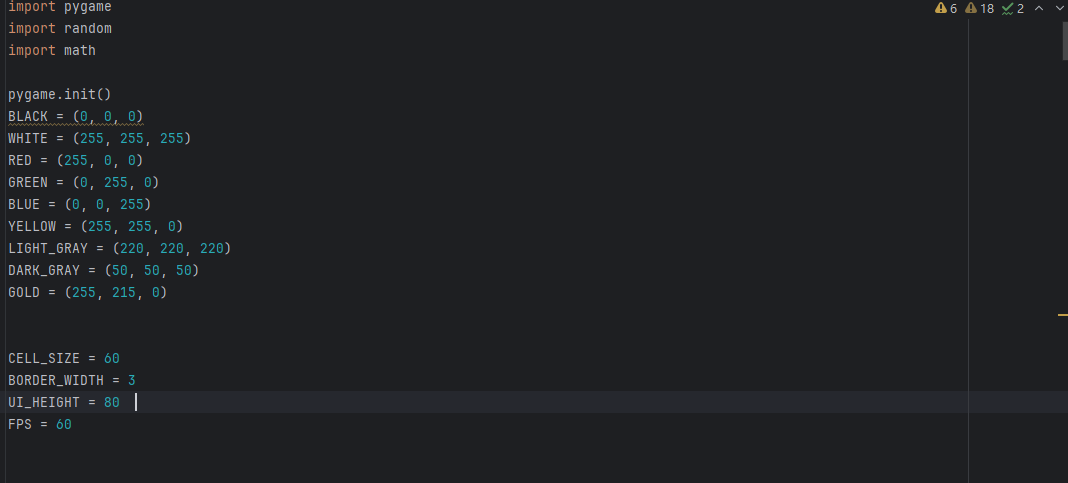
首先我们导入pygame和random两个库,别问为啥导入random,除非没学过python.然后用pygame.init对其进行初始化,现在我们来设置一下屏幕,游戏主题颜色以及FPS,这里我设置为60FPS.(其实还有一个math库哈,这个后面到添加参数的时候就会用到,后续添加)
2.设计关卡的参数
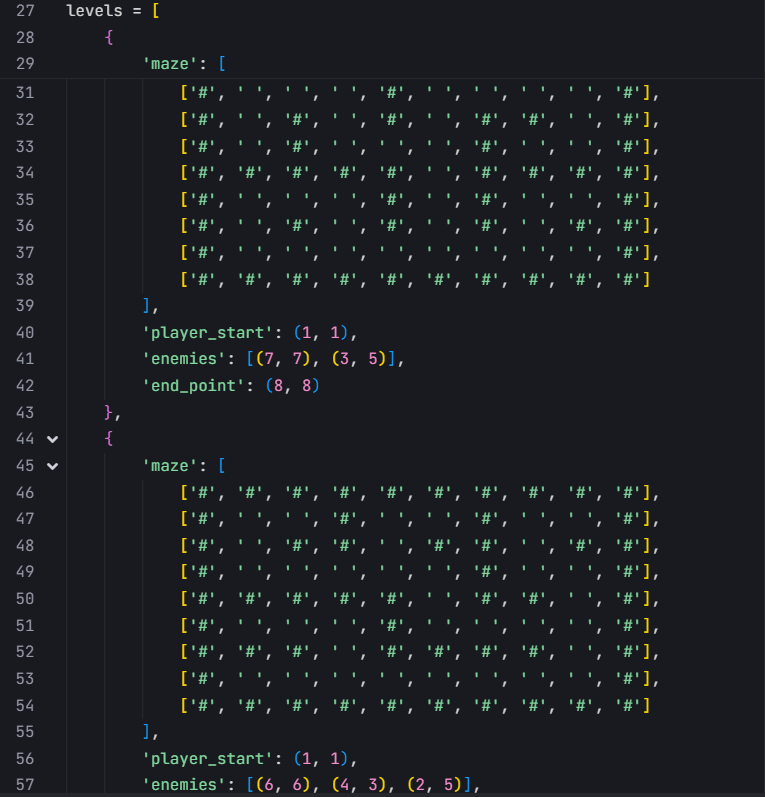
这里我在设立的过程中其实只设计了两关哈,燃尽了,家人们。我使用列表 levels 存储所有关卡的数据,每个关卡是一个字典,包含迷宫布局、玩家起始位置、敌人位置和终点位置。使用 current_level_index 记录当前关卡索引, total_levels 记录总关卡数。后续就会发现关卡设计有问题,咱们走着瞧
3.游戏状态与角色关卡设计
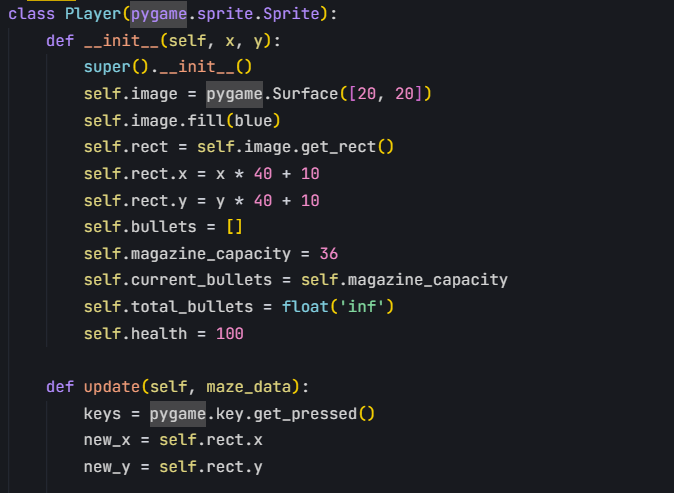
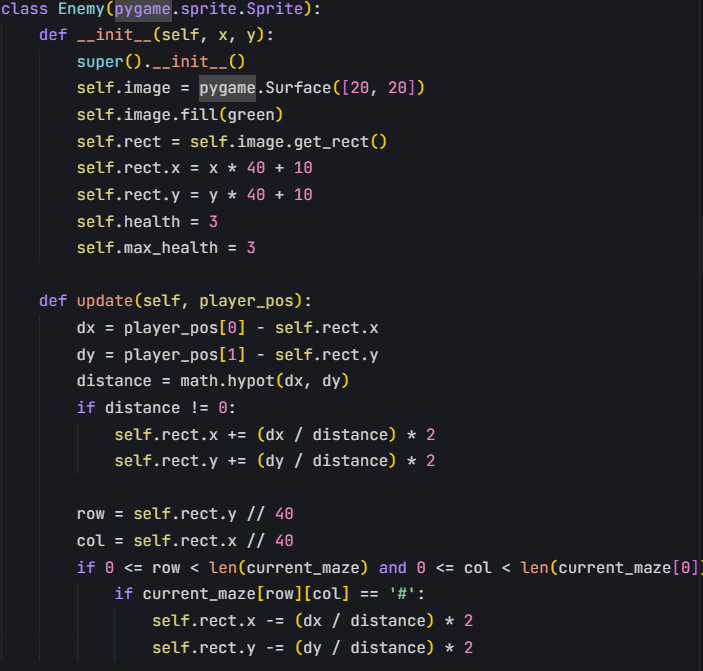
我当时在想,设计的时候游戏应该是可以暂定,退出的,不应该是玩得卡死在里面,所以接下来我设计游戏状态,用game-state绘制不同的状态,加下来设计人物,这个闯关角色说实话开始像设计成一个人,最后有点力不从心,最后设计成了一个球。然后闯关中的敌人也变成了一个球。
4.绘制菜单,加载关卡之后进入主循环
在主循环中需要考虑各种事件,就比如,这个子弹和墙碰到之后,应该是不能反弹的,还有,什么条件下这个角色可以判定为通关,然后,如果我们的角色和这个敌人交锋,角色应该是要扣血的,当血变成0的时候,应该判定游戏失败……一系列问题,最后在运行的过程中发现主循环其实是出现了很多问题的
5.直至最后游戏重置、结束
三、遇到的问题和解决方法
1.首先是我发现这个代码运行出来就是乱码
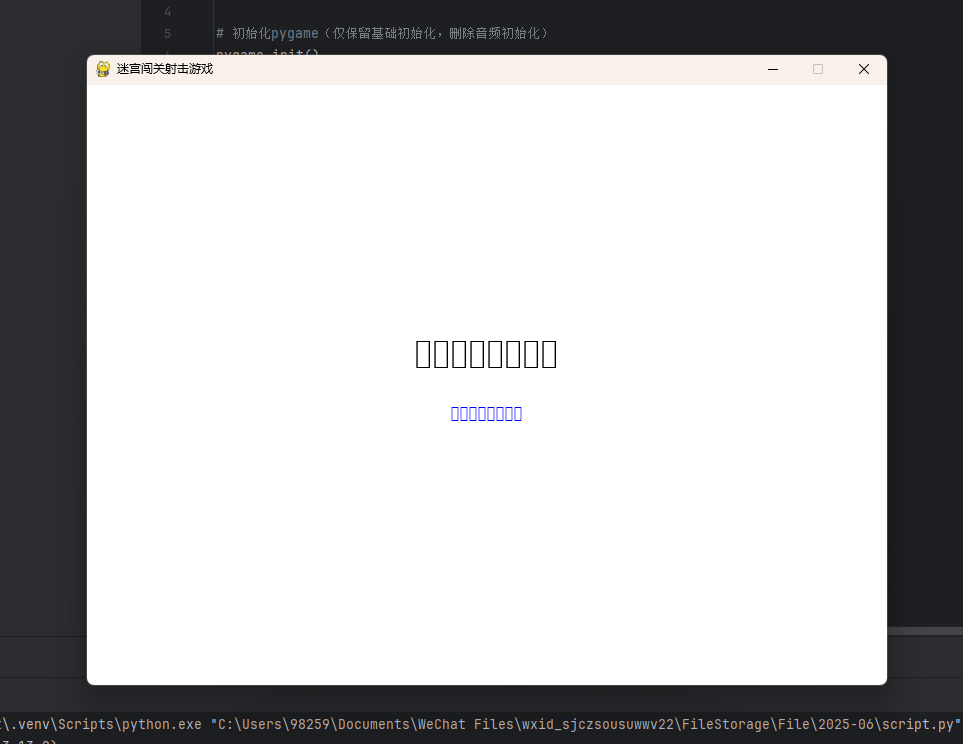
我发现是因为当初在写代码的时候我其实是加入了音频,但是里面没有文件,Pygame找不到文件,所以乱码了,然后我把音频删了,哈哈,因为我想如果不要音频大家应该还是能玩的哈
2.修改之后呢,新的问题它来了。那我从最简单的问题说起吧
(1)是我发现我进入游戏之后竟然无法移动和换弹,只能用我的鼠标左键来发射子弹射击敌人。不过这个问题的出现实在是有些入机。因为在这个游戏里,我们的输入法一定是要调成英文的,用中文的就不行。
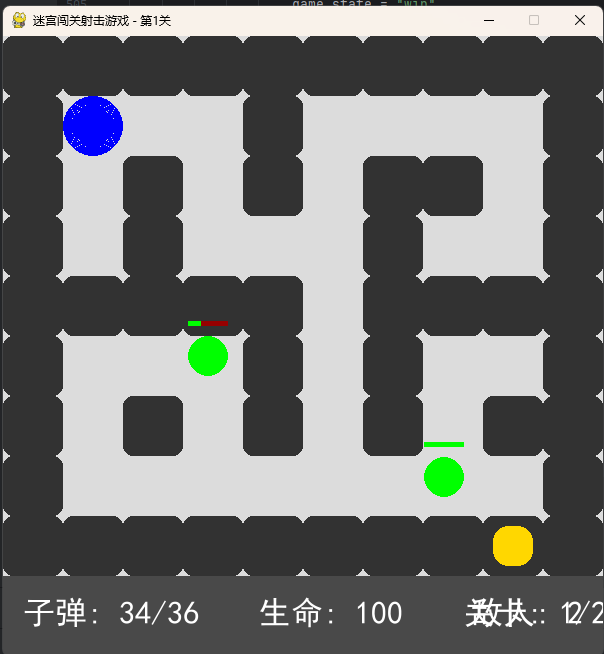
(2)就是我发现我的子弹竟然能穿墙,这让我陷入了沉思,是在主循环中出现了问题。所以我特意添加了一个用于检查的pygame.sprite.spritecollide(这里借助了豆包之力)
(3)改完之后就是我要面对的最后一个问题,就是我在设计两个关卡的时候我的终点其实设计在墙里面,这样我就没办法通关而进入到下一关。请看:
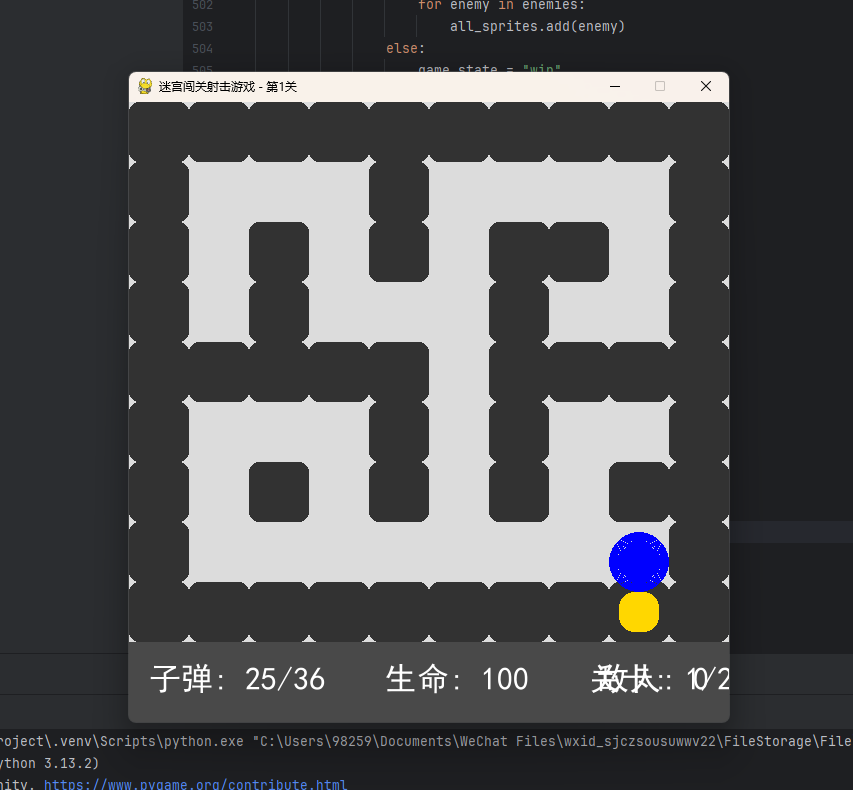
是什么原因呢,就是我当初设计的时候把那个坐标设置错误了
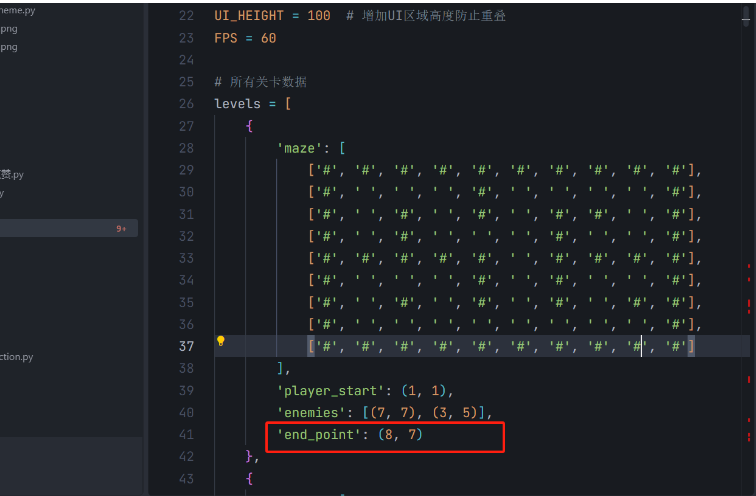
对,那个(8,8)应该是写为(8,7)
(4)改完之后进入第二关,又发现了新的问题:
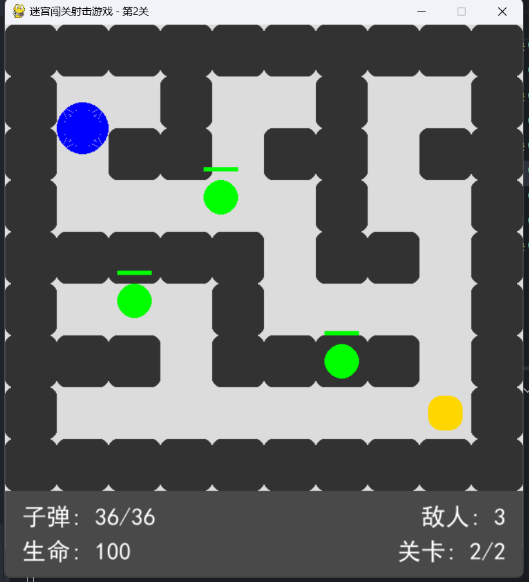
就是这个敌人enemy,我给它设计到墙里面了,这样我是无法击败他,无法通关,不过道理和上面那个差不多,马上就改过来了
四、感悟
先说说这门课的整体感受吧。我一开始听很多学长学姐说选择python课容易得高分。于是乎我便来了,来了之后我就觉得有同学说的话很对啊:没有C语言的基础最好不要来学python。唉,感觉学起来还是太挣扎了,嘤嘤嘤。然后在教学方面,我觉得强哥讲的是很清楚得,但是怎么说,恕我愚钝,唉。课堂上大家经常乐不自禁。还有那个签到,嘻嘻,每次都有点意思哈,开始说实话没找到规律,到了后来,我就发现,欸,每次第一个总是从中间开始哈,其实可以进行创新,给以后的孩子们上上强度;作业方面,我觉得没啥好说的,对于我之前有一次作业没交上,我是很愧疚的,给的时间其实很充足,然后我觉得就是,比如我们要修改我们开始写的实验报告,可以再加一个作业,最后强哥直接看我们第一次作业交没交,检查得话直接看修改后的那个作业就行,因为我不知道改了之后在哪交;真幸运碰到强哥,说实话保管下学期我感觉还是有些忙碌的,即使是python,强哥也能给我制造安慰,甚至教我们学数据结构呜呜呜。太好了!!!!!!!!!!!不过,老师,我真的不想去山西挖煤(嗷呜~)莫愁前路无知己,天下谁人不识君!强哥,我爱你,我爱python!
五。源代码
import pygame
import random
import math
初始化Pygame
pygame.init()
颜色定义
BLACK = (0, 0, 0)
WHITE = (255, 255, 255)
RED = (255, 0, 0)
GREEN = (0, 255, 0)
BLUE = (0, 0, 255)
YELLOW = (255, 255, 0)
LIGHT_GRAY = (220, 220, 220)
DARK_GRAY = (50, 50, 50)
GOLD = (255, 215, 0)
游戏配置
CELL_SIZE = 60 # 迷宫格子大小
BORDER_WIDTH = 3 # 迷宫边框宽度
UI_HEIGHT = 100 # 增加UI区域高度防止重叠
FPS = 60
所有关卡数据
levels = [
{
'maze': [
['#', '#', '#', '#', '#', '#', '#', '#', '#', '#'],
['#', ' ', ' ', ' ', '#', ' ', ' ', ' ', ' ', '#'],
['#', ' ', '#', ' ', '#', ' ', '#', '#', ' ', '#'],
['#', ' ', '#', ' ', ' ', ' ', '#', ' ', ' ', '#'],
['#', '#', '#', '#', '#', ' ', '#', '#', '#', '#'],
['#', ' ', ' ', ' ', '#', ' ', '#', ' ', ' ', '#'],
['#', ' ', '#', ' ', '#', ' ', '#', ' ', '#', '#'],
['#', ' ', ' ', ' ', ' ', ' ', ' ', ' ', ' ', '#'],
['#', '#', '#', '#', '#', '#', '#', '#', '#', '#']
],
'player_start': (1, 1),
'enemies': [(7, 7), (3, 5)],
'end_point': (8, 7)
},
{
'maze': [
['#', '#', '#', '#', '#', '#', '#', '#', '#', '#'],
['#', ' ', ' ', '#', ' ', ' ', '#', ' ', ' ', '#'],
['#', ' ', '#', '#', ' ', '#', '#', ' ', '#', '#'],
['#', ' ', ' ', ' ', ' ', ' ', '#', ' ', ' ', '#'],
['#', '#', '#', '#', '#', ' ', '#', '#', ' ', '#'],
['#', ' ', ' ', ' ', '#', ' ', ' ', ' ', ' ', '#'],
['#', '#', '#', ' ', '#', '#', '#', '#', ' ', '#'],
['#', ' ', ' ', ' ', ' ', ' ', ' ', ' ', ' ', '#'],
['#', '#', '#', '#', '#', '#', '#', '#', '#', '#']
],
'player_start': (1, 1),
'enemies': [(6, 5), (4, 3), (2, 5)],
'end_point': (8, 7)
}
]
current_level_index = 0
total_levels = len(levels)
game_state = "menu" # 状态:menu/playing/paused/win/lose
角色类:玩家
class Player(pygame.sprite.Sprite):
def init(self, x, y):
super().init()
# 创建更大的圆角玩家角色
self.image = pygame.Surface([40, 40], pygame.SRCALPHA)
pygame.draw.circle(self.image, BLUE, (20, 20), 20)
self.rect = self.image.get_rect()
self.rect.x = x * CELL_SIZE + (CELL_SIZE - 40) // 2
self.rect.y = y * CELL_SIZE + (CELL_SIZE - 40) // 2
self.magazine_capacity = 36 # 弹匣容量
self.current_bullets = self.magazine_capacity # 当前子弹
self.health = 100 # 生命值
self.speed = 2 # 移动速度
def update(self, maze_data):
    """处理移动(碰撞检测)"""
    keys = pygame.key.get_pressed()
    new_x, new_y = self.rect.x, self.rect.y

    # 方向键移动
    if keys[pygame.K_LEFT]:
        new_x -= self.speed
    if keys[pygame.K_RIGHT]:
        new_x += self.speed
    if keys[pygame.K_UP]:
        new_y -= self.speed
    if keys[pygame.K_DOWN]:
        new_y += self.speed

    # 四个角碰撞检测(防止穿墙)
    corners = [(new_x, new_y), (new_x + 39, new_y),
               (new_x, new_y + 39), (new_x + 39, new_y + 39)]
    can_move = True
    for x, y in corners:
        row, col = int(y) // CELL_SIZE, int(x) // CELL_SIZE
        if 0 <= row < len(maze_data) and 0 <= col < len(maze_data[0]):
            if maze_data[row][col] == '#':
                can_move = False
                break
    if can_move:
        self.rect.x, self.rect.y = new_x, new_y

def shoot(self, target_pos, bullets_group, all_sprites_group):
    """射击逻辑(生成子弹)"""
    if self.current_bullets > 0:
        # 防止鼠标与玩家重合导致的除零错误
        if self.rect.centerx == target_pos[0] and self.rect.centery == target_pos[1]:
            angle = random.uniform(0, math.pi * 2)
            bullet = Bullet(self.rect.centerx, self.rect.centery,
                            math.cos(angle) * 10, math.sin(angle) * 10)
        else:
            dx, dy = target_pos[0] - self.rect.centerx, target_pos[1] - self.rect.centery
            distance = math.hypot(dx, dy)
            bullet = Bullet(self.rect.centerx, self.rect.centery,
                            (dx / distance) * 10, (dy / distance) * 10)
        bullets_group.add(bullet)
        all_sprites_group.add(bullet)
        self.current_bullets -= 1

def reload(self):
    """换弹逻辑"""
    if self.current_bullets < self.magazine_capacity:
        self.current_bullets = self.magazine_capacity
子弹类
class Bullet(pygame.sprite.Sprite):
def init(self, start_x, start_y, speed_x, speed_y):
super().init()
# 创建更大的发光子弹
self.image = pygame.Surface([12, 12], pygame.SRCALPHA)
pygame.draw.circle(self.image, RED, (6, 6), 6)
self.rect = self.image.get_rect()
self.rect.centerx = start_x
self.rect.centery = start_y
self.speed_x = speed_x
self.speed_y = speed_y
self.timer = 0
def update(self):
    self.rect.x += self.speed_x
    self.rect.y += self.speed_y
    self.timer += 1

    # 边界检测(超出屏幕则销毁)
    if (self.rect.x < -10 or self.rect.x > screen_width + 10 or
            self.rect.y < -10 or self.rect.y > screen_height + 10):
        self.kill()

    # 子弹飞行时间限制
    if self.timer > 100:
        self.kill()
敌人类
class Enemy(pygame.sprite.Sprite):
def init(self, x, y):
super().init()
# 创建更大的圆角敌人角色
self.image = pygame.Surface([40, 40], pygame.SRCALPHA)
pygame.draw.circle(self.image, GREEN, (20, 20), 20)
self.rect = self.image.get_rect()
self.rect.x = x * CELL_SIZE + (CELL_SIZE - 40) // 2
self.rect.y = y * CELL_SIZE + (CELL_SIZE - 40) // 2
self.health = 3
self.max_health = 3
self.last_move = pygame.time.get_ticks() # 限制移动频率
self.speed = 2 # 移动速度
def update(self, player_pos):
    # 限制移动频率(每50毫秒移动一次,防止抖动)
    now = pygame.time.get_ticks()
    if now - self.last_move < 50:
        return
    self.last_move = now

    dx = player_pos[0] - self.rect.x
    dy = player_pos[1] - self.rect.y
    distance = math.hypot(dx, dy)

    if distance > 0:
        new_x = self.rect.x + (dx / distance) * self.speed
        new_y = self.rect.y + (dy / distance) * self.speed

        # 碰撞检测(四个角判断是否撞墙)
        corners = [(new_x, new_y), (new_x + 39, new_y),
                   (new_x, new_y + 39), (new_x + 39, new_y + 39)]
        can_move = True
        for x, y in corners:
            row, col = int(y) // CELL_SIZE, int(x) // CELL_SIZE
            if 0 <= row < len(current_maze) and 0 <= col < len(current_maze[0]):
                if current_maze[row][col] == '#':
                    can_move = False
                    break
        if can_move:
            self.rect.x, self.rect.y = new_x, new_y
加载当前关卡
def load_level(level_index):
global screen_width, screen_height, screen
level_data = levels[level_index]
maze_data = level_data['maze']
player_start = level_data['player_start']
enemy_positions = level_data['enemies']
end_point = level_data['end_point']

# 根据迷宫大小动态调整窗口尺寸
maze_rows = len(maze_data)
maze_cols = len(maze_data[0]) if maze_rows > 0 else 0
screen_width = maze_cols * CELL_SIZE
screen_height = maze_rows * CELL_SIZE + UI_HEIGHT
screen = pygame.display.set_mode((screen_width, screen_height))
pygame.display.set_caption(f"迷宫闯关射击游戏 - 第{level_index + 1}关")

player = Player(player_start[0], player_start[1])
enemies = pygame.sprite.Group()
for pos in enemy_positions:
    enemy = Enemy(pos[0], pos[1])
    enemies.add(enemy)
return maze_data, player, enemies, end_point
绘制开始菜单
def draw_start_menu():
screen.fill(LIGHT_GRAY)
# 标题
title_font = pygame.font.SysFont("SimHei", 80)
title_text = title_font.render("迷宫闯关射击游戏", True, DARK_GRAY)

# 副标题
subtitle_font = pygame.font.SysFont("SimHei", 40)
subtitle_text = subtitle_font.render("探索迷宫,消灭敌人,找到出口", True, DARK_GRAY)

# 开始提示
hint_font = pygame.font.SysFont("SimHei", 30)
hint_text = hint_font.render("按空格键开始游戏", True, BLUE)

# 控制说明
controls_font = pygame.font.SysFont("SimHei", 25)
controls_text1 = controls_font.render("方向键: 移动", True, DARK_GRAY)
controls_text2 = controls_font.render("鼠标左键: 射击", True, DARK_GRAY)
controls_text3 = controls_font.render("R键: 换弹", True, DARK_GRAY)
controls_text4 = controls_font.render("Esc键: 暂停", True, DARK_GRAY)

# 绘制文本
screen.blit(title_text, (screen_width // 2 - title_text.get_width() // 2, screen_height // 4))
screen.blit(subtitle_text, (screen_width // 2 - subtitle_text.get_width() // 2, screen_height // 4 + 100))
screen.blit(hint_text, (screen_width // 2 - hint_text.get_width() // 2, screen_height // 2))

# 绘制控制说明
controls_y = screen_height // 2 + 100
screen.blit(controls_text1, (screen_width // 2 - controls_text1.get_width() // 2, controls_y))
screen.blit(controls_text2, (screen_width // 2 - controls_text2.get_width() // 2, controls_y + 40))
screen.blit(controls_text3, (screen_width // 2 - controls_text3.get_width() // 2, controls_y + 80))
screen.blit(controls_text4, (screen_width // 2 - controls_text4.get_width() // 2, controls_y + 120))
绘制暂停界面
def draw_pause_menu():
# 创建半透明遮罩
overlay = pygame.Surface((screen_width, screen_height))
overlay.set_alpha(192)
overlay.fill(BLACK)
screen.blit(overlay, (0, 0))
# 标题
pause_font = pygame.font.SysFont("SimHei", 60)
title_text = pause_font.render("游戏暂停", True, WHITE)

# 选项
option_font = pygame.font.SysFont("SimHei", 40)
continue_text = option_font.render("按Esc继续游戏", True, WHITE)
restart_text = option_font.render("按R重新开始", True, WHITE)
quit_text = option_font.render("按Q退出游戏", True, WHITE)

# 绘制文本
screen.blit(title_text, (screen_width // 2 - title_text.get_width() // 2, screen_height // 2 - 150))
screen.blit(continue_text, (screen_width // 2 - continue_text.get_width() // 2, screen_height // 2 - 50))
screen.blit(restart_text, (screen_width // 2 - restart_text.get_width() // 2, screen_height // 2 + 50))
screen.blit(quit_text, (screen_width // 2 - quit_text.get_width() // 2, screen_height // 2 + 150))
绘制游戏界面
def draw_game():
# 绘制迷宫背景
screen.fill(LIGHT_GRAY)
# 绘制迷宫墙壁(更大的圆角)
for row_idx, row in enumerate(current_maze):
    for col_idx, cell in enumerate(row):
        if cell == '#':
            pygame.draw.rect(screen, DARK_GRAY,
                             (col_idx * CELL_SIZE, row_idx * CELL_SIZE,
                              CELL_SIZE, CELL_SIZE), 0, 10)  # 圆角更大

# 绘制终点(更大的终点)
end_x, end_y = end_point
pygame.draw.rect(screen, GOLD,
                 (end_x * CELL_SIZE + (CELL_SIZE - 40) // 2,
                  end_y * CELL_SIZE + (CELL_SIZE - 40) // 2,
                  40, 40), 0, 15)  # 更大的圆角终点

# 绘制玩家发光效果(范围更大)
if player:
    player_rect = player.rect
    for i in range(10, 0, -2):  # 发光层数减少但范围更大
        pygame.draw.circle(screen, (0, 0, 255, 40),
                           (player_rect.centerx, player_rect.centery),
                           20 + i, 2)  # 发光线更粗

# 绘制敌人血条(更大的血条)
for enemy in enemies:
    # 血条背景
    pygame.draw.rect(screen, (150, 0, 0),
                     (enemy.rect.x, enemy.rect.y - 15,
                      40, 5))  # 更长的血条
    # 当前血量
    health_width = 40 * (enemy.health / enemy.max_health)
    pygame.draw.rect(screen, (0, 255, 0),
                     (enemy.rect.x, enemy.rect.y - 15,
                      health_width, 5))

# 绘制UI背景(更高)
ui_background = pygame.Surface((screen_width, UI_HEIGHT))
ui_background.set_alpha(220)
ui_background.fill(DARK_GRAY)
screen.blit(ui_background, (0, screen_height - UI_HEIGHT))

# 绘制UI信息(更大字体)
ui_font = pygame.font.SysFont("SimHei", 28)

# 第一行信息 (顶部)
top_y = screen_height - UI_HEIGHT + 15

# 子弹信息(左对齐)
bullet_text = ui_font.render(f"子弹: {player.current_bullets}/{player.magazine_capacity}", True, WHITE)
screen.blit(bullet_text, (20, top_y))

# 敌人信息(右对齐)
enemy_text = ui_font.render(f"敌人: {len(enemies)}", True, WHITE)
screen.blit(enemy_text, (screen_width - enemy_text.get_width() - 20, top_y))

# 第二行信息(底部)
bottom_y = screen_height - UI_HEIGHT + 55

# 生命值信息(左对齐)
health_text = ui_font.render(f"生命: {int(player.health)}", True, WHITE)
screen.blit(health_text, (20, bottom_y))

# 关卡信息(右对齐)
level_text = ui_font.render(f"关卡: {current_level_index + 1}/{total_levels}", True, WHITE)
screen.blit(level_text, (screen_width - level_text.get_width() - 20, bottom_y))
绘制胜利/失败界面
def draw_result():
# 创建半透明遮罩
overlay = pygame.Surface((screen_width, screen_height))
overlay.set_alpha(192)
overlay.fill(BLACK)
screen.blit(overlay, (0, 0))
# 结果标题
result_font = pygame.font.SysFont("SimHei", 80)
text = "胜利!" if game_state == "win" else "失败!"
title_text = result_font.render(text, True, WHITE)

# 重新开始提示
restart_font = pygame.font.SysFont("SimHei", 40)
restart_text = restart_font.render("按R重新开始", True, WHITE)

# 返回菜单提示
menu_font = pygame.font.SysFont("SimHei", 30)
menu_text = menu_font.render("按M返回菜单", True, WHITE)

# 绘制文本
screen.blit(title_text, (screen_width // 2 - title_text.get_width() // 2, screen_height // 2 - 100))
screen.blit(restart_text, (screen_width // 2 - restart_text.get_width() // 2, screen_height // 2 + 50))
screen.blit(menu_text, (screen_width // 2 - menu_text.get_width() // 2, screen_height // 2 + 120))
全局变量初始化
current_maze = []
player = None
enemies = None
end_point = None
all_sprites = pygame.sprite.Group()
bullets = pygame.sprite.Group()
screen_width = 800 # 临时初始值,会在加载关卡时更新
screen_height = 600 # 临时初始值,会在加载关卡时更新
screen = pygame.display.set_mode((screen_width, screen_height))
主循环
clock = pygame.time.Clock()
running = True
while running:
# 事件处理
for event in pygame.event.get():
if event.type == pygame.QUIT:
running = False
    if game_state == "menu":
        if event.type == pygame.KEYDOWN:
            if event.key == pygame.K_SPACE:
                # 加载第一关
                current_level_index = 0
                current_maze, player, enemies, end_point = load_level(current_level_index)
                all_sprites = pygame.sprite.Group()
                bullets = pygame.sprite.Group()
                all_sprites.add(player)
                for enemy in enemies:
                    all_sprites.add(enemy)
                game_state = "playing"

    elif game_state == "playing":
        if event.type == pygame.KEYDOWN:
            if event.key == pygame.K_ESCAPE:
                game_state = "paused"
            if event.key == pygame.K_r:
                player.reload()  # 按R换弹
        if event.type == pygame.MOUSEBUTTONDOWN:
            if event.button == 1:  # 左键射击
                player.shoot(event.pos, bullets, all_sprites)

    elif game_state == "paused":
        if event.type == pygame.KEYDOWN:
            if event.key == pygame.K_ESCAPE:
                game_state = "playing"
            if event.key == pygame.K_r:
                # 重新开始当前关卡
                current_maze, player, enemies, end_point = load_level(current_level_index)
                all_sprites = pygame.sprite.Group()
                bullets = pygame.sprite.Group()
                all_sprites.add(player)
                for enemy in enemies:
                    all_sprites.add(enemy)
                game_state = "playing"
            if event.key == pygame.K_q:
                running = False

    elif game_state in ("win", "lose"):
        if event.type == pygame.KEYDOWN:
            if event.key == pygame.K_r:
                # 重新开始当前关卡
                current_maze, player, enemies, end_point = load_level(current_level_index)
                all_sprites = pygame.sprite.Group()
                bullets = pygame.sprite.Group()
                all_sprites.add(player)
                for enemy in enemies:
                    all_sprites.add(enemy)
                game_state = "playing"
            if event.key == pygame.K_m:
                # 返回菜单
                all_sprites.empty()
                bullets.empty()
                game_state = "menu"

# 游戏逻辑更新
if game_state == "playing":
    # 更新玩家
    if player:
        player.update(current_maze)

    # 更新敌人
    for enemy in enemies:
        enemy.update(player.rect.center)

    # 更新子弹
    bullets.update()

    # 子弹与敌人碰撞检测
    hits = pygame.sprite.groupcollide(bullets, enemies, True, False)
    for bullet, enemy_list in hits.items():
        for enemy in enemy_list:
            enemy.health -= 1
            if enemy.health <= 0:
                enemy.kill()

    # 玩家与敌人碰撞受伤
    if pygame.sprite.spritecollide(player, enemies, False):
        player.health -= 0.5
        if player.health <= 0:
            game_state = "lose"

    # 检查是否到达终点
    if player:
        end_x, end_y = end_point

        # 创建终点矩形(使用整个单元格)
        end_rect = pygame.Rect(end_x * CELL_SIZE, end_y * CELL_SIZE, CELL_SIZE, CELL_SIZE)

        # 检查玩家是否到达终点
        if player.rect.colliderect(end_rect):
            if current_level_index < total_levels - 1:
                # 进入下一关
                current_level_index += 1
                current_maze, player, enemies, end_point = load_level(current_level_index)
                all_sprites = pygame.sprite.Group()
                bullets = pygame.sprite.Group()
                all_sprites.add(player)
                for enemy in enemies:
                    all_sprites.add(enemy)
            else:
                # 所有关卡完成
                game_state = "win"

# 绘制游戏画面
if game_state == "menu":
    draw_start_menu()
elif game_state == "playing":
    draw_game()
    all_sprites.draw(screen)
    bullets.draw(screen)
elif game_state == "paused":
    draw_game()  # 先绘制游戏画面
    draw_pause_menu()  # 再绘制暂停菜单
elif game_state in ("win", "lose"):
    draw_game()  # 先绘制游戏画面
    draw_result()  # 再绘制结果画面

# 更新显示
pygame.display.flip()
clock.tick(FPS)
退出游戏
pygame.quit()

 浙公网安备 33010602011771号