
实践2.4 ELF文件格式分析
实践2.4 ELF文件格式分析
1.ELF文件头
查看/usr/include/elf.h文件:
define EI_NIDENT (16)
typedef struct
{
unsigned char e_ident[EI_NIDENT]; /* 魔数和其他信息 /
Elf32_Half e_type; / 目标文件类型 /
Elf32_Half e_machine; / 硬件平台 /
Elf32_Word e_version; / elf头部版本 /
Elf32_Addr e_entry; / 程序进入点 /
Elf32_Off e_phoff; / 程序头表偏移量 /
Elf32_Off e_shoff; / 节头表偏移量 /
Elf32_Word e_flags; / 处理器特定标志 /
Elf32_Half e_ehsize; / elf头部长度 /
Elf32_Half e_phentsize; / 程序头表中一个条目的长度 /
Elf32_Half e_phnum; / 程序头表条目数目 /
Elf32_Half e_shentsize; / 节头表中一个条目的长度 /
Elf32_Half e_shnum; / 节头表条目数目 /
Elf32_Half e_shstrndx; / 节头表字符索引 */
} Elf32_Ehdr;
typedef struct
{
unsigned char e_ident[EI_NIDENT]; /* Magic number and other info /
Elf64_Half e_type; / Object file type /
Elf64_Half e_machine; / Architecture /
Elf64_Word e_version; / Object file version /
Elf64_Addr e_entry; / Entry point virtual address /
Elf64_Off e_phoff; / Program header table file offset /
Elf64_Off e_shoff; / Section header table file offset /
Elf64_Word e_flags; / Processor-specific flags /
Elf64_Half e_ehsize; / ELF header size in bytes /
Elf64_Half e_phentsize; / Program header table entry size /
Elf64_Half e_phnum; / Program header table entry count /
Elf64_Half e_shentsize; / Section header table entry size /
Elf64_Half e_shnum; / Section header table entry count /
Elf64_Half e_shstrndx; / Section header string table index */
} Elf64_Ehdr;
2.查看相关信息
以实践2.3中的passwd.c为例:
gcc -c passwd.c -o passwd.o //生成汇编文件
hexdump -x passwd.o //查看十六进制信息
objdump –x passwd.o //查看段信息
readelf -a passwd.o //查看段信息
使用objdump命令结果如下:
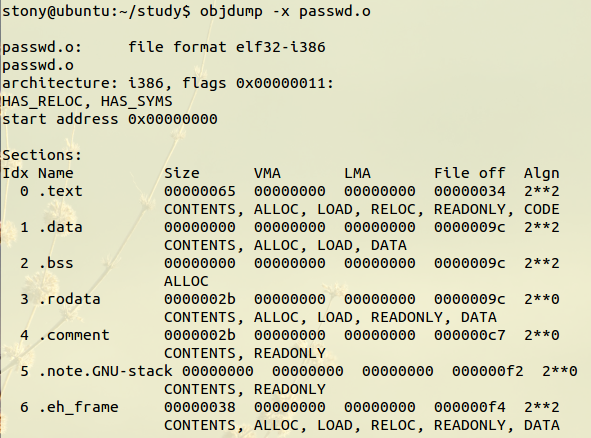
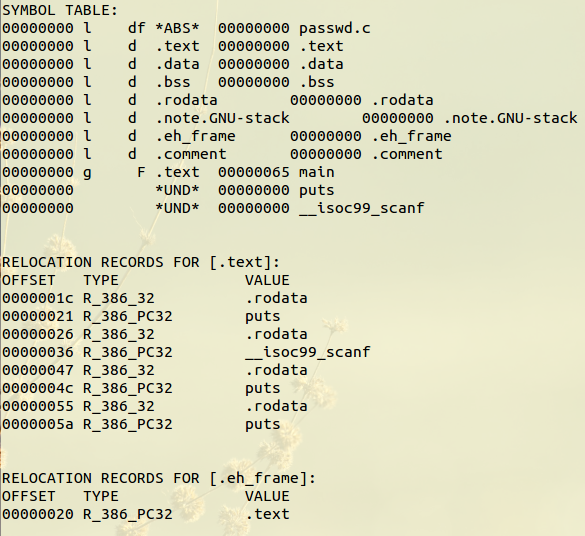
使用readelf命令结果如下:
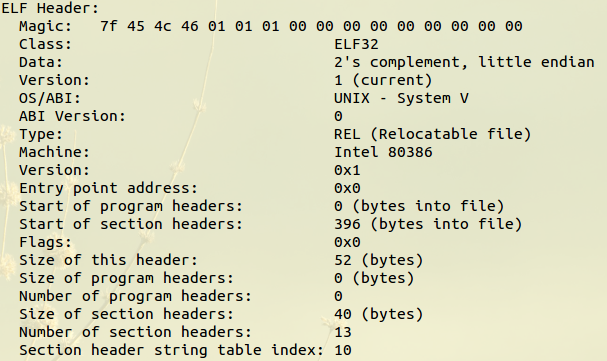
文件头:
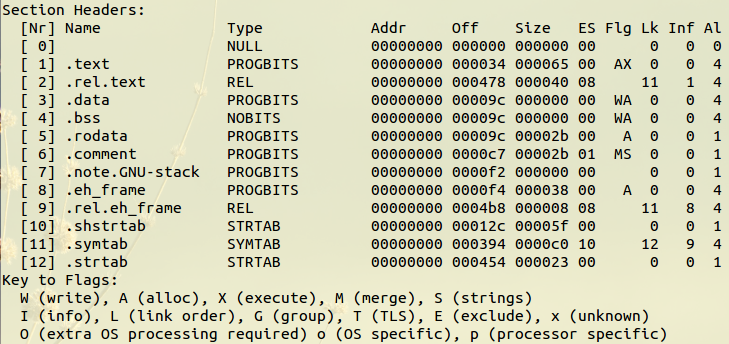
段表:
符号表:
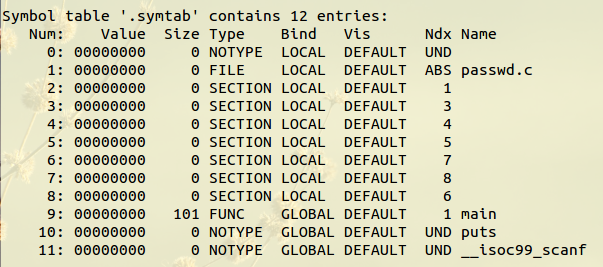
3.具体分析
3.1 文件头分析
32位的elf文件头大小是52字节,如下:

第一行实际内容为7f45 4c46 0101 0100 0000 0000 0000 0000
前四个字节7f45 4c46(0x45,0x4c,0x46是’e','l','f'对应的ASCII)是个魔数(magic number),表示这是一个ELF对象,接下来的一个字节10表示是一个32位对象(如果是64位的对象是02),再接下来的一个字节01表示采用小端法表示,再接下来的一个字节01表示文件头版本,剩下的默认都设置为0。
第二行:
e_type 2字节 0x0001 表示重定位文件
e_machine 2字节 0x0003 表示386体系文件
e_version 4字节 0x00000001 表示是当前版本
e_entry 4字节 0x00000000 表示程序入口地址(无)
第三行:
e_phoff 4字节 0x00000000 表示程序头表的偏移地址(无)
e_shoff 4字节 0x0000018c 表示段表偏移地址
e_flags 4字节 0x00000000 表示处理器特定标志(未知)
e_ehsize 2字节 0x0034 表示elf头部长度
e_phentsize 2字节 0x0000 表示程序头表中一个条目的长度
e_phnum 2字节 0x0000 表示程序头表条目数目(0)
e_shentsize 2字节 0x0028 表示每个节头表条目的大小(0x28)
e_shnum 2字节 0x000d 表示节头表条目数(13)
e_shstrndx 2字节 0x000a 表示节头表字符索引(10)
由以上可知,节头表从0x0000018c处开始,每个节区大小为0x28,一共有13个节区,第0xa是段表索引号。
3.2 节区:
第一节区:0x18c-0x1b3

第二节区:0x1b4-0x1db

第三节区:0x1dc-0x203

第四节区:0x204-0x22b

第五节区:0x22c-0x253

第六节区:0x254-0x27b

第七节区:0x27c-0x2a3

第八节区:0x2a4-0x2cb

第九节区:0x2cc-0x2f3

第十节区:0x2f4-0x31b

第十一节区:0x31c-0x343

第十二节区:0x344-0x36b

第十三节区:0x36c-0x393

3.3 节头表
typedef struct
{
Elf32_Word sh_name; /* 节名在字符表中的索引 /
Elf32_Word sh_type; / 小节的类型 /
Elf32_Word sh_flags; / 小节属性 /
Elf32_Addr sh_addr; / 节在运行时的虚拟地址 /
Elf32_Off sh_offset; / 小节的文件偏移 /
Elf32_Word sh_size; / 小节的大小 /
Elf32_Word sh_link; / 链接的另外一小节的索引 /
Elf32_Word sh_info; / 附加的小节信息 /
Elf32_Word sh_addralign; / 小节对齐 /
Elf32_Word sh_entsize; / 固定大小的入口的表 */
} Elf32_Shdr;
也就是说,在得出上一步的每一个节区的节头表内容后 ,就可以按照这个表来查找到具体段的段偏移sh_offset和段大小sh_offset。
查看的命令:
readelf命令
readelf –S passwd.o //查看段表中中存放的所有的节头
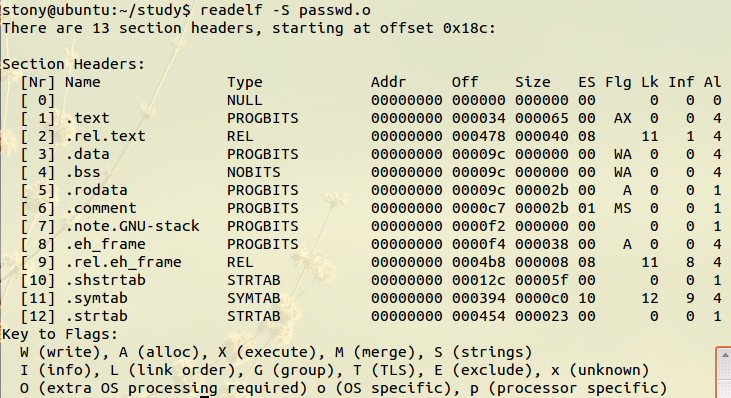
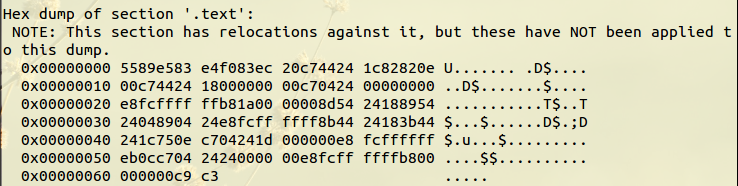
如要查看.text段,因为对应的索引为1,所以输入:
readelf -x 1 passwd.o
hexdump命令
查阅得知,.text的偏移量是0x34=52,大小是0x65=101
hexdump –s 52 –n 101 –C passwd.o
![enter description here][22]
3.4 理解常见段
-
.text section
可执行指令的集合,.data和.text都是属于PROGBITS类型的section,这是将来要运行的程序与代码。 -
.strtab section
属于STRTAB类型,可以在文件中看到,储存着符号的名字。 -
.symtab section
存放所有section中定义的符号名字,比如“data_items”,“start_loop”,是属于SYMTAB类型,它描述了.strtab中的符号在“内存”中对应的“内存地址”。 -
.rodata section
ro代表read only,即只读数据(const)。[22]:http://images2015.cnblogs.com/blog/744668/201606/744668-20160602202840649-457861662.png

 浙公网安备 33010602011771号