
第十一周、十二周作业
图片一 用内部存储实现文件写入和读取功能
<LinearLayout xmlns:android="http://schemas.android.com/apk/res/android"
    android:layout_height="match_parent"
    android:layout_width="match_parent"
    android:orientation="vertical">
 <TextView
     android:id="@+id/tv_1"
     android:layout_width="match_parent"
     android:layout_height="wrap_content"
     android:text="内部存储空间文件操作"
     android:textSize="30dp"
     android:layout_margin="5dp"
     android:background="#706767"/>
 <EditText
     android:id="@+id/et_1"
     android:layout_width="match_parent"
     android:layout_height="wrap_content"
     android:layout_marginTop="45dp"
     android:hint="输入你想写入的内容"
     android:textSize="25dp"
     android:layout_marginLeft="10dp"/>
 <Button
     android:id="@+id/but_1"
     android:layout_width="wrap_content"
     android:layout_height="wrap_content"
     android:layout_marginLeft="15dp"
     android:text="写入"
     android:textSize="25dp"
     android:background="#A09B9B"
     android:onClick="click1"/>


 <EditText
     android:id="@+id/et_2"
     android:layout_width="match_parent"
     android:layout_height="wrap_content"
     android:layout_marginTop="45dp"
     android:hint="显示读取的内容"
     android:textSize="25dp"
     android:layout_marginLeft="10dp"/>


 <Button
     android:id="@+id/but_2"
     android:layout_width="wrap_content"
     android:layout_height="wrap_content"
     android:layout_marginLeft="15dp"
     android:text="读取"
     android:textSize="25dp"
     android:background="#A09B9B"
     android:onClick="click2"/>
</LinearLayout>
package cn.itcast.save;

import androidx.appcompat.app.AppCompatActivity;
import android.os.Bundle;
import android.view.View;
import android.widget.EditText;
import android.widget.Toast;

import java.io.FileInputStream;
import java.io.FileOutputStream;
import java.io.IOException;

public class MainActivity extends AppCompatActivity {

    @Override
    protected void onCreate(Bundle savedInstanceState) {
        super.onCreate(savedInstanceState);
        setContentView(R.layout.activity_main);
    }
    public void click1(View view) {
        String fileName="data.txt";

        String content=((EditText)(findViewById(R.id.et_1))).getText().toString();
        FileOutputStream fos=null;
        try{
            fos=openFileOutput(fileName, MODE_PRIVATE);
            fos.write(content.getBytes());
        }catch(Exception e){
            e.printStackTrace();
        }finally{
            try {
                if(fos!=null){
                    fos.close();
                }
            } catch (Exception e) {
                e.printStackTrace();
            }
        }
        Toast.makeText(this, "已写入",Toast.LENGTH_LONG).show();


    }
    public void click2(View view){
        EditText editText2=findViewById( R.id.et_2 );
        String content="";
        FileInputStream fis=null;
        try {
            fis=openFileInput("data.txt");
            byte[] buffer=new byte[fis.available()];
            fis.read(buffer);
            content=new String(buffer);
        } catch (Exception e) {
            e.printStackTrace();
        }finally{
            try {
                if(fis!=null){
                    fis.close();
                }
            } catch (Exception e) {
                e.printStackTrace();
            }
        }
        editText2.setText( content );
    }


}

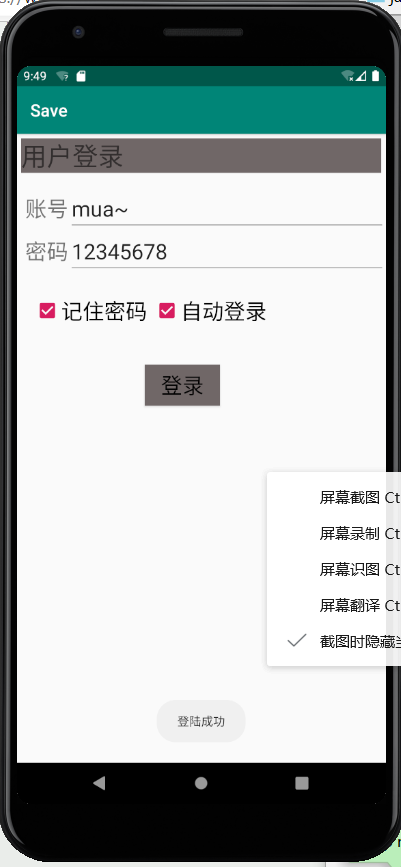
图片二 使用sharedpreference实现记住密码功能
<RelativeLayout xmlns:android="http://schemas.android.com/apk/res/android"
    android:layout_height="match_parent"
    android:layout_width="match_parent"
    android:orientation="vertical">
    <TextView
        android:id="@+id/tv_1"
        android:layout_width="match_parent"
        android:layout_height="wrap_content"
        android:text="用户登录"
        android:textSize="30dp"
        android:layout_margin="5dp"
        android:background="#706767"/>
    <TextView
        android:id="@+id/tv_2"
        android:layout_width="wrap_content"
        android:layout_height="wrap_content"
        android:text="账号"
        android:layout_marginLeft="10dp"
        android:textSize="25dp"
        android:layout_marginTop="70dp"/>
    <TextView
        android:id="@+id/tv_3"
        android:layout_width="wrap_content"
        android:layout_height="wrap_content"
        android:text="密码"
        android:layout_marginLeft="10dp"
        android:textSize="25dp"
        android:layout_marginTop="120dp"/>
    <EditText
        android:id="@+id/et_1"
        android:layout_width="match_parent"
        android:layout_height="wrap_content"
        android:hint="请输入用户名"
        android:textSize="25dp"
        android:layout_toRightOf="@id/tv_2"
        android:layout_marginTop="60dp"/>
    <EditText
        android:id="@+id/et_2"
        android:layout_width="match_parent"
        android:layout_height="wrap_content"
        android:hint="请输入密码"
        android:textSize="25dp"
        android:layout_toRightOf="@id/tv_3"
        android:layout_marginTop="110dp"/>
    <CheckBox
        android:id="@+id/cb_1"
        android:layout_width="wrap_content"
        android:layout_height="wrap_content"
        android:textSize="25dp"
        android:text="记住密码"
        android:layout_marginTop="190dp"
        android:layout_marginLeft="20dp"/>
    <CheckBox
        android:id="@+id/cb_2"
        android:layout_width="wrap_content"
        android:layout_height="wrap_content"
        android:textSize="25dp"
        android:text="自动登录"
        android:layout_marginTop="190dp"
        android:layout_marginLeft="160dp"/>
    <Button
        android:id="@+id/but_1"
        android:layout_width="wrap_content"
        android:layout_height="wrap_content"
        android:layout_marginTop="270dp"
        android:layout_marginLeft="150dp"
        android:textSize="25dp"
        android:text="登录"
        android:background="#706767"
        android:onClick="click1"/>


</RelativeLayout>
package cn.itcast.save;

import androidx.appcompat.app.AppCompatActivity;

import android.content.Context;
import android.content.SharedPreferences;
import android.os.Bundle;
import android.view.View;
import android.widget.Button;
import android.widget.CheckBox;
import android.widget.EditText;
import android.widget.Toast;

import java.util.HashMap;
import java.util.Map;

import static java.lang.System.load;

public class Main2Activity extends AppCompatActivity {

   private EditText userName,passWord;
   private CheckBox box;


    @Override
    protected void onCreate(Bundle savedInstanceState) {
        super.onCreate( savedInstanceState );
        setContentView( R.layout.activity_main2 );
        userName=findViewById( R.id.et_1 );
        passWord=findViewById( R.id.et_2 );
        box=findViewById( R.id.cb_1 );
        load();
    }
    public void click1(View view){
        String name=userName.getText().toString();
        String pwd=passWord.getText().toString();
        if (box.isChecked()){
            SharedPreferences sp=getSharedPreferences( "info",MODE_PRIVATE );
            SharedPreferences.Editor et=sp.edit();
            et.putString( "NAME",name);
            et.putString( "PWD",pwd);
            et.commit();
            Toast.makeText( this,"登陆成功",Toast.LENGTH_LONG ).show();

        }else {
            Toast.makeText( this,"登陆成功",Toast.LENGTH_LONG ).show();
        }
    }

    private void load() {
        SharedPreferences sp=getSharedPreferences( "info",MODE_PRIVATE );
        String nameString=sp.getString( "NAME","" );
        String pwdString=sp.getString( "PWD","" );
        userName.setText( nameString );
        passWord.setText( pwdString );
    }


}

 浙公网安备 33010602011771号