
实验十一
   package 实验11;

  import java.awt.*;
  import javax.swing.*;
  import java.awt.event.*;
  public class Jisuanqi extends Frame implements ActionListener{
  public Jisuanqi() {
 super("计算器");
 Frame ff=new Frame("framework test");
 ff.setSize(400,100);
 ff.setLocation(300,240);
 ff.setLayout(new FlowLayout());
 final TextField f1=new TextField("10",8);
 ff.add(f1);
 //this.add(new Label("+"));
 Label l1=new Label("+");
 ff.add(l1);
 //this.add(new TextField("20",8));
 TextField f2=new TextField("20",8);
 ff.add(f2);
 //this.add(new Button("="));
 Button b1=new Button("=");
 ff.add(b1);
 //this.add(new TextField(10));
 TextField f3=new TextField(10);
 ff.add(f3);
 ff.addWindowListener(new myclose());
 ff.setVisible(true);
 b1.addActionListener(new ActionListener()
 {public void actionPerformed(ActionEvent e)
 {double c;
 String s1=f1.getText();
 double a=Integer.parseInt(s1);
 String s2=f2.getText();
 double b=Integer.parseInt(s2);
 c=a+b;
 String m=String.valueOf(c);
 f3.setText(m);
  }

 private double Integer(String s) {
 return 0;
 }
 });
 }

 class myclose implements WindowListener{

 public void windowActivated(WindowEvent arg0) {

 }

 public void windowClosed(WindowEvent arg0) {
 // TODO Auto-generated method stub
 }

 public void windowClosing(WindowEvent arg0) {

 System.exit(0);
 }

 public void windowDeactivated(WindowEvent arg0) {

 }

 public void windowDeiconified(WindowEvent arg0) {
 }

public void windowIconified(WindowEvent arg0) {


}
  public void windowOpened(WindowEvent arg0) {

 }

 }


public static void main(String[] args) {
 new Jisuanqi();
 }


public void actionPerformed(ActionEvent arg0) {

}

}
实验结果:
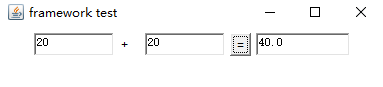
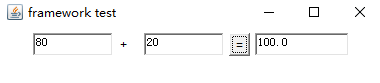
实验心得:通过本次实验了解了图形界面的构成以及事件的监听,本次实验难度较大,是在韵锦的帮助下完成的。

 浙公网安备 33010602011771号