完成评论功能
- 定义评论的视图函数
@app.route('/comment/',methods=['POST'])
def comment():
读取前端页面数据,保存到数据库中 - 用<input type="hidden" 方法获取前端的"question_id"
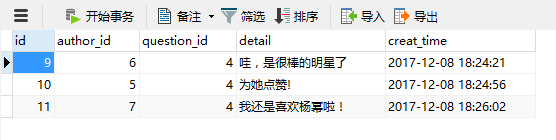
- 显示评论次数
- 要求评论前登录
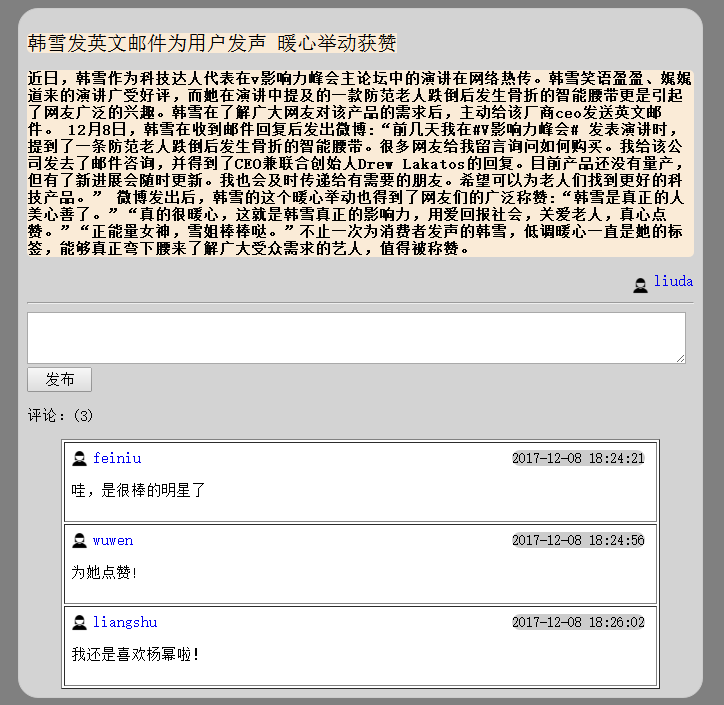
- 尝试实现详情页面下的评论列表显示
视图函数:
@app.route('/xiangqing/<question_id>')
def xiangqing(question_id):
        quest = Question.query.filter(Question.id == question_id).first()
        return render_template('xiangqing.html',ques=quest)

@app.route('/comment/',methods=['POST'])
@denglufirst
def comment():
    comment=request.form.get('pinglun')
    ques_id=request.form.get('question_id')
    user = User.query.filter(User.username == session.get('user')).first()
    auth_id=user.id
    comm=Comment(author_id=auth_id,question_id=ques_id,detail=comment)
    db.session.add(comm)
    db.session.commit()
    return redirect(url_for('xiangqing',question_id=ques_id))
详情页面html
{% extends'shouye.html' %}
{% block title %}
问答详情页
{% endblock %}
{% block jiemian %}
<body bgcolor="antiquewhite"><link rel="stylesheet" type="text/css" href="../static/css/cc.css">
    <div class="d1">
        <form action="{{ url_for('comment') }}" method="post">
            <p><span class="timu">{{ ques.title }}<br></span>
            <h1 class="neir" >{{ ques.detail }}</h1></p>
            <a href="#" class="a"><img class="people" src="{{ url_for('static',filename='image/people.png') }}">{{ ques.author.username }}</a>
            <hr class="hr">
            <textarea class="pinglun" name='pinglun'></textarea>
            <input name="question_id" type="hidden" value="{{ ques.id }}">
            <br> <input  type="submit" value="发布"style="width:65px;height:25px;font-size:15px">
            <p>评论:({{ ques.comments|length }})</p>
            <table border=1 >
                {% for foo in ques.comments %}
                    <tr><td>
                        <img class="people" src="{{ url_for('static',filename='image/people.png') }}">
                    <a href="#" class="name">{{ foo.author.username }}</a>
                     <span class="time" >{{ foo.creat_time }}</span><br>
                    <p class="nr">{{ foo.detail }}</p></td></tr>
                {% endfor %}
            </table>
        </form>
   </div>
</body>
{% endblock %}
</html>

 浙公网安备 33010602011771号