

npm--管理---搭建vue脚手架nginx
yarn的安装和使用(全网最详细)
查看当前镜像源 npm get registry
1.npm配置阿里镜像 npm config set registry https://registry.npm.taobao.org
1.安装vue脚手架---- npm install -g @vue/cli
3.npm i失败 -----https://blog.csdn.net/yqx_
npm install name:安装依赖到 mode_modules 目录下,不写入节点, npm install 时不下载该依赖。
npm install -g name:全局安装,不在 mode_modules 目录下,不写入节点, npm install 时不下载该依赖。
npm install name -S:npm install name -save的简写,自动把模块和版本添加到dependencies。
npm install name -D:npm install name -save-dev简写自动把模块和版本添加到devDependencies。
-D后,安装包会在package.json中的devDependencies对象中,简称dev。dev是在开发中要用到的。
-S后,安装包会在package.json中的dependencies对象中。简称dep。dep是在生产环境中要用到的。
1.安装nod.js
2.安装cnpm npm install cnpm -g
3.配置 npm 为淘宝镜像 npm config set registry https://registry.npm.taobao.org
4.安装 cnpm 为淘宝镜像(yIbanez不配置) npm install -g cnpm --registry=https://registry.npm.taobao.org
5.安装cli npm install -g @vue/cli
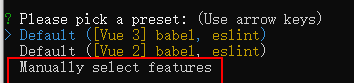
6.cmd进入目录下创建 vue create name
选择手动
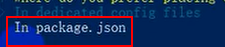
配置信息存储位置
.
安装目录cmd
重启 nginx -s reload
重启 nginx -s stop
-Dfile.encoding=GBK
location / {
proxy_pass http://192.168.10.204:20015;
}

 浙公网安备 33010602011771号