
鼠标进入离开事件的多种写法
鼠标进入离开事件的多种写法
<!DOCTYPE html>
<html>
    <head>
        <meta charset="UTF-8">
        <title>onmouseover事件</title>
    </head>
    <style>
        *{margin: 0;padding: 0;}
        .container{
            text-align: center;
        }
        .img{
            height: 250px;
            width: 180px;

        }
        #img{
            height: 250px;
            width: 180px;

        }
    </style>
    <body>
        <div class="container">
            <img src="../1-1 (1).jpeg" id="img">
            <!-- <img src="../1-1 (1).jpeg" class="img"> -->

        </div>
    </body>
    <!-- <script>
        //通过onmouseover事件
        var image = document.getElementsByTagName("img");
        // image[0].onmouseover = function bigImg(x){//给函数赋予一个参数为啥不行啊?
        //     image[0].style.height="500px";
        //     image[0].style.width="400px";
        // //     console.log('x');
        // //     x.style.height="500px";
        // //    x.style.width="400px";

        // }


        // image[0].onmouseout = function normalImg(){
        //     image[0].style.height="250px";
        //     image[0].style.width="180px";
        // }
        image[0].onmouseenter = function bigImg(){
            image[0].style.height="500px";
            image[0].style.width="400px";
        }
        image[0].onmouseleave = function normalImg(){
            image[0].style.height="250px";
            image[0].style.width="180px";
        }
    </script> -->
    <script>
        document.getElementById("img").addEventListener("mouseenter",mouseEnter);//为啥使用时不行呢?如document.getElementsByTagName("img").addEventListener("mouseenter",mouseEnter);


        document.getElementById("img").addEventListener("mouseleave",mouseLeave);
        function mouseEnter(){
            document.getElementById("img").style.height="500px";
            document.getElementById("img").style.width="500px";
        }
        function mouseLeave(){
            document.getElementById("img").style.height="250px";
            document.getElementById("img").style.width="180px";
        }
    </script>
</html>
1、通过onmouseover事件以及关于在onmouseover事件当中遇到的问题及回答?
onmouseover 属性可使用于所有 HTML 元素,除了: <base>, <bdo>, , <head>, <html>, <iframe>, <meta>, <param>, <script>, <style>, 和 <title>.
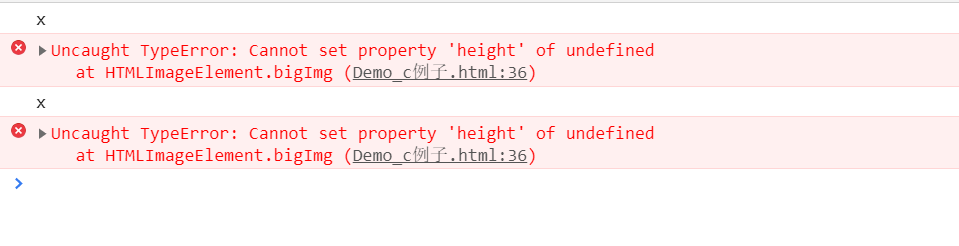
为啥给函数赋予了一个x值还是不能行,因为在
 var image = document.getElementsByTagName("img");
        image[0].onmouseover = function bigImg(this){//this永远指向其所在函数的调用者,如果该函数没有调用者,this则指向全局对象window
        //如果将this换成x( image[0].onmouseover = function bigImg(x)),则如图1-1
           console.log("x")
           //x.style.height="500px";
           //x.style.width="400px";

        }
运行结果如图:
2、通过onmousesent和onmouseleave事件
  var image = document.getElementsByTagName("img");
  image[0].onmouseout = function normalImg(){
            image[0].style.height="250px";
            image[0].style.width="180px";
        }
        image[0].onmouseenter = function bigImg(){
            image[0].style.height="500px";
            image[0].style.width="400px";
        }
        image[0].onmouseleave = function normalImg(){
            image[0].style.height="250px";
            image[0].style.width="180px";
        }
| 返回对拥有指定id的第一个对象的引用 | |
|---|---|
| getElementsByName() | 返回带有指定名称的对象的集合 |
| getElementsByTagName() |
3、通过addEventListener()方法及问题回答
 <script>
        document.getElementById("img").addEventListener("mouseenter",mouseEnter);
        //也可使用
        // document.getElementsByTagName("img")[0].addEventListener("mouseenter",mouseEnter);
        // function mouseEnter(){
        //     document.getElementsByTagName("img")[0].style.height="500px";
        //     document.getElementsByTagName("img")[0].style.width="500px";
        // }


        document.getElementById("img").addEventListener("mouseleave",mouseLeave);
        function mouseEnter(){
            document.getElementById("img").style.height="500px";
            document.getElementById("img").style.width="500px";
        }
        function mouseLeave(){
            document.getElementById("img").style.height="250px";
            document.getElementById("img").style.width="180px";
        }
    </script>
addEventListener() 方法用于向指定元素添加事件句柄
语法:变量名.addEventListener(“事件方法”, 函数名 , true/false )
注意:不要使用 "on" 前缀。 例如,使用 "click" ,而不是使用 "onclick"。true - 事件句柄在捕获阶段执行,false- 默认。事件句柄在冒泡阶段执行。

 浙公网安备 33010602011771号