
POI实现对excel文件的读取操作
POI实现对excel文件的读取操作
1,将导入的excel文件放入start静态文件中,其excel字段就是新增页面字段,顺序必须一致
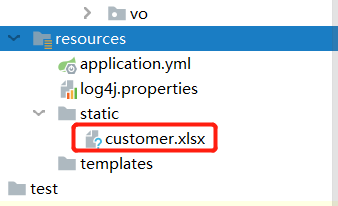
创建同用工具类
package com.mashibing.util;

import org.apache.poi.ss.usermodel.Cell;
import org.apache.poi.ss.usermodel.Row;
import org.apache.poi.ss.usermodel.Sheet;
import org.apache.poi.xssf.usermodel.XSSFWorkbook;
import org.springframework.cglib.beans.BeanMap;

import java.io.FileInputStream;
import java.util.ArrayList;
import java.util.HashMap;
import java.util.List;
import java.util.Map;

public class ExcelUtil {
    /**
     * 解析表格方法
     * @param stream 文件输入流
     * @param clazz 实体类类型
     * @return 解析表格的结果
     * @throws Exception
     */
    public static <T> List<T> readExcel(FileInputStream stream,Class<T> clazz) throws Exception {
        List<T> result = new ArrayList<>();
        // 1. 输入流中获取工作簿
        XSSFWorkbook workbook = new XSSFWorkbook(stream);
        // 2. 在工作簿中获取目标工作表
        Sheet sheet = workbook.getSheetAt(0);
        // 3. 获取工作表中的行数(先获取第一行数据,因为模板中第一行数据包含对应的字段)
        int rowNum = sheet.getPhysicalNumberOfRows();
        Row row = sheet.getRow(0);
        // 4. 存储所有实体类对应属性的集合(用于映射)
        List<String> key = new ArrayList<>();
        // 5. 遍历第一行数据,遍历出所有要新增数据的属性,并且放入到key集合中
        for (Cell cell : row) {
            cell.setCellType(Cell.CELL_TYPE_STRING);
            key.add(cell.getStringCellValue());
        }
        //6. 遍历所有的正式数据,但是要注意第二行标题不获取,所以从下标2开始获取
        for(int i = 2;i<rowNum;i++){
            // 7. 获取所有行
            row = sheet.getRow(i);
            if(row!=null){
                //8. 用于保存每条数据的Map,并且在Map中建立属性与数据的映射关系
                Map<String,String> excelMap = new HashMap<>();
                // 计数器用于映射数据使用
                int j = 0;
                // 9. 遍历所有单元格中的数据,并且把key和value(单元格的数据),放入到excelMap中进行映射
                for (Cell cell : row) {
                    if(cell!=null){
                        //10. 把单元格中的所有数据格式设置为String
                        cell.setCellType(Cell.CELL_TYPE_STRING);
                        //11. 获取所有单元格数据
                        String value = cell.getStringCellValue();
                        if(value!=null&&!value.equals("")){
                            //12. 将每个单元格的数据存储到集合中
                            excelMap.put(key.get(j),value);
                            j++;
                        }
                    }
                }
                // 12. 创建对应实体类类型
                T t = clazz.newInstance();
                /**
                 * Spring提供的BeanMap,通过反射的形式把Map中的数据映射到实体类中
                 */
                BeanMap beanMap = BeanMap.create(t);
                beanMap.putAll(excelMap);
                result.add(t);
            }
        }
        return result;
    }
}
编写Controller层
@PostMapping("/uploadExcel")
    public R uploadExcel(MultipartFile file, String company) {
        Integer result = null;
        System.out.println("uploadExcel");
        if (file != null && file.getSize() > 0) {
            try {
                // 调用readExcel方法来进行解析Excel
                //Integer insertAll(List<ZhCustomer> customers,String company);接口层写这个实现方法
                List<ZhCustomer> customers = ExcelUtil.readExcel((FileInputStream) file.getInputStream(), ZhCustomer.class);
                //当文件上传excel次数并没有存储到数据库
                result = zhCustomerService.insertAll(customers,company);
                for (ZhCustomer customer : customers) {
                    System.out.println(customer);
                }
            } catch (Exception e) {
                e.printStackTrace();
            }
        }
        return new R(result);
    }
对Impl进行设计
@Override
    public Integer insertAll(List<ZhCustomer> customers, String company) {
        Integer result = null;
        if (customers.size()>0){
            for (ZhCustomer customer : customers) {
                customer.setCompany(company);
                result = zhCustomerMapper.insert(customer);
            }
        }
        return result;
    }

 浙公网安备 33010602011771号