SpringMvc注入list实现的方法

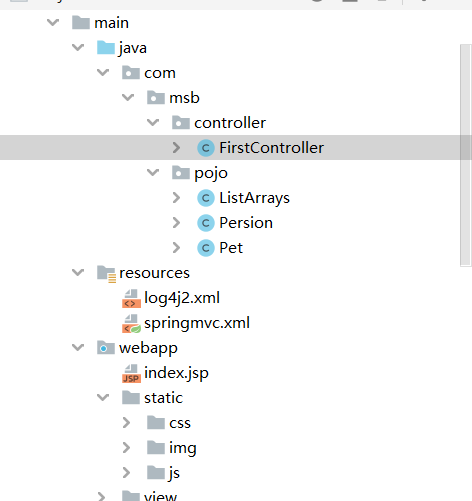
SpringMVC的xml配置文件
<?xml version="1.0" encoding="UTF-8"?>
<beans xmlns="http://www.springframework.org/schema/beans"
       xmlns:xsi="http://www.w3.org/2001/XMLSchema-instance"
       xmlns:util="http://www.springframework.org/schema/util"
       xmlns:context="http://www.springframework.org/schema/context"
       xmlns:aop="http://www.springframework.org/schema/aop"
       xmlns:tx="http://www.springframework.org/schema/tx"
       xmlns:mvc="http://www.springframework.org/schema/mvc"
       xsi:schemaLocation="http://www.springframework.org/schema/beans
       http://www.springframework.org/schema/beans/spring-beans.xsd
       http://www.springframework.org/schema/util
       http://www.springframework.org/schema/util/spring-util.xsd
       http://www.springframework.org/schema/context
       http://www.springframework.org/schema/context/spring-context.xsd
       http://www.springframework.org/schema/aop
       http://www.springframework.org/schema/aop/spring-aop.xsd
       http://www.springframework.org/schema/tx
       http://www.springframework.org/schema/tx/spring-tx.xsd
       http://www.springframework.org/schema/mvc
       http://www.springframework.org/schema/mvc/spring-mvc.xsd
">
    <!--配置Spring包扫描-->
<context:component-scan base-package="com.msb.controller" />
    <!--处理器映射器,处理器适配器,需要开启MVC-->
    <mvc:annotation-driven>
        <!--解决浏览器中文响应式乱码问题-->
        <mvc:message-converters><!--//响应类型转换器,可配置多个-->
            <bean class="org.springframework.http.converter.StringHttpMessageConverter">
                <property name="supportedMediaTypes">
                    <list>
                        <!--//相当于在servlet中写的response.setContentType("text/html;charset=utf-8")-->
                        <value>text/plain;charset=UTF-8</value>
                        <value>text/html;charset=UTF-8</value>
                        <value>application/json;charset=UTF-8</value>
                    </list>
                </property>
            </bean>
        </mvc:message-converters>
    </mvc:annotation-driven>
    <!--配置MVC对静态资源放行-->
    <!--对static文件下的所有目录文件放行-->
    <mvc:resources mapping="static/**" location="/static/"/>


    <!--配置视图解析器-->
<bean class="org.springframework.web.servlet.view.InternalResourceViewResolver">
   <property name="prefix" value="/view/"></property>
   <property name="suffix" value=".jsp"></property>
</bean>

</beans>
webapp下的index.jsp文件
<%@ page contentType="text/html;charset=UTF-8" language="java" %>
<html>
<body>
<%--action在直接写/需要加相对路径--%>
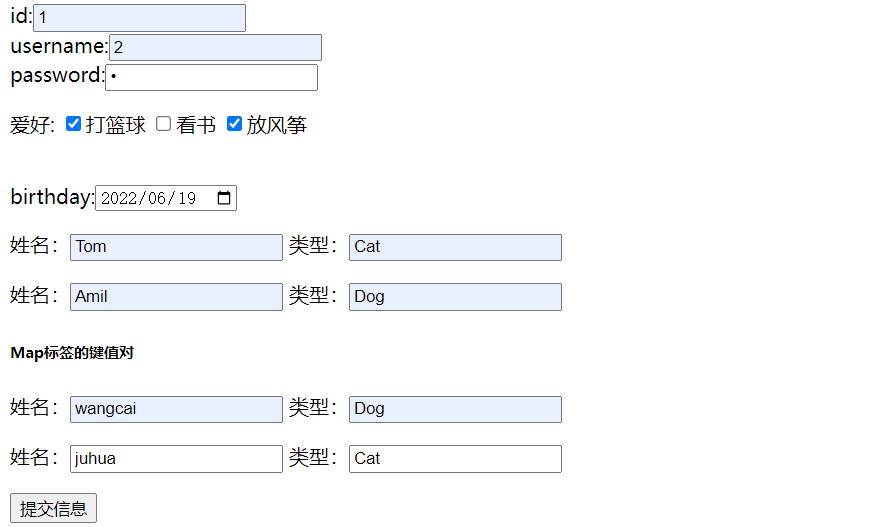
<h2>信息提交</h2>
<form action="threadController.do" method="get">
    id:<input name="persions[0].id" type="text"><br/>
    username:<input name="persions[0].name" type="text"><br/>
    password:<input name="persions[0].password" type="password"><br/>
    <p>爱好:
        <input type="checkbox" name="persions[0].hobby" value="打篮球" v-model = "hobby">打篮球
        <input type="checkbox" name="persions[0].hobby" value="看书" v-model = "hobby">看书
        <input type="checkbox" name="persions[0].hobby" value="放风筝" v-model = "hobby">放风筝
    </p>
    <br/>
    birthday:<input name="persions[0].birthday" type="date">
    <br/>
    <p>
        姓名:<input type="text" name="pets[0].Petname">
        类型:<input type="text" name="pets[0].Petanimal">
    </p>
    <p>
        姓名:<input type="text" name="pets[1].Petname">
        类型:<input type="text" name="pets[1].Petanimal">
    </p>
    <input value=提交信息 type="submit">
</form>

</body>
</html>
总集合的配置
package com.msb.pojo;
import lombok.AllArgsConstructor;
import lombok.Data;
import lombok.NoArgsConstructor;

import java.util.List;
@Data
@AllArgsConstructor
@NoArgsConstructor
public class ListArrays {
    private List<Pet> pets;
    private List<Persion> persions;
}
子集合的配置
//人类
package com.msb.pojo;
import lombok.AllArgsConstructor;
import lombok.Data;
import lombok.NoArgsConstructor;
import org.springframework.format.annotation.DateTimeFormat;
import java.util.Date;
import java.util.List;
@Data
@AllArgsConstructor
@NoArgsConstructor
public class Persion {
    private Integer id;
    private String name;
    private String password;
    private List[] hobby;
    @DateTimeFormat(pattern = "yyyy-MM-dd")
    private Date birthday;
}
//宠物类
package com.msb.pojo;
import lombok.AllArgsConstructor;
import lombok.Data;
import lombok.NoArgsConstructor;
import java.util.List;
@NoArgsConstructor
@AllArgsConstructor
@Data
public class Pet {
    private String Petname;
    private String Petanimal;

}
访问跳转配置Controller
package com.msb.controller;

import com.msb.pojo.ListArrays;
import com.msb.pojo.Persion;
import com.msb.pojo.Pet;
import jdk.nashorn.internal.ir.RuntimeNode;
import lombok.Value;
import org.springframework.stereotype.Controller;
import org.springframework.web.bind.annotation.*;
import sun.security.util.Password;
import java.util.Arrays;
import java.util.List;
//@RequestMapping可以放在元素上也可以放在方法上
//在类上面配置,@RequestMapping指在每一个方法前加该路径:http://localhost:8050/SpringMvc_war/msb/firstController.do
//,method = {RequestMethod.POST,RequestMethod.GET},params = {"password","username!=null"}
/*@RequestMapping("/mashibing")
* @RestController返回的是文字
* */
@RestController
public class FirstController {
    @RequestMapping(value = "testMappering.do", method = RequestMethod.GET)
    public String testMappering() {
        System.out.println("RequestMapping收到访问");
        return "first";
    }

    @RequestMapping("/firstController.do")
    public String firstController() {
        System.out.println("this is firstController");
        //当return路径前加上/则路径从webapp开始执行,进行路径配置
        return "first";
    }
    /*@RequestMapping( value = "/secondController.do",params = "password")*/
    @RequestMapping("/secondController/{username}/{password}")
    /*public String secondController(@RequestParam(value = "username") String username,@RequestParam(value = "password") String password){*/
    public String secondController(@PathVariable("username") String username, @PathVariable("password") String password) {
        System.out.println("this is firstController");
        System.out.println("username:" + username);
        System.out.println("password:" + password);
        //当return路径前加上/则路径从webapp开始执行,进行路径配置
        return "first";
    }
    //@RequestMapping("/threadController.do")这里的/可有可无
    @RequestMapping(value = "/threadController.do" ,method = RequestMethod.GET)
    public String threadController(ListArrays arrays ) {
        /*System.out.println(Arrays.toString(persion.getHobby()));*/
        System.out.println(arrays.getPets());
        System.out.println(arrays.getPersions());
        return "执行成功";
    }

}
不同方式获取前端资源
//当没有实体类时RequestParam这个注解获取用户输入的密码
/*public String secondRequestParam(@RequestParam(value = "username") String username,@RequestParam(value = "password") String password){*/
Map键值对设计
<h6>Map标签的键值对</h6>
    <p>
        姓名:<input type="text" name="petMap['p'].Petname">
        类型:<input type="text" name="petMap['p'].Petanimal">
    </p>
    <p>
        姓名:<input type="text" name="petMap['m'].Petname">
        类型:<input type="text" name="petMap['m'].Petanimal">
    </p>


 浙公网安备 33010602011771号